User Guides
Skills
Learn how to add, organize, and optimize your resume skills section in Rezi to show your qualifications and improve ATS performance.
Published on
July 15, 2026
Updated on
July 30, 2026
Listing your skills on a resume sounds simple… until you’re trying to remember everything you’ve ever learned, decide which skills matter most for the job, and figure out how to present them. Rezi helps with all this by offering AI tools that suggest relevant skills to help you build a stronger skills section, while handling all the ATS-friendly formatting.
In this guide, I’ll walk you through how to fill out your skills section, with the best strategies to prove you’re qualified for the job.
Start working on your skills section with our free AI Resume Builder and take advantage of our built-in AI tools to create a personalized, ATS-friendly application in minutes.
And check out our other features to fast-track your job search:
You can also learn more about what to include in your skills section:
- Best Skills for a CV to Get the Job
- The Best Skills to Put on a Resume
- High-Income Skills to Make More Money
Skill Section
Your resume skills section is a quick list of 8 to 10 abilities that make you a strong candidate for a role. It lets recruiters see your expertise and qualifications at a glance without having to read through every detail of your work history.
When filling out this section in Rezi, focus on the skills that best match your target role and that you can actually back up with experience. And yes, it’s completely normal for your skills section to overlap with your work history. Your skills section introduces your capabilities, while your experience section proves them with real examples and achievements.
How to Fill Out the Skills Section
Here’s an overview of how to fill out your skills section with Rezi:
- Create a new resume or update an existing one, then optionally target your resume for more personalized suggestions.
- Enter your relevant skills by adding abilities that match your experience and target role, then organize them into categories if needed to keep the section clear and easy to scan.
- Find more skills with AI Skills Explorer by entering a skill or job title and using Rezi’s industry-specific recommendations to uncover relevant skills you may have missed.
- Check and customize your resume by reviewing your skills section, adjusting the layout, optimizing keyword usage, and making final ATS-friendly improvements before applying.
Let’s get into the details with my tips on how to make your skills section stand out.
1. Create a new resume or upload an existing one
Before you can add skills, you’ll need to create or import a resume in Rezi. After logging in and opening your dashboard, you can choose whichever setup method works best for you:
- Start a resume from scratch.
- Upload an existing PDF or DOCX resume and transfer your information into Rezi.
- Import from your LinkedIn profile using the Rezi Chrome Extension.
- Use the AI Resume Agent to build your resume through a guided conversation.
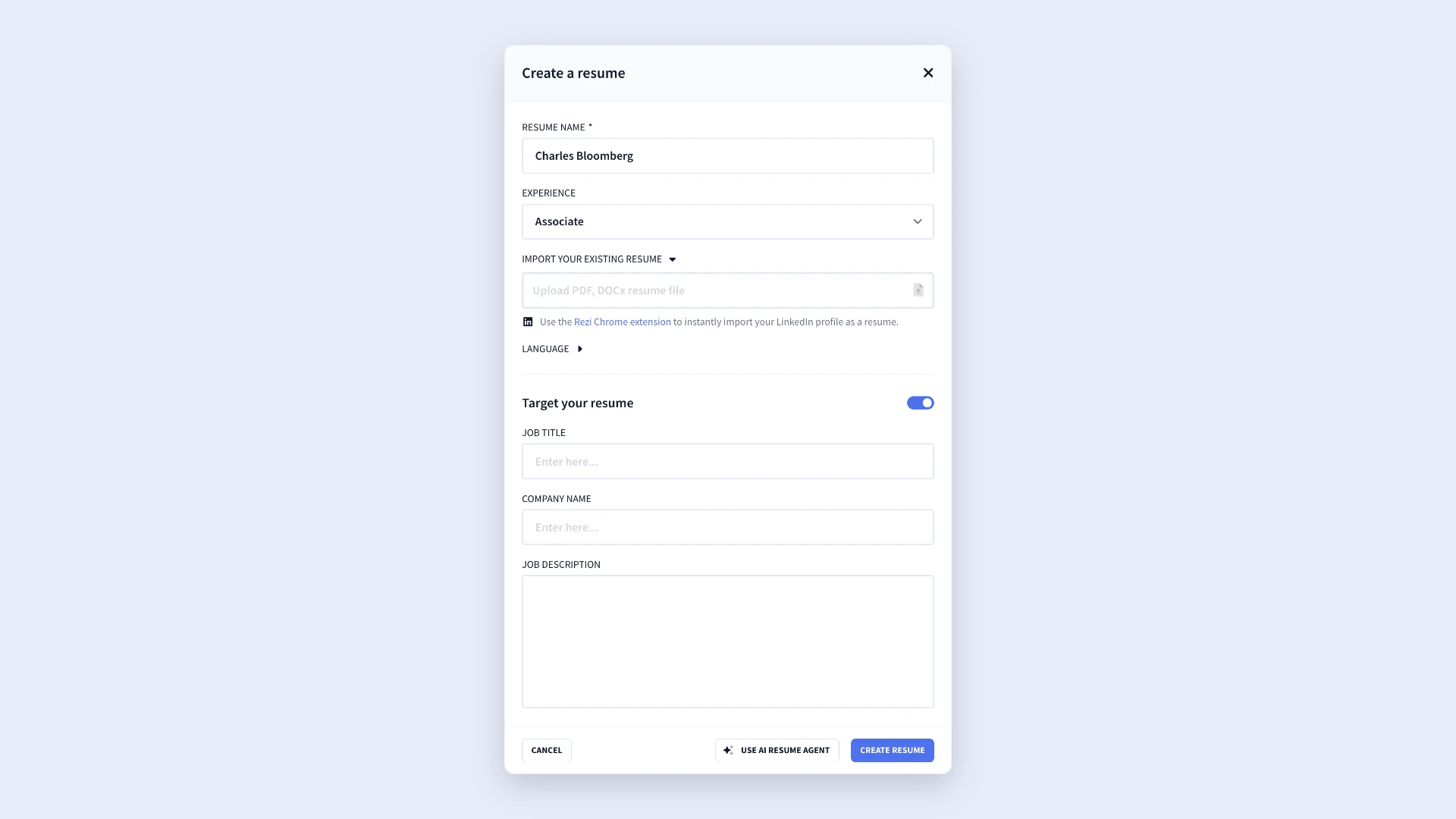
If you’re applying for a specific position, you can select Target Resume. Just enter the job title, company name, and job description to help Rezi provide more relevant suggestions and feedback throughout the resume-building process.
2. Enter your relevant skills
Once you’ve created your resume, work through each section until you reach the Skills tab.
Here, you’ll add the skills that best match your experience and the role you’re targeting. Focus on the ones you can genuinely prove through your work experience, projects, education, training, or certifications.
To keep the section concise and organised, enter your skills on a single line and separate them with commas or hyphens. This helps you maximize space while keeping it easy to read.
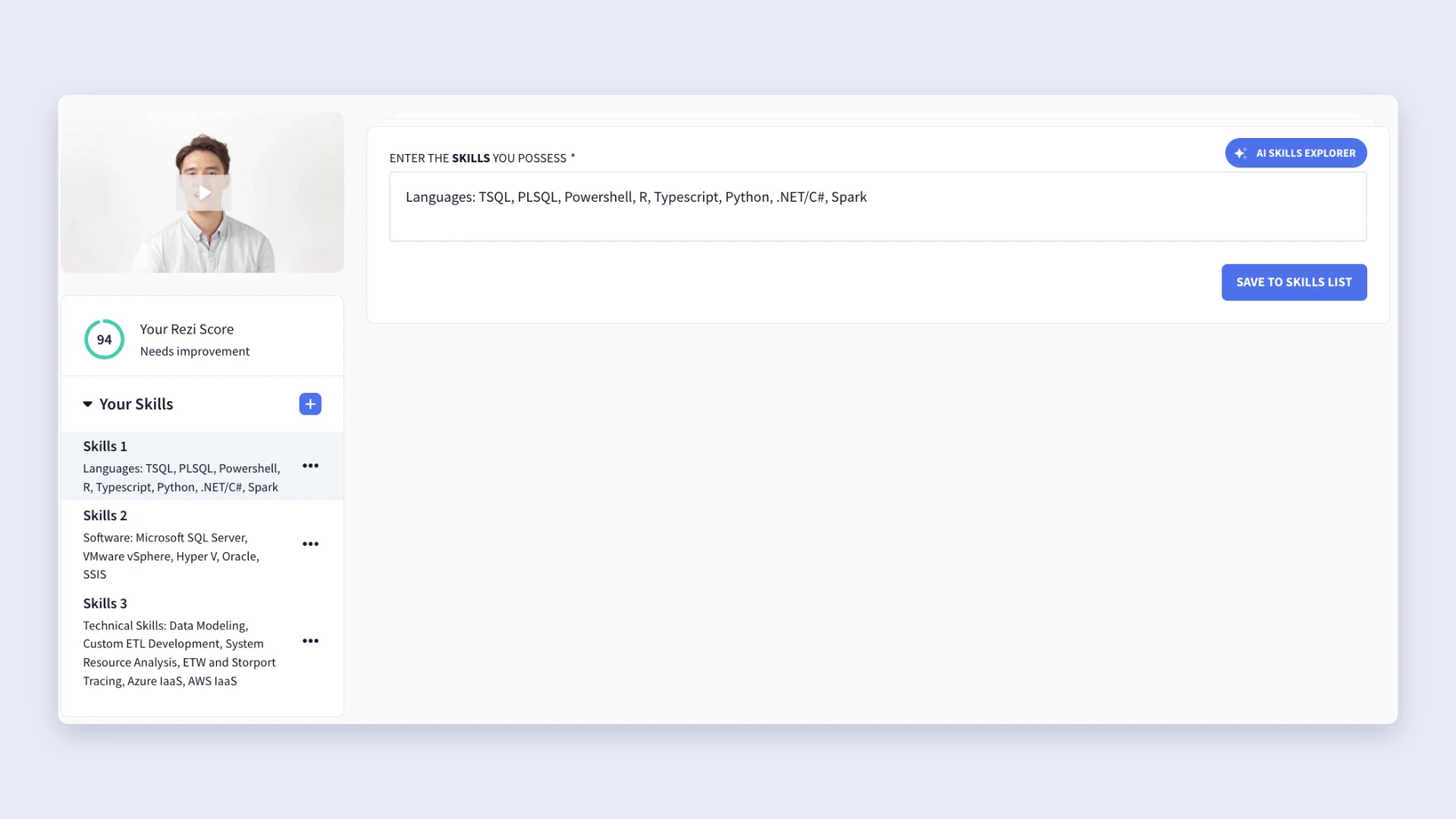
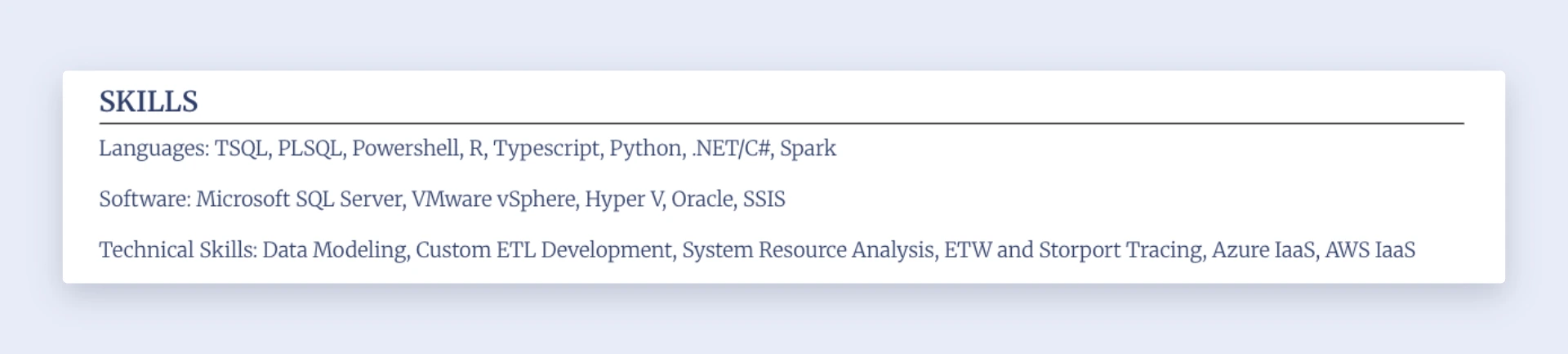
Have different types of skills? Don’t feel like everything has to sit in one long list. Rezi lets you organize skills into separate categories to make the section easier for recruiters to review. For example, you might create categories like:
- Technical Skills
- Software & Tools
- Programming Languages
- Languages
- Hard Skills
To add another category, simply click the (+) button within the Skills section. Here’s an example of how that’ll look on your finished resume:
3. Find more skills with AI Skills Explorer
Most of us have experienced brain fog when trying to think of every relevant skill we’ve developed over the years. Well, the AI Skills Explorer can help you pinpoint all those skills you might have overlooked.
After selecting the tool within the Skills tab, start by choosing a skill category:
Next, enter either an existing skill or a previous job title in the What did you do field. Rezi will generate industry-specific skill suggestions based on your input.

And it doesn’t just churn out generic recommendations. The tool focuses on skills commonly linked to your background and field. If you find a suggestion that matches your experience, simply click it to add it directly to your skills section.
4. Check and customize your resume
After completing your resume sections, head to the Finish Up & Preview tab. This is your chance to do those final checks before applying for jobs.
From here, you can:
- Review your skills section alongside the rest of your resume.
- Experiment with different resume templates.
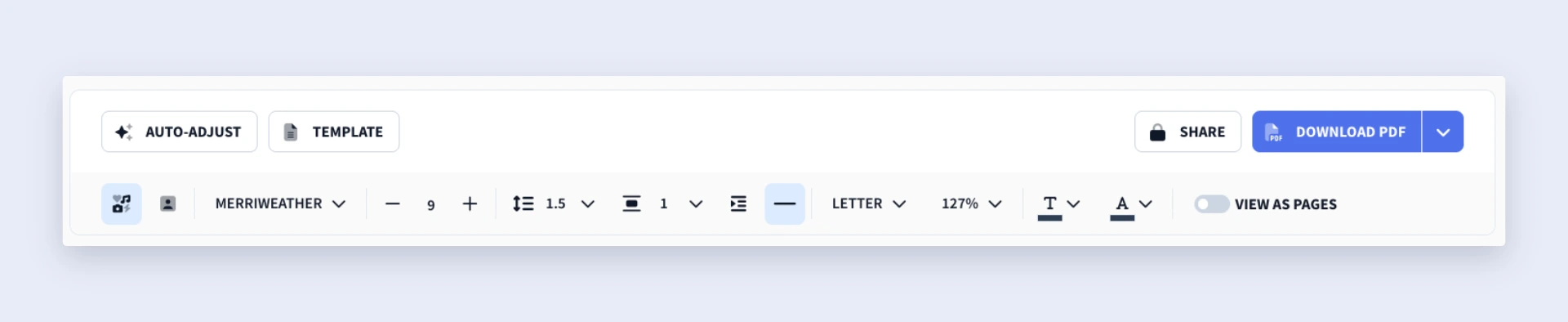
- Adjust formatting and layout options.
- Make your skills section appear more compact or take up more space.
When viewing your resume preview, select Template to browse Rezi’s layout options. Once you’ve chosen a template, use the Adjustments tab to customize the appearance. Rezi gives you flexibility while sticking to ATS-friendly formatting, so you can personalize your resume without creating issues for screening systems.
You can also reposition your skills section closer to the top of your resume if it strengthens your application. This strategy often works well when:
- You’re changing careers.
- You have employment gaps.
- You’re applying for highly technical roles.
- Your skills are one of your strongest selling points.
Finally, use the AI Keyword Targeting tool to perform one last check. This feature helps identify keywords and skills from the job listing and shows whether you’ve included them throughout your resume. You also get suggested bullet points and recommendations to improve your overall resume quality and increase your Rezi Score.
How to Get the Best Results
The strongest skills sections don’t ramble on; they keep things relevant. Rather than listing every skill you’ve ever used, focus on the skills that align with the job. A targeted skills section is easier for recruiters to scan, performs better with ATS software, and gives employers a better picture of why you’re a good fit for the role.
Check out these tips for creating a solid resume skills section.
Choose the right format
In most cases, your skills section comes after your work experience, toward the end of your resume. You can use it as a summary to reinforce the abilities you’ve already mentioned throughout your application.
If your skill set is fairly straightforward, a simple list in a horizontal line works best to maximise space. Struggling to fill up the page? You can opt for a vertical list to take up some of that white space.
If you have expertise in several areas, consider organizing your skills into categories such as:
- Technical Skills
- Tools & Systems
- Software & Platforms
- Languages
- Interpersonal Skills
Grouping related skills helps recruiters find relevant information faster, especially when you’re applying for positions that ask for a wide range of capabilities.
And please, stay away from visual skill ratings. Progress bars, star ratings, and percentage scores might look fun, but they don’t help your application. Saying you’re only “70% proficient” at something isn’t impressive, and these design elements can create problems for ATS software.
Most applicant tracking systems work best with text-based formatting, so keeping your skills clear and searchable gives you a better chance of getting seen in the filtering process.
Focus on hard and technical skills
Both hard and soft skills matter, but your skills section should primarily highlight hard and technical skills. Why? Recruiters often notice these qualifications first because they directly relate to your ability to perform the job.
Hard skills are measurable abilities you’ve built through education, training, certifications, or practical experience. They’re specific, teachable, and easy to verify in the interview or on the job (I wouldn’t recommend lying about these).
Examples include:
- Data analysis
- Financial modeling
- SQL
- Python
- SEO
Technical skills are a specialized type of hard skill. They focus on industry-specific tools, technologies, systems, and processes. Depending on your field, these skills may be some of the most important qualifications on your resume.
Soft skills still play an important role, but they work best when supported by evidence. Traits such as communication, leadership, teamwork, and problem-solving are valuable because they influence how you work with others and handle challenges.
The problem is that almost every candidate claims to have them.
Instead of filling your skills section with overused buzzwords like “excellent communicator” or “strong leader,” use your work experience section to prove those qualities through concrete accomplishments and results.
Avoid anything that doesn’t add value
One of the most common mistakes is treating your skills section as a complete inventory of everything you’ve ever learned. Most recruiters are scanning your resume; you don’t want them focusing on a random skill from ten years ago over one that directly aligns with the job.
Before submitting an application, spend a few minutes reviewing the job description and identifying what matters most to the employer. Pay particular attention to:
- Skills that appear multiple times
- Required qualifications
- Preferred or “nice-to-have” skills
- Industry-specific terminology
These details reveal what the hiring team values most. Once you’ve identified those priorities, update your skills section to reflect them (assuming you genuinely have the experience).
A simple way to evaluate each skill is to ask yourself:
- Can I confidently explain how I’ve used this skill?
- Do I have a real example that demonstrates it?
- Does it directly support the role I’m applying for?
If the answer is no, leave it out.
Find out more: How to Tailor Your Resume to a Job Description
Summary
Here’s an overview of everything you need to know about the resume skills section:
- The resume skills section is a concise summary of your most relevant abilities, giving recruiters a quick overview of what you can do.
- Most skills sections contain around 8–15 skills, though the exact number depends on your experience level and the role you’re targeting.
- Your skills section should complement your work experience, not replace it. Think of it as the “what” and your experience section as the “proof.”
- Prioritize hard skills and technical skills when possible. These are measurable, job-related abilities such as software, programming languages, or industry-specific tools.
- Include soft skills sparingly. Traits like communication, leadership, and teamwork matter, but they’re more convincing when demonstrated in your work experience.
- Tailor your skills section for each role by reviewing the job description and identifying important keywords and required qualifications.
- Keep the format simple and easy to scan. A straightforward list works well for most candidates, while grouped categories can help organize more complex skill sets.
- Avoid visual ratings, progress bars, stars, or percentage scores. These don’t provide meaningful context and can create issues for Applicant Tracking Systems (ATS).
- Before adding a skill, ask yourself whether you can confidently explain it, provide an example of using it, and connect it directly to the position.
- A strong skills section helps both recruiters and ATS software identify your qualifications, making it one of the most important sections for showing your fit for a role at a glance.
FAQ
How many skills should you include on your resume?
I recommend including around 8–10 skills, though the right number depends on your experience level and the type of role you’re targeting. More experienced professionals may have room for a slightly longer list, while entry-level candidates may have less.
The most important thing is relevance. A focused list of skills that directly support the job will make a stronger impression than a long list filled with unrelated abilities.
How do you know which skills are most relevant to a job?
Start by reading the job description and looking for patterns. Pay attention to skills that appear multiple times, required qualifications, and specific tools or technologies. These are usually the strongest indicators of what the hiring team values most. If you genuinely have those skills, prioritize them in your skills section and use your work experience to show how you’ve applied them.
Can you use the same skills section for every job application?
It’s best to tailor your skills section for each role, but that doesn’t mean rebuilding your resume from scratch every time (don’t risk losing an opportunity). A better approach is to create a few versions of your resume for different job types, then spend 5 to 10 minutes making small tweaks based on the specific job description.
What skills should you leave off your resume?
Leave out skills that aren’t relevant to the position, skills you can’t confidently discuss in an interview, and outdated skills that no longer add value. You should also avoid filling your skills section with vague buzzwords that anyone can claim. Every skill on your resume should support your application and strengthen your fit for the role.
How does the skills section help with ATS resume screening?
Many people think ATS software automatically rejects candidates, but that’s not how it works. ATS systems primarily scan resumes for keywords and store candidate information so recruiters can search through applications. When your skills section includes relevant keywords from the job description, recruiters are more likely to find your resume when searching the database. In other words, the right skills can help increase your visibility.
What should you do if you don’t have many technical skills?
Don’t worry if your technical skill set is still growing, especially if you’re an entry-level candidate. Focus on hard skills, tools, certifications, coursework, projects, and transferable skills. You can also highlight strengths you’ve developed through volunteer work, internships, academic projects, or previous jobs. If you’re actively learning new skills, consider taking online courses or earning certifications to strengthen your resume over time.

Upload or drop your resume to get started
Upload your resume to get started
Score my resume

Lauren Bedford is a seasoned writer with a track record of helping thousands of readers find practical solutions over the past five years. She's tackled a range of topics, always striving to simplify complex jargon. At Rezi, Lauren crafts genuine and actionable content that guides readers in creating standout resumes to land their dream jobs.