User Guides
Certifications
Learn how to add certifications to your resume in Rezi, including what details to include and how to tailor certifications for your target job.

Published on
July 16, 2026
Updated on
July 16, 2026
Certifications are a smart way to show employers you’ve developed skills and used your initiative to keep learning. But listing irrelevant certifications or leaving out important details can just as easily set you back. Rezi makes things easier by helping you organize your certifications and format them in a way that’s recruiter and ATS-friendly.
In this guide, I’ll walk you through how to add certifications to your resume, what information to include, and a few red flags to avoid.
To begin your certification section, head to our AI Resume Builder. We guide you through the process with advanced tools, personalised feedback, and ATS-friendly templates.
You can also check out these features to help build your application:
And find out what else you can add to make your resume stand out:
- How to List Awards on a Resume
- How to List Your Best Projects on a Resume
- How to List Extracurricular Activities on a Resume
Certifications Section
The certifications section is where you prove your professional credentials that validate your knowledge and skills. These can include:
- Industry-recognized certifications
- Online course certificates from reputable organizations
- Licenses required for certain professions
You can include certifications to show recruiters your proficiency in a specific subject, tool, or skill. Licenses serve a different purpose and are often requirements to work in fields such as healthcare, transportation, or skilled trades.
When filling out this section in Rezi, focus on certifications that strengthen your application and support the role you’re targeting. You’ll typically add the certification name, issuing organization, and completion date, with the option to include additional context about the skills you gained.
How to Fill Out the Certifications Section
Here’s a quick overview of how to fill out your certifications section:
- Create a new resume or update an existing one, then work through the resume builder until you reach the certifications section.
- Add certifications to your resume section by enabling the Certifications tab through the Add or Remove Section menu.
- Fill out your certification details and any relevant context that highlights your skills, qualifications, or expertise for the role you’re targeting.
- Customize the layout and check your content on the Finish Up & Preview page, where you can position your certifications based on your experience level and career goals.
Let’s get into the details of how to add and optimize your certifications in Rezi.
1. Create a new resume or update an existing one
Before you add certifications, you’ll need to create a resume in Rezi. You can do this in several ways, depending on where you’re starting:
- Build a resume from scratch.
- Upload information from an existing resume.
- Import from your LinkedIn profile using the Rezi Chrome Extension.
- Use the AI Resume Agent to build your resume through a guided conversation.
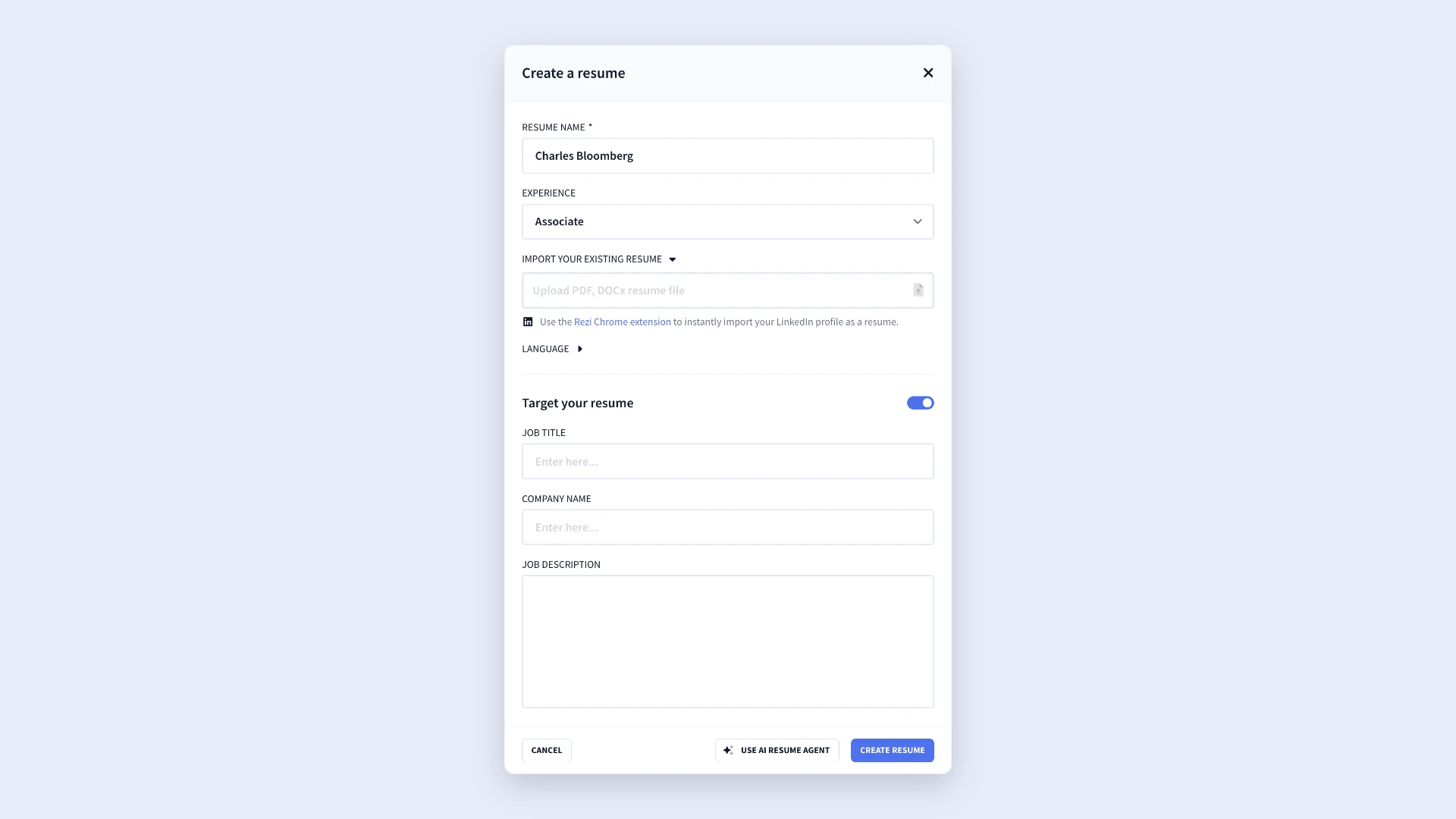
If you’re applying for a specific position, take advantage of Rezi’s Target Your Resume feature. By adding the job title, company name, and job description, you’ll get more tailored suggestions and feedback throughout the resume-building process.
Once you’ve created your resume, work through the resume sections until you reach the certifications area.
2. Add certifications to your resume tabs
When you enter the resume builder, you’ll see the standard sections such as work experience, education, and skills.
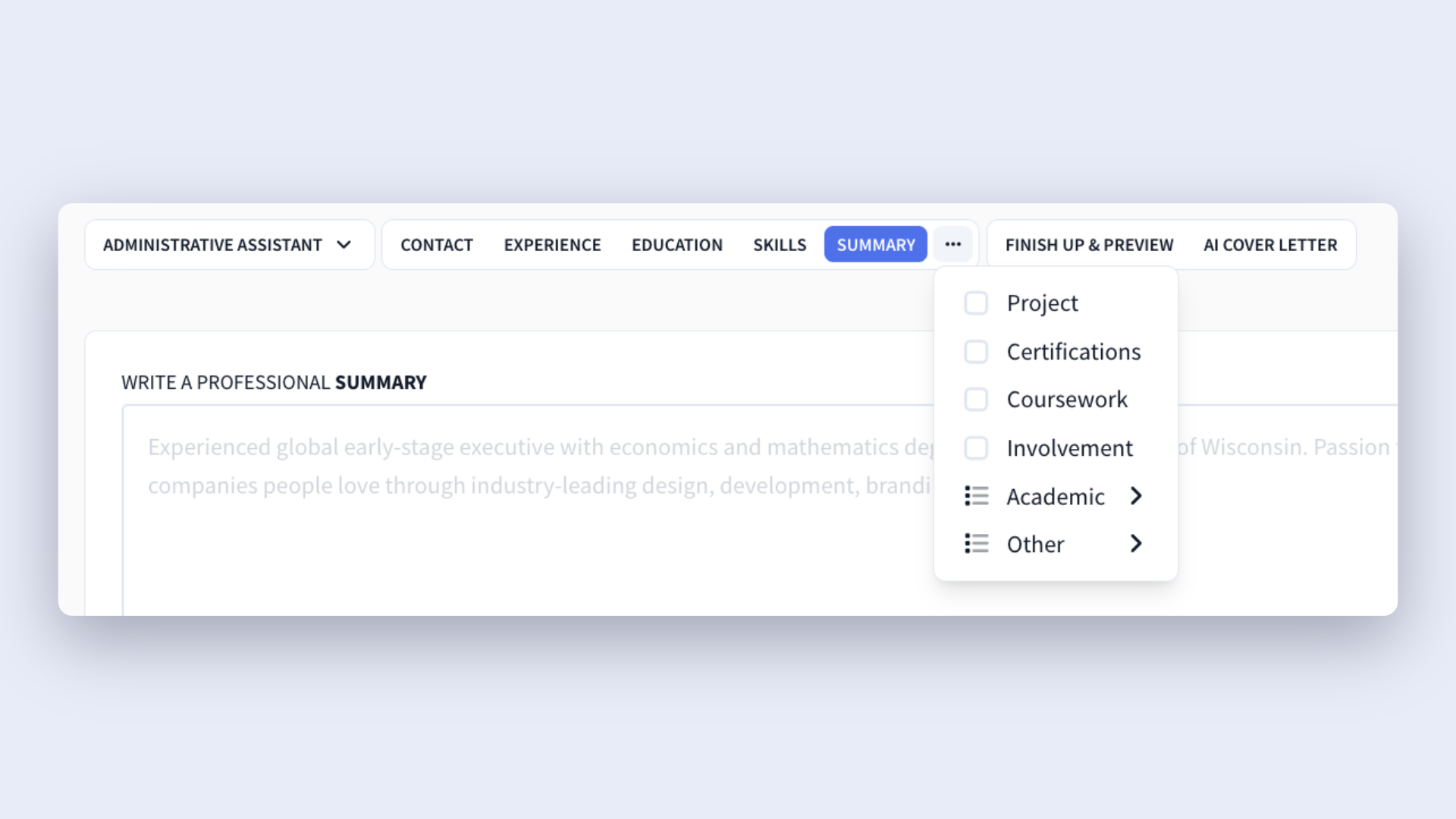
Here’s what you need to do to add the certifications tab:
- Click the three-dot menu at the end of the section tabs
- Select Add or Remove Section
- Find and enable Certifications
The certifications tab will then appear alongside your other resume sections.
Tip: If you earned your certification through your studies, you can also list it under your education section instead of creating a separate certifications section. This makes sense if you earned the certification through a university program or if it directly supports your degree.
3. Fill out your certification details
Once you’ve opened the certifications section, fill out your details and add your certifications. This section is especially handy if you’re a recent graduate, entering a new field, or don’t have much professional experience, since it shows more evidence of your skills and expertise.
That said, let me state the obvious: keep the certifications relevant to the job you’re targeting and the industry if you want to add value to your resume.
For each certification, you’ll be able to complete the following fields:
- Certification Name: Enter the official name of the credential you earned. You can use common abbreviations when recruiters are likely to recognize them (e.g., AWS, PMP).
- Certifying Authority: Add the organization that issued the certification, such as Google, Microsoft, AWS, or PMI, to help employers quickly verify the credential’s credibility.
- Date: Include the year you completed the certification. Focus on certifications that are current and relevant to your target role.
- Relevance (Optional): Add extra context, such as skills gained, topics covered, a credential ID, or a concise explanation of how it supports your qualifications.
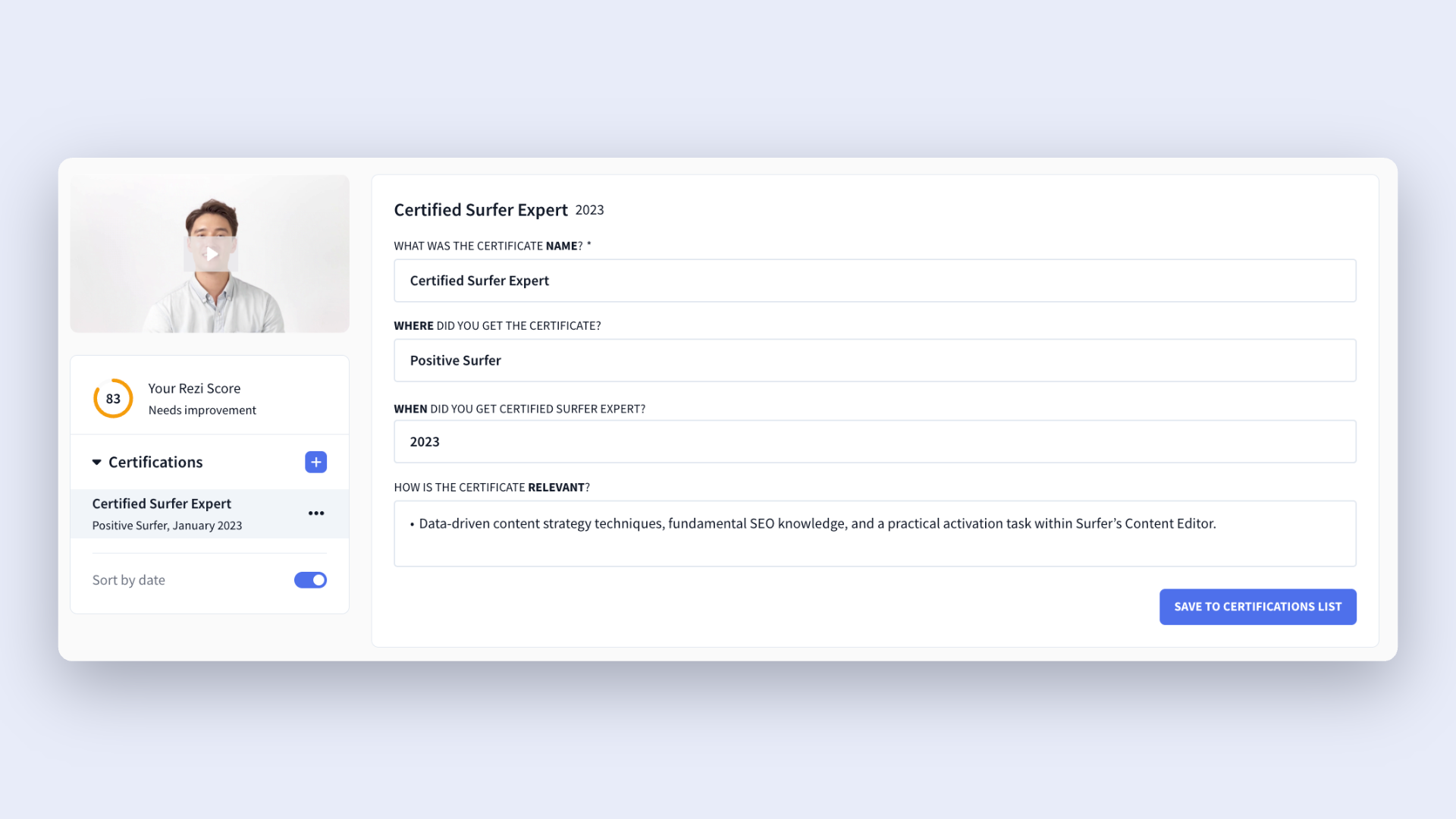
If you have multiple certifications, click the + icon to add additional entries. You can also use the Sort by Date option to automatically organize certifications in reverse chronological order.
4. Customize the layout and check your content
After you’ve completed your resume, head to the Finish Up & Preview page.
This is where you’ll:
- Review your resume for mistakes and clarity.
- Choose a resume template from our ATS-friendly template gallery.
- Adjust formatting and layout settings.
- Use AI Keyword Targeting to compare your resume against a job description.
- Review your Rezi Score and apply the feedback.
- Rename or reorder resume sections.
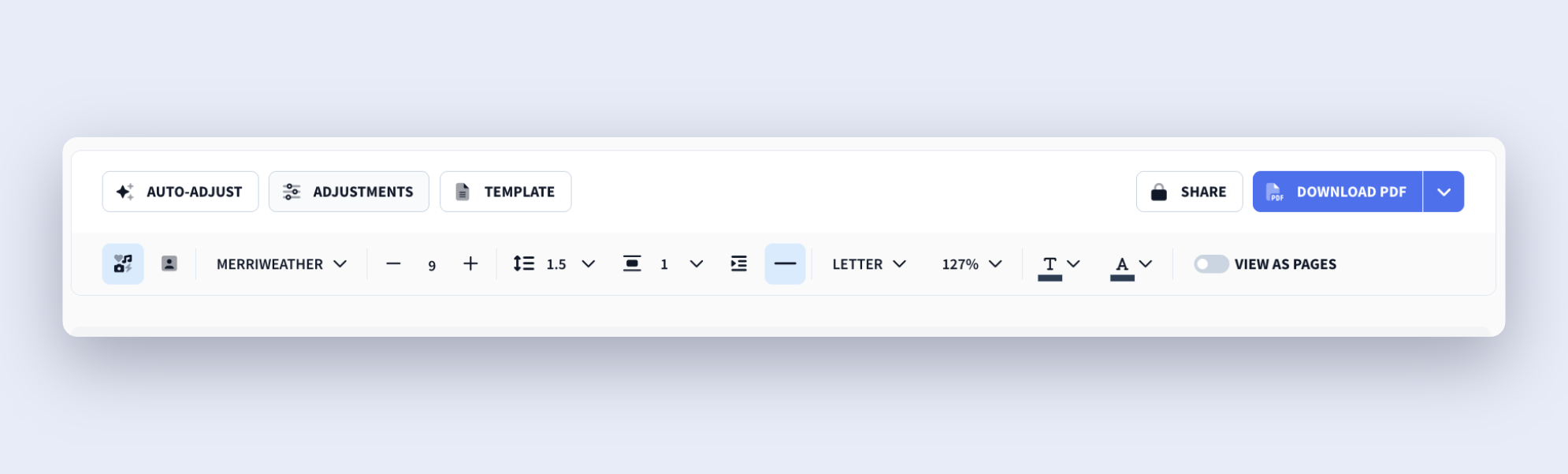
And that last one can change as your career shifts and grows. As a general rule:
- Place certifications above education or skills if they’re highly relevant to the role.
- Keep work experience above certifications if you have a strong employment history.
- Consider moving certifications closer to the top if you’re a recent graduate, a career changer, or have limited work experience.
How to Get the Best Results
When recruiters scan your resume, they want to see qualifications that directly support your ability to do the job. So, you don’t need to list every certificate you’ve ever earned. All you need to do is highlight the ones that strengthen your application and reinforce your expertise.
Check out these tips to keep your certifications section on the right track.
Keep everything concise
Use your certifications section to add value without taking the limelight away from your strongest qualifications. For most professionals, the work experience section is your biggest selling point, so keep certification entries simple and focused.
In most cases, all you need is:
- Certification name
- Issuing organization
- Completion date
If a certification is super relevant (or unknown), you can include a note about the skills you learnt from the certification. Likewise, if you’re a student or have limited work experience, you can also add extra details to emphasize your expertise while you build your experience.
For example:
- AWS Certified Solutions Architect — Amazon Web Services (2025)
- Validated expertise in cloud architecture, security, and infrastructure design.
And don’t be afraid to make cuts over time. Remove certifications that have expired or don’t relate to your target role. Is space an issue? Prioritize work experience over certifications. Employers generally place more value on proven experience than on additional credentials.
Include relevant and recent certifications
Avoid adding every certification you’ve ever earned just because you can. Recruiters only need to see the qualifications that help explain why you’re a good fit for the role. The more relevant your certifications are, the easier it is for employers to connect your background to the position.
Not sure which certifications to include? Look at a few job postings for the role you want. If the same certifications, skills, or tools keep appearing, that’s a sign they’re valued in the industry.
If you’ve built up lots of certifications (kudos), consider creating a master resume that includes all of them to speed up tailoring. When you apply for a specific role, simply copy-and-paste the most relevant certifications and leave out the ones that don’t add obvious value.
You can also use the Rezi MCP Toolkit to tailor your resume by connecting your account to popular AI tools, like Claude and Gemini, and using them to target a job description.
Highlight your certifications in the right place
The most common approach is to create a dedicated Certifications or Licenses section for all your professional certifications, online courses, continuing education programs, and industry credentials.
In most cases, you can place this section below your work experience. Employers usually care most about your professional accomplishments, so your experience should be the focus of your resume.
But there are a few exceptions.
If you’re an entry-level candidate, recent graduate, or career changer, relevant certifications could be one of your strongest selling points. In that situation, moving the certifications section higher on the page can help draw attention to your qualifications sooner.
You can also include certifications within your education section when they’re closely tied to your academics. And for really impressive certifications, consider mentioning them in your resume summary, especially when it’s required for the role or serves as a major qualification.
Summary
Here’s a breakdown of all you need to know about adding certifications to your resume:
- Include certifications that are relevant to the position you’re applying for, and remove any credentials that don’t support your qualifications for the role.
- Fill out each certification entry in Rezi with the certification name, issuing organization, and completion date so recruiters can quickly understand your credentials.
- Add extra details in the relevance field to highlight valuable skills, specialized knowledge, key topics covered, or a credential ID when it adds context.
- Keep your certifications section concise and easy to scan, giving priority to your work experience when resume space is limited.
- Leverage certifications and extra details to strengthen your resume if you’re a student, recent graduate, career changer, or professional with limited industry experience.
- Review job descriptions to identify the certifications, skills, and tools employers value most, then spend a few minutes tailoring your resume.
- Create a master resume in Rezi that includes all of your certifications, making it easier to customize applications for different roles.
- Check your certifications section in Rezi’s Finish Up & Preview page to ensure the formatting, placement, and content support your overall application.
FAQ
Should you include certifications on your resume?
Yes, if they add value to your application. Certifications can demonstrate specialized knowledge, technical skills, and a commitment to professional development. They’re especially useful when they’re required for a role, widely recognized in your industry, or help compensate for limited work experience. Just make sure the certifications you include are relevant to the position. A few strong credentials will have a greater impact than a long list of unrelated ones.
How many certifications should you list on your resume?
There’s no perfect number, but most resumes only need a handful of relevant certifications. Focus on quality rather than quantity. If you’ve earned several certifications, prioritize the ones that best align with the role you’re applying for. When space is limited, keep your strongest and most recent credentials and remove anything that doesn’t support your application.
Should you include certifications that are still in progress?
Yes, as long as the certification is relevant to the role and you’re actively working toward completing it. Just make its status clear by noting that it’s currently in progress and, if possible, include an expected completion date. This helps employers understand that you’re developing skills without mistakenly assuming you’ve already earned the credential.
Do recruiters and hiring managers actually look at certifications?
It depends on the hiring manager, but it doesn’t hurt to add them, especially when certifications are relevant to the role or required within the industry. Some employers actively search for specific credentials during the screening process, while others view them as a valuable bonus. Although certifications rarely outweigh strong work experience, they can strengthen your application and help you stand out from similarly qualified candidates.
Should you list certifications by date or importance?
In most cases, list certifications in reverse chronological order so employers can quickly see your most recent qualifications. However, if one certification is significantly more important than the others (especially if it’s required for the role), you can place it at the top of the section regardless of date. The goal is to make your most valuable and relevant credentials easy for recruiters to find.

Upload or drop your resume to get started
Upload your resume to get started
Score my resume

Lauren Bedford is a seasoned writer with a track record of helping thousands of readers find practical solutions over the past five years. She's tackled a range of topics, always striving to simplify complex jargon. At Rezi, Lauren crafts genuine and actionable content that guides readers in creating standout resumes to land their dream jobs.