User Guides
Contact
Learn how to fill out the contact section in Rezi, including what details to include, what to leave out, and tips for making a professional first impression.
Published on
July 15, 2026
Updated on
July 16, 2026
Not sure what belongs in your contact section or whether LinkedIn profiles, portfolios, and social media are worth including? Getting those decisions right can make your resume look more professional and give recruiters a better picture of who you are.
In this guide, I’ll cover what the contact section is, how to fill it out in Rezi, and a few tips to help you make the most of this small part of your resume.
Get started with our free AI Resume Builder. We walk you through all the sections with expert suggestions and feedback to create a tailored application in minutes.
You can also check out our other tools to help your job search:
And learn more about other essential resume sections:
- How to List Education on a Resume
- Resume Summary Examples for All Jobs
- How to Write a Skills Section of a Resume
- How to Write a Perfect Resume Work Experience Section
Contact Section
The contact section should be at the top of your resume so employers can quickly see who you are and how to reach you. This section typically includes your name, phone number, email address, location, LinkedIn profile, and any professional links that help support your application.
Once you create a resume with our AI Resume Builder, the contact section is usually one of the first areas you’ll complete. Yes, it’s pretty straightforward, but always check your details — one typo could cost you that all-important phone call or email.
How to Fill Out the Contact Section
Here’s the quick version of how to fill out your contact section:
- Create a new resume or update an existing one by starting from scratch, importing an existing resume, or using the Rezi Chrome Extension to pull information from LinkedIn, then follow the guided setup process to build your resume.
- Complete the contact section by adding accurate details, including your full name, email address, phone number, location, LinkedIn profile, and any relevant portfolio or website links that help strengthen your application.
- Work through each resume section by filling out the relevant fields and adding any optional sections that show your qualifications.
Now, let’s go through this step-by-step with tips and examples.
1. Create a new resume or update an existing one
Getting started with Rezi is quick and easy. After logging in and heading to your dashboard, choose the method that works best for you:
- Create a resume from scratch, including an optional job target.
- Import an existing PDF or DOCX resume and transfer your information into Rezi.
- Use the Rezi Chrome Extension to import details from your LinkedIn profile.
- Build a resume with AI Resume Agent using custom prompts.
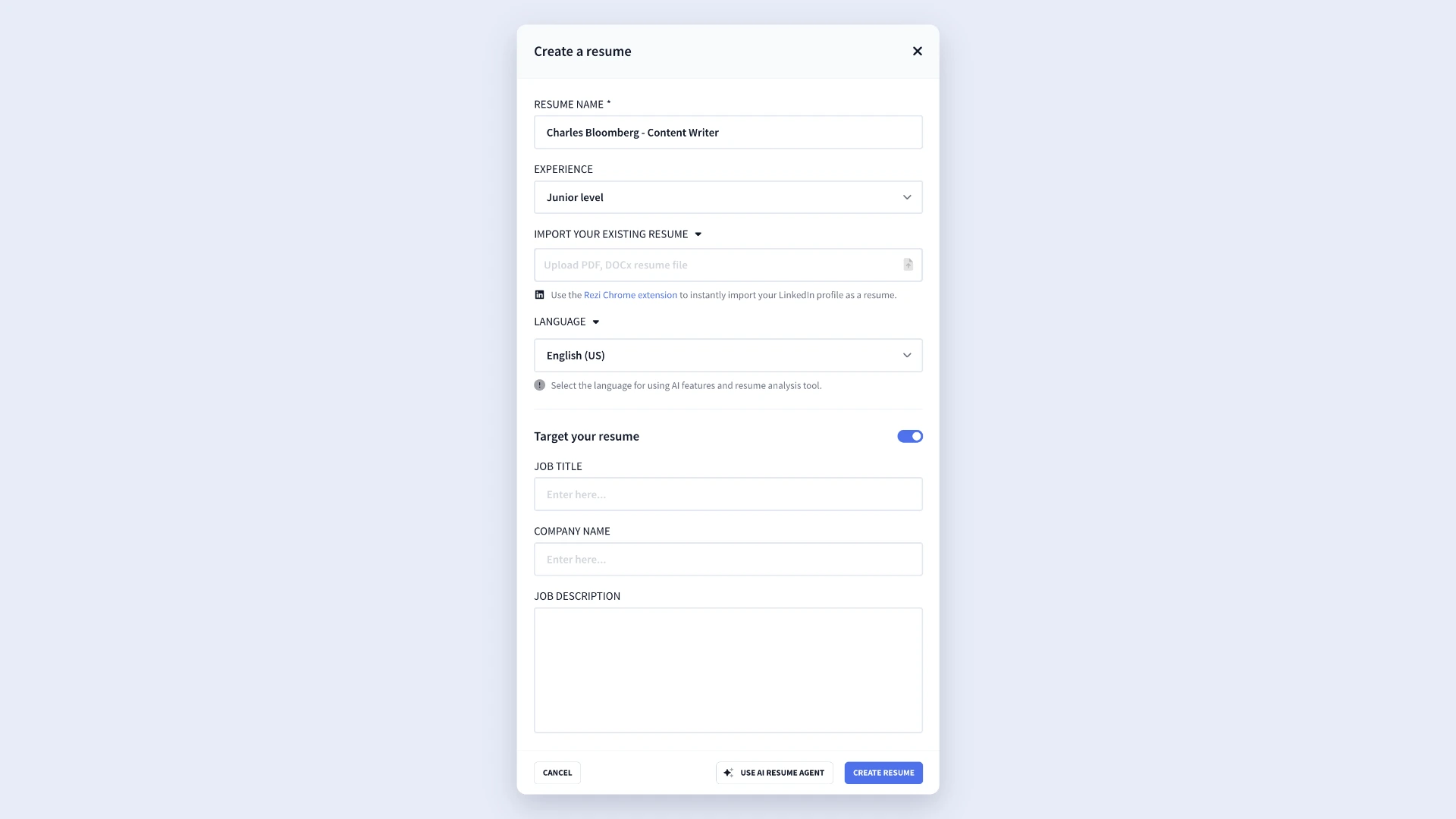
From there, Rezi will guide you through the resume-building process so you can begin completing each section.
2. Complete the contact section
The contact section appears at the top of your resume and gives recruiters the information they need to identify and contact you. Keep it professional, accurate, and current.
Not sure what to include? Just fill out these fields in the resume builder:
- Full name: Use the same name across all professional platforms, including LinkedIn. You can also add a middle initial if you regularly use it in professional settings. Likewise, if you have a hyphenated or double-barreled surname, use the complete version.
- Email address: Choose a professional email that you check regularly, such as firstname.lastname@gmail.com. Stick with established email providers like Gmail or Outlook and avoid using work or school email addresses.
- Phone number: Add a current number that you’ll actually answer if it rings. And be prepared for it to go to voicemail (that means no overly casual recordings or dad jokes).
- LinkedIn profile: Only include your LinkedIn profile if it’s updated and aligned with your resume; don’t want to get caught out inventing skills or exaggerating employment dates. Keep the URL short and clean — customize it in your LinkedIn settings if you haven't already.
- Personal website or portfolio: Add a portfolio, personal website, GitHub profile, or other relevant online presence if it strengthens your application. Keep the URL concise so it doesn’t take up unnecessary space.
- Address: Keep your location simple by listing your city and state or region. There’s no need to include your full street address. If you’re applying for jobs in another country, enable the country option. Otherwise, your city and state are usually enough.
.webp)
3. Work through each resume section
Once you’ve finished the contact section, continue building the rest of your resume by completing these standard sections:
- Experience
- Education
- Skills
- Summary
Depending on your background and career goals, you can also stand out by adding extra resume sections that highlight relevant accomplishments and qualifications, for example:
- Projects
- Certifications
- Relevant coursework
- Volunteer work or involvement
- Awards and honors
- Publications
- Reference (in most cases, this section isn’t necessary).

As you complete each section, Rezi’s AI Bullet Point Writer can help you create stronger bullet points based on the details you provide. And it doesn’t just churn out generic content; the tool uses your role details, projects, and experience as context to create tailored suggestions.
You’ll also notice your Rezi Score updating in real time. Rezi’s Real-Time Analysis continuously evaluates your resume as you write, giving you instant feedback so you can improve weak areas and build a stronger resume.
How to Get the Best Results
Yes, your contact details are the most straightforward part of your resume, but you can still use them to strengthen your job application. I recommend avoiding details that could cause bias (age discrimination is sadly a thing) and adding anything that will further prove your skills.
Here are a few tips to keep in mind when filling out your contact details.
Avoid oversharing your personal details
This isn’t an awkward work Christmas party; you don’t need to overshare. Your contact section should help employers reach you, not provide every detail about your personal life.
Employers don’t need your full mailing address. In most cases, listing your city and state is enough to show where you’re located. For example, “San Diego, California” gives recruiters the right amount of context. If you’re applying for jobs abroad, use your city and country instead.
You can also skip anything employers don’t need to evaluate you as a candidate, including:
- Age or date of birth
- Gender
- Religion
- Marital status
- Photos (unless they’re standard for your region or industry)
- Social Security numbers or other sensitive identification details
Include relevant additional links
Your contact section can do more than provide a number and email address. You can also make it easy for recruiters to learn more about your professional background.
Start with LinkedIn, but only if your profile reflects the experience and skills on your resume. A strong profile can back up your qualifications, giving extra context about your accomplishments.
You can also include other links that add value, such as:
- Personal websites
- Online portfolios
- GitHub profiles
- Professional social media accounts
Just keep it relevant. A designer’s portfolio, a developer’s GitHub repository, or a writer’s website can all prove your skills and reveal way more than simply describing the work. But if it doesn’t add value or support your professional brand? Leave it out.
Make sure every detail looks professional
Even small details can influence how employers perceive you before they read the rest of your resume. Take a few minutes to review everything you’ve included:
- Use a professional email address that you check regularly.
- Confirm that your phone number is accurate.
- Make sure your voicemail greeting sounds professional.
- Test every link to ensure it works correctly.
- Update LinkedIn, portfolios, and websites before sharing them.
- Keep formatting consistent across all contact information.
For one, you’re showing attention to detail. But you’re also just making it easier for employers to reach you and learn more about your work.
Summary
Here’s an overview of all you need to know about the resume contact section:
- The contact section sits at the top to help employers identify and contact you.
- To access the contact section in Rezi, create a new resume from scratch, import an existing resume, or import your LinkedIn profile using the Rezi Chrome Extension.
- Include the essential details: your full name, phone number, professional email address, location, LinkedIn profile, and a website or portfolio if it’s relevant to your field.
- Use the same version of your name across your resume, LinkedIn profile, portfolio, and other professional platforms.
- Add one phone number that you actively monitor. Make sure voicemail is enabled and that your greeting sounds professional in case you miss a call from a recruiter.
- Use a professional email address that you check regularly, ideally one based on your name. Avoid nicknames, outdated email providers, and school or work email addresses.
- Keep your location simple by listing your city and state (or city and country for international applications).
- Include a LinkedIn URL when possible. Before adding it, make sure your profile is current, complete, and aligned with the information on your resume.
- Avoid oversharing personal information like your age, date of birth, marital status, religion, gender, photo, Social Security number, or any other sensitive information.
FAQ
Do you need to include a personal website or portfolio?
You only need to include portfolio and other links for specific industries. A personal website or portfolio is most valuable when it shows work that employers can’t fully appreciate from a resume alone. Designers, developers, writers, photographers, marketers, and other creative professionals often benefit from including one.
Should you include a photo in the contact section?
In most cases, no. Employers generally care more about your qualifications than your appearance, and resume photos are uncommon in many countries, including the United States. Unless a photo is standard practice in your region or industry, it’s usually best to leave it out.
Which social media profiles are appropriate to include on a resume?
Only include social media profiles that support your professional goals and demonstrate relevant skills or experience. LinkedIn is the most common choice, but creative professionals may also benefit from sharing platforms that show their work. Before adding any profile, make sure the content is professional, current, and aligned with the role you’re pursuing.
Can you use your work or school email address?
It’s best to use a personal email address rather than a work or school account. If you change jobs or graduate, you could lose access to those email addresses and miss important messages from employers. A professional email based on your name that you check regularly is usually the safest and most reliable option for your job search.
Can you customize how your contact information appears in Rezi?
Yes. Rezi lets you control the information you include in your Contact section and adjust certain details. You can also change the layout on the “Finish Up and Preview” page with different templates, as well as add or remove icons.

Upload or drop your resume to get started
Upload your resume to get started
Score my resume

Lauren Bedford is a seasoned writer with a track record of helping thousands of readers find practical solutions over the past five years. She's tackled a range of topics, always striving to simplify complex jargon. At Rezi, Lauren crafts genuine and actionable content that guides readers in creating standout resumes to land their dream jobs.