User Guides
Education
Learn how to complete the education section in Rezi, including what details to include, where to place it on your resume, and how to make it stand out to employers.
Published on
July 15, 2026
Updated on
July 30, 2026
What exactly belongs in your education section? Is listing your degree enough, or should you include extra details? This depends on your experience level, but if you’re a student or recent graduate, your education section often needs to pull more weight.
If you’re using Rezi, you don’t have to figure everything out on your own. Our AI Resume Builder includes all the fields you need and takes care of the formatting, making it easier to know what information to add and how it should appear on your resume.
In this guide, I’ll walk you through how to fill out your education section, with a few tips on what to include and how to get the best results.
To start your education section, head to our free AI Resume Builder. We guide you through creating a tailored, professional, ATS-friendly resume in minutes.
And check out these other tools to help you write other resume sections:
You can also find out more about your resume’s education section with these guides:
- How to List Education on a Resume
- Where Should Education Go on a Resume
- How to Put Expected Graduation Date on a Resume
Education Section
The education section is where you highlight your academic background and qualifications. It helps employers understand what you’ve studied, where you earned your credentials, and whether you meet the educational requirements for the role.
With Rezi, you can include key details such as your degree, institution, location, and graduation date, as well as extras like a minor, GPA, and academic achievements. You can also add multiple schools, training programs, certifications, or other educational credentials.
Rule of thumb: as always, only include details that truly add value to your application.
How to Fill Out the Education Section?
Here’s a quick overview of how to fill out your education section in Rezi:
- Create or upload a resume before building your education section. If you’re applying for a specific role, use Rezi’s Target Your Resume feature to get more personalized AI suggestions and feedback.
- Fill out your education section with your most relevant academic qualifications. If you have multiple educational credentials, you can add more entries, but it’s best to leave high school details once you’ve earned a college degree or higher qualifications.
- Adjust the layout and design to show your strongest qualifications. Students and recent graduates can place education near the top, while experienced professionals should move it below their work experience section.
Let’s go through the process step-by-step.
1. Create or upload a resume
Before you complete your education section, you’ll need to create a resume in Rezi. After signing in, head to your dashboard and click Create New Resume. Rezi gives you a few ways to get started:
- Create a resume from scratch
- Upload an existing resume
- Import information directly from LinkedIn
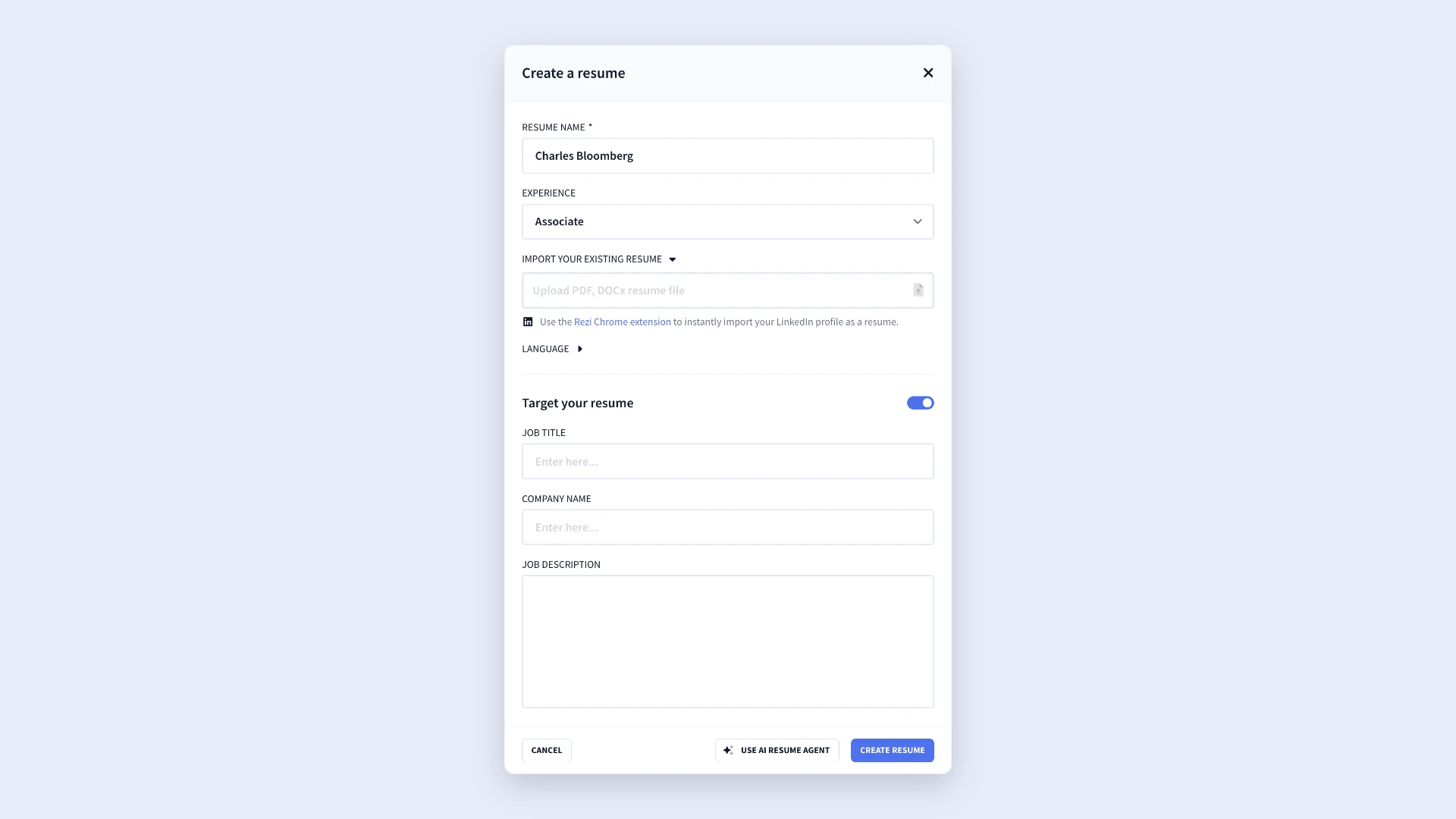
If you’re applying for a specific role, I recommend using Rezi’s Target Your Resume feature. Simply enter the job title, company name, and job description. Rezi’s AI tools can then provide more relevant suggestions and feedback throughout the resume-writing process.
You can also tailor your resume with the AI Resume Agent. Simply upload your resume and submit any prompt to get personalized suggestions on how to improve your application.
2. Fill out your education section
Once your resume is set up, head to the Education tab in the resume builder. This is where you’ll add your academic background and qualifications from high school, university, vocational schools, or training programs.
You’ll find several fields to complete:
- Degree/Qualification: Enter the degree, diploma, or qualification. Abbreviations are also fine; you can write “MBA” instead of “Master of Business Administration.”
- Institution: Add the name of the university, college, or school you attended.
- Location: Enter the institution’s city and state (or country, if applicable). When listing U.S. locations, use common state abbreviations such as “Orlando, FL.”
- Graduation Year: Include only your graduation year, rather than the full study period. If you’re still enrolled, add your expected graduation year, such as “Expected 2027.”
- Minor: If you completed a minor alongside your major field of study, include it here.
- GPA: Add your GPA, CGPA, percentage, or other grading format if it strengthens your application. That said, I’d only add a GPA if it’s higher than 3.8.
- Additional Information: Use this field for academic honors, scholarships, leadership positions, relevant coursework, or extracurricular accomplishments.
.webp)
Need to add another entry? Just click the plus (+) icon on the left-side panel and select Add New. Rezi will then create a blank education form for you. This is handy if you’ve been to multiple schools, earned advanced degrees, or completed training programs.
That said, if you’ve already earned a college degree or a higher qualification, I recommend leaving high school information off your resume. Most recruiters focus on your most recent and relevant educational achievements, so older credentials don’t add much value.
3. Adjust the layout and design
After you’ve finished adding your education details and other resume sections, head to the Finish Up & Preview tab. From here, you can preview your content, check your Rezi Score, change the template, and edit the design.
On the preview screen, click Template to browse Rezi’s available designs. The platform will suggest resume templates based on your content, but you’re free to explore the entire library and choose the style that best fits your needs.
Once you’ve selected a template, open the Adjustments tab to customize the appearance of your resume. Rezi gives you enough flexibility to personalize the design while maintaining ATS-friendly resume formatting.
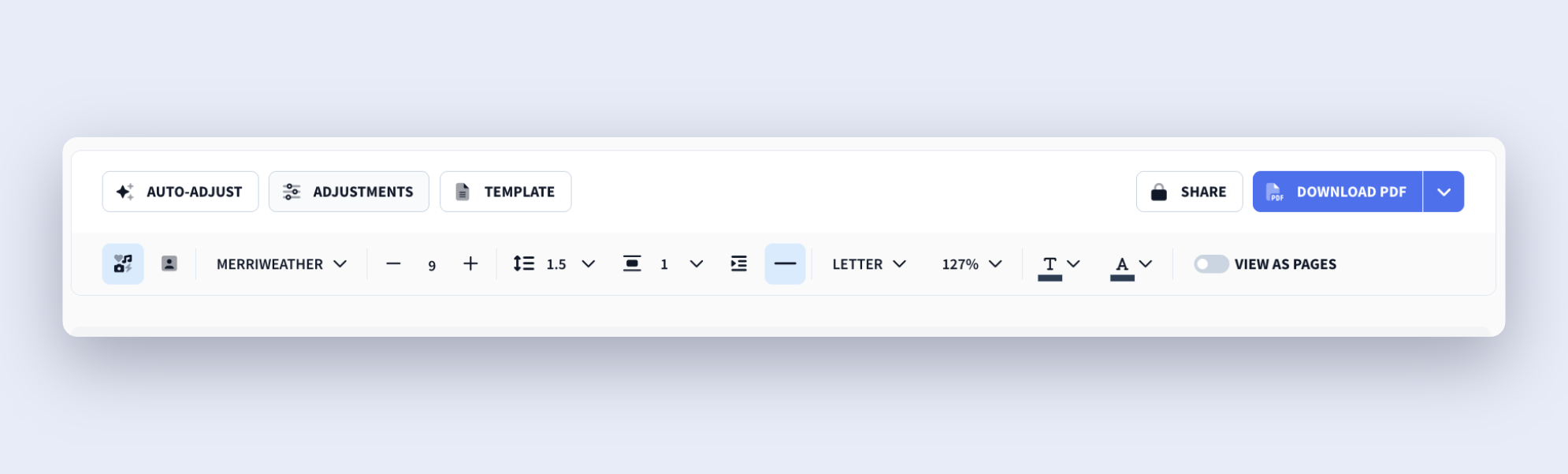
You can also drag and drop sections to change their order, which is especially handy for the education section, since the best placement often changes as your career progresses.
For example, if you’re a student or recent graduate, it makes sense to place your education near the top of your resume so employers can see your qualifications right away.
As you gain more experience and build up your work history, you can move education further down and let your professional accomplishments lead the way.
How to Get the Best Results
Your education section evolves throughout your career. Early on, it helps prove your potential and skills. Later, it confirms your qualifications while your work experience takes center stage.
Here’s how to update your education section based on your experience level.
Adjust the resume section order
If you’re a student, recent graduate, or someone with little professional experience, place your education section directly below your resume summary or objective. This way, employers can immediately see the qualifications you’re relying on to support your application.
As you build your career, your work experience section should take priority. After gaining a few years of experience, move your education below your work history. This is the standard format most recruiters expect to see, so it’s easier for them to scan.
There are also situations where you can move your education even further down. For example, if you’ve completed relevant certifications or built impressive projects, those sections might deserve more attention. In those cases, place your education section below the content that’s most relevant to the position.
It’s simple: organize your resume around what delivers the most value to the employer.
Expand your education section
When you don’t have much work experience, your education section needs to prove your potential. Instead of treating it as a short list of academic details, use it as an opportunity to show off your knowledge and achievements.
If education is one of your biggest strengths, place it near the top of your resume, right after your contact details and summary or objective. Start with the essentials:
- Degree, diploma, or qualification
- School, college, or university name
- Graduation date or expected graduation date
- Major or area of study
Then add supporting details that help employers understand what you’ve accomplished. Depending on your background, you might include:
- Relevant coursework
- Academic honors and awards
- Scholarships
- Strong GPA or grades
- Notable projects
- Research work
These extra details show sought-after transferable skills, such as communication, teamwork, problem-solving, and leadership. So yes, you can still prove you have what it takes without formal work experience.
Remove extra details as you gain experience
As your professional experience grows, the importance of your education section naturally decreases. Employers become more interested in the results you’ve delivered on the job than the details of your academic background.
If you have more than five years of relevant work experience, your education section can usually stay brief. In most cases, you’ll only need to include:
- The name of the institution
- The institution’s location
- Your degree or qualification
- Your graduation year (if you graduated within the last ten years)
At that stage, there’s rarely a need to include relevant coursework, academic projects, extracurricular activities, awards, or GPA information. Those details only take up space that you could use for professional accomplishments, measurable results, and career progression.
Similarly, if you’ve completed a college degree, are currently pursuing one, or hold another form of higher education, you can usually remove your high school education altogether. Recruiters care more about your latest qualifications and your professional track record.
Summary
Here’s all you need to know about completing your resume education section:
- Include the basics: your degree or qualification, school name, location, and graduation date (or expected graduation date if you’re still studying).
- If you’re a student or recent graduate, place the education section near the top of your resume to highlight your academic background.
- Consider adding relevant details such as a minor, GPA, academic honors, scholarships, coursework, research, or projects if they strengthen your application.
- As you gain more work experience, move the education section below your work experience section, and keep the focus on your professional achievements.
- Leave off high school information if you’ve completed or are pursuing a college degree or another high-level qualification.
- Keep the section concise if you have several years of professional experience. In most cases, employers only need to see your degree, institution, and graduation year.
- Tailor the amount of detail to your experience level; the less work experience you have, the more your education section should help showcase your knowledge and potential.
FAQ
What if you didn’t finish your degree?
You can still include unfinished education on your resume. List the school, your field of study, and the dates you attended. If you’re currently enrolled, add your expected graduation date. Even without graduating, your education can still show relevant knowledge and commitment.
How to write a resume when you only have a degree?
If you have little to no work experience, let your education section do more of the heavy lifting. Place it near the top of your resume and expand it with relevant coursework, academic projects, honors, extracurricular activities, and leadership experience. These details can help prove your skills, achievements, and potential while you build your professional experience.
Find out more: How to Write a Resume With No Experience
Can you include certifications in the education section?
Yes, you can include certifications in your education section, especially if you only have a few and they’re closely related to your studies. However, Rezi also offers a dedicated certifications section, which is usually the better option when you have multiple certifications or want to make them more visible. Use whichever approach keeps your resume organized and easy to read.
What if your degree isn’t related to the job you’re applying for?
That’s completely normal and often less important than people think. Employers usually care more about your skills, experience, and ability to perform the job than the exact subject you studied. Include your degree as usual, then focus the rest of your resume on relevant accomplishments, transferable skills, or work experience that align with the position.
Should you include relevant coursework on your resume?
Relevant coursework can be a valuable addition if you’re a student, recent graduate, or changing careers. It helps demonstrate knowledge that may not be obvious from your degree title alone. Rezi also includes a dedicated coursework section, but if you only want to highlight a few classes, you can add them under education to keep your resume concise.

Upload or drop your resume to get started
Upload your resume to get started
Score my resume

Lauren Bedford is a seasoned writer with a track record of helping thousands of readers find practical solutions over the past five years. She's tackled a range of topics, always striving to simplify complex jargon. At Rezi, Lauren crafts genuine and actionable content that guides readers in creating standout resumes to land their dream jobs.