User Guides
Rezi Human Resume Review
Rezi Human Resume Review - Have Rezi perfect your resume
Published on
August 20, 2022
Updated on
August 7, 2026
A Rezi Resume Review will give you feedback from our team of resume professionals.
With Rezi Resume Review, you get an expert in your corner who gives you personalized feedback on what’s working and what’s holding you back. From formatting and keywords to tone and clarity, each Rezi Resume Review shows you how to fine-tune your resume so it speaks to both hiring managers and applicant tracking systems.
This user doc will cover:
- How to use the Resume Review feature.
- The best ways to check your resume before sending.
- What our users say about the benefits of expert reviews.
Want to give yourself the best chance of success? Try our free AI Resume Builder to build a job application that meets modern hiring standards.
And check out more user docs to try our full range of features:
What Is the Rezi Resume Review?
Our Resume Review feature gives you access to an expert who will provide personalized, in-depth feedback on your resume.
You won’t get someone who does just a quick skim-read; our experts carefully review your document, using your professional details as a guide to pinpoint where you can make improvements.
They consider every detail, covering formatting, word choice, grammar, and overall presentation. You’ll receive clear recommendations to fix errors, strengthen your content, and refine your resume so it meets professional standards and reaches a 90+ Rezi Score.
Here’s a visual walk-through on how to use the feature:
How to Use the Rezi Resume Review
Here’s a quick breakdown of how to use our Resume Review feature:
- Head to the Rezi dashboard to preview your resumes.
- Select your resume for review; preferably one you’re using most or one with a lower Rezi Score.
- Choose a review timeline. You can get feedback in as little as 12 hours or up to 5 business days.
- Leave notes for context, such as concerns, goals, and highlights, to guide your reviewer.
- Apply the feedback to refine formatting, content, keywords, and tone.
Now, let’s get into the step-by-step details to help you take full advantage of Resume Review.
1. Head to your dashboard
Log in to your Rezi account and head to your personal dashboard. This is your central hub for managing all your resumes in one place. You can:
- View resumes in either a grid or list format
- Preview content without opening each file
- Sort and organize by name or by the date last edited
This layout makes it easy to keep track of multiple resumes and quickly find the one you want an expert to review.

2. Select a resume for review
Choose the resume you’d like an expert to analyze.

A good rule of thumb is to pick the resume you’re currently using to apply for jobs, especially if you’re not getting many responses. Been stuck trying to push a resume past a certain Rezi Score? That’s also a strong candidate.
For even more tailored feedback, you can link your resume to a job description. That way, our reviewers better understand your experience and the kind of role you want to land.
3. Choose a review timeline
Once you place your order, you’ll be able to decide how quickly you want feedback. Options range from a 12-hour turnaround to up to 5 business days, depending on the plan you select.
Here are your choices:

At the time of your order, we’ll create a duplicate copy of your resume. This means any edits you make afterward won’t carry over, so it’s best to finalize your draft before submitting it for review. That ensures the feedback you get is based on the most complete version of your resume.
4. Leave notes for your reviewer
This step is optional, but I recommend it to get the most out of the service. You’re essentially giving your reviewer context so they can provide more focused feedback. And the more direction you offer, the more customized and actionable your review will be.
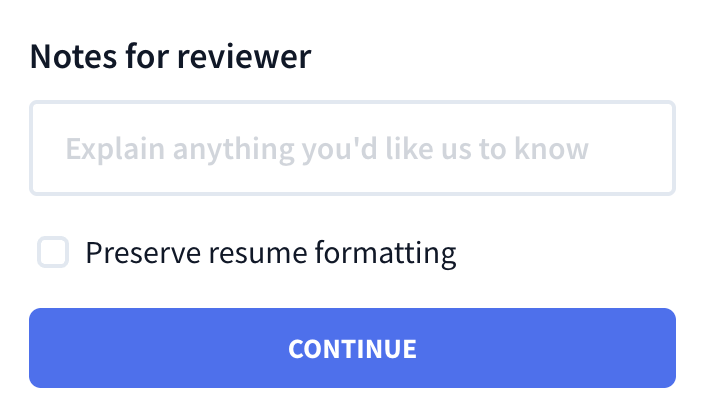
Here are some comments you can share:
- Worries: Is there anything you feel isn’t working in your resume?
- Targets: What are you hoping to achieve with this version?
- Content: What skills, experiences, or accomplishments do you want to emphasize?
5. Apply the feedback
Once you receive your resume review, it’s time to put the suggestions into practice. Our experts approach your resume from a hiring manager’s perspective, checking both the bigger picture and the finer details.
This is what their feedback could cover:
- Formatting: Ensuring your resume is organized, professional, and easy to scan.
- Content: Assessing if your experience, skills, and education are relevant and impactful.
- Keyword Optimization: Making sure your resume can pass through ATS.
- Accomplishments: Helping you outline achievements instead of just listing duties.
- Language: Offering advice on action verbs, tone, and conciseness.
- Alignment: Checking if your resume matches the industry and role you’re targeting.
Check out this real example of what that feedback looks like:

How to Review Your Own Resume
Short answer:
Start with an ATS-friendly format using simple fonts, standard headings, and reverse chronological order so both systems and recruiters can scan it easily. Tailor it to the job ad by weaving in keywords and proving skills with measurable achievements. Check your Rezi Score for insights across content, formatting, and optimization. Aiming for 90+ ensures your resume is professional and application-ready. Always get a second pair of eyes, such as friends, mentors, or tools like Grammarly, to spot mistakes you’ve missed. Finally, run through a resume checklist to confirm accuracy, clarity, and professionalism.
Let’s see how you can turn these steps into actions.
Use an ATS-friendly resume template
Before a recruiter even looks at your resume, there’s a good chance it will go through an Applicant Tracking System (ATS). These systems are designed to scan and filter resumes, meaning that anything too complicated or “creative” could actually hurt your chances.
Here’s what works best:
- Stick with simple resume fonts like Arial, Calibri, or Times New Roman.
- Use familiar headings (like Work Experience and Education) so ATS recognizes them.
- Avoid tables, text boxes, or graphics, as they can confuse the system.
- Save your resume as a Word doc or PDF (unless the employer specifies otherwise).
And remember, the best resume format for both humans and ATS is reverse chronological order. Start with your most recent role, then work backwards. This way, recruiters quickly see your current experience and career trajectory.
Take a look at our complete template gallery: ATS-Friendly Resume Templates
Compare your resume against the job ad
Not sure what to include on your resume? You can usually find all the answers in the job description. It literally tells you what the employer wants, so your resume should reflect that you’ve done your research.
Here’s how to do it:
- Highlight key skills, responsibilities, and requirements listed in the ad.
- Make sure those keywords appear naturally throughout your resume (especially in your work experience and skills sections).
- Adjust job titles if needed. For example, if your past role was “Customer Success Specialist” but the ad says “Client Support,” you can mention both to improve alignment.
But don’t just copy and paste keywords. You need to prove you’re the ideal match with evidence.
Instead of just writing “project management,” prove it with a bullet like: “Managed 5 concurrent projects with budgets up to $500k, delivering 95% on time and under budget.” That way, you’re creating a more concrete picture and showing how you contribute to success.
Check your Rezi Score and feedback
Your Rezi Score is like a built-in report card for your resume. We don’t just give you a random number; it actually breaks down your resume across five major areas:
- Content: Are your bullet points achievement-driven, clear, and do they prove your impact?
- Format: Is your resume organized, structured, and easy to read?
- Optimization: Have you used the right keywords for ATS and job relevance?
- Best Practices: Does your resume follow current industry standards?
- Application Readiness: Would your resume land you an interview if you applied today?
Within those categories, the system checks 23 details hiring managers look for, such as spelling, action verbs, and resume keywords. A score closer to 100 means your resume is professional, ATS-friendly, and ready to go, while a lower score gives you improvements on what to fix. We recommend aiming for a Rezi score of 90.
Get a second pair of eyes to check
After staring at your resume for way too long, it’s almost impossible to notice every mistake. That’s why getting outside feedback is so handy. A second perspective can catch things you’d never notice, like awkward phrasing, missing details, or formatting issues.
Here’s what you can do:
- Ask a friend, mentor, or colleague to review your resume (ideally someone who isn’t afraid to be honest).
- Ask someone in your field. They can tell you if your wording feels industry-appropriate or if you’re underselling yourself.
- Use tools like Grammarly or Hemingway Editor to spot typos and overly complex sentences. Just remember, these tools don’t always understand industry jargon, so use your judgment before accepting changes.
Create a resume checklist
Even after you’ve tailored your resume and reviewed your score, it’s worth going through a final checklist. Here are some questions to ask yourself:
- Did I proofread for spelling, grammar, and punctuation errors?
- Are job dates and titles consistent and accurate?
- Do my bullet points highlight achievements, not just tasks?
- Did I keep the design simple and professional?
- Is everything aligned and evenly spaced?
- Does the resume fit on one page (two pages max if you have extensive experience)?
And I get it; you’re probably tired of scanning your resume for the 100th time. But a quick checklist can be the difference between sending a resume that looks rushed and one that gets you an interview.
Why Job Seekers Love Resume Review
I’ll be honest, a lot of our users skip Rezi Resume Review not because it’s a bad feature, but simply because our users get so much help, feedback, and suggestions throughout the resume-writing process with our content analysis and Rezi score features that they don’t always need a second pair of expert eyes.
That said, this Trustpilot review highlights how our Resume Review feature helped this jobseeker refine their resume sections to stand out in a crowded market:

Summary
Here’s an overview of our Resume Review feature and other ways to check your resume:
- Rezi’s Resume Review connects you with professional reviewers to give you detailed, actionable feedback on format, content, grammar, and overall impact.
- It’s best to submit a resume version you’re actively using to apply for jobs, especially if it’s underperforming or stuck at a lower Rezi Score.
- Depending on your plan, you can choose how fast you want your review returned, from as little as 12 hours up to 5 business days.
- You can share concerns, career goals, or skills you need help with — the more context you give, the more personalized your feedback will be.
- Reviewers focus on formatting, keyword use for ATS, content clarity, accomplishment-driven bullets, and whether the tone/structure matches your target industry.
- Outside the review, stick with simple layouts, standard headings, and reverse chronological order so both recruiters and ATS software can scan your resume easily.
- Always compare your resume against the job description. Sprinkle in relevant keywords naturally, and back them up with examples that show results.
- Before submitting, use the Rezi Score as a quick report card across 5 categories and 23 hiring-manager-approved details.
FAQ
Is it worth paying for a resume review?
If you’re serious about landing interviews, then yes, it’s worth it. A Resume Review gives you feedback from professionals who know what recruiters actually look for in a candidate. They’ll point out what’s working, what’s not, and how to fix it. It saves you time second-guessing yourself and helps you avoid mistakes that could keep your resume from even getting considered.
What happens at a resume review?
Your resume can get analyzed in two ways:
- Rezi Score: Highlights across five different categories (content, format, optimization, best practices, applicant readiness).
- By expert reviewers: They look at your resume like a hiring manager would and offer personalized feedback.
You won’t just get “this is good” or “this is bad” feedback. Instead, you’ll get a detailed breakdown of how to improve wording, structure, and clarity to make your resume stronger.
How long does it take to review a resume?
That depends on the plan you choose. You can get feedback as fast as 12 hours, or up to 5 business days if you’re not in a rush. The turnaround time is flexible, so you can decide how quickly you need the review.
What happens if you send your resume more than once?
If you send your resume more than once, your review notes may appear similar as we provide comments based on identified issues and potential improvements in your resume. If your resumes have similarities, the comments will naturally reflect that.
To overcome this, we recommend using the latest reviewed resume as a foundation for future resumes instead of your original resume. This approach will help you avoid repetitive feedback and ensure continuous improvement.
Nothing changed in my resume. Why?
At Rezi, our approach is simple: we only make necessary changes to your resume. We won’t create problems where there aren’t any just to provide a fix. Our users often create winning resumes using Rezi’s tools, resulting in excellent outputs. So, if your resume receives fewer comments during the review process, it’s a testament to your skills and the quality of your work.

Upload or drop your resume to get started
Upload your resume to get started
Score my resume

Lauren Bedford is a seasoned writer with a track record of helping thousands of readers find practical solutions over the past five years. She's tackled a range of topics, always striving to simplify complex jargon. At Rezi, Lauren crafts genuine and actionable content that guides readers in creating standout resumes to land their dream jobs.