User Guides
Resume Templates
Learn how to use Rezi’s resume templates, choose the right design, customize formatting, and create an ATS-friendly resume that stands out.
Published on
July 15, 2026
Updated on
August 3, 2026
There are plenty of resume-building sites that love to push the “aesthetic” resume. But recruiters aren’t judging you for your ability to create a three-column masterpiece with gradient headings. They’re just trying to figure out whether you’re qualified for the job.
That’s why Rezi’s templates focus on function over flashy design. No gimmicks, no unnecessary design elements, and no formatting that confuses ATS software. Just professional templates designed to highlight your experience and skills.
In this guide, I’ll walk you through how the templates work and how to get the best results.
While you’re here, check out our free AI Resume Builder to explore our different templates, get expert bullet point suggestions, and receive your personal Rezi Score.
You can also try more of our advanced tools and features:
And take a look at more resume formatting tips and examples:
What Are the Rezi Resume Templates?
Rezi’s resume templates are professional, simple, and organized. They’re built with one goal in mind: helping you create a resume that performs well with both recruiters and Applicant Tracking Systems (ATS).
We offer over 15 resume templates, giving job seekers plenty of options while still maintaining an ATS-friendly resume structure. While we’ve included some options in the free plan, you’ll need to upgrade your subscription to a Pro or Lifetime account to access our full range.
Here’s one of our popular templates:
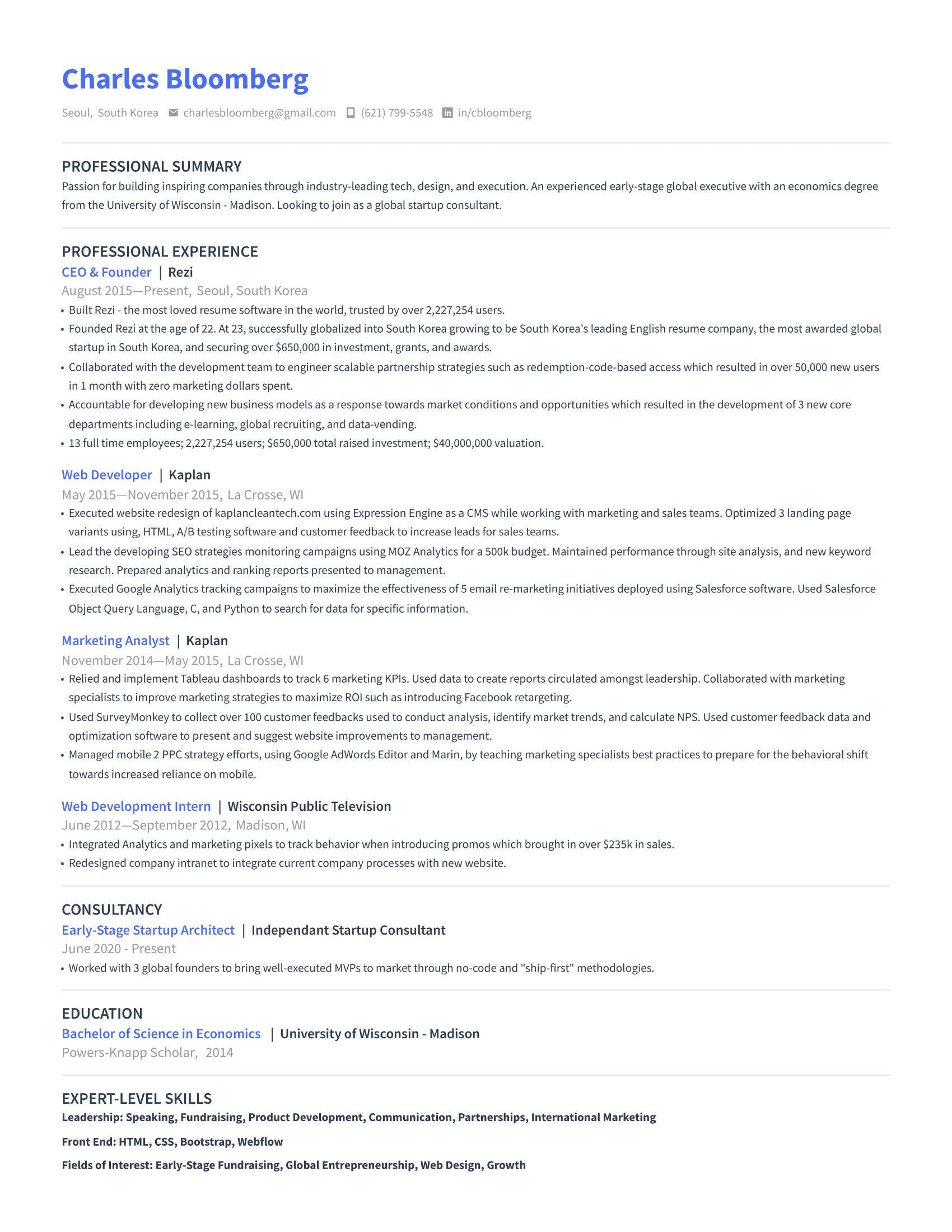
One question our users ask is: Why are the templates so minimal?
It’s a fair question. Colorful designs, graphics, and creative layouts grab attention. But many of those visually complex resumes don’t work well when they pass through ATS software. Before a recruiter even sees your application, an ATS often scans and parses your resume to identify important information such as:
- Section headings
- Job titles
- Employment dates
- Skills
- Keywords related to the position
When a resume includes multiple columns, graphics, text boxes, icons, or unusual formatting, the system may struggle to read the content. And in some cases, it can skip information entirely or place details in the wrong sections.
Instead of focusing on style over substance, Rezi prioritizes templates that support accurate ATS parsing. Every template uses a structured layout that helps hiring software read your information correctly and lets recruiters find what they need to assess you.
Want to see if your resume passes the ATS check? Use our ATS Resume Checker to get expert feedback along with your own Rezi Score.
How to Use the Resume Templates?
Here’s a quick summary of how you can access and use our templates:
- View our template gallery to browse ATS-friendly resume templates across different styles and industries.
- Choose a template in the resume builder after completing your resume, so you can match the layout to your content and experience level.
- Customize the template design with ATS-safe formatting options or use Auto-Adjust to optimize the layout automatically.
Now, let’s go through the process step-by-step.
1. View our template gallery
If you want to explore your options before writing your resume, the template gallery is the place to start. Instead of flooding users with hundreds of designs, Rezi focuses on ATS-friendly layouts that perform well during the hiring process.
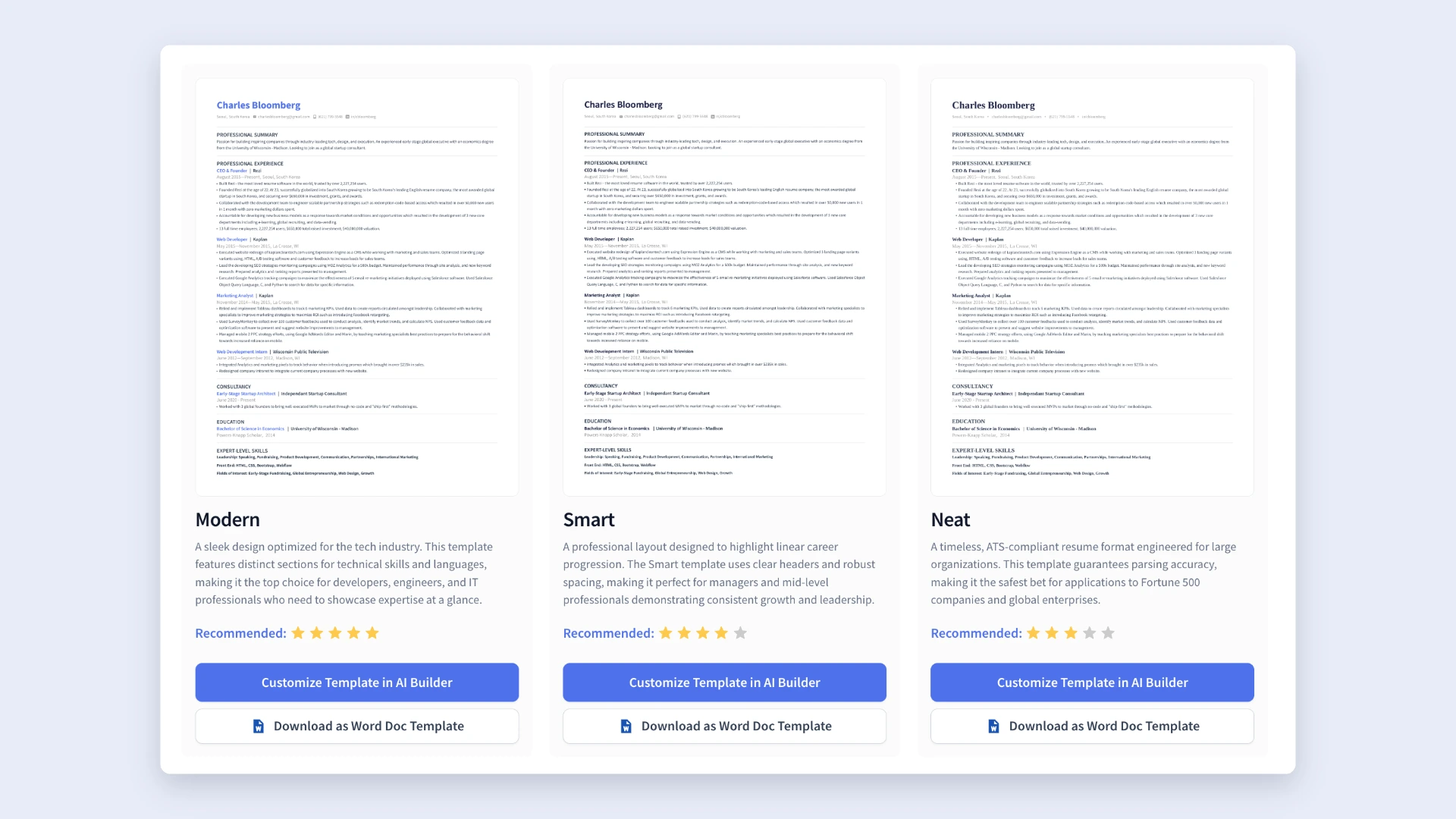
The templates are grouped into several categories:
- New Templates
- Simple and Professional Resume Templates
- Modern Resume Templates
- Creative Resume Templates
- Compact Resume Templates
While each category has its own look and feel, every template follows ATS-friendly design principles. You’ll still find subtle customization options, such as colored headings or borders, but the overall focus remains on clarity and professional presentation.
As you browse the gallery, you’ll get a better sense of what an effective, ATS-compatible resume looks like. Once you find a template you like, you can choose one of two options:
- Customize Template in AI Builder: Opens the template inside Rezi’s AI Resume Builder, where you can create your resume section by section.
- Download as Word Doc Template: Generates a free Word document version of the template that you can edit on your own.
Check out more templates and examples:
- Best Free Resume Templates and Tips
- Free Google Docs Resume Template
- Best Resume Templates and Examples
2. Choose a template in the resume builder
You don’t have to pick a template right away. In fact, it’s usually easier to select a design after you’ve finished your resume. For example, if your resume has several years of experience, a compact template will help everything fit neatly. If you have less content, a more spacious layout can create a more balanced appearance.
Getting started is straightforward:
- Sign in to your Rezi account.
- Open your dashboard.
- Create a new resume, upload an existing resume, or select one you’ve already started.
- Complete each resume section.
- Click Finish Up and Preview.
Once you reach the preview screen, you’ll see a selection of available templates. Rezi recommends options based on your resume, but you can explore every category, including:
- Simple
- Modern
- Creative
- Compact
You can also:
- Save favorite templates for later viewing
- Access recently viewed templates
- Compare multiple designs before making a final decision
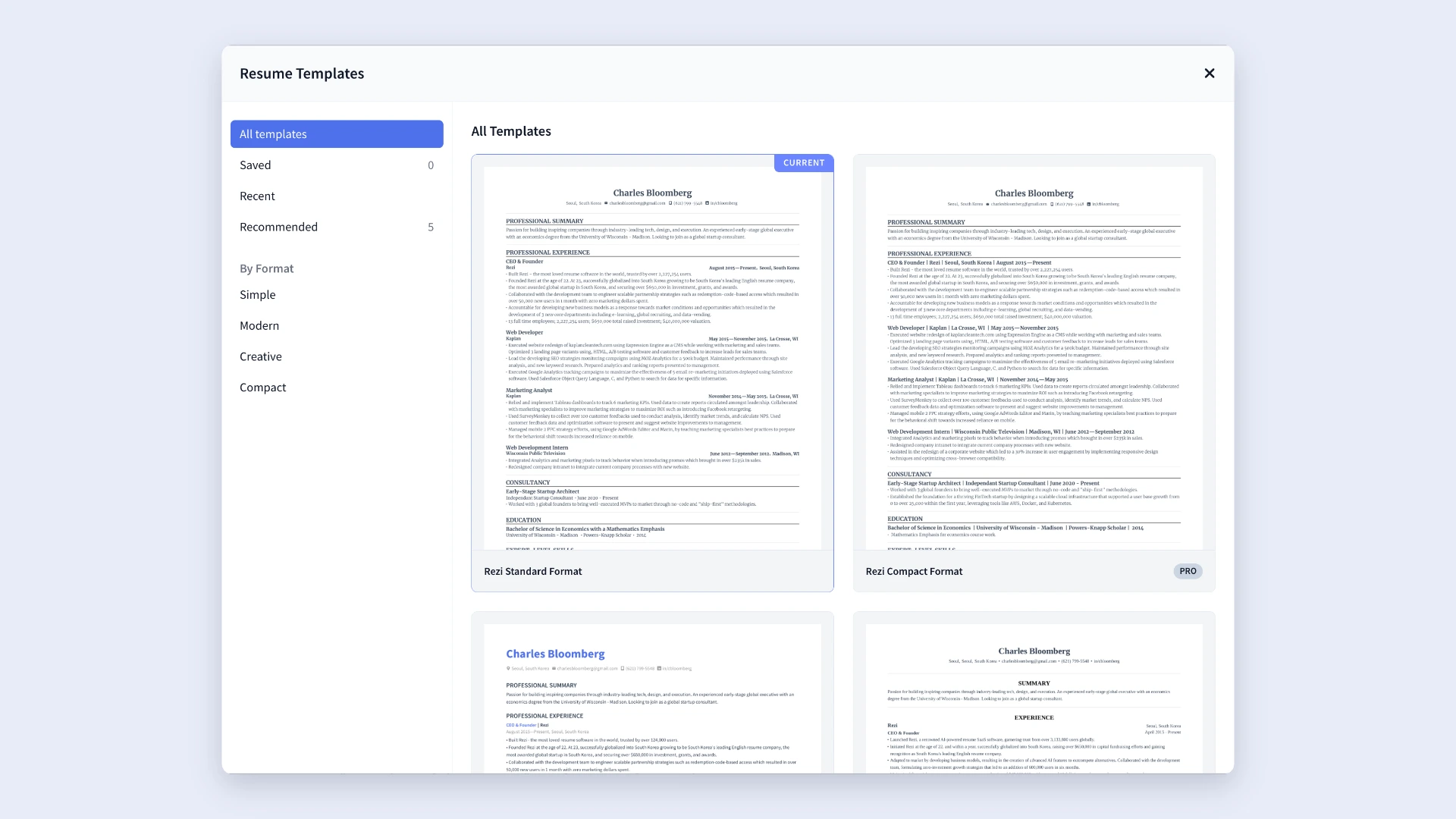
You can preview your resume in different formats and see exactly how your content looks before committing to a design. Just keep in mind that while Rezi offers some free templates, many advanced templates require a Pro or Lifetime subscription.
Looking for a particular style? Check out these popular options:
- Harvard Resume Templates
- Creative Resume Templates
- Free MS Word Resume Templates
- Best Free Canva Resume Templates
3. Customize the template design
After selecting a template, you can personalize its appearance through the Adjustments tab. Rezi gives you enough flexibility to make your resume feel like your own without introducing formatting issues that could hurt ATS performance.
Available customization options include:
- Icons: Add or remove icons next to contact information.
- Profile picture: Include a professional photo if appropriate for your industry or country.
- Font style: Choose your resume font, including options like Calibri and Merriweather.
- Font size: Adjust text size from 6 to 16 points.
- Line height: Select spacing between 1.5 and 1.85.
- Indentation and section dividers: Create more white space or keep a tighter layout.
- Accent color: Change the color used for headings and visual accents.
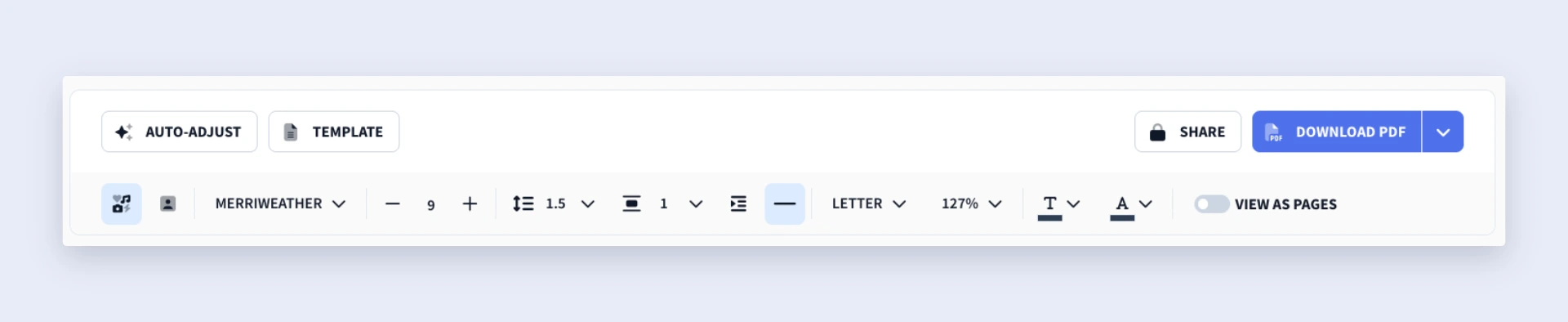
And if you’d rather skip manual formatting altogether, you can use Rezi’s Auto-Adjust feature. It automatically optimizes spacing, formatting, and layout, helping your resume look organized without spending time tweaking margins or fixing awkward line breaks.
Need more formatting advice? Get tips from our AI Resume Agent, from the best resume layouts to suggestions on tailoring your application to the job description.
How to Get the Best Results
Don’t spend time choosing the perfect template, then neglecting what actually goes inside it. Rezi’s templates are already optimized for ATS and recruiter readability, so you can focus more on keeping your resume concise and presenting your qualifications in the most effective order.
Here’s how to do it.
Try to keep everything on one page
If you can fit your most relevant accomplishments and skills onto one resume page without sacrificing important details, that’s usually the best option. Recruiters review dozens of applications, so being concise makes their job easier and increases the chances of them seeing your strongest qualifications.
That said, don’t treat the one-page rule as an absolute requirement. If you have years of relevant experience, significant accomplishments, certifications, leadership roles, or technical skills, a two-page resume makes sense.
A good rule of thumb? Add a second page only when it provides meaningful value. If you’re stretching content or adding filler just to take up space, it’s time to make some cuts. Your goal is to create a resume that’s informative, focused, and easy to scan (not a novel).
Struggling to decide what’s relevant? Use our AI Keyword Scanner to find key requirements and skills from the job ad, with suggestions on how to add them to your resume.
Consider your experience level
When choosing a template, think about both your career stage and the type of role you want.
If you’re early in your career, choose a layout that balances spacing to make your shorter work history look less sparse and more intentional. You can also take up space by focusing on:
- Skills
- Education
- Internships
- Projects
- Volunteer work
If you’re a mid-career professional or someone with extensive experience, you’ll likely need more room to highlight achievements, promotions, and responsibilities. In those situations, a more compact template can help you fit additional content without overwhelming the reader.
Choose the correct structure and section order
For most job seekers, the reverse-chronological format is the strongest and most familiar choice. It presents your recent experience first, making it easy for recruiters to follow your career progression.
In most cases, your resume should follow a structure similar to this:
- Contact information
- Professional summary or objective
- Work experience
- Education
- Skills
- Additional resume sections (certifications, projects, volunteer work, awards, etc.)
But there are a few exceptions.
If you’re a recent graduate or have less professional experience, move your education section directly below your contact details and objective to help employers see your strongest qualifications and skills beyond traditional work experience.
You can also strengthen your education section by including:
- Relevant coursework
- Scholarships
- Honors and awards
- Major class projects
- Strong GPA (when appropriate)
As your professional experience grows, your work history should be the focus. At that point, move education below your experience and simplify it to free up space for career achievements.
You might also hear about functional resumes or skills-based formats, but I suggest avoiding them. Recruiters often prefer a clear employment timeline, and functional resumes make it harder to evaluate your background. A combination format may work for highly experienced professionals, but for most candidates, reverse-chronological is your best bet.
Summary
Here’s a breakdown of everything you need to know about Rezi’s resume templates:
- Rezi offers over 15 ATS-friendly resume templates designed for a wide range of industries, so you can choose one that aligns with your professional goals and field.
- All templates use simple, structured formatting to ensure your information gets parsed accurately and reaches recruiters successfully.
- Templates are organized into categories, making it easy to find a style that matches both your experience level and the expectations of your target industry.
- You can browse the template gallery before building your resume, then either customize a template in Rezi’s AI Resume Builder or download a free Word document version.
- If you prefer, you can build your resume first and choose a template later to better fit the amount of content and experience.
- Rezi also allows customization through ATS-safe formatting options, including font styles, line spacing, section dividers, contact icons, and accent colors.
- To get the best results, match your template to your experience level and industry, use a reverse-chronological format, and keep your resume concise and relevant.
FAQ
Which template do most employers prefer for resumes?
Most employers prefer resumes that are easy to read and well-organized with no flashy colors, columns, or fancy graphics. A professional template that clearly separates sections like experience, education, and skills works best. Templates like Rezi’s Standard or Harvard style are great examples because they look good without distracting from the content.
How far back should your resume go?
Most resumes should cover the last 10–15 years. Employers are more interested in your recent and relevant experience, so there’s no need to list every job you’ve ever had, especially if it’s unrelated to the job you’re applying for.
Find out more: How Far Back (How Many Years) Should a Resume Go?
How many jobs should be on a resume?
There’s no exact rule, but most people list around four jobs on their resume. Anywhere from three to six is common, as long as they’re relevant. If you’ve had more, prioritize the ones that best match the role. Fewer is fine too; two well-detailed jobs can still make a powerful impression.
Where can I get a free resume template?
You can get free resume templates from a few places, but Rezi offers a free, ATS-optimized, professional template designed to help you get interviews. You can also try Google Docs, Word, or Canva; just make sure to choose one that’s simple and ATS-friendly.

Upload or drop your resume to get started
Upload your resume to get started
Score my resume

Lauren Bedford is a seasoned writer with a track record of helping thousands of readers find practical solutions over the past five years. She's tackled a range of topics, always striving to simplify complex jargon. At Rezi, Lauren crafts genuine and actionable content that guides readers in creating standout resumes to land their dream jobs.