User Guides
Involvement & Volunteering
Learn how to use the involvement section to emphasize volunteer work, leadership roles, and other experiences that will get your resume noticed.

Published on
August 7, 2026
Updated on
August 7, 2026
Not every impressive achievement comes with a paycheck. If you’re wondering how to include volunteer work, leadership experience, or relevant side quests without making your resume feel crowded, Rezi helps you organize and present those experiences in one dedicated section.
In this guide, I’ll walk you through how to add your involvement section and make sure it adds real value to your resume.
Or you can explore yourself with our free AI Resume Builder. We guide you through the process with AI suggestions, personalised feedback, and ATS-friendly formatting.
You can also check out our other tools and features:
And find out more about other resume sections:
- How to List Certifications on Your Resume
- How to List Your Best Projects on a Resume
- How to List Extracurricular Activities on a Resume
Involvement Section
The involvement section is where you add any experiences that don’t quite fit into your work history. Instead of creating several smaller sections, you can group different types of activities to keep your resume concise and organized.
Here are some examples of what you can include:
- Volunteer work
- Extracurricular activities
- Leadership positions
- Student organizations
- Community involvement
This section gives you the chance to reveal all those transferable skills you’ve built up outside of paid employment. Volunteer work, for example, can show leadership, teamwork, communication, work ethic, and initiative just as much as a “real” job.
How to Fill Out the Involvement Section?
Here’s the quick version of how to complete your involvement section with Rezi:
- Create a resume or upload an existing one by starting from scratch, uploading a resume, importing your LinkedIn profile, or using AI Resume Agent.
- Add the involvement section by opening the three-dot menu in the resume builder, selecting Add or Remove Section, and enabling Involvement.
- Add your involvement details by entering your role, organization, dates, location, and achievement-focused bullet points that highlight your impact.
- Review your resume in Finish Up & Preview to check your Rezi Score, apply AI feedback, choose an ATS-friendly template, customize the design, and reorder sections.
Let’s get into the details.
1. Create a resume or upload an existing one
Before you add the involvement section, you’ll need to create a resume in Rezi. From your dashboard, just click Create New Resume and choose the setup method that works best for you:
- Start a resume from scratch
- Upload an existing resume
- Import your details from LinkedIn with the Rezi Chrome Extension
- Use our AI Resume Agent to build your resume with guided prompts
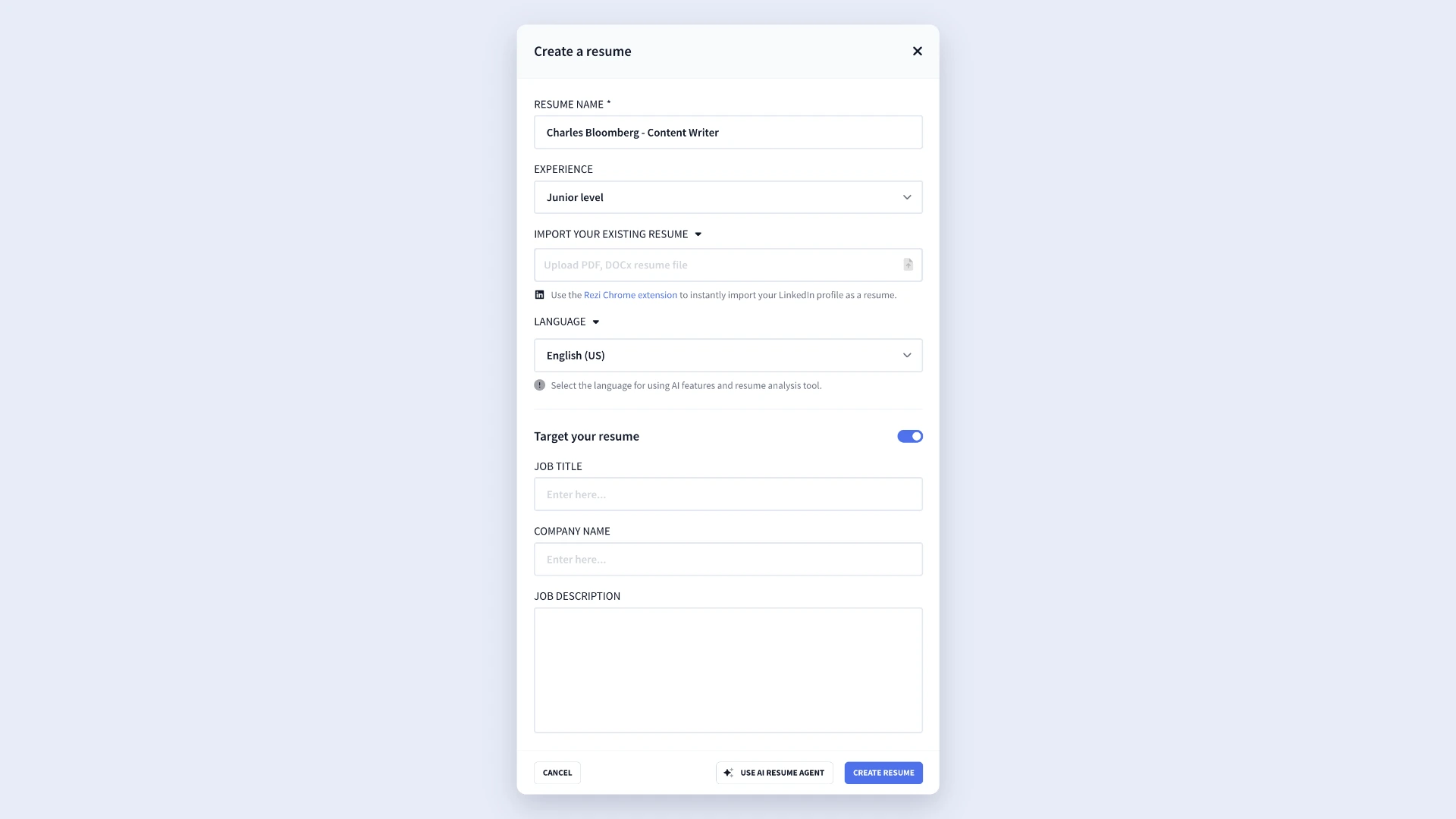
If you’re applying for a specific position, it’s worth using the Target Your Resume feature during setup. By adding the job title, company name, and job description, you’ll get more tailored AI suggestions and feedback while you build your resume.
2. Add the involvement section
When the resume builder opens, you’ll see the default sections, such as Work Experience, Education, and Skills. Once you’ve worked your way through them, here’s how to add Involvement:
- Click the three-dot menu at the end of the section tabs.
- Select Add or Remove Section.
- Find Involvement and enable it.
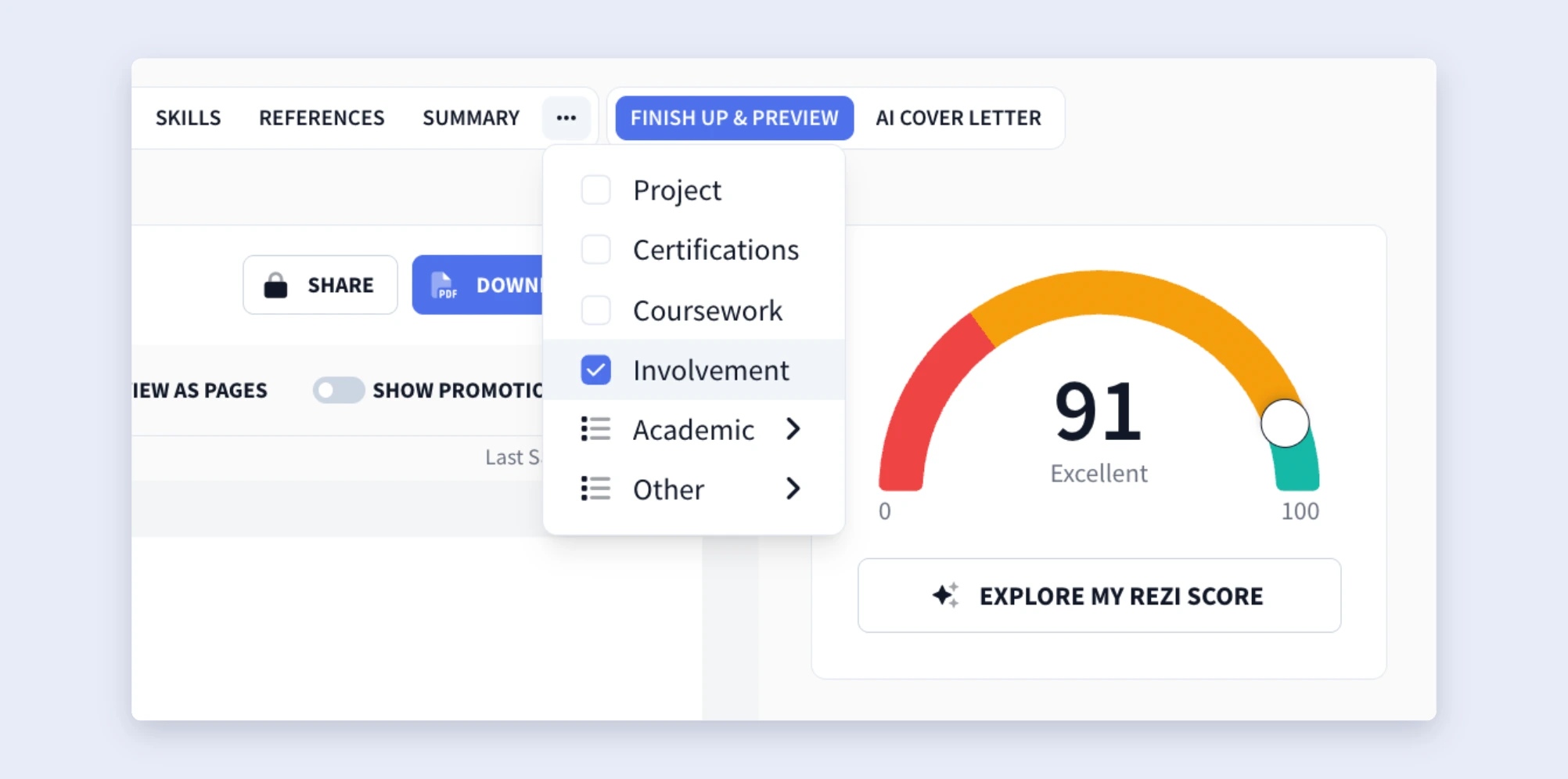
Once you’ve turned it on, the Involvement tab will appear alongside your other resume sections.
3. Add your involvement details
Now it’s time to add your experiences. For each entry, fill out the following fields:
- Role: Enter the position you held, such as Volunteer, Treasurer, or Event Coordinator.
- Organization: Add the name of the organization, club, or nonprofit.
- Duration: Select the dates you participated.
- Location: Enter the organization’s location (use standard state abbreviations when applicable).
- Description: Add bullet points that explain your contributions, responsibilities, and achievements.
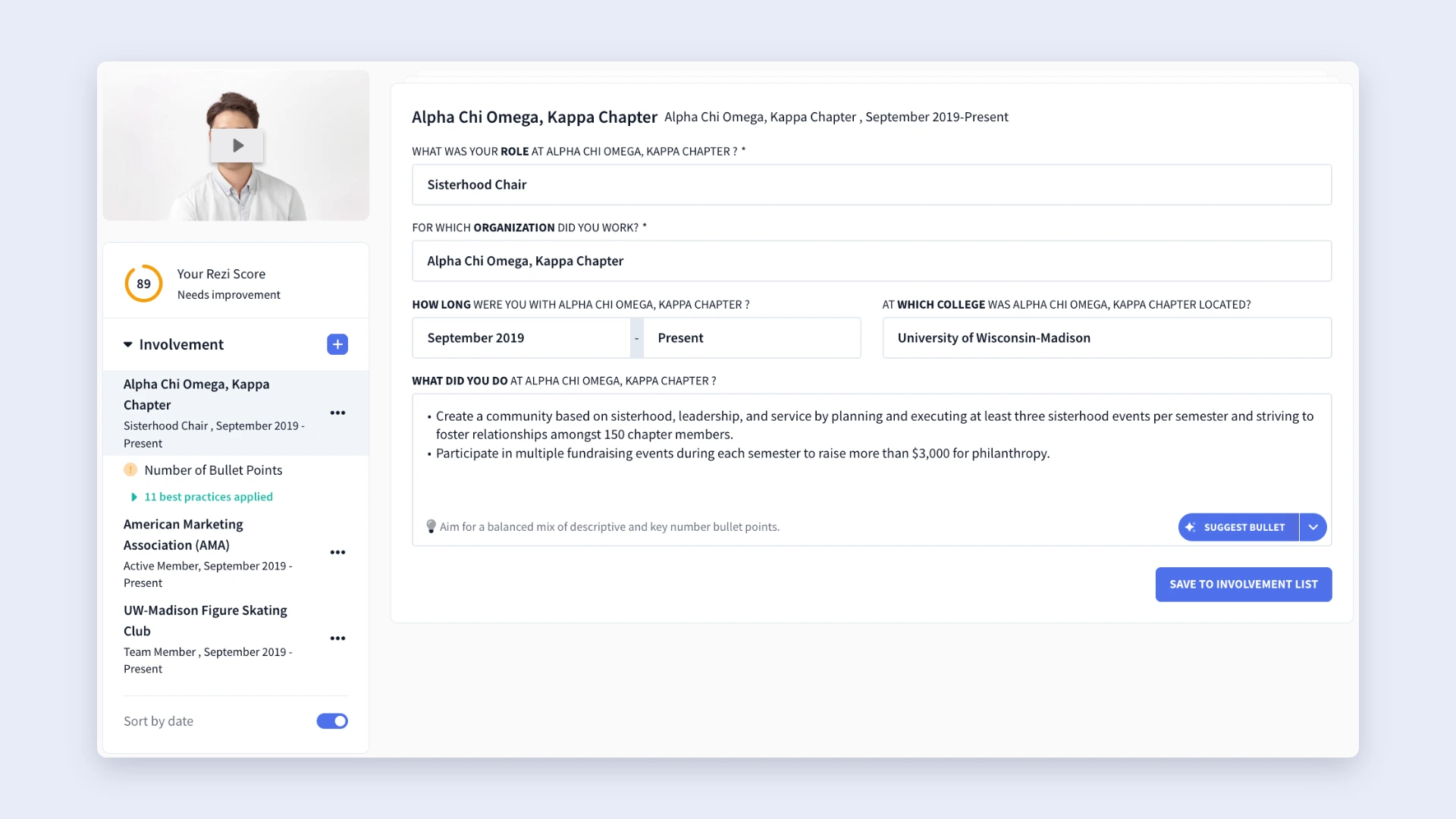
But don’t just list generic tasks that don’t actually say how well you performed. Instead, focus on the impact you made. For example, mention leadership responsibilities, events you organized, people you supported, or measurable results when you can.
Not sure how to word your experience? Rezi’s built-in AI Bullet Point Writer can help you out. You get several options:
- Suggest Bullet: Generates a professional bullet point based on your role.
- Generate Bullet With Key Numbers: Creates a bullet point that emphasizes measurable results.
- Rewrite Bullet: Improves an existing bullet point and adds quantifiable achievements.
If you need to include another activity, click the + icon in the left-side panel, then select Add New to create a new involvement entry.
4. Review your resume in Finish Up & Preview
After you’ve completed your involvement section and the rest of your resume, open the Finish Up & Preview tab. This is where you’ll review your resume before downloading or applying.
From here, you can:
- Preview your completed resume
- Check your Rezi Score and apply the feedback
- Browse our ATS-friendly resume templates
- Customize your resume’s design
- Tailor your resume with AI Keyword Targeting
The Adjustments tab also lets you personalize your resume while keeping it ATS-friendly. You can change:
- Contact icons
- Resume photo
- Font size and style
- Line spacing
- Indentation and section dividers
- Accent colors
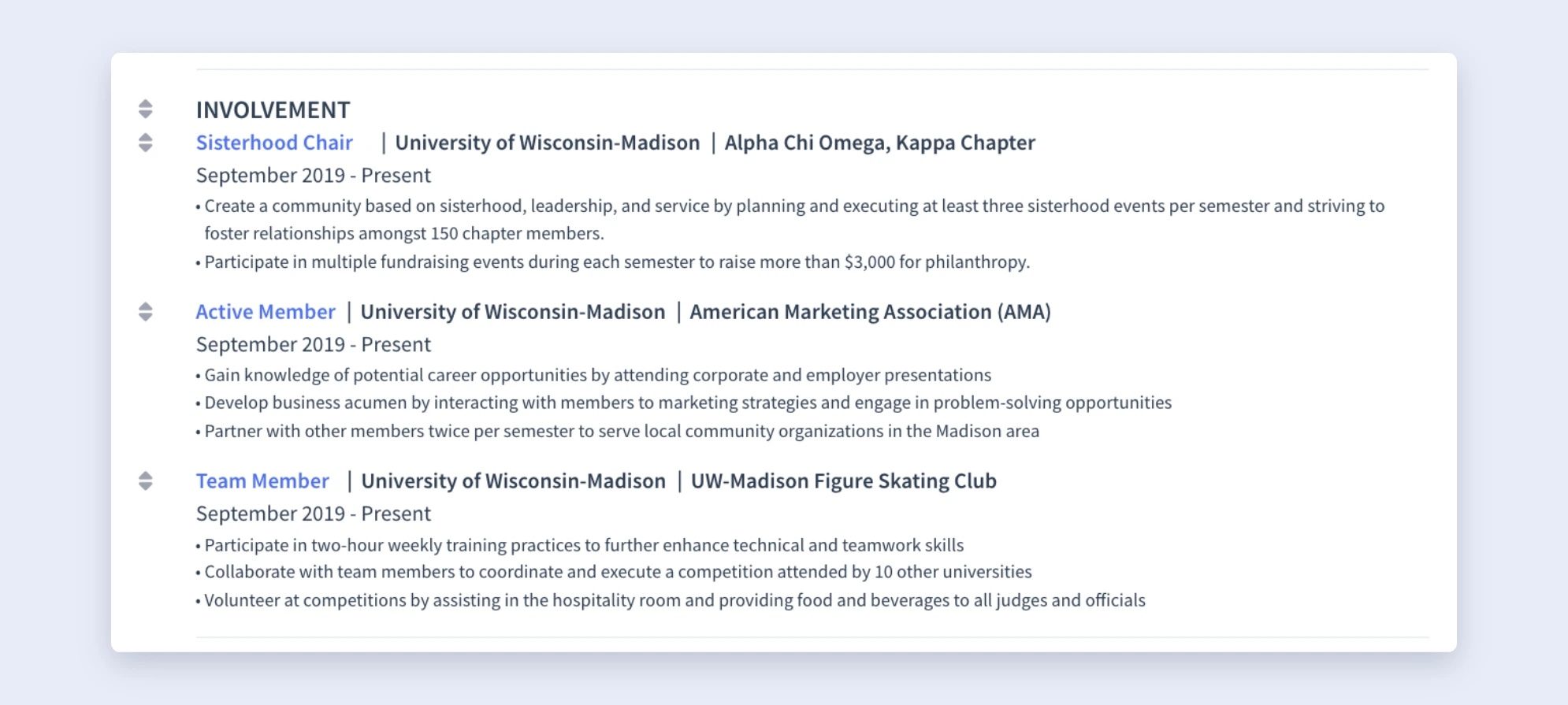
You can also drag and drop sections to change their order, which is handy for the involvement section because its placement depends on your experience level.
If you’re a student or recent graduate, placing involvement near the top can help show any relevant experience. As you gain more work experience, you can move it lower on your resume.
How to Get the Best Results
Your involvement section should do more than fill that empty space on your resume. When you’re smart about it, you can use it to highlight transferable skills, prove your potential, and show employers that you’ve made an impact outside of traditional work.
Here’s how to be more strategic with your involvement section.
Tailor your involvement to the job and industry
Just like the rest of your resume, your involvement section should match the position you’re applying for. A few tweaks here and there can make your resume more relevant to both hiring managers and Applicant Tracking Systems (ATS).
All you need to do is read the job description and pinpoint the main skills or requirements. Then, update your involvement descriptions to reflect experiences that genuinely prove those abilities.
I’m not telling you to copy the job posting word-for-word or force those keywords. Instead, naturally weave in terms that accurately describe your experience. Just don’t spend too much time tailoring your resume; it should only take a few minutes to add the right skills and phrases.
Want to tailor your resume faster? Connect our MCP Toolkit to AI assistants like Claude and Gemini, then customize your resume for any job in just seconds.
Focus on skills and measurable achievements
Many jobseekers assume they can only develop resume skills through paid employment, but that’s simply not true. Volunteer work and other activities can build essential transferable skills that play a part in any workplace, like communication, teamwork, and leadership.
But you have to sell it. Rather than simply listing duties (anyone can do this), show what you actually accomplished. Recruiters learn way more from results than from task lists because accomplishments give a glimpse into the value you can bring to your new role.
And when you can, include measurable results. Numbers help employers understand the extent of your contributions and make your claims more credible. Here are some examples:
- Coordinated events attended by 200+ participants.
- Recruited and trained 15 new volunteers.
- Increased fundraising donations by 30%.
- Organized weekly community programs serving 100 families.
Don’t have exact numbers? That’s fine. You can still emphasize positive outcomes by explaining how your efforts solved a problem, supported a team, or helped your organization reach a goal.
Consider where to place your involvement section
If you already have a strong professional background, keep your volunteer experience in its own section toward the end of your resume. That way, you keep the attention on your work history while still giving employers a chance to see relevant activities. You’re also free to rename your sections, using headings like Involvement or Volunteer Work to better match your content.
If you’re a student, recent grad, changing careers, or don’t have many jobs under your belt, you can place volunteer work alongside your paid roles to pad out your work experience section.
As long as you make it clear that it’s volunteer experience, so hiring managers understand the context. Employers realise everyone starts from somewhere, and relevant volunteer work often carries as much weight as paid experience when it shows the skills an employer wants.
Summary
Here’s an overview of everything you need to know about the involvement section of a resume:
- The involvement section is a flexible place to highlight volunteer work, extracurricular activities, leadership positions, student organizations, and community involvement.
- Before adding the section, create a resume in Rezi by starting from scratch, uploading an existing resume, importing your LinkedIn profile, or using AI Resume Agent.
- To add the section, open the resume builder, click the three-dot menu at the end of the section tabs, select Add or Remove Section, and enable Involvement.
- For each involvement entry, include your role, organization, dates, location, and a few bullet points describing your contributions and achievements.
- Instead of only listing responsibilities, explain the impact you made and quantify your results with numbers or metrics if you can.
- If you’re unsure what to write, use Rezi’s AI Bullet Point Writer to generate new bullet points, rewrite existing ones, or create results-focused bullets with measurable results.
- Tailor your involvement section by emphasizing relevant skills and naturally incorporating keywords from the job description.
- Before downloading your resume, visit Finish Up & Preview to review your content, check your Rezi Score, customize the design, and rearrange your sections.
FAQ
Should you add volunteer work to your involvement section?
Yes, volunteer work is one of the most common types of experience to include in your involvement section, as it shows in-demand transferable skills such as leadership, teamwork, work ethic, and initiative. If your volunteer experience is super relevant to the role or you have limited professional experience, you can even include it alongside your work experience to pad out that section. Otherwise, you can keep it within a dedicated Involvement section.
How many involvement entries should you include?
There’s no fixed number, but quality matters more than quantity. Aim for 1–5 relevant and recent entries, depending on your experience and available space. Focus on activities that strengthen your application and show skills that employers want. If an older or unrelated activity doesn’t add value, it’s usually best to leave it out.
What should you write in your involvement descriptions?
You should treat your involvement descriptions the same way you would your work experience. Instead of listing generic responsibilities, explain what you accomplished and the impact you made. Highlight leadership, projects you contributed to, events you organized, people you worked with, or improvements you helped to achieve.
Should you tailor your involvement section for each job application?
Yes, but don’t spend too much time on it. The easiest approach is to create a strong master resume, then make a few quick tweaks for each application. Update your involvement section by emphasizing the experiences and skills that best match the job description, and naturally include relevant keywords.
How far back should your involvement section go?
I suggest including involvement from the last 10 years, especially if it’s still relevant to the positions you’re applying for. If you’re a student or recent graduate, it’s perfectly acceptable to include university activities if they reveal valuable skills and you don’t have much professional experience. But as your career grows, replace older involvement with more recent and relevant experiences that better reflect your current qualifications and skills.

Upload or drop your resume to get started
Upload your resume to get started
Score my resume

Lauren Bedford is a seasoned writer with a track record of helping thousands of readers find practical solutions over the past five years. She's tackled a range of topics, always striving to simplify complex jargon. At Rezi, Lauren crafts genuine and actionable content that guides readers in creating standout resumes to land their dream jobs.