User Guides
Project
Learn how to fill out your resume project section in Rezi, including what to add, where to place it, and tips to make your projects get noticed.
Published on
July 15, 2026
Updated on
July 30, 2026
That paper mâché volcano you built in high school probably won’t land you your next job. But organizing a fundraising campaign, building a website, or analyzing data for a class project?
Now we’re talking.
Relevant projects help prove you have the skills employers are looking for, especially when your work experience doesn’t tell the full story. Rezi makes it easy to add those projects to your resume, organize the details, and keep everything professionally formatted.
In this guide, I’ll show you how to add projects to your resume and help them stand out.
To get started, head to our free AI Resume Builder. Work through each section with AI suggestions and personalized feedback to help you create an impressive application.
You can also check out these tools to help write your resume:
And take a look at these tips and examples for more resume sections:
- How to List Awards on a Resume
- How to List Certifications on Your Resume
- How to List Extracurricular Activities on a Resume
Projects Section
The projects section is where you show off the work you’ve done and give employers a better sense of your skills, knowledge, and accomplishments. You can include projects from:
- School
- Freelance work
- Personal projects
- Volunteer experience
- Previous jobs
In Rezi, you can add details like the project title, organization, dates, project link, and a few bullet points explaining what you did and what you achieved. It’s especially useful for students, recent grads, career changers, or anyone who wants to make up for a lack of work experience while still showing their skills and expertise.
How to Fill Out the Projects Section
Here’s a quick overview of how to fill out the projects section with Rezi:
- Create a new resume or update an existing one, then use Target Your Resume for tailored suggestions before heading to the projects section.
- Add projects to your resume by enabling the Projects section through the Add or Remove Section menu, or include projects under education or work experience.
- Fill in your project details, such as the project title, organization, dates, and result-focused bullet points, with help from Rezi’s AI Bullet Point Writer.
- Customize the layout and check your content on the Finish Up & Preview page, where you can review your resume, optimize it for ATS, and position your projects section.
Let’s get into the details.
1. Create a new resume or update an existing one
Before adding projects, you’ll first need to create a resume in Rezi. There are a few ways to get started, depending on what information you already have:
- Build a resume from scratch.
- Upload an existing resume.
- Import from your LinkedIn profile using the Rezi Chrome Extension.
- Use the AI Resume Agent to create your resume through a guided conversation.
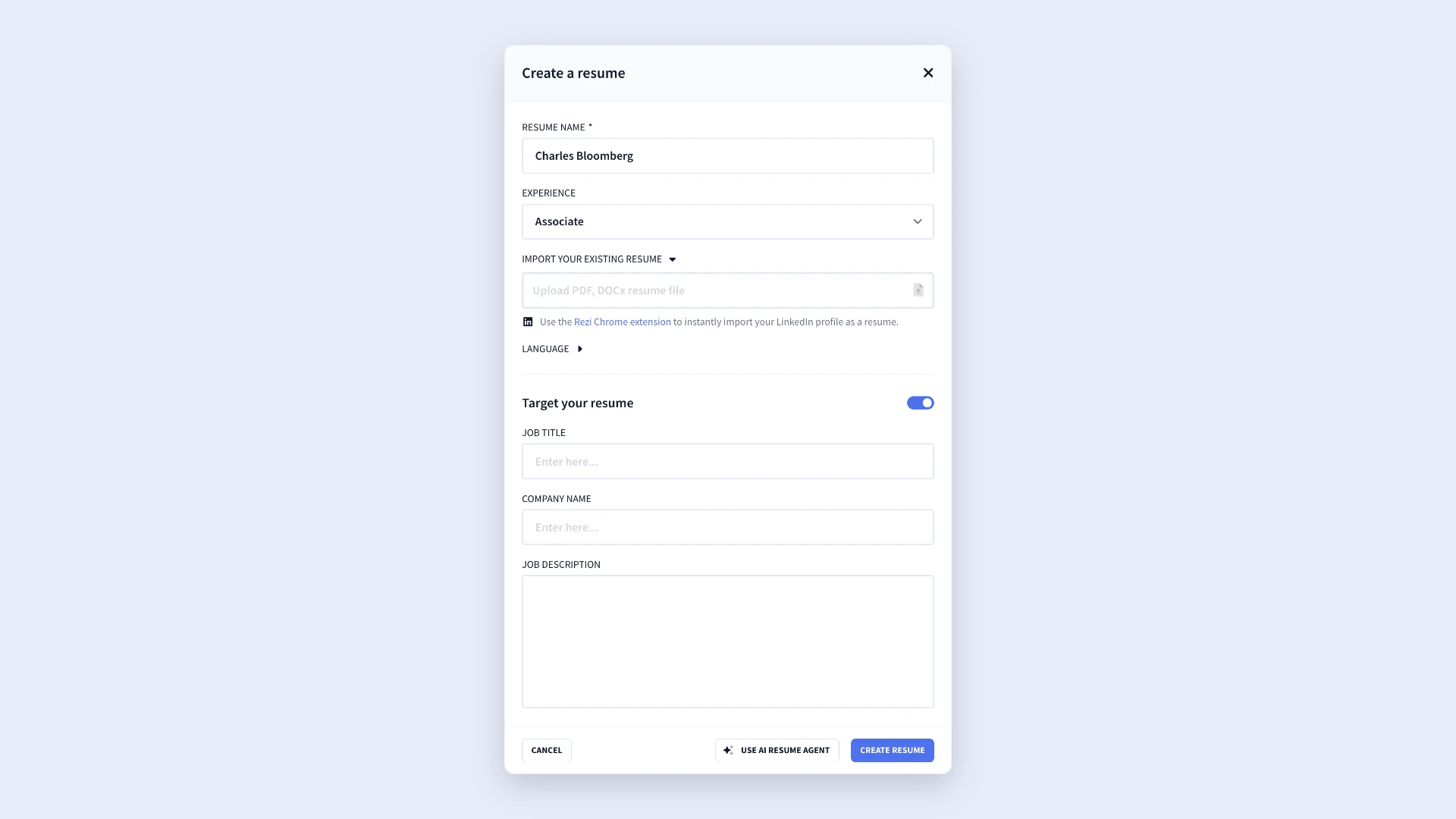
If you’re applying for a specific role, I recommend using the Target Your Resume feature before filling out your resume. Adding the job title, company name, and job description lets Rezi provide more tailored suggestions, keyword recommendations, and feedback.
Once you’ve created your resume, work through the resume builder tabs until you reach the projects section.
2. Add projects to your resume
When you enter the resume builder, you’ll see the standard sections such as work experience, education, and skills. To add the projects section:
- Click the three-dot menu at the end of the section tabs.
- Select Add or Remove Section.
- Find Project.
- Enable the section.
The Projects tab will then appear alongside your other resume sections.
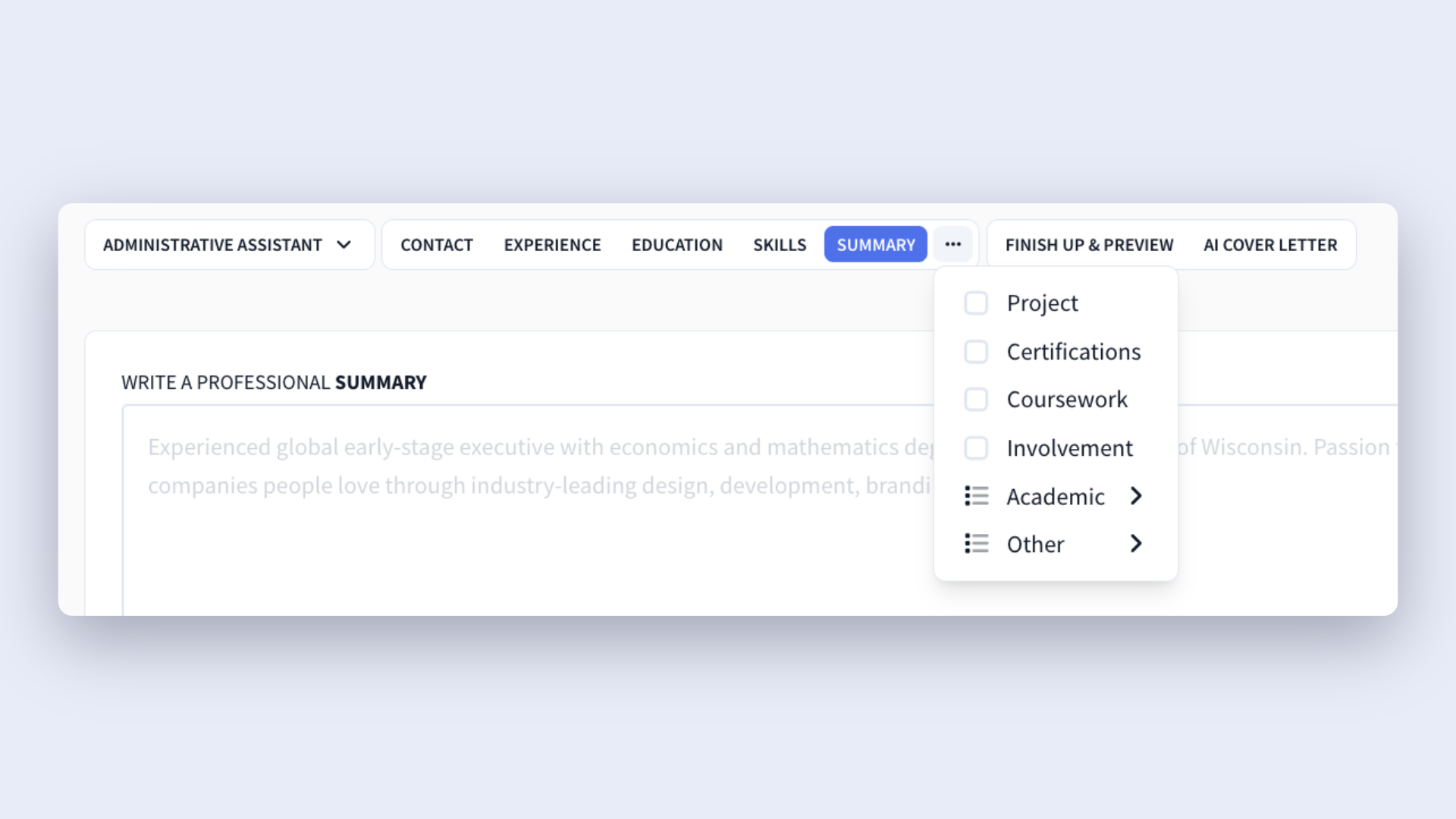
That said, projects don’t always need a dedicated section. If you completed a project as part of your degree program, you can include it under your education section instead. You can also mention projects within your work experience bullet points if you completed them on the job.
3. Fill in your project details
Once you’ve opened the projects section, you can start adding your details. Just keep everything relevant. Focus on projects that support the position you’re applying for and reinforce the skills employers want to see.
For each project, you can complete the following fields:
- Title: Enter the specific name of the project.
- Organization: List the company, school, organization, or make it clear it was an independent project.
- Duration: Add the start and end dates to show the project’s timeline.
- Project URL: Include a link to the project, portfolio, GitHub, or other supporting materials. If the URL is long, shorten it to keep your resume easy to read.
- What you did: Describe the project’s goal, your role, and the outcome in 2–3 points.
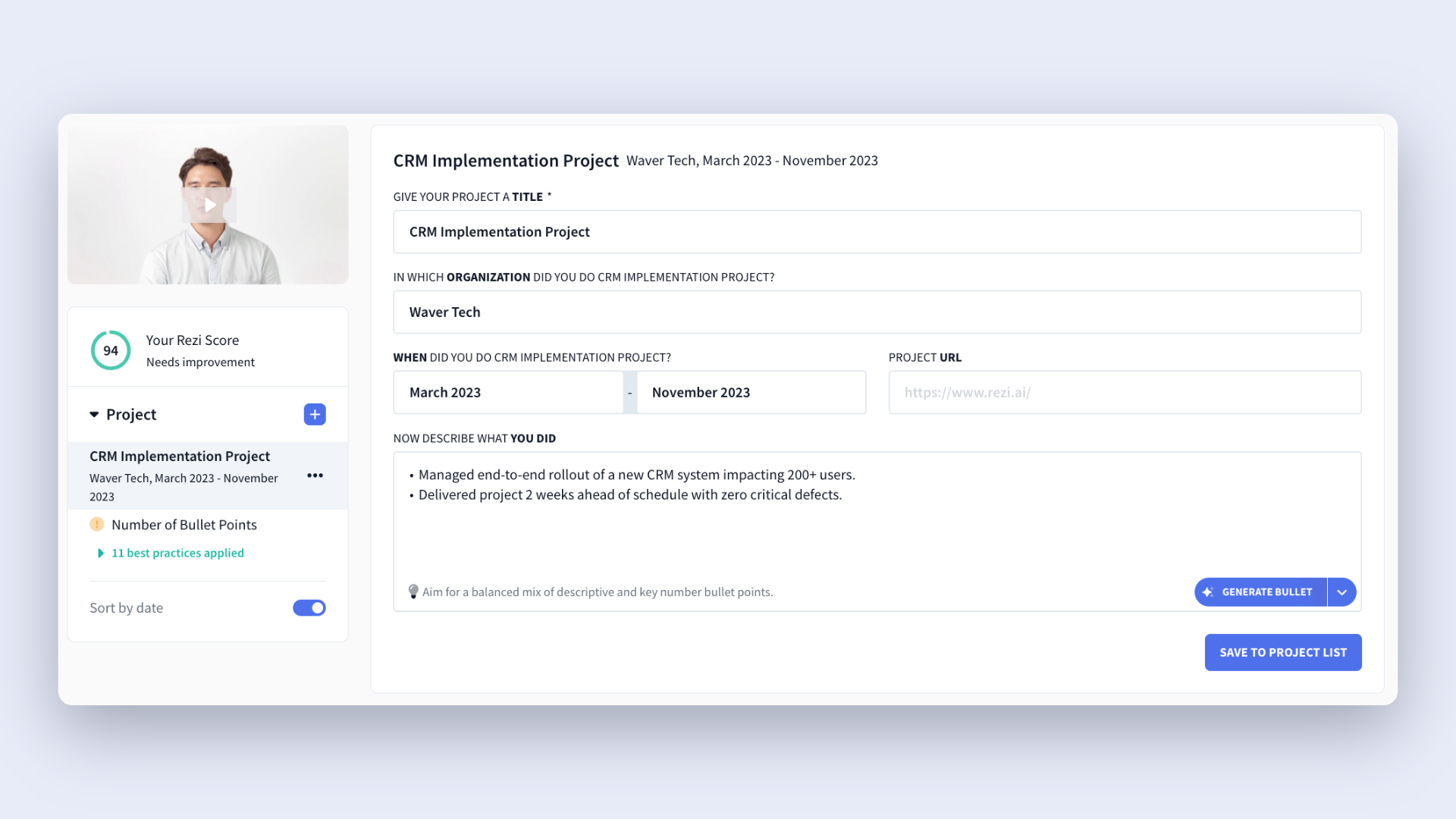
When writing your bullet points, focus on your contributions rather than simply describing the project. Recruiters want to see what you accomplished, how you approached the work, and what results you achieved.
Rezi also includes an AI Bullet Point Writer if you’re not sure how to word your experience. You can choose between:
- Generate a bullet for a standard accomplishment-focused bullet point.
- Generate bullet with key numbers to emphasize measurable results.
Once Rezi generates a suggestion, review and customize it to reflect your unique experience. If you don’t like the first option, just generate more suggestions until you find one that best represents you and your work.
4. Customize the layout and check your content
After you’ve finished building your resume, head to the Finish Up & Preview page. This is where you’ll review your resume and make final tweaks before applying for jobs. You can:
- Review your resume for mistakes, clarity, and consistency.
- Choose an ATS-friendly resume template.
- Adjust formatting and layout settings.
- Use AI Keyword Targeting to compare your resume against a job description.
- Review your Rezi Score and apply suggested improvements.
- Rename or reorder resume sections.
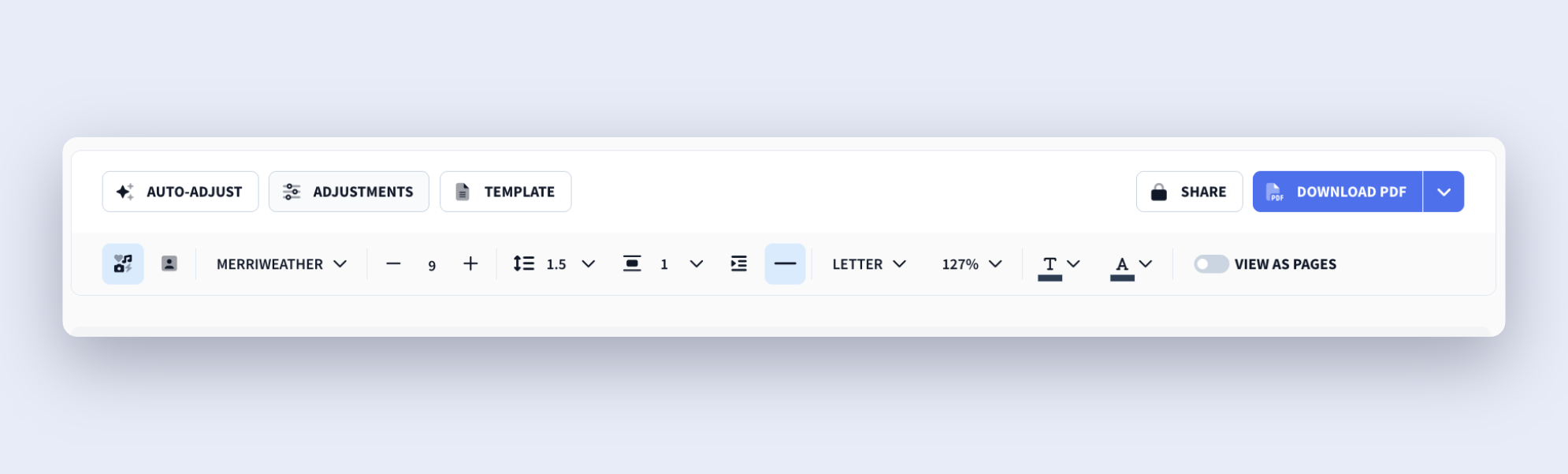
When deciding where to put your projects section, think about relevance and value.
In many cases, projects fit nicely above skills and education because they provide concrete examples of your abilities. If your projects are super relevant to the role and stronger than your work history, you could even put them above your work experience section.
But if you take that approach, make sure your project descriptions provide enough context. A few strong resume bullet points explaining the problem, your role, and the outcome help employers understand why the project deserves the spotlight on your resume.
How to Get the Best Results
Adding a bunch of random projects to your resume and calling it a day won’t impress recruiters. They can scan your resume faster than it takes you to get out of bed, so every word has to count. That’s why the best projects are relevant, easy to scan, and focused on results.
Check out these tips to take your project section to the next level.
Keep your projects relevant to the role
When choosing which projects to include, relevance should always come first. A project only deserves space on your resume if it proves skills, achievements, or qualifications that connect directly to the position you want.
Matching your projects to the job description also helps with Applicant Tracking Systems (ATS). Recruiters and ATS both look for evidence that your experience connects with the role’s requirements, so relevant projects can strengthen your keyword coverage and overall fit.
For example, if you’re applying for a data analyst position, a project involving reporting or data visualization makes sense. But that project analyzing whether pineapple belongs on pizza? It might have sparked debate among your friends, but it won’t help you land that accounting role.
Learn more about customizing your resume:
- How to Tailor Your Resume to a Job Description
- How to Tailor Your Resume to a Job Description With AI
Personalize your AI bullet points
Rezi’s AI Bullet Point Writer can save you time and give you a solid foundation, but don’t rely on it blindly. I recommend reviewing every bullet point to make sure it truly reflects your experience, contributions, and results.
You can also highlight an existing point and select Rewrite Bullet to generate alternative versions. Rezi provides multiple suggestions that cover industry-specific language and relevant keywords, so you can easily improve your content.
As you review your bullet points, use these questions as a guide:
- What did I actually accomplish?
- What impact did my work have?
- What skills did I develop or apply?
- How does this relate to the position I’m applying for?
Strong bullet points focus on achievements rather than responsibilities. So, instead of simply listing tasks (boring and vague), explain what happened because of your work. You can also pack a punch by mentioning specific tools, technologies, platforms, or frameworks.
Just keep everything concise and easy to understand. Technical details can add value, but don’t overwhelm readers with unnecessary jargon.
Consider the placement of your projects
If you have several noteworthy projects, creating a dedicated Projects section makes sense, especially for freelancers, designers, developers, and anyone whose work revolves around project-based accomplishments.
But you don’t always need to create a dedicated section for your projects, especially if you’re short on space. Here’s where else you can add them:
- Work experience section: If you completed a project as part of your job, you can include it under the relevant work experience entry. This keeps your accomplishments connected to the role and gives extra context for recruiters.
- Education section: Students and recent graduates can include academic projects in the education section, especially when those projects reveal essential skills.
- Summary: If you have a project that represents one of your biggest accomplishments, you can also mention it in your resume summary. This immediately captures a hiring manager’s attention and encourages them to continue reading.
Summary
Here’s an overview of how to add projects to your resume:
- The projects section is where you can detail hands-on work to prove your skills, accomplishments, and expertise outside of (or alongside) traditional work experience.
- Projects can come from many sources, including personal projects, freelance work, academic assignments, volunteer work, internships, research, or previous jobs.
- This section is especially valuable for students, recent graduates, career changers, and professionals with limited work experience because it helps fill experience gaps and gives recruiters more examples of your capabilities.
- Each project entry should include key information such as the project title, organization, dates, and a few bullet points describing your contributions and results.
- Focus your bullet points on achievements and impact rather than simply explaining what the project was. Recruiters want to know what you accomplished, what skills you used, and what outcomes you achieved.
- When possible, include measurable results. Metrics such as percentages, revenue, time savings, user growth, or project scale can make your accomplishments more credible.
- If you used specific tools, technologies, platforms, programming languages, or frameworks, mention them naturally within your bullet points.
- Only include projects that support your application. A few highly relevant projects will make a stronger impression than a long list of unrelated work.
- Projects don’t always need their own section. You can include them under work experience if they were part of a job, under education if you did them through school, or in a dedicated Projects section.
- Consider where the projects section appears on your resume. If your projects are highly relevant, placing them above skills or education can help draw more attention to your most impressive accomplishments.
FAQ
When should you add a dedicated projects section to your resume?
A dedicated projects section makes sense when your projects strengthen your application more than other parts of your resume. This is often the case for students, recent graduates, career changers, freelancers, and professionals with limited work experience. If you have multiple relevant projects that show off valuable skills, creating a separate section can help them stand out and give recruiters a clearer picture of what you can do.
What types of projects belong on a resume?
The best projects are those that support the role you want. These can include academic projects, freelance work, personal projects, volunteer initiatives, research, internships, or major projects completed at work. As a rule of thumb, if a project demonstrates relevant skills, accomplishments, or industry knowledge that a recruiter would care about, it’s worth adding to your resume.
How many projects should you include on your resume?
Quality matters more than quantity. In most cases, two to five strong projects are enough to show your skills without overwhelming the reader. Focus on projects that are most relevant to the job and provide the strongest examples of your abilities. If you’re struggling to fit everything on one page, remove older or less relevant projects and keep the ones that add the most value.
Can you add personal projects to your resume?
Yes, personal projects can be a great addition to your resume, especially if they reveal skills that relate to your target role. Whether you built an app, launched a website, created a portfolio, or conducted research, personal projects can help prove your expertise. Just make sure they’re relevant and describe the skills you used and the results you achieved.
What if your project didn’t have measurable results?
Not every project comes with clear metrics, and that’s okay. If you can’t quantify the outcome, focus on what you accomplished, the challenges you solved, and the skills you applied. Explain your contribution and the value you created. For example, you could highlight successful project completion, collaboration, or technical skills gained rather than forcing numbers that don’t reflect your work.
Should you include group projects on your resume?
Yes, especially if the project is relevant to the role and demonstrates valuable skills; just make your individual contribution clear. Recruiters want to understand what you specifically worked on rather than what the entire team accomplished. Focus your bullet points on your responsibilities, achievements, and impact while still acknowledging the collaborative nature of the project.

Upload or drop your resume to get started
Upload your resume to get started
Score my resume

Lauren Bedford is a seasoned writer with a track record of helping thousands of readers find practical solutions over the past five years. She's tackled a range of topics, always striving to simplify complex jargon. At Rezi, Lauren crafts genuine and actionable content that guides readers in creating standout resumes to land their dream jobs.