User Guides
AI Bullet Points
Learn how to use AI bullet points in Rezi to write stronger resume achievements, highlight measurable results, and tailor your experience to the jobs you want.

Published on
July 16, 2026
Updated on
July 16, 2026
Most people don’t struggle with the work they’ve done; they struggle with explaining it on a resume. It’s easy to write bullet points that read like a checklist of duties: answered emails, managed projects, assisted customers. The problem? Employers already know what someone in your role is supposed to do. They want to know how well you did it.
That’s why tools like Rezi’s AI Bullet Point Writer can be so useful. Instead of helping you write a longer list of duties, it helps you frame your experience to highlight accomplishments, contributions, and results.
In this guide, I’ll cover exactly how to generate AI Bullet Points using our advanced tools.
To generate AI Bullet Points, try our free AI Resume Builder. Get tailored suggestions, specific feedback, and professional templates to build your application in minutes.
You can also check out more of our advanced AI tools:
And take a look at more resume-writing tips and examples:
- How to Make a Resume Stand Out
- How to Write a Resume With No Experience
- How to Tailor Your Resume to a Job Description With AI
What Is the AI Bullet Point Writer?
The AI Bullet Point Writer is a feature inside the AI Resume Builder that turns your work experience into stronger, more professional bullet points. Instead of wondering exactly how to sell yourself, the tool helps you write impactful statements that show your responsibilities, contributions, and impact.
And it doesn’t just churn out random content. The suggestions come from the details you provide. So when you add details about your role, projects, or work experience, the AI uses that context to create points that feel relevant to your background and aligned with your target job.
You can also create different types of bullet points. For example:
- Standard bullet points: Focus on what you did and your professional achievements.
- Quantified bullet points: Add numbers or measurable outcomes to focus on results.
Quantified bullet points often make a stronger impression because they give employers a clearer picture of your impact. Saying you “increased sales by 18%” or “managed a team of 10” feels much more concrete than a general statement without context.
AI Resume Bullet Point Generator
If you want to test the feature before checking out the resume builder, there’s also our free AI Resume Bullet Point Generator. It lets you get familiar with how the tool works without creating an account or starting a full resume.
Using it is pretty straightforward:
- Enter your job title
- Add your experience level
- Include a few skills
- Click Generate Bullet Points
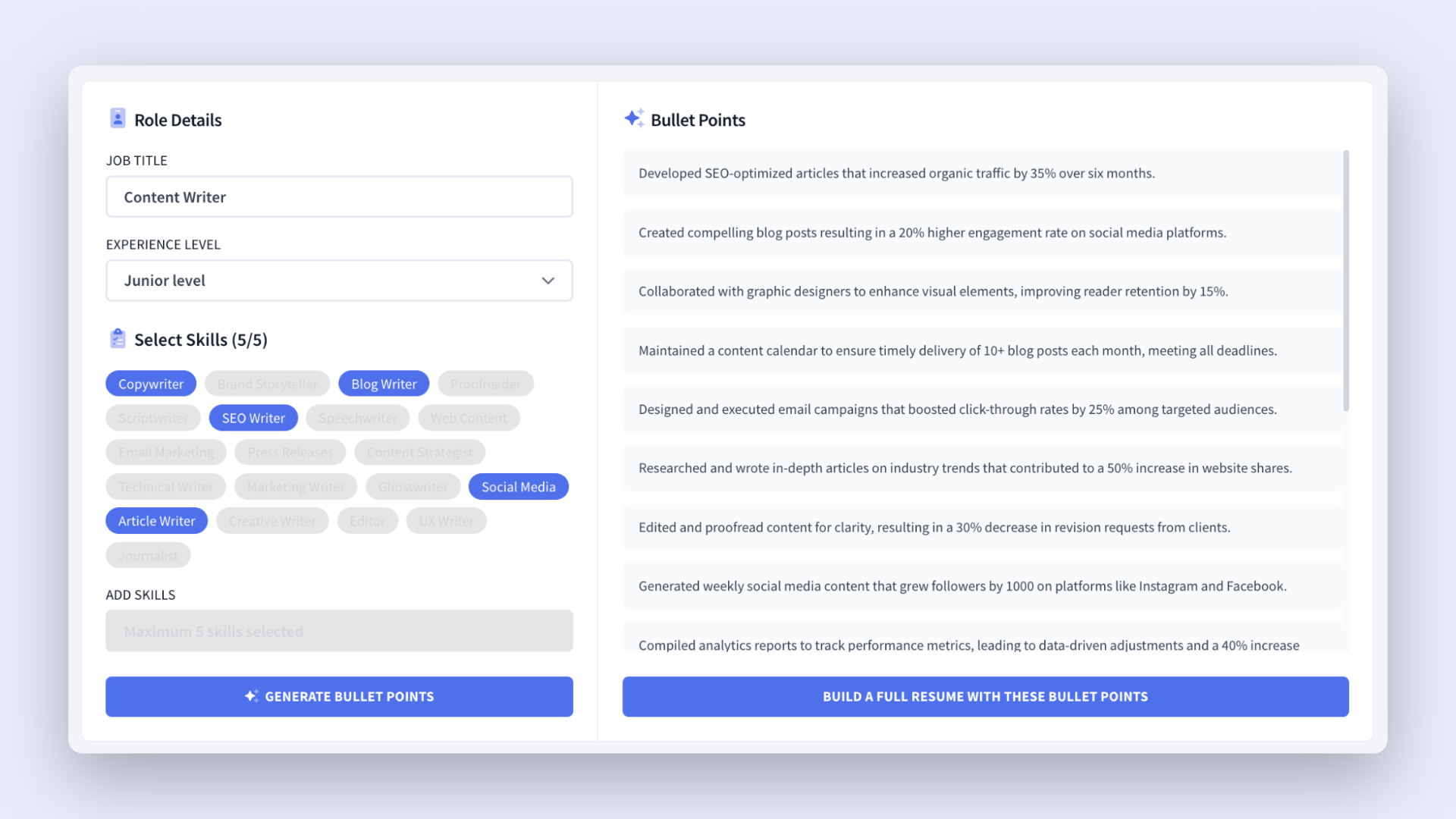
The tool then creates resume-ready bullet point suggestions, often with measurable outcomes built in. You can copy and paste the ideas directly into your current resume or use them as a starting point when building a new one in Rezi.
How to Use the AI Bullet Point Writer
Here’s a quick rundown of how to use the AI Bullet Point Writer:
- Create or upload an existing resume, then add a target job description to generate more tailored bullet-point suggestions.
- Navigate through the resume tabs to find the AI Bullet Point Writer in sections like Experience, Projects, and Involvement.
- Generate a bullet point by entering your role details and choosing between standard suggestions or quantified bullet points.
- Edit and personalize your points using the Rewrite Bullet feature, then refine the suggestions with your own achievements, responsibilities, and results.
- Finish up and preview your resume by reviewing your bullet points, checking for relevant keywords, evaluating your resume’s overall quality, and using additional AI tools.
Now, let’s see how to make the most of Rezi’s AI Bullet Points.
1. Create or upload an existing resume
First, you’ll need to create a resume in Rezi. You can either build one from scratch or upload an existing resume to your dashboard if you already have something to work with.
You have a few ways to get started:
- Add your information manually
- Upload your current resume file
- Import from your LinkedIn profile
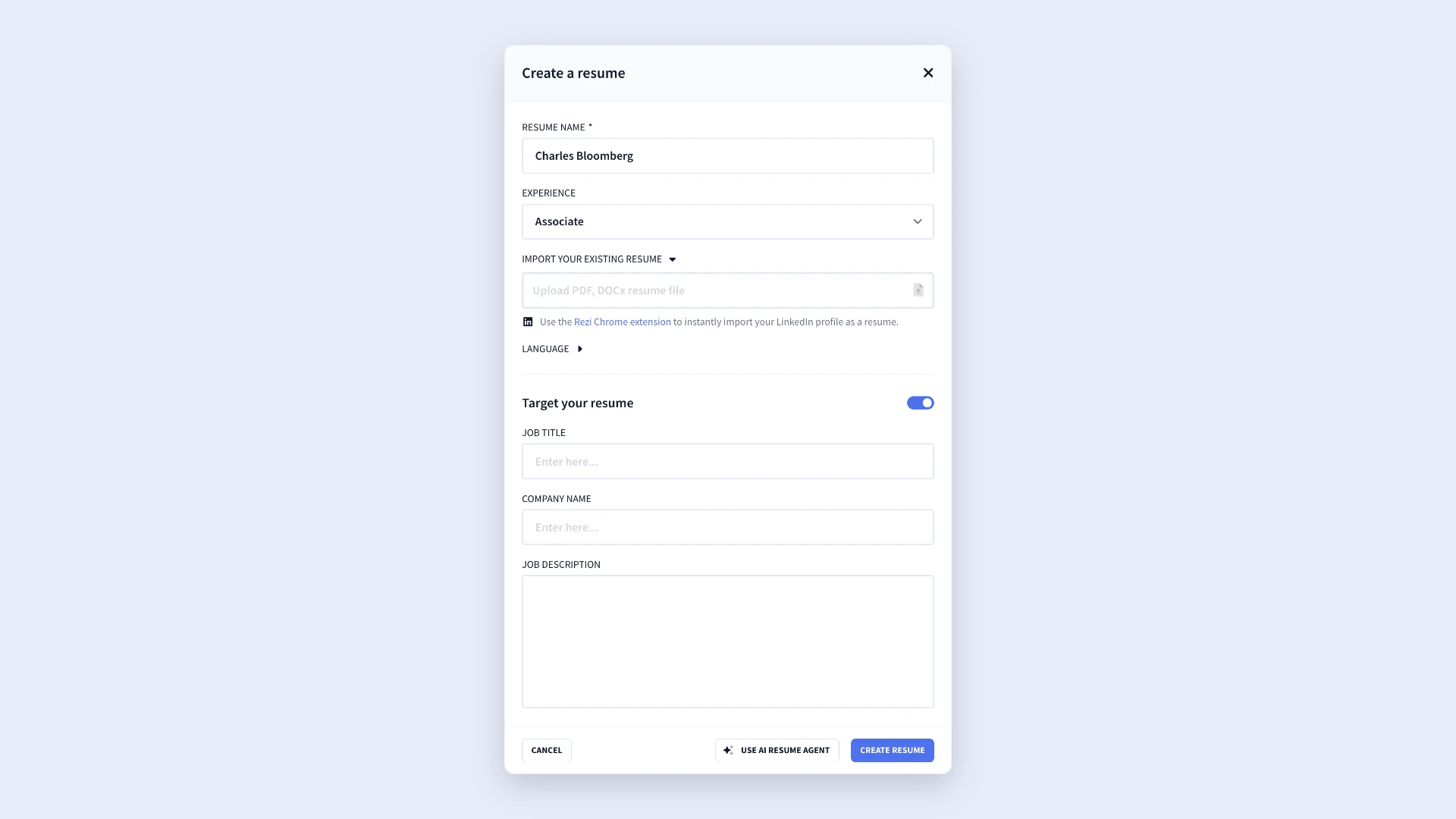
If you’re applying for a specific role, check Target your resume and add the job title, company name, and job description. With that information, the AI can tailor bullet-point suggestions to the role you want, rather than generating generic content.
2. Navigate through the resume tabs
Rezi breaks the resume-building process into simple resume sections, which makes things a lot less overwhelming, especially if this is your first time using the platform.
As you move through the resume tabs, you’ll find the AI Bullet Point Writer in places like:
- Work experience
- Projects
- Involvement
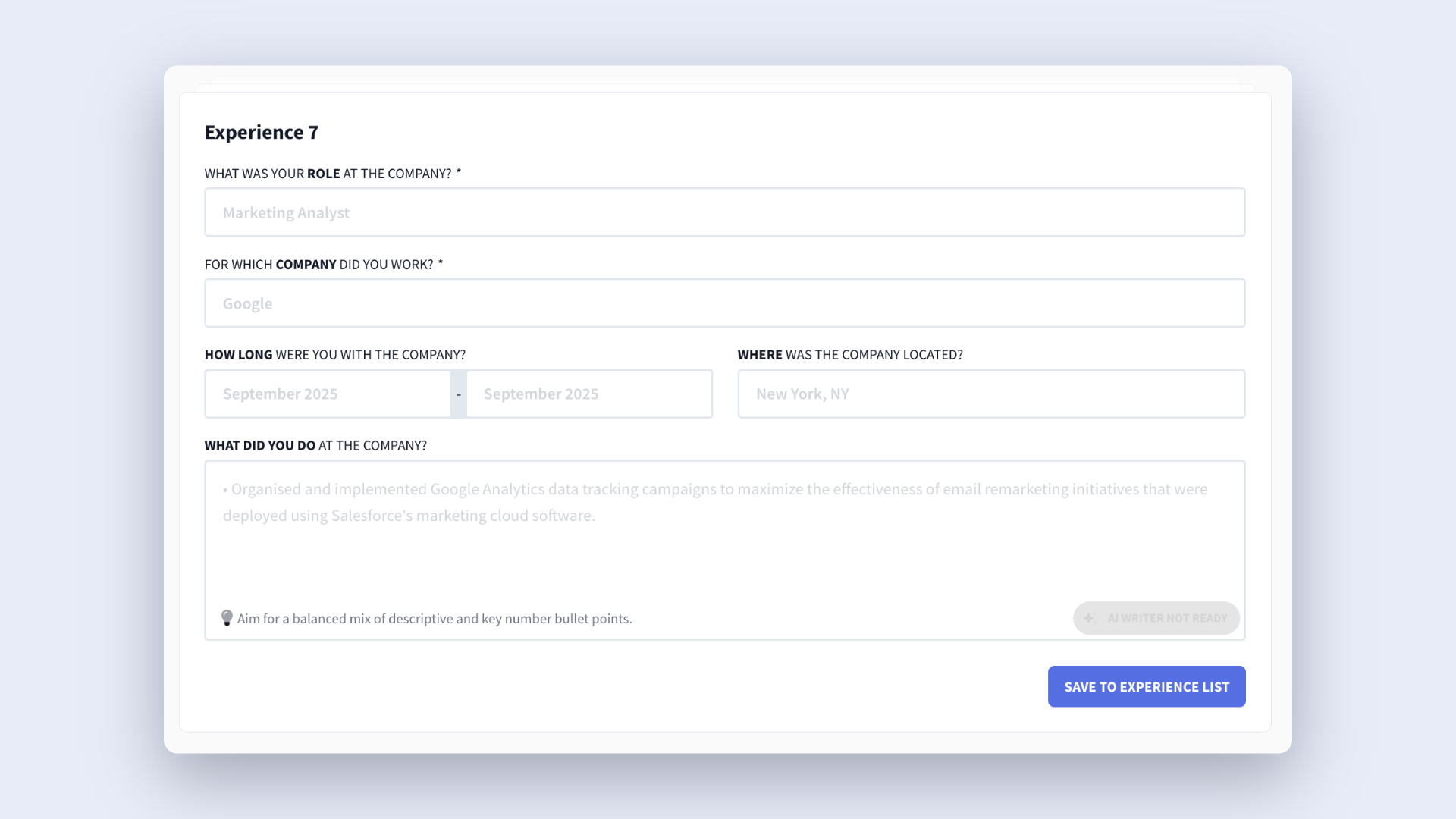
Inside these sections, Rezi guides you with fill-in-the-blank prompts and AI-generated suggestions. You’ll get examples that show you how to phrase your experience in a way that sounds professional and relevant to your field.
3. Generate a bullet point
Once you’re in a section like Experience, start by entering the basics of your role, such as your job title and company name. After that, you’re ready to generate bullet points.
You’ll see two ways to do it:
- Generate Bullet: Creates a standard bullet point based on your role and responsibilities.
- Generate Bullet With Key Numbers: Creates a bullet point with measurable results.
You can access the second option via the drop-down arrow to help employers understand the value you brought to a role and to boost your credibility. Just make sure you adjust any metrics so that they reflect your real accomplishments.
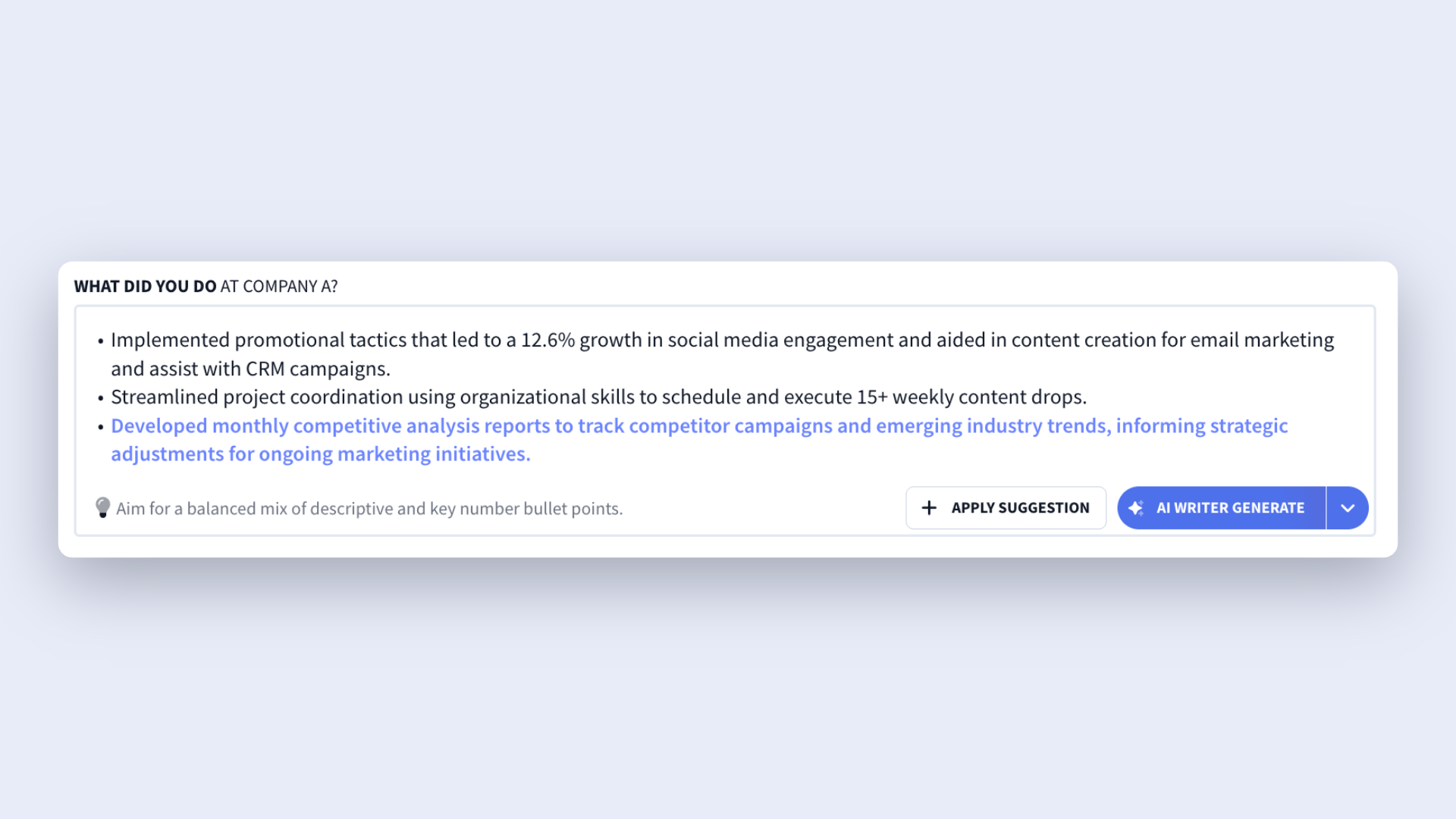
After the AI generates a suggestion, you can click Apply Suggestion if it works for you, or generate again if you want different wording or ideas.
4. Edit and personalize your points
You can improve existing bullet points by highlighting a sentence and selecting Rewrite Bullet. Rezi gives you multiple rewritten options, often with stronger wording and more relevant resume keywords tied to your industry. And if you want more measurable impact, you can also choose the version that adds key numbers.
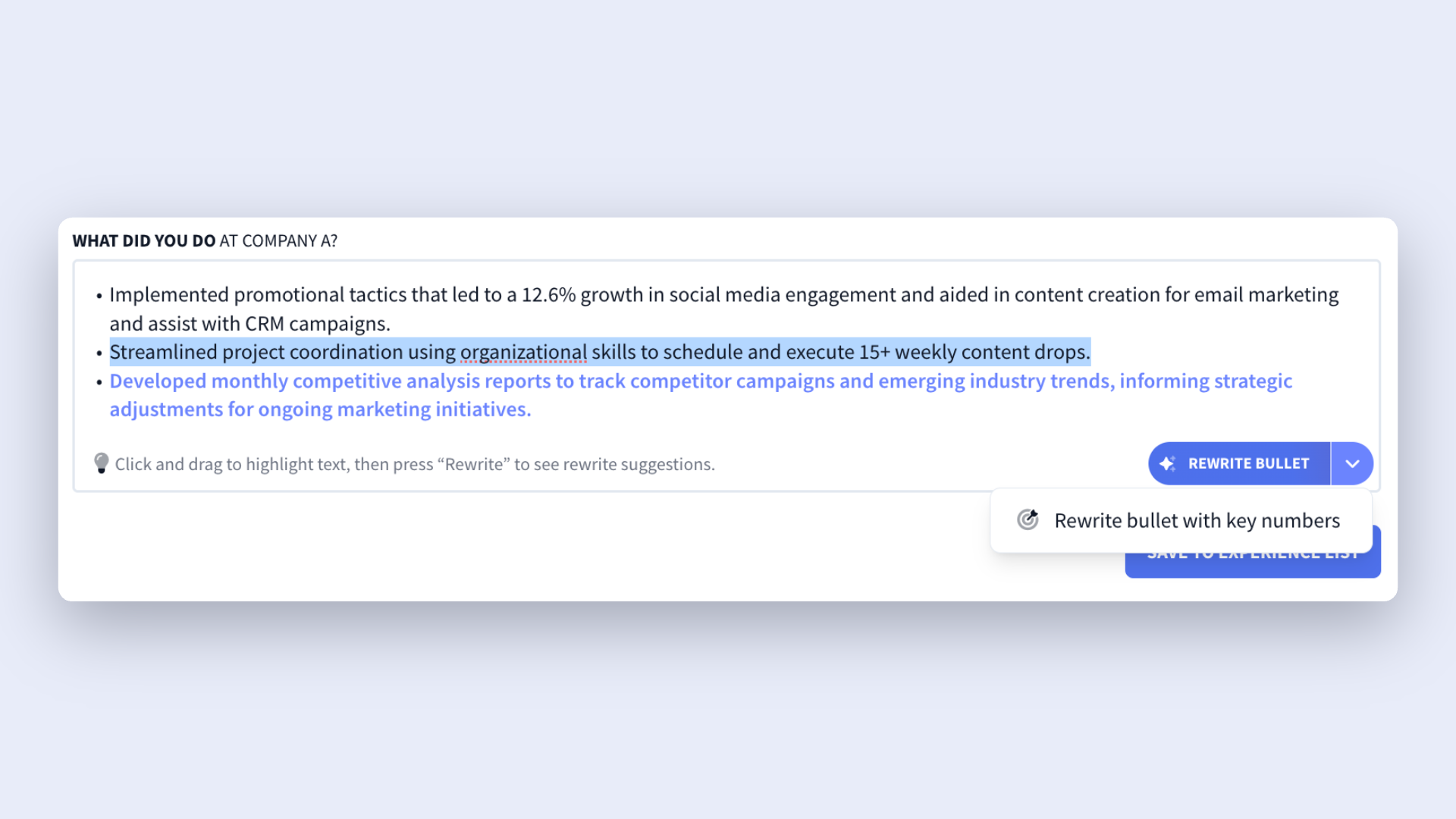
But remember: while the AI can do most of the work, I still recommend reviewing every bullet point to make sure it reflects your experience. Accuracy matters just as much as good wording.
As you review your bullet points, ask yourself:
- What did I actually achieve?
- What role did I personally play?
- How big was the impact or scope of my work?
- How did I help the company, team, or customers?
Try not to stop at job duties alone. Anyone can write, “Helped customers.” A stronger bullet explains how you added value. Did your communication skills contribute to more sales? Those details turn ordinary tasks into unique accomplishments.
5. Finish up and preview
Once you’re happy with your bullet points, head to the Finish and Preview tab for a final review. Don’t rush this stage. A quick review can catch small issues and prove that all-important attention to detail.
And before you hit send on any applications, take advantage of these extra tools:
- Use AI Keyword Scanner to check whether your resume includes important keywords from the job description.
- Check your ATS Resume Checker, which evaluates things like content quality, formatting, optimization, and overall readiness.
- Use custom prompts through the AI Resume Agent to improve, tailor, or edit specific bullet points.
How to Get the Best Results
The AI Bullet Point Writer can help you describe your experience more clearly, improve weak wording, and turn basic responsibilities into stronger bullet points — but the best results still come from adding your own details and context.
Here’s how to do it.
Keep your points relevant and results-focused
One of the biggest resume mistakes people make is trying to include everything they’ve ever done. But employers care way more about experience that connects to the job than that random side hustle 10 years ago.
Before generating or editing bullet points, spend a few minutes reviewing:
- The job description
- The role’s responsibilities and requirements
Which skills show up repeatedly? What kind of experience does the employer care about most? Use this as a guideline to shape your bullet points (as long as you keep it honest).
And no, this doesn’t mean wasting time rewriting your whole resume for every job (aka procrastination). Just adding key skills throughout can show you’re a good fit, or even better, using the AI Resume Bullet Point Writer to do the work for you.
It also helps to prioritize recent experience. In most cases, your newest roles deserve more detailed bullet points because they’re usually the most relevant and up to date. Older or unrelated positions can have fewer bullets (or none at all if they don’t add value).
Find out more:
- How to Tailor Your Resume to a Job Description
- How to Tailor Your Resume to a Job Description With AI
Add metrics and measurable results
The AI Bullet Point Writer suggests results-focused wording, but you’ll still want to personalize those details based on your real achievements. Numbers help employers understand your impact quickly, and they make your experience feel more credible.
Whenever possible, include things like:
- Percentages
- Revenue or sales growth
- Team size
- Project outcomes
- Customer or client growth
- Efficiency improvements
Don’t panic if you don’t remember exact numbers or perfect data. Even estimates, ranges, or specific examples can paint a stronger picture of what you accomplished. The goal is to show employers that you did more than just show up and complete tasks.
Follow tried-and-tested formulas
Most people know what they did at work, but putting it down on paper is a different story. If you’re stuck with writer’s block, there are a few methods you can use to articulate your points.
One reliable method is the STAR method, which gives your bullet points structure and helps to show what you can contribute. Here’s a quick breakdown:
- Situation: What was happening?
- Task: What responsibility did you have?
- Action: What did you do?
- Result: What positive outcome followed?
Another approach that works well for resumes is the Action + Task + Outcome formula. It keeps things concise, clear, and results-driven. Here’s how it works:
- Start with a strong action verb
- Explain the task or responsibility
- Finish with the outcome or result
What do both have in common? They focus on results. At the end of the day, employers are hiring you to contribute to the success of the company, and showing a positive track record is one of the best ways to reveal what you can offer.
Summary
Here’s an overview of everything you need to know about AI Bullet Points:
- The AI Bullet Point Writer helps you create stronger resume bullet points by turning your experience, responsibilities, and accomplishments into clear, tailored statements.
- The suggestions are based on the information you provide, such as your job title, projects, skills, and work experience, which helps keep everything relevant.
- The tool offers both standard bullet points and quantified bullet points, which include numbers and measurable outcomes to add more impact and credibility.
- If you don’t like a generated bullet point, you can generate additional suggestions or use the Rewrite Bullet feature for different wording and industry-specific language.
- While the AI can handle much of the writing, you should always review and personalize the results by adding accurate details, achievements, and metrics.
- You can also try the free AI Resume Bullet Point Generator without creating an account. It provides sample bullet points based on your role, experience level, and skills.
FAQ
How many resume bullet points per role should I include?
There’s no one-size-fits-all, but 3 to 5 bullet points per role is a practical guideline. However, for recent, relevant, or senior roles, you can extend up to 7 bullet points to give more depth to your contributions. Always focus on quality over quantity. It’s better to have three strong, results-driven bullets than five vague ones that reduce your impact.
What is the best bullet point symbol for a resume?
The best choice is a simple round bullet (•). This classic is ATS-friendly, keeps your resume easy to scan, and maintains a professional look. Avoid arrows, checkmarks, or decorative symbols, which can clutter your layout or cause formatting issues when uploading to job portals. If you’re using Rezi, you don’t need to worry about formatting; our resume templates automatically use ATS-optimized bullets for you.
Learn more about resume formatting: The Best Resume Format
Can you use the AI Bullet Points for free?
Yes, you can use AI Bullet Points for free, but there’s a limit. Free Rezi accounts can generate up to 10 AI bullet points, but if you find the tool helpful and need more generations, you’ll need to upgrade to a paid plan.
Rezi offers two paid options for unlimited access. The Pro plan costs $29 per month, while the Lifetime plan is available for a one-time payment of $149. Both plans remove the generation limit, making them a better fit if you’re creating multiple resumes, tailoring applications for different jobs, or regularly updating your resume throughout your career.
Can AI be detected in bullet points?
In most cases, employers can’t reliably tell whether a resume bullet point was written by AI. While AI detection tools exist, they’re far from perfect and often produce inaccurate results.
What employers can usually spot is content that sounds robotic, reads like a direct copy-and-paste from the job description, or feels overly generic. That’s why it’s important to review and personalize every AI-generated suggestion. Adding specific details about your responsibilities, achievements, and results makes your bullet points more authentic.

Upload or drop your resume to get started
Upload your resume to get started
Score my resume

Lauren Bedford is a seasoned writer with a track record of helping thousands of readers find practical solutions over the past five years. She's tackled a range of topics, always striving to simplify complex jargon. At Rezi, Lauren crafts genuine and actionable content that guides readers in creating standout resumes to land their dream jobs.