User Guides
Summary
Learn how to write, customize, and optimize your resume summary in Rezi with practical tips, AI guidance, and best practices.

Published on
July 16, 2026
Updated on
July 16, 2026
Trying to sum up all your best experiences, skills, and accomplishments in just a few sentences isn’t easy. The resume summary may be one of the shortest sections on your resume, but it has the power to set the tone. Luckily, Rezi makes the process a lot less daunting with guided suggestions, expert recommendations, and AI-powered tools.
In this guide, I’ll show you how to navigate the summary section, write a professional summary, and use Rezi’s AI Summary Writer to get tailored content when you need some inspiration.
Use our AI Resume Builder to get started on your summary, along with guidance, AI suggestions, and personalised feedback to help you create an ATS-friendly resume.
You can also check out these tools to help you complete your other resume sections:
And find out more about how to fill out the rest of your application:
- How to List Education on a Resume
- How to Write a Skills Section of a Resume
- How to Write a Resume Work Experience Section
Summary Section
The resume summary section is your opportunity to make a strong first impression before a hiring manager dives into the rest of your application. It’s essentially a quick introduction at the top of your resume that highlights who you are, what you do, and why you’re a good fit.
A strong summary typically combines your professional experience, key skills, and one or two standout accomplishments into a few concise sentences. Not sure where to start? You can write one from scratch or use Rezi’s AI Summary Writer to generate a tailored draft to refine and personalize. The goal is simple: give employers a reason to keep reading.
How to Fill Out the Summary Section
Here’s a quick breakdown of how to fill out your resume summary section with Rezi:
- Create or upload a resume, then target your application so Rezi can provide more personalized recommendations based on the specific role you’re pursuing.
- Write a professional summary that communicates who you are, what you do, and the value you bring by highlighting your professional title, experience level, most relevant skills, and key accomplishments.
- Target a job with AI Summary Writer by selecting a relevant role, adding the skills you want to emphasize, and generating tailored summary drafts.
- Review and customize your summary and resume in the Finish Up & Preview section by adjusting the design and using AI Keyword Targeting to identify important keywords.
Now, let’s go through writing an impactful summary step-by-step.
1. Create or upload a resume
Before you fill out the resume summary section, you’ll need to create or import a resume into Rezi. When you log in and open your dashboard, choose the option that works best for you:
- Start a new resume from scratch.
- Upload an existing PDF or DOCX resume.
- Import details from LinkedIn using the Rezi Chrome Extension.
- Use the AI Resume Agent to build your resume through a guided conversation.
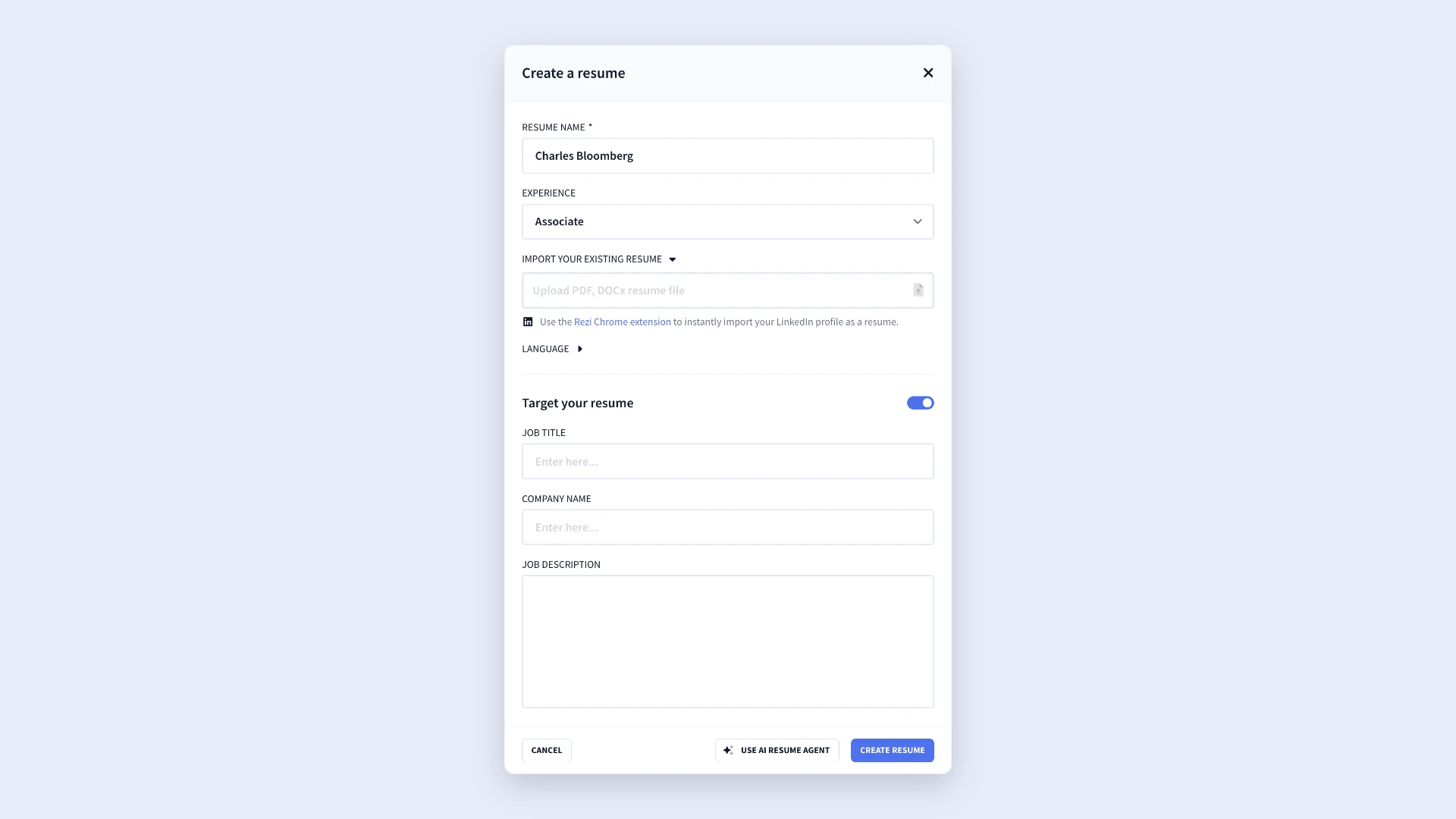
And if you’re applying for a specific role, I recommend selecting Target Resume. All you need to do is enter the job title, company name, and job description, and Rezi will use those details to provide more tailored suggestions throughout the resume-building process.
2. Write a professional summary
Once you’ve worked through the resume sections, you’ll arrive at the summary page. From there, simply type your summary into the text field or paste in an existing summary from another resume.
Getting writer’s block? Try using this formula:
- Begin with your professional title or target role.
- Mention your years of experience.
- Highlight 3 to 4 key skills that relate directly to the position.
- Include a notable achievement, result, or metric.
When you strip it down, your summary should answer three questions: who you are, what you do, and what value you bring.
Here’s an example from the summary tab in our AI Resume Builder:
.webp)
Another tip: write your summary in an implied first person. In other words, describe yourself without using words such as “I,” “me,” or “my.” This sets a more professional tone and aligns with standard resume-writing practices.
3. Target a job with AI Summary Writer
If you’re struggling to find the right words, Rezi’s AI Summary Writer can help generate a strong, tailored draft. To get started, select the role you want to emphasize. You can either:
- Choose a position from your existing work history.
- Turn off “from resume” and enter the job title you’re targeting.
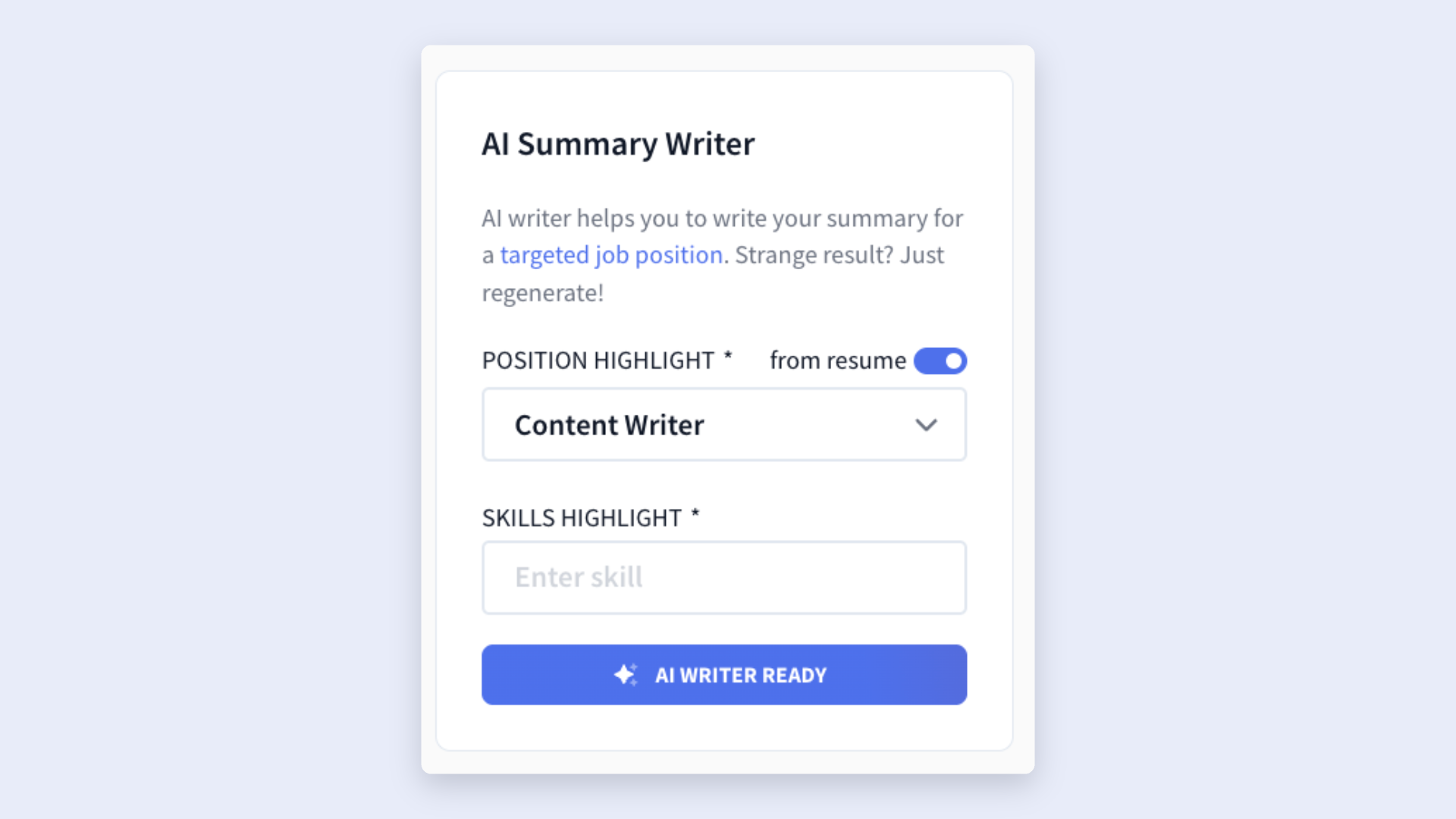
The second option is handy if you’re changing careers or applying for a role that doesn’t closely match your previous job titles on your resume.
Next, add any skills you’d like the AI to prioritize. And yes, the tool can automatically identify relevant skills, but adding your own gives you more control over the final result. Focus on:
- Skills mentioned multiple times in the job description.
- Core qualifications required for the role.
- Skills you’d want a hiring manager to notice immediately.
Once everything is set up, click AI Writer Ready to generate a summary. If the first version doesn’t hit the mark, just generate another one. You can continue adjusting the role, updating the skills, or creating additional versions until you find one that best represents you.
Here’s what the AI Summary Writer can do:
.webp)
4. Review and customize
After completing your resume, head to the Finish Up & Preview tab for a final review. This is your last chance to make sure your summary works well with the rest of your resume.
While reviewing, you can:
- Check that your summary aligns with your experience and accomplishments.
- Experiment with different resume templates.
- Adjust formatting and layout settings.
- Optimize spacing and section sizing.
When previewing your resume, explore our template gallery through the Template menu and customize the design through the Adjustments tab. Rezi keeps your formatting ATS-friendly while still giving you enough flexibility to personalize your final document.
.webp)
And before you hit download, check out the AI Keyword Targeting tool. This feature identifies keywords from the job description and shows whether you’ve included them in your resume. It can also suggest improvements, additional bullet points, and other recommendations that strengthen your resume and improve your overall Rezi Score.
How to Get the Best Results
A strong summary does three things: it stays concise, connects to the target role, and backs up claims with results. If you accomplish all three, you’ll create a summary that grabs attention and encourages hiring managers to keep reading.
Here’s how to do it.
Keep it concise and relevant
Don’t treat your resume summary like a mini autobiography. Hiring managers don’t need your entire career story; they just need a quick reason to keep reading.
Aim for three to four sentences that highlight your strongest qualifications. Focus on the experience, skills, and accomplishments that make you a strong candidate for the role. Every sentence should earn its place by telling employers something valuable about you.
And I get it, those first few lines can be intimidating. My advice? Write your summary last. It’s much easier to pull out the highlights that best represent your value from a completed resume than to stare at a blank page.
Tailor your summary to the job
You don’t want your resume to sound like a dull, generic copy you send to every job. Just like writing a birthday card, signs of personalization always help to add a unique touch.
Before writing your summary, spend a few minutes checking the job listing. Look for repeated skills, qualifications, and keywords. Then weave the most relevant ones into your summary.
This helps in two ways:
- You increase your visibility with Applicant Tracking Systems (ATS), which often scan resumes for specific terms.
- You show hiring managers you’ve taken the time to understand what they’re looking for and made that extra effort.
Just don’t overcomplicate it. Smart tailoring shouldn’t require rewriting your entire resume for every application. In most cases, you can make a few tweaks in 10–15 minutes to create a version that aligns with the role.
If you’re consistently applying for two or three different job titles, I suggest creating separate resume versions for each target role. That way, you’ll already have a strong foundation and only need to make minor adjustments before applying.
Find out more: How to Tailor Your Resume to a Job Description
Focus on your accomplishments
Instead of making vague claims about your abilities, support them with specific resume achievements. Numbers, percentages, and measurable results immediately add credibility and help employers understand the impact you’ve made.
For example, instead of writing:
Experienced sales professional with strong relationship-building skills.
You could write:
Sales professional with 5+ years of experience driving business growth and strengthening client relationships. Increased annual sales revenue by 25% while maintaining a 95% client retention rate.
The second example gives employers evidence rather than asking them to take your word for it. You should also position your experience as a solution to the employer’s needs; after all, they’re hiring you to help them grow and make money, so show them how you can do just that.
Summary
Here’s an overview of how to create a strong summary section using Rezi:
- The resume summary is a short introduction at the top of your resume that quickly tells employers who you are, what you do, and the value you bring.
- Keep your summary concise, typically 3 to 4 sentences, with your professional title, years of experience, key skills, and a notable achievement or result.
- Tailor your summary to the job you’re applying for by including relevant skills, qualifications, and keywords from the job description.
- When possible, support your claims with measurable achievements. Specific results and metrics make your summary more credible and impactful.
- Focus on the value you can provide to an employer and how you can solve their challenges, rather than what you hope to gain from the role.
- If you’re unsure what to write, use Rezi’s AI Summary Writer to generate a personalized draft based on your experience, target role, and selected skills.
- Remember to review, edit, and customize your summary so it accurately reflects your background and aligns with the position.
- Before applying, do a final review to ensure your summary matches the rest of your resume and reinforces the qualifications most relevant to the role.
FAQ
How do you write a resume summary with little or no work experience?
If you have little or no experience, focus on your education, transferable skills, certifications, volunteer work, internships, academic projects, or extracurricular activities. Highlight strengths that relate to the role and show employers what you can contribute. Even without work experience, you can still show potential, relevant skills, and enthusiasm for the position.
What skills should you mention in your resume summary?
Include skills that are most relevant to the job you’re targeting and your industry. Review the job description and identify the qualifications that appear most often. Ideally, mention a mix of technical and hard skills that align with the role. But rather than listing every skill you have, focus on the three to four strengths that best support your qualifications and reinforce your value as a candidate.
How do you make your summary ATS-friendly?
The easiest way to make your summary ATS-friendly is to include relevant keywords from the job description. Use the same terminology employers use when describing required skills, qualifications, and responsibilities. Keep the language straightforward, avoid keyword stuffing, and make sure the keywords naturally fit within the context of your experience.
How do you write a resume summary when changing careers?
When changing careers, focus on transferable skills, relevant accomplishments, and experiences that apply to your target role. Highlight strengths that bridge the gap between your previous field and the one you’re pursuing. You can also emphasize certifications, training, or projects that support your transition. You want to show employers how your existing experience prepares you to succeed in a new industry.
How often should you update your resume summary?
You should review and update your resume summary whenever you’re applying for a new role, changing career directions, gaining significant experience, or developing new skills. As a general rule, spend a few minutes tailoring your summary to each application so it reflects the qualifications and keywords most relevant to the job.

Upload or drop your resume to get started
Upload your resume to get started
Score my resume

Lauren Bedford is a seasoned writer with a track record of helping thousands of readers find practical solutions over the past five years. She's tackled a range of topics, always striving to simplify complex jargon. At Rezi, Lauren crafts genuine and actionable content that guides readers in creating standout resumes to land their dream jobs.