User Guides
AI Cover Letter Generator
Learn how to create tailored, professional cover letters with Rezi’s AI Cover Letter Generator. Upload and personalize cover letters that help you stand out.
Published on
August 20, 2022
Updated on
August 7, 2026
Rezi AI Cover Letter Generator helps you create a cover letter that’s personalized, achievement-focused, and optimized to get noticed. Spend less time staring at a blank page and more time preparing for the interview and landing that job.
Let’s get started. This guide will cover:
- The best ways to use our AI Cover Letter Generator.
- Our expert cover letter writing tips.
- What makes Rezi’s cover letter writer unique.
Want to see for yourself? Check out our AI Cover Letter Generator to get a tailored letter in seconds and use our AI Resume Builder to complete your application.
And check out more cover letter tips and examples:
- What Should a Cover Letter Include?
- How to Write a Cover Letter for a Career Change?
- How to Write a Cover Letter With No Work Experience
- Best Cover Letters: Examples, Templates, and Writing Tips
What Is Rezi AI Cover Letter Generator?
Rezi AI Cover Letter Generator lets you instantly create a cover letter that aligns with your resume and highlights your fit for the role. It’s your shortcut to a strong, tailored cover letter without the stress of starting from scratch.
Instead of spending way too long figuring out what to say and how to format it, you can generate a professionally structured cover letter in seconds.
All you need to do is enter your target job title and company, and our AI generator will automatically write a personalized cover letter for you. It pulls the right keywords and phrasing for your industry, helping you stand out while maintaining a natural tone.
How to Use the AI Cover Letter Generator
Here’s an overview of how to use the AI Cover Letter Generator:
- Head to your Rezi dashboard and select “Create New Resume”.
- Next, click the “AI Cover Letter” tab and fill out contact details, including your name, email, phone, address, company name, and the hiring manager’s name if you can find it.
- If you have an existing cover letter, upload it under the “Content” tab to keep it organized with your resumes.
- If you’re starting from scratch, enter the company name, target job position, and details you want to highlight, then let our AI Cover Letter Writer create a professional draft.
- Use your cover letter to reflect your personality and passion for the role by adding why you’re excited about the company, what drives you, and how you align with their mission.
Now, check out this simple breakdown with step-by-step instructions:
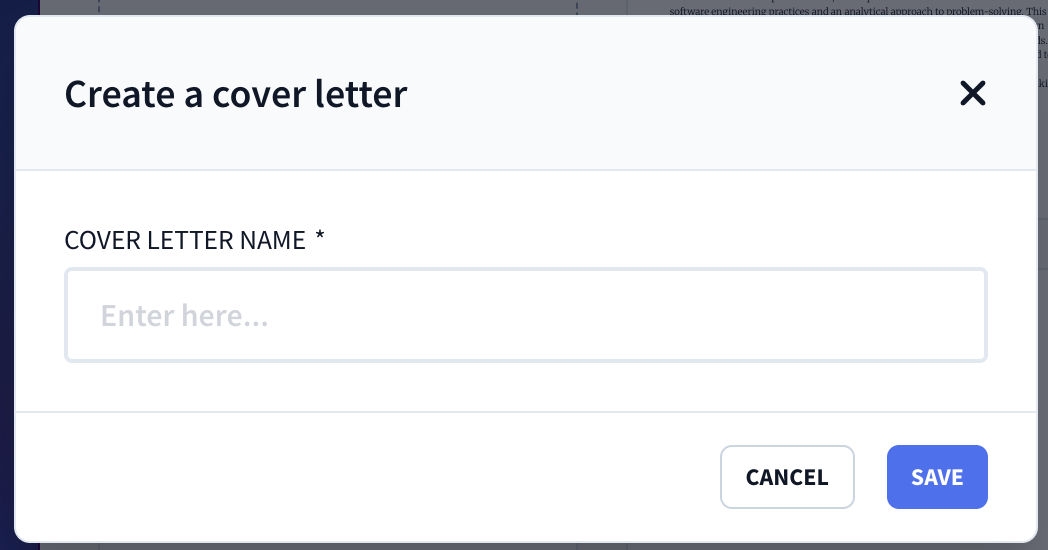
1. Create a cover letter
Start by heading to your personal Rezi dashboard and selecting “Create New Resume.” From there, select the “AI Cover Letter” tab to generate a blank cover letter template that links directly to your saved resumes.
Since your skills and basic information are automatically tied to each resume, you can easily generate a matching cover letter for every application you send out, keeping everything organized on your dashboard.
2. Enter your contact details
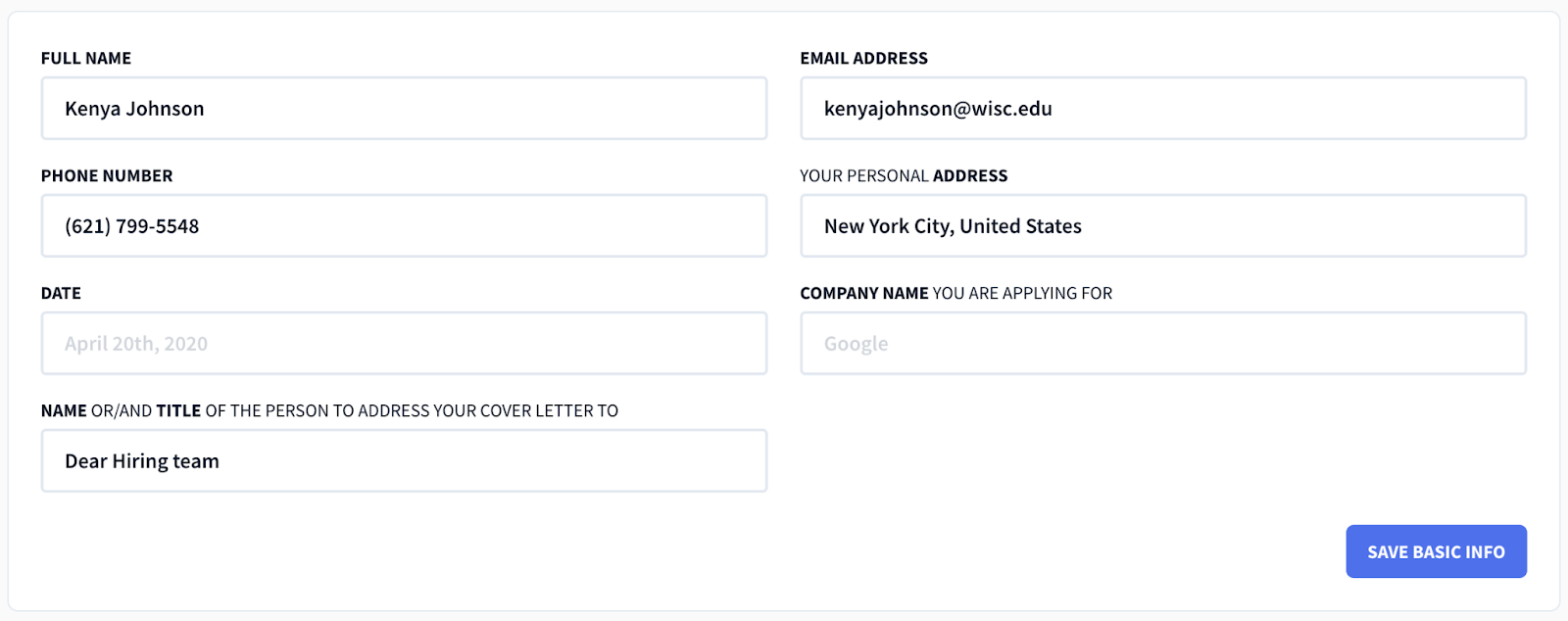
As you move through the tabs, the first section you’ll complete is “Contact”. This includes:
- Full name
- Phone number
- Email address
- Personal address
- Date
- Company name
- Name and/or title of the person you’re addressing
Try to find the hiring manager’s name for a personal touch (LinkedIn, the company website, or the job posting are good places to check). If you can’t find it, “Dear Hiring Manager” is your best bet. Just avoid “To Whom It May Concern” — it feels impersonal and looks like you’re just sending out a ton of generic cover letters.
Learn more about making the right first impression: How to Address a Cover Letter
3. Submit an existing cover letter
If you already have a cover letter you’re happy with, you can easily upload it under the “Content” tab. From there, it’s simple to fine-tune your letter to align it with the specific job you’re applying for, making sure it stays targeted and impactful.
But why bring your existing cover letter to Rezi? Keeping your cover letters organized alongside your resumes in one dashboard means everything you need for your applications is in one place — no more wasting time searching through files or old email drafts.

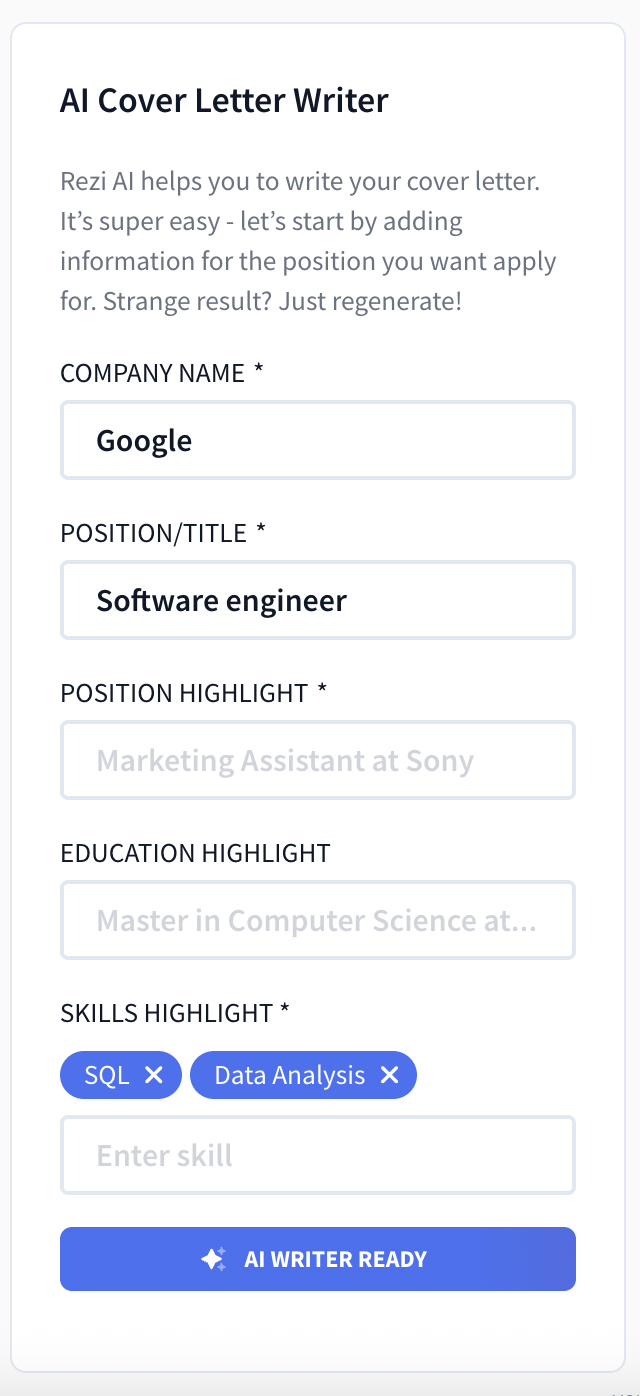
4. Start from scratch with our AI Cover Letter Writer
No existing cover letter? Not an issue. Our AI Cover Letter Writer can generate one from just a few details.
Simply enter the company name, position title, and any specific past positions, education, or skills you’d like to highlight. However, if your cover letter is linked to a saved resume, some of these fields will autofill for you, saving you even more time.
Ideally, you should upload a complete resume beforehand so that our AI Cover Letter Writer can pull all the right details from your professional background.
Once you’re ready, hit “AI Writer Generate.” In a few moments, you’ll have a 3–4 paragraph cover letter that weaves your details and relevant achievements from your resume into a professional cover letter draft.
That said, we can’t read your mind (yet), so it’s smart to add a few personal touches. You’ll still have a solid starting point, so no more being stuck wondering where to begin.
5. Add any personal touches
While the AI Cover Letter Generator creates a strong draft, your cover letter is also a space to let your personality shine. Feel free to make some tweaks to reflect your unique skills, achievements, and passion for the company. Use this opportunity to:
- Share what excites you about the role or the company’s mission.
- Highlight what motivates you and how your values align with the company.
- Convey enthusiasm and character to show how you’d fit with their culture.
Don’t fall into the trap of just listing generic skills. You have to show why you’re a genuine asset they’d want on their team. Research the company’s website, social media, or employee reviews to get to know their culture and add meaningful touches.

Learn more about creating a memorable letter: Cover Letter Tips & Examples
What Should Be in a Cover Letter?
While the AI Cover Letter Generator technology can help inspire you, find the right words, come up with a solid structure, and create a more tailored application, it can’t read minds. We don’t know exactly what drew you to the company, your most impressive professional achievement, or your unique selling point. Luckily, Rezi gives you a solid draft to make these tweaks.
Here’s what you need to know when adding your personal touches:
Structure with intentional paragraphs
We’ve all been stuck in a conversation with someone who rambles on and on, going on a million different tangents before getting to the point. Writing a cover letter with no structure can read a little like that, especially when recruiters are already zoning out after reading dozens of other cover letters.
Here’s a standard structure you can use to cover all bases while keeping it clear:
- Greeting: Avoid starting with the outdated “To Whom It May Concern.” Instead, try to find the hiring manager’s name (LinkedIn and the company website can help). If you can’t find a name, “Dear Hiring Manager” is always better than a generic greeting.
- Opening paragraph: Your cover letter opening is your moment to get their attention. You could share a relevant story, summarize an impressive achievement, or express genuine interest in the company’s mission.
- Body paragraph: Focus on one or two key accomplishments that align closely with the job. Use specific examples and numbers to show your impact, and show how you can help the company solve challenges or contribute to its goals.
- Closing paragraph: Reaffirm your enthusiasm for the position and the company while encouraging next steps, such as expressing your interest in discussing your application further during an interview.
- Sign-off: Close with a professional sign-off like “Sincerely” or “Best regards,” followed by your name.
Not sure how to finish up? Take a look: How to End a Cover Letter
Tailor your skills and achievements
You may have been the ultimate cocktail-maker in your college bartending job, but that fun fact won’t always help you land a software engineering position. Companies have problems they want to solve and targets to reach, so you need to show them how you can add specific value.
That said, don’t just repeat what’s on your resume. Instead, focus on how your background directly aligns with what the company needs, or expand on relevant resume achievements.
Here are some questions to get you thinking:
- What challenges can you help them solve?
- What goals can you help them achieve?
- Which of your skills aligns best with the job description?
Add some personality
Personalization turns a forgettable cover letter into one that actually connects with a recruiter. Would you rather read a letter that’s clearly been sent to dozens of companies, or one that was written specifically for your team? Taking the time to tailor your letter for each application by sharing what excites you about the company or role goes a long way.
Ask yourself:
- Why do I want to work here, of all places?
- What about this role feels like the right next step for me?
- How does this company’s mission or work align with what I care about?
- What unique perspective or energy could I bring to their team?
It’s your opportunity to let your enthusiasm shine naturally without overdoing it. Avoid overly dramatic statements or excessive flattery. Just keep your tone authentic and professional while showing your motivation and alignment with the company’s values.
Don’t make it all about you
Make it personal, but remember that you’re not joining a one-person business. While it’s great to share your enthusiasm and qualifications, avoid turning your letter into a mini autobiography centered solely on your career goals.
Hiring managers want to know:
- How will you fit into their culture and team?
- How can you support their projects and mission?
- How can you help them solve the challenges they’re facing right now?
Prove that you’ve done your research. Mention the company’s values, a recent project they’ve worked on, or something you genuinely admire about their work. This shows you’re not just applying anywhere.
Maintain a professional format
Rezi automatically formats your cover letter into an ATS-optimized layout that meets industry standards, but you can adjust font size and line spacing to match your preferences if needed. That said, it’s handy to know the standard formatting rules to keep your cover letter professional and consistent with your resume.
Here are a few tips:
- Use a simple, professional font like Arial, Calibri, or Verdana (9–12 pt).
- Make your name stand out at the top in a larger, bold font (14–20 pt).
- Keep your cover letter length to one page (roughly 250–400 words) with single or 1.15 line spacing and one-inch margins.
Why Job Seekers Love the AI Cover Letter Generator
There are plenty of AI cover letter writers out there, but Rezi AI Cover Letter Generator isn’t just another generic tool spitting out boring letters. Here’s what makes it different and why our users keep coming back:
- Grows with your job search. Since your cover letters live alongside your resumes in your Rezi dashboard, you can keep your application materials organized in one place, making it easy to update, track, and manage as you continue applying to roles.
- Tailored, not templated. Rezi’s AI doesn’t just fill in a blank template with your name and job title. It creates a personalized and professional cover letter tailored to the specific job title and company, showing your unique value as a candidate.
- Industry-standard formatting. No need to worry about fonts, spacing, or structure. Our technology automatically formats your cover letter into an ATS-optimized layout, with the flexibility to tweak fonts and line spacing if needed.
- Time-saving without sacrificing quality. Let’s be honest, writing cover letters is often the most dreaded part of the application process. With Rezi, you skip the blank page anxiety while still getting a high-quality draft you can quickly edit to add your voice.
- Confident personalization. Rezi gives you a strong starting point while leaving room for your personality to come through. You can focus on adding personal touches, like why you’re excited about the company’s mission or a recent project they launched, without worrying about structure or wording from scratch.
Here’s what Jonah shared about his experience using our cover letter generator:
FAQ
Is it okay to have an AI cover letter?
Yes, it’s okay to use AI to draft your cover letter, as long as you personalize it before sending. Think of AI as a foundation, helping you structure your thoughts and highlight your strengths. The key is to add your personal touch, such as specific details about why you want the role and how your unique experiences connect to the company’s needs. This will help your cover letter feel authentic and genuine, not like a generic template.
Can employers tell an AI cover letter?
Employers can spot a cover letter that feels vague, overly formal, or lacking personal details, which can happen if you copy-paste AI output without editing. However, if you use AI to generate a structured draft and then customize it with your genuine voice, experiences, and specific reasons for applying, employers won’t know (or care) that it started with AI. They’ll just see a well-written letter that shows you’re a thoughtful candidate.
How do you start a simple cover letter?
Start your cover letter by directly stating the role you’re applying for and a quick line on why you’re interested. A simple, strong opening could be: “I’m excited to apply for the Marketing Coordinator position at ABC Company, as I’ve long admired your creative approach to brand storytelling.” This immediately shows the reader what you’re applying for and sets a positive tone. From there, you can transition into outlining your relevant strengths and experiences.
Can you use ChatGPT to write a cover letter?
Yes, you can use ChatGPT to draft a foundation for your cover letter. However, it’s important to know that a ChatGPT-generated cover letter can often sound robotic or generic if you don’t personalize it. Employers can usually tell when a letter lacks a human voice or genuine enthusiasm. Always take the time to add your unique experiences, motivations, and specific reasons for wanting the role.
Find out more: How to Use ChatGPT for a Cover Letter
How to write a cover letter for an IT job?
When writing a cover letter for an IT job, focus on showing how your technical skills solve problems and add value to the company. Start by mentioning the position you’re applying for, then highlight specific projects, technologies, or certifications that align with the job description. Use clear examples, such as “introduced a new ticketing system that reduced response times by 30%,” to show your impact. Finish by expressing enthusiasm for the company’s mission and your readiness to contribute to its IT team.

Upload or drop your resume to get started
Upload your resume to get started
Score my resume

Lauren Bedford is a seasoned writer with a track record of helping thousands of readers find practical solutions over the past five years. She's tackled a range of topics, always striving to simplify complex jargon. At Rezi, Lauren crafts genuine and actionable content that guides readers in creating standout resumes to land their dream jobs.