User Guides
Awards & Honors
Learn how to add the awards and honors section in Rezi, choose the right awards to include, and frame your achievements in a way that strengthens your resume.
Published on
August 7, 2026
Updated on
August 7, 2026
Wondering if that “Employee of the Year” award deserves a mention on your resume? Sure, that’s pretty impressive. That “Best Dressed Freshman” certificate? Not so much. Knowing which awards actually add value to your application isn’t always obvious, but at least Rezi makes it easy to add and present the recognitions that’ll get you noticed (for the right reasons).
In this guide, I’ll cover how to add the awards and honors section in Rezi, what to include, and how to make your achievements work harder for your resume.
Start building your sections with our free AI Resume Builder and get personalized feedback, ATS-friendly suggestions, and AI tools to help you along the way.
You can also check out these features once you’ve built your resume:
And find out more about what to include in other resume sections:
- How to List Certifications on Your Resume
- How to List Your Best Projects on a Resume
- How to Add Volunteer Experience to a Resume
Awards and Honors Section
The awards and honors section lets you show off the recognition you’ve earned for your achievements. Whether the award came from an employer, school, or professional organization, it shows hiring managers that others have recognized your skills and contributions.
Relevant awards include:
- Performance or employee awards
- Academic honors or scholarships
- Industry or professional recognition
- Leadership or community service awards
- Military honors
That said, you don’t need to list everything you’ve ever won (leave off that 7th-grade attendance award). Your work experience and skills should be the focus, while your awards are simply there to add credibility and reinforce your potential.
How to Fill Out the Awards and Honors Section
Here’s the quick version of how to add your awards and honors to your resume:
- Create or upload a resume by building one from scratch, uploading an existing resume, importing your LinkedIn profile, or using the AI Resume Agent.
- Add awards and honors to your resume by enabling the section from the Add or Remove Section menu under the Academic category.
- Fill in your awards and honors details by adding the official award name, issuing organization, date, and an optional description that explains what you achieved.
- Preview, improve, and check your content on the Finish Up & Preview page, where you can review your resume, optimize it for ATS, and apply Rezi’s recommendations.
Let’s get into the details.
1. Create or upload a resume
Before you can add awards and honors, you’ll need to create a resume in Rezi. You can get started in whichever way works best for you:
- Build a resume from scratch.
- Upload an existing resume.
- Import details from LinkedIn with the Rezi Chrome Extension.
- Use the AI Resume Agent to build your resume through guided prompts.
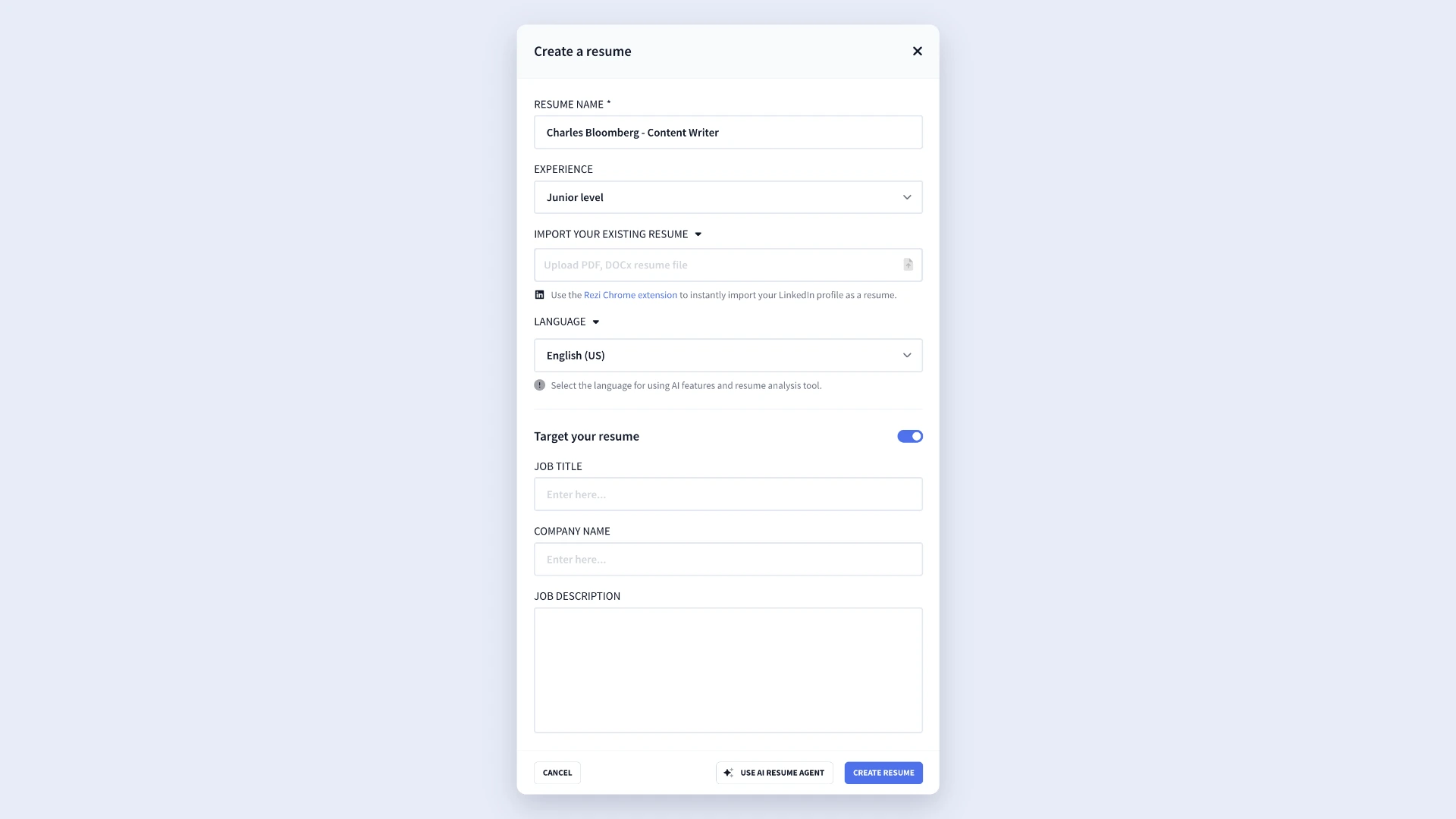
If you’re applying for a specific role, I suggest using Rezi’s Target Your Resume feature. Just add the job title, company name, and job description to get more relevant suggestions and feedback while you build your resume.
2. Add awards and honors to your resume
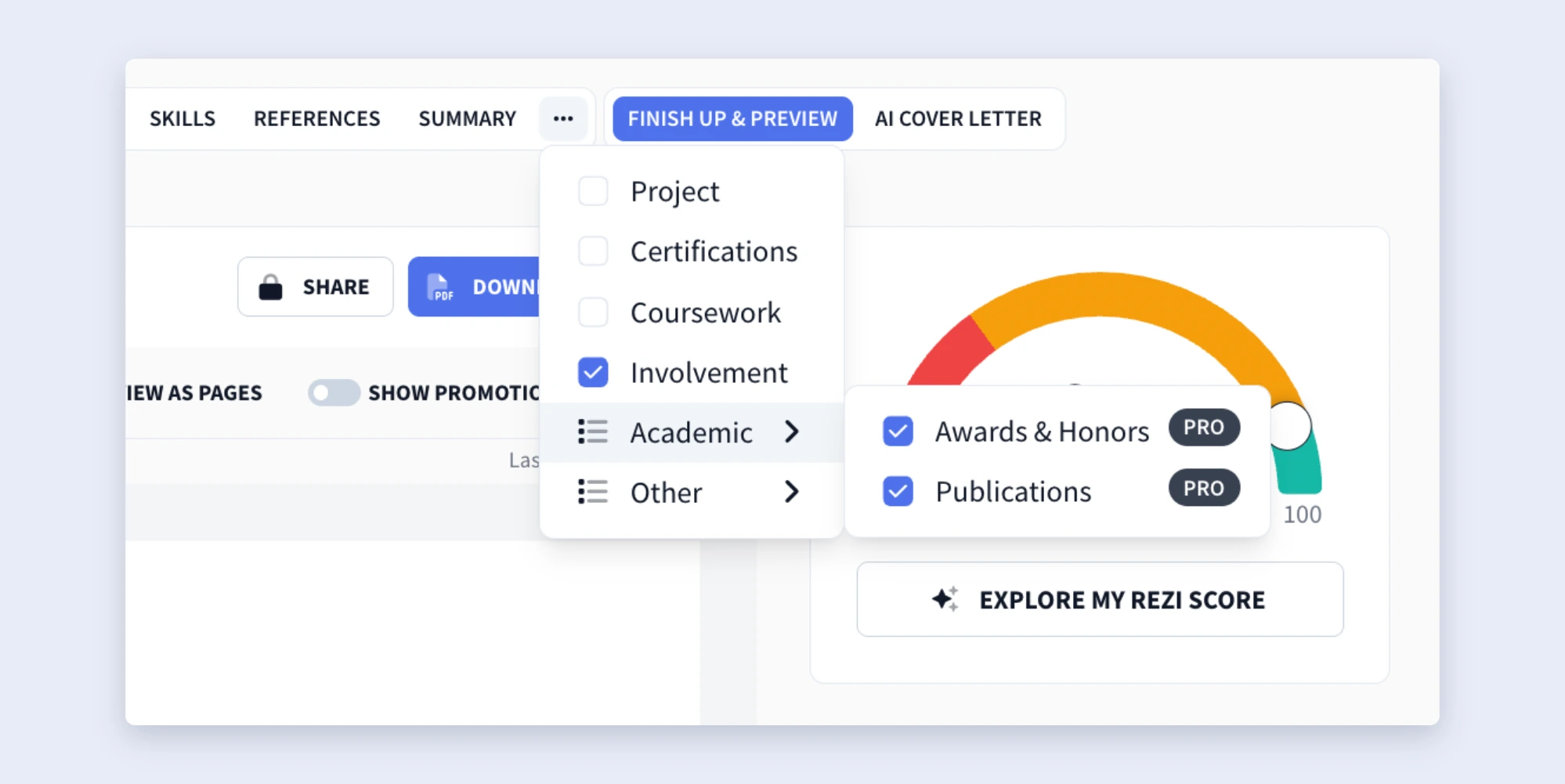
When you open the resume builder, you’ll see the default sections, such as Work Experience, Education, and Skills. To add the Awards & Honors section:
- Click the three-dot menu at the end of the section tabs.
- Select Add or Remove Section.
- Open the Academic drop-down menu.
- Turn on Awards & Honors.
You’ll then see the section appear alongside the rest of your resume sections.
Just keep in mind that you don’t always need a separate Awards and Honors section.
If you earned an academic award, you can often pop it under your Education section. Or if you earned recognition at work, you can mention it in a bullet point under the relevant job in your Work Experience section.
That said, if you’ve received several awards or you've earned recognition that’s especially impressive or relevant to the role, giving your awards their own section makes them much easier for hiring managers to notice.
And just a heads up: the Awards & Honors section is only available with a Pro or Lifetime subscription, not in the free plan.
3. Fill in your awards and honors details
Once you’ve opened the section, start adding your awards. Focus on achievements that support your application and reveal qualities that the employer is looking for (relevance matters way more than quantity).
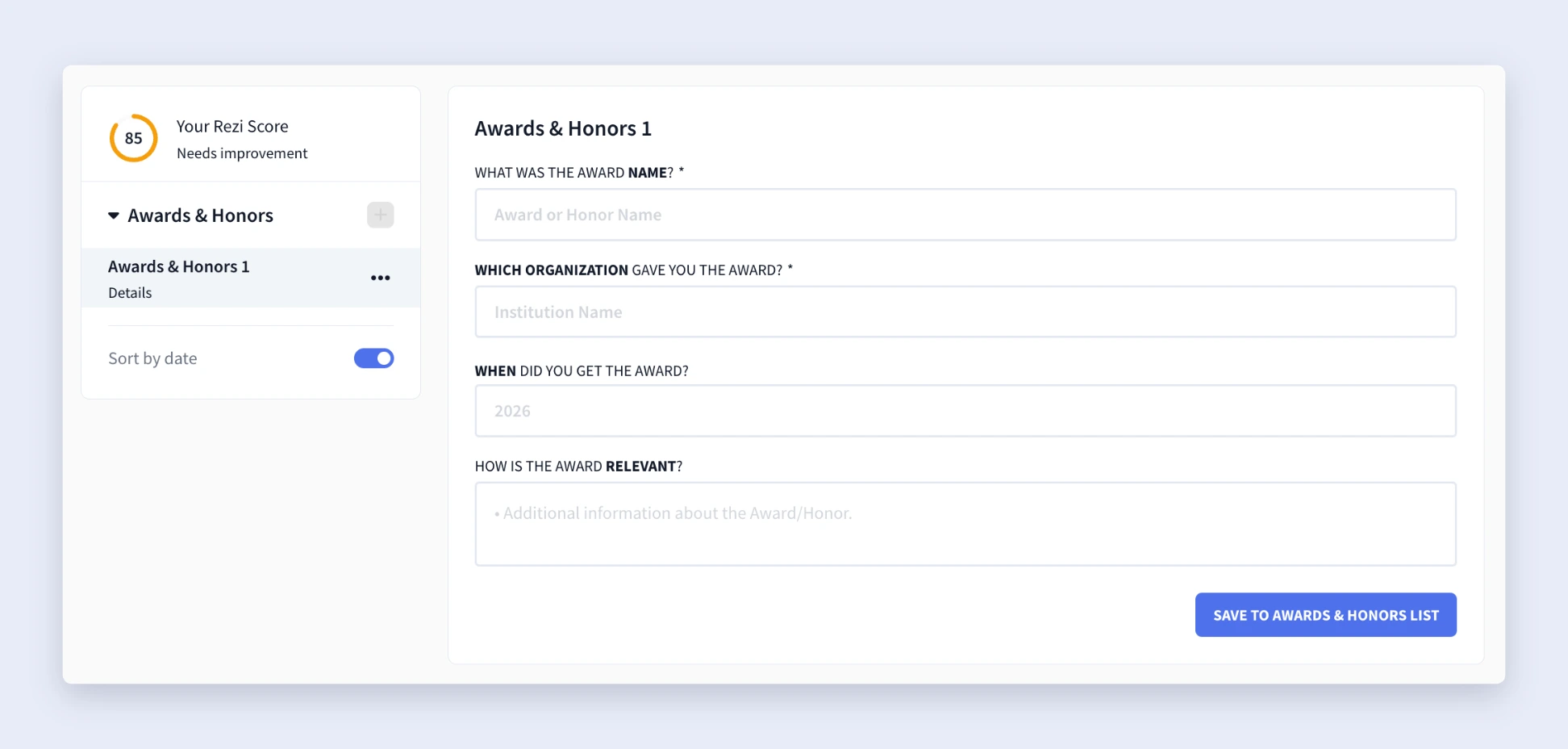
For each award, complete the following fields:
- Award Name: Use the official name of the award.
- Organization: Enter the company, institution, or organization that presented the award.
- Date: Include the year, or the month and year if the award is recent.
- Description (optional): Add one concise bullet explaining what the award recognizes. Highlight the achievement, impact, or results, and try to include measurable outcomes.
For example, instead of writing “Received Employee of the Month,” you could write “Recognized for exceeding quarterly sales targets by 28%.” That extra context gives employers a much better idea of why the award actually matters.
4. Preview, improve, and check your content
After you’ve finished adding your details, head to the Finish Up & Preview page to check your resume before sending applications.
From there, you can:
- Review your resume for grammar, clarity, and consistency.
- Choose an ATS-friendly resume template.
- Adjust the formatting and layout.
- Use AI Keyword Targeting to compare your resume against a job description.
- Check your Rezi Score and apply suggested improvements.
- Rename or reorder resume sections.

In most cases, the Awards & Honors section belongs below your Work Experience and Education sections. But there are a few exceptions.
If you’ve earned a particularly impressive academic award, you can place the section above your education. And if you’ve received a really impressive professional award (I’m talking those rare ones) that’s directly relevant to the position, you can consider moving it even higher on the page.
How to Get the Best Results
Here’s my two cents: quality beats quantity every time. Hiring managers don’t need to see every ribbon, certificate, or award you’ve collected over the years. They just want to see proof of your skills and track record. A handful of relevant awards will always make a stronger impression than a long list of random achievements.
Let’s see which awards to include on your resume and when it’s time to scrap them.
Only include awards relevant to the job or industry
Before adding an award, ask yourself this: Does this make me a better fit for the role? It’s as simple as that.
The best awards should prove your expertise, highlight valuable accomplishments, and give hiring managers more confidence in your abilities. Recent awards usually have the greatest impact because they paint a better picture of your current experience and career progression.
And no, not even the most impressive achievements always belong on every resume. The value of an award mostly depends on the position you’re applying for, so don’t be afraid to swap awards in and out for different applications.
Avoid irrelevant, outdated, or minor recognitions
One of the biggest mistakes I see people make is treating this section like your childhood trophy cabinet. Filling your resume with unrelated or outdated awards takes attention away from your work experience and skills.
Leave out awards that are:
- Unrelated to the role or industry.
- Too old to reflect your current experience.
- Minor achievements that don’t strengthen your application.
- Controversial or likely to distract from your professional qualifications.
Your work experience and accomplishments should always be the center of attention. You don’t want a skim-reading recruiter to spend those all-important ten seconds wading through awards from 15 years ago instead of your relevant qualifications.
Weave in skills and keywords from the job description
Even this small section gives you the chance to tailor your resume. I’m not saying you need to spend a ton of time tailoring each section for every application, but a few small tweaks should do the trick.
Read through the job description and look for the skills the employer values most, such as leadership, communication, problem-solving, or technical expertise. If one of your awards demonstrates those strengths, mention it in your description.
This does two things: it helps your resume align more closely with Applicant Tracking System (ATS) filters and makes it easier for recruiters to connect your achievements with the role’s requirements. Overall, it’s a win-win that only takes a few minutes.
Want to speed up tailoring time? Just use our MCP Toolkit to connect to AI tools like Claude and Gemini and tailor your resume in seconds.
Summary
Here’s an overview of everything you need to know about the awards and honors section:
- Include awards that strengthen your application by reinforcing your skills, achievements, and qualifications for the role you’re targeting.
- Prioritize relevant recognitions, such as performance awards, academic honors, scholarships, industry recognition, community service awards, or military honors.
- Create a dedicated Awards & Honors section if you have multiple or notable awards. Otherwise, consider adding academic awards under Education or professional awards within Work Experience.
- For each entry, include the official award name, issuing organization, date, and a short description explaining what the award recognizes.
- Tailor your awards to the job by choosing the recognitions that best match the job description and the employer’s priorities.
- Incorporate relevant skills or keywords when describing an award to reinforce your fit for the role and improve ATS compatibility.
- Leave out awards that are outdated, unrelated to the position, too minor to add value, or likely to distract from your professional qualifications.
- Place the Awards & Honors section below your work experience and education. Only move it higher if you’ve received an exceptionally prestigious or highly relevant award.
- Review the section before submitting your resume to ensure every award adds value and complements your experience and skills.
FAQ
Should you include awards and honors on your resume?
Yes, but only if they strengthen your application. Awards add credibility by showing that an employer, school, or professional organization has recognized your skills and achievements. If an award backs up your qualifications and helps show why you’re a strong fit for the role, it’s worth including. Otherwise, you’re better off using that space for more relevant experience or accomplishments.
What awards should you leave off your resume?
Leave out awards that don’t add value to your application. That includes recognitions that are outdated, unrelated to the role, too minor to make an impact, controversial or political, or distracting from your qualifications. Instead of trying to fill the section, focus on the awards that support your professional background and reinforce the skills employers want to see.
How many awards should you include on your resume?
There’s no perfect number, but quality always beats quantity. Most people only need up to five relevant awards, depending on their experience and achievements.
If you’ve earned several recognitions, choose the ones that best align with the position you’re applying for rather than listing everything you’ve ever won. And if your skills and experience stand up all on their own, you likely don’t need to include any awards.
What information should you include for each award?
Each award should include enough detail for employers to understand why it matters for the job. Include the official award name, the organization that presented it, and the date you received it. If possible, add a short description explaining what the award recognizes, focusing on your achievements, impact, or results rather than simply naming the award.
Which awards do employers care about most?
Employers care most about awards that prove your ability to succeed in the role they’re hiring for. Professional and industry awards, employee recognition, academic honors, scholarships, and other achievements tied to relevant skills carry the most weight. Ultimately, the best award isn’t always the most prestigious; it’s the one that clearly supports your qualifications for the job.

Upload or drop your resume to get started
Upload your resume to get started
Score my resume

Lauren Bedford is a seasoned writer with a track record of helping thousands of readers find practical solutions over the past five years. She's tackled a range of topics, always striving to simplify complex jargon. At Rezi, Lauren crafts genuine and actionable content that guides readers in creating standout resumes to land their dream jobs.