Resume
The ATS-Friendly Template Is a Marketing Label: Here’s What Actually Gets Your Resume Read
“ATS screening” and myths (or just plain lies) about it are a fearmongering tactic used by some online resume builders. At Rezi, we offer templates that indeed are compatible with most ATS. But it’s not what makes them so good. This is.


Published on
March 20, 2026
Updated on
April 13, 2026
The best ATS-friendly resume template is the simplest one: a single-column, text-first, reverse-chronological layout that keeps your job titles, skills, and outcomes easy to parse and even easier to skim—because the real filter isn’t a mythical auto-rejection bot, it’s whether your resume becomes searchable in the ATS database and persuasive in the first human scan.
Copy this baseline spec: 1 column, no tables/text boxes/icons, standard headings (Summary, Skills, Experience, Education), left-aligned text, bullet achievements with numbers.
You’ve been trained to treat “ATS-friendly” like a technical certification. It isn’t.
Most template libraries sell “ATS-safe” the same way supplements sell “doctor recommended”: it feels like proof, but the proof is rarely published. Meanwhile, the famous “75% of resumes are rejected by ATS before a human sees them” statistic has become the load-bearing myth of the resume-template economy—repeated endlessly, sourced inconsistently, and contested by practitioners.
The Rezi Thesis
“ATS-friendly” is a hygiene floor, not a strategy. You should spend 15 minutes selecting a clean, low-risk template, then spend the rest of your effort doing the work that actually changes outcomes: making the top third of your resume an evidence-rich argument that you fit this role, using the employer’s language and your quantified results.
Also, if you don’t want to use a builder, at least use our free, polished, 100% safe template downloadable in Word or Google Docs. Get it here: Free Resume Template for Google Docs and Word
1) “ATS-Friendly” Is a Sales Claim.
If a template vendor can’t show you vendor-specific parsing results (Workday vs. iCIMS vs. Greenhouse vs. Taleo), “ATS-approved” is just packaging.
That matters because parsing isn’t one thing. Your resume can look fine to a person and still import messy into a form. Indeed’s own guidance is conservative for a reason: formatting choices like margins and PDF conversion can cause text loss or weird extraction in some workflows.
What you should do instead: choose a template by constraints, not aesthetics
Use this “safe template spec” and you’ll stop gambling:
- One column
- No tables
- No text boxes
- No icons
- No images
- No headers/footers for critical info
- Standard section titles (Summary, Skills, Experience, Education)
- Left-aligned text
- Normal fonts (Calibri, Arial, Times New Roman, Garamond)
- Simple bullets (•) and consistent spacing
Copy/paste rule you can apply immediately:
Put your name + phone + email + LinkedIn in the document body, not a header. Format it like this:
- FIRST LAST
City, ST | (555) 555-5555 | you@email.com | linkedin.com/in/yourname
2) Recruiters Use the ATS as a Database—Your Real Job Is “Searchability”
The popular framing says: “Beat the ATS or you’re rejected.” That’s not how many hiring pipelines operate in practice.
Once resumes are parsed, recruiters commonly use the ATS as a search and filtering system—a database where titles, skills, certifications, and keywords determine whether you show up in results. When you fail, it’s often not because your template “broke.” It’s because you’re invisible under the terms they actually search.
The content economy pushes “keyword hacks,” but the real win is simpler: use the employer’s language for the core requirements—job title variants, tools, and credentials—without turning your resume into keyword soup.
What to do: design your top third for “instant relevance” and ATS search
Put these elements near the top:
- Target title (match the posting)
- Core skills/tools (the same nouns the posting uses)
- Proof (metrics and outcomes)
Copy/paste Summary formula (fill in the brackets):
[Target Title] with [X years] delivering [2–3 outcomes] across [domain/tools]. Recent results include [metric], [metric], and [metric] in [context].
Example structure (you can reuse this verbatim):
Project Manager with 8 years delivering cross-functional launches across SaaS and data platforms. Recent results include reducing cycle time 22%, cutting vendor spend $310K, and shipping 14 releases on schedule across product, engineering, and GTM teams.
3) The “6–8 Second Scan” Is More Actionable Than Any ATS Myth
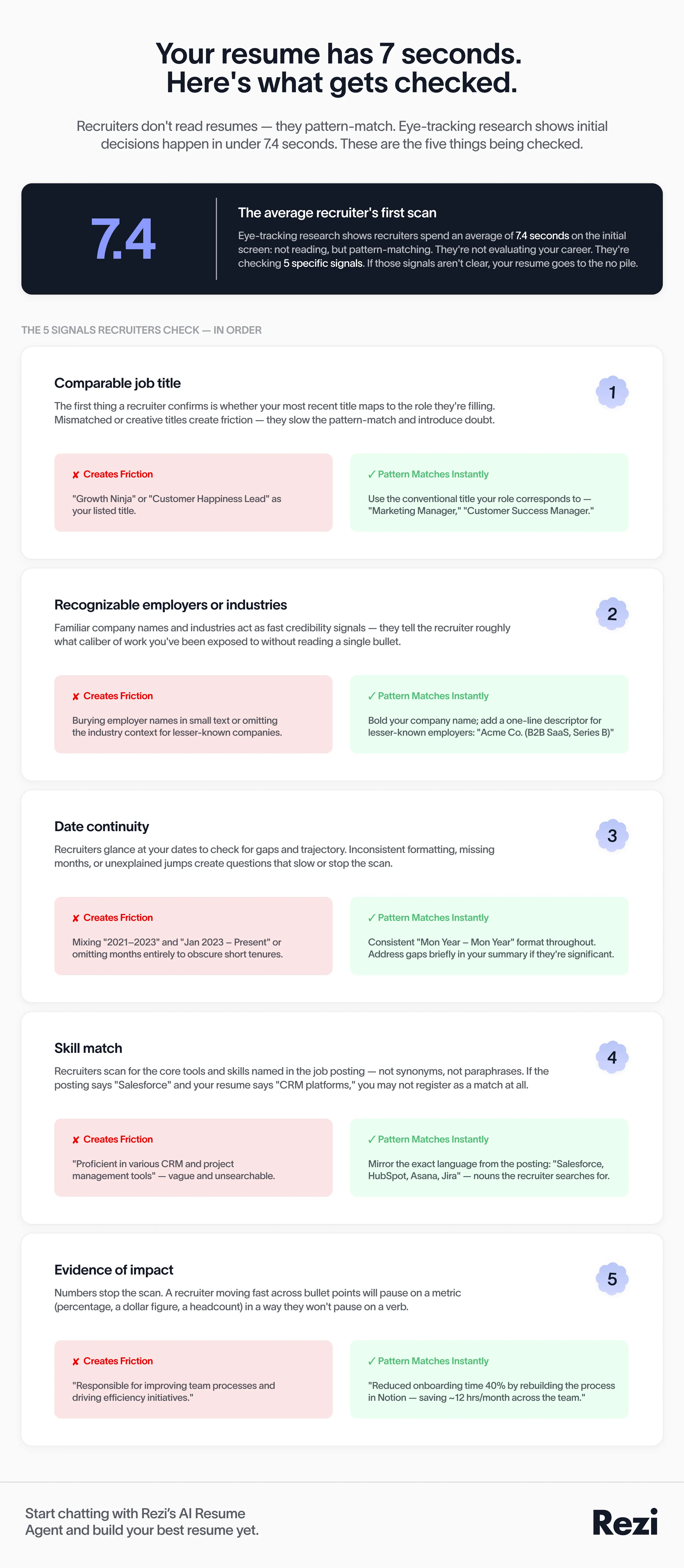
Eye-tracking research is routinely cited because it points to something painfully real: humans don’t read your resume first—they pattern-match. The Ladders’ eye-tracking work (often summarized as ~6 seconds historically, updated to ~7.4 seconds in later reporting) reinforced that initial screen decisions happen fast.
That doesn’t mean you need gimmicks. It means you need clarity.
Recruiters are scanning for:
- Comparable titles
- Recognizable employers/industries (when relevant)
- Date continuity
- Skill match
- Evidence of impact
What to do: format your Experience section for scanning, not “design”
Use this structure for each role:
- Title | Company | Location
- Dates (Month Year – Month Year)
- 1-line scope (optional but powerful)
- 3–6 bullets with metrics
Copy/paste bullet templates (choose 2–3 per role):
- Reduced [cost/time/errors] by [%/$] by [action], improving [business outcome].
- Delivered [project/output] in [timeframe] across [#] stakeholders, resulting in [metric].
- Built/automated [system/process] using [tool], cutting [manual effort] by [%/hours].
- Increased [revenue/conversion/retention] [%] by [initiative] across [segment/channel].
4) The 75% Auto-Rejection Statistic Persists Because It Sells Anxiety
The “75% of resumes are rejected by ATS” number shows up everywhere because it’s useful. It creates urgency. It implies the fix is a template, a scan score, or a subscription.
But the origin is consistently murky, and recent pushback from recruiters and career writers has made that lack of traceability impossible to ignore. One direct critique: the stat is widely repeated without a credible primary source, and the real auto-rejection mechanisms tend to be knockout criteria (work authorization, location, license requirements), not a template failing to “beat the bot.”
What to do: treat ATS compliance as a checklist, then move on
You want “parseable enough” so the ATS record isn’t mangled. After that, your ROI is in targeting and evidence.
Copy/paste your 15-minute ATS hygiene checklist:
- Save as DOCX and PDF versions
- Use one column
- Remove tables/text boxes/icons/images
- Keep section headers standard
- Confirm dates are plain text (e.g., Jan 2022 – Mar 2025)
- Upload and verify the parsed preview if the portal shows it
- Follow the portal’s file instructions (PDF vs DOCX) exactly
Practical: What to Do When You’re Searching “Best ATS-Friendly Resume Templates”
Step 1: Pick one of these three template types (stop shopping after this)
Choose based on your situation:
- Type A: Standard single-column reverse chronological (best for most roles)
- Type B: Single-column with a tight “Core Skills” block (best when tools/tech matter)
- Type C: Single-column with a “Selected Projects” section (best when your work is project-based)
Copy/paste decision rule:
If the job posting lists tools/skills as requirements, choose Type B. If it lists deliverables, choose Type C. Otherwise choose Type A.
Step 2: Build a “searchable skills spine” (10 minutes)
Create a Skills section that mirrors the job language without fluff:
- 8–16 hard skills/tools maximum
- Grouped into 2–4 categories
Copy/paste Skills layout:
- Core: [Skill], [Skill], [Skill], [Skill]
- Tools: [Tool], [Tool], [Tool], [Tool]
- Methods: [Method], [Method], [Method]
Step 3: Rewrite the first 3 bullets of your most recent role (20 minutes)
Your first bullets carry the scan.
Copy/paste rule:
Each bullet must include a verb + a scope + a metric + a business outcome.
Example template you can reuse:
Led [scope] to [action], delivering [metric] and improving [business outcome] across [team/org].
Step 4: Run a “manual parse test” before you submit (3 minutes)
Do this every time:
- Copy your resume text.
- Paste into a plain-text editor (Notes).
- Confirm it still reads in the correct order and your contact info survives.
Copy/paste acceptance criteria:
If a recruiter can understand your last two roles, dates, and skills from the plain-text paste, your template is “ATS-friendly enough.”
Final Thoughts
Stop buying template certainty you can’t verify. Pick a clean one-column format, clear the hygiene checklist, and redirect your effort into a targeted, metric-driven top third that makes your fit obvious in a fast scan.

Upload or drop your resume to get started
Upload your resume to get started
Score my resume

Jacob is the founder and CEO of Rezi. He has been sharing his unique insights on solving the resume since 2015, helping millions around the world land their dream jobs. Lately, Jacob finds himself giving a ton of speeches on topics related to global employment and building startups.