Comparisons
Indeed Career Scout Review: What Works & What Doesn’t
Discover what Indeed Career Scout is, how it works, and whether it’s worth using, plus an honest review of its features, pros, and where it falls short.

Published on
November 17, 2025
Updated on
November 17, 2025
Indeed’s Career Scout is a free AI assistant in the Indeed mobile app that helps you navigate your job search from start to finish. It can suggest jobs based on your profile, explore new career paths, offer interview practice, and help draft a resume. It works best for discovering opportunities, getting action plans, and experimenting with interview prep, though some features, like job suggestions and resume drafting, are basic and may need extra effort. Experts agree it’s helpful but not a complete replacement for traditional career tools. If you’re already using Indeed, it’s worth checking out for faster exploration and guidance, especially since it’s free.
Indeed just rolled out a brand-new AI career coach called Career Scout, and their ad doesn’t disappoint. It has cows, puns, and a chaotic interview scene involving flying balls that perfectly captures what job hunting feels like sometimes.
So, what is this new “Career Scout” about? Is it worth the hype? Does it actually help you find a job, or is it just another shiny AI feature?
We ran a quick LinkedIn poll to see if people had tried it. Turns out, most hadn’t even heard of it. So we decided to dive in ourselves and share everything you need to know about Indeed’s newest feature.
This guide will cover:
- What the Indeed Career Scout actually is.
- How it can help with your job search.
- What users (and we) think of it so far.
What Is the Indeed Career Scout?
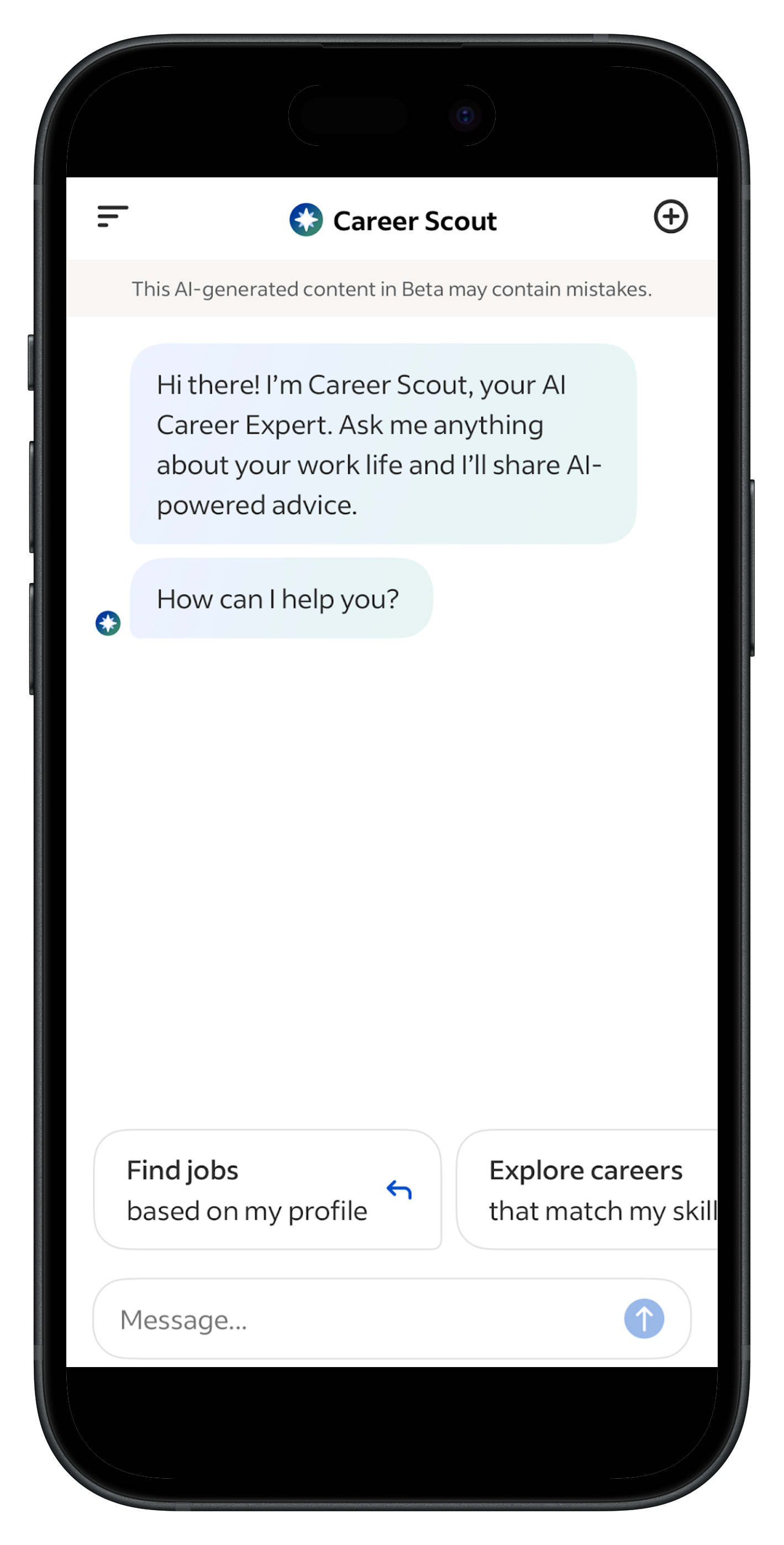
The Indeed Career Scout is your built-in AI career coach, designed to simplify your job search from start to finish. Basically ChatGPT, but focused entirely on helping you land your next role.
You can ask it anything career-related or pick from smart multiple-choice prompts that somehow read your mind and stay one step ahead.
Whether you’re reconsidering your career, trying to earn more, updating your resume, or brushing up on interview skills, Career Scout gives you an easy, conversational way to get guidance right inside the Indeed app.
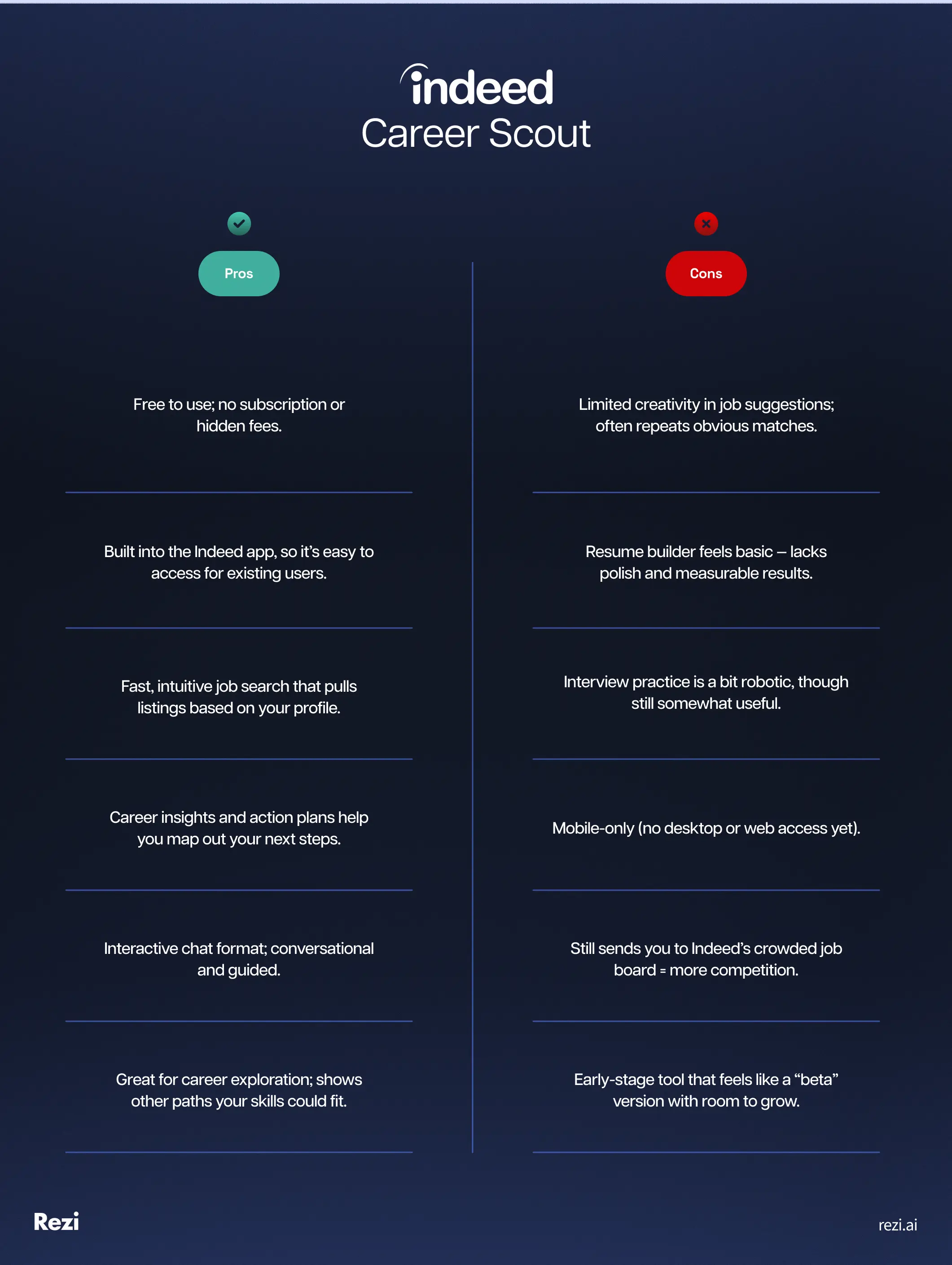
Here’s a quick breakdown of the pros and cons:
How to Use the Indeed Career Scout
Here’s how to use the Indeed Career Scout:
- Open the app, tap Career Scout, and ask a question or pick one of the four prompts.
- Find jobs based on your profile and preferences, refine searches with quick prompts, then go straight to the Indeed posting to apply.
- Explore careers by reviewing and updating your skills, get suggested roles, and create an action plan with step-by-step next moves.
- Practice interviews with AI mock sessions that give follow-up questions and feedback to improve your answers.
- Draft a resume starting from an outline of your roles, add missing jobs, and tailor it to specific job descriptions.
Once you open the Indeed app, tap the Career Scout button in the bottom middle. From there, you can either ask any question you like or start with one of the four prompts at the bottom.
I’ll walk you through each of these options, how they work, what they look like, and what you can actually get out of them.
1. Find jobs
When you click “Find me jobs,” Career Scout uses the preferences already in your Indeed profile: your desired titles, work type, minimum salary, and whether you’re open to moving, and pulls matching listings into the chat. Click a job and you’re taken straight to the Indeed post so you can apply quickly.
After showing results, Career Scout offers quick-tap prompts like:
- Expand search to more US locations
- Try a different job title
- Lower minimum salary requirement
Each choice refines your results and sparks new prompts, kind of like a recruiter who keeps asking, “What about this instead?”
Pros: It’s fast, intuitive, and great for exploring roles without manually tweaking filters.
Cons: It still sends you to Indeed’s job board, meaning you’re competing in a crowded pool. Use it for discovery, but apply directly on company websites (or even reach out to the hiring manager) to get better results.
Check out How to Get a Job Fast: Top Tips for Your Job Search.
2. Explore careers
Career Scout pulls the skills from your Indeed profile, then asks you to review, edit, or re-rank them. You can adjust your proficiency levels, add new skills, or reorder priorities before it suggests potential career paths.
My recommendations were content writer, copywriter, content editor, proofreader, and digital marketing specialist — helpful, but not exactly groundbreaking. I was hoping for a few curveballs or creative pivots outside the usual content bubble. Even after expanding my skills and asking for alternatives to a technical writer role, it still circled back to the same list.
Michael tried out the tool and had a similar experience:
“Most job recommendations were relevant, but I can’t say I uncovered any jobs that I wouldn’t have otherwise found on Indeed using normal keyword combinations. Some job suggestions were irrelevant — Career Scout suggested quite a few recruiter roles for me, even though I specified that my experience is in marketing with a specialization in the career advice industry (which I don’t think makes me in any way qualified to work as a recruiter).”
Each role does come with solid insights: why you’re suitable, the salary range, growth potential, and skills gaps to work on. That part’s genuinely useful for anyone mapping their next move.
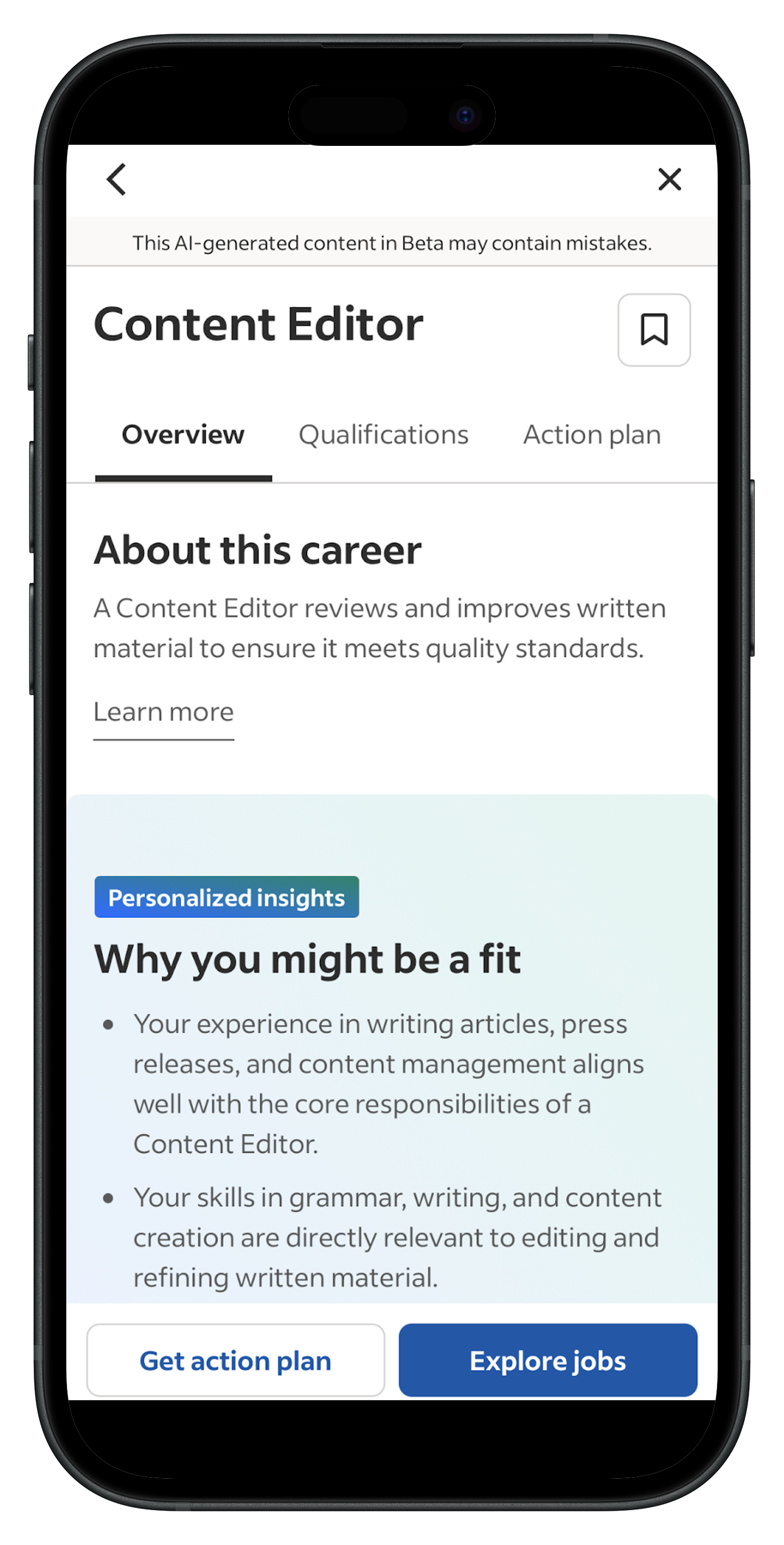
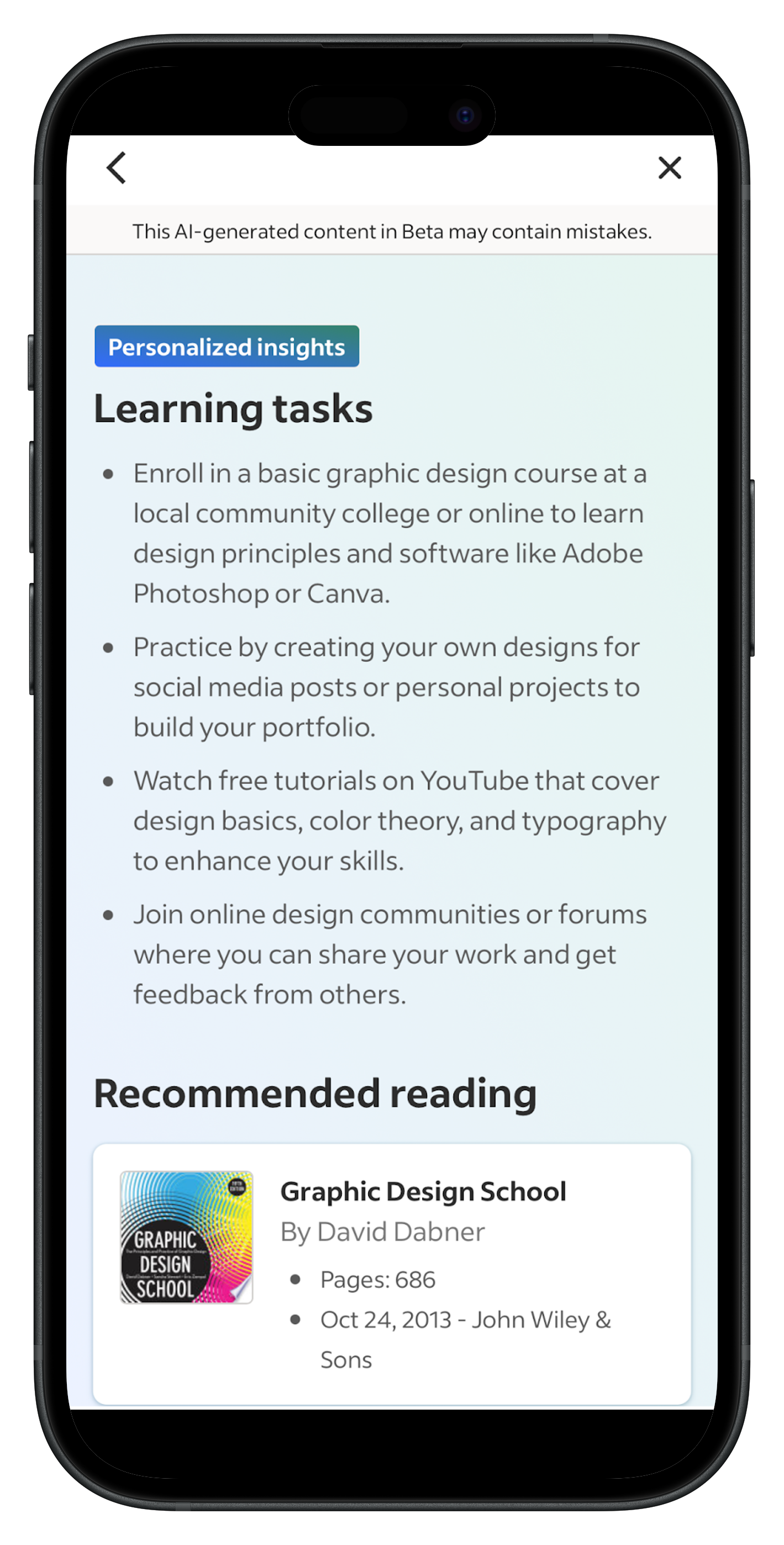
From there, you can create an action plan with a set timeline (say, “within six months”) and get tailored next steps like reviewing skills, applying strategically, and interview prep. It even suggests ways to build missing skills. Mine recommended brushing up on design:
Unfortunately, the “explore jobs” feature didn’t cooperate here during testing; it kept saying “no matches found.” Hopefully just a bug.
Bottom line: The concept and action plan are strong, but the career suggestions could use more creativity.
3. Practice interviewing
I asked a friend who’s job hunting to try Career Scout’s interview feature, and first impressions were mixed. The job options were broad, such as “marketing and advertising occupations” rather than specific roles. It took a while to load at the start, and when she accidentally locked her screen, the session restarted from scratch (not ideal).
Once it got going, though, it performed better than expected. The AI dug deeper into her responses and gave useful feedback.
Here’s some feedback from the interview:
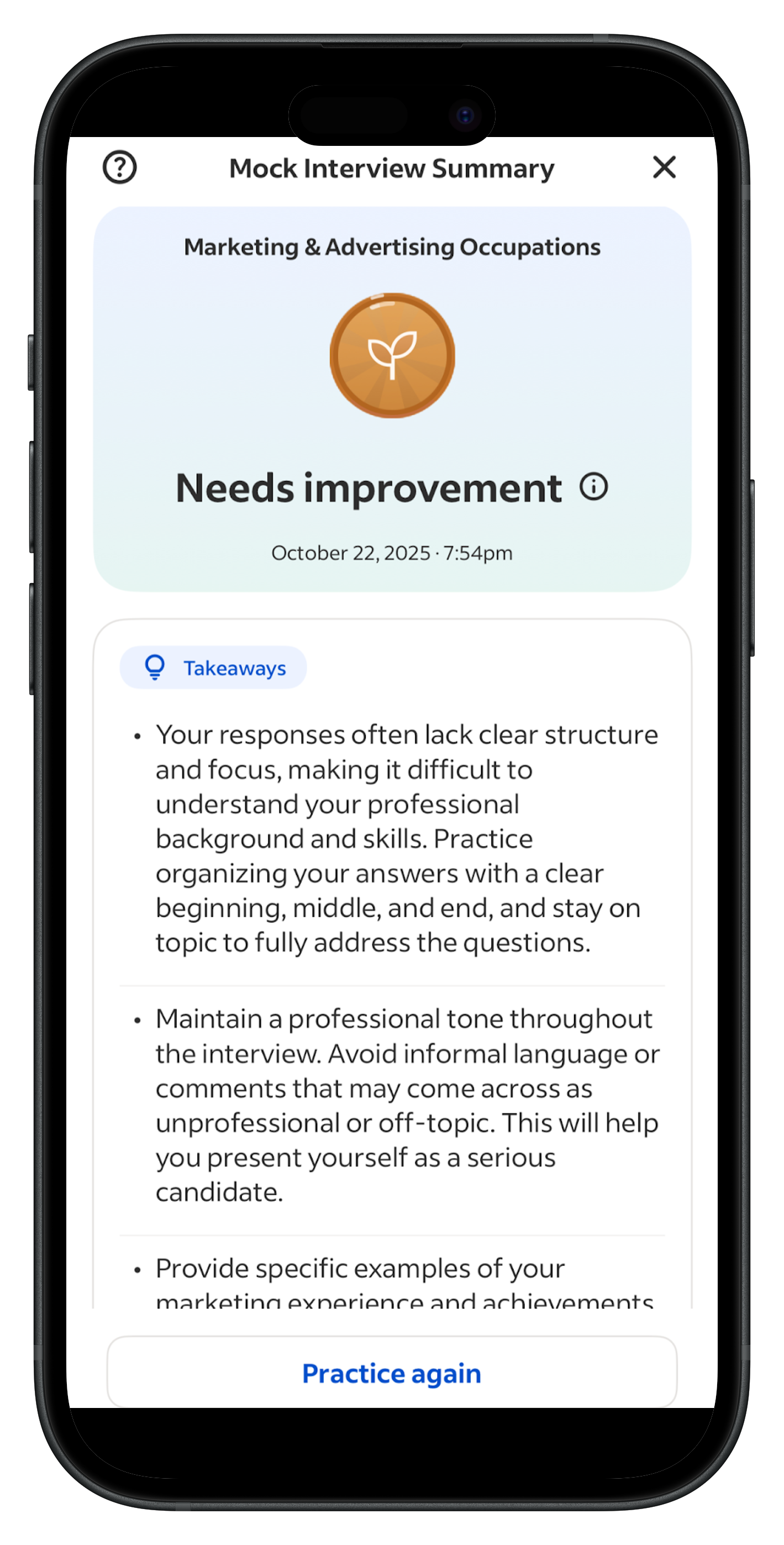
And this is what Kate said afterwards:
“It definitely feels more robotic than other tools I’ve used, but I liked how it actually listened and asked follow-up questions. When I got stuck, it nudged me to structure my answers better and even gave me ideas for what to say.”
It’s not perfect, but it’s a solid option for low-pressure interview practice, especially if you’re feeling rusty. Though honestly, there are more polished platforms out there (like our AI Interview Practice tool).
4. Draft a resume
Career Scout said it would build my resume based on the roles I’d shown interest in. It started with a simple outline and asked for updates, so I added my current job (which wasn’t on my profile). After I gave the role, company, and location, it automatically filled in the rest.
The result? Underwhelming.
The resume summary was fine, but there was no option to refresh it. My existing experience stayed untouched — no rewritten bullets or AI improvements — and the new section lacked measurable results (plus a mix of Spanish and English skills in the skills section).
When I asked for quantifiable achievements, it simply left notes on where to add them. But when I pasted in a job description and asked it to tailor my resume, it finally delivered something useful; something it should do by default.
Here’s a sample of the bullet points it generated for me:
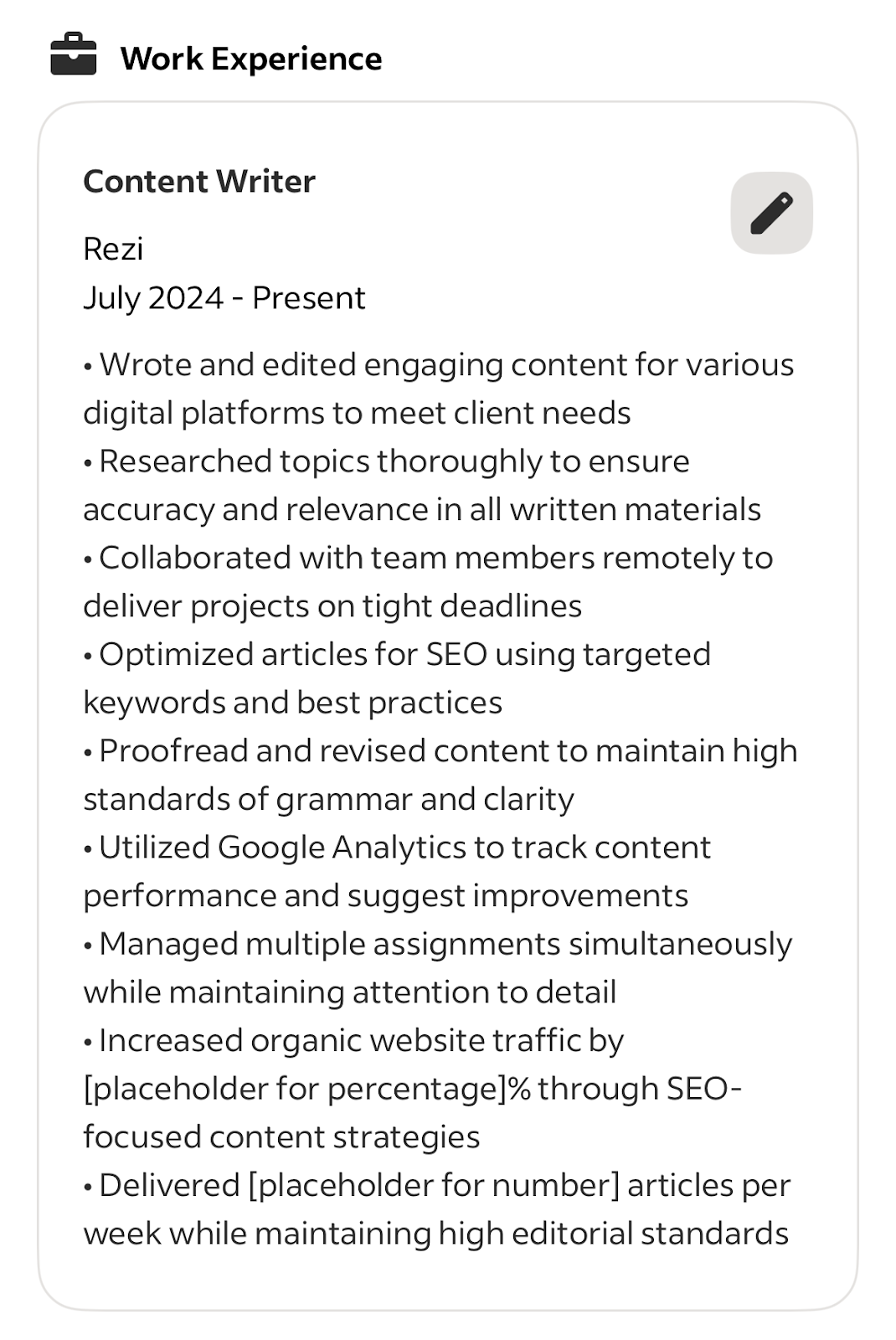
Career Scout’s resume drafting feels basic and undercooked. It can handle structure, but don’t expect much creativity or polish without doing the heavy lifting yourself.
Indeed Career Scout Reviews
I gathered some insights from a few experts on Indeed’s newest AI career assistant.
Spoiler: most agree it has potential, but still has room to grow.
Michael tried it out when it first launched:
“Indeed’s Career Scout functionality has a lot of promise, and I was excited to take it for a spin. I think it’s helpful but a bit underwhelming at this stage of development. It felt largely like a GPT wrapper on the current interface of Indeed’s mobile app. The personalized tips for career development or resume tailoring were similar to what I’d get from ChatGPT or Claude, it didn’t feel like I was talking to a chatbot that’s pre-trained on career advice topics.
The interactive interview practice tool was fun, mostly in trying to break it and make it go haywire. It wasn’t awful, but it’s way less realistic than our own AI interview practice tool, which we haven’t even been developing in 6+ months, let alone interview practice tools from industry leaders such as VMock or Big Interview.”
Amanda Smith at CNET had a slightly different take:
“While AI chatbots are limited when it comes to career advice, I like how AI agents aggregate all relevant jobs and make searching a lot easier. At this stage, it feels like AI/AI agents and a traditional search, not either or, will yield the best possibilities.”
Doug from JobStars echoed that sentiment:
“Career Scout’s unique advantage is its integration directly with Indeed listings and its mobile-first interface, but it should be considered one part of a broader toolkit rather than a stand-alone solution.”
Overall, the consensus seems clear: Career Scout has some cool features, especially for quick job discovery and mobile-first interaction, but it’s best used as a helpful companion rather than a full career solution.
Final Thoughts: Is Career Scout Worth It?
So, is Career Scout worth your time? The short answer: yes, but with some caveats.
When it’s handy:
- If you already use Indeed for job applications, Career Scout speeds things up since it’s connected directly to the platform.
- If you want to explore other careers and see where your skills could take you.
- If you want to draft a resume and get guidance as you go, perfect if you need reassurance every step of the way.
Where it falls short:
- The shiny new ads made me expect more, but it’s not quite there. To quote Tyra: “I was rooting for you! We were all rooting for you!”
- Interview practice wasn’t terrible, wasn’t amazing — somewhere in the middle.
- Resume drafting? Definitely not great. If you want a polished version, try our free AI resume builder.
- The job suggestions are a decent starting point, but you still have to do the heavy lifting: apply on company websites, check if listings are real, and track down hiring managers. (Or, you know, just use our AI Job Search tool to pull live listings straight from company websites.)
The takeaway:
Career Scout is free, fun to explore, and the action plan feature is genuinely useful if you’re considering a career change. Just don’t expect it to do all the work for you; it can help you out, but it’s not a miracle worker.
FAQ
Where can I access Career Scout?
You can find Career Scout in the Indeed Jobs mobile app. Look for the five tabs at the bottom: Home, My Jobs, Career Scout, Messages, and Profile. If it’s not showing up as the third tab, it probably isn’t available in your region yet.
Is Indeed Career Scout free?
Yes, it’s completely free. You just need an Indeed account (also free), and you can start using Career Scout right from the mobile app. No subscriptions, no hidden fees.
How do I tailor my resume to a job?
Start with your resume summary: emphasize the skills and experience that make you a fit for the position, mention the job title and company, and highlight what you bring to the table. Then make sure your work experience, education, projects, and certifications all line up with the role. Match the keywords, skills, and phrasing from the job description so your resume speaks the same language as the posting.
Does Career Scout work in all countries?
Not yet. As of October 2025, it’s only available in the US. If you’re outside the US, a VPN can help you try it out — I personally recommend NordVPN.
Is Career Scout available on desktop or mobile web?
No. Right now, Career Scout is mobile app-only. You won’t find it on desktop or mobile web, at least not yet.

Upload or drop your resume to get started
Upload your resume to get started
Score my resume

Sarah Coghlan is a writer and editor passionate about making resume and career advice clear and accessible to all. Based in Barcelona, her goal is to help job seekers create standout resumes and navigate the job search process with confidence and ease.

.webp)