Resume
The Best Resume Format for 2026: A Complete Guide to the 3 Standard Formats
The reverse-chronological resume format is typically best for job seekers. Learn why, compare it to functional and combination styles, and get 2026 layout tips.
Published on
April 5, 2024
Updated on
February 19, 2026
TL;DR
• The safest choice: The Reverse-Chronological Resume Format is the best option for 90% of job seekers. It is the safest choice, the most ATS-friendly, and the preferred format for recruiters.
• When to switch: Only use a Combination format if you are a senior executive with extensive experience. Avoid the Functional format unless you are in a highly creative industry, as it often flags up risks to hiring managers.
• Quick formatting rules: Keep it simple. Use 1-inch margins, a standard font like Arial or Calibri (10–12pt body text), and always save your file as a PDF.
Your resume content matters, but how you present it—the format—is what determines if a recruiter actually reads it.
Choosing the right format for your resume is the foundation of a successful job application. It dictates how your skills and experience are structured and ensures your document passes through Applicant Tracking Systems (ATS).
In this guide, we break down the three standard resume formats, help you choose the best one for your career level, and cover the essential formatting rules (margins, fonts, and spacing) that every professional resume needs.
What is a Resume Format?
A resume format refers to the structure and organization of your professional information. It determines the order in which sections like "Work Experience," "Education," and "Skills" appear on the page.
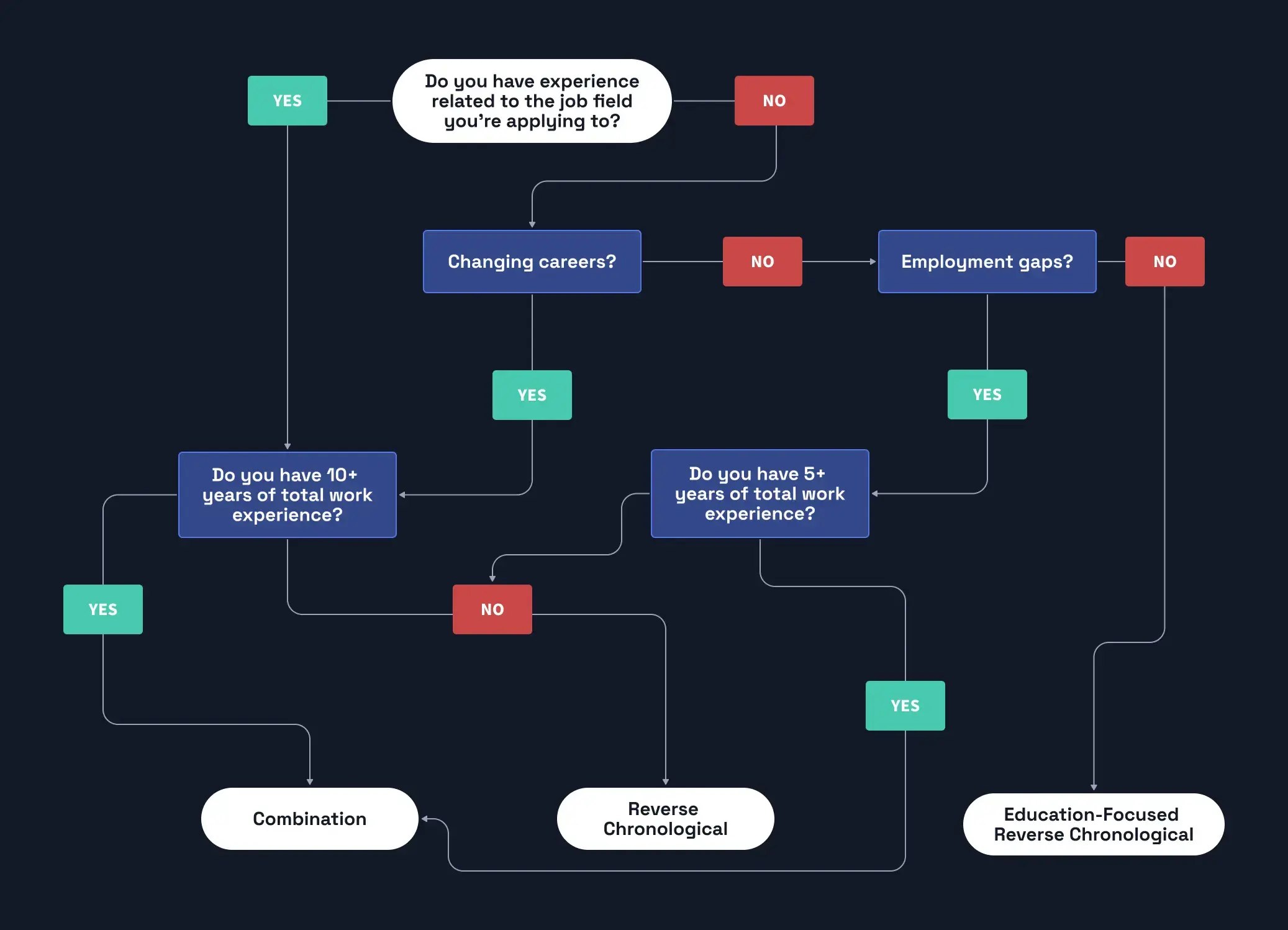
There are three standard resume formats accepted by recruiters today:
- Reverse-chronological: Focuses on work history (Most popular).
- Functional (skills-based): Focuses on abilities over timeline.
- Combination (hybrid): A blend of both.
Choosing the wrong one can hide your strengths or confuse hiring managers. Let’s look at each format in detail to find the right match for you.
The Reverse-Chronological Resume Format
Best for: 90% of job seekers, including students, mid-level professionals, and executives with a steady career path.
The reverse-chronological resume format is the gold standard in recruitment. It lists your work experience starting with your current or most recent job and works backward.
Recruiters prefer this format because it is easy to scan and tells a clear story of your career progression. It is also the most ATS-friendly resume format, ensuring your application doesn't get rejected by screening software.
Structure of a Chronological Resume:
- Contact Information
- Resume Summary (or Objective)
- Work Experience (Listed current to oldest)
- Education
- Skills
Additional Sections (Certifications, Languages, etc.)

Pros & Cons
- Pros: Highlights career growth; preferred by recruiters; easiest for ATS to parse.
- Cons: Makes employment gaps very visible; not ideal if you are changing careers completely and lack relevant titles.
The Functional (Skills-Based) Resume Format
Best for: Creative industries, "gig" workers, or those with significant employment gaps.
The functional resume format emphasizes what you can do rather than when you did it. Instead of a timeline, the main focus is a detailed "Skills" or "Achievements" section. Your work history is pushed to the bottom and often omits dates or details.
Warning: This format is risky. Many recruiters view functional resumes with suspicion, assuming the candidate is hiding a lack of experience or large gaps in employment.
Structure of a Functional Resume:
- Contact Information
- Resume Objective
- Skills Summary (Grouped by theme, e.g., "Sales Skills," "Leadership")
- Work Experience (List of employers only)
- Education

Pros & Cons
- Pros: hides employment gaps, focuses entirely on transferable skills.
- Cons: often rejected by ATS, disliked by traditional recruiters, makes it hard to verify career growth.
The Combination (Hybrid) Resume Format
Best for: Senior executives, highly experienced pros, and career changers with relevant past experience.
As the name implies, the combination resume format blends the best features of the chronological and functional styles. It features a "Skills Summary" at the top to highlight specific qualifications, followed by a traditional reverse-chronological work history.
This is an excellent format if you need to prove you have high-level expertise (Skills) backed by a solid history of performance (Work Experience).
Structure of a Combination Resume:
- Contact Information
- Professional Profile / Summary
- Extended Skills & Achievements Section
- Work Experience (Detailed reverse-chronological list)
- Education

Resume Formatting Rules: Margins, Fonts, and Layout
When people ask about "resume format," they often mean the visual layout—margins, font sizes, and spacing. Even the best content will fail if the document looks messy.
Follow these standard formatting guidelines to ensure your resume looks professional.
1. Margins
- Standard: Set margins to 1 inch on all sides.
- Tight Fit: If you need space, you can reduce them to 0.5 inches, but never go smaller.
2. Fonts
- Style: Use clean, sans-serif fonts like Arial, Calibri, Helvetica, or Roboto. Serif fonts like Georgia or Garamond are also acceptable for a more traditional look.
- Size: Keep body text between 10–12 pt. Use 14–16 pt for section headers.
3. Line Spacing
- Body Text: Single spacing or 1.15.
- Between Sections: Use double spacing (or 1.5) to create "white space" between sections. This improves readability.
4. File Format
- Always use PDF: Unless a job description explicitly asks for a Word Doc, save your resume as a PDF. This ensures your formatting stays consistent across all devices.
- Naming: FirstName_LastName_Resume.pdf (e.g., John_Doe_Resume.pdf).
Summary: Key Takeaways
- Consistency is king. Whichever resume format you choose, stick to it throughout the document.
- When in doubt, go chronological. The reverse-chronological format is the safest, most effective choice for 90% of job seekers.
- Avoid graphics and column-heavy layouts that confuse ATS software.
- Tailor it. Your format frames your experience, but you must still tailor keywords to the job description.
Frequently Asked Questions (FAQ)
Which resume format is best for ATS?
The Reverse-Chronological format is the best for ATS. Its linear structure allows parsing software to easily read dates, titles, and companies without error.
Is the functional resume format dead?
Mostly, yes. Recruiters generally dislike it because it obscures the timeline of your work history. Unless you are in a highly creative field, avoid it.
Can I use a 2-page resume format?
Yes, if you have enough relevant experience. Entry-level candidates should stick to one page. Mid-to-senior level professionals can utilize a two-page format to display their extensive work history.
What is the difference between a CV and a Resume format?
In the US, a "Resume" is a 1-2 page summary of skills and experience. A "CV" (Curriculum Vitae) is a longer, comprehensive academic document used for research and teaching roles.
Ready to build your resume? Try Rezi’s AI Resume Builder to automatically format your resume to industry standards.

Michael Tomaszewski, CPRW, is a resume and career advice expert with 9+ years of experience in the hiring industry. He has helped millions of readers and dozens of one-on-one clients create resumes and cover letters that *finally* do their talents and accomplishments justice.