Cover Letter
10 Best AI Cover Letter Generators 2026: Free Tools
Discover the best AI cover letter generators to save time, tailor your application, and stand out from the competition. Honest reviews with pros, cons, and tips.


Published on
September 25, 2025
Updated on
March 11, 2026
Key Takeaways
• Best generators tailor to the job description, pull from your resume, stay ATS-friendly on format, and let you edit tone/length — not just slap your name on a vague template.
• In this review’s ranking, Rezi is the top pick for resume-linked, ATS-friendly drafts; ChatGPT is the flexible free drafting option if you already know structure and will format elsewhere.
• Other fits called out: Grammarly for clean writing, Teal when you want resume + letter + job tracking together, Kickresume for AI drafts plus phrase banks (watch flashy templates).
• Always edit for facts and voice — AI first drafts are a start, not a send-ready letter.
• Before you submit: one page, balanced paragraphs, professional tone, and formatting that matches your resume.
Many cover letter platforms will outright prey on desperate jobseekers who are done with getting rejected. They promise the world but come with steep price tags and disappointing results.
While cover letters aren’t as popular as they used to be, they can still give you a solid advantage in a crowded job market. But only if you do it right. The best AI cover letter builders speed up the process, keep things professional, tailor your application, and leave you room to add the personal touches that make your application stand out.
Let’s dive into my honest reviews of the top AI cover letter builders. This guide will cover:
- The features to look for in an AI cover letter maker.
- My review of the top cover letter builders and how to use them.
- All the expert tips to create a winning job application.
Want to skip straight to my top pick? Try our AI Cover Letter Builder for an ATS-friendly, tailored, and professional document. And if you need some resume help, you can also try our AI Resume Bullet Point Generator to get tailored and impactful bullet point suggestions for your application.
And for adding those personal touches to your cover letter, here are more tips and examples:
- How to Address a Cover Letter
- What Should a Cover Letter Include?
- How to Write a Cover Letter for a Career Change
- How to Write a Cover Letter With No Work Experience
What Makes a Top AI Cover Letter Generator?
Most of us have sat staring at a blank page, thinking, “Where do I even start with this cover letter?”. AI cover letter generators can help, but not all of them are created equal. Some just give you a vague template with your name slapped on top, while others actually feel like they understand your background and the role you’re aiming for.
After using these tools myself, I’ve found that the best ones share these common traits:
- Tailored to the job description: A strong AI generator uses the actual job posting to identify keywords, role responsibilities, and company details. This helps shape your letter, so it looks like you’ve written it specifically for that position and company.
- Connects with your resume and work history: The smarter platforms let you upload or import your resume, so the letter naturally reflects your real experiences instead of inventing random details. This makes the letter more authentic and saves time because you don’t have to retype your background.
- Gives formatting options without overdoing it: You want an ATS-friendly format, but it’s also nice to have a little flexibility, such as choosing between professional templates, adjusting font size, or aligning with your resume’s style. The best tools keep it professional without pushing you into over-designed templates that hurt your chances.
- Offers guidance and feedback: Not everyone knows what makes a strong opener or how to explain a career gap. The better AI generators give useful pointers or even ask you guiding questions before creating the draft.
- Includes AI writing assistance for edits: A first draft is never perfect. I’ve found it really handy when the platform lets you highlight a section and ask the AI to make it shorter, more formal, or more detailed.
These are the features I personally look for in a cover letter builder, but I know everyone works a little differently. When I pulled together my list of the top ten cover letter platforms, I didn’t just stick to my favorites; I also included options that fit different industries, styles, and preferences.
10 Best AI Cover Letter Generators
Cover letters are personal. The tool that works best for me might not be the one that clicks for you. That’s why I don’t want to give you a one-sided rundown or push just one option.
Yes, I work for Rezi, and I believe we’ve built one of the strongest AI cover letter builders out there (I’ll share why in a bit). But to really understand what’s available, I tested a range of cover letter generators myself. I created letters with each tool, looked at how well they tailored content to job descriptions, checked formatting and design, and balanced the pros and cons firsthand.
Before getting into the details, here’s a quick summary of my top tried-and-tested picks.
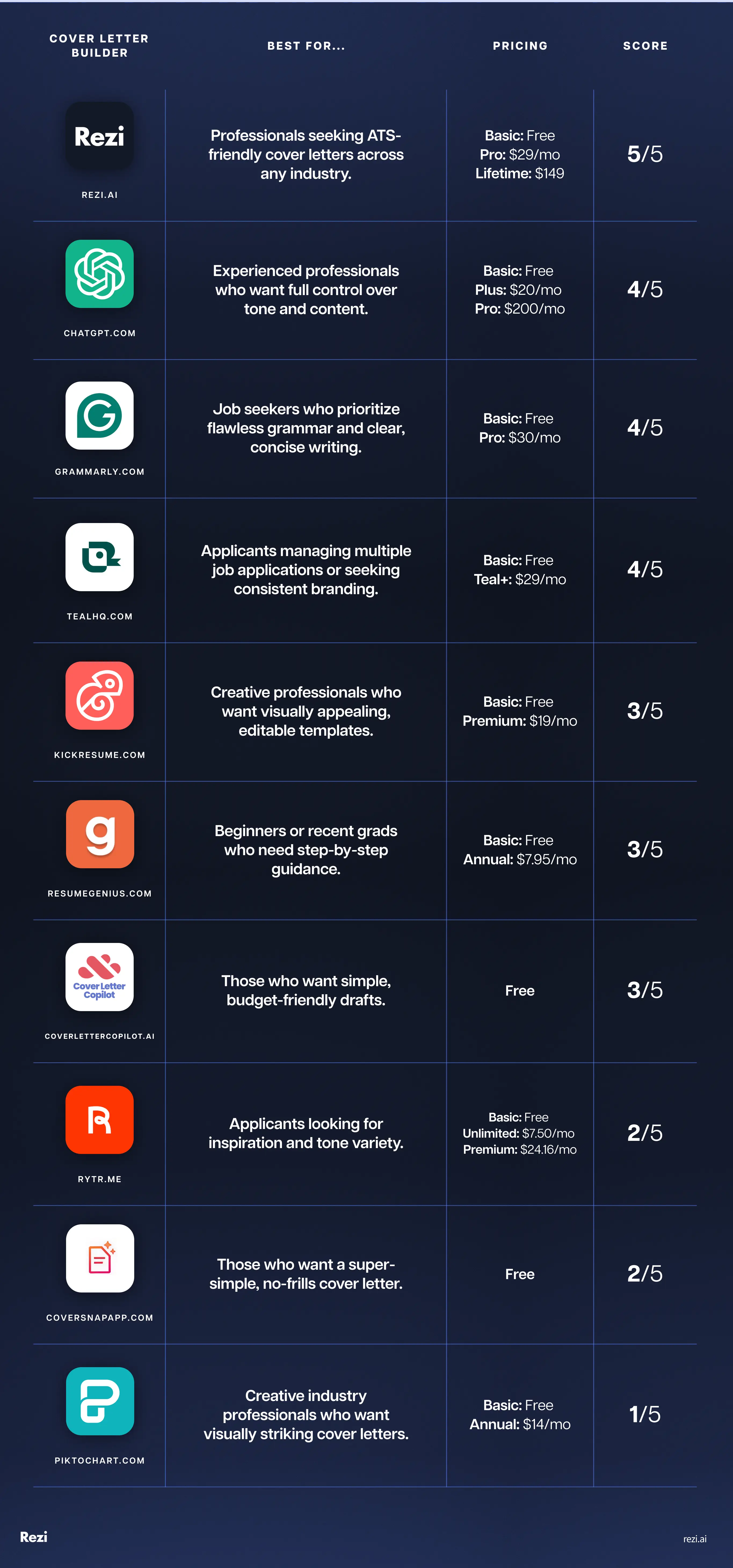
Now, let’s explore the top AI cover letters, how to use them, and anything you should consider before getting started.
1. Rezi
Rezi is best known for its AI Resume Builder, but we also have a range of other advanced features, including the AI Cover Letter Builder. And yes, I may look biased placing Rezi at number one, but it’s for good reason. Our AI Cover Letter Builder pulls details from your resume to speed up the process and ensure the output is professional and ATS-friendly.
How to use
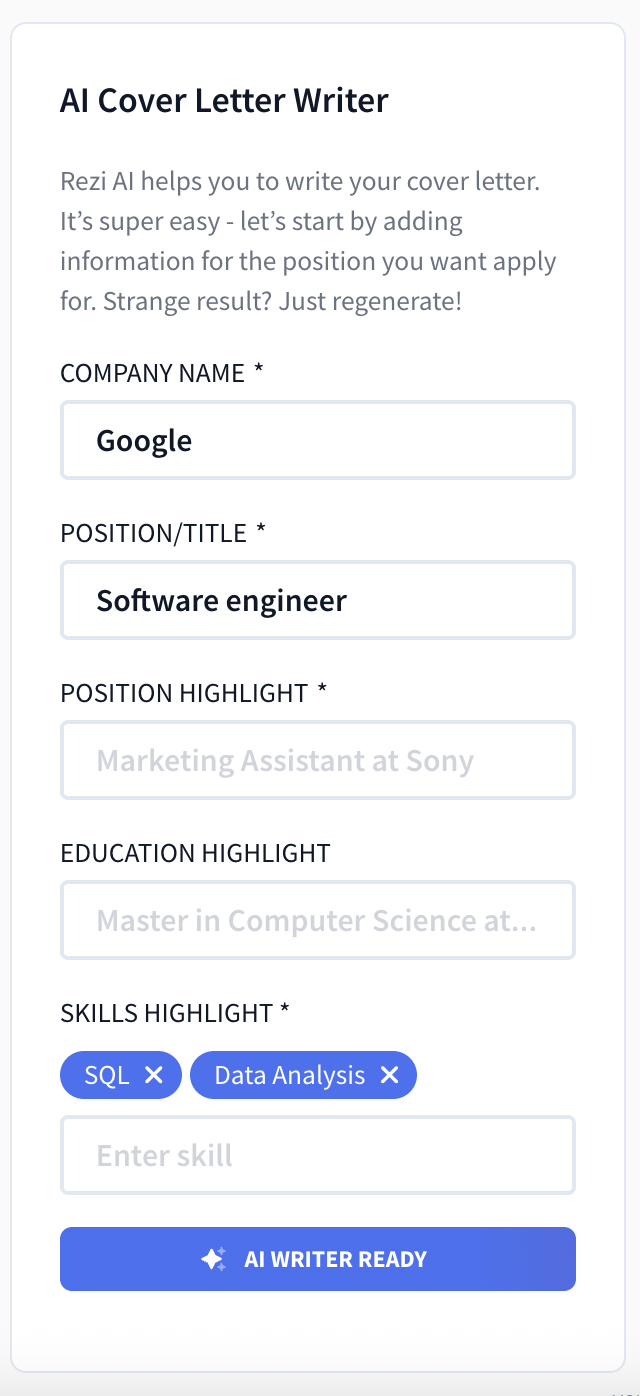
- Type in the company name and job title to generate a first draft in seconds. The draft uses industry-specific phrasing to give you that much-needed inspiration.
- You have the option of uploading an older cover letter, and the AI will rework it to better align with your desired job. This is super helpful if you don’t want to start from scratch.
- If you’ve saved your resume to the dashboard, Rezi automatically fills in your contact details and work history to save you time.
- Once the draft is ready, you can tweak the spacing and font size to make it feel less generic, then download the PDF (plus DOCX and Google Drive with a paid plan).
Pros
- Having both my resume and cover letter in one place was really practical and kept everything consistent. I didn’t have random files scattered everywhere.
- The autofill from my resume saved me a ton of time; there was no retyping my phone number or pasting skills into another template.
- The formatting looked professional right away, so I didn’t need to spend time fixing margins or font.
- The content actually sounded like it fit the job I was applying for. It wasn’t just a generic “I am interested in your company” letter.
Cons
- You can only access the Cover Letter Builder with a paid plan ($29 a month or a $149 Lifetime subscription). That said, it’s well worth it for all the other advanced features, such as the unlimited resumes, the Rezi Score, and AI Keyword Targeting.
Get the full breakdown with our user guide: AI Cover Letter Generator
2. ChatGPT
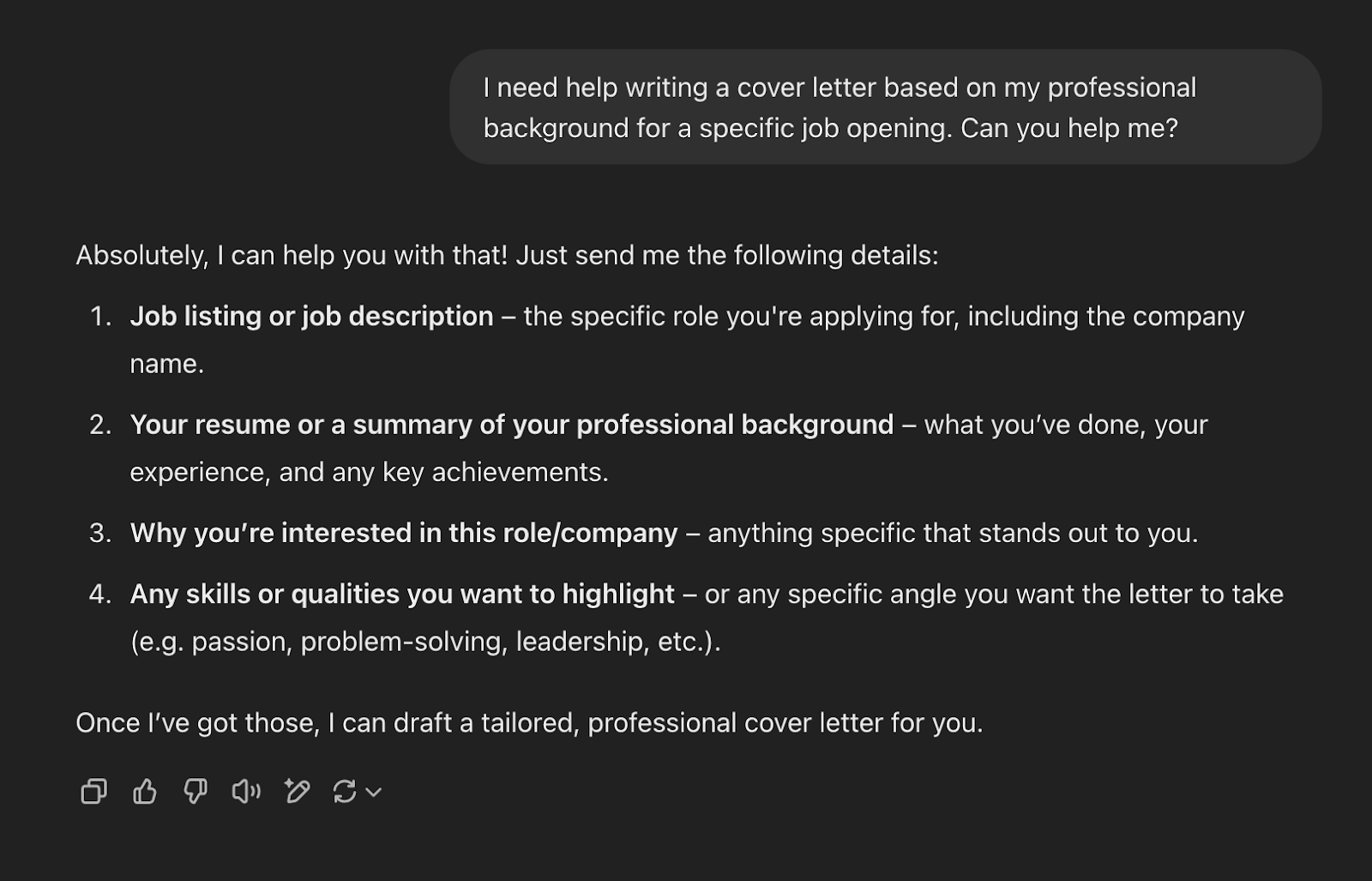
As most of us know, ChatGPT isn’t a cover letter tool. It’s a general AI model that generates text when fed the right prompts. It’s flexible and can adapt to your tone, but it won’t format anything for you or guide you through what a cover letter should look like. The upside is you can push it in any direction, but the downside is you need to know how to steer it.
How to use
- Copy the job description and resume into ChatGPT, or share your professional background. This will give you a solid, but pretty generic, first draft.
- Get more specific with instructional prompts. You could ask it to highlight a project you led or particular skills from the job description. You should also specify the tone, such as warm but professional.
- Copy everything into Google Docs or Word. From here, you can review, edit, and customize your ChatGPT cover letter to make sure it’s personalized and factually accurate.
Pros
- You can shape the draft exactly how you want. If I asked for a shorter version or a different tone, it generated the output in seconds.
- It’s good for brainstorming sentences when you get stuck. For example, I had trouble describing interpersonal skills, and it suggested phrasing that sounded more natural.
- Having past prompts saved in my account made it easy to go back and tweak earlier drafts without starting from scratch.
- It’s totally free to use, and you can experiment as much as you like before getting the final result.
Cons
- The quality of your cover letter depends completely on the prompt. When I wasn’t clear, the drafts were vague, generic, and obviously AI-written.
- It doesn’t guide you on structure, format, or content. If you don’t already know what makes a good cover letter, you won’t get much coaching (unless you ask for it, but ChatGPT isn’t best known for its accuracy).
Check out these prompts and examples: How to Use ChatGPT for a Cover Letter?
3. Grammarly
Grammarly surprised me; I’ve always used it to check spelling and grammar, but I found its cover letter builder to be effective and easy to use. It’s fast, keeps formatting minimal, and doubles down on error-free writing. The free version produces a quick draft, while the premium version layers in tone adjustments and deeper suggestions.
How to use
- Paste your resume content and the job description into the tool to generate a draft almost instantly.
- Copy that draft into Google Docs or Word to adjust spacing, font, and any other formatting details.
- With a Pro account ($30/month), you can also try their “tone” suggestions, where Grammarly adjusts sentences to sound more confident without being pushy.

Pros
- The whole process is very speedy, and you can get a draft within a couple of minutes.
- Grammarly handles the grammar and spelling automatically, so you don’t have to worry as much about small mistakes.
- Grammarly excelled in combining my work experience with skills and requirements listed in the job description, showing why I’d be a good fit for the role.
- Copying into Google Docs worked smoothly; the formatting carried over without issues.
Cons
- Grammarly doesn’t keep everything in one place. I had to upload my resume each time, instead of having a saved profile.
- There is no option to download as a PDF, which most job portals require.
- The free version only gives you the basics. More advanced features (like tone changes or deeper edits) are part of the $12/month plan.
4. Teal
Teal is a full job application management platform with resume and cover letter tools. It takes longer to set up because it wants your resume uploaded and parsed into its system, but once you’re in, you can generate cover letters that are linked directly to your resume.
How to use
- You can submit your resume or copy the content. Teal accepts doc, docx, or PDF (up to 50 MB). Teal then converts this resume to one of their templates, so it’s in their system.
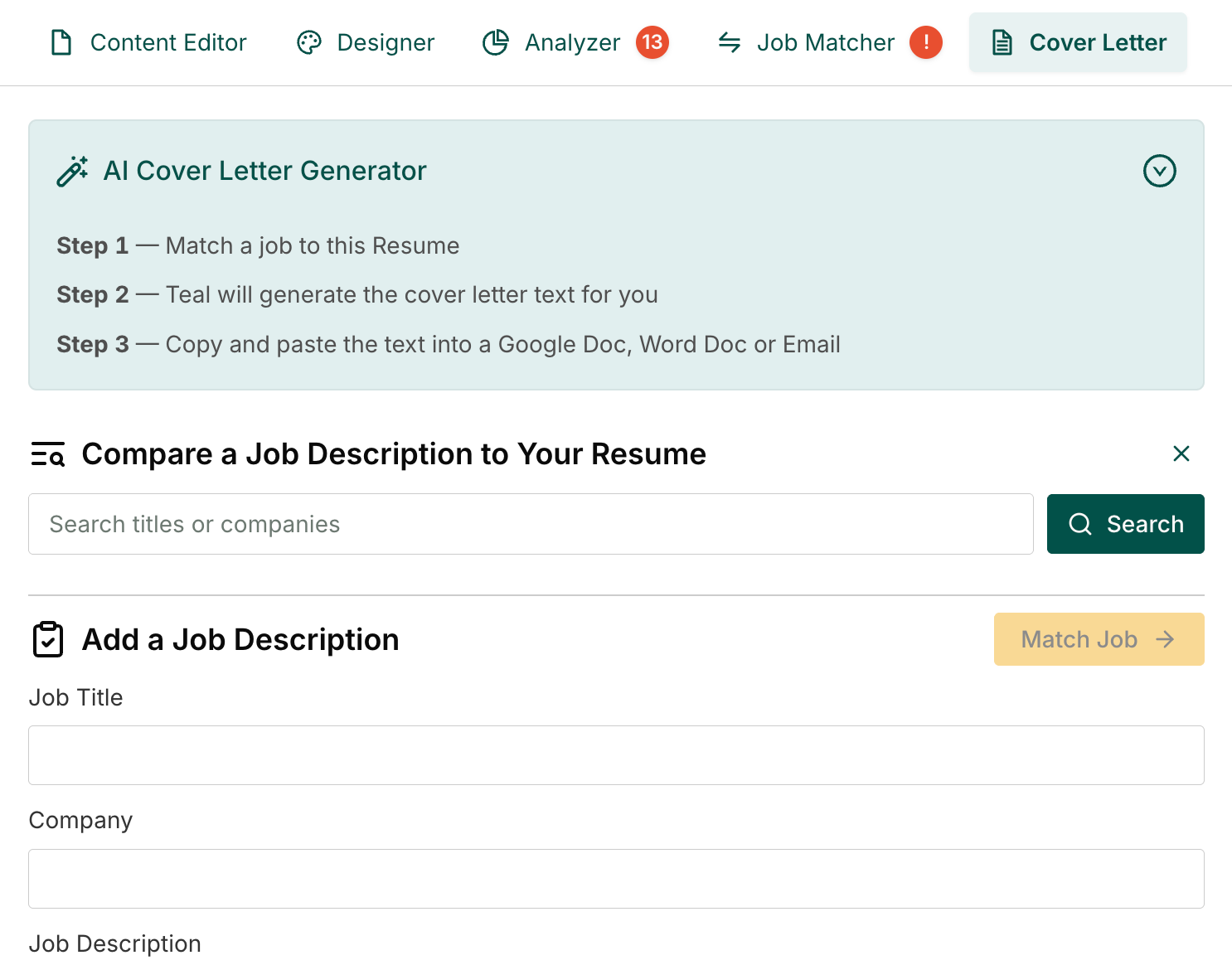
- Match a job to your resume and cover letter. You can do this by pasting in the job title, company, and job description, or searching for available jobs based on your job title.
- Use the AI writer to choose the length and tone of your cover letter. You can also select what requirements to emphasize from the job ad and enter any custom prompts.
- Once generated, you get a side-by-side view, where you can edit and preview your cover letter. There’s also the design mode, where you can change the style and templates for both your cover letter and resume.
- The ‘Improve with AI’ feature lets you adjust the tone, length, or tailor it further to the job description.
Pros
- Having my resume and cover letter connected made the whole application feel consistent. I didn’t have to worry about mismatched styles.
- The templates were professional but not over-designed. They were straightforward enough for applicant tracking systems.
- I had more control over tailoring with the custom prompts and being able to tell Teal which parts of the job description to include in my cover letter.
- Editing side-by-side made it easy to tweak wording and instantly see how it looked.
Cons
- The setup can take a while if you’re in a rush. Uploading and converting my resume wasn’t instant.
- Since your cover letter is so closely tied to your resume, you can only make design edits to your resume, which automatically get applied to your cover letter. Yes, this creates a cohesive look, but it would be nice to preview the design features on the cover letter.
- If I only wanted a cover letter, this was overkill. Teal really shines if you use it for both a resume and a cover letter.
See how Teal compares to our platform: Rezi vs. Teal: Which is Better?
5. Kickresume
Kickresume is primarily a resume builder that also includes a cover letter feature. The AI-generated drafts are impressive, and the editor makes it easy to adjust or drop in pre-written “phrases” for your industry. The catch is the templates; many are colorful and stylized, which doesn’t always work for professional cover letters.
How to use
- Enter basic information, such as your name, past employer, and job title. Then, submit the job description and your desired position to get a tailored draft.
- Choose from a wide range of templates, which you can filter by industry. While most of the templates are premium, the free ones are simpler and more appropriate for a cover letter.
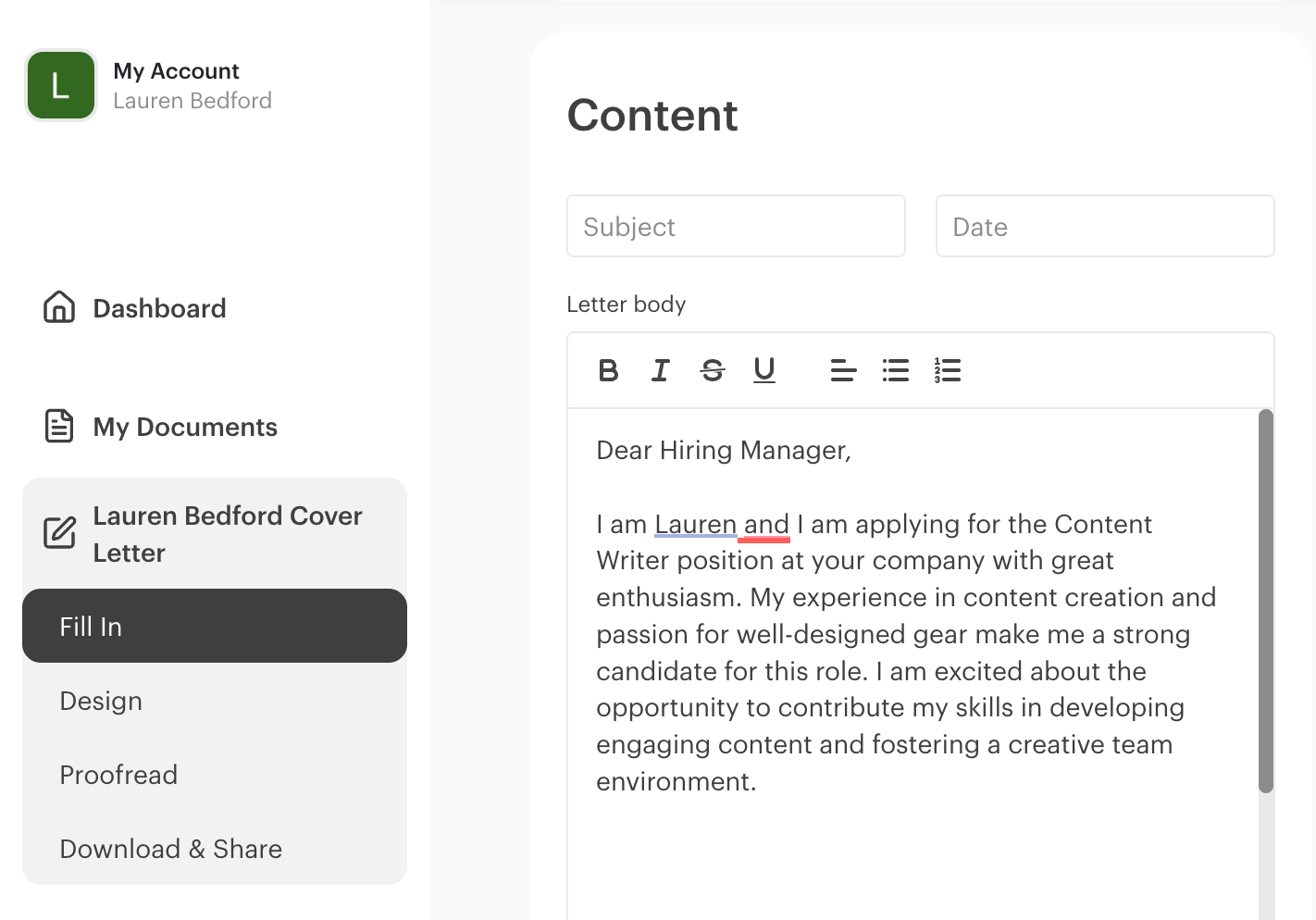
- Kickresume generates the draft in seconds, which you can edit directly in a split-screen editor. On one side is the draft, next to a preview of the formatted letter.
- Experiment with the “Add Phrases” feature to get industry-specific lines to drop in. This is handy inspiration when you don’t know how to word something.
- You can also edit the design and formatting, plus pay $26 to get your cover letter proofread by human editors in 2 working days or less.
Pros
- The tone of the drafts felt professional without being stiff. I didn’t have to rewrite entire paragraphs to make them sound human.
- The “Add Phrases” feature was genuinely useful; it gave me ready-to-use sentences for my industry that didn’t sound robotic.
- There’s a built-in spell and grammar checker, which also lets you change the language, which is handy if you’re applying for jobs in different countries.
- Many cover letter makers automatically include address information, even though this isn’t always necessary for online applications. Kickresume doesn’t include these details unless you fill out the fields.
Cons
- Most of the templates felt too flashy. Lots of bright colors and backgrounds that just don’t work for cover letters.
- Even though you can filter templates by industry, the options don’t change much. I saw the same template designs for creative fields and business.
- When editing the content, Kickresume offers design options that aren’t appropriate for a cover letter, such as adding patterned or colored backgrounds. Most of these are paid features, falsely implying that these are more premium qualities in a cover letter.
Find out more about Kickresume with our honest reviews:
6. Resume Genius
Resume Genius is an online resume and cover letter platform. What makes it different? Instead of uploading a job description or resume, you answer a series of questions about your experience, skills, and background, and it builds a draft from those answers.
How to use
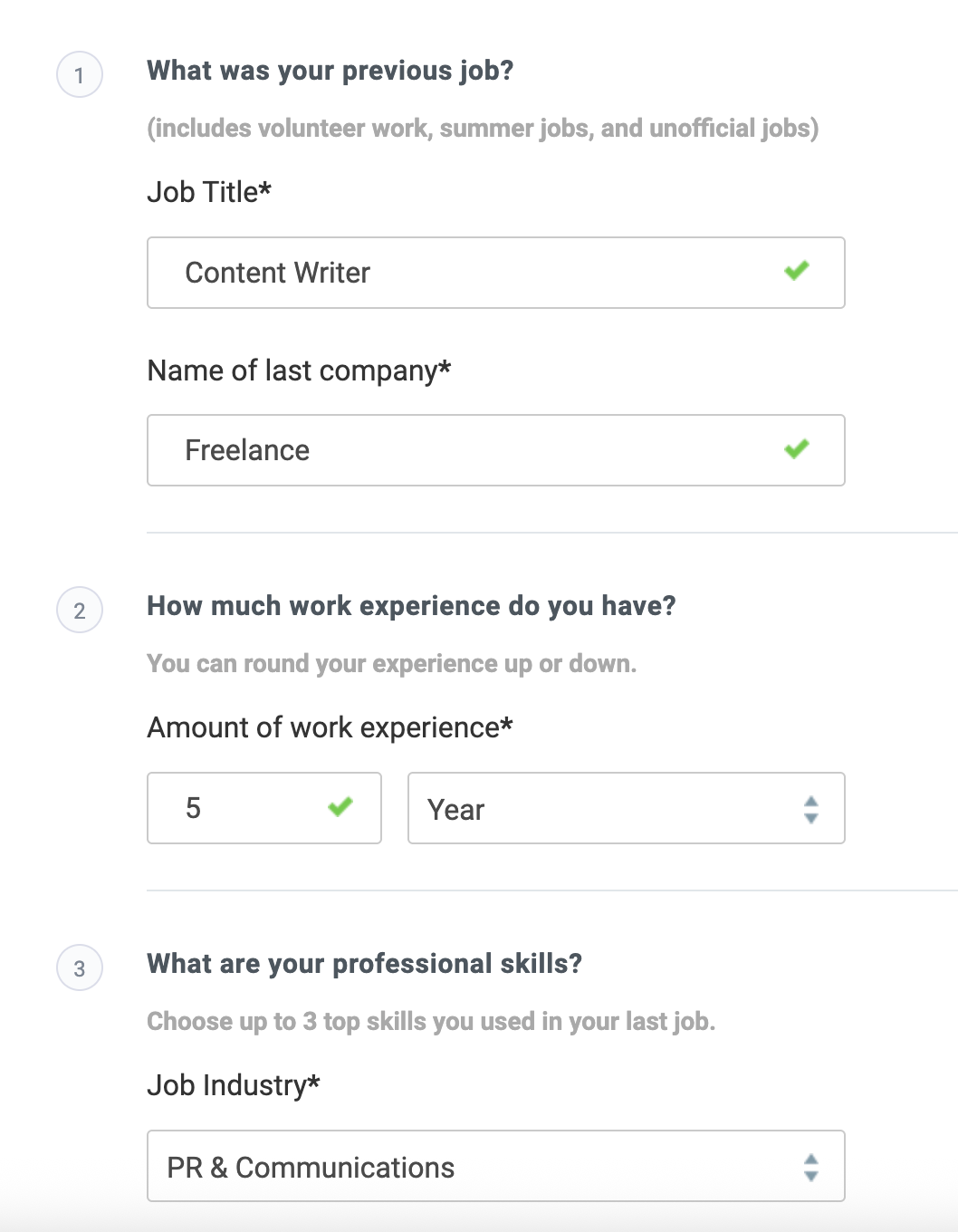
- Resume Genius kicks off by asking a few questions to tailor your cover letter. This includes whether you’ve had any work experience, if you graduated from college, and the details of your previous job.
- Pick your industry from a dropdown list and check off both hard and soft skills. I found that many of my specific skills weren’t there, so I had to settle for vague ones.
- Fill in your contact details and the company name, so the system can generate a draft. You can also access other tools that let you pair your cover letter template with a matching resume template.
- Once you generate the cover letter, you can edit the content and change the color of your name before downloading it as a Word document or PDF.
Pros
- I liked that it asked me whether I wanted to explain employment gaps. That’s a question most tools ignore, despite being a real issue for many jobseekers.
- Having a checklist of skills to pick from was useful when I couldn’t think of what to highlight. I could also choose a word that “described me,” which helped jog ideas.
- Formatting stayed simple and professional. It was ATS-friendly, and I appreciated that it didn’t clutter the document with logos or graphics.
Cons
- The skills list was limited. As a content writer, my niche skills weren’t there, and I couldn’t type them in manually.
- There’s no way to paste the job description or upload your resume, which means the first draft was too generic. Editing was definitely required before sending.
- Formatting options were minimal. Other than changing the color of my name, I couldn’t adjust fonts or spacing.
7. Cover Letter Copilot
Cover Letter Copilot is basically ChatGPT with a structure built around it. Instead of typing your own prompts, the site walks you through uploading your resume, pasting a job description, and picking a tone. It generates drafts based on that input and lets you tweak sentences with quick style edits.
How to use
- After creating a free account, upload your resume as a PDF and paste in a job description. That part was smooth, though it took about a minute to process my resume.
- You can choose the tone for your cover letter: professional, modern, or friendly. It gives short suggestions on which tone to choose based on your industry or job title.
- Select a professional template that matches your industry and personal brand. You can customize colors, fonts, letterhead styles, and contact information.
- The final step is to add any additional prompts, such as aspects you want to emphasize or skills you want to include in your cover letter.

Pros
- The interface is easy to use and even a little fun. The progress bar made the steps feel manageable, and the prompts guided me through without confusion.
- I appreciated being able to regenerate multiple drafts to find the best one for my preferences. I could also copy parts of the different versions and combine them in an external document.
- With the paid version, you can highlight parts of the text and choose from the following options: Concise, Detailed, Professional, Informal, or Custom. This is a nice feature that helps inspire you or reword the text without much effort.
Cons
- It claims to be five times faster than ChatGPT, but in my experience, it took the same amount of time to generate the cover letter (or even longer).
- You only get access to other cover letter template options with the paid account; otherwise, you only get access to the Classic version.
- I went with a modern tone and found the cover letter to lean too heavily into flowery language. It literally introduced me as “a Barcelona-based content wizard,” which made me laugh, but wasn’t something I could actually send.
8. Rytr
Rytr is a general AI writing assistant that covers a wide range of use cases, from blog posts to emails and product descriptions. A “cover letter” is just one of the templates it offers. The tool is versatile, but for cover letters, it’s more of a starting point than a finished draft.
How to use
- Select “cover letter” as the use case, choose English as the language, and pick a tone. There are over 20 tones, such as formal, enthusiastic, convincing, etc. I went with “convincing.”
- Enter your job role and skills. You can also choose the number of cover letter variants you want and the level of creativity.
- You have a range of formatting options, including text alignment and images (though you won’t need half of these options for a cover letter).
- Rytr generates a cover letter with short, organized paragraphs with placeholders for contact details.
- The dashboard saves your drafts, which is handy if you want to revisit and compare them later.

Pros
- It was nice having a range of tones (though only some of these aren’t appropriate for a cover letter). You can also use the “My Voice” feature with a paid account to set specific tone profiles that customize the content to sound like you.
- The in-line editor was handy. I could highlight a sentence and tell Rytr to shorten it, rewrite it, or even swap in a different company name.
- The interface is polished and user-friendly, storing all your documents in one place.
Cons
- Not being able to paste in a job description was a major drawback. The drafts felt generic and needed significant edits to align with the role.
- There was no step to upload my resume, so some of the “unique” achievements it generated were completely made up.
- The free plan only lets you generate three variants, which limits the amount of experimenting you can do.
9. CoverSnap
CoverSnap is a barebones AI cover letter generator. You paste your resume and the job description, pick a tone, and it generates a draft. That’s it. There are no templates, editing tools, or design options — you copy the draft out and polish it elsewhere.
How to use
- You start by pasting your resume, but for me, the formatting got scrambled. The dates were mismatched, and some bullet points were duplicated, so I had to do some tweaking and hope for the best.
- Paste in a job description and choose a tone. These include professional, startup, executive, technical, creative, and funny. (Though I wouldn’t recommend opting for the last option, as it doesn’t really fit with a professional document.)
- The generated cover letter leaves fields for you to include the recipient’s address and your contact information. It also keeps everything organized by dividing the content into short paragraphs.
- You get 3 free cover letters a day, or you can unlock unlimited access for a one-time purchase of $5.

Pros
- CoverSnaps’s selling point is its simplicity. No account needed, no setup, no subscription — I was generating within minutes.
- It combined my resume information with the job description fairly well, and the tone felt professional.
- You get three free letters per day, which is generous compared to other tools.
Cons
- The resume parsing was messy. Even with my simple resume, it jumbled things, so I didn’t fully trust how it handled the details.
- Zero editing options on the platform. I had to copy everything to an external document before making changes.
- The platform’s simplicity selling point is also its biggest flaw. If you want templates, rewording tools, or any real customization, you won’t find it here.
10. Piktochart
Piktochart is a design platform that focuses on visuals. You upload a resume or text, and it generates a draft you can then place into colorful templates with customizable fonts and graphics. The obvious problem is that the design focus can overshadow the writing. It’s better suited to creative fields than traditional job applications.
How to use
- Choose “cover letter” from the document types and upload your resume. There’s also an optional “Additional Information” box where you can submit the job title and any other instructions.
- Choose from a range of templates. Most of them are colorful and aesthetically pleasing, but way too flashy for a cover letter. Many also included headshots, which I definitely wouldn’t send to an employer.
- Once your cover letter has been generated, you can choose from a range of formatting options, including: AI Tools, Graphics, Text, Design Components, Colors, Charts, Maps, and more (just don’t go overboard, or it’ll look like a flyer).
- You can also edit your text to tailor it to the role you want (which I recommend since it doesn’t ask you for the job description).

Pros
- There is plenty of formatting flexibility, which you’ll appreciate if you enjoy tinkering with fonts, spacing, or design elements.
- Piktochart could work for creative industries where a more visual approach is acceptable.
- The ability to add comments directly into the document was useful for leaving myself notes before finalizing.
Cons
- The writing output wasn’t reliable; I ended up with duplicated paragraphs and no integration with job descriptions.
- The design emphasis is a double-edged sword. The templates are attractive, but most are inappropriate for professional applications.
- The guidance was minimal. The first step literally said, “Type Your Topic,” which wasn’t very clear. A newbie might not know what to enter.
AI Cover Letter Example
Want to see what a great cover letter writer can produce? Here’s one I made for a project management position using Rezi’s AI Cover Letter Builder. You can also use it as inspiration for your own structure and content.

And it’s not just me championing Rezi’s cover letter writer. Here’s why William, one of our users, said it was his favorite Rezi feature:
Check out more cover letter templates: Best Cover Letters: Examples, Templates, and Tips
How to Make an AI Cover Letter for a Job Application?
In short: Find the best platform for you and add personal touches to tailor your application.
An AI cover letter builder can take you far, but it’s not a mind reader. Yes, feeding it your resume and the job description is a strong starting point, but don’t stop there.
To truly stand out, you need to go beyond your resume with your personal wins, unique perspective, and genuine interest in the role. That’s what shows employers you’re not just another applicant clicking “apply all,” but someone who’s thoughtfully aiming for their company.
Here’s how to make the most out of AI while keeping your cover letter authentically yours.
Find an AI cover letter builder that suits your preferences
Not every AI cover letter tool works the same way. Some are super simple but give you something generic. Others ask you more questions and take longer, but the result feels more tailored. If you just want a draft to kick off your editing, a quick generator is fine. If you’d rather the AI do most of the work, look for one that accepts resumes and job postings.
Personally, I like tools that balance speed with control. I don’t mind answering a few extra prompts if it means the draft actually sounds like me. So before diving in, think about what matters most to you: speed, customization, formatting options, or design templates that match your resume.
Submit your resume or work history
Most AI cover letter builders will let you upload your resume, or at least paste in your work history. This step matters because the AI can pull your real experiences instead of making things up (trust me, I’ve had one tool “award” me certifications I never earned).
If uploading isn’t an option, note your most recent role, skills, and accomplishments before starting. That way, when the AI asks for prompts, you’ll have details handy. For example, instead of just saying, “Worked in marketing,” you can share, “Led a campaign that increased social media engagement by 40%.” The more specific you are, the stronger the draft.
Tailor your cover letter to the job description
No matter how good the AI is, the letter still needs to match the job ad. The best generators let you paste the job description, so they can include keywords and responsibilities. That way, your letter doesn’t just talk about your skills; it connects them to what the company wants.
Even if the tool doesn’t offer that feature, you can still copy some phrases from the job posting into your prompt or add them manually. For example, if the job description says they want someone who can “work well in a team,” make sure that exact phrase (or something close) shows up in your letter. This is a great way to get noticed by Applicant Tracking Systems (ATS).
And it also impresses hiring professionals:

Add personal touches and unique accomplishments
AI is great at achieving a solid foundation, but the danger is ending up with a letter that sounds a little flat. That’s where you need to add personal touches. Add one or two accomplishments you’re genuinely proud of, or explain briefly why the company’s mission or values matter to you. That’s the human element an AI draft usually misses.
Here’s what a Redditor said about the importance of creating a personal connection:

Instead of just repeating your resume, highlight something memorable or expand on a relevant success story. Ask yourself these questions for inspiration:
- What’s one accomplishment from your past role that you’re genuinely proud of?
- Did you ever solve a problem in a way that made a real difference?
- How has my work created an impact on a team, a project, or the company as a whole?
- What excites you about this specific company or role beyond the job description?
- Do you share any values or passions with the company’s mission?
Check the cover letter formatting
Once you have a draft you’re happy with, don’t forget the final touches and cover letter formatting. Make sure you have the right contact information structure, the spacing is easy to read, and the tone feels professional (without being robotic). Some AI builders will handle this automatically, while others just give you the text to format yourself in Word or Google Docs.
I usually do a quick scan before finalizing: Is the letter one page? Do the paragraphs look balanced? Does it match the style of my resume? Small tweaks here go a long way. A perfectly worded letter can still fall flat if it looks sloppy on the page.
Find out more: How to Use AI to Write a Cover Letter
Final Thoughts: What’s the Best Cover Letter Generator?
If I had to recommend the strongest all-around options, the first five on my list above are the clear winners. I work for Rezi for a reason; it’s my go-to if you want your resume and cover letter in one place and perfectly ATS-friendly.
ChatGPT is the most flexible if you like experimenting, and Grammarly is great for error-free writing. Teal is ideal if you want consistency between your resume and cover letters. And Kickresume is great if you want a mix of AI help and ready-made phrases.
The rest of the tools on my list are decent if you prefer something simpler (like CoverSnap) or more visual (like Piktochart). But they come with trade-offs, like less personalization, messy formatting, or designs that are too much for a professional document.
No matter which one you choose, the most important step is adding your own voice — those personal touches and accomplishments that AI can’t fully capture for you. That’s what turns a decent draft into a tailored cover letter worth sending.
FAQ
What’s the best free AI cover letter generator?
If you’re looking for a totally free option, ChatGPT is a decent starting point. It won’t format your cover letter automatically or provide templates, but it’s flexible, fast, and completely free. You can feed it your resume, the job description, and a few prompts about tone or accomplishments, and it will generate a draft you can tweak.
But ChatGPT isn’t specifically designed for creating cover letters, so you’ll need to enter more prompts and instructions to get a tailored copy that’s ready to send to employers. Plus, you’ll need to do your own research on what to include and the right way to format your cover letter.
Do employers read cover letters?
Yes and no. It really depends on the employer, industry, and the role. Many hiring managers admit that they skip or skim cover letters, especially for high-volume roles. But is it worth the risk of showing you’re not willing to put in the extra effort?
For jobs in fields like marketing, communications, or creative industries, a well-written cover letter can make a big difference. Even in more traditional industries, a tailored cover letter can highlight key accomplishments or explain gaps in a way a resume cannot. Essentially, a good cover letter can tip the scales in your favor.
Can companies detect AI cover letters?
Employers increasingly have the tools and experience to spot AI-generated writing, especially if it feels generic, robotic, or mismatched with your resume. Common giveaways include repetitive phrasing, overly formal sentences, or a lack of personal details.
That said, AI can still be a powerful starting point as long as you edit it, add your unique voice, and include specific achievements. Employers usually don’t have an issue with using AI as a foundation, as long as you take the time and effort to add those personal touches.
What’s the best cover letter design?
The best cover letter design is organized, professional, and easy to read. Stick with simple fonts like Arial or Calibri, 10–12pt, and use consistent spacing and margins. Avoid flashy colors, graphics, or images unless you’re applying to a creative field where they’ve specifically asked you to show personality in your job description. Just keep it subtle; the design should support the content, not distract from it.
Is it worth using a cover letter builder?
Yes, especially if you’re short on time or unsure where to start. A cover letter builder can help structure your letter, suggest phrasing, and ensure you highlight your most relevant achievements.
Tools like Rezi go beyond templates, linking your resume to the letter and tailoring phrasing for Applicant Tracking Systems (ATS). Of course, you still need to add those personal touches, but it’s a great way to start the process, get inspiration, and get away from the dreaded writer’s block.

Upload or drop your resume to get started
Upload your resume to get started
Score my resume

Lauren Bedford is a seasoned writer with a track record of helping thousands of readers find practical solutions over the past five years. She's tackled a range of topics, always striving to simplify complex jargon. At Rezi, Lauren crafts genuine and actionable content that guides readers in creating standout resumes to land their dream jobs.