Cover Letter
How to Use AI to Write a Cover Letter: Tips, Tools, & Benefits
Learn how to use AI tools like Rezi and ChatGPT to write faster, smarter, and more personalized cover letters that actually sound like you.

Published on
July 20, 2025
Updated on
July 22, 2025
AI can help you write a strong, personalized cover letter and save you hours in the process. To get started, you can use either a dedicated AI cover letter builder like Rezi or a flexible tool like ChatGPT. Just enter your contact info, add a few key job details, choose which skills to highlight, and let the AI create the draft. Then, review the letter, edit for tone, and make sure it sounds like you. Tools like Rezi make the process faster and more hands-off, while ChatGPT gives you more control and flexibility if you prefer to guide the content yourself. Either way, the AI does the heavy lifting, and you just have to polish the final result.
Writing a cover letter can feel like the most frustrating part of job hunting (well, maybe not worse than a video application, but still). You’re already customizing resumes, filling out forms, and juggling dozens of applications. Now you have to write another letter from scratch?
That’s where AI comes in. But knowing how to use it is where most people get stuck. One friend swears by ChatGPT. Another believes a cover letter builder is the way to go. So, which actually works better? And how do you use these tools to get results fast?
This guide breaks it down. You’ll learn:
- How to use an AI cover letter generator (and which ones are worth it).
- How to write a strong, personalized cover letter with ChatGPT.
- The real benefits of using AI for your job applications.
Ready to get started? Try the AI Cover Letter Writer or check out these helpful guides:
- Tips for Writing a Cover Letter With No Experience
- Best Cover Letters: Examples, Templates, and Writing Tips
- How to Write a Cover Letter for an Internship
- How to Write a Cover Letter for a Career Change
Can AI Write a Cover Letter?
AI can write your cover letter — and do a pretty good job of it, too. With a tool like ChatGPT, you can generate a personalized draft in seconds based on your resume, skills, and the job description. Add a few extra details like tone or key accomplishments, and you’ll get a strong starting point that saves you time and energy.
That said, ChatGPT still requires some manual work. You’ll need to copy the content into a document, adjust the formatting, tweak the wording, and make sure it actually sounds like you. If you want something quicker and more hands-off, an AI cover letter generator (like Rezi) can handle everything in one place — writing, formatting, and editing — without the back-and-forth. Just don’t skip the final step: review it, make it personal, and make sure it reflects your voice.
How to Use an AI Cover Letter Generator
Here’s how to get the best results from using an AI cover letter generator:
- Provide your name, email, phone, location, today’s date, and the hiring manager’s name.
- If you have ideas or a previous letter, write a quick rough draft.
- Add the job title, company, and relevant past job or education details.
- Choose the skills you want to highlight.
- Generate AI suggestions, adjust the tone, fix mistakes, and make sure it sounds like you.
Each of these steps helps the AI write a stronger, more tailored cover letter. Let’s take a closer look at how to do each one.
1. Start with your contact details
Before AI can generate your letter, enter your basic info:
- Full name
- Phone number
- Location (city and state/country)
- Today’s date
- Hiring manager’s name (if you can find it)
No need to include the company’s full mailing address — that’s outdated. But adding the hiring manager’s name shows effort and makes a good impression. Check the job post, company website, or LinkedIn. If you can’t find it, “Dear Hiring Manager” works just fine.
With Rezi, this info is automatically formatted at the top of the letter. If you’ve already created a resume in Rezi, your details are ready to go. Otherwise, just fill out the form like this:

2. Write a rough draft (optional)
Got some ideas or an old cover letter? Write a quick rough draft highlighting your key skills and experience for the job. Don’t worry about perfection — AI will help clean it up. If you’re starting from scratch with no clue what to say, you can skip this step and let the AI create a draft for you.
In Rezi, you can paste your draft and easily refine it into a clear, polished letter.
3. Add job, company, and experience
To generate a personalized cover letter, the AI needs some context. Make sure you include:
- The company name and job title.
- A past role or experience that’s relevant to this position.
- Any recent education highlights (if you’re a student or recent grad).
This helps the AI tailor the letter to your strengths. With Rezi, you can easily submit this info. Just enter one key role or education detail to showcase your fit for the job:

4. Choose the skills to highlight
Scan the job description and pick out the key skills the employer is looking for. If you’re using Rezi, it will suggest relevant skills based on the job. You can use those suggestions, add your own, and update them anytime to generate a fresh version of your letter.
Here are some sample skills suggested for a teacher position:

5. Generate AI suggestions
Once you’ve added all your details, let the AI do its thing. It’ll create a complete draft with an intro, body, and closing. Not happy with the first version? You can tweak your inputs or regenerate as many times as you like. Tools like Rezi save every version, so it’s easy to revisit a previous draft if needed.
Here’s an example of a first draft from the Rezi AI Cover Letter Writer:

6. Edit and review
Give your letter a careful read and fix anything that feels off — awkward phrasing, small mistakes, or any details the AI didn’t get quite right.
Most importantly, make sure it doesn’t sound like a robot wrote it. Hiring managers can spot a generic AI-generated letter a mile away. Change the tone, add a personal touch, and make sure your personality comes through.
One Reddit user summed it up perfectly:

To make an AI draft sound like you, work through these checks:
1. Start by rewriting the opening in your voice.
AI intros often feel like templates: “I am excited to apply…” or “With great interest…”
Instead, write a first paragraph the way you’d actually explain why you’re applying. Simple, direct, human. For example:
- What pulled you to this role?
- Why this company, specifically?
- What’s the one-liner version of your fit?
Even a small tweak here makes the whole letter feel less robotic.
2. Add 1–2 concrete, personal specifics AI couldn’t invent.
This is the biggest “humanizer.” AI is good at broad claims; you need real details. Examples:
- A moment that made you interested in the field.
- A project you’re proud of, with context.
- A specific problem you want to help them solve.
- Something you noticed about the company’s product, mission, or recent work.
Think of it like this: if someone else could copy-paste your cover letter and it still fits them, it’s not personal enough.
3. Replace vague statements with proof.
AI loves phrases like:
- “I’m a strong communicator.”
- “I thrive in fast-paced environments.”
- “I’m passionate about innovation.”
Swap those for quick evidence:
- “In my last role, I led weekly cross-team updates for 12 stakeholders.”
- “I managed three overlapping launches with zero missed deadlines.”
- “I redesigned our onboarding flow, cutting time-to-activation by 18%.”
Specifics = believable = human.
4. Cut the fluff and corporate filler.
AI drafts often over-explain, over-praise, or overuse buzzwords. You can safely remove:
- Long summaries of the job description.
- Excessive compliments about the company.
- Buzzword piles (synergy, leverage, dynamic, etc.).
- Repeated points.
A human cover letter feels lighter and more direct. If a sentence doesn’t add meaning, delete it.
5. Add small “voice markers.”
This doesn’t mean being casual or jokey — just natural. Examples:
- Shorter sentences mixed with longer ones.
- Contractions (I’m, I’ve, don’t) if they match your style.
- A confident but grounded tone.
- Simple wording over fancy wording.
Read it out loud. If you wouldn’t say it in real life, rewrite it.
6. Make sure the motivation sounds real.
AI struggles with authentic motivation because it doesn’t know what you care about. In your middle paragraph, answer:
- Why are you leaving / changing roles?
- Why now?
- Why them?
Keep it honest and positive. You don’t need to overshare, just be real.
7. Do a final “AI giveaway” scan.
Look for these red flags:
- Overly formal tone throughout.
- Repeated adjectives (excellent, strong, proven).
- Generic claims without examples.
- Perfectly even paragraphs with no personality.
- Phrases you’ve never used before.
Fix those and you’re good.
How to Create a Cover Letter with ChatGPT
Here’s how to create a tailored cover letter using ChatGPT:
- Have the job description, your resume, and key company info ready.
- Choose 2–3 relevant achievements.
- Have a clear reason why you’re excited about the role and company.
- Write a specific prompt including your role, skills, accomplishments, and company interest.
- Use the prompt to generate a cover letter with ChatGPT.
- Edit and personalize the result to make it sound like you.
Before you start writing, gather a few details to help ChatGPT create a cover letter that feels personal and job-specific. You’ll need:
- The full job description, especially the responsibilities and qualifications.
- Your updated resume, so ChatGPT can accurately reflect your relevant experience.
- A few details about the company that interest you (mission, recent projects, or values).
- 2–3 achievements that align with the role.
- A clear reason why you’re excited about the job.
Once you have that, it’s time to craft your prompt. Be specific — vague instructions like “write a cover letter for a civil engineer” won’t get you the best result. Give context so the AI can tailor the letter to your experience and the job.
Here’s a prompt template you can copy and fill in:
Write a cover letter for a [job title] position at [company name]. I have [number] years of experience in [your main area of expertise or industry]. Highlight my experience with [key skill or responsibility], and mention my achievement in [specific project or accomplishment], where I [what you did + result]. I’m especially interested in this role because of [something about the company — values, mission, recent project, etc.]. Use a [tone you prefer: professional, friendly, confident, etc.] tone.
This kind of detail helps ChatGPT generate a draft that sounds more like you. From there, just refine the content, add your voice, and double-check the tone. AI can get you most of the way, but a little editing makes it truly yours.
Here’s what ChatGPT came up with based on that prompt:

For more on ChatGPT, read How to Use ChatGPT for a Cover Letter.
What Are the Best Cover Letter Builders?
In short: Rezi stands out for its speed, ease, and smart AI that creates good-quality, tailored cover letters you can quickly adjust. Other strong options include Resume Genius with its templates and questionnaire, Kickresume’s visual choices, Cover-Letter-Now’s step-by-step help, and ChatGPT’s free, flexible writing support (though formatting is on you).
Full disclosure: I’m obviously biased toward Rezi — but for good reason. It’s clean, fast, and super intuitive. Just enter a few details, and the AI drafts a letter that’s often spot-on right away. You can edit and regenerate it as much as you want, and the layout looks sleek and professional. And if you forgot a skill, just add it in last minute and hit generate again. Easy.
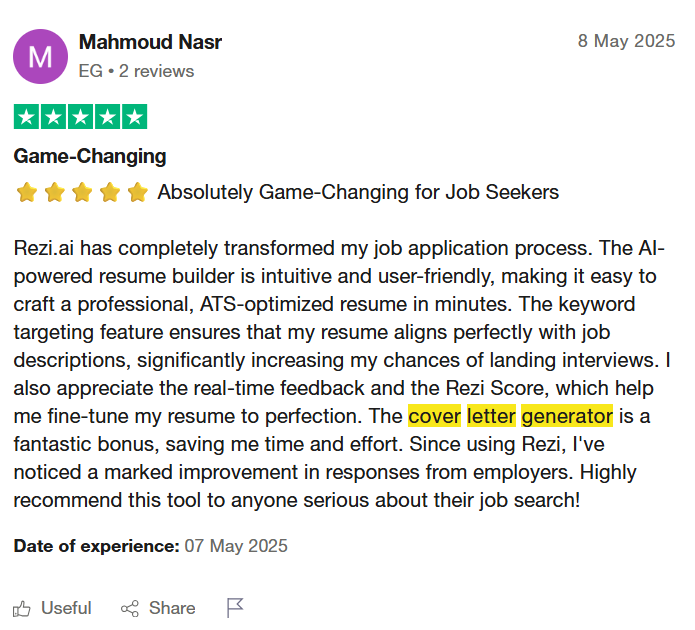
But you don’t have to take our word for it. Check out what this Rezi user had to say:
That said, here are some other solid cover letter generators:
- Resume Genius: Tons of templates to choose from, from modern to minimalist. Their AI pulls from real job ads and uses a handy questionnaire to personalize your letter.
- Kickresume: I like how visual it is. You enter your info, then get to pick from a lineup of polished templates with your letter already in place. Beginner-friendly and sharp-looking.
- Cover-Letter-Now: Guides you step-by-step, then lets you click on paragraphs and add in sample sentences. It clearly breaks your letter into intro, body, and closing for easy edits.
- ChatGPT: How could I not mention ChatGPT? It’s free, flexible, and great for refining your wording. But you’ll need to do your own formatting and copy-pasting. Perfect if you know what you want to say but need help phrasing it.
If you don’t believe comparison is the thief of joy, you might enjoy these side-by-side breakdowns:
Benefits of Writing a Cover Letter with AI
In short: writing a cover letter with AI is a smart way to save time and reduce stress, especially since many hiring managers barely read them. If a cover letter is optional, it’s still worth submitting to show effort. AI helps you draft faster, beat writer’s block, tailor your letter to the job, highlight key strengths, and polish your tone. It also keeps the structure on point and makes it easy to tweak for future applications.
Let’s be honest: cover letters don’t get the love they used to. A lot of hiring managers barely glance at them — some skip them altogether. But does that mean you should? Absolutely not.
If there’s an option to upload a cover letter, always do it. It shows effort and interest, even if it only gets a skim.
Here’s what this tech recruiter shared on Reddit:

As they mentioned, your resume is what really does the heavy lifting. So if the cover letter is more of a bonus than a must-have, why spend hours perfecting every sentence? That’s exactly where AI can help.
Here’s why it’s worth making a cover letter with AI:
Save time and write faster
Writing a cover letter from scratch can take hours, especially if you’re applying to several jobs. AI can give you a strong first draft in minutes. You can revise it, build on it, or just use it as inspiration to kickstart your own version.
Beat the writer’s block
Not sure where to begin or how to word things? AI can give you a clear starting point and structure. Sometimes, even seeing a rough paragraph can help you get in the flow and start writing.
Tailor each letter to the job
Smart AI tools (*cough* Rezi) tailor your letter to the company, role, and even the specific keywords in the job description. It weaves those details into your experience so naturally, the letter feels targeted, not templated.
Highlight your best stuff
Want the letter to show off your leadership skills or that internship that matches the role? Guide the AI to focus on your most relevant strengths, so you’re not stuck with a generic “I’m a great team player” letter.
Sound polished and professional
If writing isn’t your thing, it’s no big deal. AI tightens up your language, smooths out awkward phrasing, and makes you sound confident. And if English isn’t your first language, it can help you sound so clear and professional, the hiring manager might double-check if you’re a native speaker.
Get the structure right
Cover letters follow a basic format: intro, body, closing. AI will help you hit all the right parts without overthinking it. And if you’re using a builder like Rezi, it’ll handle the formatting too — spacing, fonts, and all.
Easy to update for the next job
Once you have a draft you like, updating it for another role is quick and painless. Just swap in a few details (like the company name or job title) and you’re ready to send it off again.
Wondering if Rezi’s worth it? Yosra noticed a real difference in callbacks after switching from her usual resume and cover letter to ones created with Rezi:
For more user insights, read Is Rezi Worth It: An Honest Review With Customer Feedback.
Summary
Here’s a recap of how to use AI to write a cover letter:
- AI saves time and reduces stress by generating strong first drafts in minutes, which is ideal for multiple job applications.
- AI cover letter builders like Rezi are faster and more automated, handling formatting and structure. ChatGPT offers more control, but requires hands-on editing.
- Start by inputting your contact info, job title, company name, and relevant experience.
- Add details that personalize the draft, such as years in the field, achievements, and why you’re excited about the company.
- Highlight skills from the job description that align with your strengths to guide the AI.
- Always edit the draft to refine tone, fix awkward phrasing, and make sure it sounds like you.
- A personalized cover letter still matters, even if it’s only skimmed by hiring managers, and AI makes writing one easier than ever.
FAQ
Is it bad to use ChatGPT for a cover letter?
Not at all. ChatGPT is just a tool to help you get started, like a template or spellchecker. The trick is to make sure the final letter sounds like you. Don’t just copy-paste — add your personality and why you want the job. Used right, it saves time and helps you write a clear, thoughtful letter.
Can companies detect AI cover letters?
Hiring managers won’t run your letter through AI detectors (probably), but they can spot when something sounds robotic or generic. If you change up the tone, add personal details, and make sure it honestly reflects your experience and interest, you’ll be fine.
What should you avoid putting in a cover letter?
Skip repeating your resume, using vague buzzwords like “hardworking,” or writing long, rambling paragraphs. Also, avoid negativity or being too casual. Instead, focus on why you want the job, what makes you a great fit, and keep it clear, friendly, and professional.
How to use AI for a job application?
AI can do way more than just draft cover letters. It can help you write and tailor your resume for each job, prep you for interviews, and even find roles that match your skills. Some tools can score your resume or help craft a sharp summary to make you stand out. If you want something that does it all, give Rezi a try.
Are cover letters necessary?
Not always, but they’re usually worth the effort. Some jobs don’t require them, and not all hiring managers read them closely. Still, a good cover letter shows you care, lets you highlight something unique, and helps you connect on a deeper level than a resume alone. Plus, with AI tools making writing quick and easy, it’s often worth taking that extra step.
For more on this, read Are Cover Letters Necessary? 5 Times You Can Skip Them.
How to make a quick cover letter?
Use ChatGPT or a builder like Rezi. Give it your name, the job title, a few relevant experiences, and why you want the role. Let it draft the letter, then tweak the tone and add your personal touch. You can usually have a polished letter ready in under 10 minutes.

Upload or drop your resume to get started
Upload your resume to get started
Score my resume

Sarah Coghlan is a writer and editor passionate about making resume and career advice clear and accessible to all. Based in Barcelona, her goal is to help job seekers create standout resumes and navigate the job search process with confidence and ease.