User Guides
Job Search
Learn how to use Rezi Job Search to find real jobs, tailor resumes, track applications, and improve your chances of landing interviews.
Published on
July 15, 2026
Updated on
July 16, 2026
Job boards like LinkedIn and Indeed are popular for a reason. They put millions of jobs in one place, which sounds great… until you’re competing with hundreds of applicants for the same role, sorting through ghost listings, and wondering whether anyone actually reads applications.
If that sounds familiar, it’s time to expand your search. Instead of acting like another crowded job board, Rezi Job Search helps you find real jobs sourced directly from company career pages, tailor your resume to specific roles, and keep your applications organized — all in one place.
In this guide, I’ll walk you through what Rezi Job Search is, how to use it, and how to get the best results.
Want to improve your resume before job hunting? Check out our free AI Resume Builder. Create a tailored resume in minutes with expert suggestions and feedback.
You can also explore our other job search tools:
And check out more job search strategies and tips:
What Is Rezi Job Search?
Rezi brings job hunting and resume writing together with the Job Search platform. The tool helps you find real job openings, tailor your resume to specific roles, and track applications without constantly switching tabs.
What makes it different from the job board giants is that Rezi uses a massive database of real, current openings sourced directly from company career pages. With over 1.3 million jobs available, you get access to fresh opportunities straight from employers.
Here are some of the key features of Rezi Job Search:
- Find jobs: Browse thousands of active job listings based on your experience, skills, and career interests.
- Tailor your resume: Once you find a role you like, you can immediately use Rezi’s resume tools to customize your application.
- Track your applications: Keep tabs on where you’ve applied and organize opportunities by stage, such as saved, applied, interviewing, or offer stage.
Want a better view of the job market? You can also explore the Rezi Job Search Map to discover opportunities by location, role, and skill before you send your next application.
How To Use Rezi Job Search
Here’s a quick overview of how to use Rezi Job Search:
- Open Rezi Job Search from your dashboard to access job listings, organize applications, and tailor resumes in one connected workspace.
- Search for roles using keywords, job titles, or locations, then refine results with filters and sorting options to find relevant opportunities faster.
- Review job details through organized sections that highlight responsibilities, requirements, salary, skills, and company information so you can quickly assess fit.
- Apply through the company website and use Target Resume to tailor your resume with AI-powered keyword and content suggestions.
- Track your applications by saving jobs and updating statuses, helping you stay organized throughout every stage of the hiring process.
Let’s explore the details of how to use Job Search step-by-step.
1. Open Rezi Job Search
Start from your Rezi dashboard and click Job Search.
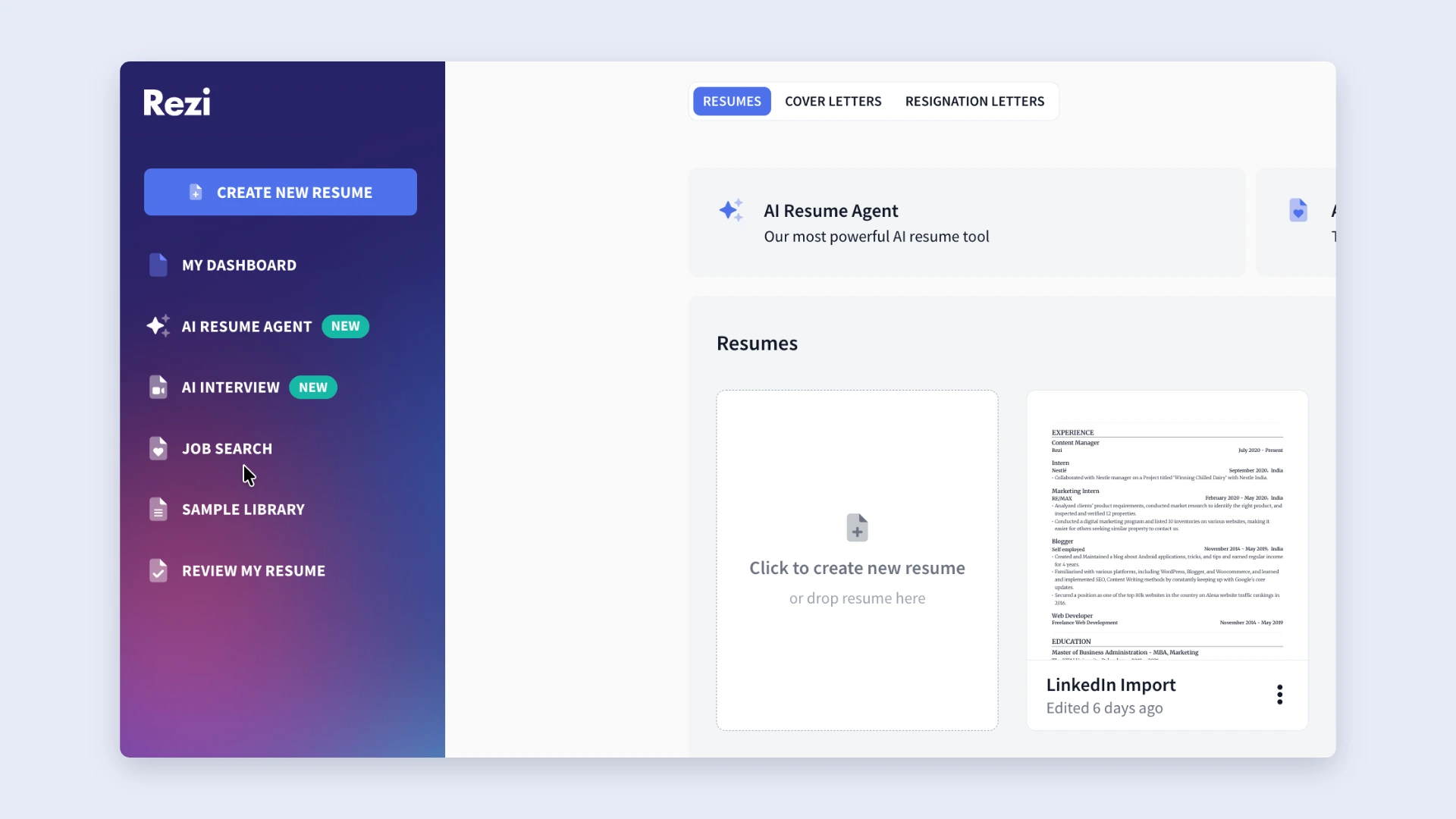
Once you land on the Job Search page, you’ll have access to three core things:
- Search for jobs
- Organize applications
- Tailor resumes to specific job descriptions
Since everything connects inside your dashboard, Rezi keeps your job search tied to your resumes and job descriptions. This makes it easier to customize applications without constantly copying and pasting information between platforms.
2. Search for roles
Use the search bar to enter job titles, keywords, industries, or locations to find opportunities that match your experience and career goals.
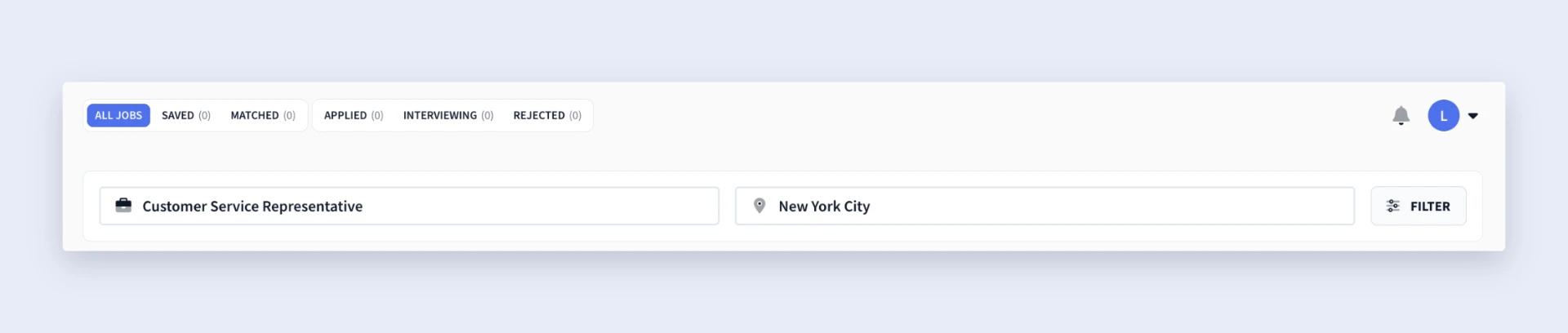
And to narrow things down, Rezi gives you these filters:
- Workplace Type (remote, on-site)
- Job Type (full-time, part-time)
- Visa Sponsorship
- Skills
You can also clean up your search results by excluding jobs you’ve already:
- Saved
- Applied to
- Been rejected from
As you browse, you can also sort listings by:
- Best Match: Great when you want roles aligned with your background
- Newest First: Useful if you want to jump on fresh opportunities quickly
Rezi refreshes listings regularly and sources jobs directly from company career pages, helping to cut down on duplicate or outdated postings.
3. Review job details
Once something catches your eye, click the listing to dig into the details. Instead of scanning one giant wall of text, Rezi organizes job descriptions into sections so you can quickly decide whether a role makes sense for you.
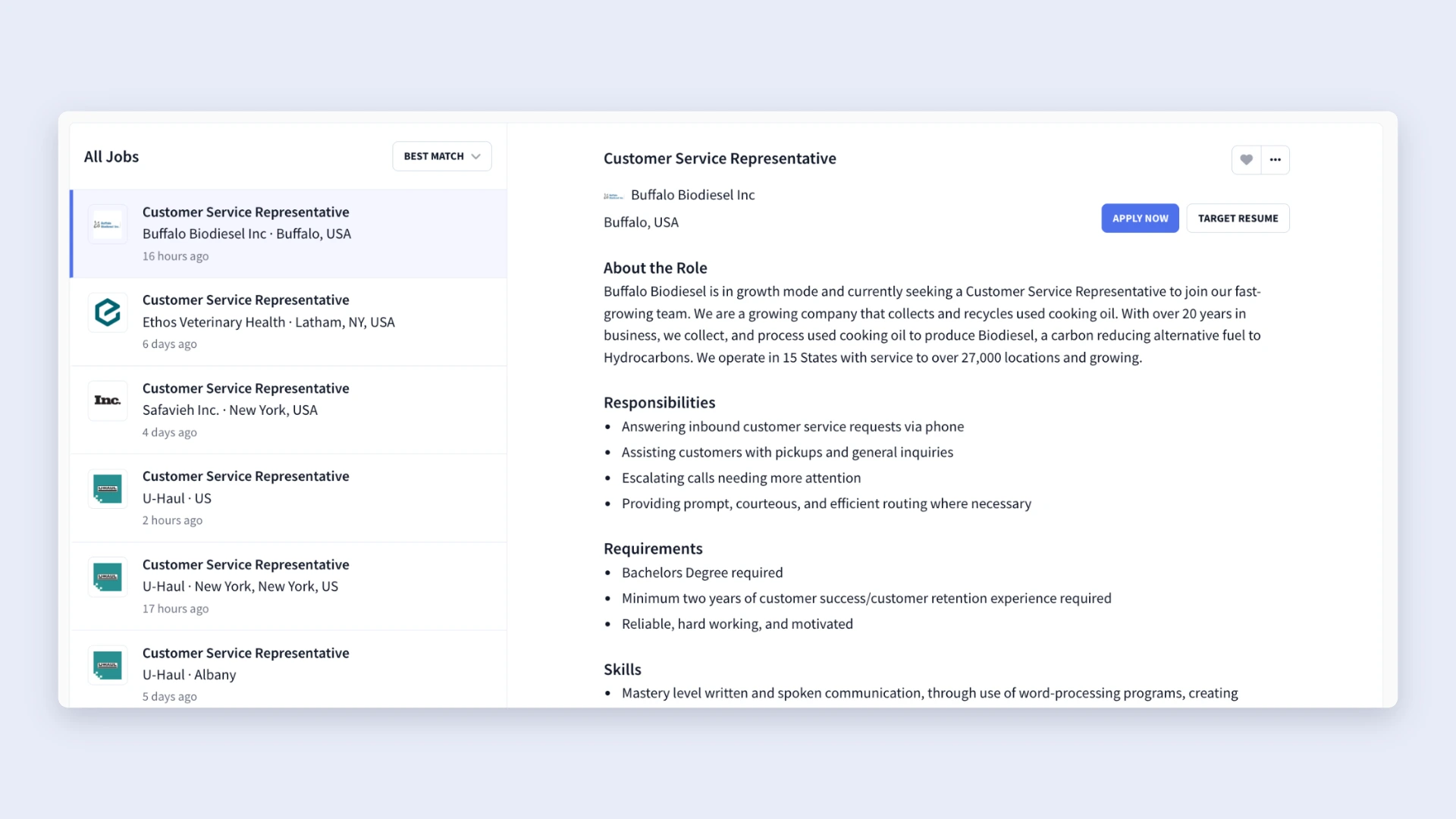
You’ll typically see details broken down into these sections:
- About the Role
- Responsibilities
- Requirements
- Skills
- Location
- Work Type
- Experience Level
- Education Level
- Annual Salary
- Benefits
- About the Company
- Equal Opportunity Information
This is a big time-saver because you can immediately check the qualifications, compensation, and expectations before investing energy into an application. And if you’re interested but not ready to apply yet, you can save the role and revisit it later in your Saved Jobs section.
4. Apply and tailor to the job description
When you’re ready to move forward, click Apply Now. Rezi doesn’t submit applications for you; instead, it takes you directly to the company’s website, where you’ll complete the application process.
That extra step comes with a few advantages:
- You may face less competition than candidates applying through crowded job boards like LinkedIn.
- You show a stronger interest by visiting the company’s careers page.
- You learn more about the company beyond the short summary shown on most job boards.
But before applying, take advantage of one of Job Search’s best features: Target Resume.
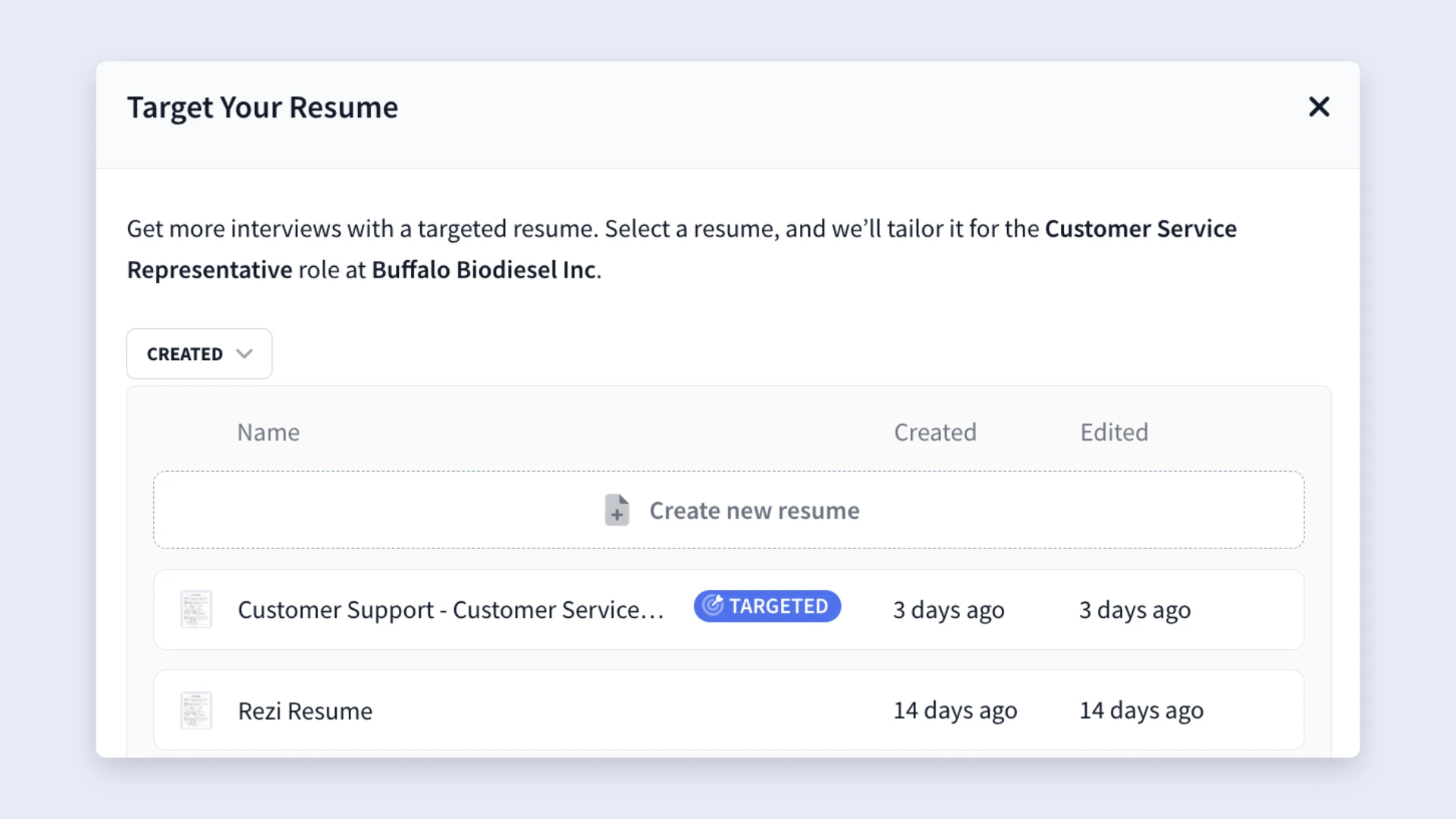
When you select Target Resume, Rezi lets you choose a resume from your dashboard and customize it for that specific role. From there, it opens your resume inside the AI Resume Builder so you can improve alignment with the job description.
For example, you can use the AI Keyword Targeting feature to:
- Spot important keywords you’re missing
- Get suggestions for weaving those terms into bullet points
- Better align your resume with the role’s requirements
Why is this important? With a single job getting hundreds of applicants, tailored resumes have a better chance of standing out and performing better than sending the same, generic version to every employer.
You can also use our AI Resume Agent to compare any resume against a job description and get specific tips on how to tailor your application.
5. Track your applications
Rezi helps you avoid forgetting which jobs you applied to (or got rejected from) by giving you a built-in system to track your applications. As you move through the hiring process, you can save jobs and update each application’s status directly on the platform.
Here’s how the categories work:
- All Jobs: Browse openings and search by title, keyword, or location
- Saved: Jobs you bookmarked for later
- Applied: Roles you’ve already submitted applications for
- Interviewing: Positions where you’ve moved to the interview stage
- Rejected: Applications that didn’t move forward
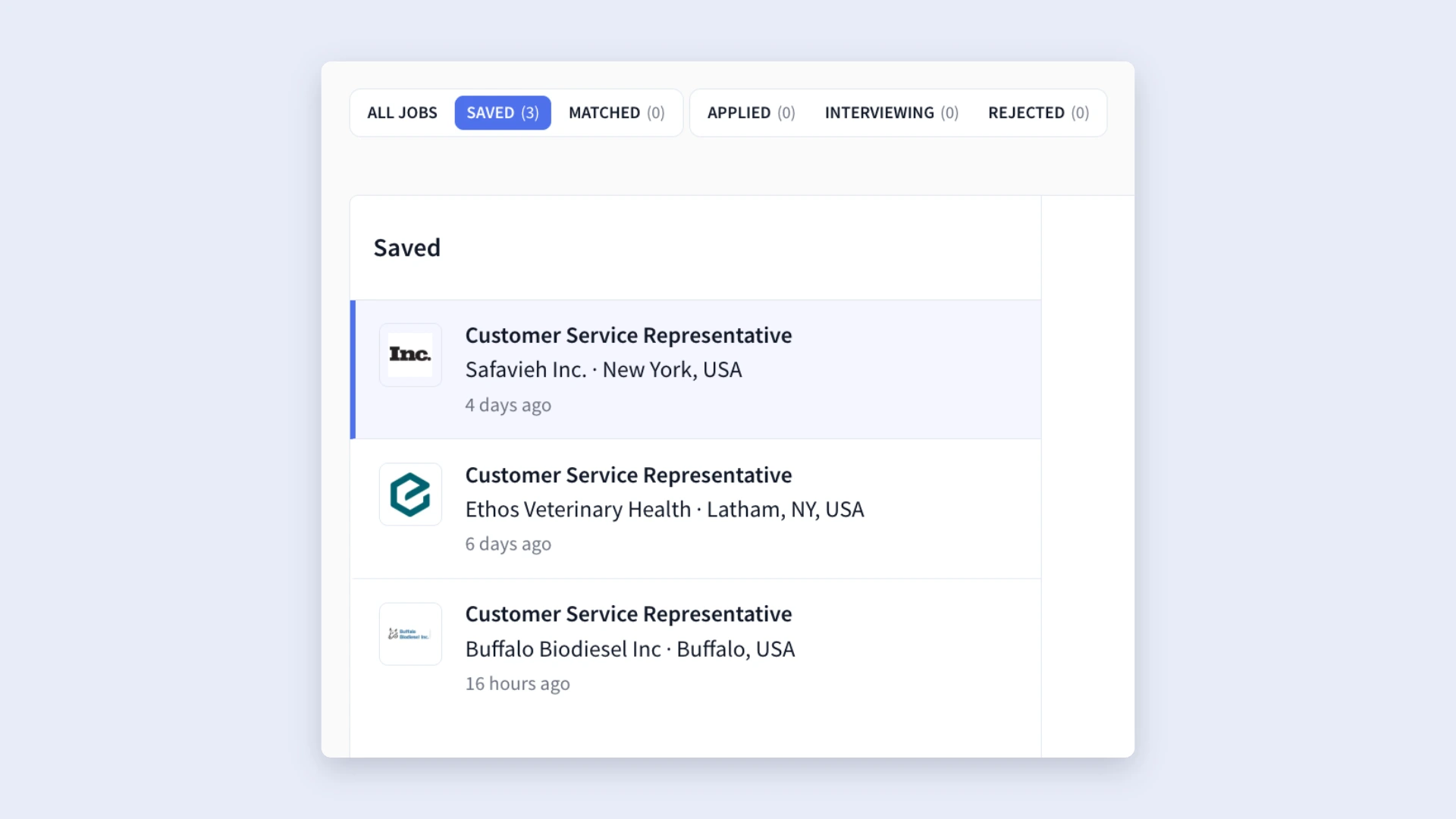
Yes, it’s pretty simple, but it’s all you need to keep on top of your applications. Once they start piling up, having a system like this feels a lot easier than digging through old emails trying to remember which company you have an interview with (been there, don’t recommend).
Check out more ways to organize your applications: How to Keep Track of Job Applications
How to Get the Best Results
Rezi Job Search gives you plenty of useful data and tools, but the real advantages come from how you use them. You don’t need a perfect strategy on day one; you just need a system that helps you learn what works and adjust as you go.
Here are some simple tips to get the most out of your job search:
Pay attention to patterns in your job applications
After weeks of applying, step back and look for patterns. Are certain job titles getting you more responses? Do smaller companies reply more than big brands? Are remote roles more competitive for your background? Notice what’s working and focus your attention in those areas.
It can also give you better clarity if you’re unsure which career direction you want to pursue. As you save and apply to roles, ask yourself:
- What salary range keeps showing up?
- Which companies feel exciting to me?
- What kind of growth opportunities matter most?
- Which cultures or work environments stand out?
Even if you don’t have many options, spotting trends helps you become more intentional about where you spend your time and energy.
Customize resumes by role type and job title
You don’t need to rebuild your resume from scratch for every application. In fact, doing that can slow you down so much that you miss good opportunities.
Instead, use Rezi Job Search to spot common themes across job descriptions.
As you save jobs, you’ll probably notice repeated skills, responsibilities, and ATS keywords. Maybe three different positions all ask for negotiation, analytics, and campaign reporting. That’s your sign to create a resume version tailored to that type of role.
I recommend 2 to 4 strong resume variations based on the positions you apply for most often. For example:
- One resume for Marketing Specialist roles
- One for Growth Marketing positions
- One for Content or Brand Marketing jobs
That way, you’re not constantly rewriting everything. You’re starting with a resume that already speaks the language of the role and making minor tweaks when necessary.
And remember: when you use Target Resume, you can quickly compare your resume against the job description and make focused improvements instead of rewriting everything.
You can also connect Rezi to AI tools like Claude, Gemini, or Codex with the MCP Toolkit and customize resumes to job descriptions in seconds.
Focus on timing
Old-school job search advice loves deep customization. Analyze every keyword, rewrite every section, tweak every sentence. In theory, it (kind of) makes sense. In practice, spending 45 minutes on every application usually means you’ll apply to fewer jobs.
It’s better to balance volume and timing.
The sooner you apply after a job goes live, the better your chances are of being seen early on. Recruiters often review applications in batches, and some roles start moving before the posting even closes.
So, here’s a more realistic strategy:
- Start with a resume already tailored to the role type
- Spend 5–10 minutes making targeted edits
- Add missing keywords where they make sense
- Apply while the posting is still fresh
Stay open to different opportunities
I’m all for chasing your dream role, but sometimes the path to it looks different from what you expected. If responses feel slow (or non-existent), try widening the search before assuming something’s wrong.
For example, companies can use wildly different job titles for similar work. What one employer calls a “Marketing Specialist,” another might label:
- Brand Strategist
- Growth Coordinator
- Digital Marketing Associate
It also helps to stay open to different company sizes, industries, and career paths. Sometimes a smaller company gives you more freedom, faster growth, or stronger experience than a role at a brand everyone recognizes.
And remember: you don’t have to get it exactly right immediately. Early in your career, treat the process like research. Try different roles, learn what excites you, and pay attention to what feels like a fit.
Summary
Here’s an overview of everything you need to know about Rezi Job Search:
- Rezi Job Search is an all-in-one workspace where you can find job openings, tailor resumes, and manage applications from a single dashboard.
- Instead of functioning like a generic job board, Rezi pulls from over 1.3 million jobs sourced directly from company career pages.
- You can search for jobs using keywords, job titles, skills, or locations, then narrow results with filters, such as workplace type or job type.
- Every job listing includes a breakdown of useful details, such as responsibilities, required skills, salary, experience level, benefits, and company information.
- Rezi doesn’t automatically apply to jobs for you. When you click “Apply Now,” it sends you directly to the company website, where you complete the application yourself.
- You can connect a specific resume to a job description and use AI tools like Keyword Targeting to identify missing skills, improve wording, and tailor content.
- Instead of rewriting your resume for every application, create a few strong resume versions for your most common job types.
- Applying shortly after a role gets posted often improves your chances, so aim for quick edits instead of spending an hour rebuilding your resume for every opportunity.
- Rezi helps you stay organized by tracking jobs through categories like Saved, Applied, Interviewing, and Rejected.
FAQ
Is Rezi Job Search free?
Yes, Rezi Job Search is free to use. You can search for jobs, browse listings, save roles, and organize applications directly within the platform. However, to get full access to all Rezi’s features, you can pay $29 a month for a Pro account or a one-time Lifetime subscription at $149.
How does Rezi Job Search connect to the AI Resume Builder?
Once you find a role you want to apply for, you can connect that job description directly to a resume using Target Resume. Rezi then opens your resume in the AI Resume Builder, where tools like AI Keyword Targeting, bullet point suggestions, and resume optimization help you tailor your content to the position.
What is the Rezi Job Search Map?
The Job Search Map lets you explore millions of job opportunities on an interactive world map, which is helpful if you’re considering relocation or just want a bigger-picture view of the market. You can search by job title, skill, or location, then filter the results. It helps you spot hiring trends, compare regions, and discover opportunities you might never find through traditional job boards.
What’s the best job search platform?
Rezi’s Job Search stands out if you want a more organized, strategic process because it combines job discovery, resume tailoring, and application tracking in one place. LinkedIn works well for networking, Indeed is strong for volume, and niche boards can help in specialized industries. That said, there’s no single “best” platform for everyone; it depends on your goals.

Upload or drop your resume to get started
Upload your resume to get started
Score my resume

Lauren Bedford is a seasoned writer with a track record of helping thousands of readers find practical solutions over the past five years. She's tackled a range of topics, always striving to simplify complex jargon. At Rezi, Lauren crafts genuine and actionable content that guides readers in creating standout resumes to land their dream jobs.