User Guides
AI Resume Agent
Learn how to use the AI Resume Agent to improve your resume, tailor applications, boost ATS performance, prepare for interviews, and find relevant jobs.
Published on
July 15, 2026
Updated on
July 16, 2026
Sure, you can throw your resume into ChatGPT and ask it to “make it better.” But you’ll probably get a response filled with vague buzzwords, suspiciously corporate phrasing, and robotic bullet points (no surprise there). General AI tools aren’t built specifically for resumes, ATS systems, or what hiring managers really want to see.
Instead of dishing out generic advice, the AI Resume Agent analyzes your resume, tailors it to specific job descriptions, suggests stronger bullet points, improves ATS compatibility, and even helps with finding jobs. It’s built to give feedback that’s tied to your experience rather than handing you the same copy-and-paste advice everyone else gets.
In this guide, I’ll show you how to use the AI Resume Agent and make the most of its features.
Want better results from the AI Resume Agent? Start with the free AI Resume Builder to get more personalized feedback and stronger suggestions.
You can also check out these tools to help with your job search:
And take a look at more ways to use AI:
- Ways to Use AI to Write a Resume
- How to Use AI to Write a Cover Letter
- How to Tailor Your Resume to a Job Description With AI
What Is the Rezi AI Resume Agent?
The AI Resume Agent is an AI-powered resume and career assistant designed to support you through every stage of the job search process. It’s like ChatGPT, but specifically trained to understand resumes, Applicant Tracking Systems (ATS), and job search strategies.
And it doesn’t just give generic, robotic advice. It works with your experience, existing resume, and target jobs to offer recommendations that are relevant and practical.
Here are some ways the AI Resume Agent can help:
- Analyze your resume and point out areas that need improvement
- Rewrite and strengthen resume sections so they sound clearer and more impactful
- Tailor your resume to match a specific job posting
- Suggest stronger bullet points and professional summaries
- Share interview preparation tips based on your background and experience
- Recommend job opportunities that align with your skills and career goals
And you don’t even need an existing resume to get started. You can also connect to the AI Resume Agent when you create a resume and work through the process of building your application step-by-step with custom prompts and personalized suggestions.
To get better outputs, submit any relevant information, including your resume and job descriptions. This gives the AI Resume Agent more context, which means you’ll get feedback that feels personalized instead of generic.
Whether you want to raise your Rezi Score, customize your resume, prepare for interviews, or discover new job opportunities, the AI Resume Agent helps guide you through the process.
How to Use the AI Resume Agent
Here’s the short version of how to use the AI Resume Agent:
- Start with a built-in prompt by uploading your resume from your dashboard or as a PDF, then choosing from: Improve My Rezi Score, Target My Resume, or Find Jobs.
- Enter your own prompts by asking custom questions about resumes, interviews, job searching, or career growth, and include details like your resume and a job description.
- Review and apply the feedback by using the AI Resume Agent’s detailed suggestions to strengthen bullet points, add measurable results, improve formatting, and more.
- Continue the conversation to get the best results by asking follow-up questions, requesting stronger examples, clarifying recommendations, and refining your resume.
Now, let’s get into the details to see exactly how it works.
1. Start with a built-in prompt
Head to your dashboard and click AI Resume Agent. Before you select a built-in prompt, attach your resume from your dashboard or upload it as a PDF. The more information you provide, the more useful and personalized the feedback becomes.
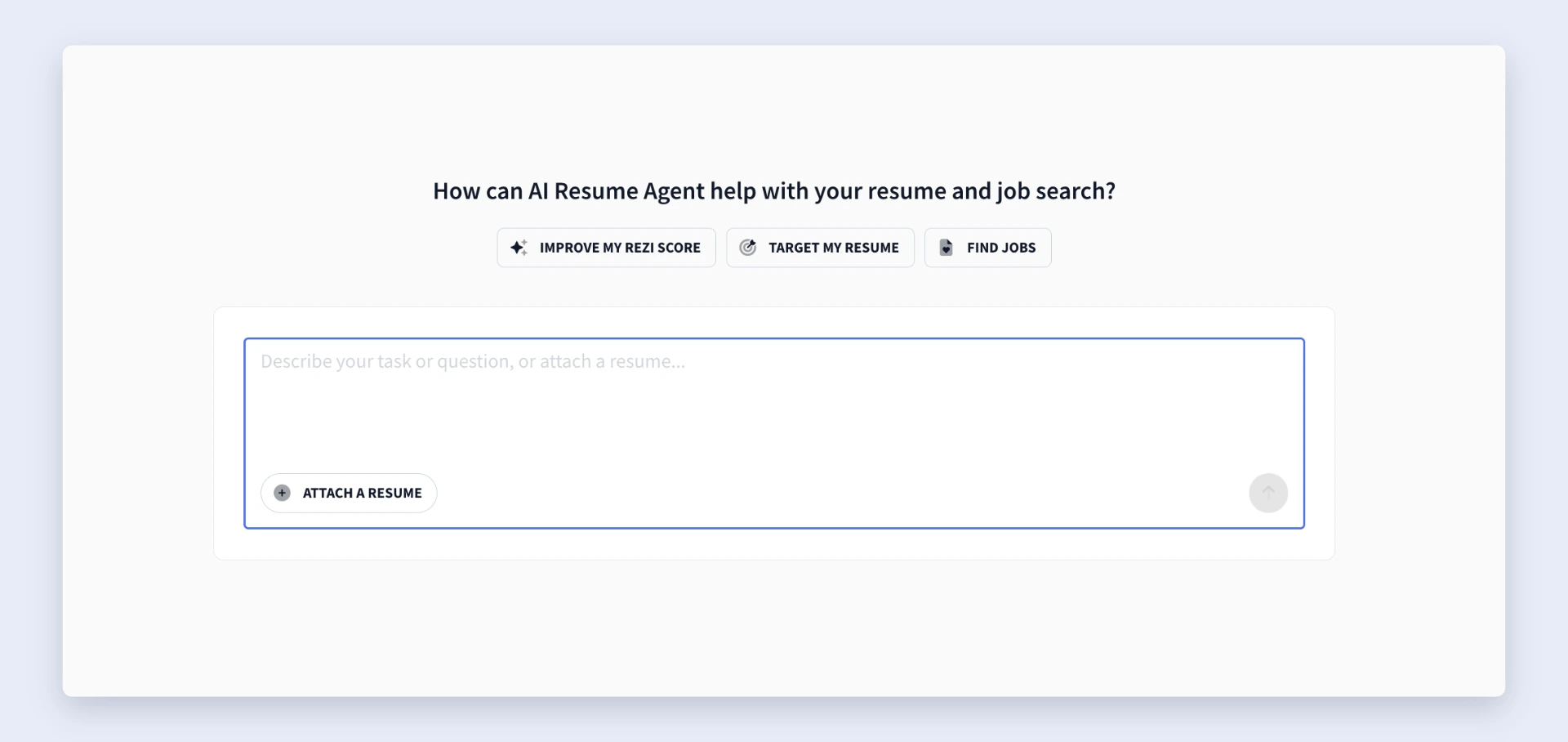
Once you’ve uploaded your resume, you can choose from three main options:
- If you choose Improve My Rezi Score, the AI reviews your resume and highlights ways to improve readability, keyword usage, and ATS performance.
- If you select Target My Resume, the AI compares your resume with a job description and recommends edits that improve alignment.
- If you choose Find Jobs, the AI uses your resume, experience, skills, and location to surface relevant opportunities through Rezi’s AI Job Search tool.
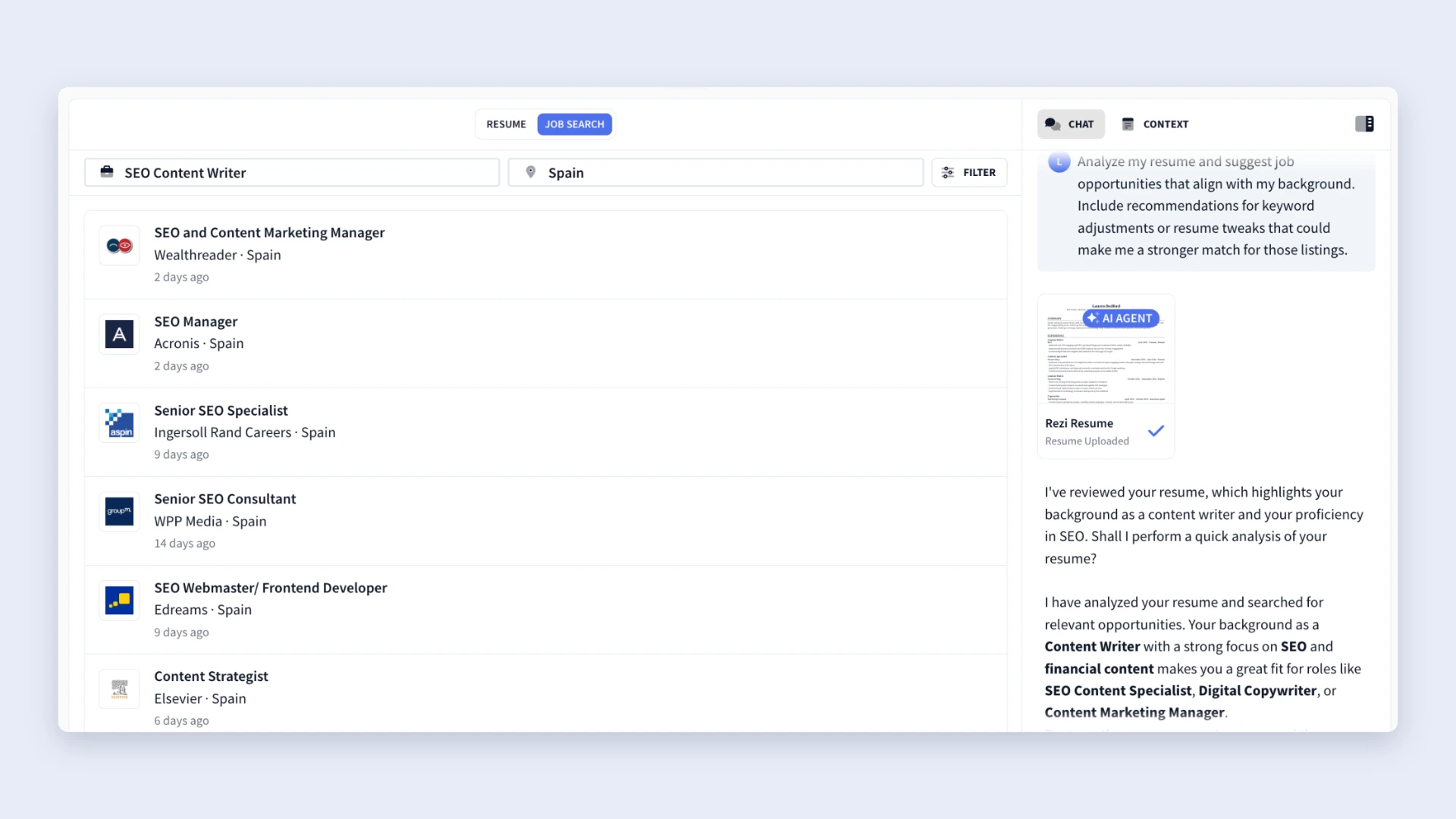
After clicking one of these options, the AI Resume Agent starts the conversation and gives recommendations based on your resume and career goals. From there, you can ask follow-up questions and dig deeper into the feedback.
2. Enter your own prompts
Once you get comfortable, move beyond the pre-written options and ask the AI Resume Agent your own questions. You can type custom prompts about resumes, job searching, interviews, or career growth, and the AI will respond with advice tailored to your situation.
To get stronger results, try adding:
- Your resume
- A job description
- Details about your career goals or target role
- Any specific challenges you’re running into
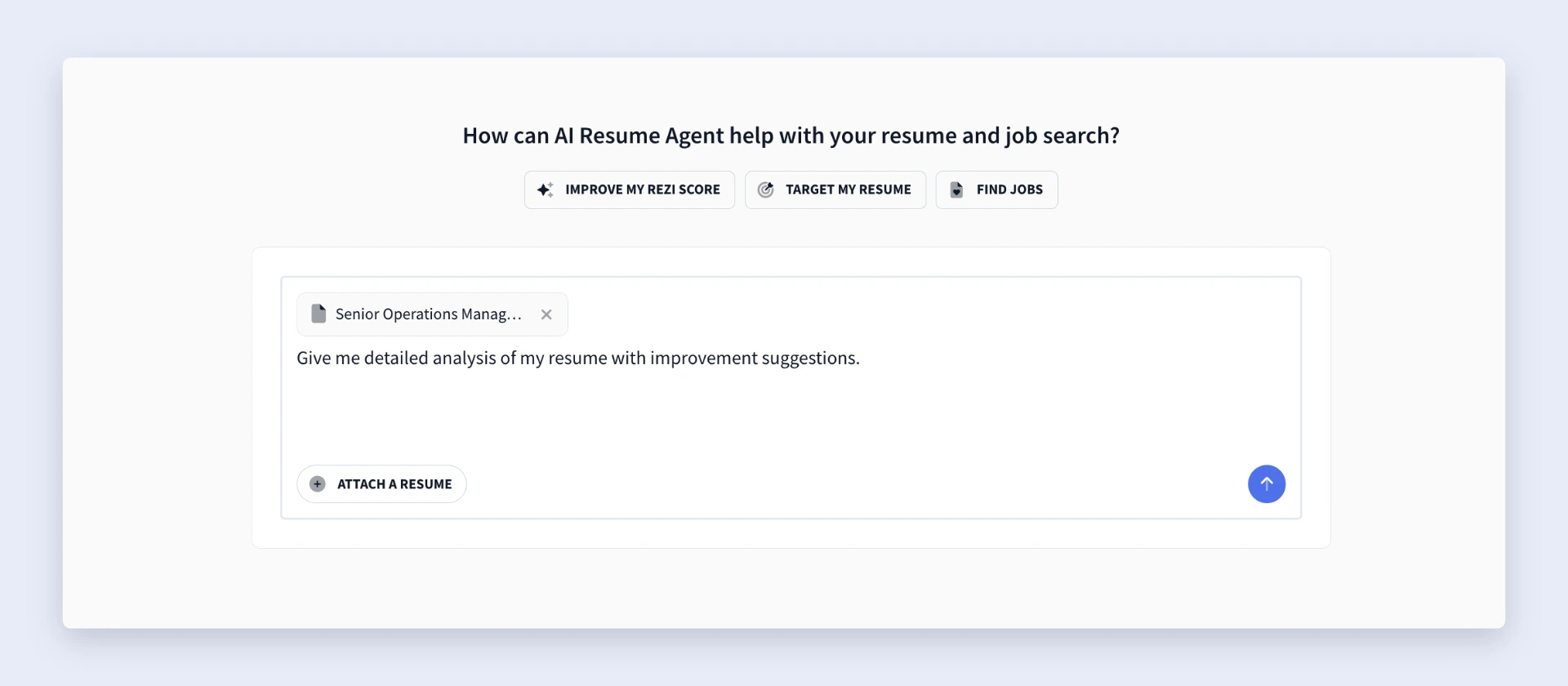
And here are a few examples of prompts you can try:
• Give me a detailed analysis of my resume and tell me what I should improve.
• Tailor my resume for this job description.
• Give me stronger bullet point ideas for my work experience.
• Rewrite my resume summary to sound more engaging and ATS-friendly.
• Give me interview questions and prep tips for my target role.
• Find job opportunities based on my experience, location, and preferences.
And remember: vague questions lead to vague answers. The more context you provide, the more practical the advice becomes.
You can also use the free AI Resume Bullet Point Generator to get a list of resume-ready bullet suggestions tailored to your professional background.
3. Review and apply the feedback
After you submit a prompt and upload your resume, the AI Resume Agent will pull up your resume alongside detailed suggestions and improvement tips. Instead of giving broad advice, it points to specific resume sections and explains what you can improve.
The feedback may cover things like:
- Weak or unclear bullet points
- Missing metrics and measurable results
- Resume formatting issues
- ATS-friendly language and keyword optimization
- Ways to make your accomplishments sound more impactful
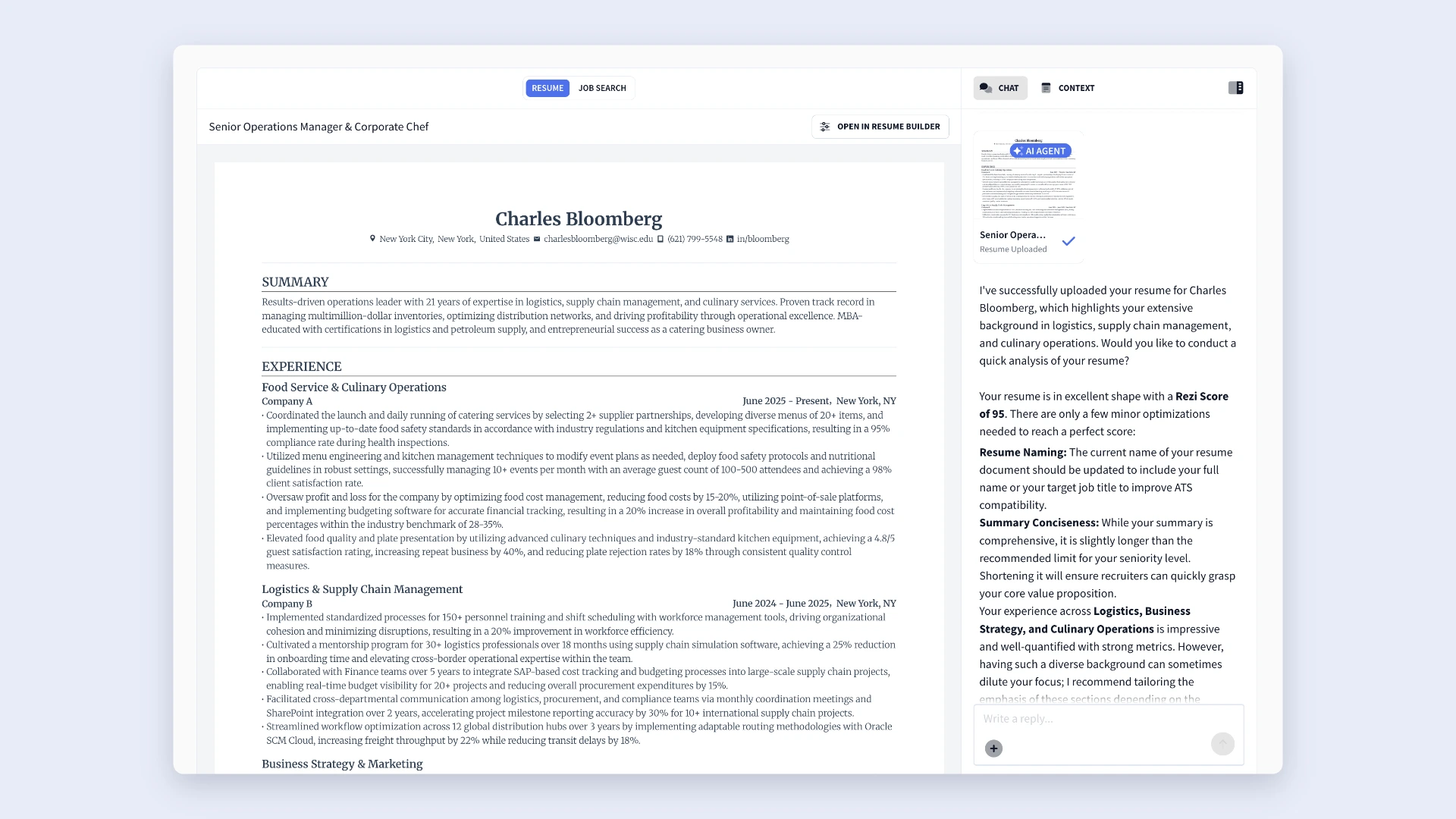
And a handy bonus is that you can review the suggestions while editing your resume side-by-side. So, there’s no jumping between multiple tabs or trying to remember the feedback.
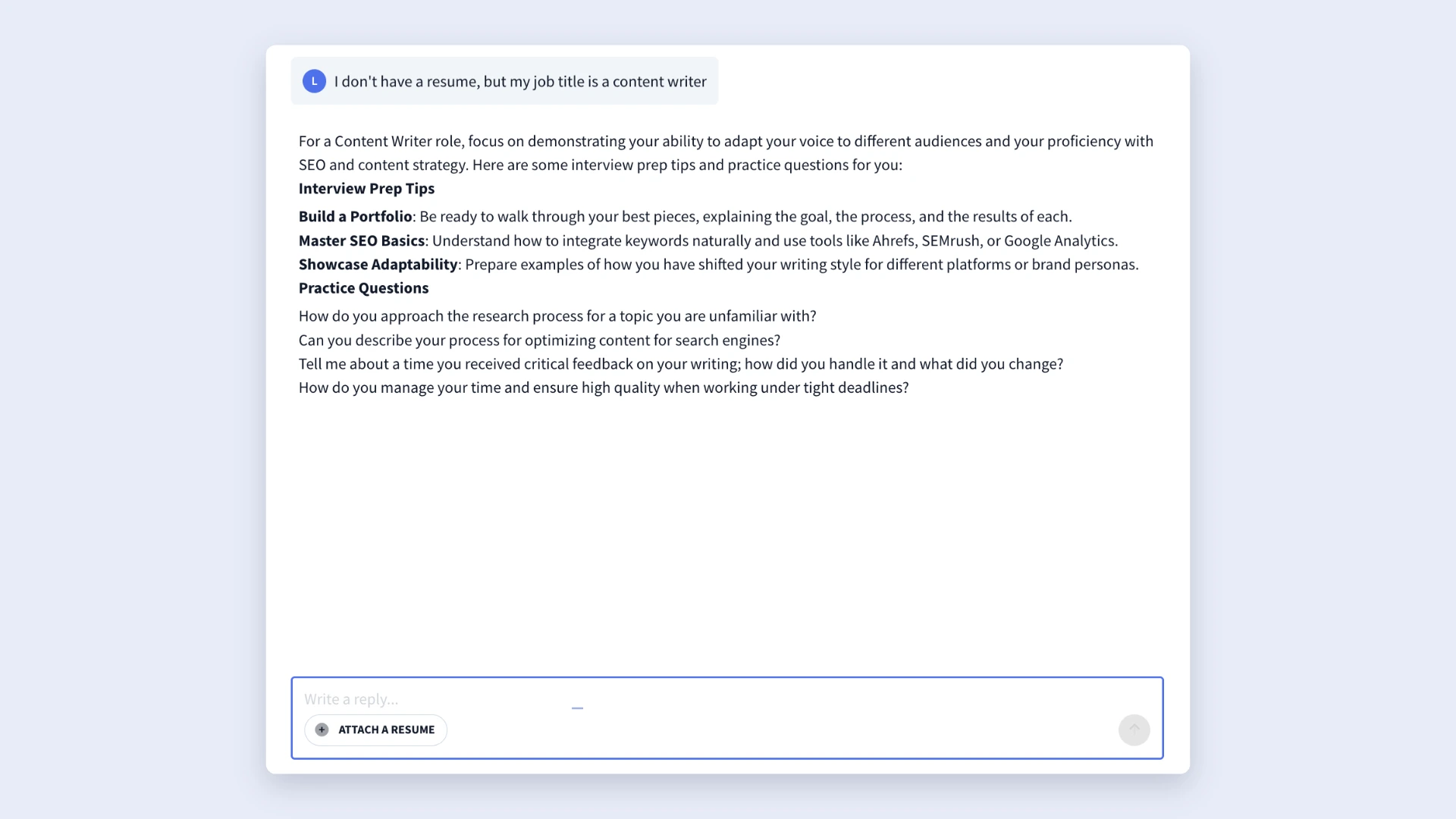
No resume yet? You can still use the AI Resume Agent. If you share enough information about your background, target role, or career goals, it can still offer advice. For example, you might ask for interview prep based on your current role or request resume tips for switching industries.
If you already have a resume, you can also get actionable feedback with the ATS Resume Checker. Get ATS-friendly tips and improvements along with your own Rezi Score.
4. Continue the conversation
If you want to make the most out of the AI Resume Agent, don’t treat it like a one-and-done tool. You’ll get better results if you keep the conversation going. If you want stronger resume bullet points, ask for examples. If something sounds unclear, ask the AI to explain why it suggested a change.
For example, you could ask:
- Can you show me exactly where to apply these changes?
- Can you rewrite this bullet point to sound more results-focused?
- Give me three stronger examples based on my experience.
- How can I make this resume better for ATS systems?
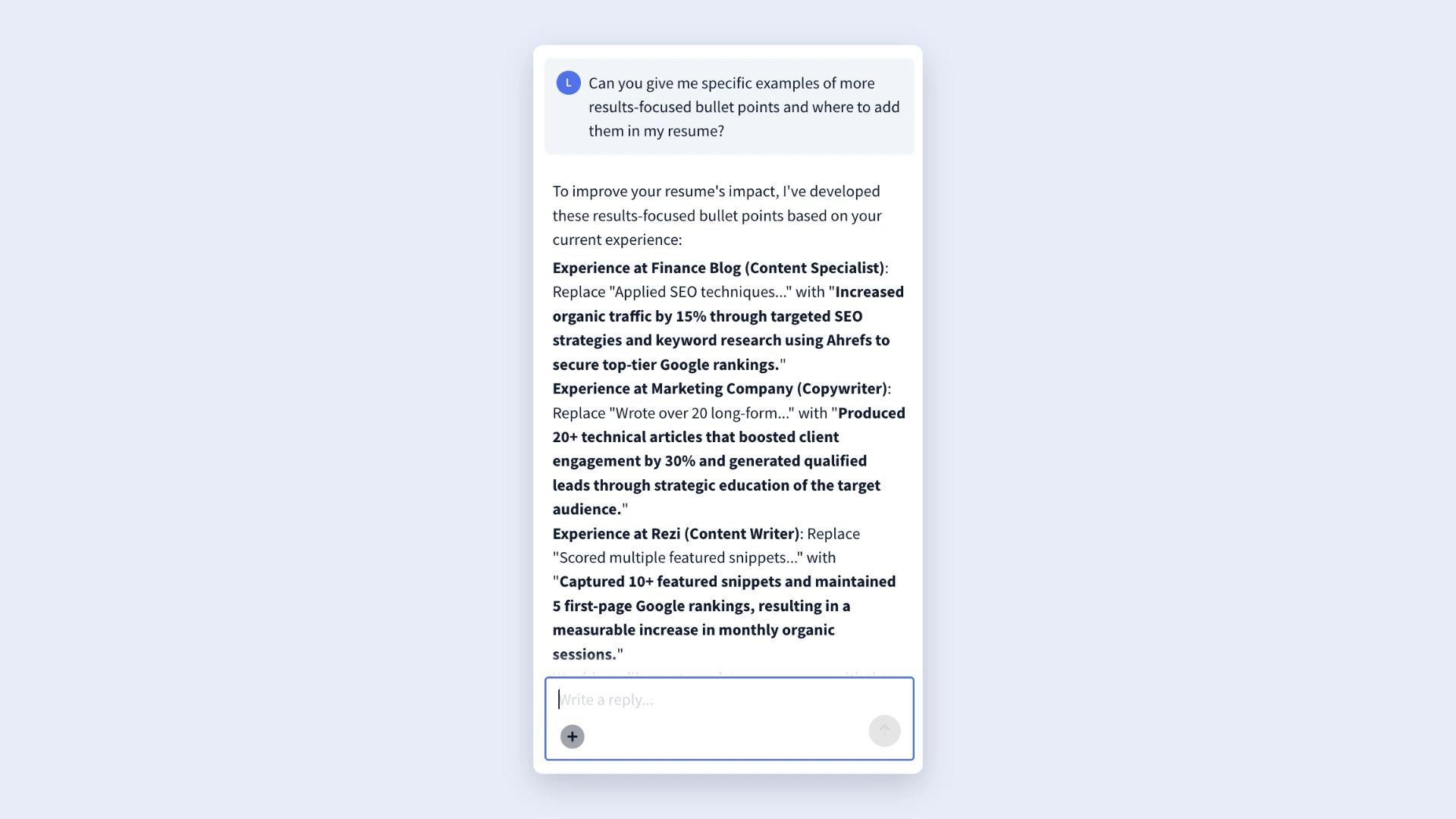
Feel free to continue asking questions and keep improving your resume until you feel confident hitting submit on your applications.
How to Get the Best Results
The AI Resume Agent can do a lot, but the quality of the output depends on what you put into it. If you treat it like a quick question-and-answer tool, you’ll still get decent feedback. But if you give it context, details, and direction, the results become way more practical and personalized.
Here are a few simple ways to get the most out of it.
Be specific with your prompts
The AI Resume Agent is built to give detailed resume and job search tips, but it can only work with the information you provide. It’s smart, but it can’t guess your career goals, target roles, or what you actually accomplished at work (aka, it’s not a mind reader).
For example, compare this generic prompt to something more specific:
- How can I improve my resume? (broad and vague)
- Analyze my resume for a project manager role and tell me how I can improve my Rezi score. (gives context and mentions a specific resume goal)
Here are a few more ways to improve the quality of responses:
- Attach your most recent resume
- Paste the full job description instead of a short summary
- Explain the type of role you want
- Mention any career changes, employment gaps, or specific concerns you have
Update your resume
You don’t need a perfect resume before using the AI Resume Agent (after all, that’s why you’re using it). But it does help to start with something current and reasonably complete.
For example, an updated resume helps the AI:
- Suggest stronger and more relevant bullet points
- Identify missing keywords for ATS systems
- Offer interview preparation tips based on your experience
- Recommend job opportunities that fit your background
If your resume still lists an old job title, outdated skills, or missing achievements, the AI can only work with that version of your story. Spending a few minutes updating your latest experience before uploading it to the AI Resume Agent usually leads to stronger recommendations.
Make feedback unique to you
One of the best things about the AI Resume Agent is that it can suggest stronger bullet points, measurable achievements, and more impactful wording. That said, don’t copy and paste every suggestion word-for-word without reviewing it.
The best move is to tweak the wording, swap in real numbers, or add small details that reflect what you achieved.
Why? Because hiring managers read a lot of resumes. Generic wording can blend together, while specific accomplishments stand out. A resume that comes across as personal and authentic always feels stronger than one that sounds like it came directly from ChatGPT.
Check out more tips: How to Make a Resume Stand Out
Summary
Here’s an overview of everything you need to know about the AI Resume Agent:
- The AI Resume Agent is Rezi’s built-in AI career assistant designed to help with resume writing, job searching, ATS optimization, and interview preparation.
- You can start with pre-built prompts like Improve My Rezi Score, Target My Resume, or Find Jobs to get guided, goal-specific support.
- The tool works best when you upload your resume and paste job descriptions, since more context leads to more personalized feedback.
- It can analyze your resume, rewrite sections, suggest stronger bullet points, improve summaries, and recommend ATS-friendly keywords.
- The AI Resume Agent can tailor your resume to specific job postings so your experience aligns more closely with employer expectations.
- You can also use it for interview prep, career advice, and job discovery based on your skills, experience, role preferences, and location.
- Feedback appears alongside your resume, making it easy to apply edits without constantly switching tabs or documents.
- The best results come from treating it like an ongoing conversation — ask follow-up questions, refine suggestions, and personalize recommendations to match your real achievements.
FAQ
How do you access the AI Resume Agent?
You can access the AI Resume Agent directly from your Rezi dashboard. Just log in, head to your dashboard, and click AI Resume Agent to get started. Once you’re inside, you can either choose a built-in prompt like Improve My Rezi Score, Target My Resume, or Find Jobs, or type your own custom question.
What prompts work best for the AI Resume Agent?
Specific prompts typically lead to better results. Instead of asking broad questions like, “How can I improve my resume?” try something more detailed, such as, “Tailor my resume for this finance role,” or “Rewrite my bullet points to sound more results-focused.” You’ll also get stronger feedback if you upload your resume, paste a job description, and explain your goals. The more context you give, the more practical and personalized the advice becomes.
Do you need a resume to use AI Resume Agent?
No, you don’t need a resume to use the AI Resume Agent. Without a resume, you can still ask for interview tips, career advice, resume guidance, or job search recommendations. That said, attaching your resume gives the AI more context, which leads to more personalized feedback, stronger suggestions, and better recommendations based on your experience and skills.
Is the AI Resume Agent ATS-friendly?
Yes, the AI Resume Agent is designed to help you create a more ATS-friendly resume. It can recommend stronger keywords, improve formatting, suggest clearer wording, and help align your resume with job descriptions so applicant tracking systems can read it more effectively. Features like Improve My Rezi Score and Target My Resume are especially helpful if you want to strengthen ATS compatibility and improve your chances of getting noticed by recruiters.
Is the Rezi AI Resume Agent free?
Yes, you can try the AI Resume Agent for free, but there’s a limit. Rezi gives free users one AI prompt to test the feature and see how it works. If you want unlimited access to prompts, resume feedback, tailoring suggestions, and ongoing AI support, you’ll need to upgrade your account. Rezi’s Pro plan costs $29 per month, while the Lifetime subscription is a one-time payment of $149, which gives you long-term access without a recurring monthly fee.

Upload or drop your resume to get started
Upload your resume to get started
Score my resume

Lauren Bedford is a seasoned writer with a track record of helping thousands of readers find practical solutions over the past five years. She's tackled a range of topics, always striving to simplify complex jargon. At Rezi, Lauren crafts genuine and actionable content that guides readers in creating standout resumes to land their dream jobs.