User Guides
Create Resume
Creating a resume from scratch - The best way to create your first resume
Published on
July 16, 2026
Updated on
July 16, 2026
Psyching yourself up to build or update your resume can be a daunting task, especially if you’re new to resume writing. That’s why Rezi gives you the freedom to choose how to begin the process. Whether you want to build a resume from scratch, upload an existing resume, or import details from your LinkedIn profile, Rezi helps you get started faster and with less effort.
In this guide, I’ll cover each option and help you choose the best way to create a resume.
Ready to jump straight into your resume? Check out our free AI Resume Builder to create a tailored, professional, and ATS-friendly job application in minutes.
Once you’ve completed your resume, use our advanced tools to prepare for the next steps:
And check out these handy resume tips and examples:
Creating a Resume
You have four options when creating a Rezi resume: start your resume from scratch, update an existing resume, use details from your LinkedIn profile, or go through the process with our AI Resume Agent. No worries about formatting and layout; all you need to do is focus on adding the right experiences, skills, and achievements.
To get started, simply create a new resume from your dashboard and choose the method that works best for you. Rezi will guide you through the process and give you access to AI-powered tools that can help improve your content, tailor your resume to specific roles, and make your qualifications stand out.
How to Create a Resume
Here’s a quick rundown of the different ways you can create a resume with Rezi:
- Build a resume from scratch by starting a new resume from your dashboard, completing the setup details, and optionally targeting a specific job.
- Create from an existing resume by either copying your information into Rezi manually or importing a PDF or DOCX file.
- Import your LinkedIn profile using the Rezi Chrome Extension to transfer your professional information to a new resume.
- Use AI Resume Agent to build, improve, and tailor your resume through a conversation, with real-time AI suggestions and updates.
Now, let’s explore these options in more detail.
1. Create a resume from scratch
Starting with a blank slate? After signing into your account, head to your dashboard and click Create New Resume. You’ll be prompted to complete a short setup form before entering the resume builder.
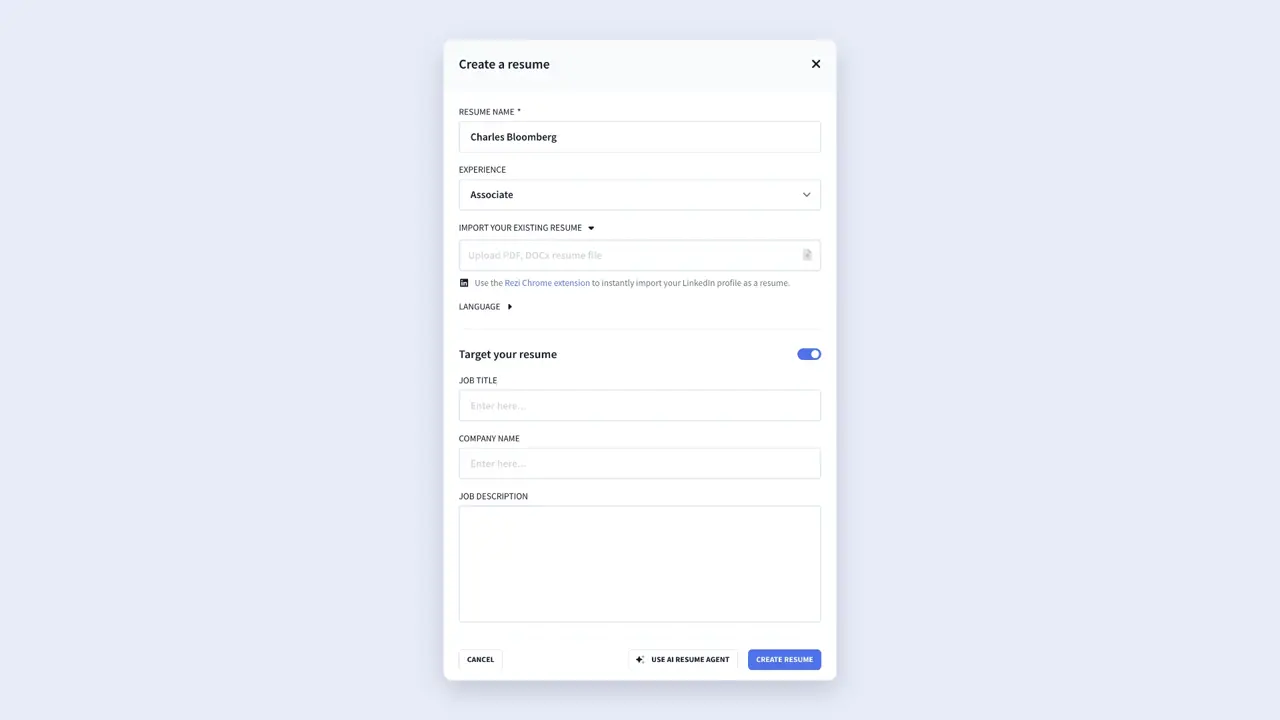
When naming your resume, use a simple format like your first name, last name, and target job title. You’ll also select your experience level so Rezi can tailor the resume-building experience to your background.
You can also select the language of your resume if you’re applying for an international company.
One feature that’s especially useful for first-time users is Target Your Resume. If you already have a job in mind, enter the job title, company name, and job description. Rezi’s AI tools can then provide more relevant suggestions and feedback throughout the writing process.
Learn more about targeting a job description:
- Tailor Your Resume to a Job Description
- How to Find Keywords Missing on a Resume
- How to Tailor Your Resume to a Job Description With AI
2. Create from an existing resume
If you’ve already created a resume elsewhere, you don’t need to start over. You can use your current resume as the foundation for your new Rezi resume in one of two ways.
The first option is to transfer your information manually. Create a new resume in Rezi and copy your content into the right sections one at a time. This approach gives you full control and can be helpful if you want to reorganize or update information as you go.
The second option is faster: import your existing resume directly. Start a new resume from your dashboard and then select Import Your Existing Resume. Rezi supports PDF and DOCX files, and the import process typically only takes a few seconds.
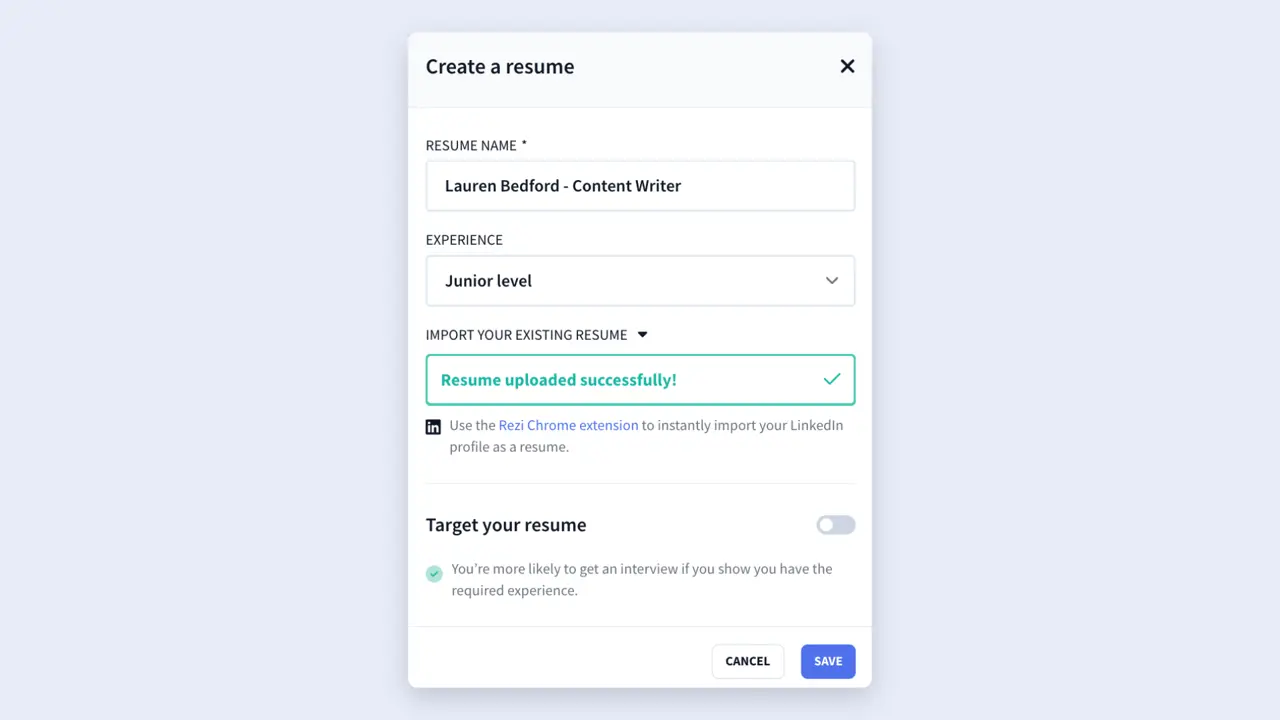
After the upload finishes, click Save and Rezi will generate a resume draft using the imported content. But before moving forward, take a few minutes to review everything carefully, as different resume formats can affect how the platform transfers information.
From there, you can make edits directly in the preview page or return to the resume builder for more AI-powered tools, including:
- AI Bullet Point Writer for stronger, more results-focused accomplishments.
- AI Summary Generator for creating a professional, tailored resume summary.
3. Import your LinkedIn profile
You can import your LinkedIn profile through the Rezi Chrome Extension. After installing and opening the extension, follow the prompts and open your LinkedIn profile. Rezi will extract all the relevant information and use it to create a new resume in your account.
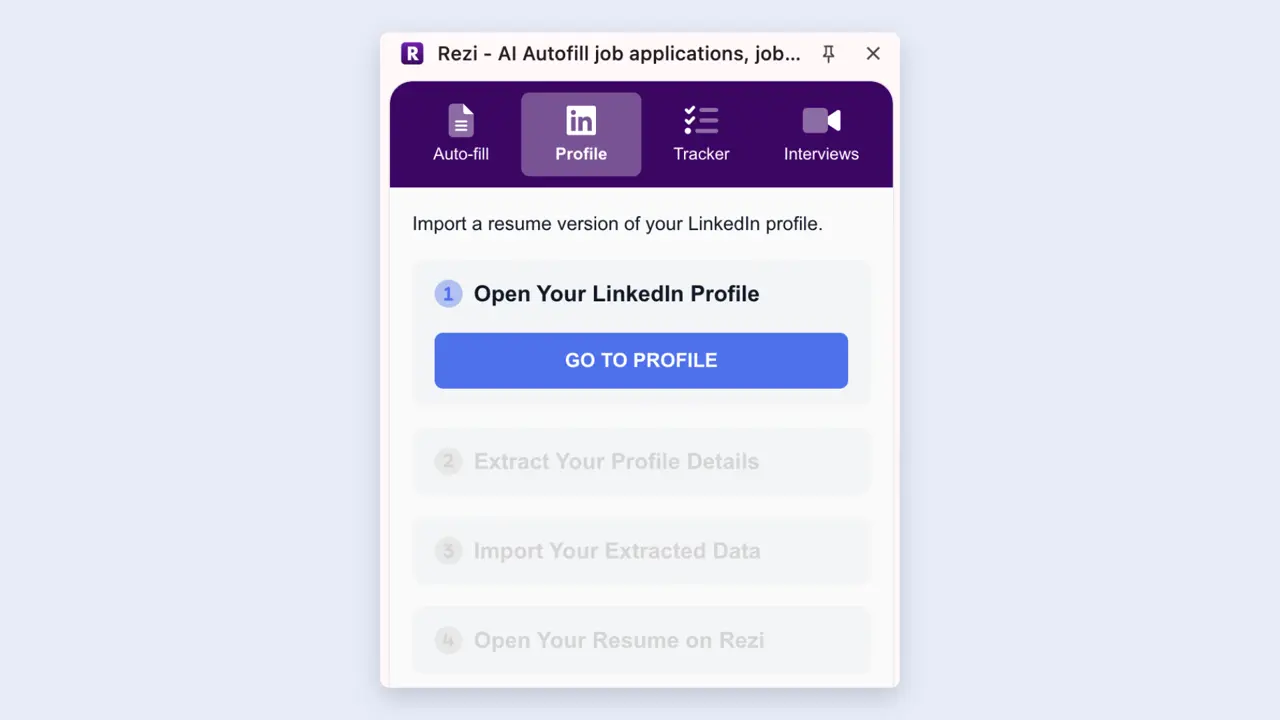
Once the import is complete, Rezi will either take you to your dashboard or ask you to sign in first. You’ll then see a newly created resume, labeled LinkedIn Import (don’t worry about the default name; you can rename it whenever you like).
Just keep in mind that LinkedIn profiles and resumes serve different purposes. LinkedIn often includes broader career information and more conversational descriptions, while resumes should stay focused, concise, and tailored to a specific position.
After importing, spend some time personalizing the content by:
- Remove information that isn’t relevant to your target role.
- Strengthening accomplishment-focused bullet points.
- Customizing your resume summary for the position you’re pursuing.
- Ensuring the skills section aligns with the job requirements.
4. Use AI Resume Agent
If you’d rather have guidance throughout the entire process, the AI Resume Agent can help you build your resume through a conversation instead of filling out each section on your own.
To get started, create a new resume as usual, then select Use AI Resume Agent at the bottom of the window to open the chatbot with your new resume already attached.
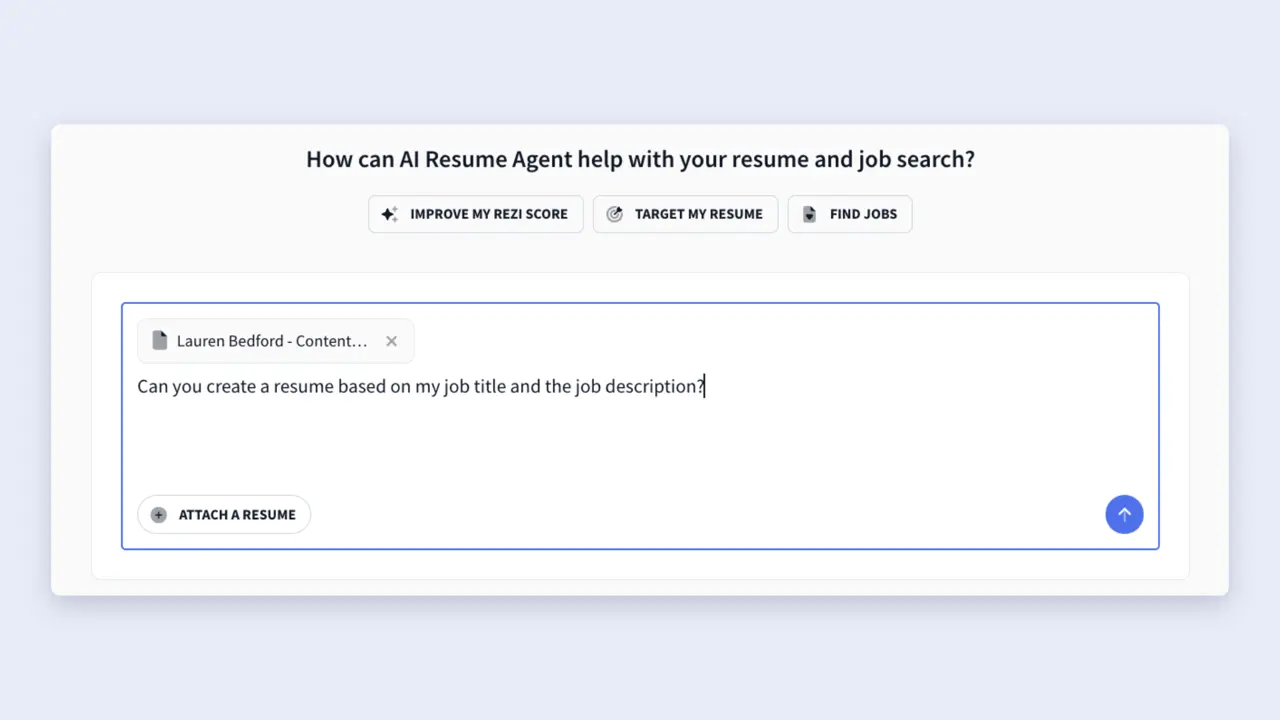
From there, you can enter prompts to build your resume, such as:
- Create a resume from scratch
- Improve specific sections
- Identify key skills from a job description
- Write stronger work experience bullet points
- Generate a tailored professional summary.
Of course, the more context you provide, the better the recommendations will be.
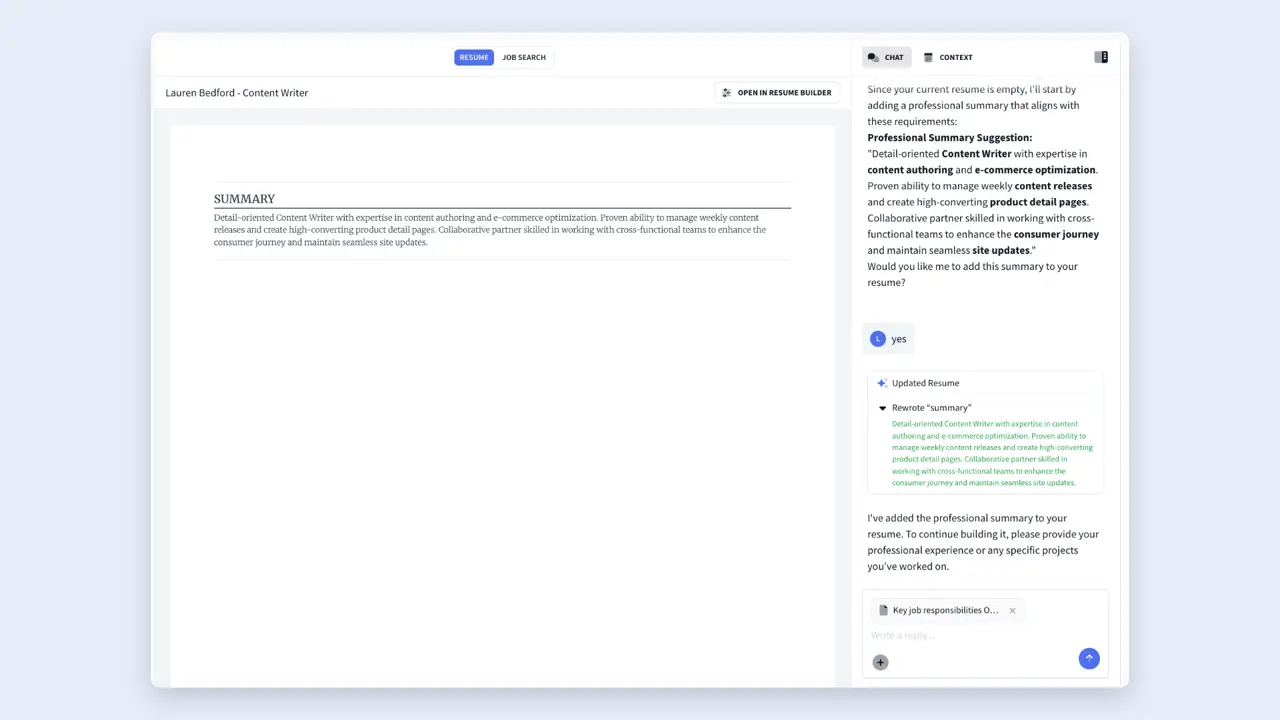
One of the biggest perks of the AI Resume Agent is that you can build your resume step by step while seeing the results in real time. As the agent adds content, updates sections, or makes suggestions, you'll see those changes reflected in the resume preview.
Summary
Here’s an overview of everything you need to know about creating a Rezi resume:
- Decide how you want to build your resume: create one from scratch, import an existing resume, or use your LinkedIn profile to generate a new resume automatically.
- When creating a new resume, give it a clear name and select your experience level so Rezi can better tailor recommendations, feedback, and resume-building guidance.
- If you’re applying for a specific position, use the “Target Your Resume” feature by adding the job title, company name, and job description for more personalized AI assistance.
- Rezi’s AI Resume Builder walks you through each section, making it easier to organize your professional summary, work experience, education, skills, and other qualifications.
- You can import existing resumes as PDF or DOCX files, allowing you to transfer your content quickly instead of manually re-entering all of your information.
- After importing a resume, review every section to ensure details transferred correctly, as formatting differences between documents can affect how information appears.
- The Rezi Chrome Extension lets you import information directly from LinkedIn, saving time by automatically pulling in your professional experience, education, and skills.
- Use the AI Resume Agent to build and improve your application step-by-step through custom prompts.
- No matter how you create your resume, take time to refine and personalize the content using Rezi’s AI tools so your resume stays relevant and tailored to your target role.
FAQ
Do you need a job description to use Rezi’s AI tools?
No, you can still use Rezi’s AI tools without a job description. Rezi can analyze your existing work experience, skills, and resume bullet points to provide suggestions and improvements. That said, adding a job description gives the AI more context, which helps it generate more tailored recommendations and feedback for a specific role.
Can you edit an imported resume after it’s uploaded?
Absolutely. Once you’ve imported a resume, you can edit any section just like a resume you created from scratch. You can update your work experience section, revise bullet points, add new information, or make formatting adjustments. You can also move into the resume builder to take advantage of Rezi’s AI-powered writing and optimization tools.
How do you know when your resume is ready to send to employers?
One of the easiest ways to evaluate your resume is by checking your Rezi Score. The score highlights areas for improvement and guides you on how to strengthen your resume. If you’re applying for a specific role, the AI Keyword Targeting feature can also identify important keywords from the job ad and suggest opportunities to weave them naturally into your resume.
Do you need the Rezi Chrome Extension to import LinkedIn data?
Yes, LinkedIn imports are completed through the Rezi Chrome Extension. Once installed, the extension can pull relevant information from your LinkedIn profile and use it to create a new resume in your Rezi account. After the import finishes, you can review, edit, and tailor the content directly in Rezi.
Can you create multiple versions of your resume for different jobs?
Yes, and it’s often a smart strategy. Different employers may prioritize different skills, experiences, or keywords, so creating tailored versions of your resume can improve your chances of landing interviews. You can duplicate an existing resume and make targeted adjustments rather than rebuilding everything from scratch.

Upload or drop your resume to get started
Upload your resume to get started
Score my resume

Lauren Bedford is a seasoned writer with a track record of helping thousands of readers find practical solutions over the past five years. She's tackled a range of topics, always striving to simplify complex jargon. At Rezi, Lauren crafts genuine and actionable content that guides readers in creating standout resumes to land their dream jobs.