User Guides
Rezi Chrome Extension
Learn how the Rezi Chrome Extension helps you apply for jobs faster with auto-fill, job tracking, LinkedIn imports, and personalized interview prep.
Published on
June 3, 2026
Updated on
June 10, 2026
The part nobody talks about in the job search? All those browser tabs. One tab for job boards, another for your resume, LinkedIn open somewhere, and plenty of application pages asking for the same information you already typed three times today.
Rezi Chrome Extension tackles this by keeping your job search tools in one place. You can auto-fill applications, import LinkedIn details, track applications, and practice tailored interviews without all the tab chaos.
The Rezi Chrome Extension starts with your Rezi account. So, set yours up with our free AI Resume Builder to create a tailored resume with expert feedback in minutes.
You can also check out our other tools to help with your job search:
And take a look at more useful guides:
What Is the Rezi Chrome Extension?
The Rezi Chrome Extension brings your entire job search workflow into one place inside Chrome. Instead of jumping between tabs, copying the same details into endless applications, or trying to remember where you applied, the extension handles everything as you browse jobs.
It works alongside resume tools you already use in Rezi, so everything stays connected. The jobs you apply to, the details you enter, and interview prep all sync with your account.
Here’s what you can do with the Rezi Chrome Extension:
- Auto-fill job applications using your Rezi resumes
- Import your LinkedIn profile and transfer relevant details to your resume
- Track your applications by organizing and monitoring your progress
- Practice interviews tailored to an exact job posting
And no, the Chrome extension doesn’t require a steep learning curve or any hidden costs. You simply install it, connect your Rezi account, and start using it while browsing job boards or company career pages.
How to Use the Rezi Chrome Extension
Here’s the quick version of how to use the Rezi Chrome Extension:
- Go to the Chrome Web Store to search for “Rezi - AI Autofill job applications, job tracker, resume import,” install the extension with “Add to Chrome,” and sign in.
- Automatically fill job applications by selecting a resume from your Rezi dashboard and using the auto-fill feature to populate application fields.
- Import a resume version of your LinkedIn profile by opening your LinkedIn page to extract your professional details and turn them into resume-ready content.
- Track your applications in one organized place by sorting jobs into categories like Applied, Interviewing, Rejected, and Saved Jobs.
- Practice with tailored interviews by uploading your resume and entering your target role so Rezi can generate personalized mock interview questions.
Here’s how the Rezi Chrome Extension works step by step.
1. Go to the Chrome Web Store
Head to the Chrome Web Store and search for Rezi. Then click on the extension called Rezi - AI Autofill job applications, job tracker, resume import.

Before installing, feel free to look through the feature overview and user reviews. You’ll get a good sense of what the extension can do and how other job seekers use it.
When you’re ready:
- Click Add to Chrome
- Let Chrome install the extension automatically
- Sign in using your Rezi account or Google login
Once you log in, you’re set. The extension connects to your Rezi account, which means your resumes, profile details, and job activity stay synced.
2. Automatically fill job applications
Instead of manually entering the same job history, skills, and contact details into every application form, Rezi fills those fields for you. It works across major Applicant Tracking Systems (ATS), including platforms like Workday, Greenhouse, and Lever.
When you’re applying for a job:
- Select Choose Your Resume from your Rezi dashboard
- Click Auto-fill Your Application
- Let Rezi populate the fields using your resume data
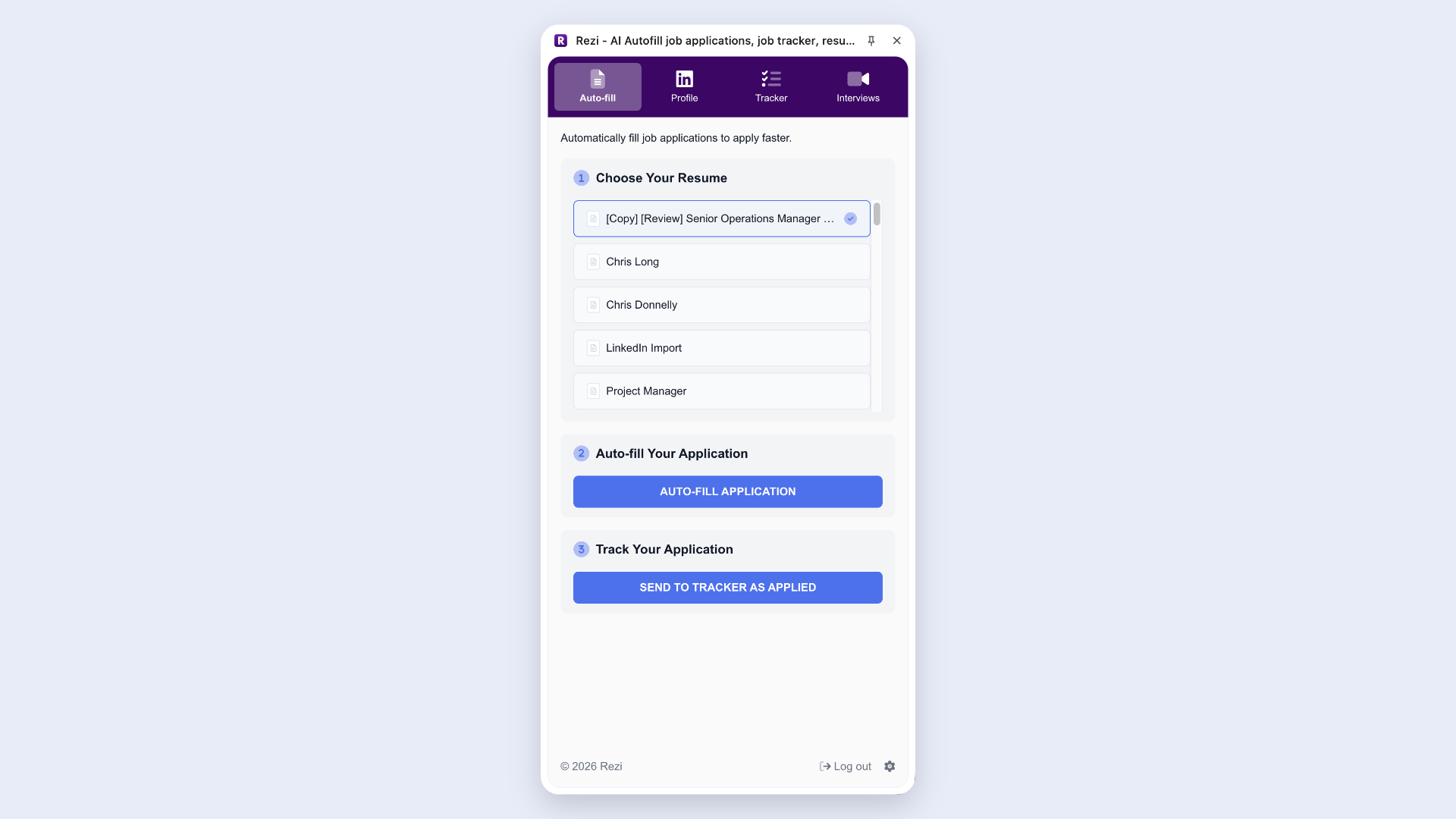
Of course, you still want to double-check everything before submitting, but you’ll save a lot of time that would otherwise disappear into mind-numbing copy-and-paste tasks.
3. Import a resume version of your LinkedIn profile
Rather than building your resume from scratch, you can import information directly from your LinkedIn profile. Rezi takes relevant details and turns them into a resume inside your account.
Here’s how it works:
- Launch the Rezi extension
- Open your LinkedIn profile
- Let Rezi transfer your professional details to your resume
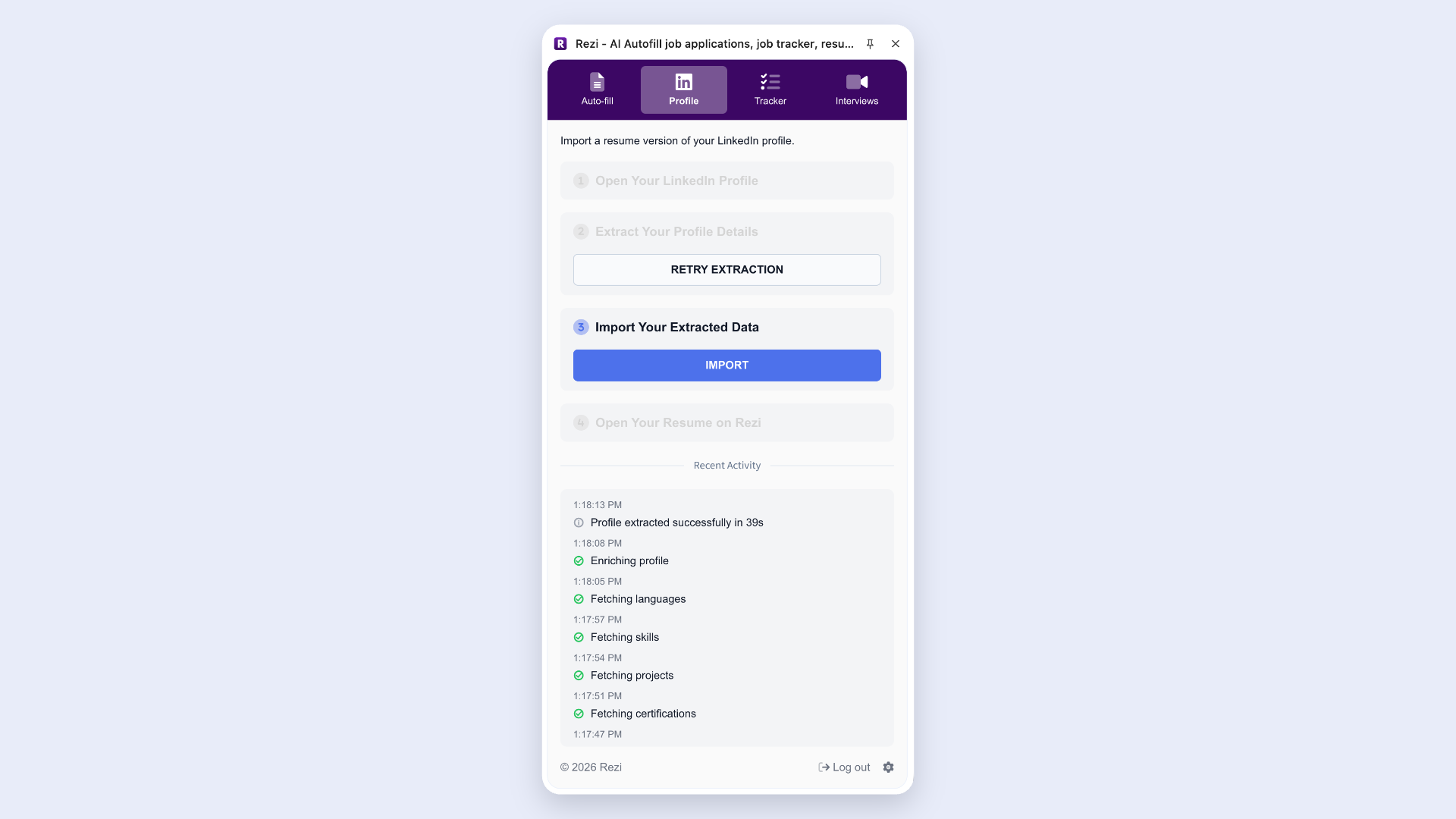
This shortcut helps you build a strong foundation for your resume, especially if your LinkedIn profile already reflects your work history, education, and accomplishments.
4. Track your applications
After dozens of applications, it’s easy to forget where you applied, which resume you sent, or whether a company even replied. The Rezi Chrome Extension helps you stay organized by keeping all your application activity in one place.
You can organize applications into categories like:
- Applied
- Interviewing
- Rejected
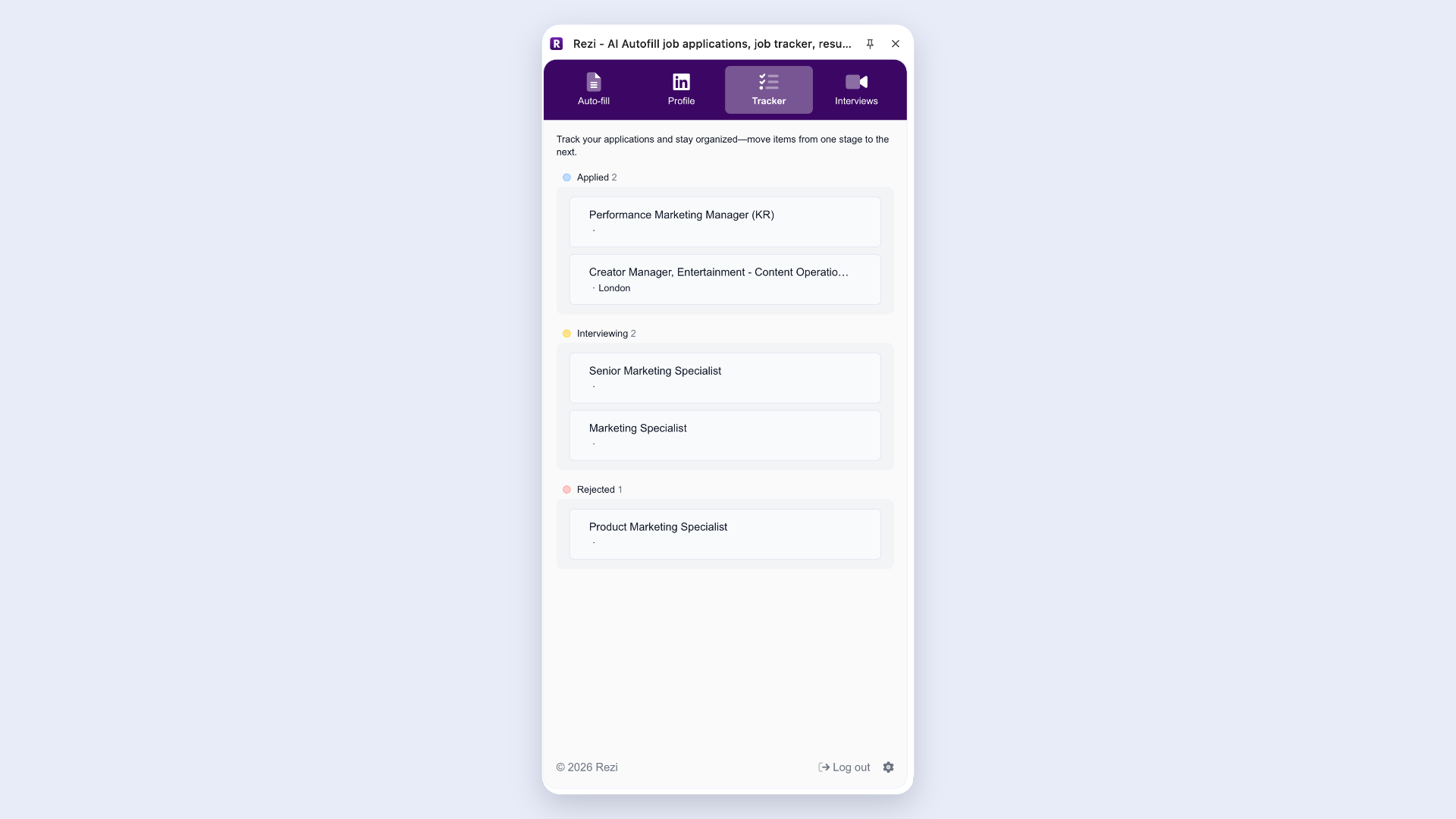
This helps you track every step of the process, from the first application to the final interview, without switching tools or digging through old emails.
You can also track your applications with AI Job Search, where you can discover over a million updated job listings sourced directly from company pages.
5. Practice with tailored interviews
The Rezi Chrome Extension can generate mock interview questions based on the exact role you’re viewing. Instead of practicing easy, generic interviews, you can step out of your comfort zone with questions that feel much more relevant to the position you want.
To use it:
- Upload your resume
- Enter your target role or company
- Let Rezi generate personalized interview questions
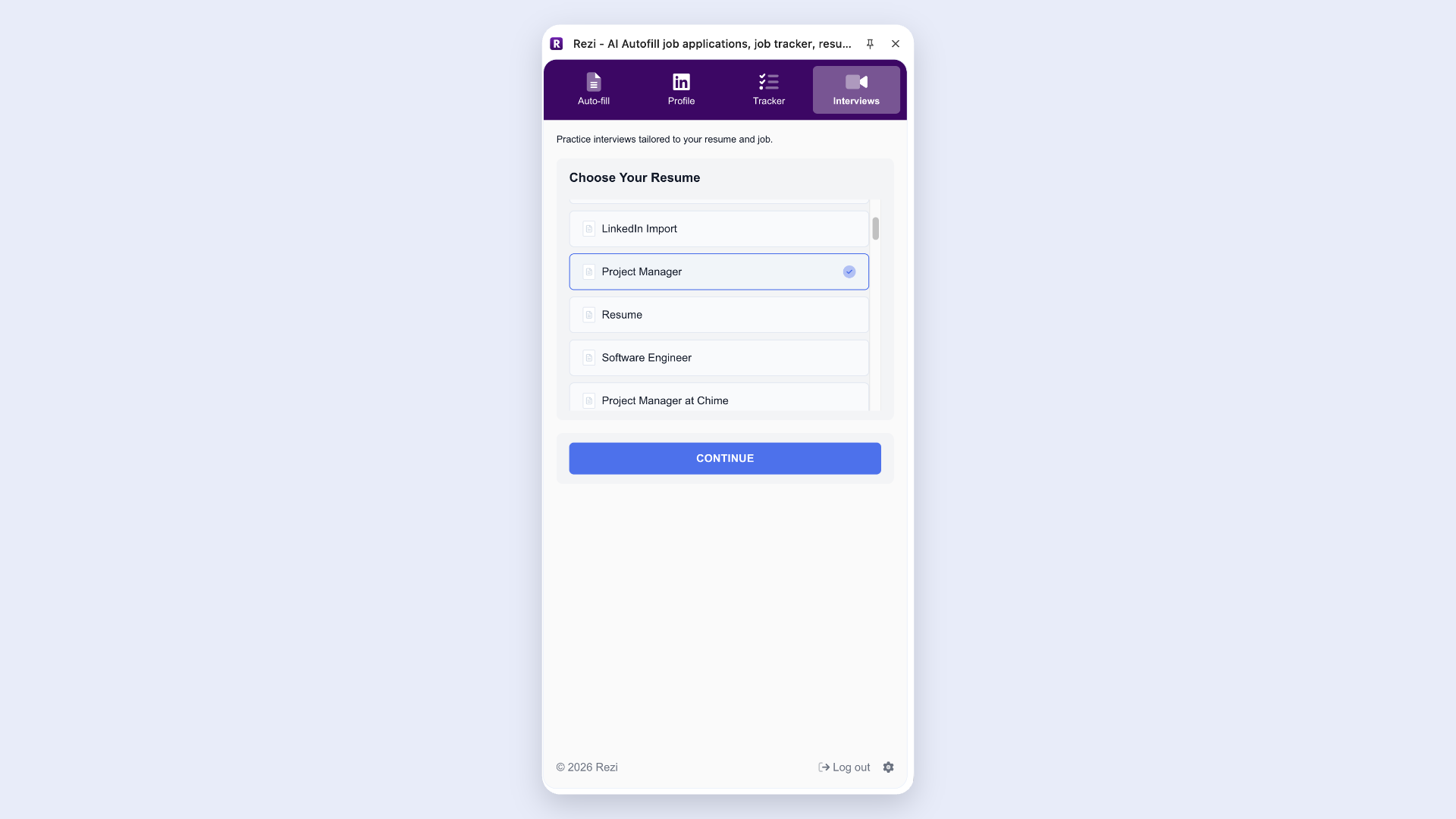
Since Rezi uses both your resume and the role details, the questions feel more tailored and realistic. And the closer your preparation gets to the real thing, the less likely you are to fumble the interview under pressure.
Need some more guidance? Check out these interview tips and examples:
- Phone Interview Questions
- Unique Interview Questions to Ask Employers
- Common Interview Questions and Sample Answers
How to Get the Best Results
The Rezi Chrome Extension saves you time, but better inputs lead to better outcomes. Auto-fill works best when it has strong information to pull from, job tracking is more useful when you watch out for patterns, and interview prep works better when you practice with solid strategies.
Here’s how to take full advantage of the Rezi Chrome Extension.
Focus on achievements in your resume
The Rezi Chrome Extension takes details from your resume, so the quality of your applications starts there. Throughout your resume, hiring managers want proof that you can create results (not just show up and complete mindless tasks).
Instead of writing generic duties or stuffing your resume with buzzwords, focus on key resume achievements. Ask yourself:
- Did you improve a process?
- Solve a problem?
- Save time or money?
- Help a team hit a goal?
Whenever possible, add numbers to show impact. For example, “Managed social media accounts” becomes much stronger as “Increased social engagement by 35% in six months through targeted content campaigns.”
Need help with your bullets? Try our free AI Resume Bullet Point Generator to get tailored and impactful suggestions that you can add straight to your job application.
Keep your LinkedIn updated
Since the Chrome extension imports information directly from LinkedIn, keeping your profile up to date makes setup faster and more accurate. Treat LinkedIn like regular maintenance rather than a once-every-five-years emergency project.
A few simple habits help:
- Update new skills, achievements, and roles regularly
- Refresh your headline and experience section when things change
- Engage thoughtfully with content in your industry (“Great insight!” on every post doesn’t count as networking).
Find out more: How to Make a Good LinkedIn Profile
Notice patterns when tracking applications
After rolling out the applications, take a step back and look for trends. Are certain roles getting more responses? Do smaller companies reply faster? Are you only landing interviews for one type of position?
Spotting the patterns can help you adjust your strategy, rather than wasting time and applying blindly to everything with an “Easy Apply” button.
You can also use tracking to stay realistic about what matters to you, such as:
- Salary expectations
- Growth opportunities
- Company culture
- Remote or hybrid flexibility
And on a practical level, tracking everything in one place lowers the chances of missing an interview invitation buried somewhere in your inbox or forgetting which version of your resume you submitted.
Learn more about organizing your applications: How to Keep Track of Job Applications
Use tried-and-tested interview methods
The Chrome extension can generate tailored interview questions, but your preparation matters just as much as the questions themselves.
One of the best frameworks for behavioral interviews is the STAR method, which helps you structure answers without rambling. Here’s the breakdown:
- Situation: Set the context
- Task: Explain your responsibility
- Action: Describe what you did
- Result: Share the outcome and impact
You can also borrow from the SMART goal framework to improve examples:
- Specific: Focus on one clear contribution
- Measurable: Include outcomes or results
- Achievable: Stick to what you actually owned
- Relevant: Connect your example to the role
- Time-bound: Mention timelines when relevant
You don’t want to sound like you’re reading from a script, but being prepared and structured in your answers can help you stay calm under pressure and deal with unexpected questions.
Need more practice? Try our AI Interview Practice to get job-tailored questions and detailed feedback to improve your answers and boost your confidence.
Summary
Here’s an overview of everything you need to know about the Rezi Chrome Extension:
- The Rezi Chrome Extension lets you apply for jobs, track applications, import resume details, and prepare for interviews all in one place.
- The extension connects directly to your Rezi account rather than working as a separate platform, so your resumes, applications, and interview prep stay synced.
- You can install it through the Chrome Web Store by searching for “Rezi - AI Autofill job applications, job tracker, resume import,” then signing in with your Rezi account.
- The auto-fill feature helps you complete applications faster by pulling information from your Rezi resume to populate fields across major ATS platforms.
- Instead of repeatedly copying and pasting work history, skills, and personal details, you can choose a resume from your dashboard and let Rezi fill out applications in seconds.
- The LinkedIn import feature helps first-time users get started quickly by extracting professional details from their profile and turning that information into a resume.
- Rezi includes a built-in application tracker with a Kanban-style board, helping you organize jobs into stages like Applied, Interviewing, and Rejected.
- You can prepare for interviews with personalized mock questions based on your uploaded resume and the specific role you’re viewing online.
FAQ
How do you install the Rezi Chrome Extension?
Installing the Rezi Chrome Extension only takes a few minutes. Head to the Chrome Web Store and search for “Rezi - AI Autofill job applications, job tracker, resume import.” Open the extension page, review the features if you’d like, and click “Add to Chrome.” Chrome will install it automatically in your browser. After that, sign in using your Rezi account or Google credentials, and you’re ready to start using features like auto-fill, application tracking, and interview prep.
Is the Rezi Chrome Extension free to use?
Yes, Rezi offers the extension’s auto-fill feature for free, which means you can start completing job applications faster without paying just to access the basics. Once you install the extension and connect your account, you can use it to populate application fields with information from your resume and profile.
Do you need a Rezi account to use the Chrome Extension?
Yes, you’ll need a Rezi account to use the Chrome Extension. That’s because it works as an extension of your Rezi dashboard rather than as a standalone tool. It pulls information from your resumes and saved data to auto-fill applications, track jobs, and generate interview questions.
Is the Rezi Chrome Extension easy for beginners to use?
Yes, the extension keeps things simple by guiding you through setup and connecting directly to your existing account. Once installed, most features feel intuitive: choose a resume, click auto-fill, track applications, or import LinkedIn details.

Upload or drop your resume to get started
Upload your resume to get started
Score my resume

Lauren Bedford is a seasoned writer with a track record of helping thousands of readers find practical solutions over the past five years. She's tackled a range of topics, always striving to simplify complex jargon. At Rezi, Lauren crafts genuine and actionable content that guides readers in creating standout resumes to land their dream jobs.