Career Advice
15 Best Job Search Engines in 2026 (Top Career Websites)
Discover the best job search engines to find your next role faster. Compare top sites like Indeed and LinkedIn with niche boards to land the right job for you.

Published on
September 17, 2025
Updated on
February 25, 2026
How does a job that was only posted an hour ago already have 200 applicants? It’s frustrating. Especially as you’ve already applied to ten jobs this month with almost no replies. Sometimes it feels like you’re shouting into the void, unsure if you’re applying to ghost jobs or just stumbling across scams along the way.
I’m saying this from personal experience, and the issues many of us deal with when searching for a job. Honestly, popular job search engines are popular for a reason. But when you keep hitting the same wall, it’s both motivating and useful to expand your search for more opportunities.
That’s why I’ve put together a list of the top job search engines. This guide will cover:
- A breakdown of the best job search sites.
- Which job-finding website is the best fit for you.
- All the expert tips and hacks to improve your job search.
And check out more useful guides and insights for job seekers:
- Why Is It So Hard to Find a Job
- How to Keep Track of Job Applications
- I Can’t Find a Job: What to Do When You Can’t Get Hired
- Gen Z Job Market: What Needs to Change in the Workplace
Best Job Search Engines
I’ve done my fair share of job-hunting, and I’ve tried and tested many search engines. But I didn’t want this list to be based on my opinion alone. I’ve scoured the internet for real user reviews, expert opinions, and Trustpilot scores to bring you the most popular job-searching websites across different industries, preferences, and job types.
And with that, here are the top picks for the best job search engines:
- Rezi Job Search
- Indeed
- Monster Jobs
- ZipRecruiter
- Glassdoor
- USAJOBS
- FlexJobs
- Craiglist
- Dice
- SimplyHired
- Ladders
- Upwork
- Wellfound
- HiringCafe
Now, let’s explore the key features, plus the pros and cons, of each job search engine.
1. Rezi Job Search
Full transparency: Rezi is not a job board. It’s a job search tool that gives you millions of fresh listings, updated hourly. Call me biased, but the tool has some genuinely helpful features. What I appreciate most is how we pull openings straight from company websites, which means the jobs are usually active (not those annoying, expired ghost jobs).
It’s not overloaded with ads or spammy recruiter posts, and you can filter by skill, role, and remote work, which makes it feel much more curated. You can also track and save all your applications on one dashboard to keep everything organized.
The platform also focuses on giving you tools beyond the search. Once you find a job, you can instantly generate a tailored resume with our AI Resume Builder to boost your chances of landing that all-important interview.
Pros: high-quality postings, built-in tracking features, ATS-friendly resumes
Cons: smaller brand recognition, fewer extras like company reviews
Best for: people who want a streamlined tool that combines job search and resume creation
2. LinkedIn
LinkedIn isn’t just a job board; it’s a professional ecosystem. You’ve got the classic job listings, but also direct access to hiring managers, career courses, alumni information, and communities in your field.
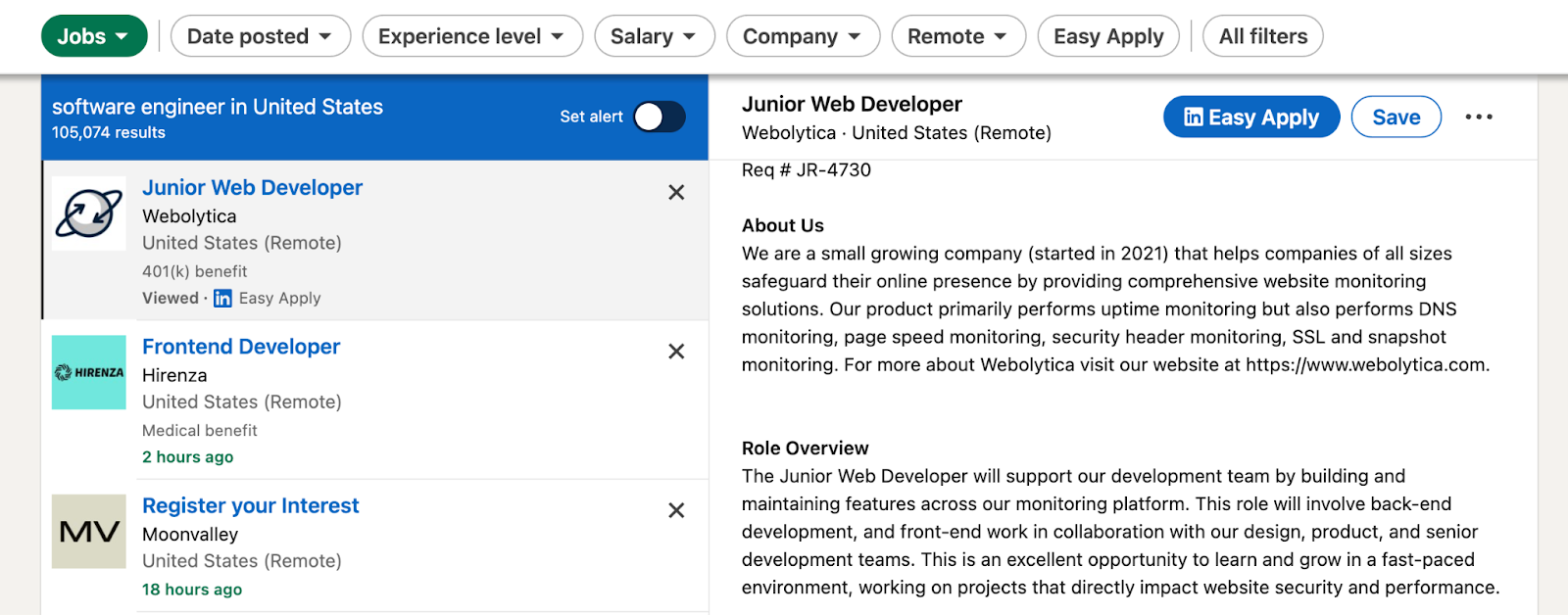
What makes LinkedIn different is the networking power (and we all know how important those connections are). Recruiters search profiles daily, so if your profile is strong, and you engage a little (posting, commenting, connecting), you get organic visibility. You can also set your LinkedIn profile to show you’re “open to work,” which signals recruiters.
Applications are simple with the “Easy Apply” button (though this may fall into “cutting corners” territory). But the real hack is when you combine search with reaching out to people who work at the company. It’s basically modern-day networking without leaving your couch.
Pros: millions of global jobs, huge network, personal branding, direct recruiter access
Cons: can feel overwhelming or superficial, plenty of competition, ghost job listings
Best for: anyone who relies on networking or is creating a professional brand
3. Indeed
Indeed is massive, and most of us have used it at some point in our quest to find a job. For many, it’s the default search engine for jobs, with every type of listing you can imagine.

It’s super easy to use: type in a job title or skill plus a location, and you’ve got hundreds of results. You can filter by pay, type (full-time, contract, remote), experience level, and more. One thing I like is how quickly you can save or apply to jobs, especially if you upload your resume and let employers find you.
That said, because it’s so big, you get a lot of duplicate posts, random staffing agency listings, and fake job listings. Still, for sheer volume, it’s undefeated. And for people just starting or making a broad search, it’s one of the easiest starting points.
Pros: massive reach, free, simple interface, useful search filters
Cons: job spam, duplicate postings, less personalized matches
Best for: job hunters who want volume and don’t mind sorting through to find the good stuff
4. Monster Jobs
Monster is one of the oldest players in the job search space. And it’s pretty easy to use. When you search for jobs, it highlights keywords and skills, giving you a quick sense of whether you’re the right fit. You can also upload your resume for recruiters to find you proactively, which is a major plus if you’re not applying actively every day.

I’ve found the interface a bit clunkier than Indeed or LinkedIn, but it gets the job done, especially if you’re looking in traditional sectors like office admin, customer service, logistics, etc. You also get career advice and salary tools, though these features aren’t always updated.
Now, here’s the big catch. Monster and its merged site, CareerBuilder, recently filed for bankruptcy in June this year. With their future unclear, I wouldn’t recommend putting all your eggs in the Monster basket.
Pros: Skill highlights, resume visibility, solid for traditional roles
Cons: Outdated interface, recently filed for bankruptcy
Best for: people who want something easy-to-use and straightforward
5. ZipRecruiter
ZipRecruiter markets itself almost like a concierge job service. It uses a smart matching algorithm along with its AI assistant “Phil” (whom they’re very proud of) that suggests jobs and nudges you if an employer views or likes your application.

It’s very applicant-friendly; once you make an account, you can one-click apply to tons of jobs and get notifications about new matches every day. These notifications can be pretty handy if you have a busy schedule and want the job search to come to you.
The downside? These same email alerts can be a bit too frequent if you don’t adjust your settings, and some jobs will bounce you out to sketchy employer sites to apply. Still, with over 4.3 million global employers using the site, you get plenty of options.
Pros: Personalized matching, easy to apply, AI feedback on application views
Cons: Lots of alerts, occasional redirecting to spammy portals
Best for: professionals who want AI-powered recommendations and real-time updates
6. Glassdoor
Glassdoor is like a mix of a job board and a behind-the-scenes gossip forum for workplaces (been there, got the tea). Most people know it for company reviews and salary transparency, but it’s also a functional job search engine.

The obvious selling point is that you can research the company and apply for the job on the same site. You can read employee reviews, see salary estimates, benefits, and interview questions before applying. Yes, it takes extra time, but I’d rather find out the boss’s micromanaging habits sooner rather than a week into the job.
Once you set up your profile (resume, intro, skills), you’ll get personalized job suggestions and can set alerts. Their “Know Your Worth” tool is great too; it gives you a rough salary benchmark based on your role and location.
Pros: salary transparency, honest company reviews
Cons: not all companies are reviewed; some reviews are outdated or biased
Best for: people who care about company culture, transparency, and salary comparisons
7. OysterLink
OysterLink is a job platform that matches employers and employees in the hospitality and restaurant industry in the United States. The platform offers salary insight, career tips and many more.
The website has a very good user experience and it is very easy to post a job on OysterLink. In addition, the website offers celebrity interviews. Applicants can check the interviews and shape their career mindset for their future.
.png)
Pros: Easy to apply and post a job.
Cons: Since it is a niche job search platform, there is not much variety in job listings.
Best for: For those who want to be hired quickly and for those who want to post their jobs in the hospitality niche.
8. USAJOBS
USAJOBS is the official site for U.S. government positions, where you can find everything from postal jobs to work at the Air Force or the State Department. The layout feels bureaucratic, but that’s government for you.

To use it, you need to set up a Login.gov account, then build a detailed profile and upload a federal-style resume. Once you do, you can search by agency, salary, location, security clearance, and more. You can then save job postings and get frequent alerts.
The application process is understandably longer than other job search powerhouses, with extra steps, such as occupational questionnaires and documentation. But it’s worth it if you want stable, well-benefited work in the government sector.
Pros: centralized portal for all federal jobs, strong benefits, and job security
Cons: The process is slower, competitive, and full of paperwork
Best for: people specifically looking for federal employment or government work
9. FlexJobs
FlexJobs is the go-to site for remote and flexible jobs. They claim to screen all listings for legitimacy, which means you shouldn’t technically see any fake “work-from-home” scams or commission-only roles.
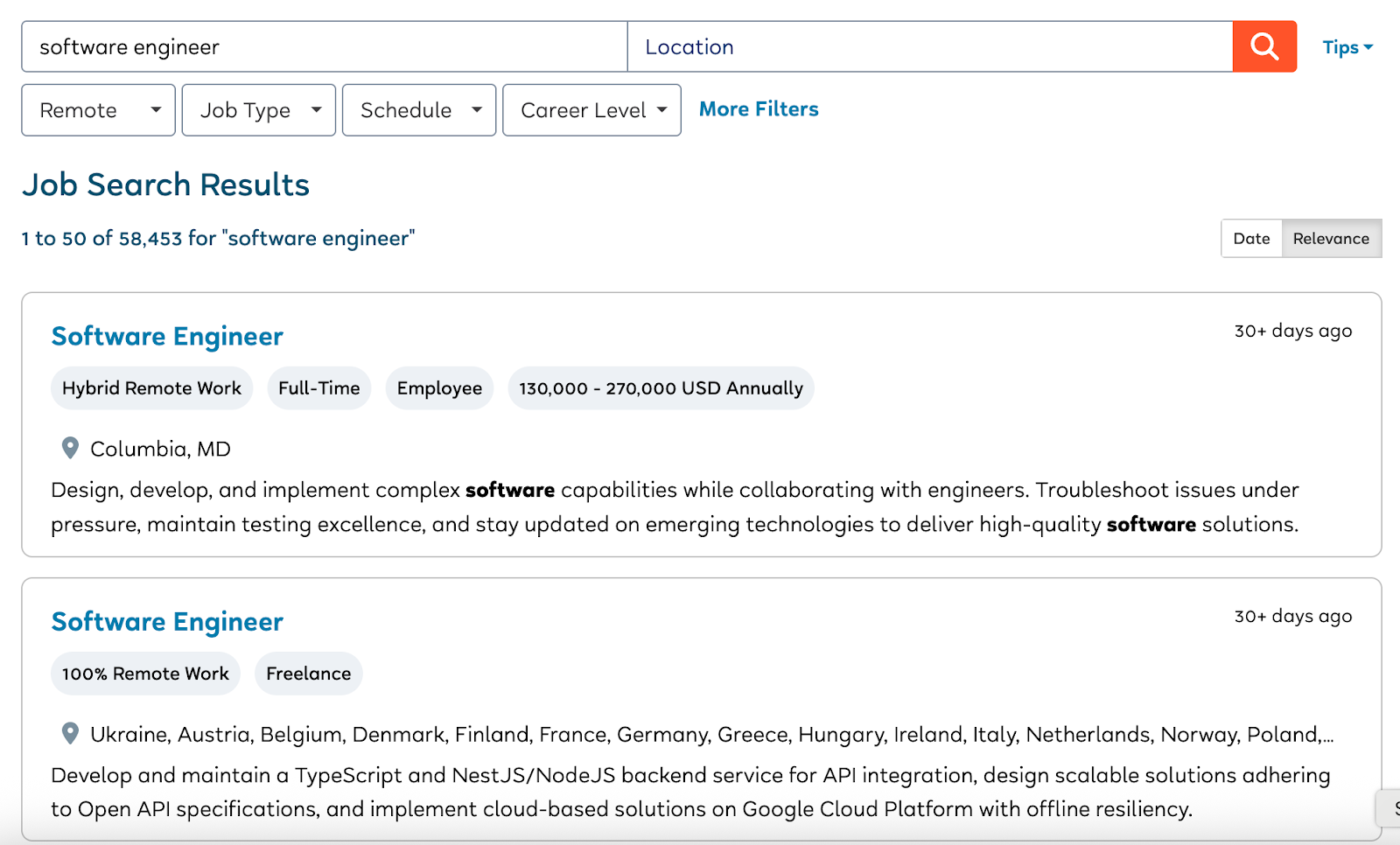
You get targeted filters for part-time, freelance, hybrid, or fully remote work across tons of industries. They also offer webinars, career coaching, and articles (although I wouldn’t call this a selling point with similar information elsewhere for free).
But there’s a catch: all this comes at the cost of the dreaded membership fee. You can try it for $2.95 for two weeks, but then it jumps to about $24 per month, which is obviously a major drawback. Still, if you’re serious about remote work and not getting any luck from the free sites, it might be worth paying to save time and avoid scams.
Pros: remote and hybrid listings, fewer scams, advanced filters
Cons: monthly fee, lack of transparency about pricing upfront
Best for: professionals committed to remote and flexible work
10. Craigslist
Most of us have heard about some of the crazy listings coming from Craigslist, and honestly, I was hesitant to add it to this list. It’s certainly hit-or-miss, but there are just enough success stories for me to give it a place.

The website is essentially a forum and services platform, with posts ranging from apartment rentals, cinema discussions, and lost objects. The jobs section is mostly limited to small businesses, local gigs, and random opportunities you won’t find on bigger sites — perfect for some quick cash or odd jobs.
The interface is plain, and anyone can post for free. So yes, there are plenty of scammers and sketchy MLM postings. You really have to vet each post carefully. But if you’re looking for a local side hustle, freelance work, or an entry-level job, you could find some decent opportunities.
Pros: simple, local gigs, great for small businesses, and one-off jobs
Cons: high scam risk, little filtering, no big-name employers
Best for: people looking for local, flexible, short-term, or small business gigs
11. Dice
Dice is one of the top platforms if you’re in tech or IT. It’s built specifically for developers, engineers, data professionals, cybersecurity folks; you get the idea. And it’s pretty popular, with the site claiming to have over 7 million US members and more than 200k jobs posted monthly.

Once you create a profile and make it visible, recruiters from major companies (Disney, Boeing, Capital One, Bank of America) can reach out directly. I also appreciate that you can filter by contract vs. full-time, and that their alerts are skill-specific (like Java, AWS, cybersecurity).
They even let you message employers directly through the platform. It’s very efficient if you’re technical. But the obvious downside is its niche — if you’re not in tech, it’s basically useless.
Pros: tech-specific, targeted filters, recruiters reach out to you directly
Cons: limited to tech roles, subscription fees for premium features
Best for: anyone in the tech industry wanting focused job listings and recruiter access
12. SimplyHired
SimplyHired is a major job aggregator site, pulling job posts from thousands of websites around the world and putting them all in one place. It’s also a partner of Indeed, so if you already have an Indeed account, you can log in and apply with the same profile.

The interface is minimalist and easy to navigate. And the job ads list benefits and required skills right at the top, so you can decide quickly if it’s worth your time. There’s also a built-in salary estimator tool, which is handy for seeing if a role matches your expectations.
They say they don’t do any lengthy assessments like other platforms, and apparently, they even coach employers to write better job descriptions. Still, it’s very similar to Indeed, so it might feel redundant if you’re already using that.
Pros: aggregated listings, salary estimator, synced with Indeed
Cons: not very different from Indeed, fewer extra features
Best for: people who want a simple search experience across multiple sources
13. Ladders
Ladders has an air of exclusivity about it, focusing on high-paying jobs over $100K. With that in mind, it’s best suited for senior professionals, executive-level talent, and all the overachievers.

The platform offers a free version where you can browse and apply to jobs marked “Free”. However, for access to its full curated list and tools like “Apply4Me,” you’ll need the Premium plan, which is quite pricey. There are various payment options, including $49.97 per month for 1 month, or $24.97 per month for 12 months.
The premium tools can save time, but most reviews say the free plan (plus some manual effort) is all you really need. Ladders also offers resume writing services and insider data about companies hiring at six-figure levels. But honestly, if you’re already using LinkedIn or Glassdoor, you might get similar access to these insights.
Pros: jobs curated specifically for $100K+ roles, strong recruiter network, resume tools
Cons: pricey premium plans, the free version is limited, and competitors offer similar postings
Best for: senior professionals seeking executive or high-income roles
14. Upwork
Upwork is one of the most popular platforms for freelancing across the globe. All you need to do it set up a free profile, list your skills, portfolio, and hourly rates, then start pitching to clients.
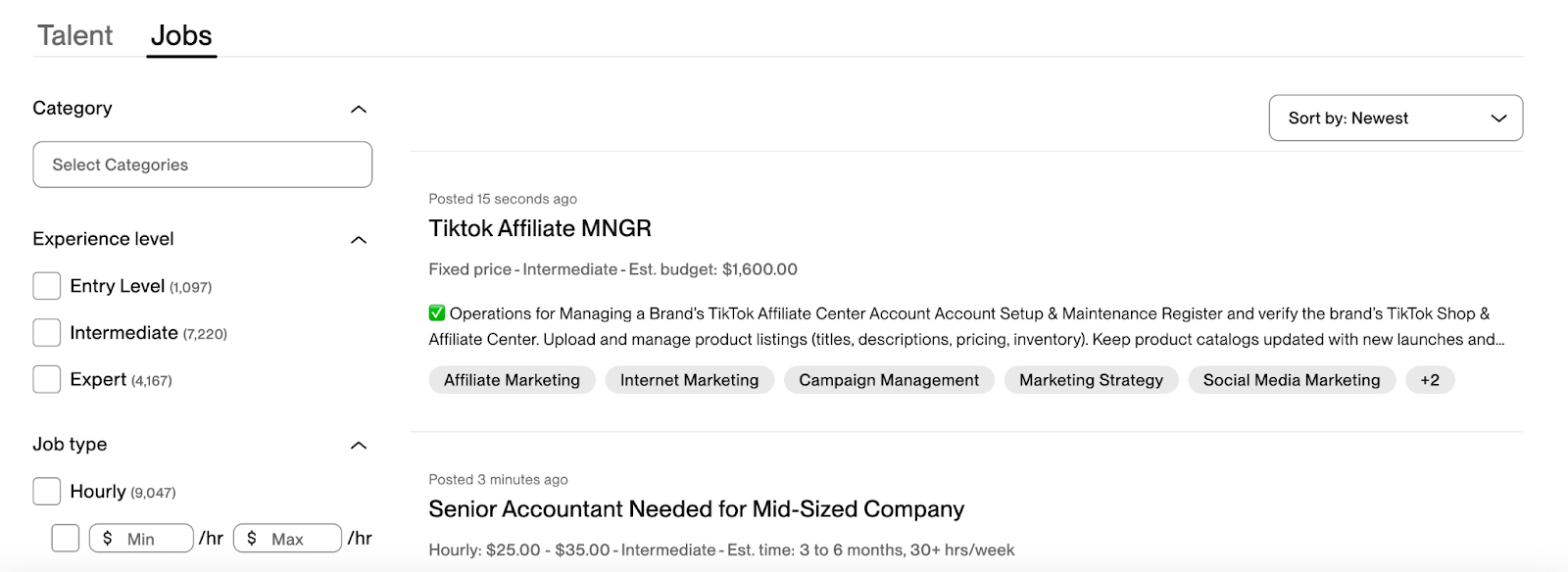
Projects can be hourly or fixed-price, covering everything from writing and graphic design to coding and consulting. There are the Project Catalog and Consultations features, which let you package your services and set prices upfront. You can also use “Connects” to run ads and attract more clients (you get a limited number for free, then you need to buy more).
Upwork charges a service fee (0–15% on new contracts), but it’s totally free to create an account. But just a heads up: breaking in and standing out is hard because competition is global and fierce, but once you get a few good reviews, it gets easier and can be lucrative.
Pros: global reach, full freelancing ecosystem, direct messaging
Cons: high competition, service fees, requires time to build up credibility
Best for: freelancers looking for ongoing clients or project-based work
15. Wellfound
Wellfound (formerly AngelList Talent) is tailor-made for those looking to join a startup. You create a profile for free and apply directly to founders or hiring managers (often without middleman recruiters).
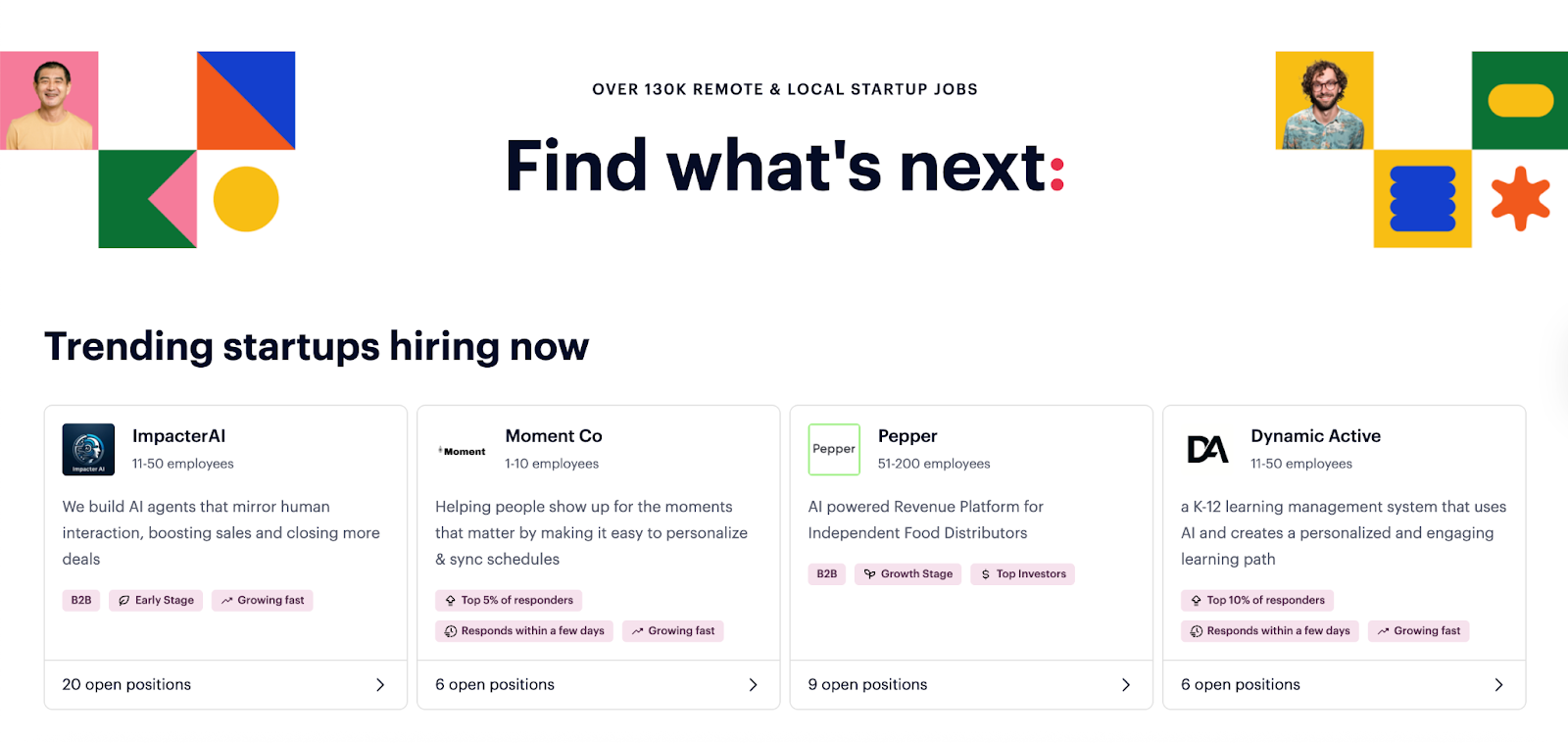
You get insights that normal job boards usually don’t include, such as funding rounds, company valuation, equity options, and founder background. There’s also a feature to “highlight” your profile so recruiters can pitch to you.
The roles are mostly in tech, product, growth, design, and operations. The downside? Because it’s the startup world, some roles pay less or are a bit chaotic. Plus, some users have complained that there aren’t enough listings compared to bigger sites. But if you want fast-moving, early-stage companies, this is the place.
Pros: startup-focused listings, equity information, one-click apply, direct access to founders
Cons: smaller volume of jobs, lower salaries, and some companies are unstructured
Best for: tech professionals or entrepreneurial-minded people who want to join startups
16. HiringCafe
HiringCafe is a newer platform built specifically for remote work seekers — and I was pleasantly surprised. It uses AI (basically GPT behind the scenes) to gather over 12,000 job listings directly from thousands of company sites. It then summarizes them for you so you’re not reading endless descriptions.
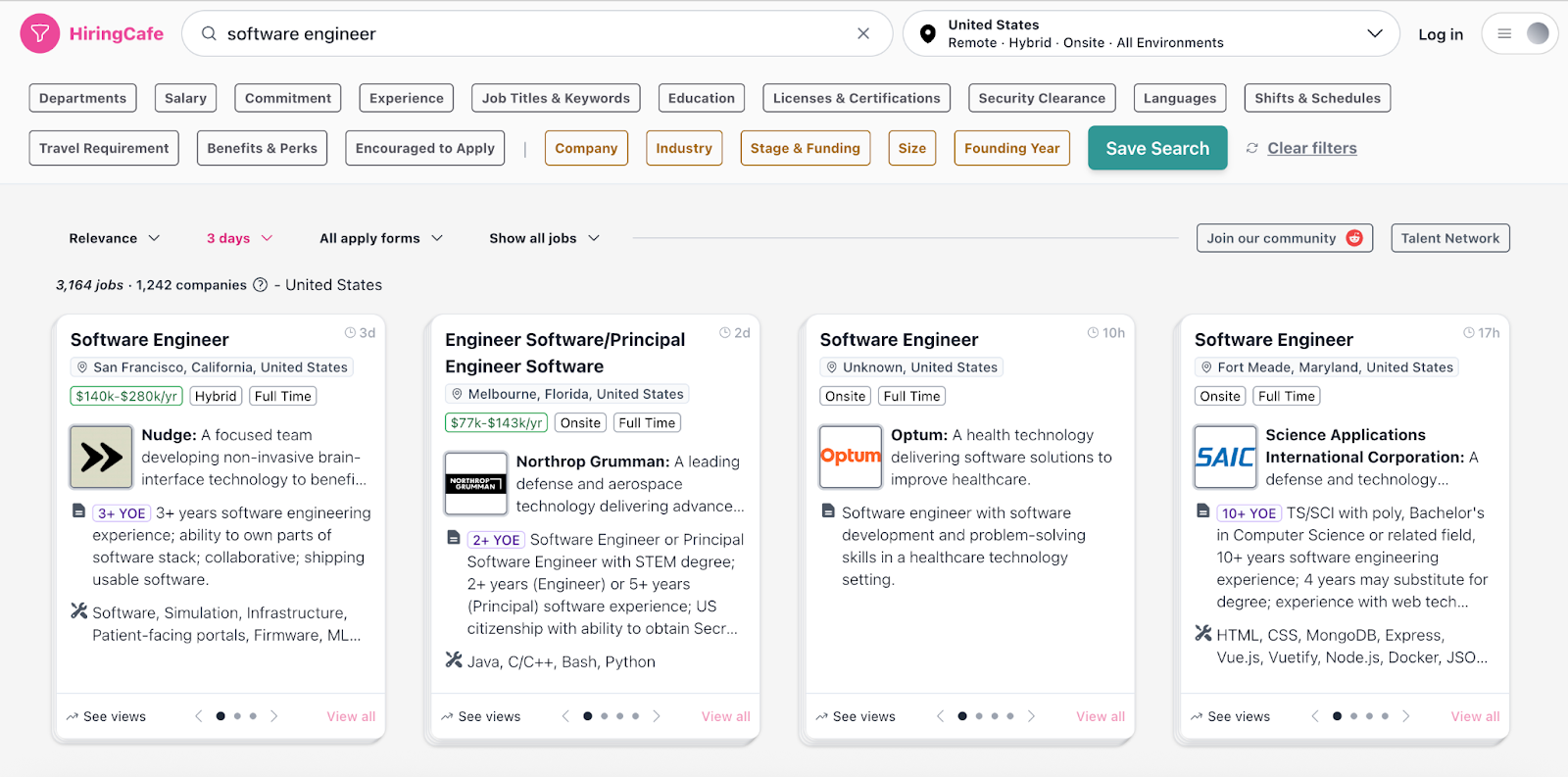
The interface is clean, card-based, and super minimal. You can filter by experience, licenses, benefits, company size, startup stage, etc. Transparency is also a big plus. They show salary information and actively filter out scams, ghost jobs, and reposts by scraping fresh listings three times a day.
It’s totally free to use and promises to always be free. It’s not a massive brand yet, so it doesn’t have extras like networking, but it’s great for focused remote job hunting without the noise or spammy listings.
Pros: AI summarization, remote-only jobs, salary transparency, scam filtering, completely free
Cons: newer platform, smaller database compared to older giants, limited non-remote options
Best for: people specifically hunting remote roles who want speed, clarity, and clean filters
Where Is the Best Place to Look for Jobs?
I wouldn’t visit a reptile sanctuary if I were looking to adopt a fluffy puppy. It would be a waste of time, and I’d be setting myself up for disappointment. And yes, the same goes for your job search. Looking for jobs already takes up a lot of time, so don’t make it harder for yourself by visiting the wrong job search site.
Here’s an overview of the best job finder websites for different preferences and industries.
General job seekers
If your goal is to see a wide range of open positions across industries, start with the biggest aggregators. These platforms collect listings from all over the internet and give you volume, which is great when you’re casting a wide net.
Best platforms for general searches:
- LinkedIn: The default hub for professional networking, a wide range of jobs, recruiter outreach, and industry presence.
- Indeed: Tons of listings with easy filtering, covering nearly every industry.
- Rezi: Perfect if you want to combine a job search with AI resume optimization and application tracking in one place.
Tech, startups, and remote-first roles
Are you a tech professional or interested in startups? You might need a more targeted approach. Explore sites that offer the types of roles where culture matters and skills are key to the position.
Best platforms for tech and startups:
- JobLeads: Great for access to unlisted and non-advertised positions.
- Dice: Best for tech professionals (software, data, DevOps, cybersecurity).
- Wellfound: Ideal for startup jobs with potential equity and direct access to founders.
- HiringCafe: Remote-only roles with AI summaries and salary transparency.
- FlexJobs: Paid service, but pretty solid if you want vetted remote jobs with fewer scams.
High salaries and executive roles
If you’re established in your career and specifically targeting six-figure salaries or senior-level positions (congrats), you likely don’t want to scroll through entry-level listings. You need boards that curate roles based on compensation and seniority.
Best platforms for high-paying roles:
- Ladders: Built for $100K+ jobs, especially mid- to executive-level professionals.
- LinkedIn: Still great for high-paying roles (with filters for seniority and salary).
Freelancing, gigs, and flexible work
For freelance or gig-based work where you set your own rates and choose projects on demand, traditional job boards won’t cut it. These platforms let you pitch for projects, build portfolios, and get paid through the site. This is especially handy if you’re a creative, marketer, writer, designer, or developer looking for flexible work.
Best platforms for freelancers:
- Upwork: Huge global freelance marketplace, tons of categories, but highly competitive.
- Craigslist: Good for small local gigs or part-time work, though full of scams, so proceed with caution.
Government and public sector jobs
If stability, pensions, and public service appeal to you, you might consider a government role. These jobs have a different application process and live in their own dedicated portal for structured, but reliable, long-term careers.
Best platform for government jobs:
- USAJOBS: Official federal job portal with everything from USPS to Homeland Security roles.
Job Search Advice and Tips
Job boards are a great place to start, but some of these positions never even make it onto the internet. Word of mouth and having the right connections are powerful steps to securing those coveted roles. And there are other methods too, such as improving your job application, being flexible to opportunities, and having a great deal of determination.
I know these things are often easier said than done, especially after your 20th job rejection. So, check out these proactive steps to keep on track without feeling defeated.
Refine your resume
Your job application is still your number one asset. Instead of sending the same file everywhere, you’re better off tailoring your resume to a handful of jobs that genuinely excite you. To impress future employers, your resume should show not just what you did, but how well you did it.
What you can do:
- Re-read each job description and update your resume so it mirrors the requirements and language they’re asking for, especially in the skills and work experience section.
- Replace generic responsibilities with specific resume achievements backed by numbers (e.g., “increased sales by 15%”), so you stand out as a high performer.
Avoid cutting corners
I used to hit “Easy Apply” on almost every job I saw and called it a day. Shocker: I never got any responses. Hiring managers notice when someone takes the time to tailor their application and do their research. Plus, Applicant Tracking Systems (ATS) usually reward specificity.
What you can do:
- Skip “Easy Apply” when possible and go directly to the company site. It shows interest and sometimes helps you bypass the resume scanner.
- Limit yourself to 5–10 well-tailored applications per day. Quality over quantity will give you an edge and help reduce burnout.
Reach out to your network
Fun fact about me: I landed my last three jobs through personal referrals and past colleagues. And no, I don’t have a big LinkedIn following or rich parents. But I know how to maintain good relationships with my coworkers and to use those connections when looking for my next job. A quick message or coffee chat can often do more than a dozen cold applications.
What you can do:
- Make a mental list of people you’ve worked with, gone to school with, or know through family. Send a short, genuine message letting them know you’re exploring new roles.
- Update your LinkedIn and turn on “Open to Work” so recruiters and connections can see you’re available. Then, reach out to a few people in your industry each week.
Send follow-up emails
A follow-up message after you apply or following the interview can give you a small but real edge. It shows interest, courtesy, and gives your name a second appearance in the hiring manager’s inbox. Just don’t cross the line into being too eager or desperate. Keep it short and professional.
What you can do:
- After applying, send a quick 3–4 sentence message to the hiring manager to confirm your interest and thank them for their time.
- During interview rounds, always send a follow-up email afterward. It keeps your name fresh and can genuinely tip the scales in your favor.
Stay open and flexible
I’m all for following your dreams, but there’s only so much you can do if you’re not getting any responses or opportunities. Maybe your dream job has a different title, or it lives in a smaller company you’ve never heard of. Staying open (especially early in the search) helps you find surprising opportunities you might’ve overlooked.
What you can do:
- Broaden your search terms and consider roles that use similar skills, even if the title isn’t exactly what you wanted.
- Decide how long you’ll stick with a narrow search before expanding. If nothing’s landing after a couple of months, adjust your filters or include a few different job types.
Don’t get disheartened
Rejection sucks, especially if it’s the 10th “no” this week. But job hunting is truly a numbers game. You might apply to 30 jobs and only hear back from 3 — and that’s totally normal. My advice? Don’t emotionally marry any one opportunity until you’ve signed the offer.
What you can do:
- Keep applying even if a job has hundreds of applicants. You never know, many of them won’t be qualified or didn’t bother tailoring their resumes.
- Treat each application as a rep in the gym — the more you do, the better you get. And some may see this as pessimistic (I’d go with realistic), but try to keep energy high, yet expectations low.
Check out more job search tips and examples: How to Get A Job Fast
Summary
Here’s an overview of everything you need to know about finding and using a job search engine:
- Start with a mix of large sites and niche boards that fit your field for both volume and focus.
- Don’t use job boards as your only strategy. They’re great for searching, but many hires still happen through networking and referrals. Use boards to find roles, then go deeper.
- Tailor your resume for each application, even when applying through a job site. ATS filters out generic resumes and reward applications that match the job description.
- Avoid relying on "Easy Apply" for every job. Whenever possible, go to the company website and apply directly. It shows more intent and helps bypass automated filters.
- Save searches and set up job alerts so roles come to you automatically. This cuts your effort in half and makes sure you don’t miss new listings that match your criteria.
- Use filters wisely: salary range, remote preference, industry, and experience level help you avoid wasting time scrolling through jobs that don’t fit your goals.
- Use job boards for research, too. Compare salaries, read company reviews, and figure out which employers have better reputations before investing time in the application.
- Organize your applications using a spreadsheet or tracking tool so you don’t apply to the same job twice and can follow up on the ones you really care about.
- Once you find a posting on a job board, look up the company on LinkedIn, find the hiring manager, and send a short message to increase your chances of standing out.
FAQ
What is the most used job search?
The most widely used job search engines are Indeed and LinkedIn. They are often the default sites most people start with, partly because they pull listings from thousands of company pages and job boards. They cover every industry and job level, from entry-level to executive. They have a huge reach, which is why millions of people rely on it when starting their job hunt.
Where to find jobs online?
You can find jobs online using a mix of big general job boards and more niche sites, depending on your field. For a broad search, Indeed and LinkedIn are still the most practical because you get the largest volume of listings. LinkedIn also has networking opportunities, which help a lot with visibility and direct outreach. If you want remote work, sites like FlexJobs or HiringCafe are worth checking out, and USAJOBS is the official go-to for government jobs.
What jobs are hiring right now?
Right now, there’s consistent demand in a few major areas. The US Bureau of Statistics found that the fastest-growing occupations are in wind turbine and solar panel energy. This was followed by data scientists and nurse practitioners.
In general, tech roles like software engineers, data analysts, and AI experts are still being hired, even with some industry slowdowns and layoffs. Healthcare jobs like medical managers, therapists, and physicians continue to be in high demand.
Where to find recruiter jobs?
If you’re trying to find jobs as a recruiter or in HR, LinkedIn is one of the best places to look. You’ll see human resources and recruiter roles posted daily, and it’s also the platform where HR people and recruiters network, so you can message or connect directly.
Indeed and ZipRecruiter are also solid options; you just filter by the job title “Recruiter” or “HR Specialist.” For more niche options, sites like SHRM or HR.com have career sections.
Check out these examples for your job application: 20+ Recruiter Resumes
What are the best local job search engines?
For local job hunting, your best bets are platforms like Craigslist and Facebook Jobs. They tend to attract smaller businesses and local gigs that never make it onto the bigger national job boards. Many cities also have their own local job boards or career portals. Even Google can function as a local job search tool; if you type “jobs near me,” it aggregates listings from multiple sources and prioritizes nearby opportunities.

Upload or drop your resume to get started
Upload your resume to get started
Score my resume

Lauren Bedford is a seasoned writer with a track record of helping thousands of readers find practical solutions over the past five years. She's tackled a range of topics, always striving to simplify complex jargon. At Rezi, Lauren crafts genuine and actionable content that guides readers in creating standout resumes to land their dream jobs.