Resume
How to Optimize Your Resume for ATS: A Checklist for 2026
Use this ATS optimization checklist to ensure your resume passes Applicant Tracking Systems. Covers formatting, keywords, file type, section headings, and common ATS errors.

Published on
August 17, 2022
Updated on
February 25, 2026
To optimize your resume for ATS, focus on simplicity and clarity. Use a single-column layout, standard fonts like Arial or Calibri, and clear section headings such as “Work Experience” and “Education.” Include job-specific keywords naturally, based on the job description, and spell out abbreviations. Stick to bullet points to highlight achievements and avoid special characters or graphics. Lastly, save your resume as a PDF or Word doc and proofread carefully to ensure no errors.
You’ve probably heard the horror stories — ATS is the cold, heartless gatekeeper standing between you and your dream job. It’s like a CAPTCHA test for resumes — if yours isn’t formatted right or doesn’t have the right keywords, the system shrugs and says, access denied.
But ATS isn’t some evil robot rejecting you for fun. It’s just sorting applications to help recruiters find the best matches faster. Believe it or not, it’s actual humans making the final call. If your resume isn’t optimized for the system, though, it might get buried under a bunch of better-optimized ones.
The good news is you don’t need to “beat” the ATS — you just need to work with it. This guide covers:
- A breakdown of what makes an ATS-optimized resume.
- Simple, actionable tips to rank higher in searches.
- A free ATS resume checker to test your resume.
- The best ATS-friendly resume templates.
Need a free, ATS-optimized resume? Try our AI Resume Builder. For more tips on making your resume stand out to ATS, check out these guides:
- Resume Dos & Dont’s for ATS Success
- How to Use Keywords to Stand Out
- Tailoring Your Resume to the Job Description
What is an ATS-Optimized Resume
An ATS-optimized resume is designed to be easily read and ranked by an Applicant Tracking System (ATS). The ATS helps companies sort, filter, and rank resumes based on keywords and formatting, making it easier for recruiters to handle tons of applications.
When your resume is ATS-friendly, it’s easier for the system to find what it’s looking for, so your resume doesn’t get buried. It’s not about tricking the system, but making sure your resume is clear and keyword-rich for both the ATS and recruiters.
Here’s how the ATS works:
- It scans your resume for relevant keywords (skills, certifications, job titles) to check if you’re a good fit.
- It sometimes has capabilities to rank resumes to help recruiters spot top candidates.
- The ATS doesn’t usually “reject” resumes (unless you flunk pre-screening questions), but if yours isn’t formatted well or missing important keywords, it might get buried under better-optimized ones.
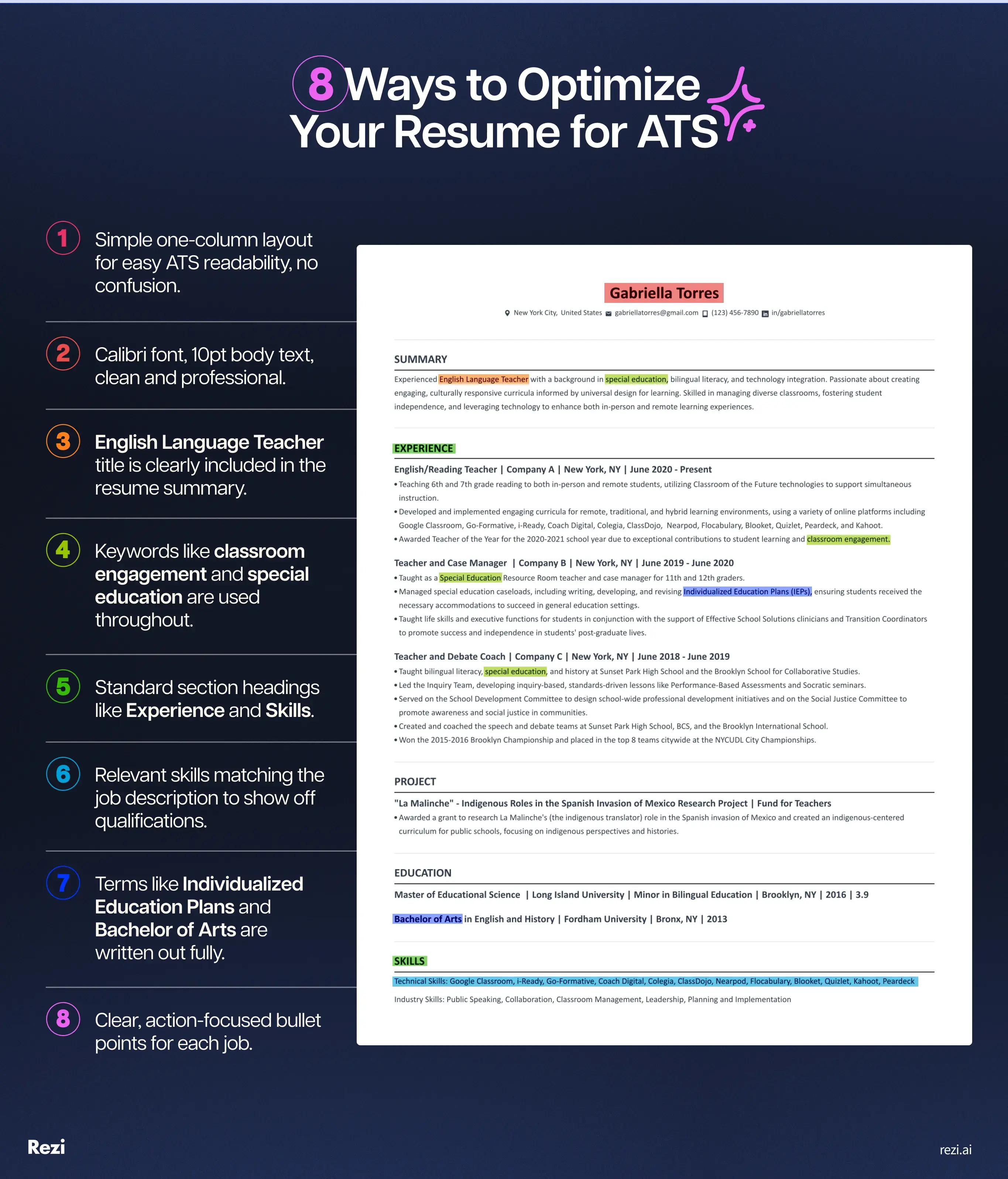
Take a look at this sample resume with some smart optimization tips to get you noticed.
Why do companies use ATS?
Companies rely on ATS to make hiring faster, easier, and more efficient. Here’s why:
- It quickly scans and filters resumes, helping hiring managers sort through applications faster.
- By automating the screening process, companies save time and reduce hiring costs.
- ATS applies the same criteria to every resume, reducing bias.
- It keeps all applications in one place, making it easier to track candidates.
What happens to your resume inside an ATS
Not all Applicant Tracking Systems work the same, but here’s what most of them do:
- Collects your application. When you apply through a company’s careers page or a job board, your resume is pulled into a central database.
- Organizes your information. The system parses your resume into sections like contact details, work history, education, and skills for easier filtering.
- Applies non-negotiable filters. If the employer uses knockout questions (work authorization, minimum years of experience), the ATS can automatically remove you if you don’t meet those criteria.
- Makes resumes searchable. Recruiters can search by keywords or apply filters for specific skills and experience. Some systems also generate a match score for each candidate.
- Ranks based on overall fit. Many systems sort candidates by relevance and recency. If a role requires Python, C++, and RESTful API skills, and you only list Python, you’ll rank lower but won’t be automatically eliminated.
- Manages the hiring workflow. Beyond screening, the ATS helps post jobs, track candidates, schedule interviews, send automated emails, and generate hiring reports.
Popular Applicant Tracking Systems
The most popular Applicant Tracking Systems range from simple recruiting tools for small teams to enterprise platforms built for global hiring.
Here are some of the most well-known ATS platforms:
Tips for Creating an ATS-Optimized Resume
In short: keep your resume simple, structured, and keyword-optimized. Use a single-column format, left-align text, and avoid headers, footers, or fancy designs. Choose standard fonts like Arial or Calibri, and ensure section titles are clear (“Work Experience,” not “My Career Journey”). Naturally include job-specific keywords and spell out abbreviations. Stick to bullet points for clarity, highlight relevant certifications, and save your resume as a PDF unless instructed otherwise. Finally, proofread carefully to catch errors.
The ATS won’t hire you, but it does decide whether your resume lands at the top of the hiring manager’s (metaphorical) pile. So, make it easy for the ATS to read and rank. Here are some simple and effective tips to get your resume as optimized as possible.
Stick to a single-column resume
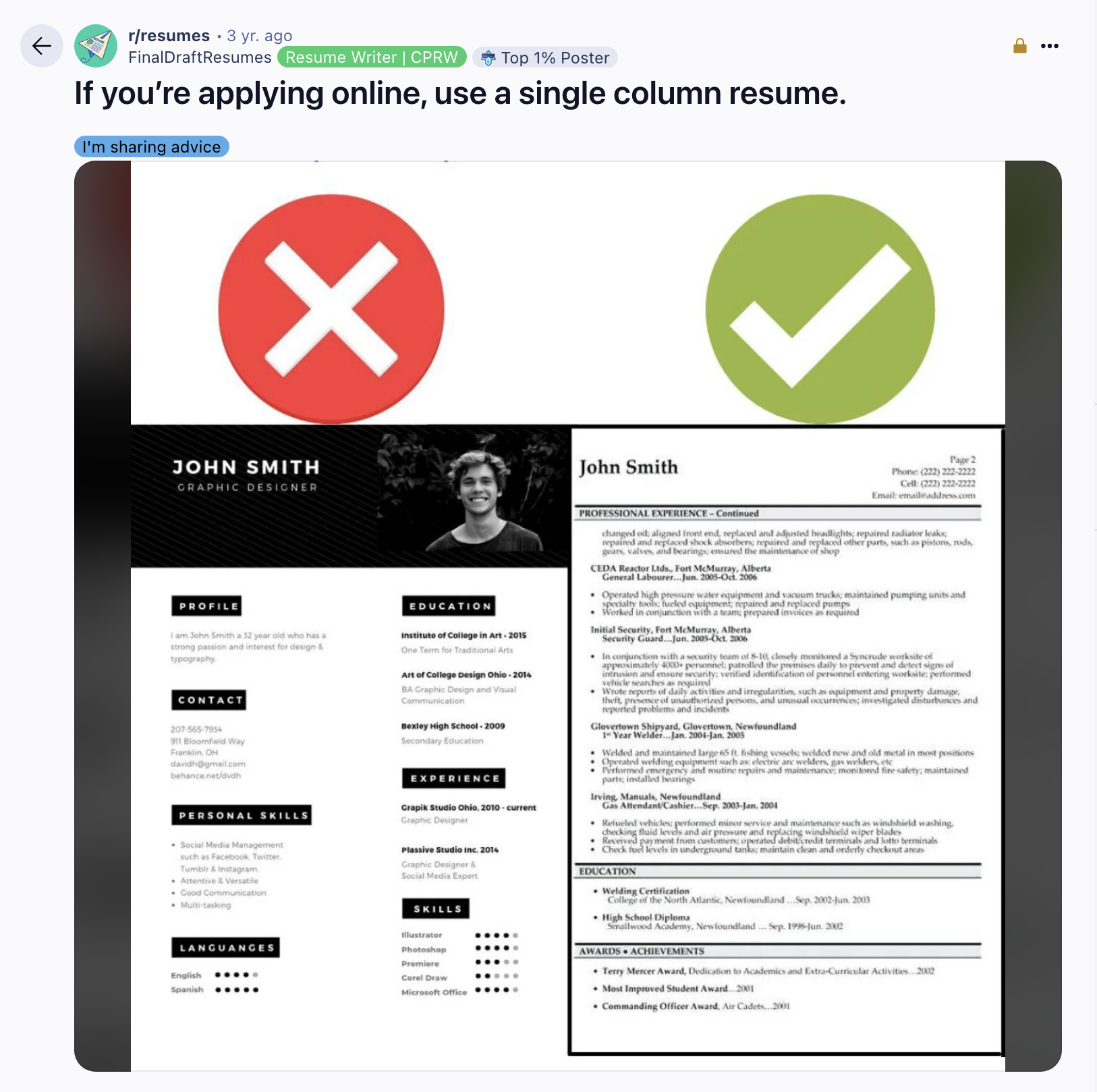
Multi-column resumes may look sleek, but they can confuse the ATS. Many types of ATS struggle to read text in multiple columns, tables, or text boxes, and key details could be missed.
Here’s how to keep your resume ATS-optimized:
- Use a single-column layout so everything is read in order.
- Left-align your text to make scanning easier.
- Avoid placing info in headers or footers, as some ATS might skip these sections.
- Stick to simple formatting — skip shaded backgrounds, graphics, or icons.
Put your contact details at the top in plain text
Make sure hiring managers can reach you easily.
- Put your full name in a bold, larger font (20–24 pt).
- Add your phone number, a professional email address, and location (city and state or country — skip your full address).
- Drop in a clickable link to your LinkedIn profile. (If you need help with that, check out our guide on How to Create Your LinkedIn.)
- If applicable, include links to your portfolio or relevant social media.
- ATS scans your contact details to build your profile, so they need to be easy to read.
- Keep your info in plain text — placing it in headers, footers, or fancy formatting can make it invisible to the system.
Use a standard, professional font
Your font choice can make or break your resume’s readability. Fancy fonts might look cool, but they can confuse the ATS and distract hiring managers.
Here’s how to keep your resume ATS-optimized:
- Stick to one font — mixing styles looks messy.
- Go for easy-to-read options like Arial, Calibri, Helvetica, or Verdana.
- Size matters: name in 20–24 pt, headings in 14–16 pt, and body text in 10–12 pt.
Include job-specific keywords naturally
Keywords are the magic words that get your resume past the ATS and in front of a hiring manager. But don’t just throw them in randomly — use them where it makes sense.
Here’s how to keep your resume ATS-optimized:
- Look at the job description for keywords (skills, tools, qualifications) that keep popping up.
- Include them in your work experience section. For example, instead of just listing “communication skills,” describe how you “led weekly team meetings to coordinate project timelines and ensure clear communication between departments.”
- Use a mix of broad and specific terms. If the job asks for “customer service,” also mention related skills like “client relations” or “account management.”
- Don’t overdo it. Spread keywords naturally throughout your resume.
Choose standard section headings
While creativity can be great in some places, ATS needs standard section titles to sort your information. If it doesn’t recognize a section, it may skip it. Plus, recruiters don’t have time to play detective trying to find your skills and experience.
Here’s how to keep your resume ATS-optimized:
- Stick to standard titles like “Work Experience” and “Education.”
- Avoid quirky section titles — ATS won’t recognize labels like “What I Bring to the Table” or “My Academic Era,” and recruiters might find them unprofessional.
Mention the exact job title in your summary or objective
Including the exact job title from the listing in your resume summary or objective helps the ATS identify you as a strong match and shows you’re serious about the role.
Here’s how to keep your resume ATS-optimized:
- Match the job title exactly as listed. If they’re hiring a “Teacher Assistant” but you’ve always called yourself a “Teaching Assistant,” go with their wording.
- Use the job title naturally in your resume objective or summary: “Experienced marketing director with a track record of leading high-performing teams and growing brands through smart, strategic campaigns.”
- If you’re new to the role, emphasize your enthusiasm and relevant skills: “Recent mechanical engineering graduate with CAD and prototyping experience, eager to apply skills as a Mechanical Engineer at ABC Corp.”
List the skills you actually have
Resist the urge to list every skill in the job description to “trick” the ATS. You could get caught in an interview or be asked to prove what you know in a skills test.
Here’s how to keep your resume ATS-optimized:
- Only list skills you’re actually good at and can demonstrate.
- Highlight the skills mentioned in the job description and show how you’ve used them.
- If you’re missing a skill, consider taking a course on platforms like Coursera, edX, or Udemy. You can even list it as “in progress” if you’re working toward it.
Spell out abbreviations and acronyms
ATS might miss acronyms or abbreviations, so use the full version to ensure your resume includes the exact terms the system and recruiters are looking for.
Here’s how to keep your resume ATS-optimized:
- Write out the full term first, followed by the abbreviation in parentheses. For example: Project Management Professional (PMP).
- Use complete year ranges, such as 2020–2022, not ‘20–’22.
Avoid special characters and accented letters
ATS can have trouble with special characters or accents, causing errors or missed information.
Here’s how to keep your resume ATS-optimized:
- Replace accented characters (like é, ü, or ñ) with their unaccented versions, like “resume” instead of “résumé.”
- Stick to basic punctuation — symbols like %, $, and # are fine, but others like &, ~, or * may cause issues.
Use bullet points for clarity
Bullet points make your resume easier to read and help highlight key achievements. Keep them simple and effective.
Here’s how to keep your resume ATS-optimized:
- Use 3–8 bullets per job, starting each one with a strong action verb.
- Stick to basic bullet styles like solid circles or dashes — avoid fancy symbols.
Highlight relevant certifications and training
Certifications relevant to the job can really boost your resume.
Here’s how to keep your resume ATS-optimized:
- List certifications or training in a separate certifications section on your resume.
- If you’re working toward a certification, note it as “Certified Data Analyst (in progress).”
Keep the education section simple
Your education section should be clear and to the point — it’s just quick proof that you meet requirements.
- List your highest degree first, with the school, degree, and graduation date.
- Still in school? Include “degree in progress,” your expected graduation date, and emphasize any relevant coursework, honors, or extracurriculars.
- Add your GPA if it’s over 3.5 (and you graduated in the last 10 years).
- Keep certifications in a separate section with the institution name and completion date.
- Avoid acronyms — spell out your degree first, like Bachelor of Environmental Science (BES).
- ATS scans for degrees and majors, so make sure they’re clear and easy to identify.
- A separate certification section on your resume ensures ATS picks them up.
- Spelling out degrees prevents errors in ATS processing.
Add extra sections the ATS scans
These additional resume sections can give hiring managers a better sense of your skills and personality — especially if you’re light on experience.
- Hobbies and interests. Show off skills through your hobbies, like photography for visual creativity, blogging for writing and marketing, chess for problem-solving, or team sports for leadership.
- Extracurricular activities. Student government, debate club, or starting a society show leadership, responsibility, and teamwork.
- Languages. List any languages you speak with your proficiency level (basic, intermediate, fluent, native).
- Awards and honors. Recognition like “Best Latte Art,” “Top Salesperson,” or academic scholarships prove your dedication and achievements.
- Projects. Running a blog, coding an app, or designing a portfolio shows creativity, problem-solving, and self-motivation.
- Volunteer experience. Community service, tutoring, or event planning highlights empathy, teamwork, and a strong work ethic on your resume.
- ATS scans sections like “Languages” and “Volunteer Work,” so including these can help your resume rank higher.
- Some ATS also look for extracurriculars and awards, showcasing your well-roundedness and adding extra value.
- Extra sections reinforce job-related skills, giving you an edge over other applicants.
Save your resume as a PDF or Word doc
Older ATS might handle Word docs better, but they can get messed up when opened on different devices. On the other hand, PDFs preserve your formatting.
Here’s how to keep your resume ATS-optimized:
- Follow the job posting’s instructions. If they want a Word document, send a Word doc.
- If you have a choice, decide what matters most to you:
- If ATS readability is your priority (even if formatting is off for the recruiter), go with Word.
- If you prefer your resume to look perfect for the recruiter, choose a PDF — but it might not be as ATS-friendly.
Proofread to avoid formatting or spelling mistakes
Even a tiny typo or wonky format can hurt your resume’s chances. The ATS won’t recognize misspelled words and if a hiring manager sees it, they won’t be impressed either.
Here’s how to keep your resume ATS-optimized:
- Use a spell checker like Grammarly and read your resume out loud to catch mistakes.
- Double-check your formatting — make sure headings and bullet points look consistent.
- Have someone else review it. A fresh pair of eyes can spot mistakes you might overlook.
Network to get your resume seen by a human
Don’t rely solely on submitting an application. If you know someone at the company, ask for a referral. Referrals carry more weight than cold applications and significantly increase the chances your resume gets read.
If you don’t know anyone, connect with employees on LinkedIn and send a thoughtful message after applying.
As Daniel Chait, CEO of Greenhouse Software, puts it:
“People need to focus more on the people and the decision-making behind those job processes, and less on the software filing the applicants.”
His advice: set job alerts so you can apply quickly, tailor your resume properly, and build real connections inside the company.
Why Is My Resume Still Not Being Read by a Human?
Your resume may not be getting read because it’s either not aligned closely enough with the job or you’re competing against too many equally qualified candidates.
If your resume isn’t getting traction, it could be because:
- It’s not tailored enough.
- Maybe you’re missing key skills from the job description.
- Your content isn’t easy to scan.
But if you’re doing all of that, it mightn’t be about ATS at all.
You’re probably competing with hundreds of qualified applicants. Hiring managers sometimes review enough resumes to build a shortlist, then stop reading. Not because the rest aren’t good, but because they don’t need more.
Sometimes it comes down to small differences: someone has one more year of experience. Someone worked at a company they recognized. Someone listed a tool the hiring manager prefers.
Recruiters can afford to be selective. And sometimes, the decision isn’t as deep as we’d like to think.
ATS Resume Checker
The Rezi AI Resume Checker helps you fine-tune your resume for ATS and recruiters. Here’s what it does:
- ATS optimization. Ensures your resume is properly formatted and includes the right keywords.
- Keyword analysis. Scans job descriptions to check if your resume includes key terms.
- Instant feedback. Flags issues like missing bullet points or vague wording.
- Resume score. Rates your resume on 23 key factors to show how it stacks up.
Get free, personalized feedback on formatting, content, and grammar. Or try premium ($29/month) risk-free with a money-back guarantee. Why not give it a shot?
Best Free ATS-Optimized Resume Templates
Need a resume that looks good and is optimized for ATS? Here are three solid templates that do both.
Professional resume template
Clean, structured, and easy to scan — this template keeps things professional while ensuring ATS picks up all your key details. Recruiters will also appreciate how easy it is to find what they need.

Want more options? Check out 35+ Free Professional Resume Templates.
Basic resume template
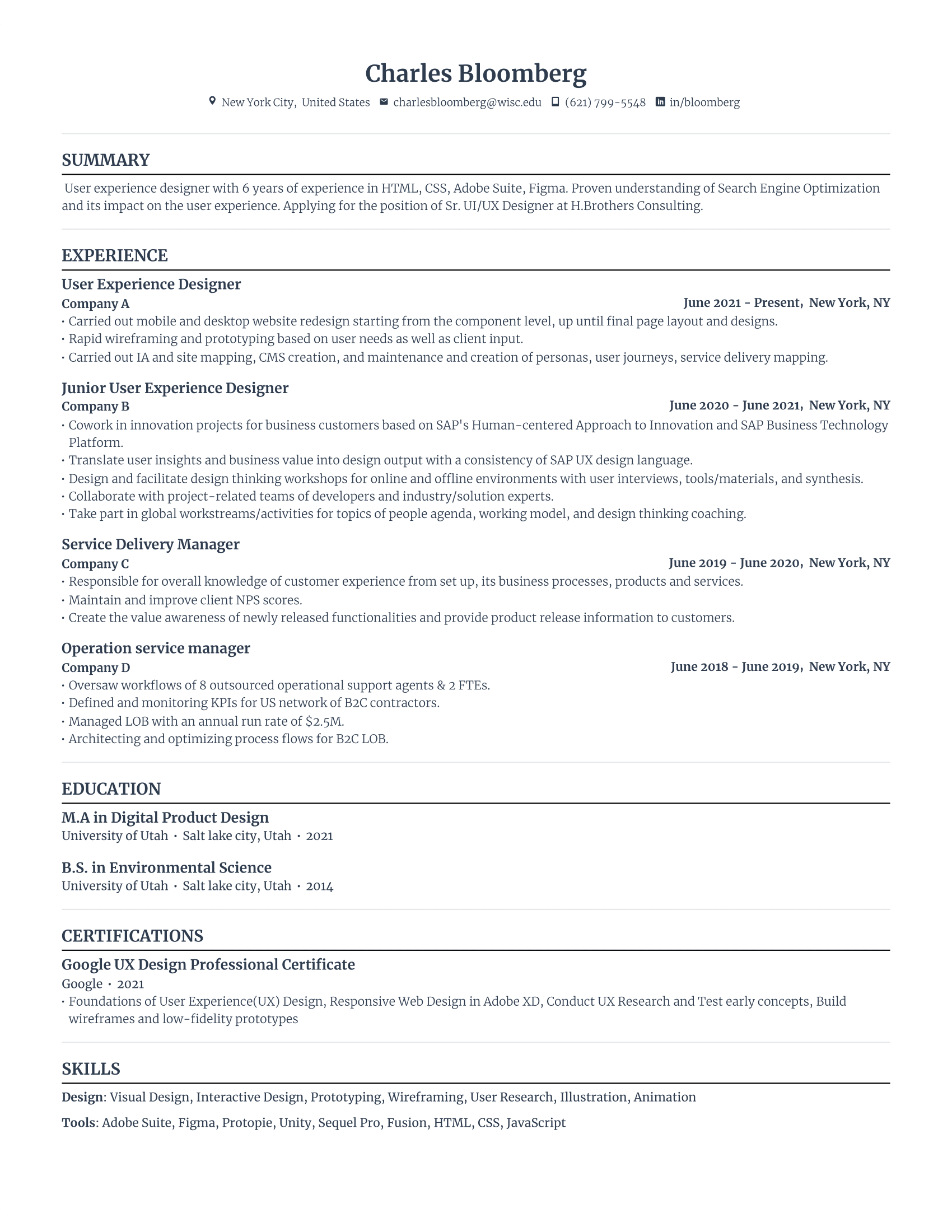
A no-fuss, easy-to-read layout with plenty of breathing room. The simple formatting makes it look polished without overwhelming the page.
Need more minimalist designs? See 30+ Free & Basic Resume Templates.
Modern resume template
A subtle pop of color helps you stand out while staying ATS-friendly. Perfect if you want a touch of creativity without going overboard.

For more ATS-friendly styles, browse ATS Resume Examples & Templates.
Summary
Here’s a recap of how to optimize your resume for ATS:
- ATS sorts and ranks resumes based on keywords and formatting.
- Use a single-column, left-aligned layout to make your resume easy for ATS to read.
- Stick to standard fonts like Arial or Calibri and avoid fancy designs.
- Include relevant keywords from the job description naturally throughout your resume.
- Use standard section titles like “Work Experience” and “Education” for clarity.
- Mention the job title in your resume summary or objective exactly as it’s listed in the job description.
- List only the skills you can demonstrate, matching them to job requirements.
- Spell out acronyms and abbreviations to ensure ATS doesn’t miss important terms.
- Avoid special characters, accents, or fancy punctuation that may confuse the ATS.
- Proofread carefully to ensure formatting and spelling are correct for better ATS readability.
FAQ
What two main areas of a resume should be optimized to ensure it is ready for an ATS?
The two main areas to focus on are formatting and keywords. Keep your resume clean and simple with a single-column layout, standard fonts, and no graphics. For keywords, match your skills, certifications, and job titles with the ones in the job description to help the ATS find and rank your resume.
Why is my resume getting rejected by ATS?
Your resume isn’t really “rejected” by the ATS — it’s sorted. The ATS helps recruiters manage applications, but recruiters make the final call. However, you could get disqualified if you fail “knockout questions,” like not having the right visa, experience, or degree. If you don’t meet these basic requirements, the ATS flags your resume early on.
What is a good ATS score for a resume?
A good ATS score is usually 80% or higher. This means your resume is hitting the key points, like relevant keywords, clear formatting, and required skills. While it can vary by system, scoring around 80% means you’re on the right track for getting noticed by recruiters.
Is a 2-page resume ok for ATS?
A two-page resume is fine for ATS, as long as it’s concise and well-organized. If you have 10+ years of experience, a second page is fine. Just make sure it’s packed with relevant content and not unnecessary fluff. If your resume spills onto the second page with only a few lines, condense it to one.
What is the most shortlisted resume format?
The reverse-chronological format is the most popular and widely shortlisted. It lists your work history in reverse order, making it easy for recruiters to see your career progression. This format is clear, straightforward, and highlights your experience, which is why it’s a go-to for hiring managers.
When will a human recruiter not see my resume?
Recruiters usually focus on the top-ranked resumes based on keyword matches or filters. If your resume isn’t well-optimized or properly formatted, it could get buried in a sea of other applications. Make sure your resume is tailored to the job and includes the right keywords to get noticed.
What’s the most common mistake to avoid when making an ATS resume?
Overcomplicating it. Fancy layouts, text boxes, graphics, and non-standard fonts can make your resume unreadable to ATS. Another big mistake is ignoring keywords. ATS scans for job-related terms, so if you don’t use the right ones, your resume might never make it to a real person.
Can I make an ATS-friendly resume for free?
Yes, plenty of free options exist. Rezi offers ATS-optimized templates, or you can use Microsoft Word or Google Docs. Just keep it simple — stick to a single-column layout, use standard headings, avoid headers, footers, and images, and you’re good to go.
Can ATS read PDFs from Canva?
Not always. Canva resumes often use text boxes and design elements that can confuse ATS. If you’re using Canva, keep the layout super simple — no columns, no fancy fonts, just plain text. Even then, some systems might struggle, so a template from Word, Google Docs, Rezi, Kickresume, or Enhancv is usually the safer choice.
How to pass the Workday ATS?
You don’t need to trick Workday or any ATS; just make your resume easy to read and keyword-rich. Use simple formatting, a single-column layout, standard headings, and include the exact job title and key phrases from the job post. Avoid graphics, text boxes, and images, and fill in all application fields.
How many companies use ATS?
ATS are widely used by nearly 99% of Fortune 500 companies, 70% of large firms, and 20% of small and mid-sized businesses. 94% of recruiters agree that ATS has improved their hiring efficiency, helping filter candidates and manage applications more effectively (Select Software Reviews).

Upload or drop your resume to get started
Upload your resume to get started
Score my resume

Sarah Coghlan is a writer and editor passionate about making resume and career advice clear and accessible to all. Based in Barcelona, her goal is to help job seekers create standout resumes and navigate the job search process with confidence and ease.