User Guides
Resume Name
Learn how to choose a professional resume name with Rezi to keep your applications organized and make a strong impression.
Published on
July 16, 2026
Updated on
July 23, 2026
Sending a resume tailored for one job to the wrong company? Not a good look. Your resume name might feel like a small detail, but it’s what keeps hiring managers clear on who you are and helps you avoid mixing up versions when you’re juggling multiple applications.
In this guide, I’ll walk you through how to name your resume in Rezi and share professional naming formats that keep your applications organized and mistake-free.
You can get started with our free AI Resume Builder. Use our AI tools and personalized feedback to create an ATS-friendly application in minutes.
And check out more tools to improve your resume:
You can also find out more about the best resume practices and red flags:
Naming Your Resume
Your resume name is the first thing a recruiter sees when they download your resume, so a clear, professional name makes a better first impression than a generic or cluttered one. It also helps you stay organized, especially if you’re tailoring your resume for multiple jobs.
When naming your resume, follow these simple practices:
- Use a clear, descriptive format, such as FirstName_LastName_Resume or FirstName_LastName_JobTitle.
- Avoid vague or cluttered names like resume_final_FINAL_v3, which can look unprofessional and make it harder to identify different resume versions.
Overall, the right resume name helps recruiters identify your resume quickly, keeps your Rezi dashboard organized, and aligns with Rezi’s resume quality recommendations.
How to Name Your Resume
Here’s a quick breakdown of the two methods to name your resume with Rezi:
- Method 1: Name your resume during the setup process after creating a new resume from your dashboard, importing an existing resume or LinkedIn profile, or using the AI Resume Agent.
- Method 2: Rename your resume after creation by going to your dashboard, hovering over the resume you want to update, clicking the Gear icon or selecting Edit from the three-dot menu, entering a new name, and clicking Save.
Let’s get into the details.
Method 1: Name your resume during creation
When you create a new resume in Rezi, you’ll choose a name before you enter the AI Resume Builder. Just head to your dashboard, click Create New Resume, then enter your details. You can also start a new resume by:
- Creating a resume from an existing one by manually copying your information or importing a PDF or DOCX file.
- Importing your LinkedIn profile with the Rezi Chrome Extension to transfer your professional information automatically.
- Using the AI Resume Agent to build, improve, and tailor your resume through a conversation with real-time AI suggestions.
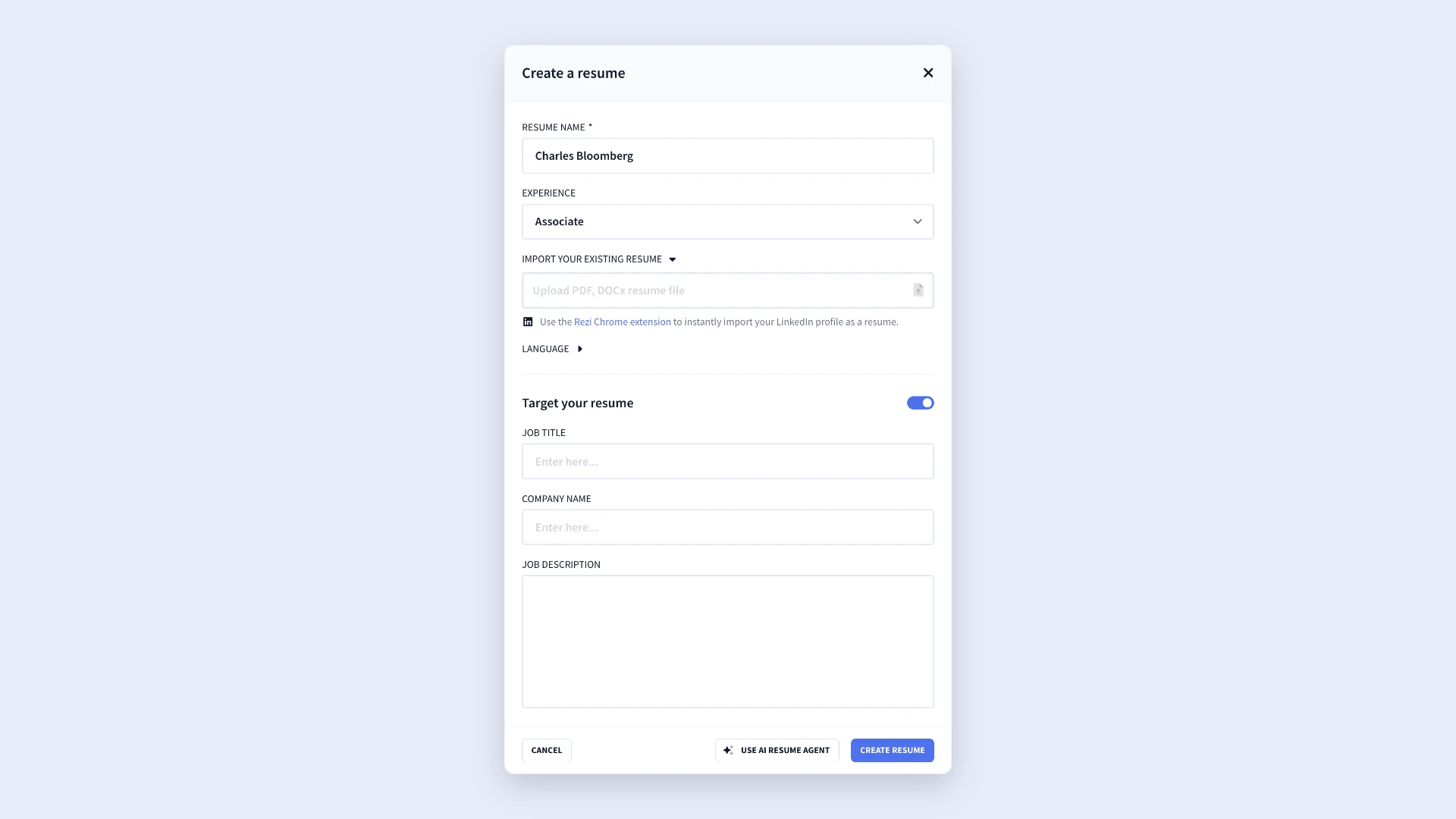
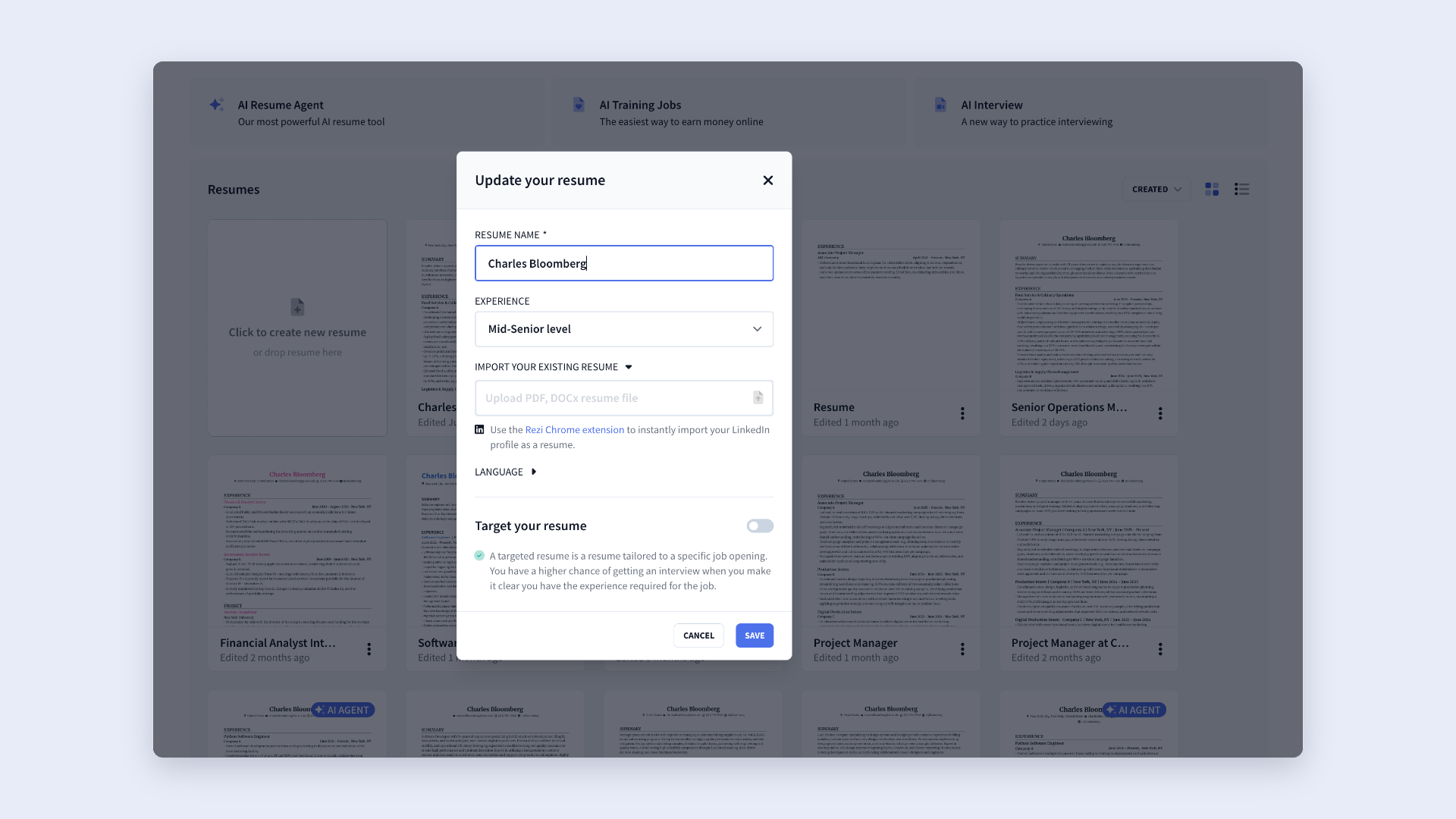
Before the resume builder opens, you’ll complete a short setup form. This includes your resume name, experience level, and preferred language. You can also turn on Target Your Resume to tailor your resume for a specific job title, company, and job description right from the start.
When naming your resume, stick to a simple format that’s easy to recognize at a glance. This helps you stay organized, especially if you create multiple resumes for different jobs or companies.
Here are some recommended naming formats:
- FirstName_LastName_Resume
- FirstName_LastName_JobTitle
- FirstName_LastName_CompanyName
Method 2: Rename your resume after creation
If you’ve already created a resume, you can rename it at any time.
Simply go to your dashboard to view all your saved resumes. Hover over the resume you want to rename, then click the Gear icon or select Edit from the three-dot menu. Enter your new resume name, click Save, and the updated name will appear on your dashboard immediately.
Find out more: The Best Resume File Format
Summary
Here’s an overview of everything you need to know about naming your resume with Rezi:
- Use a professional naming format, such as FirstName_LastName_Resume or FirstName_LastName_JobTitle.
- Include the job title or company name if you’ve tailored your resume for a specific role or employer, for example, Emma_Darcy_Marketing_Manager or Emma_Darcy_Acme.
- Keep the name short, descriptive, and easy to recognize so that you and the recruiter can quickly identify the correct version.
- Avoid vague or cluttered names like resume.pdf, myresume, or resume_final_FINAL_v3, which can look unprofessional.
- Use a consistent naming convention across all your resume versions to keep your files and Rezi dashboard organized.
- Create separate, clearly named resumes for different jobs instead of reusing a generic resume for every application.
FAQ
Why does your resume name matter?
Your resume name matters because it’s often the first thing recruiters see when they download your file, so a clear, professional name helps create a strong first impression and show attention to detail. It also helps you stay organized, making it easier to quickly identify the right resume without opening several files.
Can you rename your resume after creating it?
Yes, you can rename your resume after creating it in Rezi. Just go to your dashboard, find the resume you want to update, hover over it, and click the Gear icon or select Edit from the menu. From there, you can change the name and save it instantly.
Should you include the job title in your resume name?
Yes, including the job title is a smart move when you’re targeting a specific role to help you and the recruiter instantly recognize which resume matches which application. It also keeps your dashboard organized and reduces the chance of submitting the wrong version by mistake, especially if you’re tailoring multiple versions.
Should you include the company name in your resume name?
Including the company name can be helpful when you’re tailoring a resume for a specific employer, especially if you’re applying to several companies at once. It adds clarity and makes each version easy to distinguish. However, you don’t need it for every resume, only when you’re actively customizing for that specific company.
How do you organize multiple versions of your resume?
The easiest way is to use a consistent naming system that includes your name plus either the job title or company, so every file is instantly recognizable. Keep formats consistent across all versions and avoid random or vague names. In Rezi, you can also rename resumes directly from your dashboard, which helps you stay on top of different tailored versions without confusion during your job search.
Learn more about how to organise your applications: How to Keep Track of Job Applications

Upload or drop your resume to get started
Upload your resume to get started
Score my resume

Lauren Bedford is a seasoned writer with a track record of helping thousands of readers find practical solutions over the past five years. She's tackled a range of topics, always striving to simplify complex jargon. At Rezi, Lauren crafts genuine and actionable content that guides readers in creating standout resumes to land their dream jobs.