Resume
How to Make a Truly ATS-Friendly Resume
Learn how to make an ATS-friendly resume with formatting tips, keyword strategies, and common mistakes to avoid so you pass the scan and impress recruiters.


Published on
April 29, 2026
Updated on
April 29, 2026
Short answer: An ATS-friendly resume uses a clean, single-column layout, standard section headings, and keywords pulled naturally from the job description. Avoid graphics, tables, text boxes, and unusual fonts — these can cause the system to misread or skip your content entirely. The ATS doesn't reject resumes on its own. It organizes them so recruiters can search and filter efficiently. Your goal is to make your resume easy for the software to parse and compelling enough for the human who reads it next.
Background on ATS fear-mongering
Nearly every modern ATS myth traces back to one claim from 2012: 75% of resumes are rejected by an ATS, and a human never sees them.
That statistic (spoiler alert: it’s false) is the cornerstone of all the ATS chaos that followed: formatting panic, keyword-stuffing advice, the fear of “invisible robot gatekeepers.”
The stat came from Preptel, a company that shut down in 2013, with no published methodology. Preptel was a resume-optimization software, so of course, they had a direct financial incentive to convince job seekers that ATS was a brutal automated filter they needed to beat. They published no methodology, no study, no survey, and no sample size.
How the myth spread
The ensuing citation chain is well-documented. A 2014 Forbes article cited Preptel, a 2018 CIO.com piece cited Forbes, and a 2019 CNBC article cited CIO.com. No one verified the original source.
From there, it propagated to Yahoo News, CNET, LinkedIn posts, TikTok career coaches, and countless resume-service marketing pages. The CIO.com piece even used some sleight of hand by juxtaposing the Preptel number with a quote by Josh Bersin from Deloitte, making it look like the statistic had Deloitte’s reputation behind it — which it didn’t.
In 2020, Christine Assaf, an HR and organizational psychology researcher, published a comprehensive piece debunking the myth on her blog, HRtact. It was too little too late.
Six years later, and the fear around ATS is totally blown out of proportion (no, it’s not sitting there auto-rejecting you).
But there is a real reason people talk about it. If your resume isn’t easy for these systems to read and doesn’t reflect the job you’re applying for, you can get overlooked.
So, instead of buying into the hype or ignoring it completely, let’s break down what’s actually going on. Here’s what we’ll cover:
- The definition of an ATS resume.
- How an ATS reads your job application (including a real-life experiment using the most popular ATS software).
- The reality of how recruiters use ATS in the hiring process, based on interviews with industry insiders.
If you want to create an ATS-friendly resume, check out our free AI Resume Builder. Just enter your professional details and get a tailored job application in minutes.
And check out more useful tips and guides:
What’s an ATS Resume?
An ATS resume is a job application that’s compatible with Applicant Tracking Systems (ATS). When you apply, your resume gets uploaded into the company’s ATS. From there, the system parses your document, which is a fancy way of saying it reads and organizes your information.
Once the ATS stores your resume, it becomes searchable. Recruiters don’t need to scroll endlessly through every applicant; they simply search the database using resume keywords and filters tied to the job. If your resume includes specific terms (and uses them in a way the ATS can recognize), you have a much better shot at showing up in those search results.
I spoke with Maria, a former recruiter, about her experience with ATS and its benefits:
I relied heavily on the ATS software, not because it would keep me from recruiting (you don’t necessarily need it to recruit), but it makes your time more efficient. It can help you create lists of different candidates with different skill requirements and categorize each person. Overall, the main benefit is making your time more efficient and getting as many applicants as you can throughout the process.
On top of this, the ATS also helps hiring teams:
- Filter candidates based on required qualifications
- Organize and review applications in one place
- Schedule interviews and track progress
- Store feedback and communication
Your resume needs to work with ATS, not against it. The Rezi MCP Toolkit helps by connecting your resume to AI tools like Claude or Gemini, so you can quickly tailor it to each job description and improve different sections in seconds.
What Does Your Resume Look Like in an ATS?
I wanted to see firsthand how an ATS actually reads my resume and where it might misinterpret or completely miss key details based on formatting and layout.
To test this, I uploaded the same resume content using different templates into real application systems: Visa (which uses SmartRecruiters) and Adobe (which runs on Workday, one of the most widely used ATS platforms). The goal was to see how accurately each system could extract and autofill my information.
Quick heads-up from experience: I lost more time than I’d like to admit with design-heavy resumes on Canva and similar tools, only to have them rejected for exceeding file size limits (10MB, which isn’t uncommon). Lesson learned: keep it simple.

Rezi Resume
I started with Rezi’s tried-and-tested template from our ATS-friendly template gallery.

And as you can see, simplicity equals better compatibility. The system read and copied over all my bullet points from my work experience section, along with the correct dates and job titles.

Uploading my resume to Adobe was also a success. The system identified all the right information with the correct lines and spacing (I can’t say the same for the other templates).
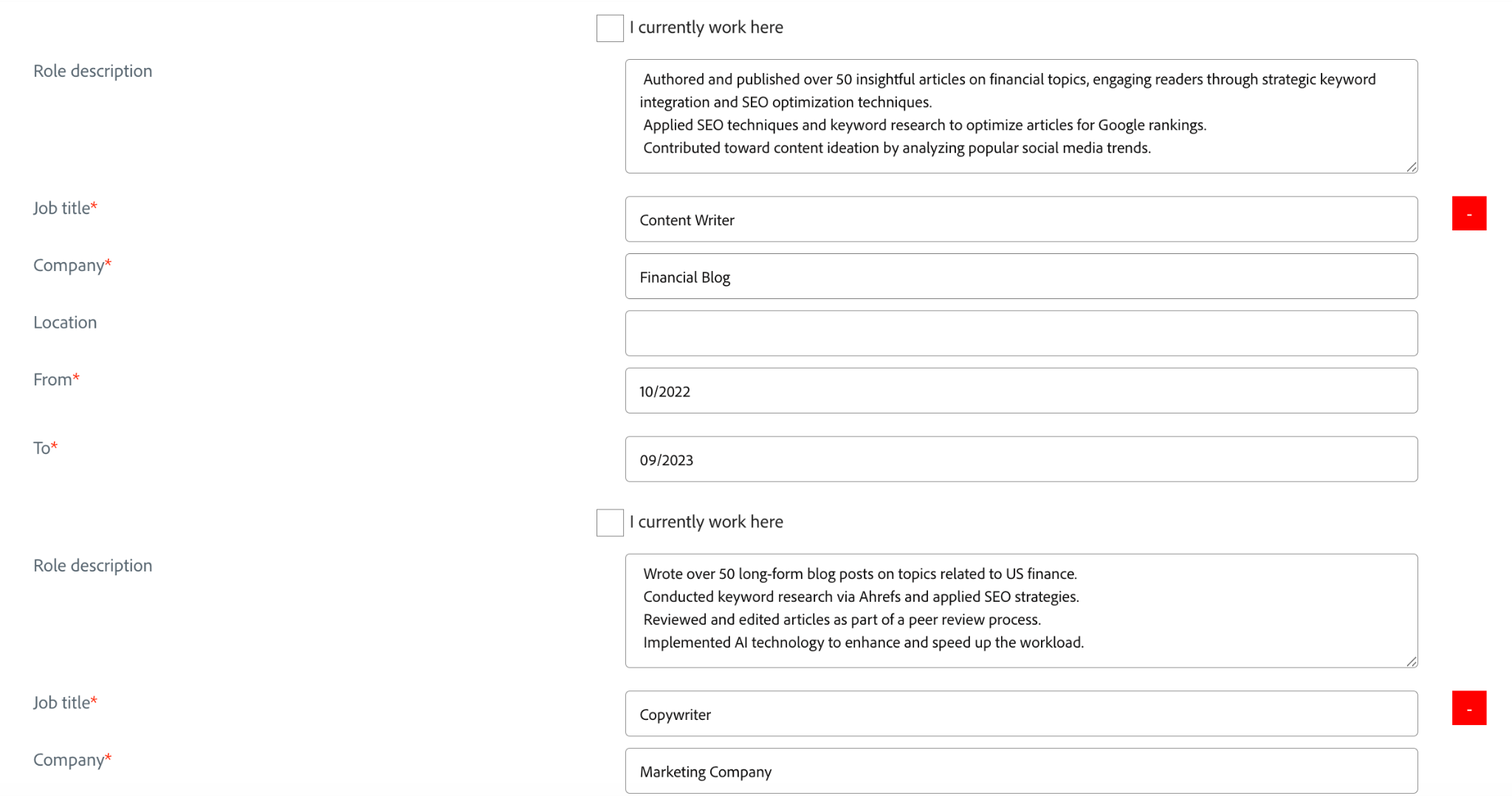
FlowCV Resume
Next, I tried a more “aesthetic” template from FlowCV. While the resume-building site has plenty of minimalist templates to choose from, I opted for a two-column layout with a color block to see how the systems held up with more “elaborate” formatting.

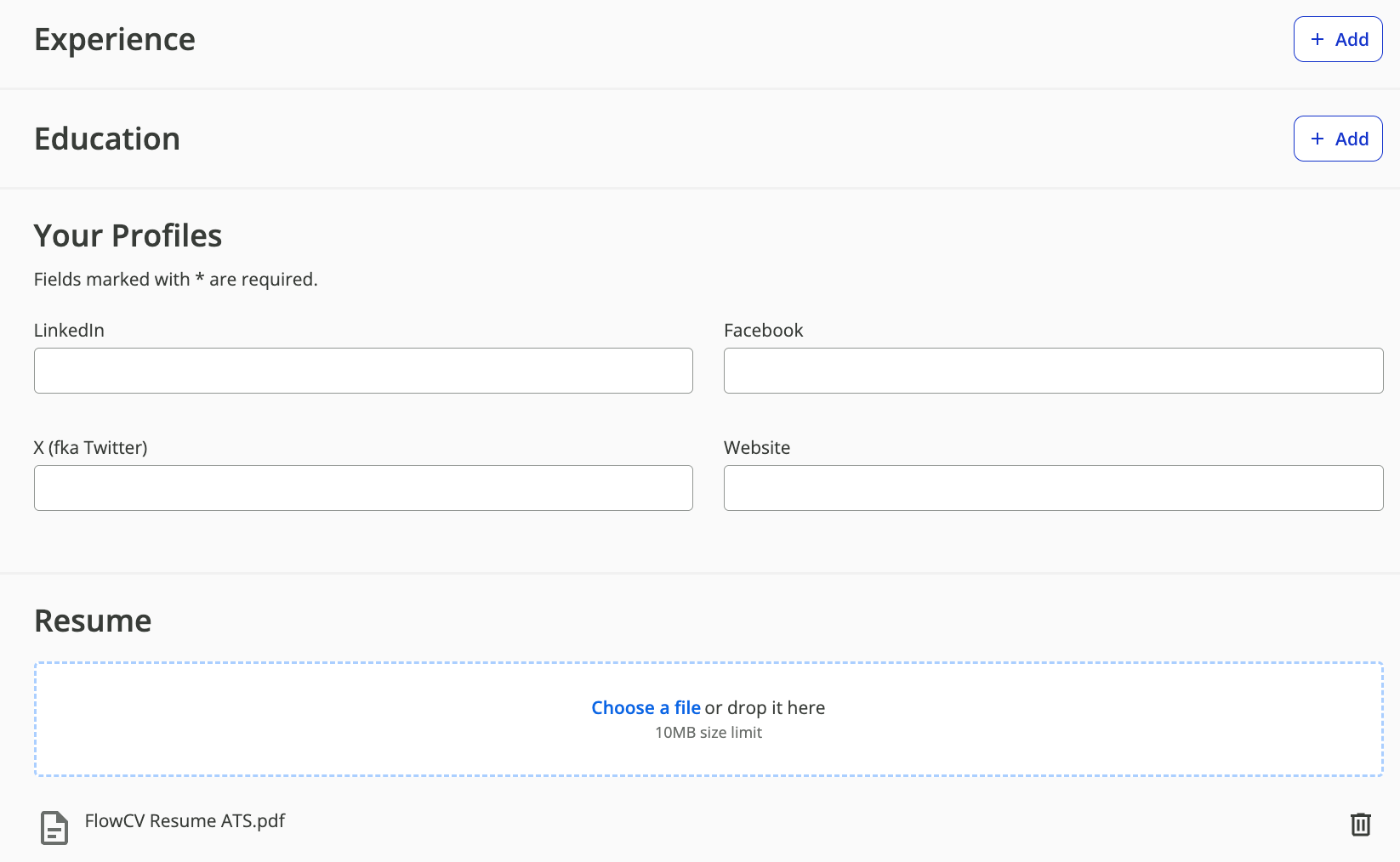
I got nowhere with this on the Visa application site; it left my experience and education totally blank. I blame it on more complex formatting (like colored backgrounds and two columns), which can confuse online systems and cause them to miss entire sections or important keywords.
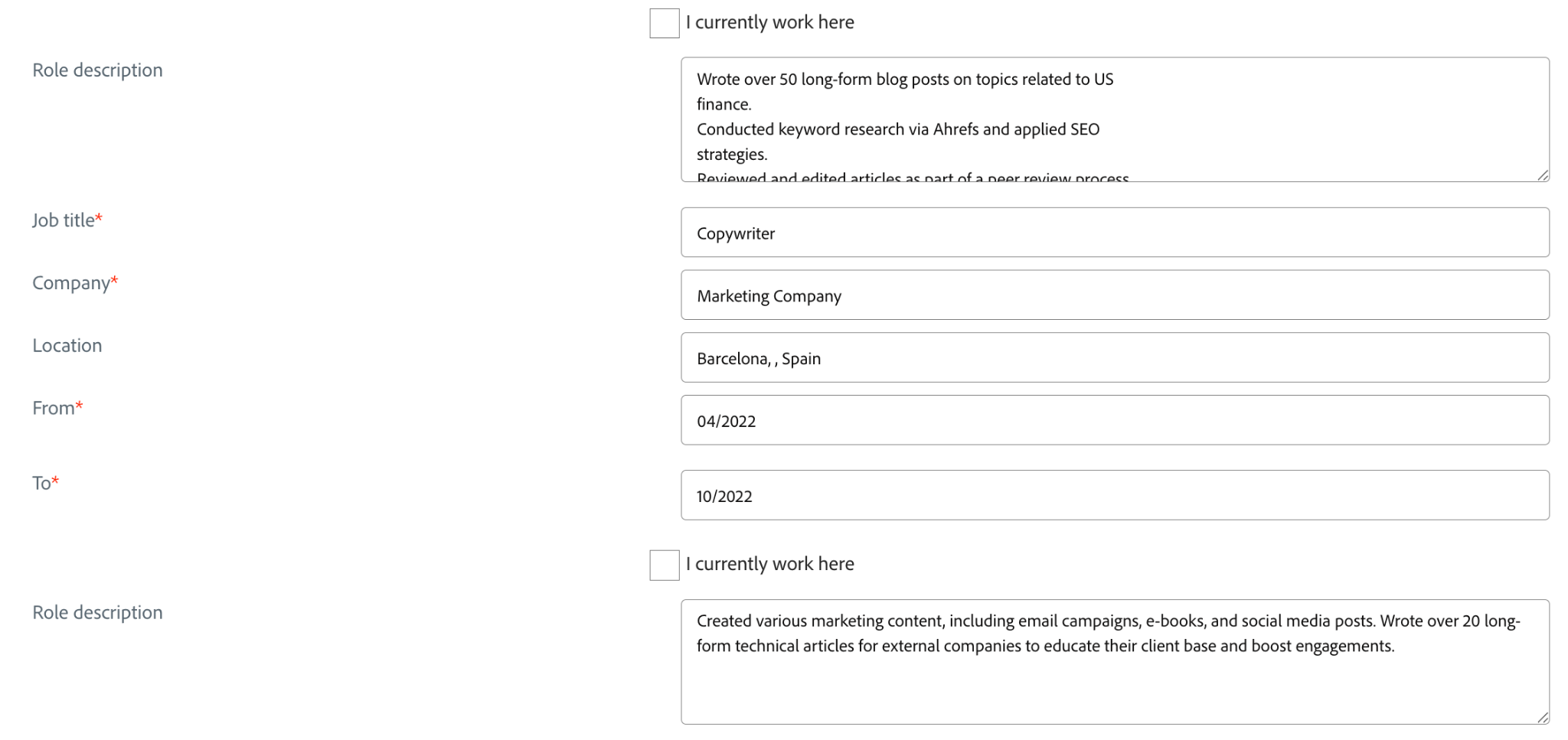
The Adobe system picked up the details better, but it still struggled with fitting everything onto the right lines. It seems the two-column layout worked against it, leaving half a field empty with white space and the other with bullet points all copied onto the same line.
Teal Resume
Next up was Teal, another popular resume-building site, offering both minimalistic and more design-heavy templates. To keep it fair (and realistic), I again opted for a simpler design.
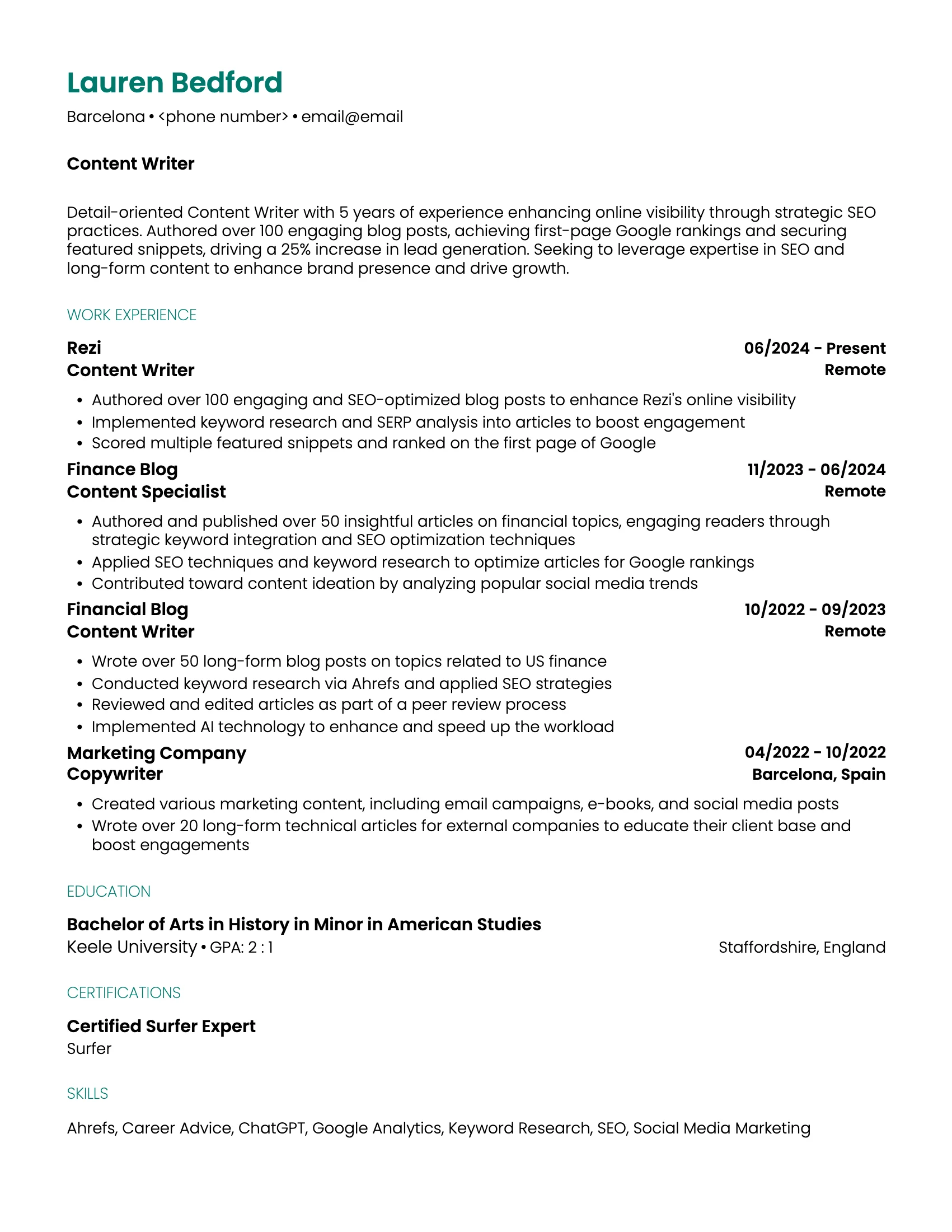
The system correctly read most of my information (aside from changing my name from ‘Lauren’ to ‘Lau’), but it’s clearly far from perfect. It could be the less conventional Poppins font or the lack of spacing between sections, but all those gaps between letters would be an issue for the system identifying keywords.

That said, the Adobe application using the Workday ATS worked much better, copying all the details, minus any awkward gaps.

My overall verdict? Don’t risk the ATS not reading your resume just because you wanted to use a cool font or bold colors. Online systems (and recruiters) only care if you’re qualified, not your eye for design. A simple format puts the focus on your content and increases your compatibility with ATS.
How Much Do Recruiters Rely on ATS?
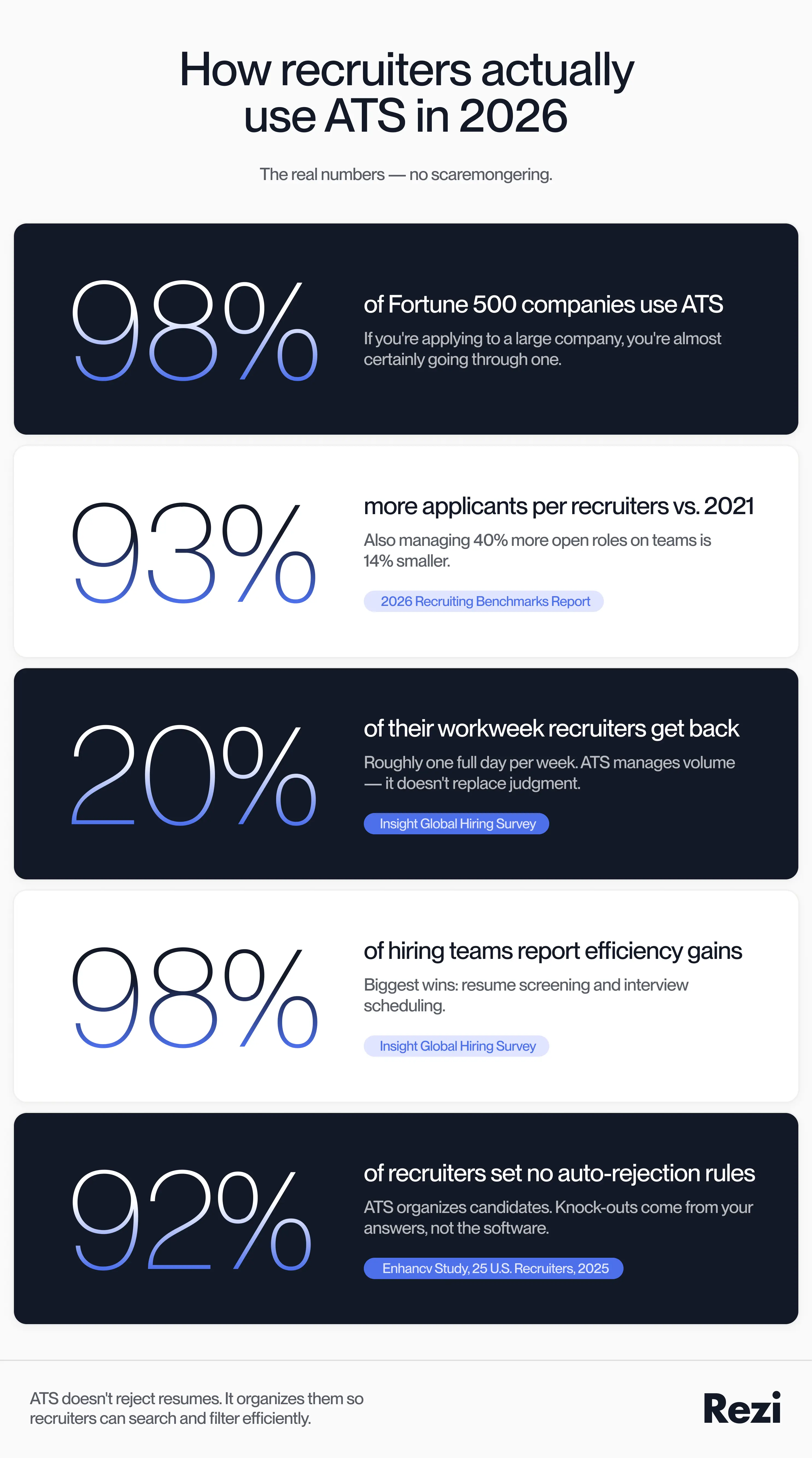
None of this actually matters if companies and recruiters aren’t using ATS. Well, it turns out that they are, especially bigger companies, with 97.8% of Fortune 500 companies using these systems.
The reality is that recruiters are dealing with a surge in applications that would make anyone reach for automation. A 2026 Benchmarks Report found that recruiters are handling 93% more applications and managing 40% more open roles than in 2021; all while working on teams that are 14% smaller.
That said, ATS isn’t designed to replace recruiters, just to help them out.
On average, teams using these tools reclaim about 20% of their workweek, which is basically like getting a full day back every week. Unsurprisingly, an Insight Global report found that 98% of hiring teams saw real efficiency improvements, especially in resume screening and interview scheduling.
So, yes, recruiters are using ATS and AI tools in hiring, but they don’t rely on them blindly. They still review resumes, make judgment calls, and decide who moves forward. The ATS just helps them narrow the field to something manageable.
But with so many advancements in AI, what does that mean for the future of recruiting? A 2025 recruiting report showed that 37% of companies are already experimenting with or actively using generative AI in hiring, up noticeably from the year before.
Here’s what Maria shared about potential concerns in the future:
From what I’ve heard from my recruitment network, the issue with AI is that it doesn’t understand human behaviour. For example, if a candidate lists their preferences as remote, the system could decide it’s not a match. But what if circumstances have changed, or this person is more desperate for a job? Or if someone graduated with a biology major, but their professional background is in finance. There could be a good reason for that jump, but the AI would just screen for the biology major and decide they’re not suited for a finance position.
The AI is filtering through the system, looking for keywords that are going to be beneficial to the job description and what you’re looking for. But I don’t think it will be able to make those judgment calls when considering candidates for certain jobs.
The Future of Recruitment Technologies 2025 found that 63% of organizations use AI in talent acquisition for tasks like writing job descriptions, resume filtering, and interview questions. But the concerns are clear, with the main ones being bias (58%) and depersonalization (51%).
The future of recruitment and technology will be about balancing efficiency and human judgment. AI can speed things up, but it still struggles with context and the messy reality of career paths. The companies that get this right won’t rely on AI to make decisions for them; they’ll use it to make better decisions.
Check out more insider knowledge from a recruiter’s perspective:
- How Recruiters Rewrite Candidate Resumes
- How to Increase Your Recruitment Placements
- How to Improve Candidate Experience in Recruitment
The Job Seeker Perspective
So, how do job seekers feel about ATS? Are they aware that these systems even exist? And if so, do they see them as more of an obstacle or just another tool in the hiring process?
We created a poll on LinkedIn to see what job seekers really think. Here are the results:
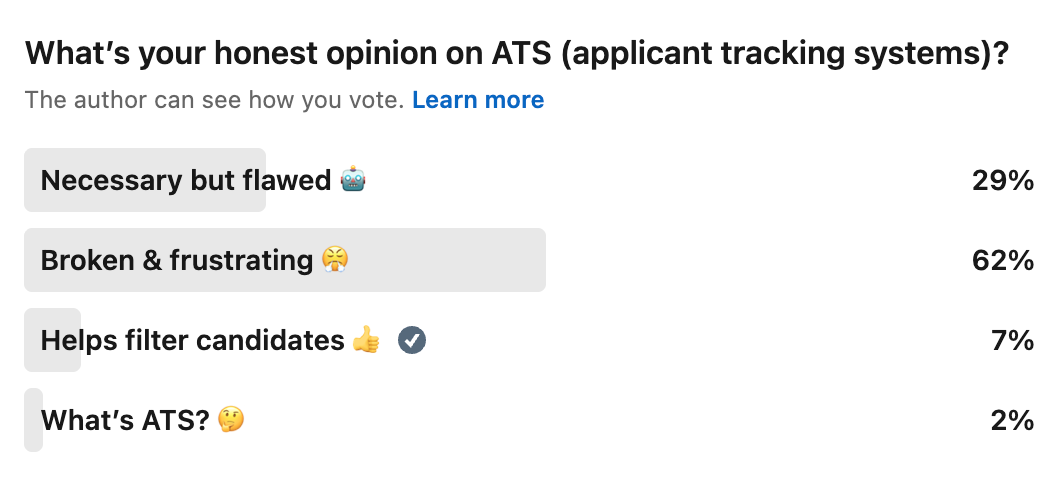
So, it’s safe to say that the majority of job seekers clearly aren’t thrilled with ATS. It could be the countless rejection emails for no apparent reason, but it may also be certain sites like Jobscan selling the idea that humans won’t even see your resume if you don’t get a perfect ATS score.
Here’s what one respondent, Douglas, shared about his frustrations with ATS:
It seems many companies are using the ATS to count out qualified applicants based on resume keywords. When tailoring a resume, the applicant shouldn’t have to stuff it with every keyword. There have been times when an application gets rejected within 24 to 48 hours because it didn’t use every keyword. And there’s no way that a human had a chance to look at the resume.
With a high number of resumes submitted, using an ATS could help to screen out those who don’t have the skills, experience, and qualifications. However, the screening rules need to be adjusted so they don’t rule out qualified people just because they don’t use specific keywords.
Is ATS Really Rejecting Your Resume?
One of the reasons job seekers are so anti-ATS comes down to the persistent myth that it’s some ruthless robot auto-rejecting perfectly good candidates. In reality, it’s more like an overworked librarian organizing thousands of books… and occasionally misplacing a few.
Time to separate the scaremongering from the facts.
Myth: You can cheat the system
If keywords matter so much, why not just copy the job description and stuff your resume with all the right phrases? Well, ATS doesn’t have the final say on whether your resume gets through to the next stage. Recruiters are still human, and they can see when you’re overselling yourself.
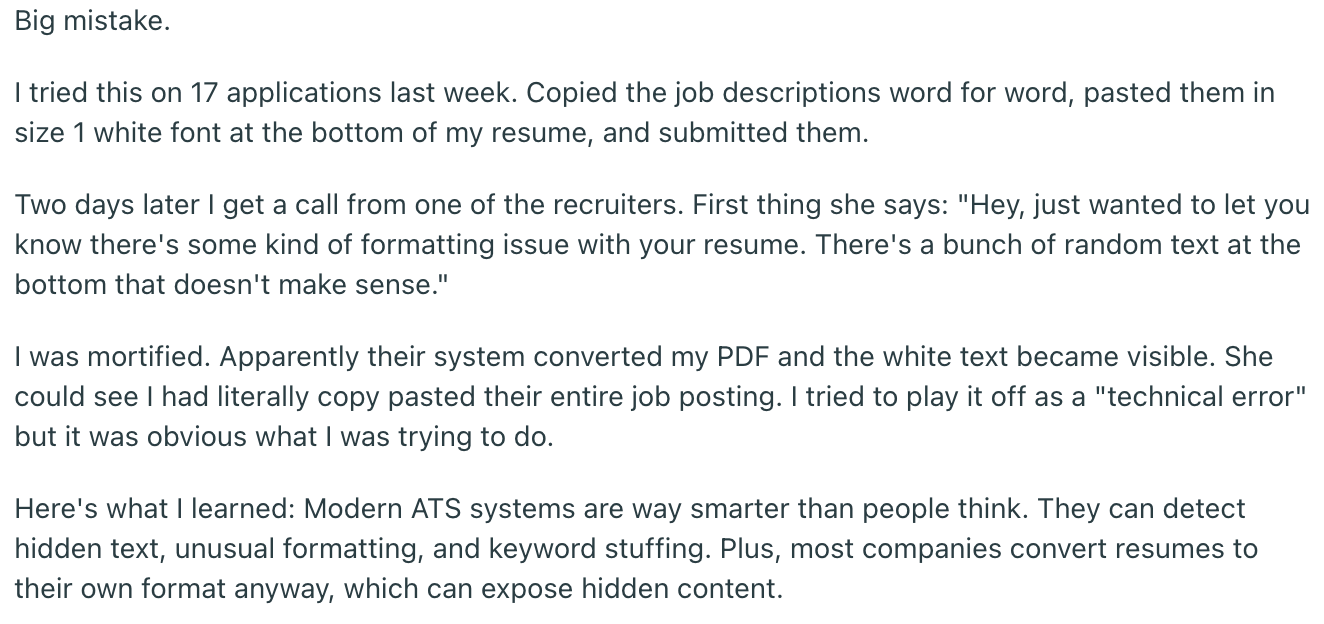
Yes, keywords help your resume get found in the database. But if you use the same phrase 15 times, copy-paste skills you don’t actually have, or hide keywords in white text (yes, people still try this), you’ll likely get caught out, eventually.
Here’s how trying to cheat the system turned out for this Redditor:
What actually works:
- Use keywords naturally, in context (woven into achievements, not dumped in a list of duties).
- Match the language of the job description, but only where it’s true.
- Mix in related terms instead of repeating one phrase over and over.
You’re not trying to game the ATS; it’s more about making tailoring faster without losing authenticity. With the Rezi MCP Toolkit, you can use AI to align your resume with a job listing while still keeping your experience natural and readable to the people behind the software.
Myth: ATS is rejecting your resume
An ATS doesn’t sit there rejecting people like some bouncer at a nightclub. It organizes, sorts, and surfaces candidates so that recruiters can review them more efficiently.
But it can misread your resume.
When you upload your file, the system tries to convert it into plain text. In that process, it can:
- Strip out formatting
- Ignore text inside headers/footers
- Break apart columns or text boxes
- Miss content embedded in images
So, no, the ATS didn’t reject you; it just didn’t fully understand your design-heavy formatting.
And let’s not forget the knock-out questions during the application process. Many job seekers blame that instant-rejection email on ATS, but in reality, you just told them you had 2 years of experience when they wanted at least 5. Or, what’s even more likely, your desired salary was outside of their range, or you don’t have a necessary level of education or a specific certification the job requires.
What actually works:
- Avoid:
- Headers and footers for key details (like your email or phone number)
- Tables, graphics, and text boxes
- Fancy design elements that look great but confuse software
- Stick to a clean, single-column layout (left to right, top to bottom)
- Use standard resume fonts and simple formatting
Don’t underestimate the power of using the right font. A Redditor explained in a recent post that the text from their resume PDF looked different when they copied it into an external document, potentially preventing the ATS from reading keywords.
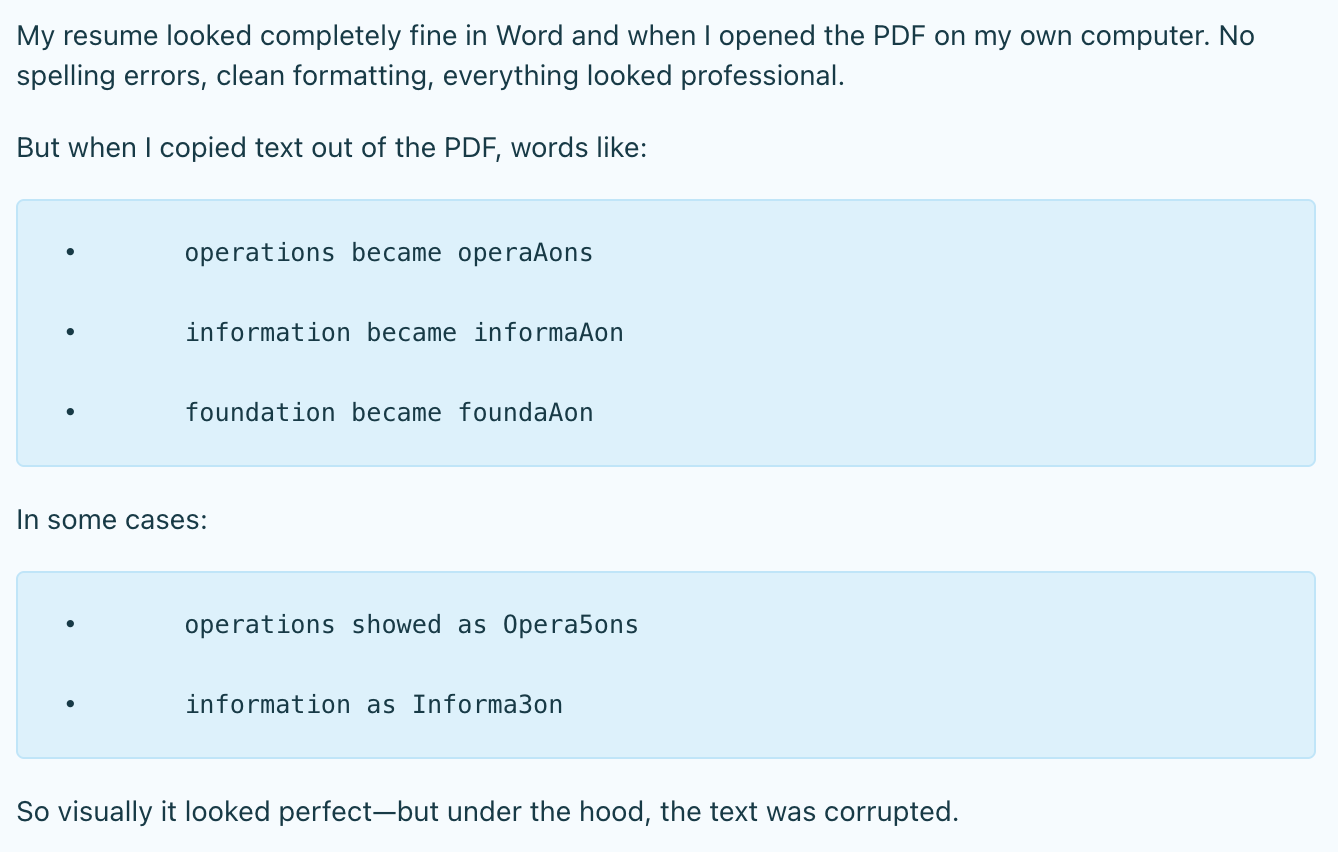
The problem? A font/encoding issue when exporting to PDF. The solution was simply to switch from Calibri to Arial, then recreate the PDF.
That said, Calibri is usually considered a safe resume font, but when in doubt, paste the text into Notes or a Word document to check, and turn off ligatures when writing your resume.
Learn more about the best resume formatting practices:
Myth: ATS is replacing recruiters
An ATS doesn’t hire people. It doesn’t evaluate culture fit, ask follow-up questions, or get a gut feeling about a candidate. It simply organizes information and helps recruiters manage volume.
Recruiters and hiring managers are still deeply involved. Here’s just some of what they do:
- Review the most relevant resumes
- Interpret experience beyond keywords
- Conduct interviews and assess soft skills
- Collaborate with teams before making decisions
Even when the system ranks or surfaces candidates, a human still decides who actually moves forward. So no, the robots aren’t taking over hiring anytime soon.
What actually works:
Assuming humans are still in the driver’s seat (they are), your resume needs to do two things well: get found and then hold attention. Here’s how to do it:
- Pull a handful of key phrases from the job posting and use them where they naturally fit. This helps you show up in searches and feel relevant to the reader.
- Use a layered approach to keywords by including a concise skills section for quick scanning. Then reinforce those same skills in your bullet points with context and results.
- Once your resume is surfaced, it needs to tell a compelling story. Add clear achievements with quantifiable results (that beats keyword-heavy fluff every time).
- Tailor your resume for each role. Reorder sections, adjust bullet points, and highlight the experience that matters most for that job, not every job you’ve ever had.
- Don’t skip the human element. Follow up, reach out, and network when you can. The ATS might get your foot in the door, but people still open it.
Check out more ATS misconceptions: ATS Myths: What People Get Wrong
Final Thoughts: What Actually Makes a Resume ATS-Friendly?
An ATS-friendly resume is about making your experience easy to read, parse, and find. Keep your format simple, your structure familiar, and your wording aligned with the job description. When you use relevant keywords naturally and avoid overly designed layouts, you give the system exactly what it needs to surface your application.
But getting through the ATS is only half the job. Once it finds your resume, you still need to impress a human. Focus on clear achievements, tailor your content to each role, and prioritize substance over style.
FAQ
What is a good ATS resume score?
If you’re using tools that score your resume, aim for 80% or higher, but don’t obsess over hitting 100%. Those scores are helpful guides that can help you with formatting and keywords, but they don’t replace a final judgment from a recruiter. Focus on alignment with the job description, clear formatting, and strong content.
If you need some guidance, check out our ATS Resume Checker. The tool evaluates your resume using 23 checkpoints and tells you where you need to improve.
How can you optimize your resume for ATS?
Start by tailoring your resume to the job description by pulling key phrases and weaving them naturally into your experience. Use a simple layout, standard headings (like “Work Experience” and “Skills”), and avoid anything fancy like graphics or tables. Focus on resume achievements with measurable results, not just duties. And tailor your resume for each role. It sounds like extra work (it is), but it could be the difference between getting filtered out and getting seen.
Where to find the best ATS resume templates?
Stick with platforms that prioritize function and clarity over design flair. Rezi’s ATS templates are built with ATS in mind, with single-column layouts, organized sections, and no over-the-top design elements. Yes, we keep things minimal, but the point is to focus on your experiences and qualifications, not getting distracted by colors and skills charts.
Can ATS read bullet points?
Yes, and you should absolutely use them, especially in your work history section. ATS systems read bullet points just fine as long as they’re formatted simply (no symbols, icons, or unusual characters). In fact, bullet points help break up your experience in a way that both the system and recruiters can scan quickly. Just make sure each bullet is clear, keyword-relevant, and focused on outcomes, not just responsibilities.
What’s the best ATS resume format?
A reverse-chronological format wins every time. It’s the most ATS-friendly and recruiter-approved structure because it clearly shows your career progression. Keep it single-column, left-aligned, and easy to follow from top to bottom. Save your file as a PDF (unless stated otherwise), and use standard section headings. Functional or heavily designed resumes might look nice, but they often confuse the system, and that’s a risk you don’t need.
Methodology and Limitations
Tracing the "75% of resumes are rejected by ATS" statistic
The figure originates from a 2012 sales pitch by Preptel, a resume-optimization vendor whose CEO, Jon Ciampi, had previously worked at ATS-maker SumTotal Systems. Preptel published no study, methodology, or sample size, and shut down in 2013. The claim first appeared in mainstream tech media through Computerworld's March 2012 article "5 insider secrets for beating applicant tracking systems", which attributed the figure directly to Preptel, and a companion CIO.com review of Preptel's ResumeterPro service the same year. From there it moved through a March 2014 Forbes column by the founder of a resume service (original URL no longer locatable on forbes.com; cited via Jan Tegze's 2022 analysis); an April 2018 CIO.com piece, "The secrets to beating an applicant tracking system (ATS)" (preserved on CIO's Australian mirror after the original URL was rewritten), which paired the statistic with a quote from Josh Bersin of Bersin by Deloitte; and Kerri Anne Renzulli's February 2019 CNBC Make It article, "75% of resumes are never read by a human", which re-attributed the number to Preptel six years after the company's closure. A September 2021 CNET article, "Automated hiring software rejects millions of qualified job candidates by mistake" (original CNET URL offline; accessed via a Penn State archive), built on the Harvard Business School / Accenture "Hidden Workers: Untapped Talent" report, extended the narrative to "millions of qualified applicants."
The statistic was first publicly traced to Preptel by HR consultant Christine Assaf on her blog HRTact in October 2020, in "Your job application was rejected by a human, not a computer", reprinted that month at Ask a Manager, independently verified by recruiter Jan Tegze in 2022, and expanded by HiringThing in 2025. A 2025 Enhancv study of 25 U.S. recruiters across more than 10 ATS platforms, covered by HR Gazette, found that 92% do not configure content-based auto-rejection; automated filtering, where it occurs, is handled by recruiter-defined knockout questions rather than algorithmic resume scoring.
Resume parsing test
To assess how different resume formats are read by live applicant tracking systems, the same candidate information was compiled into three templates — Rezi, FlowCV, and Teal — and uploaded to two active job applications: Visa, which runs on SmartRecruiters, and Adobe, which runs on Workday. We compared how accurately each ATS extracted and auto-populated name, contact details, work experience, dates, and education fields.
Interviews and poll
We conducted one on-the-record interview with a former in-house recruiter about day-to-day ATS use and views on AI in hiring; quotes are reproduced with her permission. We also ran a LinkedIn poll of job seekers on attitudes toward ATS, supplemented with on-the-record commentary from one respondent.
Secondary sources
Recruiter workload and AI-adoption figures are drawn from third-party industry reports, including a 2026 recruiting benchmarks report, an Insight Global survey of hiring teams, and a Future of Recruitment Technologies 2025 report. The 97.8% Fortune 500 adoption figure is sourced from Jobscan's annual ATS usage research.
Limitations
The parsing test covered two ATS platforms, not the 100-plus systems on the market; results will vary with the specific system, version, and employer configuration. The recruiter interview reflects one practitioner's experience and is not representative of the field. The LinkedIn poll was not probability-sampled and reflects the views of users in the author's network rather than job seekers in general. The original URL of the March 2014 Forbes column could not be independently verified on forbes.com at the time of publication and is cited via secondary references. Several of the industry reports cited, including the Fortune 500 adoption figure from Jobscan, were produced by vendors with a commercial interest in the prevalence and perceived stakes of ATS use; they are treated as indicative rather than definitive.

Upload or drop your resume to get started
Upload your resume to get started
Score my resume

Lauren Bedford is a seasoned writer with a track record of helping thousands of readers find practical solutions over the past five years. She's tackled a range of topics, always striving to simplify complex jargon. At Rezi, Lauren crafts genuine and actionable content that guides readers in creating standout resumes to land their dream jobs.