Resume
How to Choose an ATS Resume Builder (AI Tools and Templates)
Choose the right ATS resume builder by learning what features matter, what red flags to avoid, and how to create resumes that pass screenings.

Published on
March 12, 2026
Updated on
April 13, 2026
ATS resume builders help you format and write resumes so that applicant tracking systems can read them correctly and pass them to recruiters. They usually focus on simple layouts, standard headings, and keyword guidance pulled from job descriptions. The best ones help you tailor resumes quickly, suggest missing skills, and flag formatting issues without rewriting your experience or voice. Watch out for builders that prioritize fun designs, overuse AI-generated content, or promise guaranteed interviews.
ATS scanners aren’t the job search villains the internet makes them out to be. They’re just the software that companies use to sort and organize applications by skills, titles, and qualifications. Most rejections aren’t personal or automated decisions. The issue is when a resume is too tricky to read because of heavy design, messy formatting, or missing details.
A good ATS resume builder removes that stress. But only if you pick the right one. Some platforms rely on ATS fear-based marketing, selling expensive template libraries that look great on Pinterest but aren’t built for professional applications.
To help you separate what’s actually useful from the useless, I’ll walk you through the resume builder features that truly matter and those you can safely ignore. This guide will cover:
- A breakdown of ATS-friendly resume-builders.
- How to choose the right resume platform for you.
- All the warning signs when creating a resume.
Want to play it safe? Try our free AI Resume Builder. No fancy templates or exaggerated bullet points. Just an ATS-friendly application tailored to your desired job.
Check out more ATS guides and tips:
- ATS Resume Examples
- Why Your ATS Parse Failed
- AI Resume Screening Explained
- ATS Myths: What People Get Wrong
What Makes a Resume Builder ATS-Friendly?
An Applicant Tracking System (ATS) is basically a digital filing cabinet that recruiters use to organize candidates, but (to dispel any myths) it rarely makes the actual hiring decisions. It simply follows filters and company search rules to help recruiters manage huge piles of resumes without losing their minds.
And yes, companies are really using these systems. According to Jobscan 2025 data, 97.8% of Fortune 500 companies use ATS in the hiring process.
But ATS software isn’t perfect. It can misread formatting, skip details, or accidentally overlook important details like job titles or contact details. The best resume builders improve compatibility by focusing on clarity, structure, and relevance while still letting you control your story.
Here are the top signs that a resume builder is truly ATS-friendly:
- Simple templates: Minimalist layout, familiar headings, and straightforward bullet points that ATS software can easily parse.
- Keyword guidance: Real-time suggestions help you include relevant skills and phrases from the job description without turning your resume into a list of buzzwords.
- Avoids complex formatting: No tables, columns, heavy graphics, icons, dreaded skills charts, or text in headers/footers that can confuse the system.
- Content-focused editing: Lets you highlight achievements, measurable results, and unique contributions instead of just filling in generic responsibilities.
- Intuitive interface: Easy to navigate, with tools that guide rather than over-automate your resume, so you maintain control of tone and accuracy.
Put your mind at ease with our free ATS Resume Checker. Our technology will analyze your resume and provide tips and examples on how to improve your application.
How to Choose a Resume Builder Optimized for ATS?
Here’s a breakdown of how to choose an ATS-friendly resume builder:
- Check the resume tailoring features and choose a builder that makes it easy to adjust wording, skills, and bullet points for each job.
- Look for keyword targeting tools that help you identify and naturally integrate the most important skills and requirements from job postings.
- Watch out for pre-written robotic language and pick a builder that suggests role-specific bullet points, checks ATS compatibility, and lets you adjust tone.
- Review the resume template options and stick with simple layouts that avoid tables, columns, graphics, and creative section titles.
- Don’t get tempted by false promises and avoid builders that guarantee jobs, overcharge for basic features, or rely too heavily on automation.
Now, let’s get into the resume builder green flags and warning signs.
1. Check the resume tailoring features
Realistically, most people aren’t sending the same resume to every company (at least, you shouldn’t). You usually need to make small tweaks in wording, skills, and sometimes how you frame your role.
When choosing an ATS resume builder, consider how easily it lets you tailor your resume for different jobs. The best builders let you paste the full job description to get context about tone, skills, and priorities.
For example, here’s how Rezi begins the resume-building process:
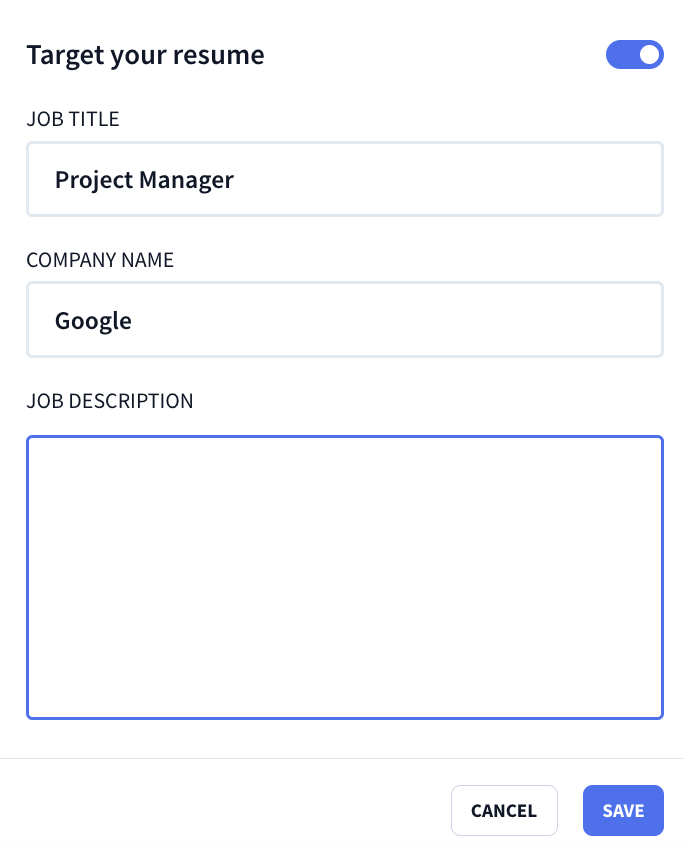
By analyzing your details and the job ad, decent tailoring features should help you:
- Adjust your bullet points to cover the main requirements.
- Highlight skills you already have but may have overlooked.
- Suggest gaps you need to address to stand out.
Still, read everything before sending. If a sentence sounds like something you would never say or doesn’t fit your unique experiences, fix it. The goal is a clearer version of your voice, not a robotic replacement.
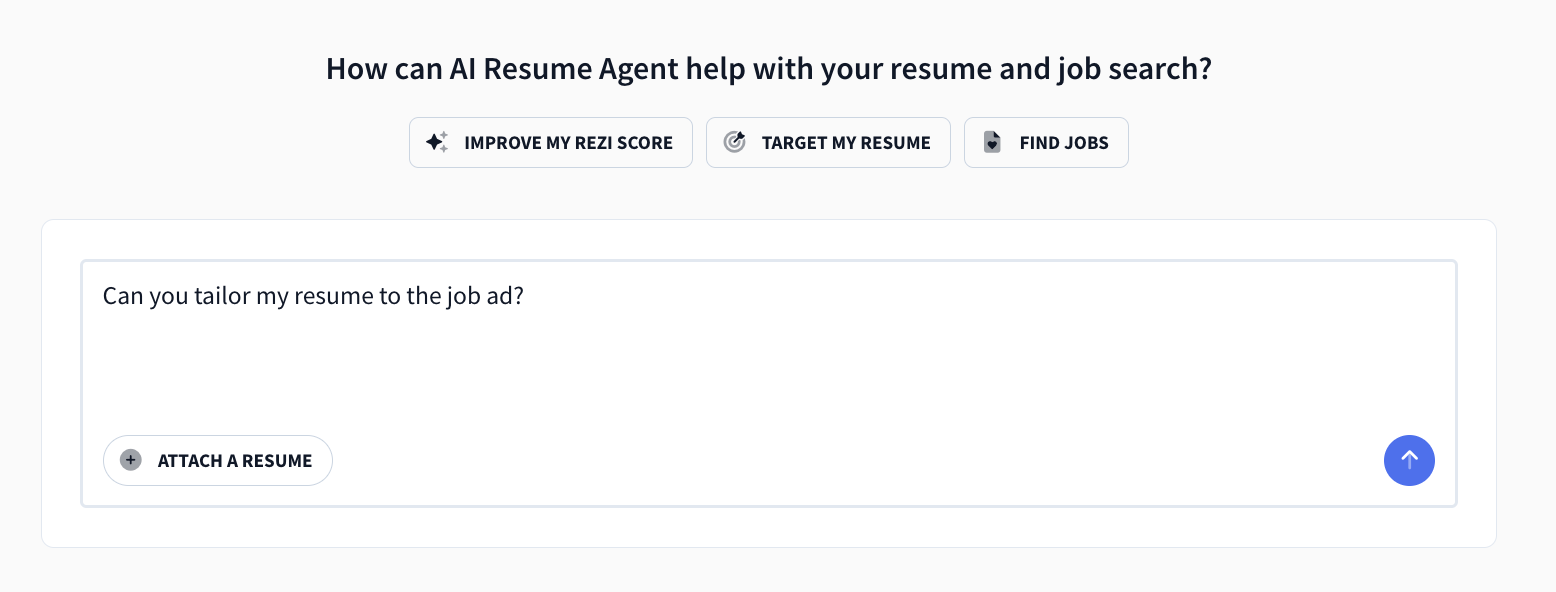
You can also try our AI Resume Agent to help tailor your application. Simply submit your resume and ask it to connect with the job ad, rewrite your bullet points, add relevant skills, and more.
2. Look for keyword targeting tools
ATS systems are looking for proof that you match the job. They do that by scanning for specific skills, job titles, qualifications, and responsibilities. Keyword tools help you see what the employer cares about without forcing you to play detective (or procrastinate) with the job description.
The best tools should be refreshingly simple to use:
- Paste the full job posting.
- Add job title or company.
- Review missing keywords and suggestions.
Our AI Keyword Targeting tool does all of the above and more to ensure you rank well with ATS scanners. Here’s a glimpse into how it works:

Just don’t forget about context. Keywords only work if they connect to the real work you did. If you add “AI literacy,” you should back yourself up by mentioning specific tools and how you actually used those skills in your last role.
If a tool pushes you to cram resume keywords everywhere, it only makes your resume harder to read and just looks like you copied and pasted the job ad. Recruiters have read enough resumes to tell when something feels forced or fake.
The best keyword tools help you weave in phrases and skills naturally alongside your real accomplishments.
3. Watch out for pre-written robotic language
AI has the power to write refined sentences when you’re drawing blanks. Sometimes a little too refined. If every resume bullet point sounds like it came from the same corporate phrase generator, it stops feeling believable. And when every line starts blurring together? That usually comes from over-relying on AI suggestions.
Here’s what a bullet point writer within a resume builder should offer:
- Bullet point ideas based on your role and industry.
- ATS checks and content feedback.
- Options to adjust tone and detail.
And this is what Rezi’s AI Bullet Point Writer (aka, a genuinely helpful tool) looks like in action:

Just watch out for when AI tools focus more on responsibilities instead of impact. And keep an eye on the details, like the difference between “led a team” (exaggeration) and “mentored new trainees” (the reality).
Before you keep AI-written content, ask yourself:
- Would I explain it this way in an interview?
- Does this show results, not just tasks?
- Does this sound like someone who actually did the work?
If needed, add small personal details. Numbers, tools, scale, and outcomes add credibility and make it more unique to your professional story.
4. Review the resume template options
“ATS-friendly template” gets thrown around a lot, and not always with the best intentions. Some templates look great visually but can still confuse ATS systems with bold formatting or graphics. Since you rarely know what software a company uses, simple formatting is usually the safer bet.
In general, here’s what you should avoid:
- Tables and multi-column layouts
- Icons, graphics, and shapes
- Text in headers or footers
- Creative section titles
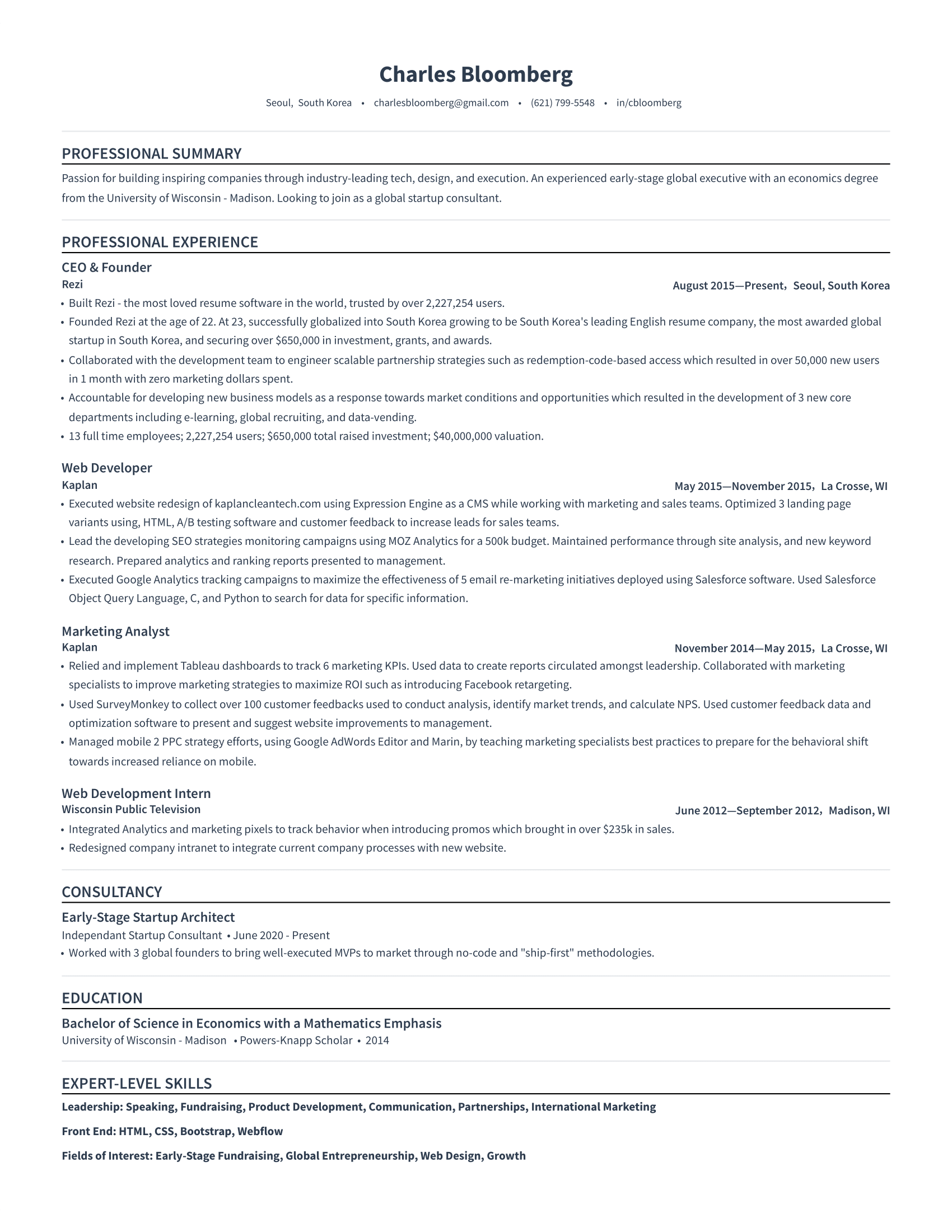
Stick to simple and professional formatting. Left-aligned text, standard headings, and clear bullet points. It might not look as “aesthetic,” but most hiring teams care more about clarity than your eye for design.
Here’s what an ATS-friendly template looks like:
Not sure if your template is ATS-friendly? Paste your resume into Notepad. If it stays readable and organized, you’re probably safe. If it turns into a formatting mess, an ATS might see that mess too.
Check out more tried-and-tested templates:
- MS Word Resume Templates
- Free Google Docs Resume Template
- Free Professional Resume Templates
- Best Resume Templates and Examples
5. Don’t get tempted by false promises
If a resume builder promises you a job (only after coughing up a monthly fee, of course), it’s probably overselling. Tools can help you present your experience better, but they can’t create an experience you don’t have or guarantee an interview.
Here are some resume-builder warning signs:
- Guarantees a job once you pay a subscription fee.
- Charges high fees for basic features.
- Focuses heavily on AI and overlooks guidance.
AI should guide you through the process, while still letting you control the story. You decide what to highlight, what to cut, and how to frame your experience.
Overall, a strong resume builder keeps your information focused and relevant. Usually one to two pages, built around the job you want. If a tool helps you get there faster and with less guesswork, it is doing its job. If it sounds like a miracle cure, it probably is not.
Which Is the Best ATS-Friendly Resume Builder?
Many resume builders claim to be ATS-friendly. Shocker: not all of them are telling the truth. When you’re unemployed or a job is on the line, you don’t want to waste time (and money) on a resume builder that won’t give you the best shot at landing an interview.
I’ve explored a lot of resume builders (trust me), and here are my top picks for ATS-friendly options:
- Rezi: If you want something that is focused on getting through ATS filters, this is the one for you. The AI tools help you build bullet points tied to real job postings while checking your resume content as you write. It’s useful if you want guidance on keywords, summaries, and overall clarity without needing to guess what recruiters want to see.
- Sheets Resume: This one is very “no fluff” in a good way. It focuses on one strong ATS-friendly layout and builds AI guidance around it. Instead of rewriting everything for you, it nudges you with prompts and suggestions. If you like staying in control of your writing but want some guardrails, this is a straightforward option.
- Resume.io: The AI features are lighter compared to more specialized resume AI tools, but the builder still helps refine wording and structure. If you already have decent content and mostly want to improve it or get inspiration, this one should feel easy to work with.
- Resume Genius: This works well if you want step-by-step guidance. It walks you through each section and offers content suggestions along the way. It also includes cover letter help and general job application tips, which makes it feel like an all-in-one starter kit.
- Teal: This popular resume builder helps you tailor resumes to specific job descriptions and pushes you to show measurable achievements instead of generic duties. The built-in job tracker is also useful if you apply to multiple roles and want everything in one dashboard.
Check out my complete list: Best AI Resume Builders
What Are the Resume Builder Red Flags?
One of the biggest red flags is when a tool leans too hard on the “ATS-friendly” label without explaining what that means. With AI everywhere right now, some platforms sell the idea that their tool will completely change your job search.
In reality, many just offer basic templates plus vague keyword suggestions.
The risk isn’t just the technology; it’s the false confidence it can create. If a tool makes you think you can just click a few buttons and suddenly land interviews, it’s time to step back and figure out what it actually does to help you get there.
An obvious warning sign? Good old-fashioned customer reviews. You can find people sharing bad experiences on places like Reddit and Trustpilot about overpriced builders or misleading subscriptions. Don’t get me wrong, people love to complain. But when 90% of reviews are negative, it’s time to pay attention.
Another red flag is when a resume builder flaunts “design freedom” but forgets about substance. Do you really need 50 different templates when ATS-friendly resumes are all about simplicity? Those colorful layouts might look fun, but they can confuse the system and bury your achievements. Your skills and results should do the talking, not a rainbow of fonts and icons.
Watch out for things like:
- Skill bars or star ratings.
- Heavy graphics, headshots, or icon-based layouts.
- Multi-column templates or tables.
- Templates that break when you edit text.
Here’s what you don’t want your resume to look like (courtesy of Canva):

(What do you mean you can only perform a skill at 78%?)
A little color is fine, but photos, complex visuals, and “creative” section names usually create more problems than they solve. A simple template usually saves time and keeps the focus where it belongs: your results, your impact, and how well you match the job.
Summary
Here’s everything to keep in mind (and avoid) when choosing an ATS resume builder:
- ATS resume builders help structure your resume so hiring software can scan it correctly for human recruiters.
- The best builders use simple templates with standard section headings and consistent formatting that ATS systems can easily read.
- Good tools help you tailor your resume to each job by pulling language, skills, and priorities directly from the job description.
- Keyword suggestions are valuable when they help you match job requirements while still tying those keywords to real results and experience.
- Strong builders guide your writing with prompts, scoring, or feedback without fully rewriting your resume or removing your voice.
- You should avoid builders that rely heavily on graphics, tables, columns, icons, or complex layouts that can break ATS parsing.
- If a builder promises guaranteed interviews, job offers, or “ATS bypass” features, it’s usually a sign of marketing hype.
- The right tool should save time by helping with structure, wording, and checks while letting you control your story and achievements.
- You should always review and edit AI-generated content because it can sound generic or miss important context about your work.
- A good ATS builder improves your presentation and clarity, but your experience, results, and relevance to the job still matter most.
FAQ
Do employers know if you used an AI resume builder?
Most employers can only tell if you’ve used an AI resume builder if the content sounds overly generic or robotic. Recruiters usually focus on whether your resume is clear, relevant, and accurate, not how you created it. What they can notice is when the content sounds vague or overly polished in a way that feels copy-pasted.
If you use AI tools, you should edit the output so it reflects your real experience and voice. As long as your achievements are real and the language sounds natural, employers generally care much more about what you have done than how you wrote it.
Get the full breakdown: How to Tell if a Resume Is AI-Generated
Can ChatGPT write a CV?
Yes, AI tools can help you write a CV, especially if you give detailed input about your experience, achievements, and target roles. ChatGPT can help structure sections, rewrite bullet points, and improve clarity. You provide specifics, metrics, and context, and the AI uses this information to form a narrative.
You should still review everything for accuracy and tone. AI tends to default to safe, generic phrasing, so adding your voice and real results makes a big difference in making the CV feel authentic and competitive.
Learn more about ChatGPT’s capabilities:
Can ChatGPT give an ATS score?
Tools built specifically for resumes usually give ATS-style scores, but general AI tools can’t give a true ATS score because they’re not connected to real applicant tracking systems. That said, ChatGPT can still review your resume and estimate how ATS-friendly it looks based on formatting, keywords, and structure.
Just remember that every company uses different ATS software, so no score is universal. It’s better to treat AI feedback as guidance rather than a final verdict on whether your resume will pass screening.
You can also use our Rezi Score to get valuable insights into how application-ready your application is, with detailed suggestions for improvements.
How to update a resume?
Start by reviewing your resume against your current career goals, not just your last job. Remove older or less relevant details and focus on recent achievements that match the roles you want. Then update metrics, tools, and responsibilities to reflect your latest work.
You can use AI or resume tools to help rewrite sections, but you should always double-check facts and tone. Updating a resume regularly, even when you are not job hunting, makes future applications much easier.
Find out more: How to Update Your Resume
Where to find the best free resume templates?
You can find strong, free resume templates from trusted platforms that balance design and readability. Start with templates from Rezi, Canva, Microsoft, or Google Docs if you’re looking for free and affordable options. Look for templates with clear headings, single-column formatting, a simple layout, and minimal graphics.

Upload or drop your resume to get started
Upload your resume to get started
Score my resume

Lauren Bedford is a seasoned writer with a track record of helping thousands of readers find practical solutions over the past five years. She's tackled a range of topics, always striving to simplify complex jargon. At Rezi, Lauren crafts genuine and actionable content that guides readers in creating standout resumes to land their dream jobs.