Resume
Why Your ATS Parse Failed (and How to Fix the Mistakes)
Find out why your ATS parse failed and get practical tips to improve formatting, keywords, and structure for better job application results.

Published on
December 23, 2025
Updated on
January 2, 2026
Complex design elements like columns, charts, text boxes, or decorative icons can confuse applicant tracking systems (ATS), causing it to skip or misread information. Unclear or overly decorative fonts can also trip up the software, while headers, footers, or very narrow margins may hide essential details such as your contact information. Missing standard section headings, inconsistent date formats, or a lack of relevant keywords can prevent the ATS from properly categorizing and ranking your experience. Using the wrong file type can also make your resume unreadable to the system.
There’s been some confusion over how Applicant Tracking Systems (ATS) actually work.
Some recruiters say they read every resume themselves, while others admit there’s no way they can manually sort through thousands of applications for one role. That leaves many of us feeling unsure about what really happens after we hit “submit.”
An ATS doesn’t just send your application straight to the rejection pile. It simply organizes and filters resumes based on keywords, qualifications, and basic details. But if you haven’t built your resume in a way the system can easily interpret, important information can get missed or misfiled.
So what actually causes those ATS hiccups? Let’s walk through it. This guide will cover:
- The truth about how ATS works.
- All the common ATS resume mistakes.
- How to make your resume more ATS-friendly.
If you want to guarantee your resume is ATS-optimized, use our free AI Resume Builder. Our ATS-friendly features will build you a customized resume in minutes.
And take a look at our other ATS tips and guides:
- ATS Resume Format
- Expert Tips for an ATS-Optimized Resume
- AI Resume Screening Explained
- How to Beat Applicant Tracking Systems
- How to Create ATS Resumes That Pass Filters
How Does ATS Work?
An ATS (Applicant Tracking System) takes your resume, converts it into searchable text, and then compares that text to what the employer wants. And no, ATS isn’t just a scaremongering tactic. It’s actually pretty common, with the ATS Usage Report detecting ATS in 97.8% of Fortune 500 companies.
Why is it so popular? Instead of a person reading every application, the system scans for job titles, skills, and qualifications, then organizes everything, so recruiters can find candidates who match their needs. They simply type in certain skills or phrases, and the ATS pulls up the resumes that contain them.
Now, there’s a common myth that ATS can outright reject your application. This isn’t entirely true. Its main job is to scan, sort, and categorize. If your resume is clear, easy to parse, and uses terminology that matches the job posting, the system is more likely to recognize you as a qualified applicant.
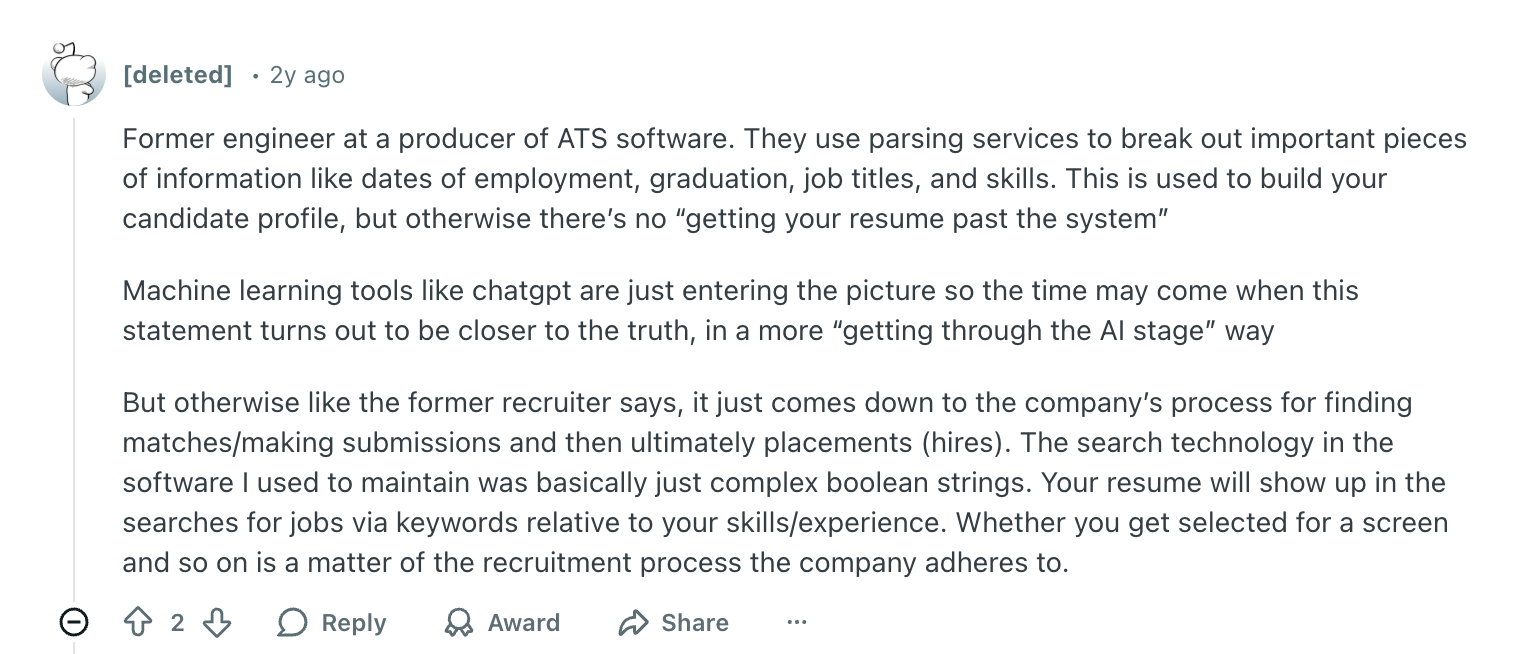
Here’s some insider knowledge of how ATS scanners work:
Want to find out if your resume is ATS-friendly? Use our ATS Resume Checker to see your ATS score along with tips to improve.
Why Did Your ATS Parse Fail?
Here’s why your ATS parse might have failed:
- Too many complex design elements
- Unclear resume fonts
- Your margins, headers, and footers are confusing the system
- You don’t have the right sections or headings
- Inconsistent date formatting
- Lack of resume keywords and phrases
- Unreadable file types
That skills chart might look fun, but neither a recruiter nor an ATS knows what “three out of five stars in communication” is supposed to mean. Small choices like these can make your resume more difficult for the system to read and harder for a recruiter to find you in their search.
Let’s explore the ATS red flags and how to avoid them.
1. You have too many complex design elements
When ATS reads your resume, it’s basically scanning line by line, looking for recognizable text. Throw in columns, text boxes, charts, icons, or bold decorative elements, and the system can miss information. Anything that looks “pretty” to the human eye often translates into a jumbled mess for the ATS. The software might even skip sections entirely.
A quick way to test this is to drop your resume into a plain-text tool like Notepad or a Google Docs text-only view. If everything shows up in the correct order, you’re in good shape. But if pieces disappear or the layout collapses into chaos, that’s your sign that the ATS struggled.
Find out more: What Does a Resume Look Like?
2. You’ve used unclear resume fonts
Some fonts just aren’t resume-friendly. Decorative or playful fonts, such as Brush Script or anything that belongs on a novelty T-shirt, can cause the ATS to squint metaphorically and misread your text. Even Times New Roman (once the gold standard) now reads a bit dated and doesn’t always pop on modern screens.
Reliable resume fonts include Calibri, Helvetica, Arial, Georgia, Garamond, or Avenir Next. These display well across devices and play nicely with most parsing systems. Keep the size between 9 and 12 points for your main text and 14 to 16 for section headers to maintain balance without overwhelming the page.
3. Your margins, headers, and footers are confusing the system
It’s tempting to tuck extra details into your header or footer to save space, but ATS software can ignore those areas entirely. If your contact details live up there, the system may never capture them (goodbye, interview).
Keep any essential information, such as your name, email, and phone number, in the main body of your document.
Margins also play a role. Classic one-inch margins keep your layout organized, but if you need extra room, shrinking to three-quarters or half an inch is fine. Too-narrow margins can make your text feel cramped and harder for both humans and software to interpret.
Check out more resume layout tips:
- How to Fit a Resume on One Page?
- How Long Should a Resume Be?
- Should Resumes Be One-Page Long?
- One-Page Resume Templates
- Are Two-Page Resumes Better?
4. You don’t have the right sections or headings
ATS programs depend on predictable headings to figure out what’s what.
Without obvious labels like “Experience,” “Education,” or “Skills,” the system may misfile your information or even ignore parts of it. Creative headers like “My Journey” or “Where I’ve Been” may scream ‘I’m not like other resumes’, but they don’t help the system or hiring manager.
Here are some examples of ATS-friendly resume section headings:
- Summary - Profile - Objective
- Experience - Work History - Professional Experience
- Education
- Certifications - Projects - Courses - Publications
- Skills - Technical Skills
Sticking with standard, widely recognized section titles is the easiest way to keep the ATS on track. Plus, it helps our recruiters who are quickly scanning through resume sections to find your background and skills.
Learn more about what to include in these resume sections:
- Personal Details in a Resume
- How to Write a Perfect Work Experience Section
- How to List Education on a Resume
- Skills Section for a Resume
5. You didn’t use consistent date formatting
If you switch between formats (say “Feb 2022” in one role and “February ‘22” in another), the system can get confused and fail to calculate your timeline correctly. Missing months or using seasonal wording like “Winter 2023” can cause even bigger gaps.
The ATS needs obvious start and end dates to understand your work history and determine how long you stayed in each role. Pick a format, such as “Jan 2023–Jun 2024” or “January 2023–June 2024”, and use it everywhere.
Consistency makes your timeline easy to interpret and prevents the software from assuming gaps that don’t actually exist.
6. You haven’t added enough keywords and phrases
ATS systems look for alignment between your resume and the job description. If the role calls for SQL, Python, or Figma and you don’t mention those resume keywords, you’re less likely to show up in a recruiter’s search results. Even if you include every other tool, not tailoring your resume is an easy way to get ruled out.
The solution? Simply use the right terms naturally throughout your resume. And don’t try to cheat the system by hiding keywords in white text or cramming them into random corners (that can actually get your file flagged). Instead, mirror the language from the job posting where it makes sense, especially in your skills and experience sections.
Here’s what an IT manager who works with recruiters shared about resume keywords:

Try AI Keyword Targeting to speed through this process. Just paste in the job description, and our technology will offer suggestions on how to add essential skills and phrases to your resume.
Related articles:
- How to Instantly Find Missing Resume Keywords
- How to Target Job Descriptions
- Why It’s Hard to Write a Good Resume
7. You sent an unreadable file type
Sometimes the issue is as simple as the file format. While many ATS platforms can read resumes that are PDFs, DOCs, DOCXs, and even plain text files, not all systems are equally flexible.
If you upload a format that the employer’s ATS can’t handle (like a PNG), the software might not extract your information at all.
When you’re unsure, sticking with a PDF is usually the safest bet. There’s also no harm in reaching out to the hiring manager via email to ask them what file type is best (just make sure you didn’t overlook it in the application instructions). Your goal is to give the ATS something it can easily parse so your content actually reaches human eyes.
Further resources:
- ATS Resume Examples
- Creative Resume Designs
- MS Word Resume Templates
- Google Docs Resume Templates
- Canva Resume Templates Review
How to Improve Your ATS Parse Rate
Here’s how to improve your ATS parsing rate:
- Tailor your resume with keywords from the job posting to make sure ATS recognizes your relevant skills and experience.
- Simplify your formatting and template design with standard fonts, plenty of white space, and minimal design features.
- Don’t forget about the content; focus on quantifiable wins, replace vague statements with concrete achievements, and cut generic descriptions.
- Include the right skills and job titles to make your professional background easy for ATS to categorize.
- Spell out uncommon acronyms so ATS and recruiters can recognize your expertise.
- Proofread and check for typos; errors can confuse ATS and make your resume look unprofessional.
Now, let’s explore each step in more detail with examples so you know exactly how to make your resume more ATS-friendly.
1. Tailor your resume with keywords from the job posting
ATS scans your resume for specific skills, responsibilities, and qualifications that you can find in the job posting. You don’t need to copy word-for-word, but naturally weave in the same terminology you see in the description. When a recruiter types in a keyword to filter candidates, you want your resume to pop up instantly.
Here’s how to identify and add those keywords:
- Highlight the most repeated skills and responsibilities in the job listing, then mirror those terms where they genuinely apply.
- Take it further by creating a keyword list of all the job ad skills you notice in your industry as you apply to different jobs.
- Make sure each must-have requirement from the posting is easy to spot within seconds.
- Rephrase keywords in your own voice so they fit naturally into your achievements and work history.
Keep reading to find out more: How to Tailor a Resume to a Job Posting
2. Simplify your formatting and template design
We’ve already established that flashy templates with charts, icons, or pictures can confuse ATS and can scramble your text. But aside from that, they don’t have a place in a professional document. Even if you wanted to show some creative flair for a design job, that’s why you have a portfolio. Keep your resume minimalistic and focused on content.
Here’s how to simplify your resume format:
- Use a single-column layout with clear section labels and standard fonts.
- Keep plenty of white space, so your text breathes and doesn’t overwhelm the reader.
- Break job descriptions into short points using standard round or square bullets.
- Avoid images, graphics, text boxes, or decorative lines that might interfere with parsing.
3. Don’t forget about the content
It’s easy to get caught up in picking the “perfect” template and forget the part that really matters: what you actually did in your jobs.
Use specific resume bullet points to show what you accomplished and how. Whenever you can, throw in numbers to make it concrete. That way, the ATS can pick up the right keywords, and recruiters get a sense of the impact you’ve made.
Follow these steps to make your content stand out:
- Review your past roles and list quantifiable wins (percentages, dollars, volume, etc.).
- Look up similar job descriptions to refresh your memory of typical responsibilities and terminology.
- Replace vague statements with concrete achievements that show how you contributed.
- Prioritize high-value details instead of wasting space on generic or irrelevant information.
Try our AI Bullet Point Writer to generate points and suggestions based on your professional background and the job description.
4. Include the right skills and job titles
ATS software uses job titles and skill terms to help decipher whether you fit the role.
If your titles and skills are unconventional or irrelevant, the system may not understand how your experience aligns. You don’t need to rewrite your work history; just make sure your titles and skills reflect industry norms so the ATS can quickly categorize you.
Here’s how to get started:
- Adjust job titles slightly to the industry-standard equivalent if your internal title is confusing or long-winded.
- Stay truthful and don’t exaggerate your job titles (don’t call yourself CEO when you’re just self-employed).
- Perform a skills audit based on several job postings in your target field.
- Create grouped skill categories like “Technical Skills,” “Software,” or “Tools”, so it’s easier to pinpoint your abilities.
Need some inspiration? Check out our AI Skills Explorer to find in-demand skills for your industry and background across all categories.
5. Spell out uncommon acronyms
ATS systems aren’t always smart enough to interpret every shorthand. If you only use acronyms, you risk the software missing major chunks of your expertise. Including both the spelled-out phrase and the abbreviation ensures you appear in searches for either version, and that you don’t confuse any non-technical recruiters.
Here’s my advice for including acronyms in your resume:
- Write the full term first, followed by the acronym in parentheses.
- Use the exact terminology the job posting uses for maximum alignment.
- Scan your resume for niche acronyms and add the expanded form where needed.
6. Proofread and check for typos
Even the strongest resume can lose to another candidate if it’s littered with mistakes. Typos not only look sloppy; they can also alter keywords and cause the ATS to miss important terms. An error-free resume shows attention to detail and professionalism, two traits recruiters care about just as much as your technical skills.
Here’s how to double-check your resume:
- Read your resume aloud or give it to someone you trust to catch errors your eyes skim past. (Relevant guide: How to Edit Your Resume.)
- Check all names, tools, dates, and technical terms for proper spelling and consistency.
- Use tools like Grammarly or ProWritingAid to catch mistakes and get rewrite suggestions.
- Just don’t rely on these tools entirely; they can make mistakes too (source: I use them every day).
ATS-Friendly Resume Examples
What does an ATS-friendly resume actually look like? Honestly, pretty basic.
But that’s the point.
ATS scanners don’t need to see how well you match your colored headings to the decorative swirls in the corners of your resume (and neither do recruiters). Simplicity is the best way to keep the attention firmly on your skills and achievements.
Here are a few of my favorite Rezi templates that are guaranteed to do well with ATS:
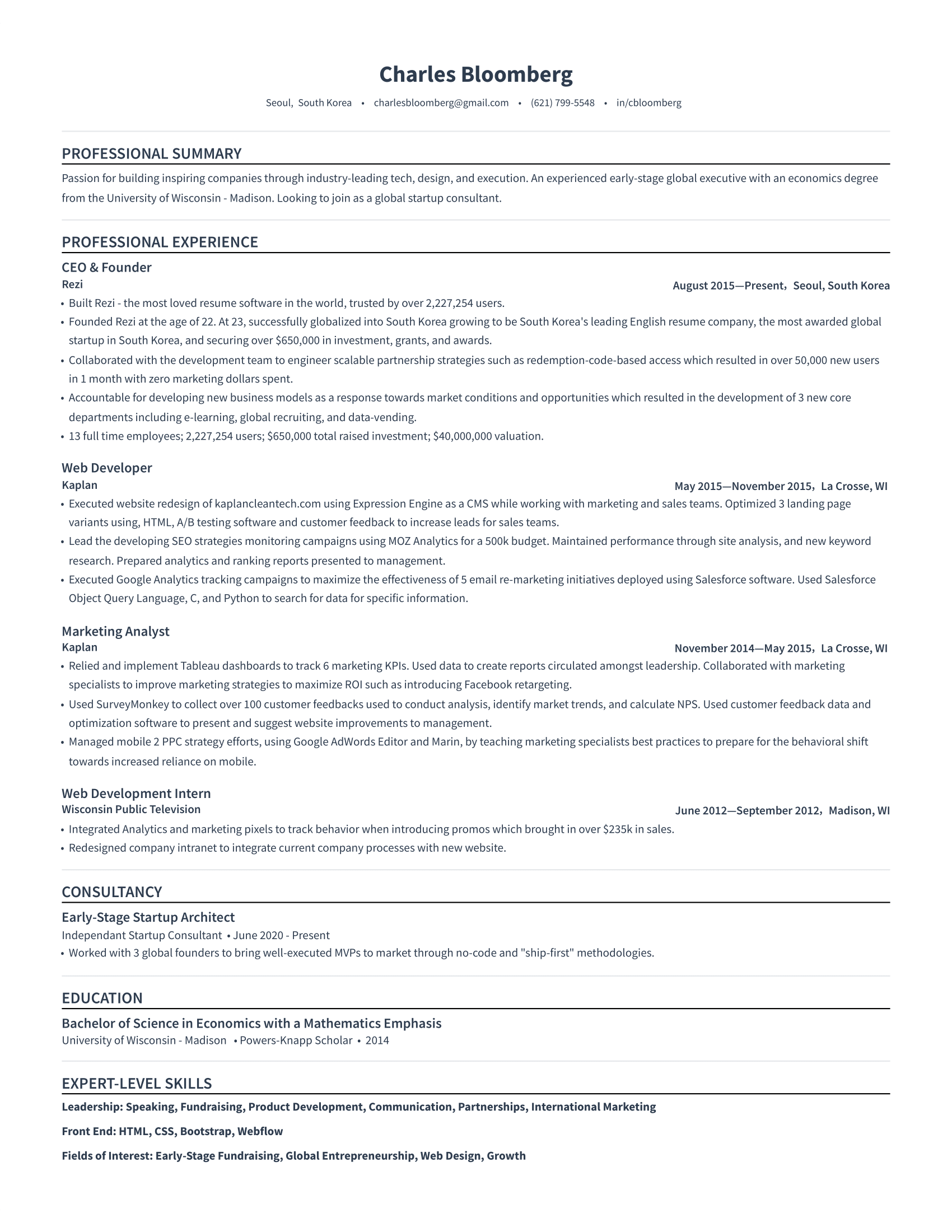
Simple Resume Template
This no-frills resume is perfect for ATS scanners due to its simplicity, bold headings, and organized sections. The clean formatting means you can add all those important keywords and phrases without overcrowding the page.
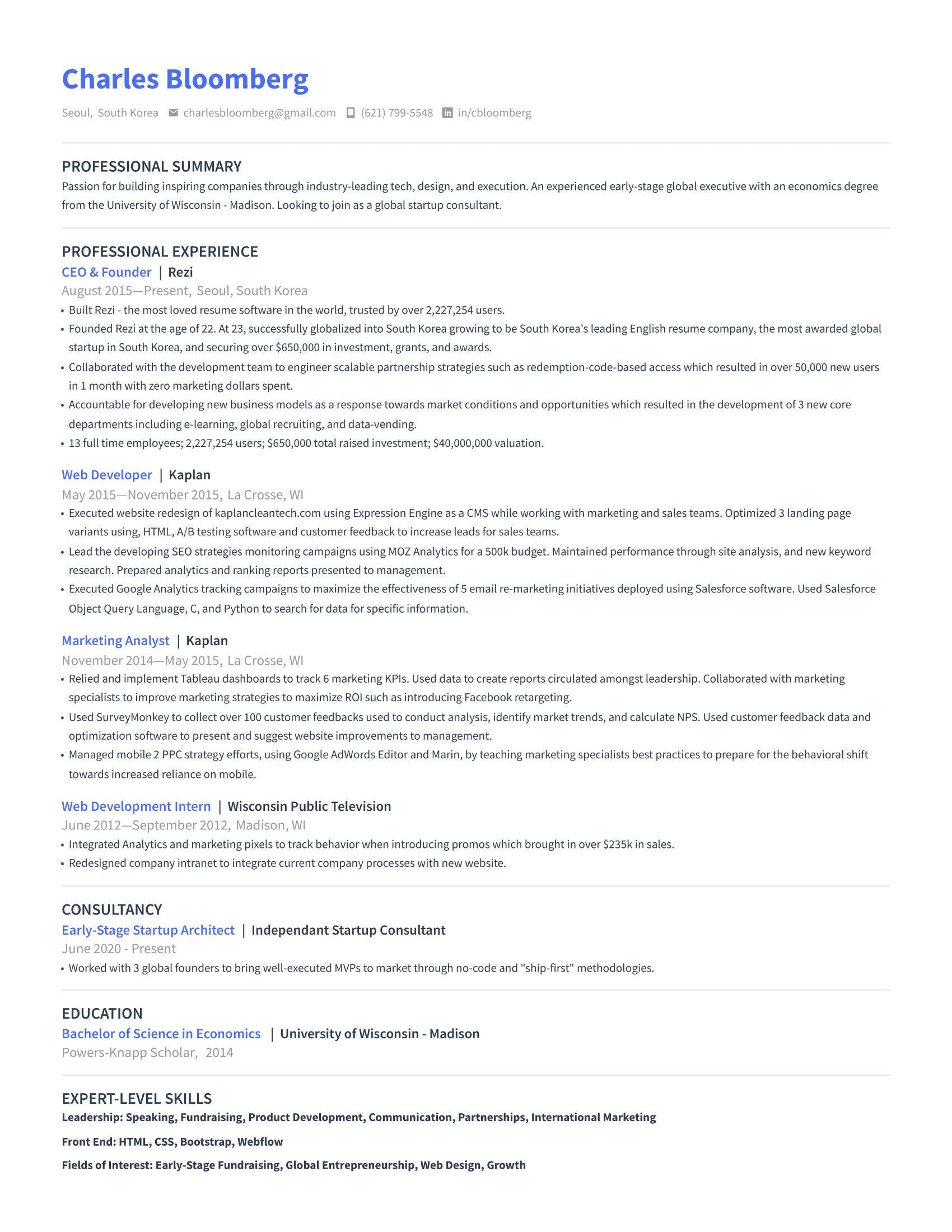
Modern Resume Template
Want to add some personality without confusing ATS scanners? Well, this is one way to do it. You can use this subtle pop of color to highlight your name and job titles, which is perfect if you want to emphasize how your professional background matches your desired job role.
Maximum Resume Template
One-page resumes are usually the go-to because they’re quick to scan. But if you have a lot of experience to cover, this template gives you room to include it all without making the page feel cramped. And the more relevant details you can fit in, the more opportunities the ATS has to pick up valuable keywords.

Summary
Let’s wrap up with a quick summary of why your ATS parse failed and how to fix it:
- Using columns, tables, icons, or text boxes can scramble the text in an ATS, so switch to a simple layout to ensure the system reads your resume correctly.
- Missing keywords or phrasing in the job description can make your resume difficult to search. Including those terms in your sections improves your chances of being found.
- Unconventional job titles may confuse the ATS. Adjust them to industry-standard equivalents to help the system categorize your experience.
- Decorative or unusual fonts can cause the software to misread your text. Stick with standard fonts like Arial, Calibri, or Helvetica to keep everything legible.
- Using acronyms without spelling them out can prevent the system from recognizing them, so it’s best to write the full term followed by the abbreviation.
- Placing your contact information in a header or footer can result in it being missed, so it’s best to include your name, email, and phone number in the main body.
- Typos, inconsistent dates, or formatting issues can cause the ATS to misinterpret your resume. Proofread carefully and use consistent styles to keep your document accurate.
- Missing sections like Experience, Skills, or Education can confuse the system, so clearly label each section to make your resume easier for both the ATS and recruiters.
- Uploading a file type the ATS can’t interpret can prevent parsing, so save your resume as a .docx or PDF to keep your formatting intact.
FAQ
What if your resume is not ATS-friendly?
If your resume isn’t ATS-friendly, you won’t get rejected outright, but the system may misread chunks of your information or miss them entirely. You could be totally qualified and still get filtered out simply because the software couldn’t understand your formatting or wording.
How can Rezi help with ATS parsing?
Rezi has several features that can help make your resume more ATS-friendly, such as templates, AI Keyword Targeting, and AI Skills Explorer.
That said, one of the best tools to improve your resume is the Rezi Score, which evaluates how well your resume will perform inside an ATS. Anything that might cause parsing issues, such as missing keywords, weak phrasing, or formatting errors, gets flagged.
On top of that, the Real-Time Analysis feature tells you exactly what to fix and how to fix it. Instead of guessing whether your resume is ATS-friendly, you get guided, step-by-step suggestions until your resume meets ATS standards.
Is a 70% ATS score good?
A 70% score is decent, but it’s worth improving if you want to stand out in competitive roles. You can use the Rezi Score to get expert suggestions and bring your score up to 90% or higher to give yourself a better chance with ATS scanners.
What is a common mistake that causes resumes to fail ATS screening?
One of the biggest resume mistakes is overly designed templates with columns, icons, graphics, text boxes, and fancy formatting. These elements may look fun for social media, but they aren’t appropriate for a professional document and can often turn into scrambled nonsense for ATS software.
What are the three most common reasons for rejecting candidates?
Here are the three big red flags that consistently cause resumes to fail ATS screening and recruiter review.
- Missing or weak keywords. ATS software is designed to scan for specific skills, tools, and qualifications mentioned in the job posting. If your resume doesn’t include those keywords, the system could assume you’re not a match.
- Poor formatting. Fancy templates with columns, graphics, or text boxes often scramble the text, causing the ATS to misread or skip sections entirely.
- Unclear or inconsistent information. That includes using unusual job titles that don’t align with industry norms, inconsistent date formatting, vague bullet points that don’t quantify your achievements, or leaving out key resume sections.

Upload or drop your resume to get started
Upload your resume to get started
Score my resume

Lauren Bedford is a seasoned writer with a track record of helping thousands of readers find practical solutions over the past five years. She's tackled a range of topics, always striving to simplify complex jargon. At Rezi, Lauren crafts genuine and actionable content that guides readers in creating standout resumes to land their dream jobs.