Resume
What Does a Resume Look Like? Examples and Formatting
What does a resume look like? Learn how to format a resume that stands out, with examples, key sections to include, and expert tips to impress recruiters.

Published on
September 9, 2025
Updated on
September 12, 2025
Looks might not be everything, but they do matter on a resume. Picture a recruiter sorting through hundreds of applications for a single job. Are they going to linger on the cluttered resumes with hard-to-read fonts and neon color blocks? After a long day, probably not.
You also have to make it past the digital scanners. All those aesthetic resume templates might look fun, but they can confuse ATS and distract from your content. The solution? Just like the first interview and first day of work, your first impression on paper should be professional and organized.
Let’s walk through how to do it. This guide will show you:
- How to make a resume look good.
- What to include on your resume.
- Resume examples and layouts.
And if you don’t want to take any chances, try our free AI Resume Builder. Our expert technology will take care of all your resume formatting, structure, and content in minutes.
You can also learn more about resume formatting with our handy guides:
What Does a Resume Look Like?
Here’s a quick breakdown of what a resume should look like:
- Choose a simple resume style that’s easy to scan.
- Use a professional resume structure with familiar sections.
- Add bullet points to showcase achievements, not just tasks.
- Opt for ATS-friendly fonts that look polished and professional.
- Avoid colorful and bold designs that overwhelm your content.
- Stick to a one-page resume unless you have extensive experience.
And here’s what that looks like on a resume template:

Now, let’s get into the details with examples of how a resume should look.
1. Choose a simple resume style
Less is more. I’ve seen way too many job seekers thinking fancy designs and colorful layouts are their tickets to standing out. But recruiters are more interested in your qualifications than your ability to color match.
Many companies also use Applicant Tracking Systems (ATS) to scan resumes digitally before a human ever sees them. If your resume is too complicated, the ATS might not read it properly, which means the system could misread it before it gets to the recruiter.
Stick with a single-column layout that flows naturally from top to bottom. Clear headings, simple fonts, and plenty of white space make your resume easy to scan — both for software and hiring managers. The goal? To guide someone through your career story without them having to hunt for the important details.
2. Use a professional resume structure
The best way to tell your career story is with a predictable, professional structure. Recruiters have a ton of resumes to get through, and they’re more likely to skip parts of your application if it takes them longer than a few seconds to find what they need.
Here’s the most common structure for your resume sections:
- Name and job title
- Contact information
- Summary
- Work experience
- Education
- Skills
- Additional information (certifications, projects, awards, etc.)
Recruiters expect to see information in this order, and it’s easy for ATS to recognize these standard headings. Now isn’t the time to get creative with headings like “My Skill Set” or “Career Voyage”. You’ll just confuse ATS and probably raise a few eyebrows.
You should also list your work history in reverse chronological order, so your most recent (and usually most relevant) experience is right at the top. This format highlights your growth and makes it easy for employers to track your career progression.
3. Add bullet points to describe achievements
Nobody likes reading a wall of text (the reason I skip most instructions). Adding resume bullet points (especially in your work experience section) is a nice hack to cram all that information without overwhelming the reader.
Instead of writing long paragraphs, use 3–5 bullets per job to break down your achievements and responsibilities. The key here is to make them specific and valuable. But how do you know what’s going to impress the recruiter?
Most of the answers are in the job description; it’s basically your personal cheat sheet. If the listing emphasizes a skill or qualification you have, make sure you highlight it in one of your bullet points. Just remember: not every single task needs a spot.
Focus on results, growth, and experiences that align with the role you’re applying for. If you’re running out of space, prioritize recent achievements over older or less relevant work. And please, don’t cram in ten irrelevant bullets just to look impressive.
Here’s how to describe your achievements using bullet points:

4. Opt for ATS-friendly fonts
Fonts might seem like a small detail, but they play a big role in how your resume comes across. If a recruiter has to squint or reach for their glasses just to read your resume, you’re already off to a bad start.
You want a resume font that’s professional and easy to read on any screen. Safe bets include Calibri, Helvetica, Georgia, Arial, or Garamond. Want something a little more modern? Source Sans Pro or Avenir Next are solid choices. Keep the body text between 10 and 12 points, and use 14 to 16 points for your section titles.
Avoid anything that resembles a greeting card font. That includes the obvious culprits, such as Comic Sans, Brush Script, or Papyrus. Times New Roman is another one to skip; it feels outdated and doesn’t make a strong impression anymore.
5. Avoid colorful and bold designs
I know those aesthetic resume templates with colorful boxes and icons look tempting, but they could do more harm than good. Elements like graphics, multiple columns, or pictures confuse the system and could result in your resume not being read at all. That just isn’t a risk worth taking.
Here’s a perfect example of what not to do:

If you really want to add a touch of color, keep it subtle. A muted shade for section headers or a neat border can add some personality without distracting from your content. Remember, it’s your words and resume achievements that will make you stand out, not a rainbow-colored sidebar.
Here’s how to add some creativity without going overboard:

6. Stick to a one-page resume
This isn’t necessarily a set rule, but most people should aim for a one-page resume. Recruiters aren’t looking for your entire life story; they just want the highlights that prove you’re a strong fit for the role. If you’ve been in the workforce for less than 15 years, one page is more than enough.
So, how do you decide what gets the chop? Short answer: cut the fluff. Buzzwords like “hard worker” or “great communicator” don’t add value, and recruiters have heard it all before. Instead, prove those qualities through your experiences and results.
Trim irrelevant details, too. If you’re applying for a marketing job, no one needs to see that you once did a banking internship. Optional sections like courses or volunteer work can help recent grads fill space, but seasoned professionals can usually skip them.
Now, if you’re in mid- to senior-level territory with lots of relevant experience, a two-page resume is fine — as long as everything you include has real value. That means it directly relates to the position and shows how you can contribute to the company’s success.
What Should Be on a Resume?
Short answer:
A great resume starts with your name and contact details at the top, including a bold name, job title, phone, email, and LinkedIn or portfolio link. Next comes a summary or objective, which should be 2 to 4 sentences highlighting your experience, key skills, and value to an employer. The work experience section is the core: list roles in reverse chronological order, with bullet points per job showing measurable achievements. Below this, add an education section and a focused skills section with 6 to 10 relevant abilities. Finally, include extras like certifications, projects, or volunteer work — but only if they strengthen your application.
Name and contact details
The very top of your resume tells employers who you are and how to reach you. Start with your name in bold, larger font so it’s the first thing they see. Right below, it’s smart to add a job title; ideally, the exact one from the job description (or something close). This subtle detail makes you look instantly aligned with the role.
When it comes to contact details, keep them simple and professional:
- Location: Just your city and state; no full address needed.
- Phone number: A number you actually answer.
- Email: Professional only (yourname@gmail.com beats cheeselover@hotmail.com every time).
- LinkedIn or portfolio link: Include if it’s updated and relevant.
- Skip the photo: Resumes aren’t dating profiles; let your experience do the talking.
Here’s what that looks like:

Summary or objective
Your summary or objective is a 2–4 sentence paragraph that goes below your contact details, setting the tone for the rest of your resume. So, what’s the difference between these two introductions? Honestly, not much. But they could appeal to those at different career stages.
A strong resume summary should:
- State who you are and your experience level
- Highlight two or three key skills
- Mention an achievement that sets you apart
- End with what you can bring to the employer
Take a look at this summary example:

A resume objective has most of the same details, but it’s more about career goals and how you plan to grow in the role. This is the better choice if you’re new to the workforce and want to focus on the future rather than past accomplishments.
Don’t have a strong professional background? Find out more: How to Write a Resume With No Experience
Work experience section
Your work experience section is the heart of your resume. It’s your chance to show off your skills and give real examples of why you’re the best candidate for the job. Employers don’t just want to know what your responsibilities were (anyone can make a list of duties).
They want to see what you actually achieved. Numbers, percentages, and results help create a more concrete picture and honestly just sound more impressive. Saying you “served customers” is fine (a little blah), but stating you “served 50 customers a day” packs a nice punch.
A good work entry usually includes:
- Job title, company, and dates of employment
- Between 3 and 5 bullet points highlighting achievements (not just duties)
- Metrics when possible (e.g., “Boosted sales by 20%”)
This is what your resume work experience section should look like:
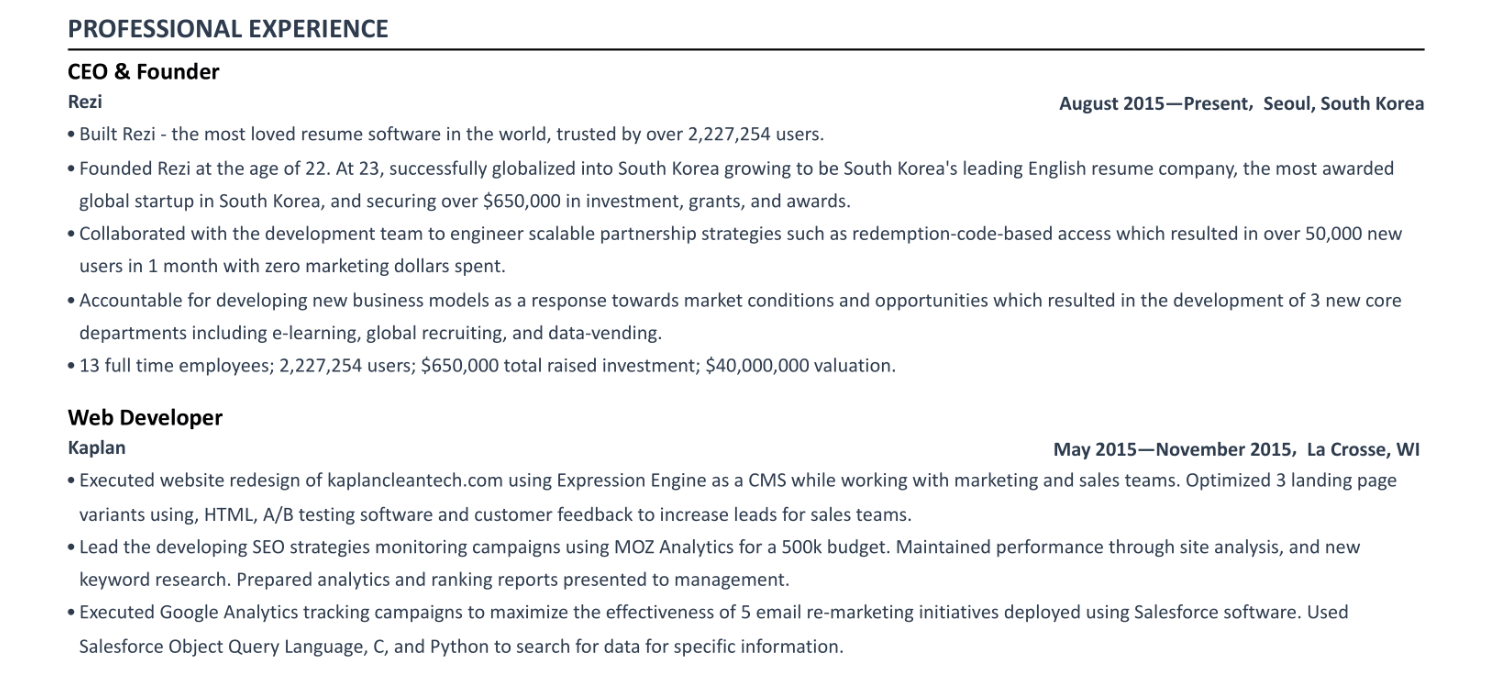
And remember: tailor this section to the job description. If the listing emphasizes project management and client communication, make sure those show up in your bullets.
Education and training
Education is either the headliner (if you’re fresh out of school) or the supporting act (if you’ve got a solid work history). If you belong to the latter, all you need to include is your degree, the name of your school, and its location. And this is what to add if you’re earlier in your career:
- GPA (only if it’s 3.5 or higher)
- Honors, awards, or scholarships
- Relevant coursework or extracurricular activities
Here’s what that looks like on your resume:

Been in the workforce for a while? You can keep your education section simple with just your degree and institution. And once you’ve got a college degree, leave high school off the page, as it’s no longer relevant.
Skills section
Your skills section serves as a checklist for recruiters. In just a few seconds, they can see if you have what they’re looking for, and if you do, they’ll be more tempted to explore the rest of your resume. Lining up your skills with those mentioned in the job posting shows right away that you’re a strong match.
But the mistake I see most often? People try to squeeze in every skill they’ve ever touched, hoping it’ll make them look more impressive. That approach can backfire. It looks forced, and when the list is too long, recruiters may skim right past it. Instead, keep it focused with 6 to 10 skills that are truly relevant to the position.
For example:
- Good: Salesforce, SQL, Google Analytics
- Bad: “Tech-savvy” or “comfortable with computers”
If you have a mix of skills, you can even group them (like “Technical” vs. “Interpersonal”). And if you’re switching careers, emphasize transferable skills that prove you can adapt.
Take a look at this resume skills section:

Not sure what skills to include on your resume? Try our AI Skills Explorer to find the most popular skills for your job title and industry.
Additional information
I see lots of questions from job seekers asking if they need to fill their resumes with certifications, projects, or anything else their mom would proudly stick on the fridge.
Before you start overcrowding your resume, ask yourself these questions:
- Did you earn this in the last ten years?
- Is it directly related to the position you want?
- Does it help prove that you’re going to bring success to the company?
If the answer is yes to all these questions, feel free to add it to a small section at the end of your resume. But that dog grooming certification you got in college? Not so impressive for your future career in software development.
Here are some additional sections you can include in your resume (if they add value):
- Projects: Relevant side work, class projects, or freelance work with measurable results.
- Languages: Only if useful for the role.
- Volunteer work: Great for showing leadership or teamwork outside your job.
- Hobbies: Include only if you’ve got space, and if they show something interesting about you (like website-building, not binge-watching Netflix).
Learn more about adding more depth to your resume: All 25+ Resume Sections
Best Resume Examples
There’s no set format or style for a resume. Yes, it’s best to keep things simple, but you can swap sections around or add a subtle touch of color if it aligns better with your preferences and professional background.
Here are some tried-and-tested resume templates for different needs, style choices, and experience levels.
Professional Resume Template
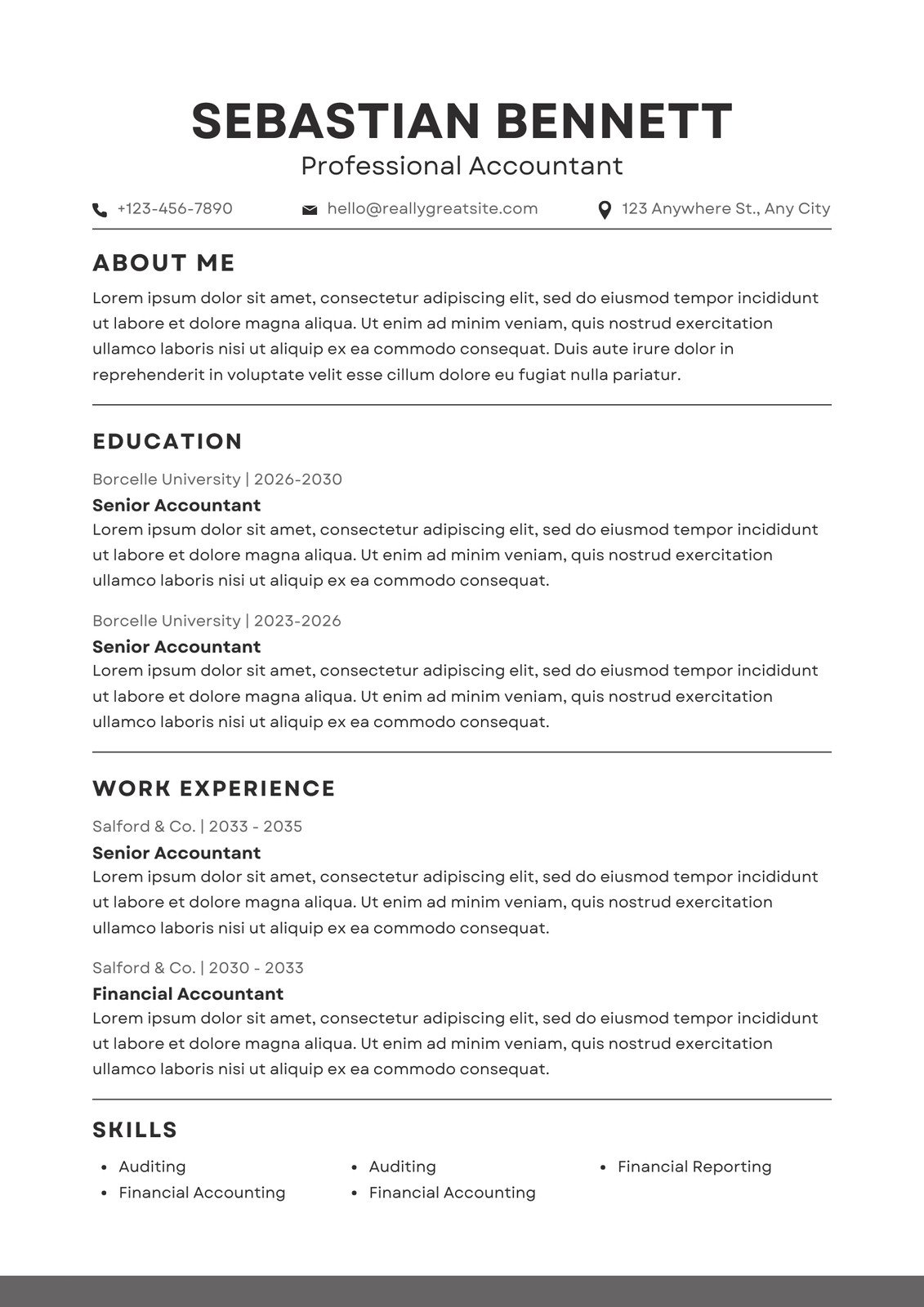
A professional resume doesn’t have to feel stiff or dull. It’s about presenting your experiences with structure, clarity, and balance, without relying on flashy designs. It lets employers see your qualifications at a glance, keeping the focus where it belongs: on your achievements and skills.

Harvard Resume Template
The Harvard resume is known for its focus on measurable results. It highlights education before work experience for students or new grads, with detailed bullet points outlining academic accomplishments. Our take on the Harvard resume puts work experience back up top, as this is often the focus for recruiters.

IT Resume Template
An IT resume is built to show your technical expertise. It lets you highlight skills like coding, troubleshooting, and software tools while also providing space to feature relevant projects. This template emphasizes hard skills and problem-solving abilities, showing employers that you can excel in a technical environment. It’s a mix of skills, experience, and proof of hands-on ability.

Federal Resume Template
A federal resume is different from the standard one-page private sector version. These can span several pages and require specific details like citizenship, salary grade, and security clearances. The goal is to give HR everything they need to confirm eligibility and qualifications right away. It’s thorough, detailed, and designed for navigating government hiring processes.

College Resume Template
If you’re still in school or just starting out, your template should highlight what you do have: education, projects, extracurriculars, volunteering, and relevant coursework. It shifts the focus from limited work experience to transferable skills and initiative. For students, it’s less about a long job history and more about proving potential and readiness to grow.
Summary
Here’s an overview of what a resume should look like:
- Stick with a single-column layout, clear headings, and plenty of white space. Fancy templates or graphics can confuse ATS and distract recruiters from your qualifications.
- Use a standard order: contact details, summary, work experience, education, skills, and extras like certifications.
- Recent graduates should lead with education, while experienced professionals should put it after work experience.
- Use 3–5 bullet points per role, focusing on measurable results like percentages, savings, or growth. Recruiters want to know how you stood out, not your job description.
- Mirror the language and skills mentioned in the posting. Recruiters often use job descriptions as a checklist, so aligning your resume shows you’re a solid candidate.
- List 6–10 specific, job-related skills rather than vague terms to make your resume stronger and help you pass ATS keyword scans.
- Choose professional fonts like Calibri, Helvetica, Georgia, or Garamond. Keep the body text between 10 and 12 points and headings larger.
- Skip photos, icons, and bright graphics. If you want personality, add a subtle accent in your headers. Focus on content over style.
- For most professionals with under 15 years of experience, one page is enough. Trim irrelevant details, avoid buzzwords, and prioritize recent accomplishments.
FAQ
What is the best resume format?
The best format is one that makes your resume easy to scan. Keep it simple with a single-column layout, clear section headings, and plenty of white space so nothing feels cluttered.
Bullet points help break down your text and make achievements pop without overwhelming the reader. Aim for 3 to 5 bullets per job, focused on results rather than tasks. Stick with professional resume fonts (Calibri, Arial, Helvetica) and consistent spacing throughout.
How much work experience should be on a resume?
Quality beats quantity. Most resumes should cover the last 10–15 years of relevant experience. Recruiters aren’t looking for your entire career history; they just want to see the roles that best match the job you’re applying for. Focus on your accomplishments in each position, not just your responsibilities. If you’re running out of space, trim older or less relevant jobs and spotlight recent achievements that show growth and impact.
What should not be on your resume?
Skip personal details like your full address, birthdate, or a photo. Don’t list every single job you’ve ever had if it’s irrelevant to the role. Outdated skills (like “Microsoft Word” or “typing speed”) also need to go. And ditch the buzzwords like “hard worker” or “team player” — you can show those qualities through your results instead.
How to make a college resume?
If you’re in college or a recent grad, don’t worry about limited work experience. Highlight what you do have: internships, projects, volunteer work, leadership skills, or campus activities. List your education near the top, add any relevant coursework, and include a skills section with technical tools you’ve learned. The key is proving you’re proactive and eager to learn, not just waiting for opportunities to land in your lap.
What is the difference between a resume and a CV?
A resume is usually one page, tailored for a specific job, highlighting your most relevant skills and experience. A CV (curriculum vitae) is more detailed and academic. It can be multiple pages, covering your entire career, publications, research, teaching experience, and credentials. In the U.S., most job applications ask for resumes, but in academia or international roles, an academic CV is often the standard.

Upload or drop your resume to get started
Upload your resume to get started
Score my resume

Lauren Bedford is a seasoned writer with a track record of helping thousands of readers find practical solutions over the past five years. She's tackled a range of topics, always striving to simplify complex jargon. At Rezi, Lauren crafts genuine and actionable content that guides readers in creating standout resumes to land their dream jobs.