Resume
How to Improve a Resume (16 Steps for a Better Resume)
Use a resume format that’s ATS-friendly. Clarify your impact and technical expertise with strong verbs. Use timeframes, mention key tools, and be concise.


Published on
December 19, 2025
Updated on
December 19, 2025
To improve a resume, get expert feedback using an AI agent such as Rezi AI Resume Agent. Next, use an ATS resume checker to see if your resume is application-ready. Make sure your resume template is ATS-friendly and that the format is clean. Highlight how you made an impact by showcasing achievements and technical expertise. Quantify results and responsibilities where possible, and include timeframes. Mention trends, key tools, and demonstrate strong leadership. List your top relevant skills as well as your top credentials. Emphasize career highlights and strengths in the summary, use keywords in stronger context, and consider stronger action verbs. Lastly, showcase your online presence and make your writing as concise as possible.
If you already have a resume but feel like it could be much better, this guide is for you.
Starting a resume from scratch just isn’t ideal (I know, I’ve been there). It’s like tearing up an essay you’re 80% done with and rewriting it from page one.
Your resume might only just need a few improvements, and once you make them, you’ll be fully confident you have something that will land you interviews at even the most competitive job openings.
I’ll show you exactly how to do that using smart AI resume tools you can apply instantly. By the end, your resume will not only look better, but more importantly, it’ll communicate your value in a way companies simply can’t ignore.
How to Improve a Resume Step-by-Step
Here’s how to improve a resume:
- Get expert resume advice from an intelligent AI resume agent.
- Use an ATS resume checker to see how good your resume currently is.
- Make sure you’re using a resume template with strong ATS compatibility.
- Highlight how you made an impact through quantified achievements and outcomes.
- Prove your technical expertise for the target role.
- Include timeframes.
- Put the most important bullet points first.
- Share how you’re using AI and emerging technologies in your industry.
- Demonstrate strong leadership and cross-functional collaboration
- List the most important and relevant skills in the skills section.
- Include your top qualifications and credentials.
- Emphasize your top career highlights, strengths, and unique skill set in your summary section.
- Use relevant keywords in a stronger context.
- Use strong action verbs that paint a clear picture of your impact.
- Showcase your online presence.
- Make your writing as concise as possible.
- Cut the filler and outdated details.
- Frame gaps in a positive light.
- Proofread before you hit send.
Let’s go through each step in more detail below.
You might also find these guides helpful:
1. Get expert resume advice from an intelligent AI resume agent
I would say you can easily get effective resume feedback by hiring a resume expert or career coach in your industry, but they’re expensive enough that most people (including myself) can find it difficult to justify the cost for a single review.
Depending on the organization and the level of help you want, professional resume writing services can range from hundreds to thousands. That’s quite a heavy investment.
RzAI (our AI Resume Agent) changes that.
You can now get expert resume feedback and career advice without paying a steep price. It works like the tools you’re probably already familiar with: ChatGPT, Gemini, and Claude.
However, RzAI is built and trained specifically for resumes, ATS compliance, modern hiring standards, and career best practices.
Here’s how you can start using an AI Resume Agent to improve your resume.
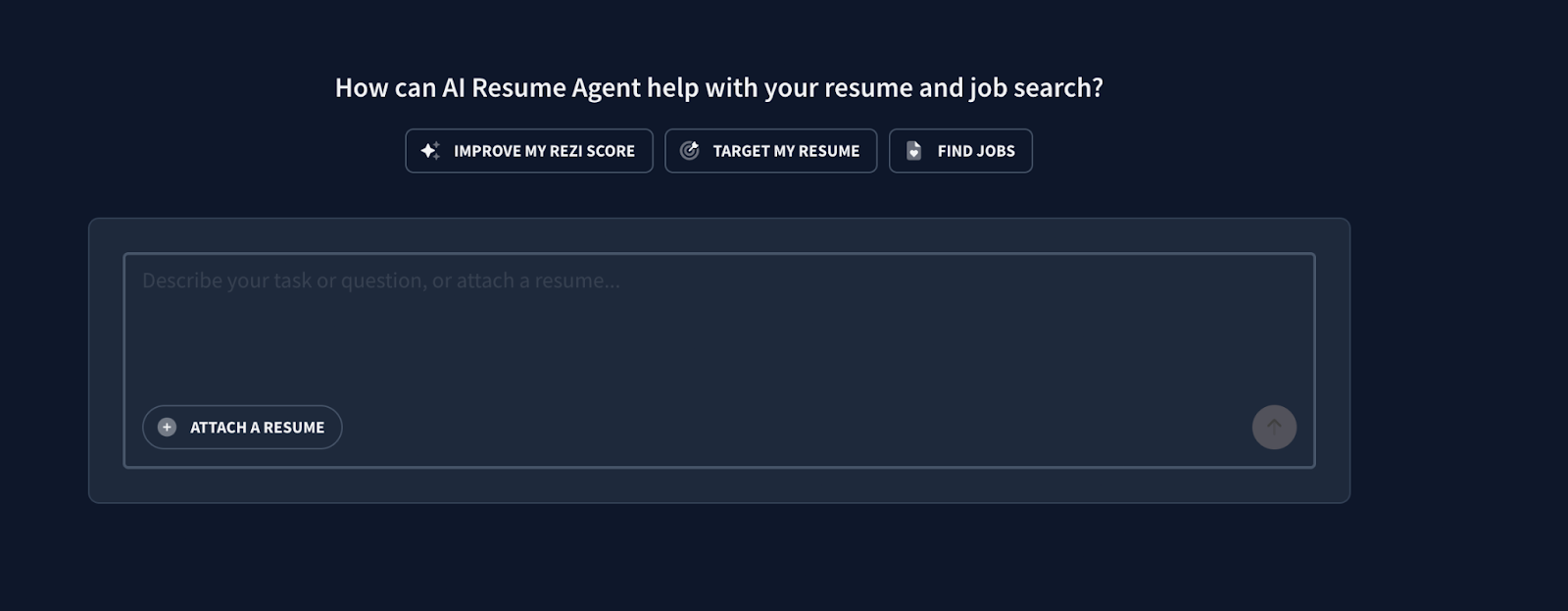
First, open a new chat with RzAI:
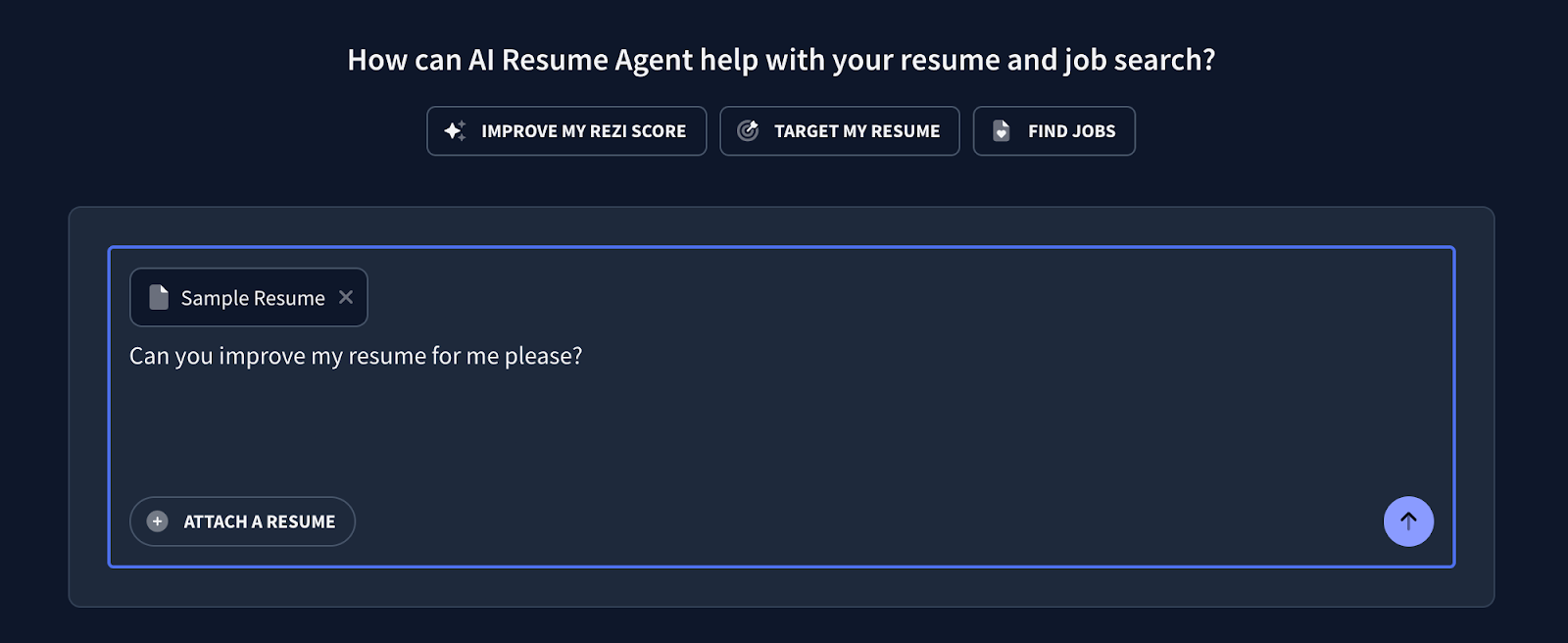
Next, attach your current resume and ask to improve it:
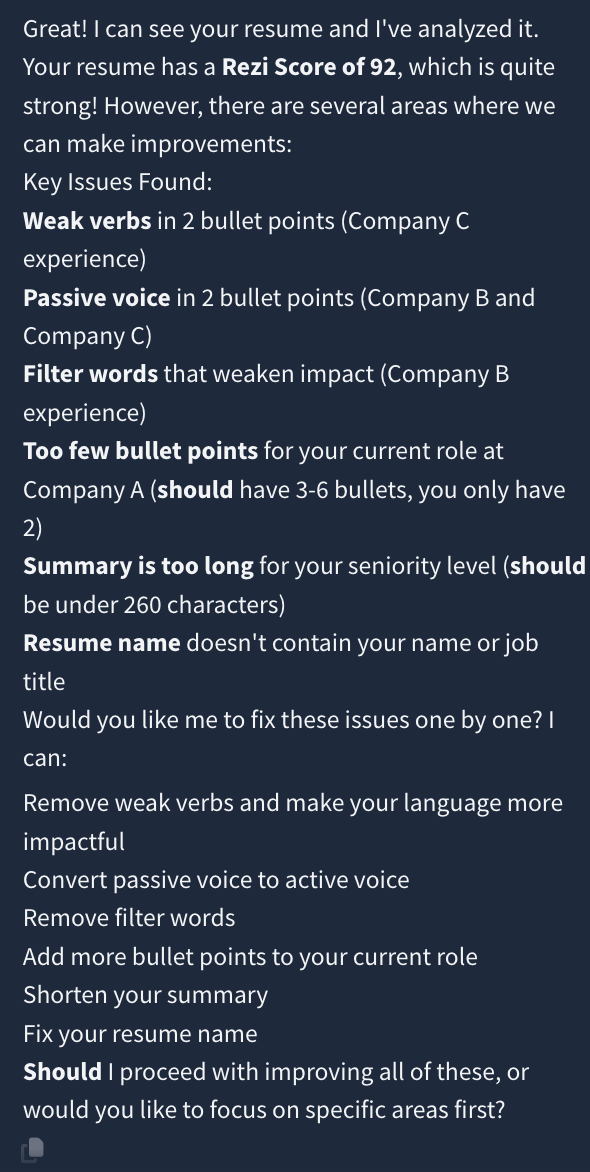
It then gave me a list of key issues and offered to improve each one by one:
Here’s a part of the response I got after asking the AI Resume Agent to work on the improvements:
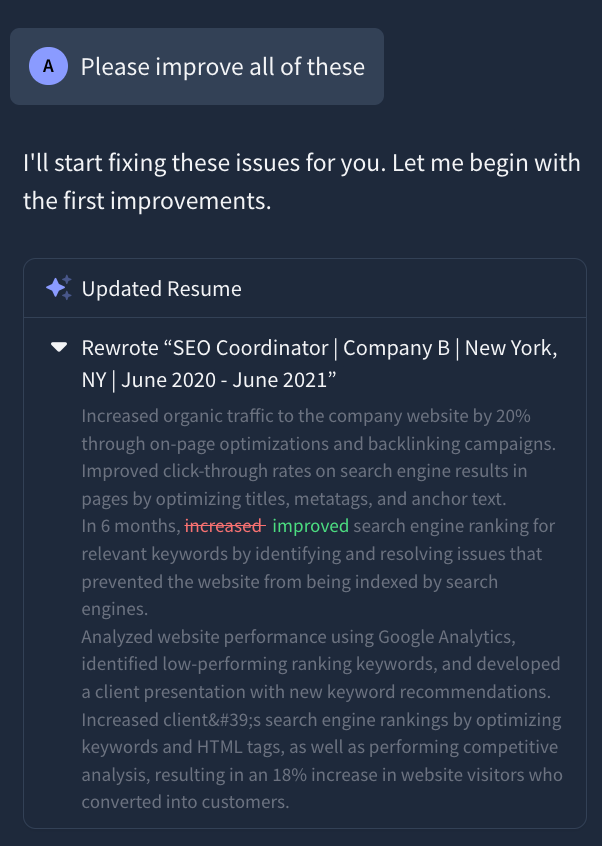
You can get a breakdown of what’s weak and exactly how to strengthen each section. It can also rewrite bullet points, include keywords, and clarify your achievements for you.
And because the AI agent connects directly to the rest of Rezi, you can instantly jump into our other tools like the ATS Resume Checker, Resume Summary Generator, or Keyword Targeting all within one place.
Here are other ways to use our AI Resume Agent:
- Get broad resume feedback, like overall improvements, structure tips, or things you might be missing.
- Ask for highly specific advice, such as rewriting a single bullet point to emphasize a particular contribution or strengthening one section at a time.
- Get career guidance on your next target role, including what skills you need, what gaps you should work on, and how to position yourself.
- Tailor your resume to a specific job description (and repeat this process for every application so each version is optimized automatically).
- Explore potential job titles and roles that match your background, skills, and experience.
Why we built the first intelligent AI Resume Agent
We built this AI Resume Agent because we wanted job seekers to have access to real, high-level resume and career expertise without having to spend hundreds or thousands. This tool reflects the combined experience of our team of resume experts who’ve reviewed numerous job applications over the years.
All of it is validated by our Chief Learning & Career Architect, Sandra Buatti-Ramos, who helped transform higher education by creating one of the first university-wide, AI-powered career education platforms that supported over 7,600 learners with scalable, on-demand courses in resume strategy, job search optimization, and prompt engineering. (Learn more about Sandra’s role at Rezi here.)
Further resources:
2. Use an ATS resume checker to see how good your resume currently is
Many companies today use applicant tracking systems (ATS) to scan your resume. These modern resume scanners will check within seconds if your resume matches their job description. Resumes that don’t match will get filtered out.
An ATS resume checker will reveal how compatible your resume is with modern hiring criteria. It gives you feedback across resume format and content.
For example, with the Rezi resume checker tool, it gives you a resume score out of 100 based on five key areas. This includes content, formatting, optimization, best practices, and application-readiness. The report also includes actionable feedback.
Here’s an example:
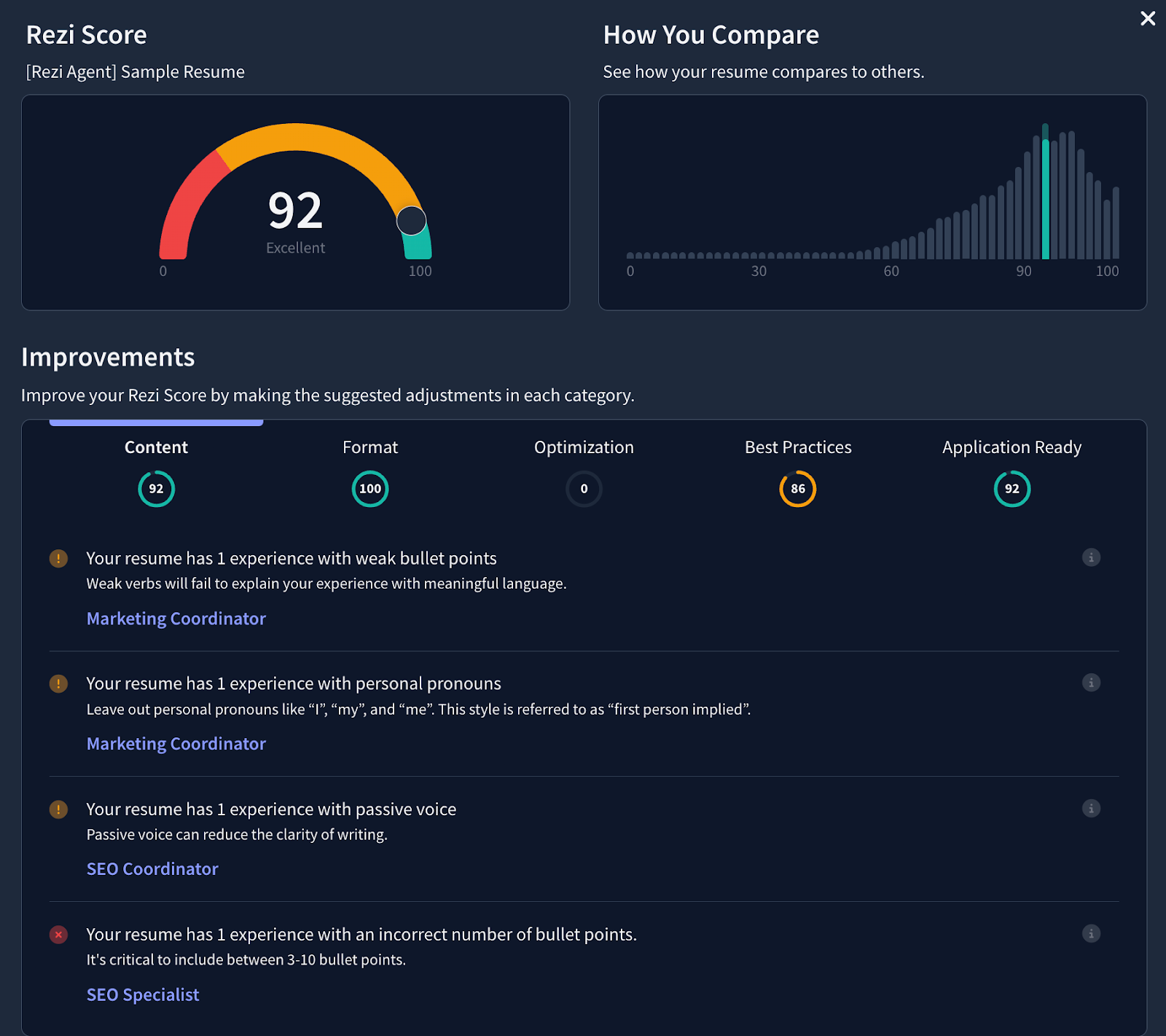
A score of 90 or above signals that your resume is good to go.
If you’re improving your resume using our AI resume builder, our resume checker tool is integrated throughout the process. You’ll get real-time content analysis and feedback so you know what to improve on the spot as you work on your resume.
See below for an example of our real-time content analysis tool:
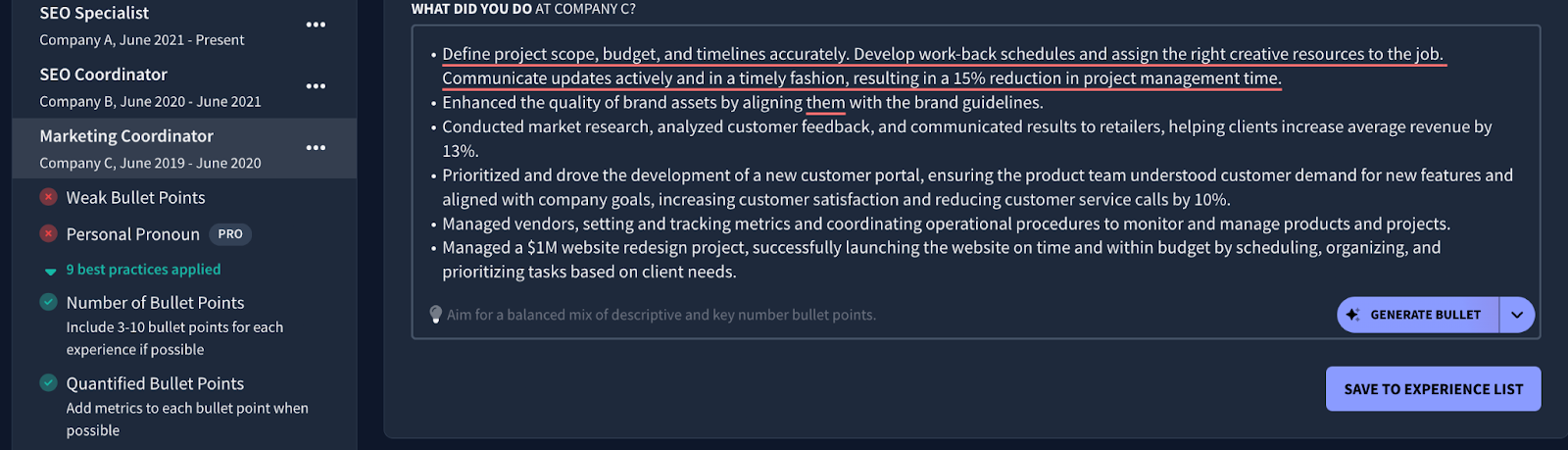
Use the insights from a resume checker to identify any critical errors and understand what to improve and how.
Read more ATS guides here:
- Expert Tips for an ATS-Optimized Resume
- How to Create an ATS Resume
- How to Beat Applicant Tracking Systems (ATS)
- What to Do and Not Do When Optimizing an ATS Resume
- AI Resume Screening Explained
3. Make sure you’re using a resume template with strong ATS compatibility
Your resume format directly affects how much of it is readable by applicant tracking systems (ATS).
Decorative elements and unusual spacing or complex layouts, for instance, may disappear or get misread when parsed by resume scanners. Strong content won’t save you if the system can’t even interpret it properly.
An ATS-friendly resume template should have:
- Clean, minimal design and layout.
- Clear section headers.
- No text boxes, tables, or decorative graphics.
- Consistent spacing and structure.
- Proper metadata labeling.
Here’s an example of an ATS resume template:
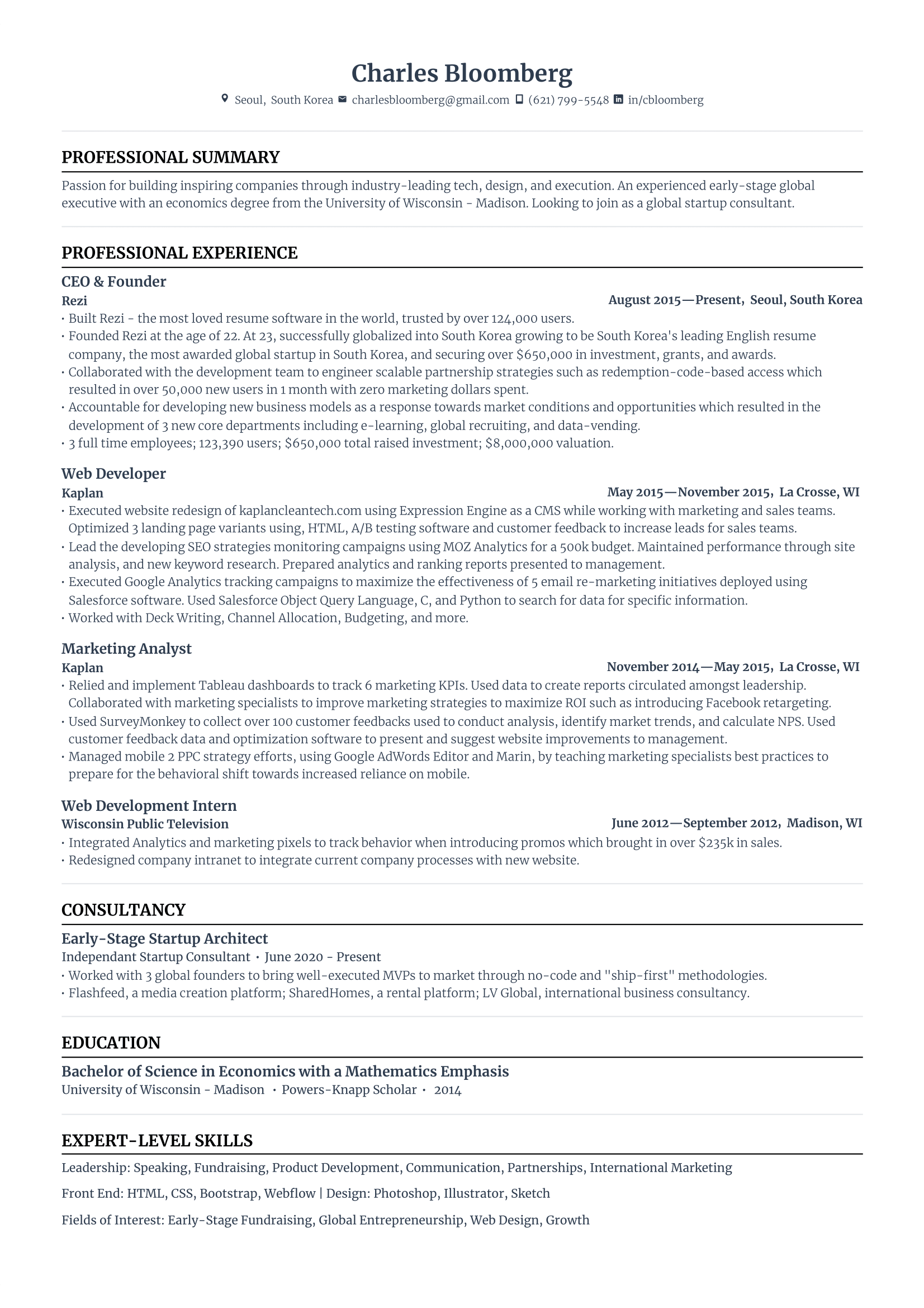
What’s the best online resume template for ATS compatibility?
To answer this question, I must refer to our open-source Resume Metadata Standard project.
In short, we tested templates from different online resume builders by running them through real ATS platforms like Workday.
Our findings? Most templates today labeled as “ATS-friendly” still failed to parse more than half the resume. Only the resume templates at Rezi consistently performed the best, with the highest readability score across scanners compared to others.
Now this isn’t about calling out our competitors. Modern resume scanners are also flawed. It just shows how unpredictable ATS systems can be. Using a template with the highest ATS compatibility that’s been tested against real hiring software will significantly improve your chances of being seen.
With that in mind, I suggest starting with our standard resume templates. Each template is built specifically for ATS parsing. You get a clean, professional layout that recruiters can skim and resume scanners can interpret correctly.
If you upload your existing resume into Rezi, our resume builder can automatically restructure your content into a proven, ATS-friendly format. You can check out more of our resume templates here or our resume examples here.
More resources:
- How to Choose the Right Resume Template
- MS Word Resume Templates
- Google Docs Resume Templates
- Adobe Illustrator Resume Templates
- A Career Expert’s Honest Review of Canva’s Resume Builder
- Canva Resume Templates Reviewed
4. Highlight how you made an impact through quantified achievements and outcomes
Make sure your achievements on a resume are quantified to clarify the exact impact of your contributions at previous companies. This is something recruiters are looking for: how your work has led to company growth and actual results.
When I say “results,” think revenue growth, time saved, user growth, conversion rates, efficiency improvements, number of clients supported, project scope, and so forth. Even if you can’t get the precise numbers, an estimate is still better than leaving things vague. (But yes — oddly specific numbers like 98.24% often look more credible than perfectly rounded ones, but either works as long as it reflects your real contribution.)
Here are some examples of achievements by role:
- Waiter: Streamlined the ordering process, cutting table turnover by 10 minutes, which increased customer capacity during peak hours.
- Barista: Achieved a 95% customer satisfaction rating through attentive, personalized service.
- Sales clerk: Introduced upselling strategies that led to a 15% increase in daily sales during busy shifts.
- Paralegal: Conducted comprehensive legal research that contributed to winning a significant case, saving the firm potential damages of $500,000.
- Architect: Managed multiple projects simultaneously, completing all within budget and ahead of schedule, resulting in increased client satisfaction and repeat business.
- Psychiatric nurse: Developed a patient feedback system that led to a 25% reduction in reported incidents of distress among patients.
- ESL teacher: Introduced interactive learning activities that increased class participation rates by 40%, fostering a more dynamic classroom environment.
- IT support: Identified and resolved recurring technical issues, leading to a 30% reduction in support tickets over six months.
- Volunteer coordinator: Organized community events that increased volunteer participation by 40%, strengthening community support for the mission.
- Administrative assistant: Developed a weekly update newsletter for the team, improving interdepartmental communication and collaboration.
Your achievements don’t always have to be monumental — they just need to show how you added value. Whether you saved time, improved efficiency, or kept things running smoothly, it’s worth including on your resume.
And if you don’t have numbers, you can signal positive feedback. For example, “Received 12 positive customer reviews in 10 days” and “Awarded employee of the month.” Including awards on a resume can go a long way.
You can easily rewrite your bullet points to emphasize relevant accomplishments and results using an AI resume editor. With Rezi AI Bullet Point Editor, for example, just highlight a bullet point and click “Rewrite bullet with key numbers.” It’ll then suggest a clear and impactful sentence for you, as shown below:
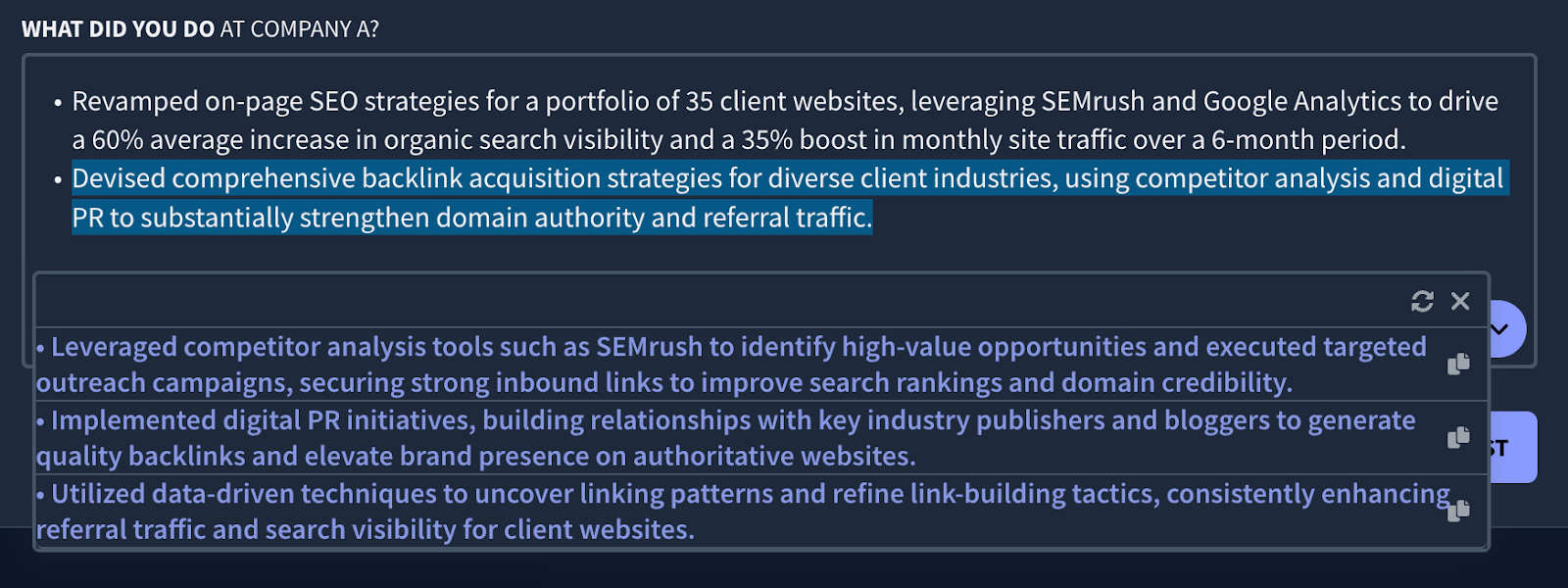
After that, feel free to tweak the wording and numbers to make sure it accurately reflects your experience.
That said, another quick tweak you can make is to mention your achievements at the start of the bullet point, followed by the key responsibilities that made it happen. Since recruiters skim resumes in only a few seconds, leading with the outcome makes it almost impossible to miss your impact, and then the “how” naturally follows right after.
Here’s an example:
- Instead of, “Launched a re-engagement email marketing campaign that increased paid conversions by 20%”
- Try, “Increased paid conversions by 20% by launching a re-engagement email marketing campaign”
Use this results-first structure for your strongest, most relevant outcomes. However, don’t force it on every bullet point.
There’s nothing wrong with the first example since some bullet points should start with the responsibility, especially when you need to emphasize your technical skills, tools, or process first. This is even arguably more important for roles where technical expertise matters more than the metric itself, which leads us nicely to the next step.
5. Prove your technical expertise for the target role
In other words: does your resume prove you can actually do the day-to-day work?
Quantifying your achievements is important, but recruiters also want to see that you understand the technical responsibilities of the job you’re applying for. If your work experience section only lists outcomes like, “increased conversions,” “reduced churn,” and “boosted revenue” but without explaining how, it can raise questions.
Recruiters want to see the tools, processes, and methods behind those results as proof that you have the required technical expertise for the role. That’s what tells them you’re not just taking credit for team-wide wins, but you understand the craft.
Even if you were part of a massive team, the recruiter needs to know exactly what you did to move the needle. Otherwise, it’s hard for them to see your specific value.
Whenever you can, isolate your personal contributions. Instead of saying "worked on a product launch," try "developed the core API architecture that allowed the product to scale to 50k users." It’s about taking ownership of your specific slice of the project.
Prove your technical expertise by showcasing the following:
- Key tools you used (e.g., HubSpot, SQL, Figma, Python, Google Ads, Salesforce)
- Methodologies (e.g., A/B testing, agile sprints, UX research, ETL pipelines)
- Systems you managed (e.g., CRM workflows, cloud infrastructure, editorial pipelines)
- Tasks and projects that show hands-on knowledge
These details matter just as much as the results. They help recruiters connect your experience to the requirements in the job description.
Here’s an example:
- Instead of, “Improved campaign efficiency by 30%”
- Try, “Optimized Google Ads bidding strategies using custom audience segments, improving campaign efficiency by 30%.”
You should also quantify your technical responsibilities where possible. Here are some examples below:
- Instead of saying you “managed the CRM,” specify the scale, such as “managed a CRM with 12,000+ contacts” or “automated 30+ workflows.”
- Instead of “ran SQL queries,” you can write, “ran daily SQL queries across datasets of 1M+ rows.”
- Instead of “handled support tickets,” use “resolved 40–60 technical tickets per week with a 95% satisfaction rating.”
These details instantly make your technical expertise feel more concrete and measurable without turning the bullet point into a full paragraph.
Need help writing relevant bullet points for your target role? Tools like Rezi AI Bullet Point Writer can generate sentences based on the best resume writing practices. Just enter your job position and click “Generate bullet” or “Generate bullet with key numbers.” Here’s an example below:
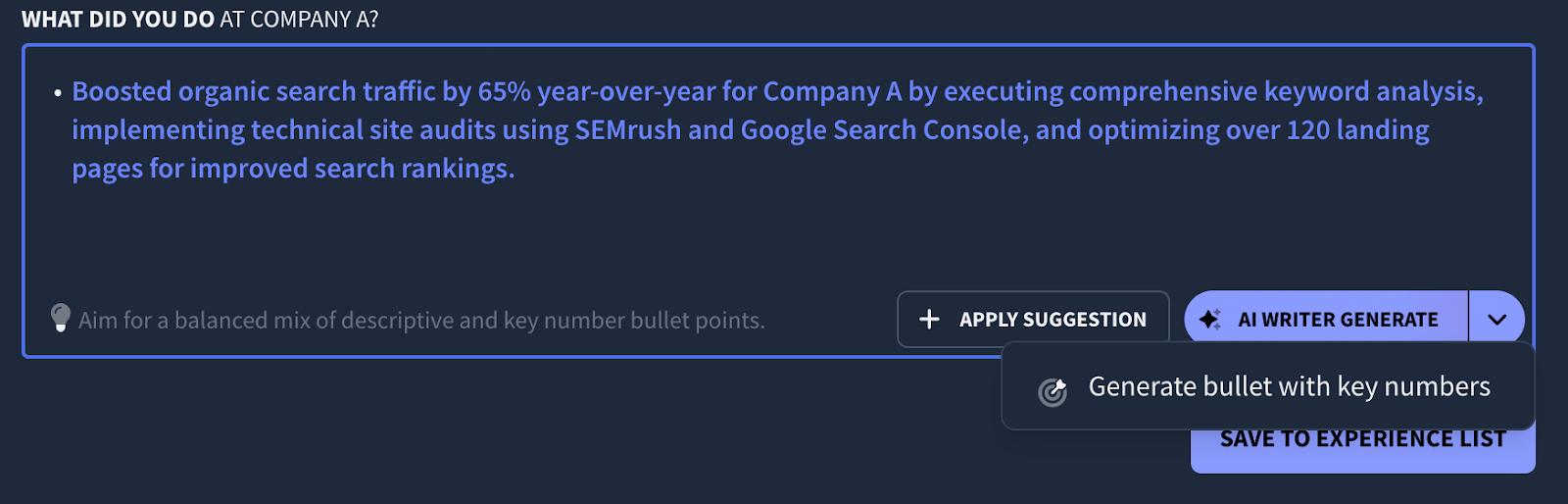
Alternatively, use Rezi AI Bullet Point Editor to help rewrite your existing resume sentences for more clarity.
And if you want more tailored guidance, just ask our AI Resume Agent directly. You can be as specific as you need by uploading your resume and entering prompts like:
- “Rewrite this bullet point to highlight the technical skills and tools I used.”
- “What technical responsibilities should I emphasize for this role? [Paste job description]”
- “Break down the technical steps I took in this project and turn them into strong bullet points.”
- “Identify which of my technical skills are most relevant to this job and help me phrase them clearly.”
- “Rewrite my achievements to show both the impact and the technical process behind them.”
Don’t just say you delivered results on your resume. Specify exactly how you delivered them. Technical clarity and measurable impact is what convinces recruiters you’re qualified.
6. Include timeframes
Adding simple time markers can make your responsibilities and accomplishments feel far more credible. These small additions help recruiters quickly assess your pace of execution, the scope of your impact, and how long you sustained those contributions.
Here are some examples:
- Instead of “Managed onboarding for new clients,” try “Managed onboarding for 80+ new clients per quarter.”
- Instead of “Increased website traffic by 40%,” try “Increased website traffic by 40% in 6 months.”
- Instead of “Led a team of designers,” try “Led a team of 4 designers for a 9-month product redesign.”
- Instead of “Improved data processing efficiency,” try “Improved data processing efficiency by 30% within the first 60 days.”
Timeframes show when something happened and how long it took, which gives hiring managers real context for the scale and difficulty of your work. They can also signal high performance especially when you delivered results faster than the industry average or consistently exceeded expectations.
7. Put the most important bullet points first
Recruiters skim resumes in seconds. So, lead with your strongest, most relevant achievements or technical responsibilities. This makes the most impressive parts of your experience hard to overlook.
If you have one standout metric, a major project, or a high-impact responsibility that directly matches the job description, put it at the top of the list.
A simple reorder of resume bullet points can make your application feel instantly more focused, intentional, and aligned with the role you’re targeting.
8. Share how you’re using AI and emerging technologies in your industry
Let’s face it, AI has made a dent in almost every single industry.
Show that you’re developing AI skills and actively evolving in your industry. Clarify how you use AI tools, automation, or emerging technologies in your day-to-day work.
Recruiters pay attention to this because it shows you’re adaptable, ahead of the curve, and continuously improving your skill set — all traits top candidates share.
This doesn’t always mean you need to be building AI models or doing anything overly technical. Even showing how you use tools like ChatGPT-5, Gemini, or Claude to optimize processes, streamline tasks and workflows, or support decision-making can strengthen your technical credibility.
It also helps to highlight relevant industry trends you’re aware of or actively incorporating, such as AI-assisted copywriting, data automation, machine learning–driven insights, LLM workflows, or emerging tools in your specific field.
Here are some examples:
- Integrated ChatGPT-5 and Gemini into research workflows, reducing prep time for client projects by 40%.
- Automated weekly reporting using Python and AI-driven data extraction, improving accuracy and saving 6+ hours per week.
- Leveraged AI-based QA tools to detect errors in code deployments, reducing bugs by 25%.
9. Demonstrate strong leadership and cross-functional collaboration
This doesn’t always mean overseeing an entire department. Good leadership skills also relate to taking initiative, influencing outcomes, and helping people work better together.
And cross-functional collaboration is one of the most universally valued skills across every industry. Companies want to know whether you have strong communication and can work effectively with designers, engineers, sales teams, data analysts, product managers, and so forth.
You don’t need a management title to show leadership and interpersonal skills. You just need to highlight situations where you guided a process, owned a project, coordinated across teams, or contributed to team success.
Here are some examples:
- Led a cross-functional team of designers, engineers, and analysts to deliver a product update used by 40,000+ customers.
- Collaborated with sales and customer success teams to identify churn risks, reducing monthly churn by 12%.
- Mentored 2 junior team members and trained the wider team on new AI research workflows.
- Partnered with engineering to streamline deployment processes, cutting release timelines from 3 weeks to 5 days.
- Coordinated with product managers and UX designers to scope and deliver a new onboarding flow, improving activation rates by 18%.
10. List the most important and relevant skills in the skills section
The skills section of your resume isn’t a dumping ground for every skill you’ve ever touched or are half decent at. Keep it focused on the most relevant and high-value skills for the role you’re applying to.
You should also be able to prove them through experience. If a skill you listed isn’t reflected anywhere in your bullet points then it loses credibility. Companies want to see both: the skill and proof you actually used it.
To figure out the best skills to put on a resume, start with the job description.
Look for key tools, technical abilities, and soft skills that appear consistently. Then prioritize the ones you can confidently back up with real experience or accomplishments.
You can use Rezi AI Skills Explorer to find relevant skills for your field. Just enter the category of skill (e.g., technical, software, hard, soft) and then enter a skill you already have. You’ll then receive suggestions, as shown below:
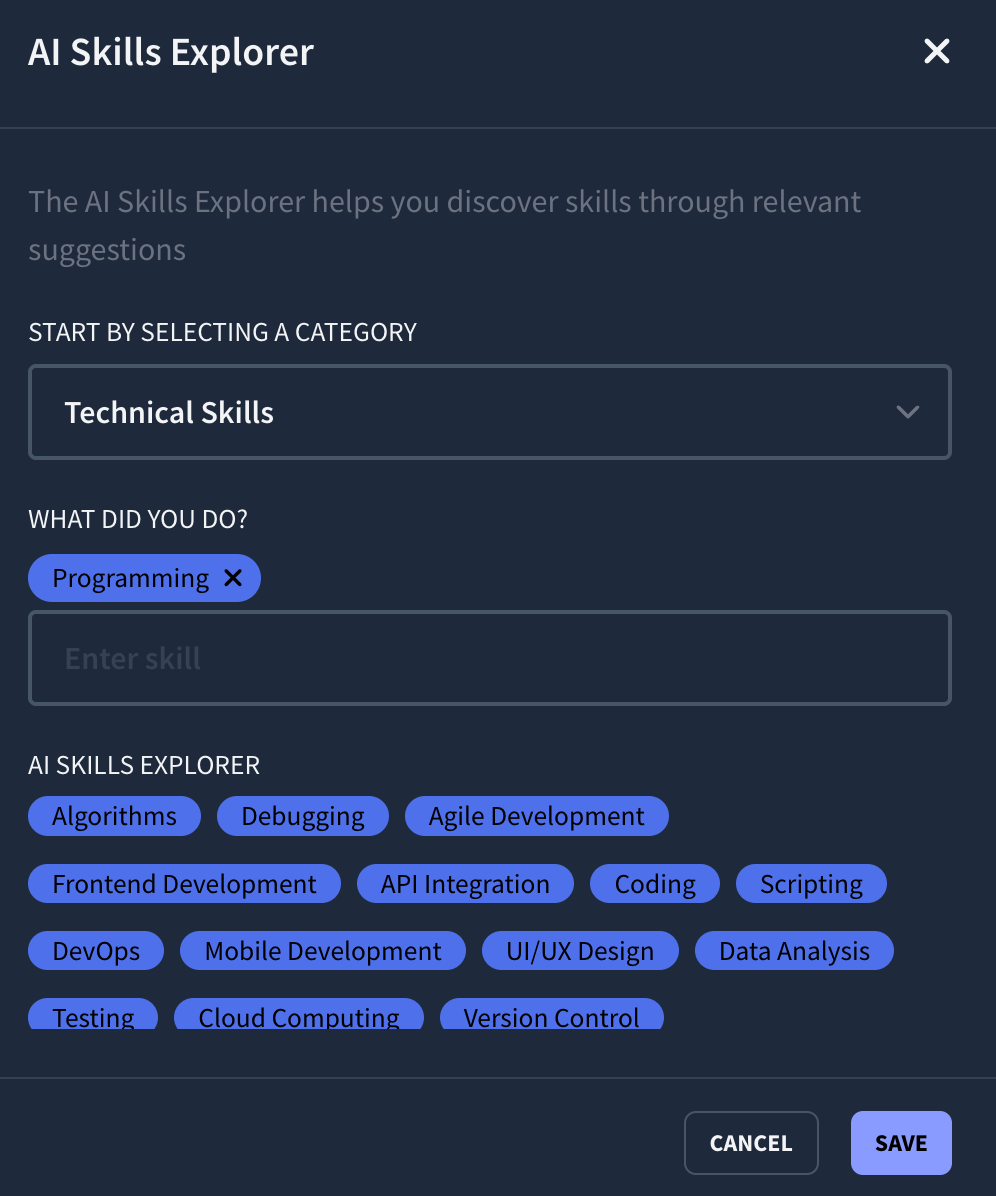
Once you have your list, place the strongest, most in-demand skills first. And when listing a large variety of abilities, create categories to make it easier to skim.
Learn more about skills to include on a resume:
- Best Hard Skills for a Resume
- Soft Skills to Put on a Resume
- Technical Skills to Put on a Resume
- Customer Service Skills for a Resume
- How to List Language Skills on a Resume
- Programming Skills to Put on a Resume
- Computer Skills for Your Resume
11. Include your top qualifications and credentials
This doesn’t just involve a university degree. It also includes relevant certifications, courses, or licenses that help validate your expertise.
When you have multiple qualifications, you could use individual sections to emphasize them. If you want to reserve space on your resume, put them together in a single section, such as “Education and Certifications.”
Focus on highlighting credentials that show you’re invested in upskilling and staying current with modern tools, industry standards, and emerging trends.
Related articles:
- How to List Education on a Resume
- Where Should Education Go on a Resume?
- How to Include Resume Certifications
- Relevant Coursework on a Resume
- Publications on a Resume
12. Emphasize your top career highlights, strengths, and unique skill set in your summary section
Make an offer in your resume summary section that answers this one question: “Why should we hire specifically you and not someone else?”
There are going to be other candidates who meet the core job requirements and can carry out the day-to-day tasks of the role. Your summary or objective section should make it clear why you’re better suited for the company over other candidates who are more than capable enough to do the job.
You do this by:
- Highlighting your biggest career accomplishments and professional highlights.
- Showcasing your strongest skills.
- Emphasizing your unique mix of experience that makes you valuable.
Imagine you’re applying for a software engineer role. The company already expects candidates who can write clean code and meet deadlines, that’s the baseline. So to stand out, position yourself around a specialization or unique strength, such as:
- “Software Engineer with 5+ years of FinTech experience. Proven track record in delivering large-scale payment system optimizations that reduced transaction latency by 32%.”
- “Software Engineer with 5+ years of experience leading end-to-end data and infrastructure migrations for bootstrapped startups, enabling 2–3x scalability with zero downtime.”
- “Software Engineer with 5+ years of experience debugging and improving high-traffic systems, launching AI features adopted by 200,000+ users, and educating a growing audience of 100,000+ through technical content.”
Now from any of these examples, you’re more than just a software engineer, and your resume would immediately stand out.
If writing this feels overwhelming, use Rezi AI Resume Summary Generator for ideas. Add the job position and skills you want to highlight, and it’ll give you suggestions as shown below:
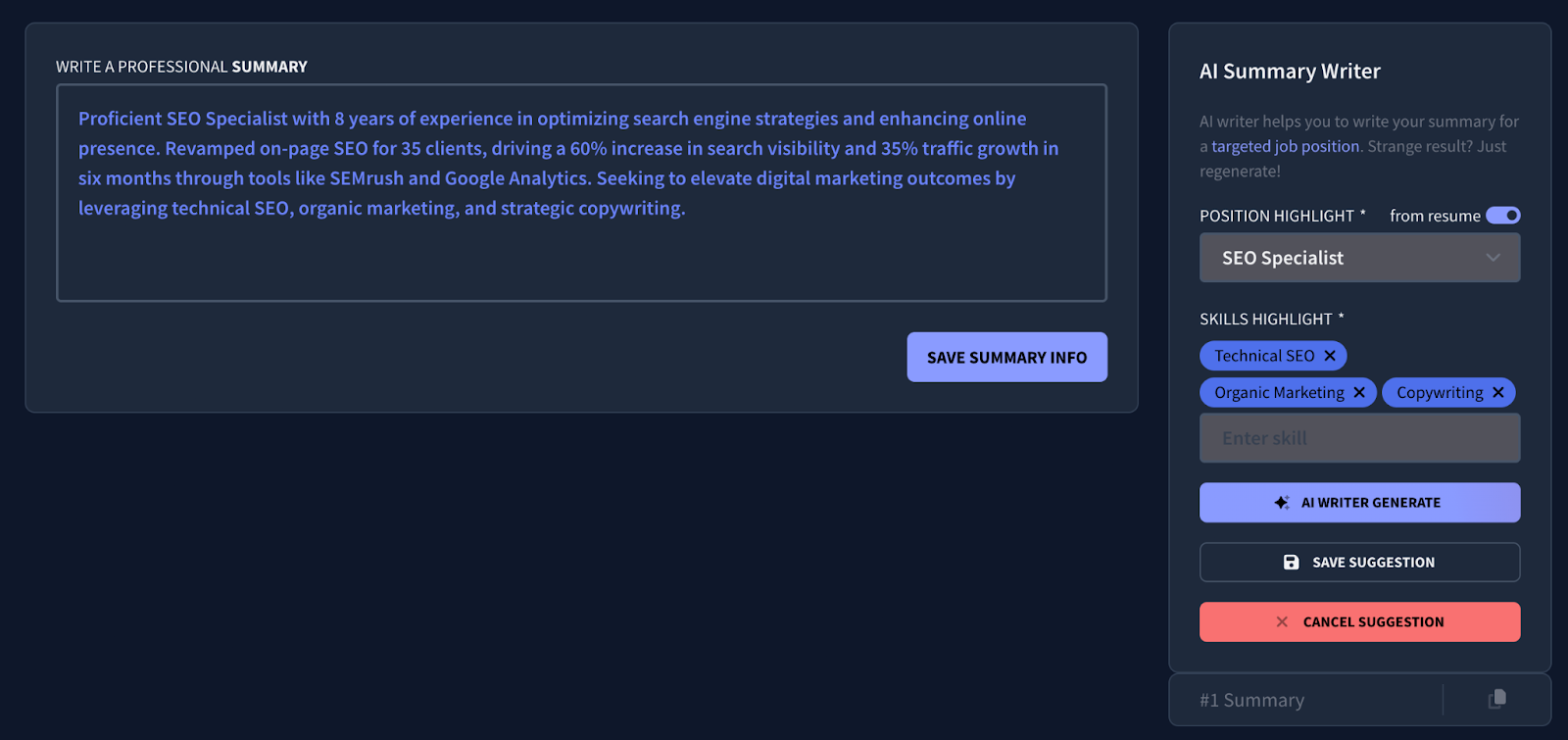
Alternatively, use our AI Resume Agent for more specific prompts. You can start with this prompt:
“Based on my resume and the job description, help me write a compelling resume summary that highlights my strongest achievements (insert achievements here), core areas of expertise, (insert top skills here), and unique strengths (insert relevant accomplishments and experience here). Make me stand out from other candidates.”
Make your pitch obvious, confident, and clear on why you’re the strongest choice.
13. Use relevant keywords in stronger context
Anyone can include resume keywords like “project management,” “Python,” or “SQL” just by listing them in the skills section. But not everyone can tie these to specific responsibilities or outcomes.
Here are some examples:
- Instead of just “Project management,” try “Led end-to-end project management for a 6-month product launch with cross-functional teams.”
- Instead of just “SQL,” try “Leveraged SQL to analyze datasets of 1M+ rows to identify retention patterns and inform roadmap decisions.”
This is how to tailor a resume and show competence, not just checkbox keyword stuffing.
If you’re unsure which keywords matter most, use a resume keyword scanner. Paste the job description, and it’ll show you what keywords are missing from your resume so that you know what to include. Here’s an example with Rezi AI Keyword Targeting:
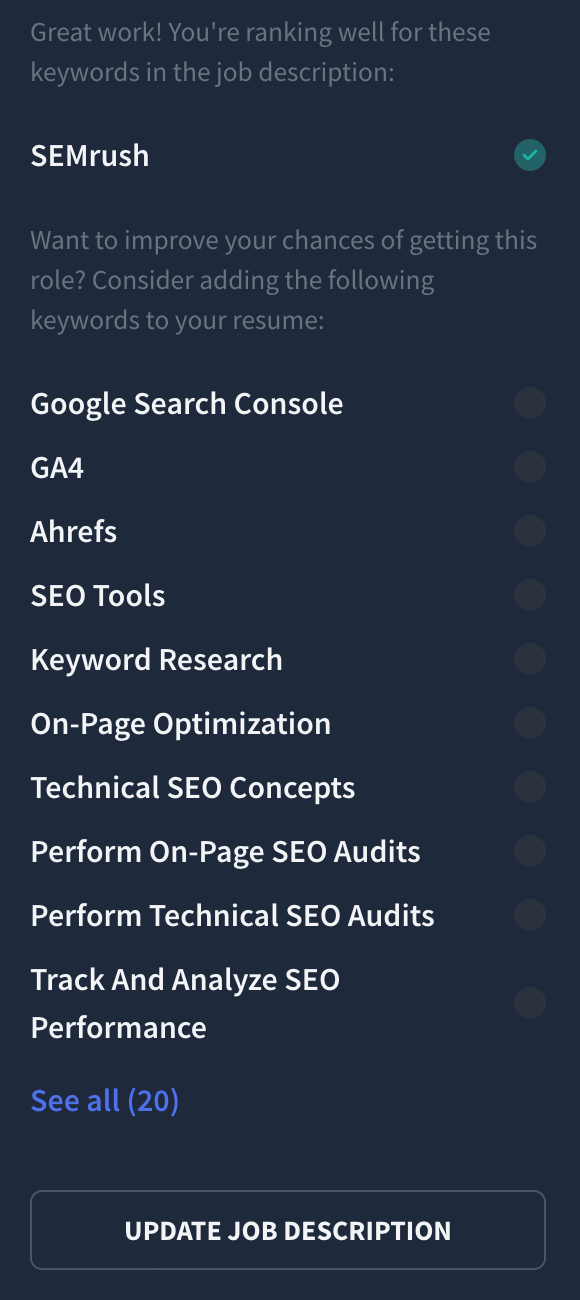
For further suggestions, click “Yes, add bullet point” and our tool will generate a sentence for your resume that includes the missing keyword. This helps you target the job description.
14. Use strong action verbs that paint a clear picture of your impact
Weak action verbs like “helped,” “worked on,” or “assisted with” don’t tell recruiters anything about what you actually did.
Strong action verbs, on the other hand, immediately clarify your role and contribution. Think verbs like: led, executed, optimized, developed, automated, analyzed, designed, improved, implemented.
Rather than “Worked on email campaigns,” a better start to the sentence would be “Executed and optimized weekly email campaigns reaching 50,000+ subscribers.”
Good verbs make it obvious what you did and how you made an impact.
15. Showcase your online presence
If you have an online presence that supports your professional brand, make it visible on your resume.
Recruiters often check your LinkedIn, portfolio, or personal website to see your work in action and get a better sense of who you are beyond bullet points. And this isn’t about linking every social profile, just the ones that actually help you stand out. For most people, that means:
- LinkedIn (almost always worth including)
- Portfolio or website (especially for creative, data, product, and technical roles)
- GitHub (for software engineers, data roles, or technical projects)
- Content-driven platforms if relevant (e.g., Medium and Substack)
A strong online presence can strengthen your credibility, showcase your writing or technical skills, and provide more depth than a one-page resume can fit.
If you’re using Rezi to refine your resume, you can easily add these links through the contact information section of any template.
Relevant articles:
- How to Write a Resume Header
- Examples of Resume Headlines
- How to Create a Good LinkedIn Profile
- How to List Your Best Projects on a Resume
16. Make your writing as concise as possible
If a sentence can be said in fewer words without losing meaning, cut it down.
Aim for short, direct bullets that highlight your responsibilities, tools, and results. Avoid filler phrases like “responsible for,” “helped with,” or “worked on.” These eat up space without adding clarity. Focus on strong action verbs and clean phrasing.
The clearer and more concise your bullet points are, the faster hiring managers can understand your value.
You might also find these articles helpful:
- How to Write a Good Resume
- How to Write a Resume With No Work Experience
- How to Write a Resume for a Career Change
- STAR Method for Resume Writing
17. Cut the filler and outdated details
Improving your resume isn’t just about adding new information; you also have to cut what no longer serves you.
A hiring manager isn’t looking for your entire life story — your stint as a tarot card reader might be a cool “fun fact”, but it won’t guarantee you a future at the company. Employers want professional highlights that relate to their role.
Remove outdated or unrelated experience
- Prioritize your top accomplishments and skills — ditch anything outdated or unrelated.
- Spotlight the last 10–15 years unless older jobs are critical to the role.
Skip the personal details
Leaving out personal information keeps your privacy intact and ensures hiring managers focus on what matters — your skills and experience.
- Don’t include your age, gender, marital status, religion, ethnicity, or social security number.
- Only add a photo if it’s explicitly required (like in modeling or acting).
Trim your education section as your career grows
Your education section is pretty straightforward, and it’s easy to overlook when making edits. But as your career progresses, it could be the section taking up the most valuable space. It could also be the place to add extra details if you’re fresh out of college.
Drop “references available upon request”
Why state the obvious with the antiquated “references available upon request”?
Employers already assume you’ll provide references if asked. Adding it takes up valuable space and might make your resume seem a bit old-fashioned.
- Leave “references available upon request” off entirely. Use the extra space to highlight your skills, experience, and accomplishments.
- Prepare a separate document with three to five professional references and their contact information. If you don’t have this yet, start asking for references from past colleagues or supervisors.
18. Frame gaps in a positive light
Addressing gaps on your resume is key to keeping your career story positive. Be honest, strategic, and ready to explain during interviews if it comes up.
- Use years only (2020–2021) to downplay shorter gaps and make sure to keep your formatting consistent. Or leave them out altogether unless they’re highly relevant.
- Talk about skills or experiences gained during breaks, like volunteering, pursuing personal projects, or taking courses.
19. Proofread before you hit send
As a writer, I understand that reading through your entire document after already spending hours on it isn’t the most enjoyable way to spend your time. But even the strongest resume can be undermined by a simple typo. Errors instantly chip away at your credibility because they suggest a lack of attention to detail.
Proofreading is part of presenting yourself professionally. Tools like Grammarly and ProWritingAid can help, but your own eyes (and ears!) are still the most reliable editors. And if your brain is numb from all the editing, you can even ask a trusted friend to take a quick look.
Here’s how to review your application before sending:
- Triple-check your contact details; one wrong letter in your email or digit in your phone number can cost you interviews.
- Use grammar-checking tools to catch common mistakes, but don’t rely on them alone. They can sometimes miss things or make your content less authentic to you.
- Look out for typos, awkward phrasing, and inconsistencies that weaken your overall message.
- Read your resume out loud to spot clunky sentences, missing words, and places where your writing doesn’t flow.
Before and After Resume Example
Let’s review a sample resume before and after being updated. The “before” version is a well-written resume. The “after” version will also be well-written, but will include a few refinements based on some new example details.
Before updating a resume
Jane Doe
Phone: (123) 456-7890
Email: jane.doe@example.com
LinkedIn: [LinkedIn profile URL]
Summary
Experienced marketing manager with over 7 years in the industry. Skilled in developing and executing marketing strategies, managing campaigns, and leading teams to achieve company goals.
Work Experience
Marketing Manager
ABC Company, Anytown, USA
March 2018 – Present
• Developed and implemented marketing strategies that increased brand awareness by 25%.
• Managed a team of 5 marketing professionals.
• Coordinated and executed successful marketing campaigns across various channels.
• Conducted market research to identify new opportunities.
• Collaborated with sales and product teams to align marketing strategies.
Marketing Specialist
XYZ Company, Anytown, USA
June 2015 – February 2018
• Assisted in the development of marketing materials and campaigns.
• Conducted market analysis and research.
• Supported the marketing manager in executing marketing plans.
• Monitored and reported on the effectiveness of marketing campaigns.
Education
• Bachelor of Science in Marketing
• State University, Anytown, USA
• Graduated May 2015
Skills
• Hard skills: Campaign Management, Email Marketing, Paid Marketing, SEO.
• Soft skills: Communication, Leadership, Public Speaking.
After updating a resume
Jane Doe
Phone: (123) 456-7890
Email: jane.doe@example.com
LinkedIn: [LinkedIn profile URL]
Summary
Dynamic marketing manager with over 7 years of experience in creating and executing innovative marketing strategies. Proven track record in boosting brand awareness and driving sales through data-driven decision-making and cross-functional collaboration. Adept at leading high-performing teams to exceed company objectives.
Work Experience
Marketing Manager
ABC Company, Anytown, USA
March 2018 – Present
• Spearheaded the development and execution of comprehensive marketing strategies, resulting in a 25% increase in brand awareness and a 15% rise in sales.
• Led a team of 5 marketing professionals, fostering a collaborative and innovative work environment.
• Orchestrated multichannel marketing campaigns, including digital, social media, and traditional advertising, driving a 20% increase in customer engagement.
• Leveraged advanced analytics to identify market trends and opportunities, enhancing campaign effectiveness.
• Partnered with sales and product teams to ensure alignment and coherence in marketing strategies, contributing to a 10% improvement in product launch success rates.
Marketing Specialist
XYZ Company, Anytown, USA
June 2015 – February 2018
• Contributed to the creation of impactful marketing materials and campaigns, supporting overall brand goals.
• Conducted in-depth market analysis and research, providing valuable insights for strategic planning.
• Collaborated with the marketing manager to execute targeted marketing plans, achieving a 10% growth in customer base.
• Monitored and analyzed campaign performance metrics, optimizing strategies for better outcomes.
Education
• Bachelor of Science in Marketing
• State University, Anytown, USA
• Graduated May 2015
Skills
• Hard skills: Strategic Marketing Planning, Content Marketing, Copywriting, Multi-Channel Campaign Management, Data Analysis.
• Soft skills: Leadership, Delegation, Communication, Presentation, Public Speaking, Relationship Building, Storytelling.
Key improvements in the updated resume and why it works
Here’s a summary of what’s new when comparing the updated resume to its previous version:
- More dynamic and impactful language. Refined phrases like "Developed and implemented marketing strategies" to "Spearheaded the development and execution of comprehensive marketing strategies."
- More specific, measurable outcomes. Expanded the results in the work experience section, adding extra details such as a “15% rise in sales” and “contributing to a 10% improvement in product launch success rates.”
- Enhanced skills section. The skills section reflects the candidate’s current abilities and includes more strategic competencies.
- Clearer contributions. Specified the purpose and impact of actions. Rather than just writing that you managed a team, clarify what came of it.
Why this updated resume is better:
- Emphasizes results. Not only does the updated resume include more specific, quantifiable achievements, but it also expands on them by specifying results. This reiterates the candidate's ability to drive tangible outcomes, which is attractive to hiring managers.
- Highlights leadership and collaboration skills. The new work experience section demonstrates leadership abilities, teamwork, and cross-functional collaboration more clearly.
- Relevant and more competent industry skills. The updated skills section is more aligned with industry trends, making the candidate appear more competitive.
- Reflects a more proactive approach. Using stronger, less generic action verbs (e.g., “Spearheaded” and “Orchestrated”) makes the resume more engaging and reiterates the candidate's ability to drive impact.
When to Update Your Resume?
Update your resume at least once every six months. If you’re currently employed, aim to update it at the end of each quarter to make sure you include key details without forgetting them, such as specific numbers or metrics for accomplishments and responsibilities.
Here’s when to definitely update your resume:
- Your work experience has expanded: if you’ve been promoted, taken on new responsibilities, or accomplished something significant, update your work experience section to reflect these changes.
- You’ve gained new qualifications or certifications: adding any new accredited courses, certifications, or projects you’ve completed can enhance your job prospects.
- You’re considering a career change: make sure your new resume fits the field you’re seeking to enter. Highlighting relevant skills and experiences can make you a more attractive candidate in a new industry.
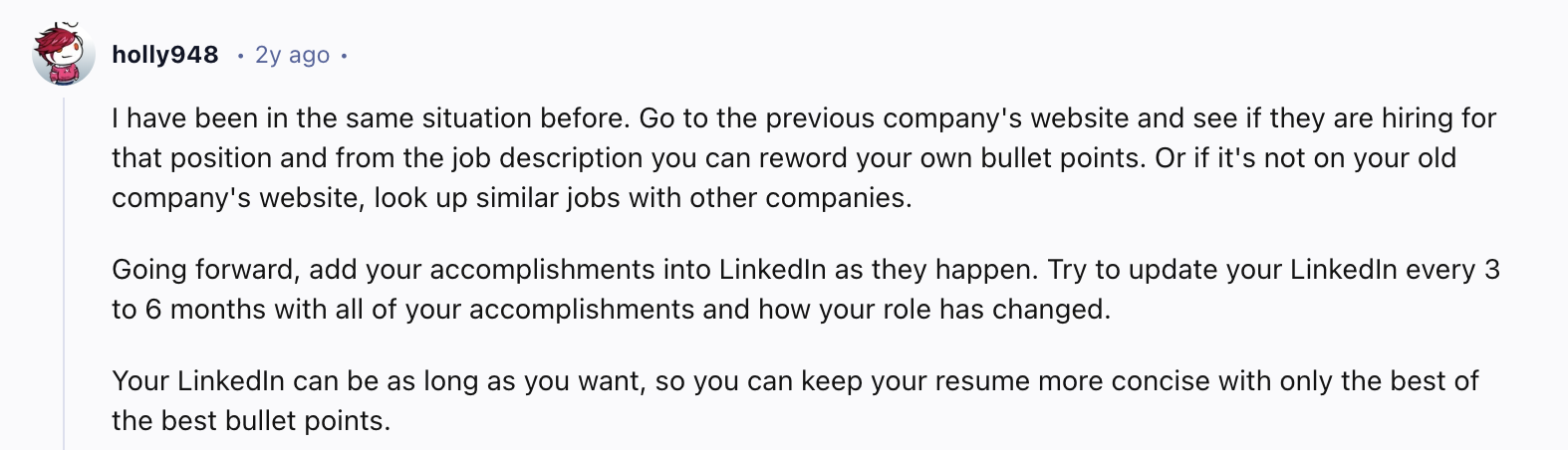
In short, update your resume whenever you accomplish something significant. Get into a habit of adding these accomplishments immediately to your LinkedIn profile to make all future resume updates easier and more streamlined. This advice, as discussed on a Reddit thread, helps you remember all those important highlights.
Include your current or most recent job position
Follow the same format as for any other role, but when listing the dates of employment, begin with the month and year you started. For the end date, type “Present” to indicate it’s your current position.
Here’s an example:

Summary
Let’s recap on how to improve a resume:
- Get expert feedback from a smart AI resume agent
- Score your resume using an ATS checker and see any critical areas for improvement.
- Opt for a resume template with strong ATS compatibility.
- Quantify achievements and outcomes to prove your impact.
- Specify your technical responsibilities and quantify tasks if possible.
- Add timeframes to tasks, projects, and accomplishments.
- Acknowledge emerging technologies and trends.
- Show proof of strong leadership and cross-functional collaboration.
- Put the most relevant skills in the skills section.
- Add your top qualifications, certifications, and credentials.
- Make your summary section more compelling by emphasizing unique skills, career highlights, and core areas of expertise.
- Include relevant keywords in a stronger context.
- Use action verbs that clarify what you actually did and achieved.
- Make your online presence known.
- Remove fluff so that your writing is sharp and succinct.
- Cut outdated roles, personal details, and other filler.
- Explain employment gaps positively.
- Proofread carefully before sending.
Improving your resume is all about telling a stronger story of who you are. And remember, your resume doesn’t have to be perfect. It just needs to be good enough to show why you’re the right person for the job.
FAQs
What can I do to make my resume better?
Prioritize showcasing relevant achievements and technical know-how. Focus on clarity, impact, and relevance. Every line in your resume either proves your skills or shows a real business outcome you contributed to. Quantify your achievements and responsibilities where possible, and use action verbs that clarify exactly how you made a difference. Use an ATS-friendly resume template and keep the formatting clean and professional. To check how ready your resume is and if there are critical areas for improvement, run it through an ATS checker. For expert resume feedback without the cost of traditional career experts, use Rezi AI Resume Agent to help you improve your resume.
How do I know if my resume is good enough?
The best way to confirm is by running it through an ATS resume checker. Alternatively, you can check yourself by making sure the format is clear, readable, and professional. Unless stated otherwise in the job description, always submit your resume as a PDF or Word document. Next, make sure you’ve included important resume keywords and highlighted your most relevant skills, qualifications, and achievements. Lastly, make sure there are no spelling or grammar errors.
What is the most important part of a resume to improve?
Your work experience section is the most important part of your resume. It’s usually what recruiters care about most and often the first thing they skim to decide if you’re worth reaching out for. So, focus on improving your bullet points by using clear action verbs, leading with your strongest achievements, and showing specific responsibilities or technical skills that prove you’re qualified. Also, quantify your accomplishments and responsibilities wherever possible and include timeframes.
How can I make my resume stand out?
You stand out by making your value impossible to ignore. Highlight your unique strengths and top career highlights immediately in the summary section. Clarify what you can deliver that other candidates usually don’t. Back up your claims with real results and use clean, professional formatting. Keep your writing tight and tailor your content using relevant keywords from the job description.
What is the 30-second rule for resumes?
The 30-second rule refers to the idea that a hiring manager will spend about 30 seconds scanning your resume initially. While this might not be as accurate today due to ATS filtering many resumes, it’s still important to make those first few lines count. Highlight your most impressive skills, achievements, and qualifications so both recruiters and ATS can easily spot your strengths right away.
What are the three C’s of a resume?
The three C’s are Clear, Concise, and Consistent:
- Clear: Make your resume easy to read with straightforward language and organized sections.
- Concise: Keep your content brief and to the point — don’t include unnecessary details or fluff.
- Consistent: Use consistent formatting and language throughout, ensuring everything flows smoothly.
Can ChatGPT rewrite your resume?
Yes, ChatGPT can be a helpful tool for rewriting your resume. You can provide your existing resume or bullet points, and ChatGPT can reword them to highlight achievements, use stronger action verbs, or tailor content for a specific role.
Just keep in mind that ChatGPT is only as good as the prompts you provide. You can suggest strong wording and structure, but you still need to verify facts, numbers, and formatting, and ensure the content reflects your true skills and experiences.
How to update a resume after graduation?
After graduating, update your resume by first polishing your education section. Add your degree, institution, location, major, and date of graduation. List any relevant coursework, internships, projects, or extracurricular activities that demonstrate your skills and experience. Highlight any honors or awards you received, too. Next, tailor your resume to the jobs you’re applying for by including keywords from the target job description and emphasizing the most relevant skills, qualifications, and experiences.
How do I make my resume stand out for my first job?
Shift the focus from what you’ve done to what you’re capable of doing. Lead with a strong professional layout that highlights academic achievements, relevant coursework, and extracurricular leadership or volunteer work. Don’t underestimate "informal" experience too; that high-stakes club treasury role or the summer you spent managing a lawn care side-hustle counts as project management and reliability. Use a clean, one-page template that is easy for both humans and AI scanners to read, and always include a summary or objective section that emphasizes your "hunger to learn" and how your specific background makes you the right person to hire.
What should I put on my resume to make it more unique?
To make your resume truly unique, move beyond the standard "Work Experience" section. Consider custom sections based on your specific background, like “Consultancy” when you have consulting experience from relevant projects. Emphasize tangible evidence of your skills and passion, such as a personal blog, a coding project, or a successful fundraise you organized. One effective way to make yourself stand out is to use your online presence to your advantage. This includes adding a link to your portfolio, website, or social media.

Upload or drop your resume to get started
Upload your resume to get started
Score my resume

Astley Cervania is a career writer and editor who has been sharing resume and job search insights for 5+ years. He shapes the direction of the Rezi blog, providing practical answers for important career-related questions and helping hundreds of thousands of people navigate the job market and build resumes that land interviews.

.webp)