Resume
25 ATS Resume Examples for 2026 (Free Templates & Downloads)
Browse 25 ATS resume examples with free downloadable templates. Each example is tested to pass Applicant Tracking Systems and includes formatting tips for your industry.

Published on
August 17, 2022
Updated on
February 25, 2026
You’ve sent dozens (feels like hundreds) of resumes, and yet… nothing. No interview requests, not even a rejection email. What’s going on? Sure, it could be bad luck or a competitive job market, but there’s another possibility: your resume might not even be reaching a recruiter’s desk.
Now ask yourself: Did you tailor your resume to each job? Are you using an ATS-friendly format? Did you include the right keywords? If not, Applicant Tracking Systems (ATS) will likely filter you out. Lucky for you, I’ve put together a range of ATS-friendly examples to give you some much-needed inspiration.
Find the best ATS resume example for you. This guide will include:
- The definition of ATS and how the system works.
- ATS-friendly resume examples for different styles and industries.
- The best tips to guarantee your resume makes it past the ATS.
Or let us do the legwork for you with our free AI Resume Builder. Just enter your details and we’ll create an ATS-friendly resume with the right format and structure.
Need more tips? Check out our other ATS guides:
- How to Create an ATS Resume
- 20 Ways to Optimize an ATS Resume
- How to Make Sure You Have an ATS Resume
- Beat The Applicant Tracking System in 9 Easy Steps
What Is an ATS Resume?
An ATS resume is specifically designed to pass through Applicant Tracking Systems. Many companies use this software to filter and rank job applications before a human recruiter sees them. Since recruiters can receive hundreds of applications daily, ATS helps them quickly identify the most relevant candidates.
To get past ATS filters, your resume should have a simple format without complex graphics, columns, or unusual fonts that could confuse the system. More importantly, it should be optimized with keywords that match the job description, ensuring the software recognizes you as a strong candidate.
At the same time, a great ATS resume isn’t just about getting past the software. Once that happens, you need to impress human recruiters by highlighting your accomplishments, skills, and experiences to prove you’re the best match.
Want to get started? Use our free ATS resume template for Google Docs.
How Does an Applicant Tracking System Work?
Here’s a simple breakdown of how an ATS works:
1. Scanning your resume: When you submit your resume, the ATS scans for key details like your name, contact information, job titles, work experience, and education.
2. Searching for keywords: ATS looks for terms that match the job description, like “data analysis,” “project management,” or “customer service.” If your resume contains the right ATS keywords, you boost your chances of reaching an actual human.
3. Filtering out unqualified candidates: ATS software sometimes automatically eliminates resumes that don’t meet the job’s minimum qualifications. This could be missing experience, education, or those all-important keywords. Even a great candidate can get rejected if their resume isn’t formatted properly or lacks the right terms.
4. Building a candidate profile: Once your application is in the system, the ATS creates a candidate profile that recruiters can access. This makes it easy for hiring teams to track applicants, revisit strong candidates, and search the database for future roles.
5. Helping with the next stages: Many ATS platforms don’t just screen resumes; they also help companies schedule interviews, send follow-up emails, and manage job postings. If a recruiter likes your profile, they can contact you through the system.
ATS Resume Examples
The trick to a good resume? Customization. The general rule for ATS is to keep things simple. But that doesn’t mean you can’t make a few tweaks to better align your resume with the job, company, and industry.
I’ve gathered 25 ATS-friendly resume examples that work across different fields and experience levels. But getting past ATS is just the first step — you also need the green light from human recruiters. That’s why I’ve included expert tips to help you get noticed.
Let’s start with different types of ATS-friendly resumes.
Professional Resume Template
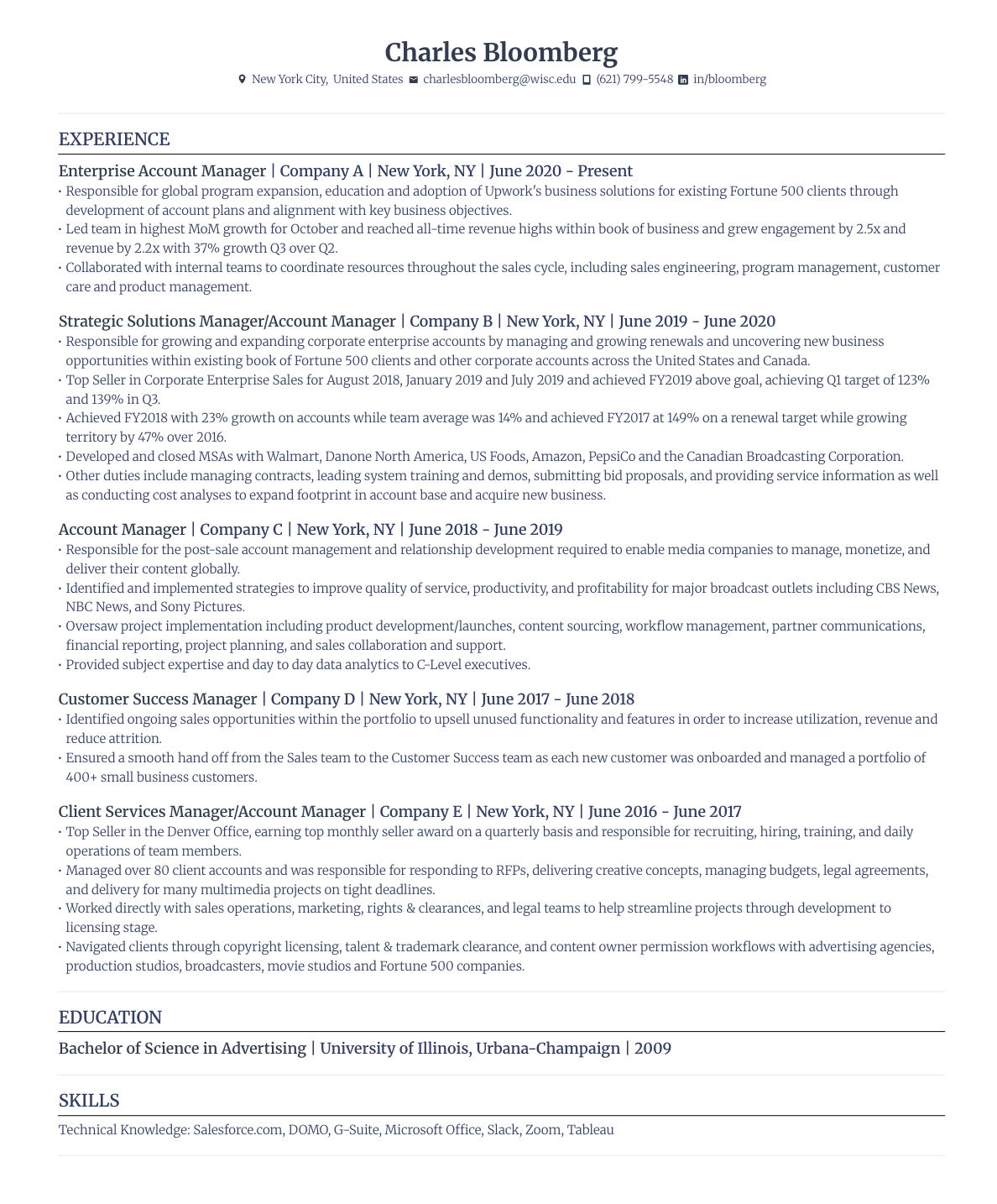
A professional resume should be clear and direct — no flashy extras needed. This candidate ditches unnecessary images and graphics, ensuring the ATS scans their resume without glitches.
- Instead of overloading the resume with excessive design, this job seeker prioritizes content, allowing for a more keyword-heavy work experience section.
- By strategically using the word “manager” in job titles, this resume aligns with the job description, increasing the chances of passing ATS keyword scans.
- Make sure your job titles reflect your actual responsibilities if you’re tweaking them for ATS optimization. Exaggerating titles could backfire during interviews.
Reverse Chronological Resume Template
The reverse chronological resume format is the gold standard for ATS compatibility. This format highlights career progression by placing the most recent and relevant experience at the top. It also makes it easier for ATS to extract and categorize job history without confusion.
- ATS systems are most familiar with the reverse chronological format, so it’s your safest bet. But even though the most recent roles are at the top, this candidate smartly expands on positions that align more with the target job.
- A touch of color makes the resume visually appealing without interfering with the ATS’s ability to scan text. Too many design features can confuse ATS, so keep it minimal.
- Using ATS-friendly resume fonts like Calibri, Arial, or Helvetica prevents parsing errors.
Simple Resume Template
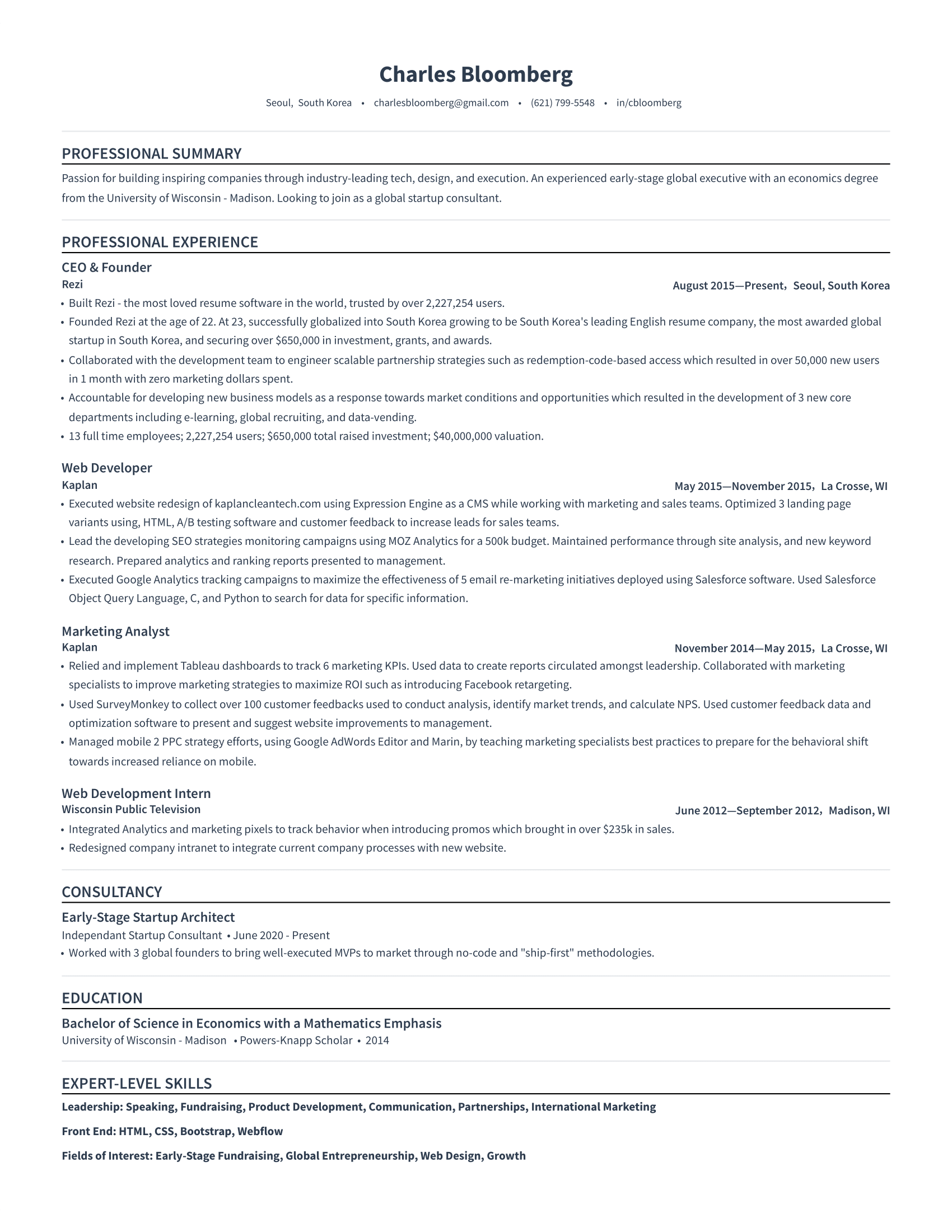
This resume follows the core principle of ATS optimization: simplicity. It avoids charts, graphics, or fancy formatting. Why? It guarantees that ATS correctly reads every piece of information.
- Many ATS scanners don’t recognize visual elements like graphs, icons, or images. This candidate avoids all the fluff and keeps the text the main event.
- By using clean section breaks and white space instead of text boxes or columns, the resume remains structured while being easy to scan.
- Instead of listing skills in a long, chunky paragraph, this candidate groups them into categories, making it easier for the ATS and recruiters to match them with job descriptions.
Modern Resume Template
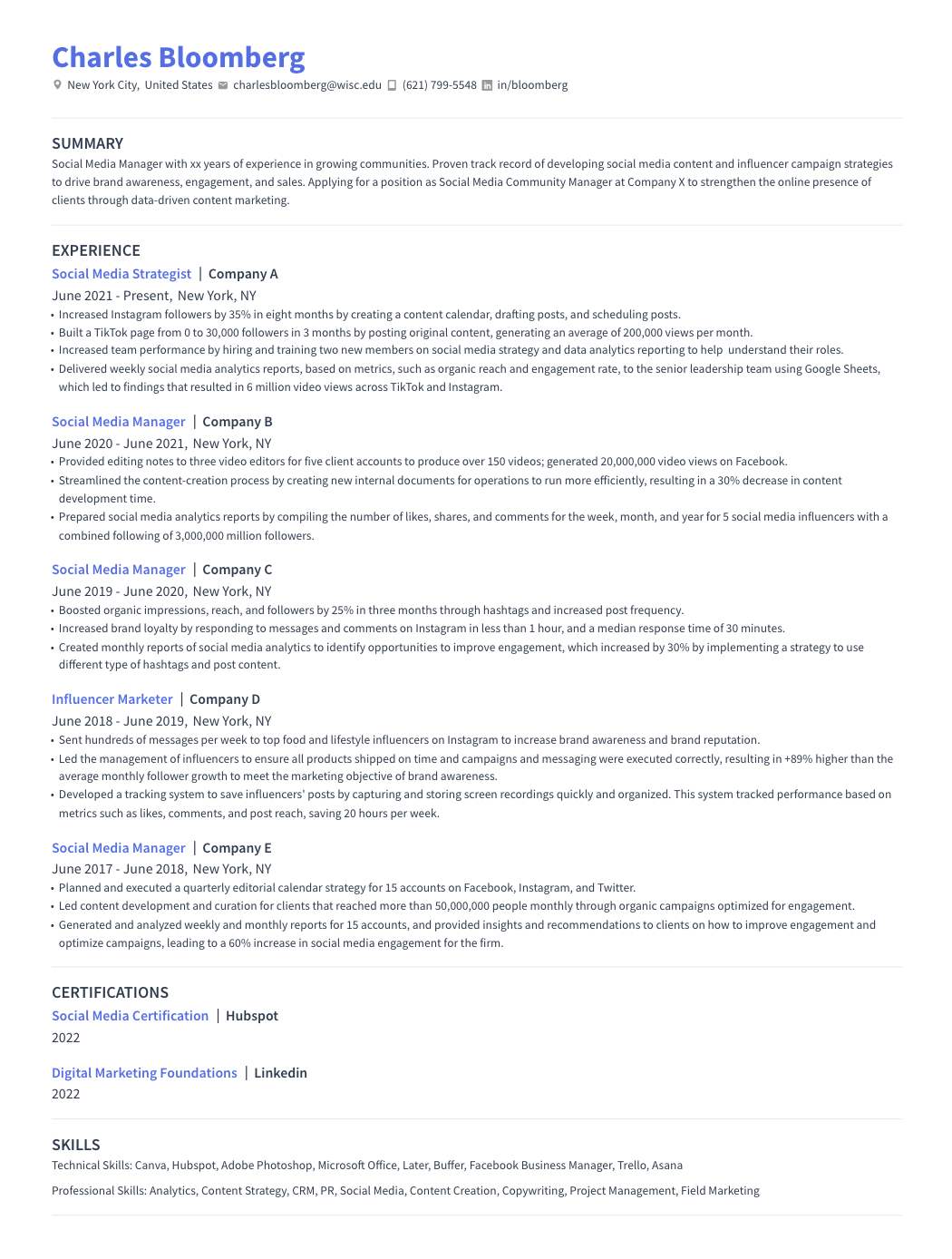
Want to balance professionalism with personality? This resume includes subtle design features, such as pops of color and slight font variations. It adds a versatile touch without messing with ATS compatibility.
- By only using minimal color in headings, this candidate ensures their resume is ATS-readable while adding a fresh feel.
- Some ATS systems struggle with multi-column layouts, so keeping everything in one column prevents data from getting scrambled.
- Slight font weight variations (such as bolded job titles) also make the resume easier (and more interesting) for human recruiters to scan.
Creative Resume Template
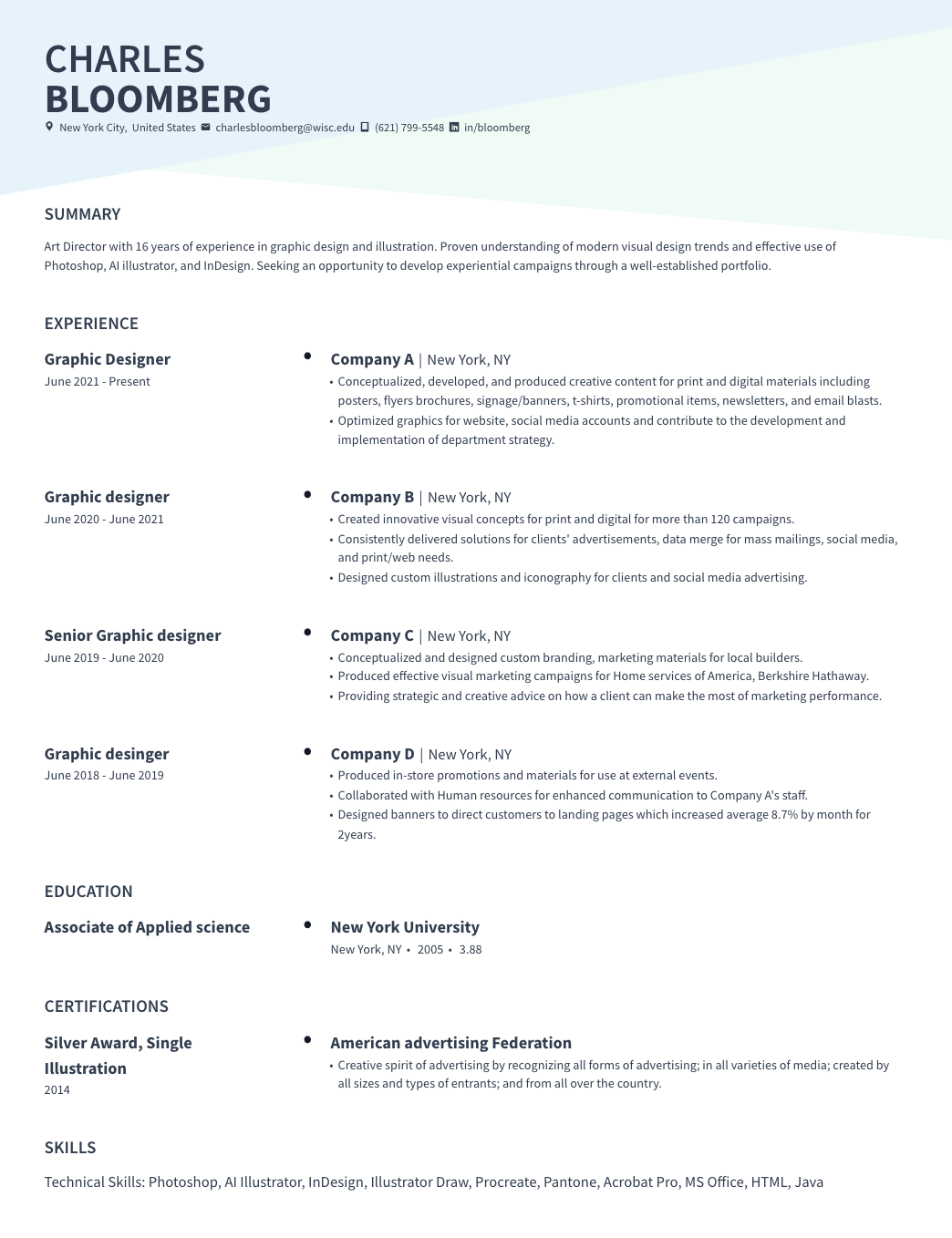
Many assume that a “creative” resume means bold colors, fancy patterns, and all the Canva extras. But those design elements can confuse an ATS and send your resume straight to the reject pile.
- A well-designed header can add personality without interfering with ATS scanning. This candidate keeps the main content plain and structured for easy readability.
- ATS systems rely on structured job histories, so giving job titles and dates their own space ensures clear parsing.
- If you don’t have extensive work experience, extra resume sections are a great way to include industry-relevant keywords while showing expertise. For example, this job seeker includes a “Certifications” section for better keyword optimization:
Technical Resume Template
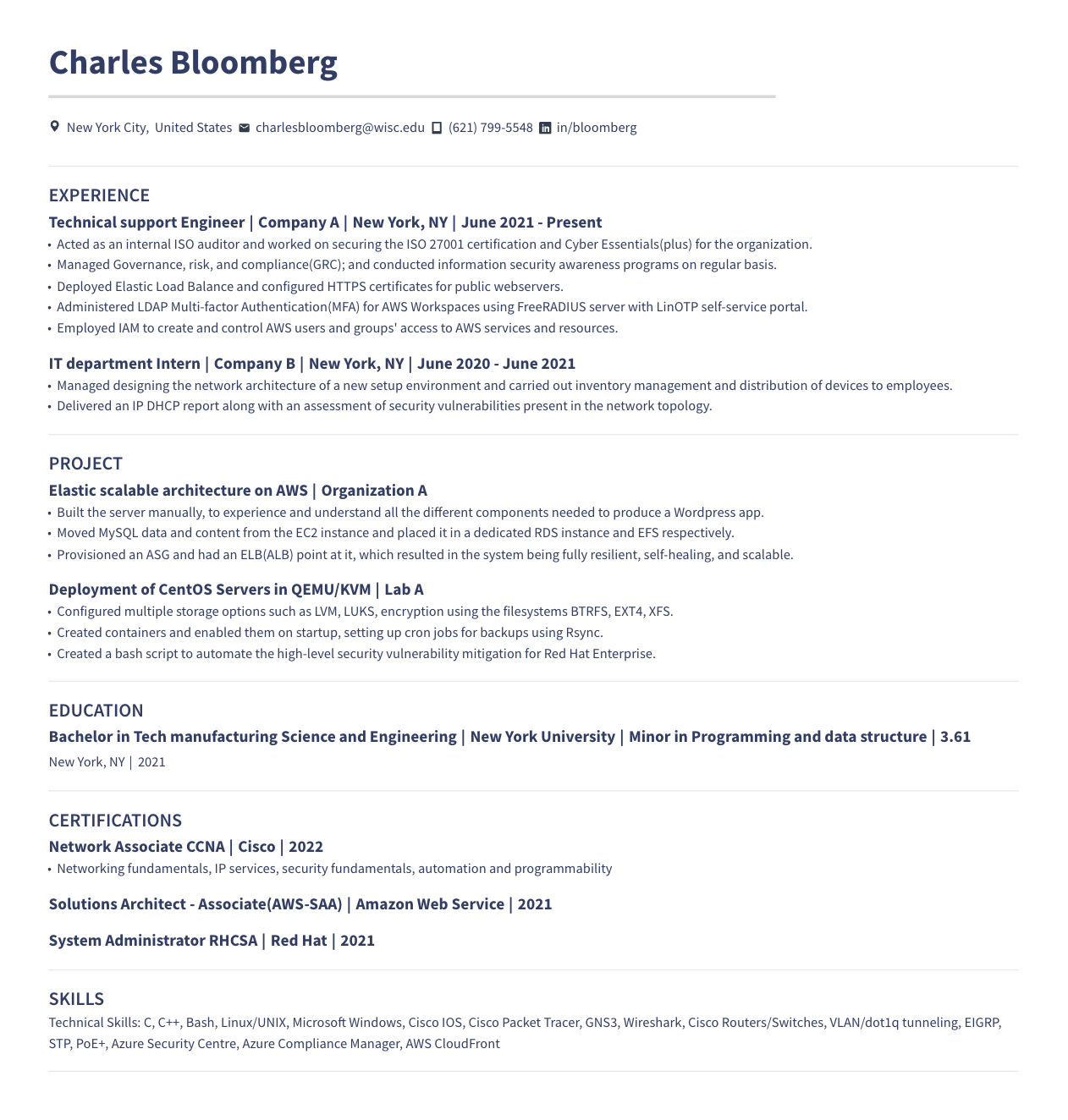
Yes, it’s tempting to load your technical resume with acronyms and jargon, but ATS systems don’t always recognize them. This job seeker does a great job of ensuring both human and ATS can understand, while structuring their information to highlight technical expertise.
- Writing “Multi-factor Authentication (MFA)” instead of just “MFA” ensures the ATS recognizes the keyword, regardless of how the system is programmed.
- The candidate includes ‘Projects’ and ‘Certifications’ sections to fit in more keywords. Just avoid adding projects for the sake of filling space; irrelevant information can do more harm than good.
- Since technical roles often require knowledge of specific tools and software, this job seeker includes relevant industry terms throughout their resume, making it more likely to pass ATS scans.
US Resume Template
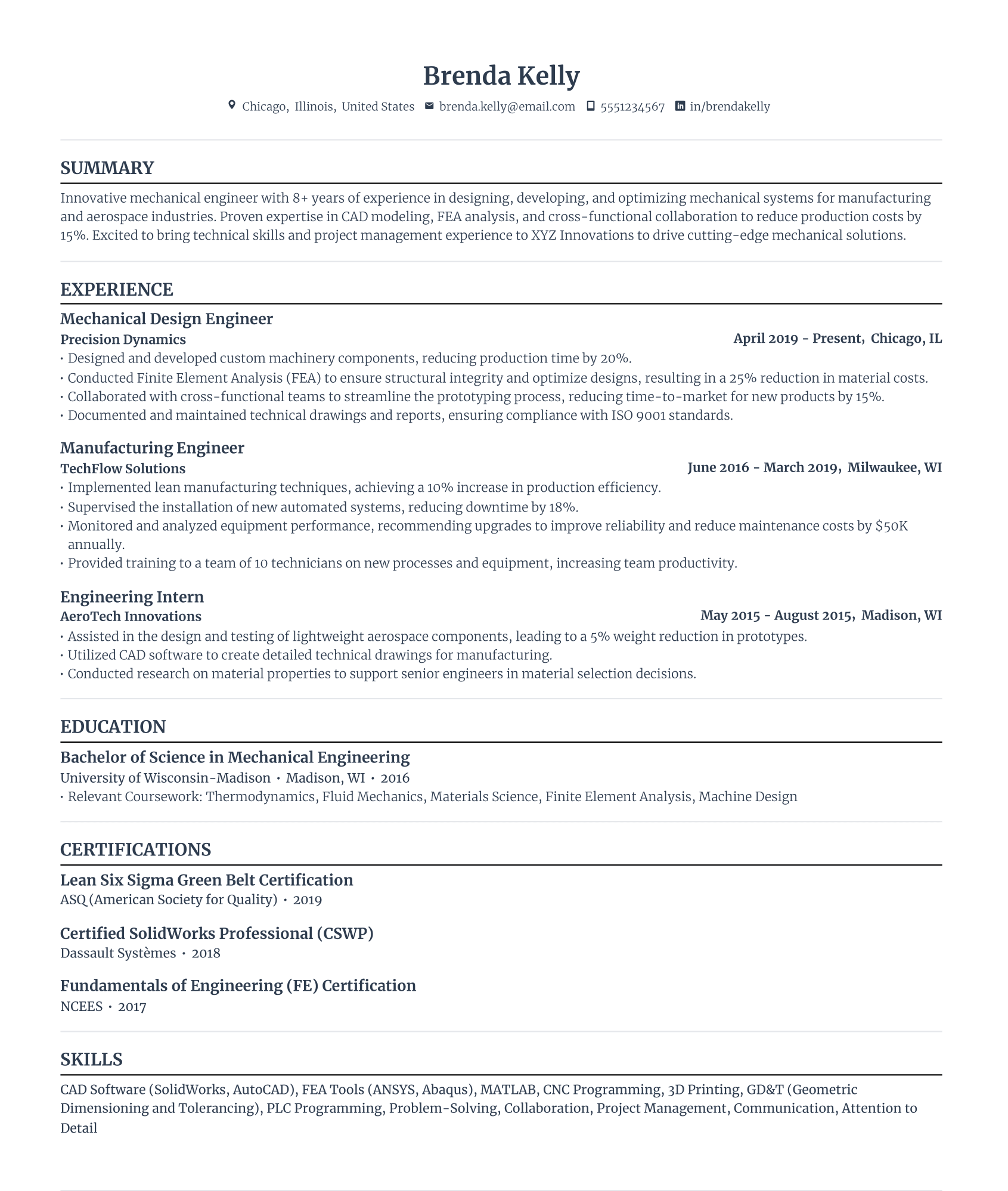
This candidate follows the standard US format — reverse chronological order, clearly labeled sections, and no oversharing of personal details. It sticks to best practices that help both ATS systems and recruiters quickly scan and understand the candidate’s qualifications.
- In the US, ATS doesn’t need overly-personal details like a headshot and your full address. This isn’t a dating profile — including them can actually work against you in some hiring processes.
- This candidate includes a professional summary with keywords to help ATS and recruiters understand the candidate’s career focus at a glance.
- While a one-page resume is the standard for ATS, this one extends to two pages. That’s fine if every piece of information is relevant and optimized with keywords — just be mindful that unnecessary content can dilute your impact.
Microsoft Word Resume Template
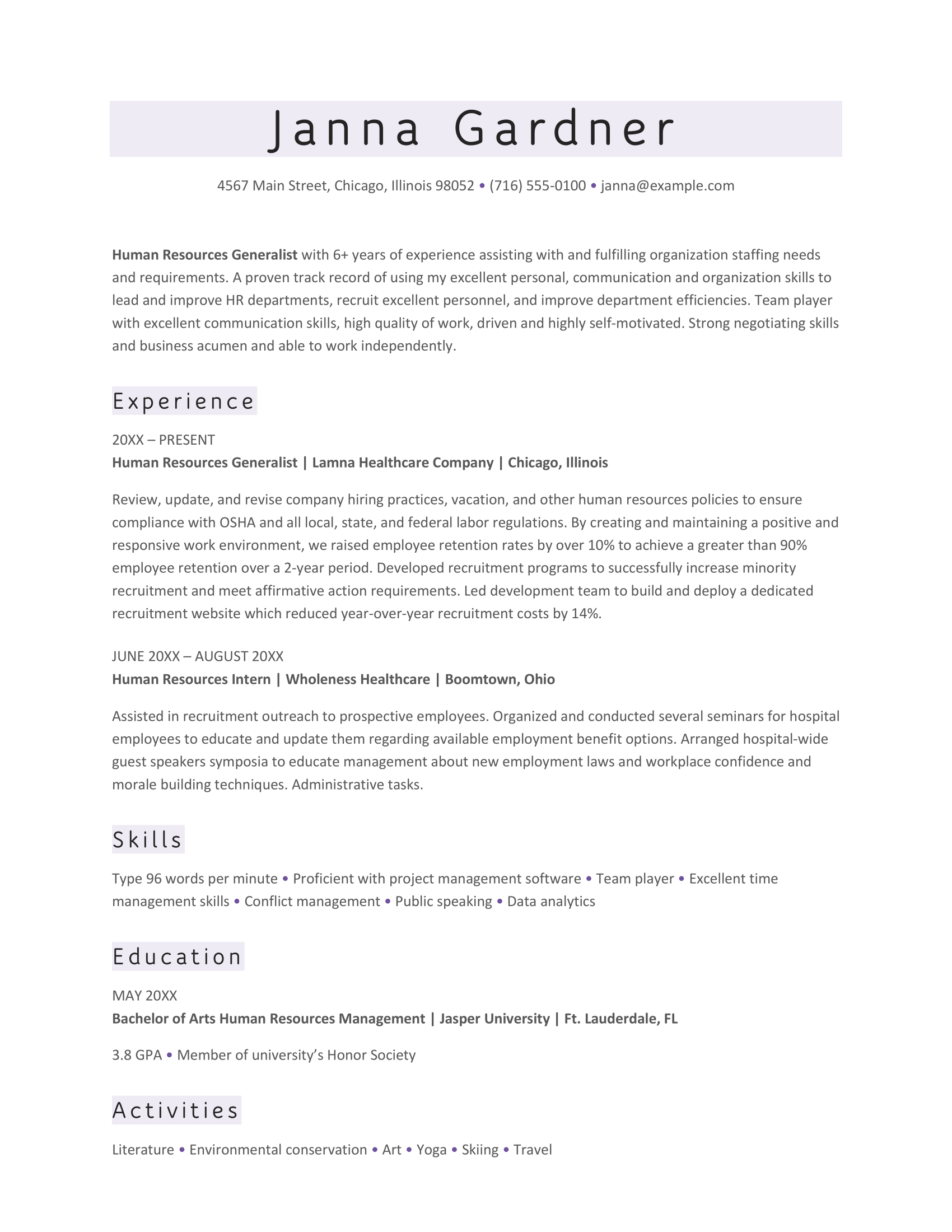
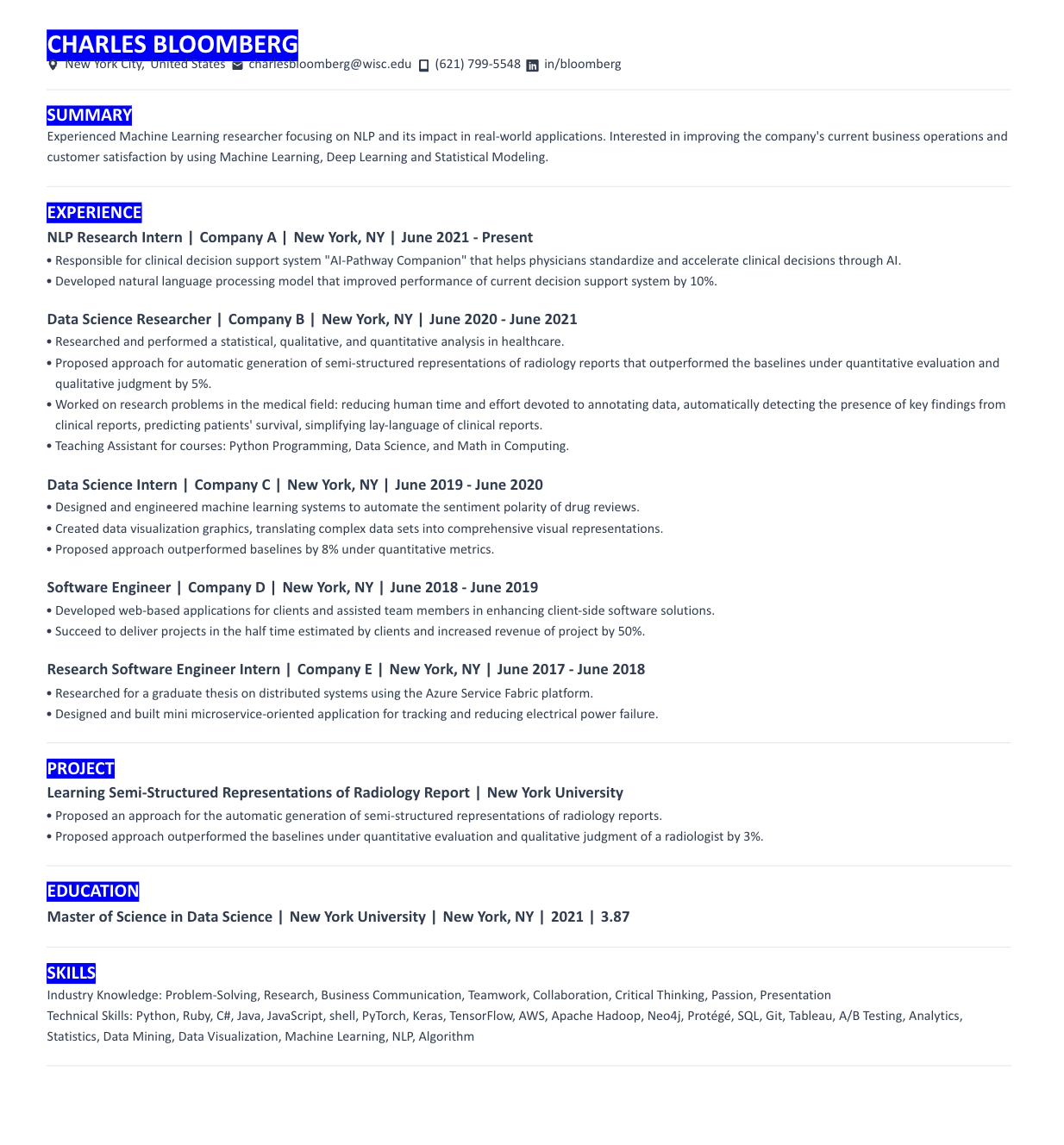
Microsoft Word is a solid choice for creating an ATS-friendly resume, especially when saved as a PDF. This resume keeps things simple and structured while adding subtle design elements to make it easy on the eyes.
- This candidate uses color blocks for section headings to draw attention without interfering with ATS. However, they don’t take it overboard with complex tables, images, or text boxes.
- Be cautious when adding an ‘Activities’ section. This can add value if used wisely, especially if hobbies align with the job role. But usually, it only takes up space for more relevant skills and experiences.
- My advice for this candidate? Add resume bullet points to break up chunky paragraphs and improve readability for both ATS and recruiters.
Check out more Microsoft Word templates: 50 MS Word Resume Templates
Google Docs Resume Template
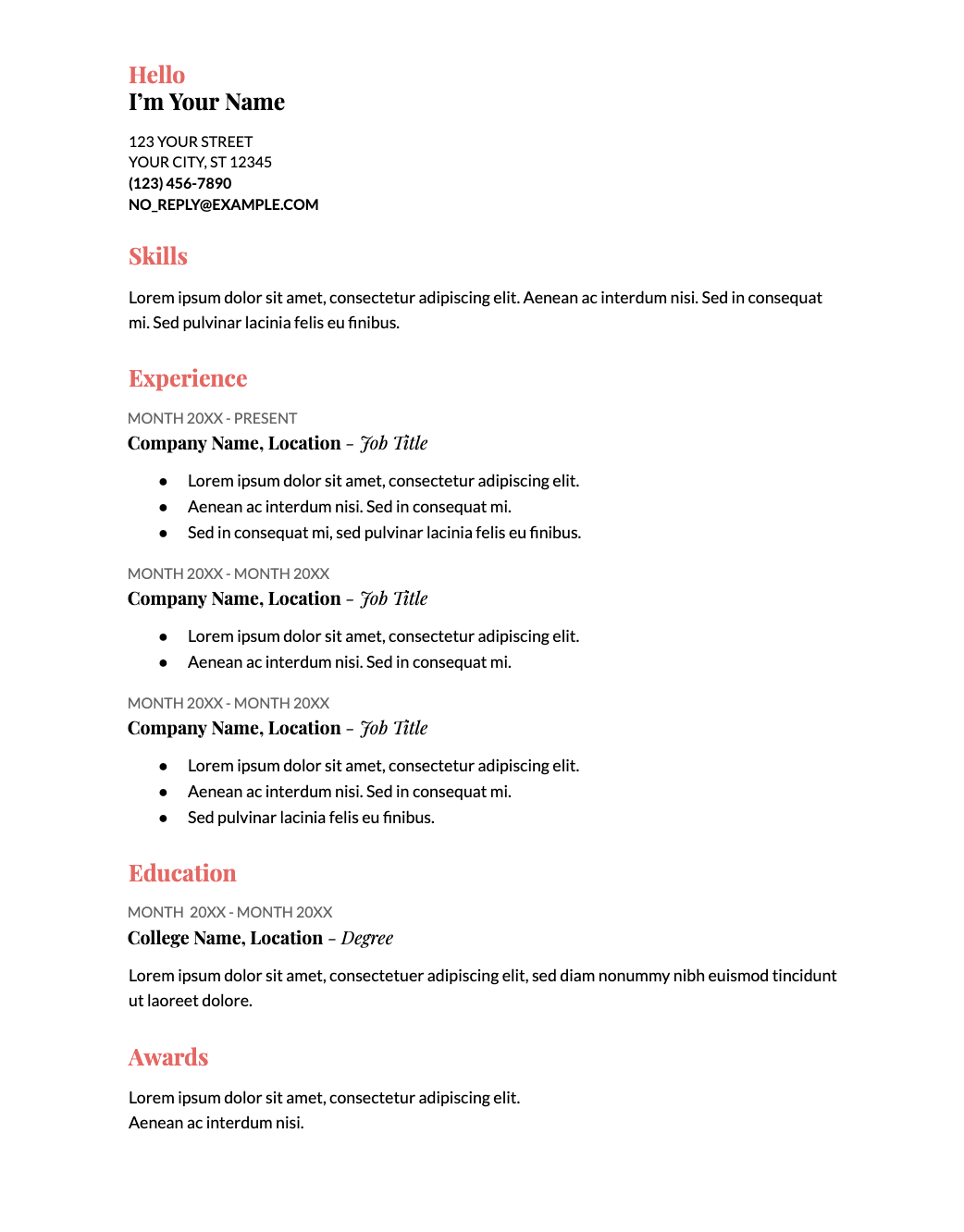
The Google Docs template is a simple resume that works well for those with less work experience. Because it doesn’t leave much room for detailed job descriptions, it’s a better choice if you want to emphasize skills over experience.
- Touches of color and font variation add a dynamic look without making it difficult for ATS to scan.
- Just be careful with decorative fonts — some ATS systems struggle to recognize them, especially in job titles. If ATS can’t read your job title, it might not correctly match the job description.
- Since this template limits space for outlining duties and accomplishments, make every word count. Focus on impact and achievements rather than just listing responsibilities.
Take a look at our top Google Docs templates: 40 Free Google Docs Resume Templates
ATS Resume Examples: Job Types
You wouldn’t list every detail of your college bartending days when applying for a managerial role, right? Tailoring your resume is about showing the skills and experiences that prove you’re the right fit for the job. But it’s not just what you include — it’s how you present it.
Check out these ATS-friendly resume examples from different industries to see what works.
Engineering Resume Template
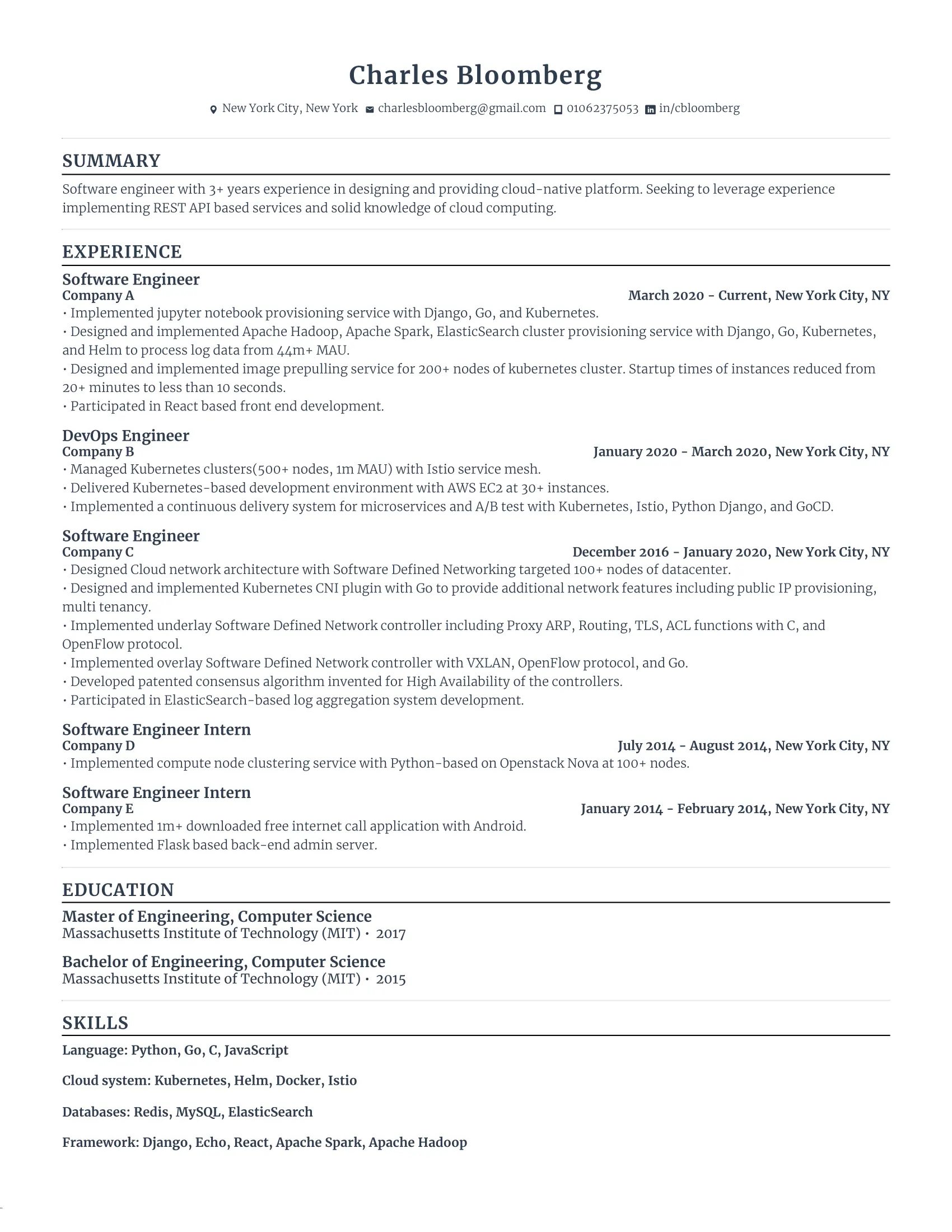
Engineering resumes need to be technically detailed and ATS-friendly. This candidate has done well by incorporating relevant keywords, job titles, and tools to ensure their resume gets picked up by ATS scanners.
- The job seeker has increased their chances of getting through by using ‘Engineer’ in the job titles to match the role in the job description.
- Many ATS systems filter candidates based on specific tools mentioned in the job ad, so it’s smart to include these technologies in both the experience and skills sections.
- While spelling out acronyms is usually best, this candidate has kept them when they match the exact wording in the job description, which can help with keyword optimization.
FAANG Resume Template
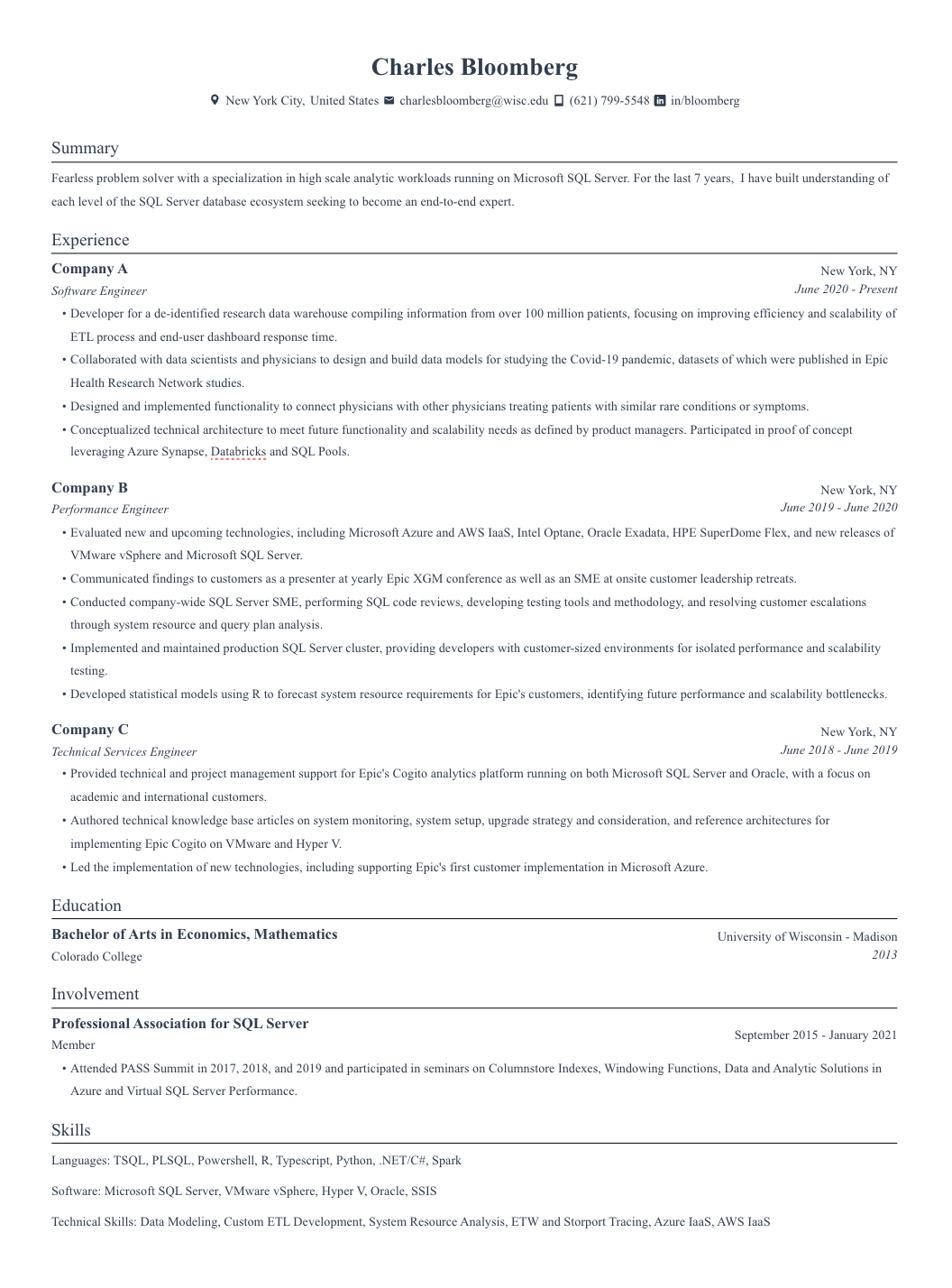
FAANG companies are highly competitive, and their ATS systems are designed to filter candidates based on specific qualifications. This resume emphasizes technical expertise, impact, and scalability — key factors for landing a role at top tech companies.
- FAANG recruiters look for candidates who can handle large-scale projects and optimize performance. This candidate weaves in words like “scalability” and highlights their impact with customers, which is a major plus in this industry.
- Instead of just listing tools in a skills section, this job seeker incorporates them into their work experience bullet points, making their resume more keyword-focused.
- For FAANG resumes, measurable results (percentages, dollar amounts, or efficiency improvements) can make an even stronger impact. Adding more data-driven metrics could elevate this resume further.
Teacher Resume Template

While teaching requires plenty of creativity, you should keep most of it in the classroom. Remember, your resume is a professional document. This candidate has found a solid balance between adding personality and maintaining an ATS format.
- Subtle design elements add personality without interfering with ATS. A small strip of color and a modern font make the resume visually appealing while keeping it scannable.
- Instead of just saying “online learning platforms,” the candidate lists specific tools (e.g., Google Classroom, Zoom, etc.), which helps with keyword matching.
- This candidate has listed some soft skills (e.g., collaboration) in the skills section. But this doesn’t tell the recruiter much about what they can do. I’d recommend replacing these with technical abilities for keyword optimization and giving concrete examples of soft skills in the work experience section.
Marketing Resume Template
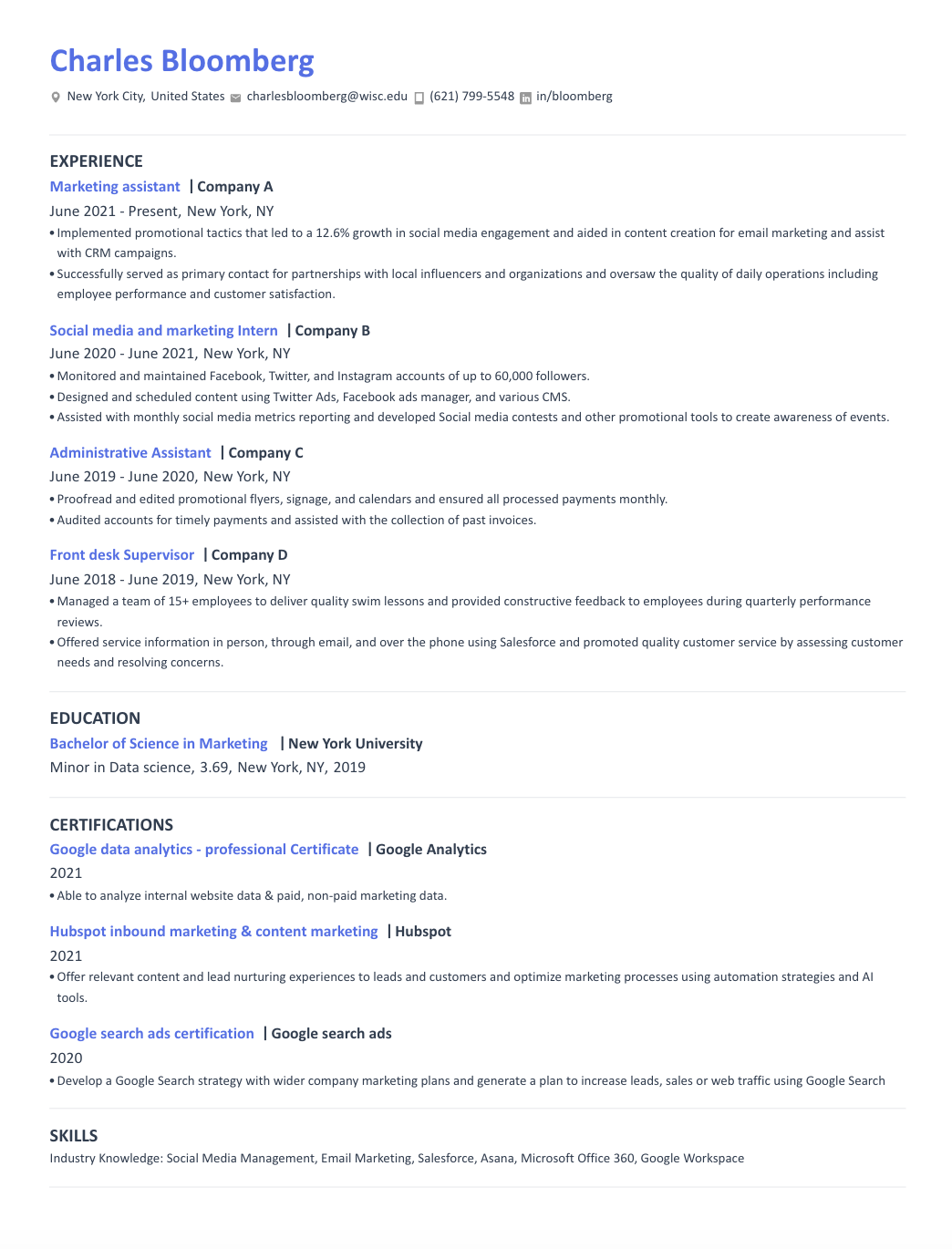
Marketing resumes can dabble with creativity while keeping an ATS-friendly format. This candidate has included subtle design elements while maintaining ATS standards (though there are areas for improvement).
- Even though not all previous jobs were marketing-related, the candidate highlights relevant skills and accomplishments (e.g., proofreading promotional materials, managing a team) to show ATS they have a relevant background.
- The candidate’s most recent job only has two bullet points. I suggest expanding this to at least four to show more depth and ensure the ATS recognizes the role as substantial.
- Listing specific marketing tools (e.g., SEO software, social media platforms, email marketing tools) in the skills section could also strengthen keyword optimization.
Nursing Resume Template
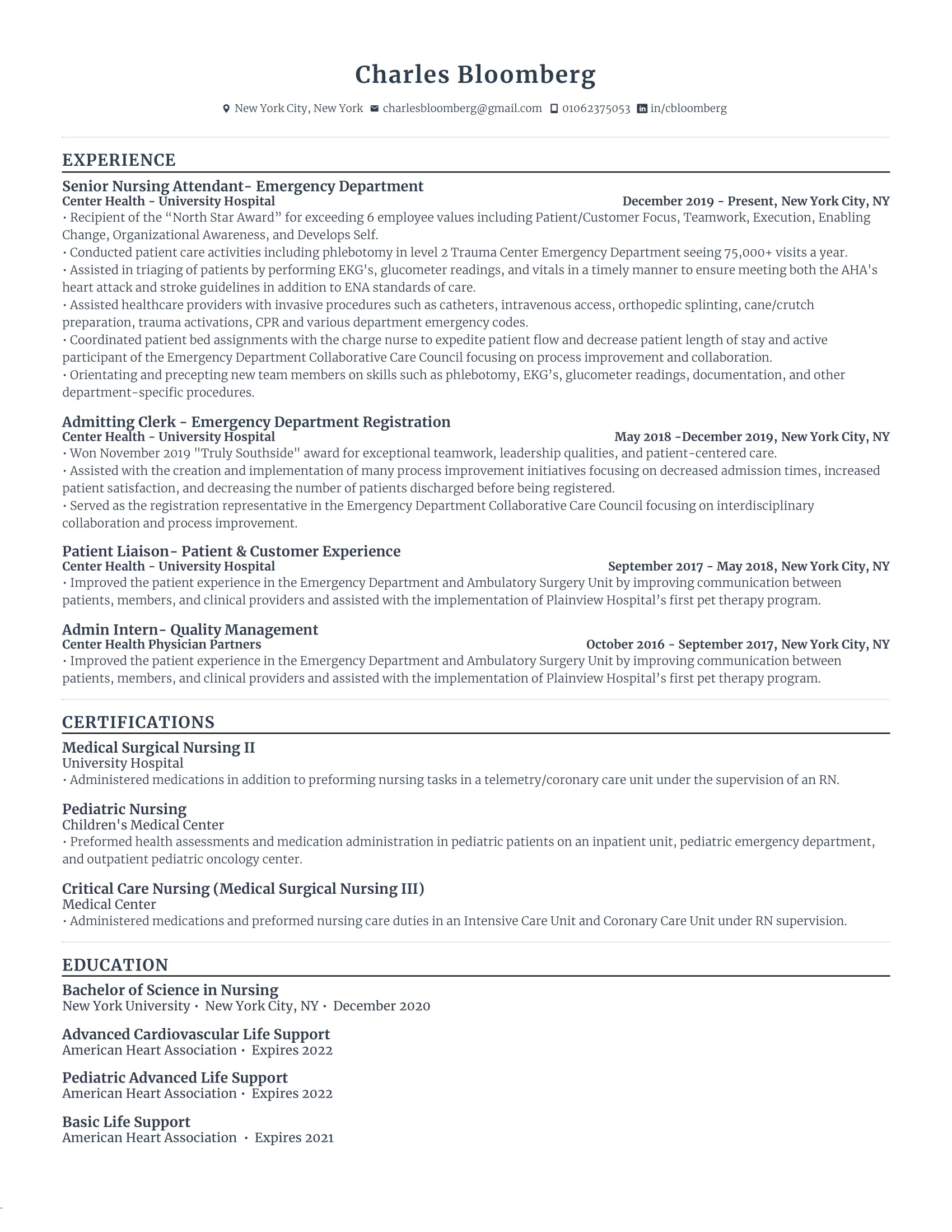
Healthcare resumes differ from traditional ones because education, certifications, and training can hold more weight than in other industries. This candidate emphasizes both credentials and accomplishments, making it ATS-friendly and compelling to recruiters.
- ATS systems are often programmed to scan for specific nursing credentials. This job seeker lists them clearly to make sure they’re recognized.
- Soft skills are naturally incorporated: Instead of listing vague abilities like “compassion” or “teamwork” in a skills section, the candidate shows their skills through their work experience (e.g., patient care, leadership in high-pressure situations).
- While this candidate has woven skills into their experience, adding a dedicated skills section could make it easier for the ATS to pick up key medical keywords.
Sales Resume Template
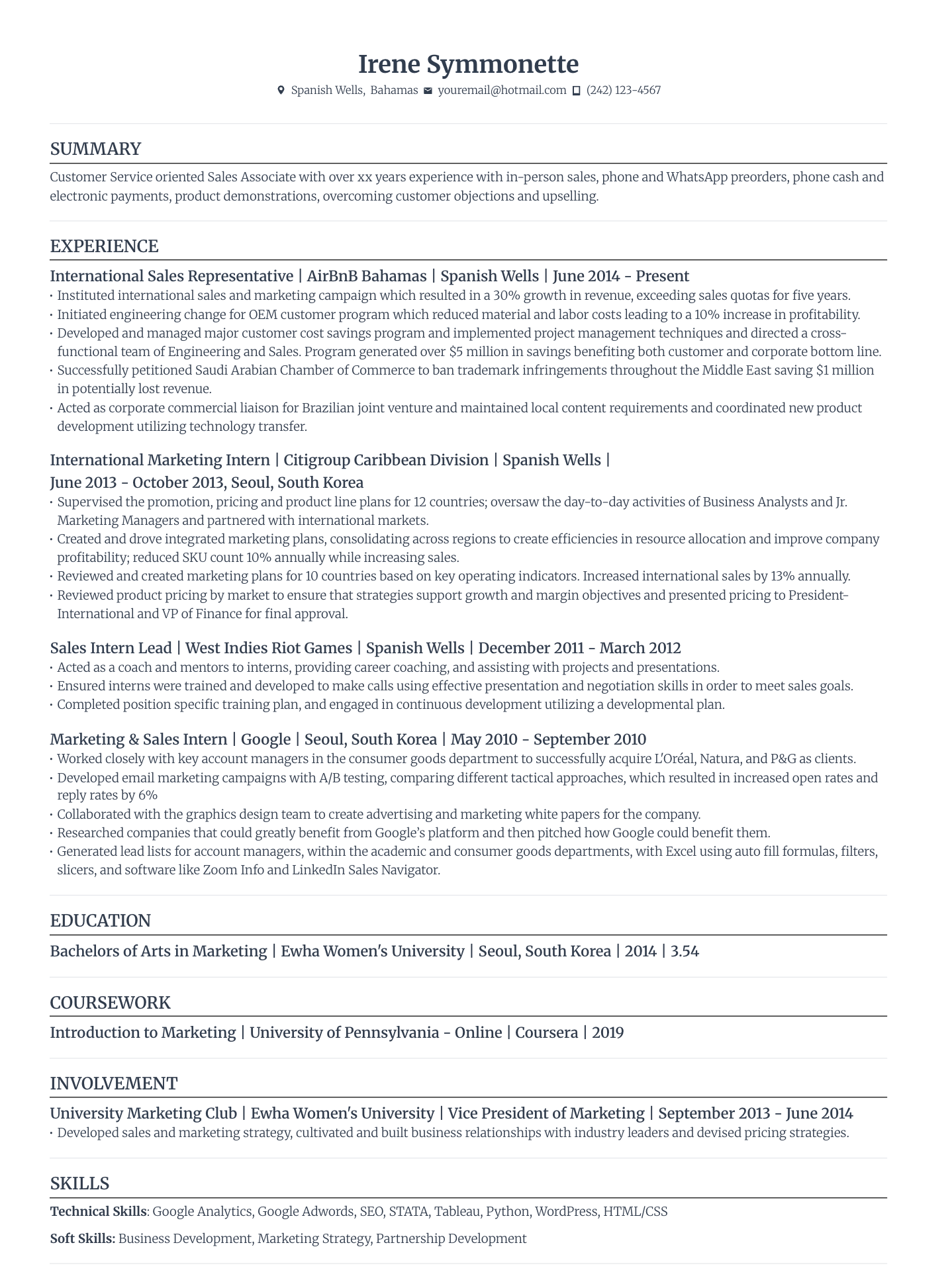
A sales resume should highlight the skills and experience that prove you can drive revenue. This candidate has also made the resume scannable while balancing subtle design elements. That said, they could work on some sections to make the content stronger.
- Education details (like coursework) may no longer be necessary if this candidate has been in the workforce for a while. Removing them would make room for more detailed work experience.
- Keeping it to one page is ideal — while ATS can scan two pages, recruiters are often in skim mode. Trimming unnecessary sections and resume buzzwords can help keep attention on what matters most.
- Ensure every detail adds value. If something doesn’t align with the job description or shows how you can contribute to the company’s success, consider cutting it.
Customer Service Resume Template
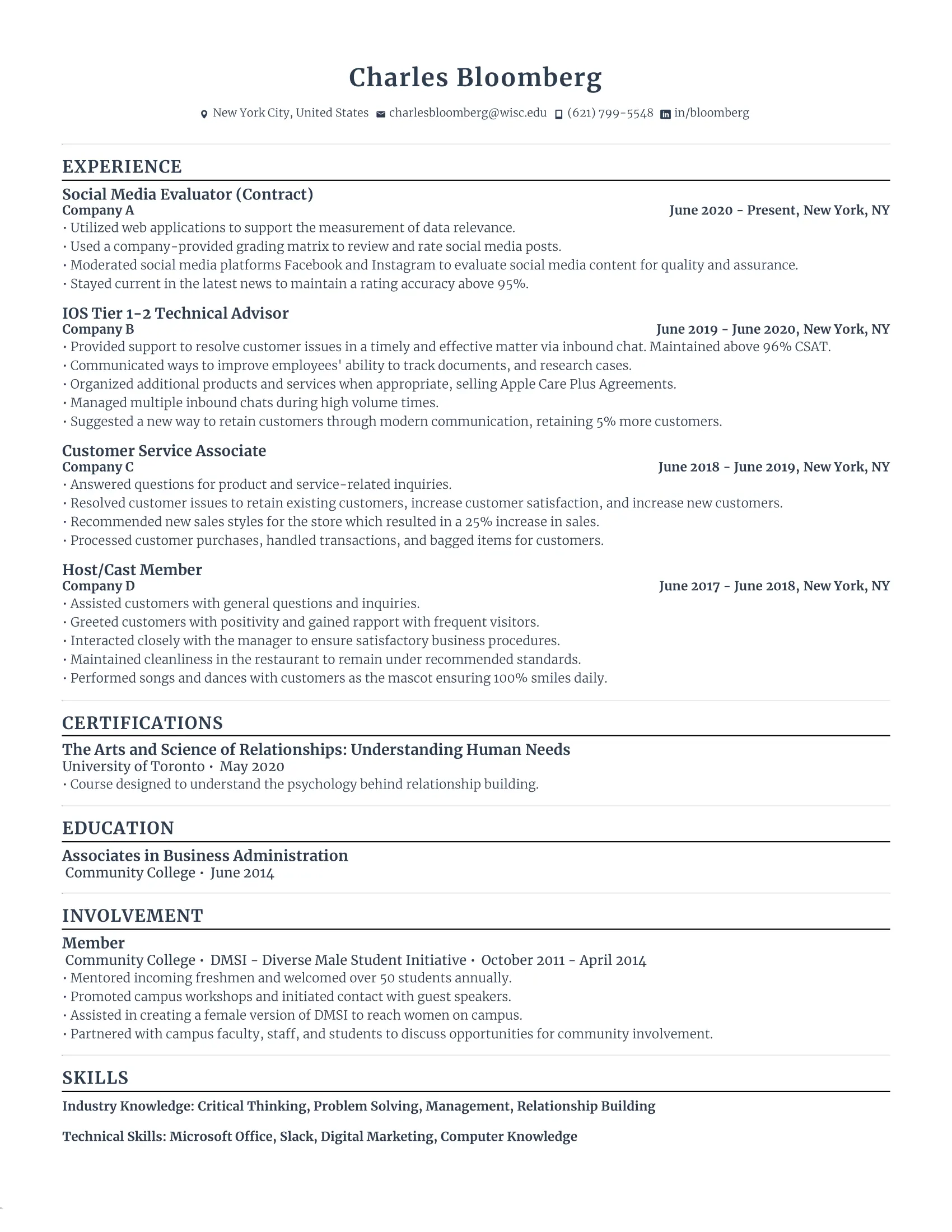
Customer service requires strong interpersonal skills and adaptability, and this candidate proves that by tailoring different job experiences to highlight these qualifications. Even with varied roles, this job seeker has successfully connected their experiences to customer service.
- The candidate tailors unrelated jobs to highlight customer service skills, making it clear to ATS and recruiters that they’re a strong fit for the role.
- They also mention “customer service” in 3 out of 4 jobs, increasing keyword matches in ATS scans when applying for jobs in this industry.
- Don’t have much work experience? You can add extra sections like ‘Involvement’ and ‘Certifications’ to reinforce your experiences with people-oriented roles and professional development.
Business Resume Template
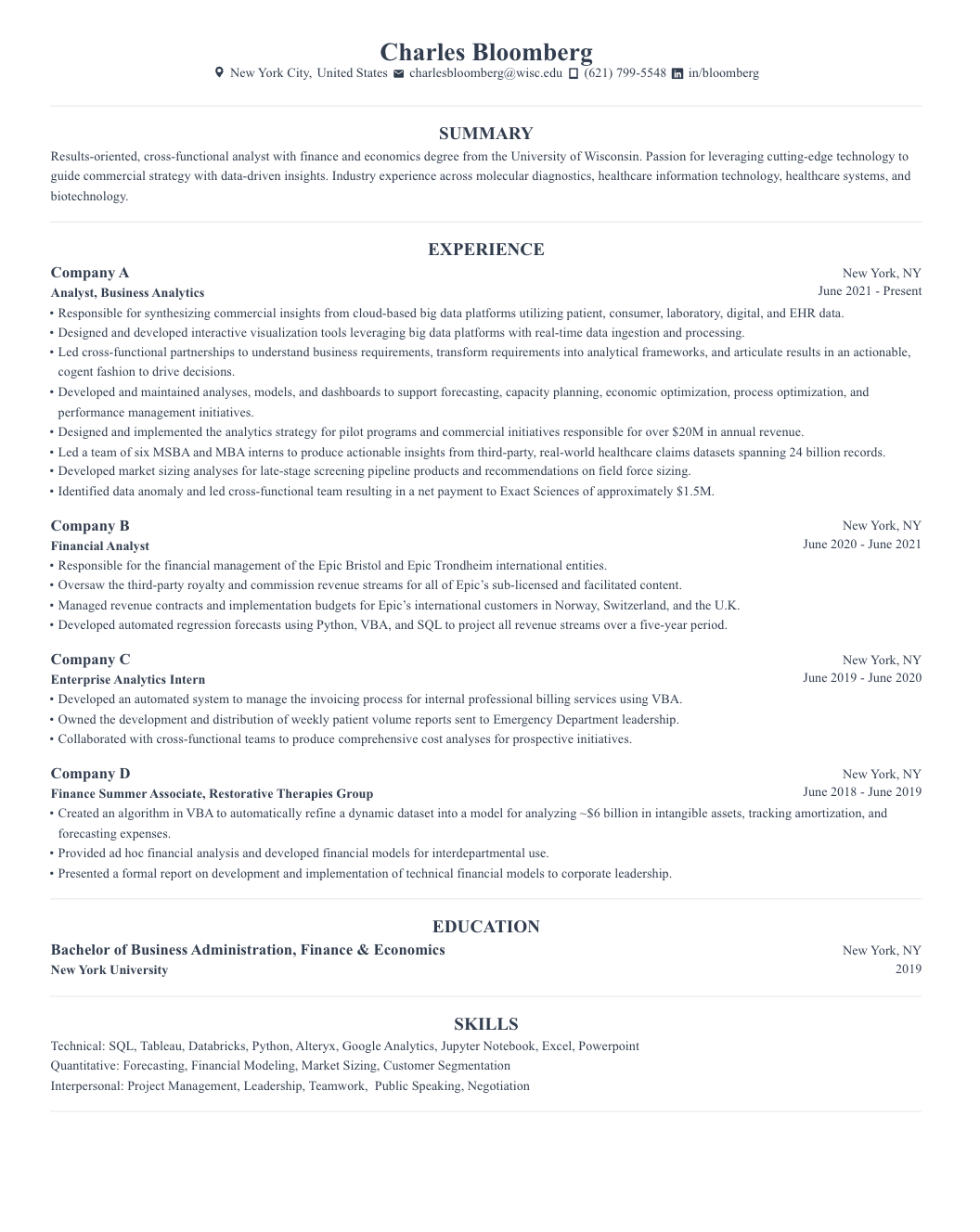
When you have lots of experience, the challenge isn’t just listing it all — it’s presenting it in a way that’s optimized for ATS. This candidate structures their resume with all the job-worthy details while ensuring it remains readable for ATS and recruiters.
- This job seeker’s resume includes line dividers to clearly separate sections, preventing the resume from looking like an overwhelming wall of text.
- Maximize space by placing dates to the far right instead of under job titles, keeping the focus on your experience and accomplishments.
- The candidate chooses an ATS-friendly file format (PDF) to maintain formatting consistency. DOCX is also a strong alternative, but always check the job application instructions — some ATS systems may prefer one over the other.
IT Resume Template

IT resumes should show your technical expertise without making it too complicated. Find ways to integrate relevant software and technologies, but don’t just list them. Show how you used these tools to deliver results.
- This resume clearly states company names under job titles, helping recruiters quickly identify notable employers.
- Include quantifiable results, like “resulted in 45% lower billing.” ATS and recruiters love to see numbers because they provide clear evidence of impact.
- This job seeker has added resume language skills. This can be a bonus if the job description says it’s an international or multilingual role. Just be honest — if the job requires fluency and you’re only at a basic level, it could backfire down the line.
Executive Resume Template
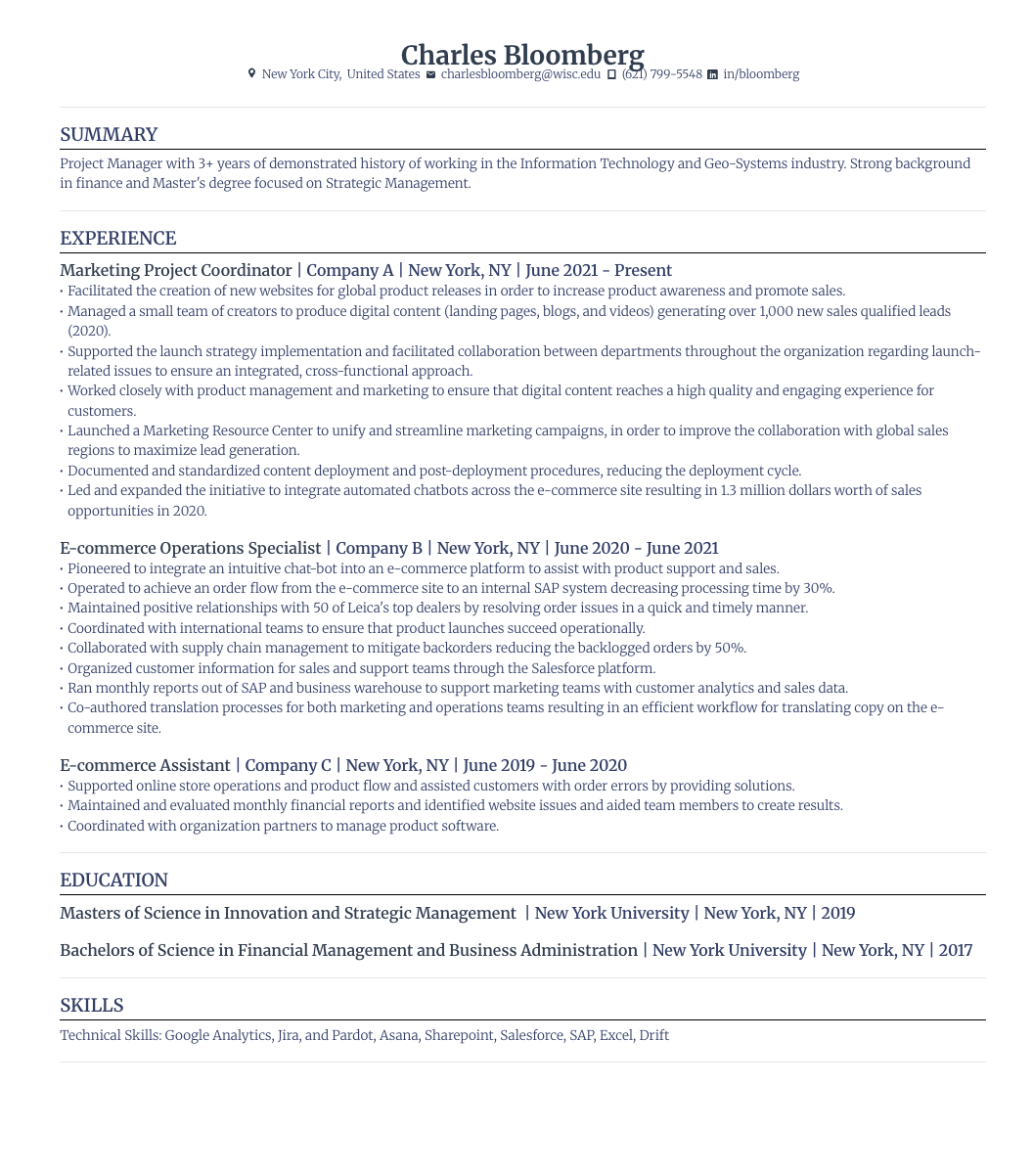
Executive resumes should show leadership, strategy, and impact. By maximizing space with the job details on one line, this candidate has more room to impress with their skills and experiences.
- The job seeker includes leadership-related keywords like “project manager” in the summary to ensure the ATS recognizes the candidate’s seniority level.
- Use strong action verbs such as “launched,” “led,” and “organized” to demonstrate leadership skills and deliver a strong impression.
- We usually recommend 3 to 5 bullet points per job. However, this job seeker expands on job experience with more points than usual, which is appropriate for executive roles where you need to show more expertise.
HR Resume Template
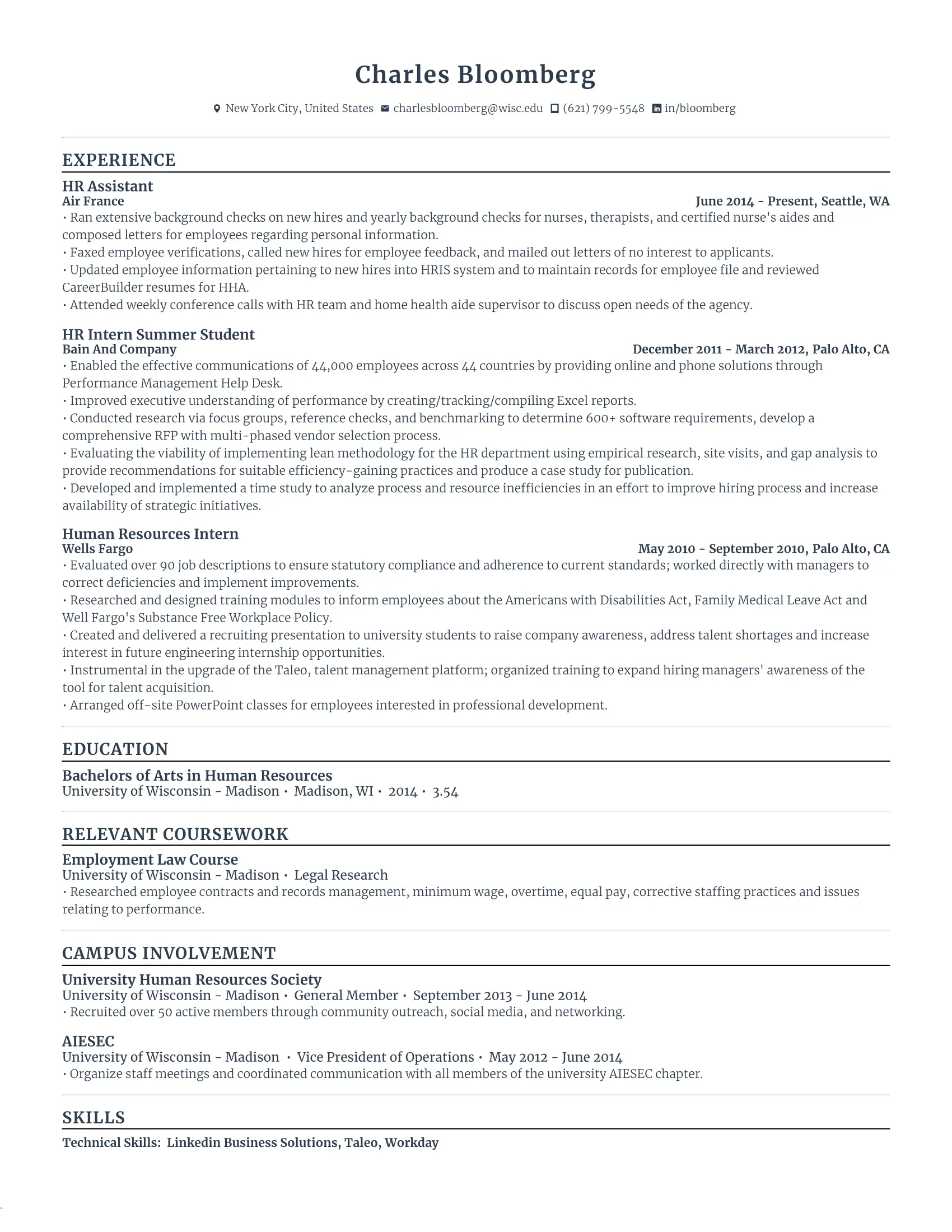
HR professionals are often the ones screening resumes, so if you’re going for this role, the pressure is on to make your resume ATS and human-friendly. Fortunately, this candidate has made smart keyword choices and followed a tried-and-tested format.
- Employers might enter different variations of keywords into ATS, so be sure to cover both bases. This candidate includes ‘HR’ and ‘Human Resources’ in job titles to boost keyword matches.
- Despite not having a ton of experience, they expand on their educational background with a ‘Relevant Coursework’ and ‘Campus Involvement’ section to show how their background supports their qualifications.
- Be selective with coursework — if the law course doesn’t add direct value to HR, it might not be necessary. Focus on coursework that strengthens the resume’s alignment with the job description.
Finance Resume Template
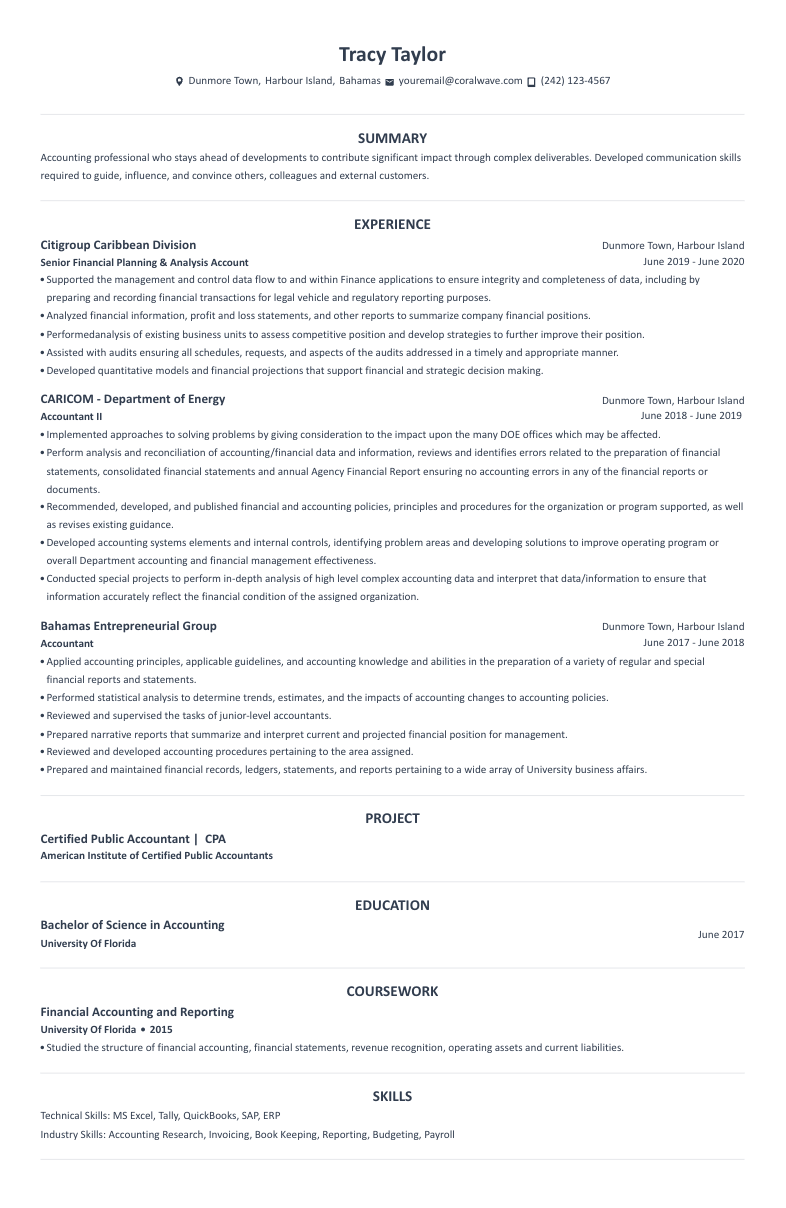
For finance roles, ATS is often programmed to scan for industry-specific keywords, certifications, and technical skills. While the candidate nails this aspect, they could do some refining to make their resume more concise and direct.
- This job seeker has strategically included ‘accountant’ multiple times to boost ATS keyword recognition. We see it woven naturally into the summary, work experience, education, coursework, training, and skills sections.
- The candidate has chosen an ATS-friendly font (Calibri, size 10), staying within the ATS ideal 10-12 size range for body text and 12-14 for headings.
- This resume spills onto two pages, which isn’t great for fast scanning. Since the candidate has some work experience, the coursework section could be removed to fit everything onto one page.
ATS Resume Examples: Educational Level
Job hunting with little to no experience? It can feel overwhelming, but remember — you control the narrative. Whether in high school or fresh out of college, you’ve probably built up more valuable skills than you think. The trick is how you present them.
Here’s how to frame your experience to get past ATS.
Resume Template for High School Students
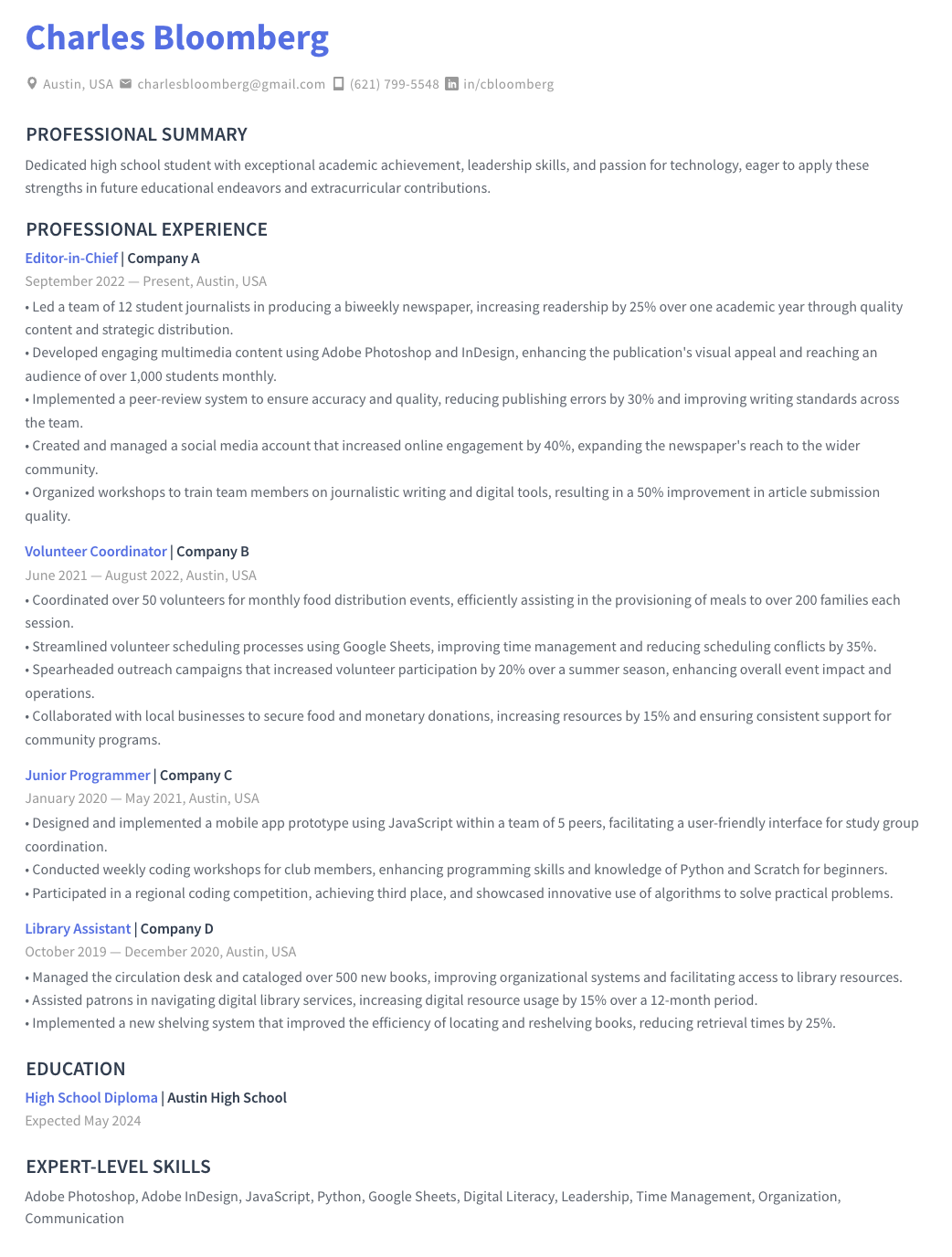
When you’re in high school, your resume isn’t about years of experience — it’s about showing your potential. Whether through part-time jobs, volunteer work, or personal projects, the goal is to highlight skills that prove you can adapt and grow in the professional world.
- This high-schooler focuses on skills gained through school, clubs, and work, ensuring their resume stays relevant even with limited experience.
- Even if you don’t have paid experience, think about projects, volunteer work, or leadership roles that show off your skills.
- Since this job seeker has work experience, education is placed below job history. However, you can list education first if you don’t have much experience.
Resume Template for College Students
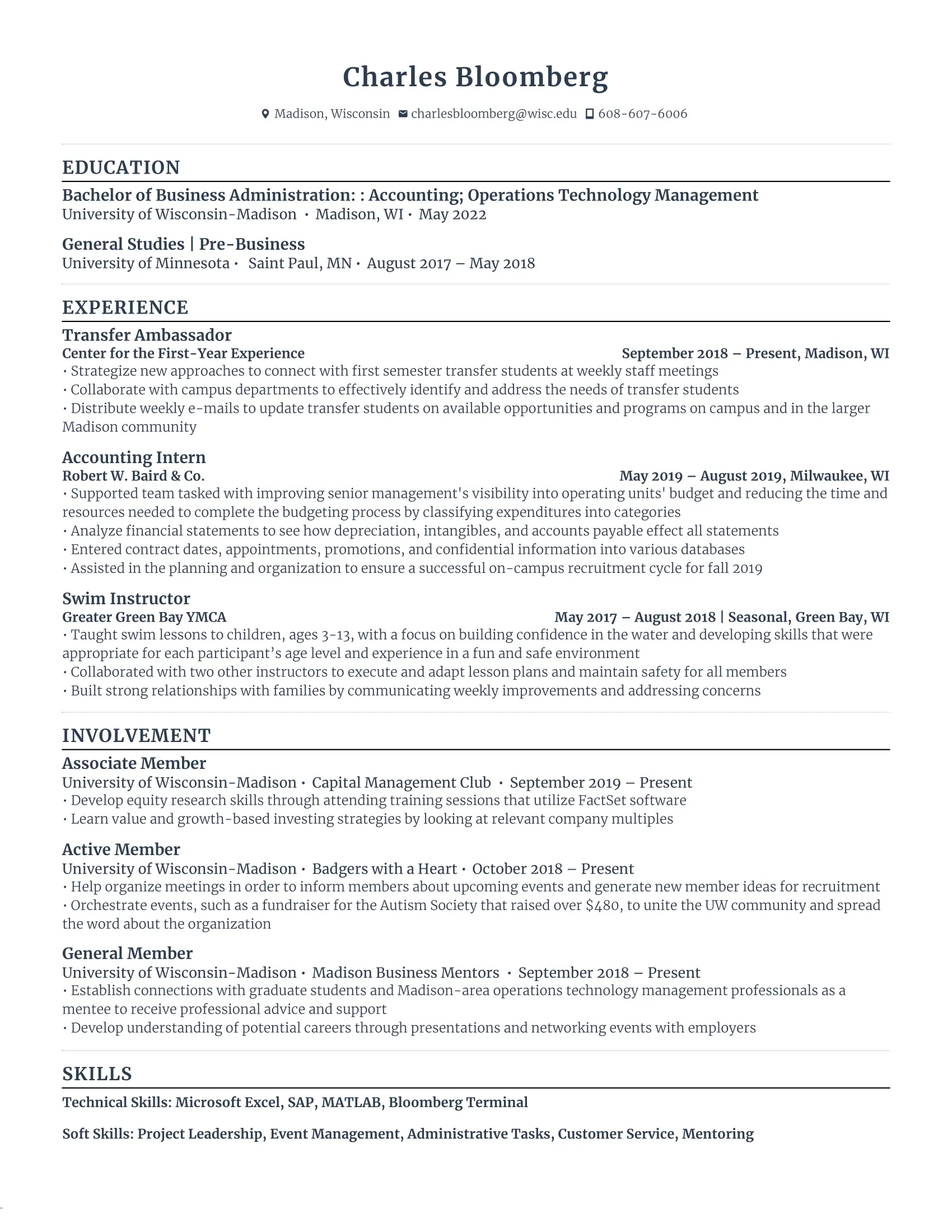
As a college student, your resume should highlight education, transferable skills, and relevant experiences — especially if your work history isn’t directly related to your target industry. Just be mindful of the bigger picture. Eventually, education should take a backseat to work experience.
- While work experience is usually front and center, you can place education at the top if you’re a student or recent graduate with no work experience. After about five years post-graduation, it’s best to shift education below work experience.
- This student uses strong action words like ‘collaborate,’ ‘supported team,’ and ‘built strong relationships,’ to emphasize communication and teamwork — essential skills for almost any job.
- They effectively show off transferable skills by tying experiences from unrelated jobs to valuable workplace abilities, making it easier for ATS to match qualifications.
Resume Template for No Experience
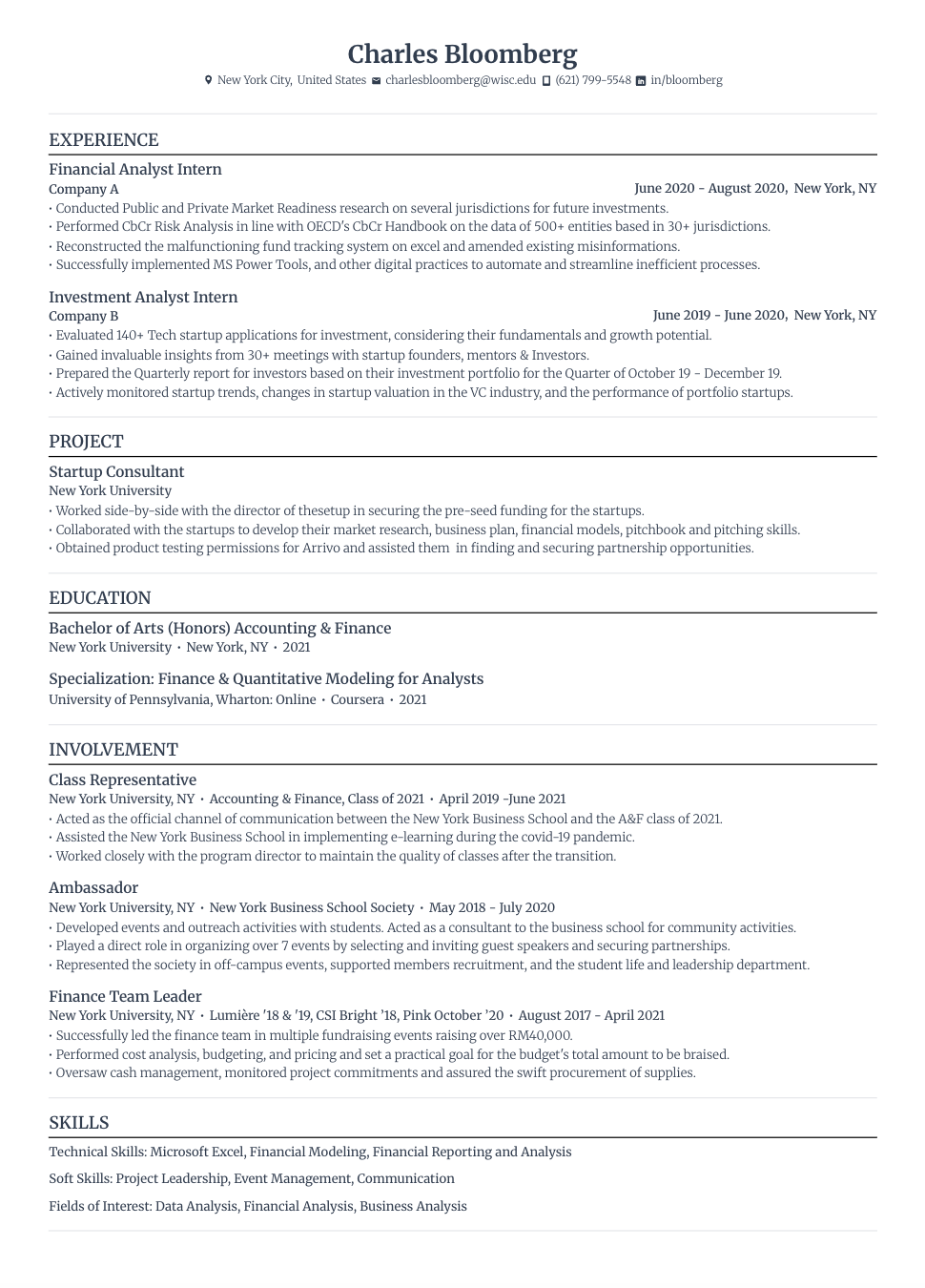
Not having paid work experience doesn’t mean you can’t create a strong resume. This candidate has done a great job of highlighting internships, projects, and academic achievements to align with their target role.
- The job seeker includes measurable achievements, like concrete examples of results from internships or academic projects, to show companies their skills and potential.
- You can also demonstrate proactive learning by emphasizing education, internships, and extracurricular activities — all of which help ATS recognize the candidate as a strong match for an entry-level position.
- ATS doesn’t differentiate between paid and unpaid experience, so relevant projects, internships, and volunteer work still count. Just make sure every section adds value — while involvement and projects are great, ensure they’re truly relevant to the job rather than just filling white space.
How to Make a Resume ATS-Friendly?
Not worried about ATS? What if I told you that around 98.4 percent of Fortune 500 companies used ATS scanners in 2024? That means if your resume isn’t formatted correctly, it could get rejected before it has a chance. The good news? Making your resume ATS-friendly isn’t rocket science.
Here’s how you can optimize yours to ensure it gets seen by the right people.
1. Stick with an ATS-friendly format
A well-structured resume makes life easier for ATS and recruiters who skim through endless applications. The best approach? Reverse chronological order. This means listing your most recent jobs first, letting ATS and hiring managers easily see your career progression.
But the devil is in the details if you want to get past the system. Stick with professional resume fonts like Arial, Calibri, or Helvetica in a 10–12 point size. Decorative fonts won’t impress anyone; they’ll just make your resume harder to read (or worse, unreadable to the ATS).
Bullet points are also a great way to highlight your duties and accomplishments — just keep them simple. Circles or squares work best. Unique bullet styles like stars or swirls might look fun in your planner, but when scanned by an ATS? They can turn into unreadable symbols, making your resume look messy or incomplete.
Find out more about structuring your ATS resume: The Best Resume Format
2. Add clear section headings
ATS software categorizes your resume based on specific section headings, so using standard labels helps to keep things clear and organized. Stick to universally recognized headings like:
- Professional Summary/Profile/Objective
- Work Experience/Professional Experience
- Education
- Skills/ Expert-Level Skills
- Projects
- Certifications
You want your headings to catch the reader’s eye, but not at the expense of ATS readability. Using subtle color accents or capitalization can help them stand out, but avoid non-standard fonts. Keeping headings between 12 and 14 points also ensures they’re noticeable without throwing off the balance.
And while it might be tempting to get creative with section titles— ike “My Career Journey” or “What I Bring to the Table” — don’t do it. ATS won’t recognize these, which means your key qualifications could end up in the wrong category or completely overlooked.
3. Include the job title and keywords
One of the biggest mistakes job seekers make? Submitting the same generic resume for every job. ATS software is designed to scan for specific keywords that match the job posting, so if your resume isn’t customized, good luck reaching a recruiter.
Start by aligning your job title with the role. If the posting is for a Marketing Director, that exact phrase (or something very close) should appear in your resume.
But keywords go beyond job titles — they also cover skills, certifications, and industry-specific terms. If the job description mentions “data analysis,” “SEO optimization,” or “customer service,” and you have experience in those areas, weave those terms naturally into your resume.
Another trick is using both the full term and the abbreviation. For example, writing “CRM (Customer Relationship Management)” ensures the ATS picks up on both variations. Just don’t overdo it — keyword stuffing is obvious and can make your resume read awkwardly.
Learn more about customizing your resume: Tailor Your Resume to a Job to Any Job Description
4. Choose the right file type
Most modern ATS systems can process PDF and .docx files without issue, but it’s always best to check the job posting for specific instructions. Some companies still use older ATS software that may struggle with certain file types, so it’s better to be safe than sorry.
That said, PDFs are generally the best choice because they lock in your formatting, so your resume looks exactly how you intended (no weird spacing issues or scrambled text). But if there’s any doubt, a .docx file is your next best option.
5. Avoid images, tables, and headers
Visually appealing resumes certainly add some much-needed fun to the job-hunting abyss. But fancy designs can hurt your ATS chances. Many systems struggle to read information stored in images, tables, or headers, meaning critical details could be ignored.
To make sure your resume is fully scannable:
- Avoid headers or footers. ATS might not recognize text in these areas, so keep your name, contact details, and job title in the main body of the document.
- Skip images, logos, or icons. These may not be read by ATS and take up valuable space for your skills and experiences.
- Don’t use tables or columns. While they might help with layout, ATS software can misread them, leading to scrambled information.
Summary
Here’s an overview of everything to keep in mind when writing an ATS resume:
- Use a reverse-chronological format. List your most recent job first to highlight career growth and make it easy for ATS to scan.
- Stick to ATS fonts like Arial, Calibri, Verdana, and Helvetica, in a 10–12 point size. You can go up to size 12–14 for headings to help them stand out.
- Keep section headings simple and recognizable with common titles like “Work Experience” and “Skills” instead of creative names like “My Career Journey.”
- Optimize for keywords by matching the job description and naturally including relevant skills, certifications, and job titles throughout your resume.
- Avoid images, tables, and too many design elements, as ATS struggles to read graphics, columns, and unusual bullet points. Stick to simple text formatting.
- Use full terms and their abbreviations to ensure you match the ATS search criteria. For example, “SEO (Search Engine Optimization)” to increase keyword matches.
- Save in the right file type. PDFs are generally best for maintaining formatting, but check the job posting, as some ATS systems may prefer other file types like .docx.
- Place contact details outside headers/footers. Some ATS software can’t read information in these sections, so keep them in the main body of your resume.
- Limit your resume to one page by removing irrelevant details that don’t add real value. Recruiters are often skimming, so keep it concise while ensuring you hit key requirements.
FAQ
How do I check if my CV is ATS-friendly?
A quick way to test your resume is to copy and paste it into a plain text document (like Notepad). If the formatting looks messy or sections disappear, ATS might not read it properly.
If you want a more thorough check, use our ATS Resume Checker. We’ll give you real-time feedback and a score based on key ATS factors, like keywords and formatting.
What does ATS stand for in a resume?
ATS stands for Applicant Tracking System. Companies use ATS to search for and filter qualified candidates by looking for specific criteria, such as keywords, job titles, and formatting elements.
If your resume isn’t optimized for ATS, it might not even make it to a recruiter’s desk. That’s why you should use a simple format, standard fonts, and relevant keywords to ensure your resume gets noticed.
How do I convert my resume to an ATS resume?
To make your resume ATS-friendly, start with a reverse-chronological format and use standard section headings like “Work Experience” and “Skills.” Remove images, text boxes, and fancy graphics, as ATS struggles to read them. Stick with clear, simple fonts like Calibri or Arial in 10–12 point size.
Most importantly, incorporate keywords from the job description naturally throughout your resume. ATS scans for specific terms, so if the job requires “project management” or “data analysis,” make sure those phrases are in your experience or skills sections.
What is the best ATS resume format?
The reverse-chronological format is the best choice for an ATS-friendly resume. It lists your most recent job first, making it easier for ATS and recruiters to track your career growth. Stick to a simple layout with familiar headings like “Work Experience” and “Education.”
Avoid columns, tables, and graphics, as ATS may misread or skip them. Use bullet points to highlight key achievements, and incorporate relevant keywords from the job posting naturally throughout your resume.
Do ATS read PDFs?
Most modern ATS systems can read PDFs. To be safe, check the job posting — if it specifies a preferred format, follow those instructions. If not, PDFs are generally a great choice because they preserve your formatting across different devices. If you’re unsure or applying to an older company with legacy systems, a .docx file is a solid alternative.

Upload or drop your resume to get started
Upload your resume to get started
Score my resume

Lauren Bedford is a seasoned writer with a track record of helping thousands of readers find practical solutions over the past five years. She's tackled a range of topics, always striving to simplify complex jargon. At Rezi, Lauren crafts genuine and actionable content that guides readers in creating standout resumes to land their dream jobs.