Resume
How to Increase Your ATS Score (Free Resume ATS Checker)
Learn how to increase your ATS score with practical tips and a free resume ATS checker. Optimize keywords, fix formatting issues, and improve your resume.
Published on
March 18, 2026
Updated on
March 18, 2026
An ATS score is a percentage from a resume tool that compares your resume to a job description. That said, real applicant tracking systems don’t typically “score” you. They store resumes in a searchable database and rank candidates based on keyword matches, filters, and qualifications. That means exact wording matters. If the job posting lists specific skills or requirements, and your resume doesn’t include them, you may not appear in recruiter searches. Formatting is also important; keep it simple and ATS-friendly. Focus on relevance, keyword alignment, and meeting core requirements.
ATS scores don’t work like most people think they do.
A solid ATS score from a resume checker doesn’t guarantee that you’ll get hired, but it can show you what’s missing, what’s misaligned, and what’s holding you back.
Recruiters don’t sit there reviewing percentages. ATS scores from resume checkers give you real insight into how well your resume aligns with keyword searches, formatting standards, and what hiring managers scan for.
I’ll break down what the ATS score means and how to improve yours. This guide will cover:
- The meaning of an ATS score and ATS resume.
- How to optimize your resume for ATS.
- The best ways to check if your resume is ATS-friendly.
If you want to build a resume that meets ATS standards, use our free AI Resume Builder. Just enter your details and get a professional and tailored resume in minutes.
And learn more about how ATS works:
What Is the ATS Score?
An ATS score is a percentage match that shows how closely your resume aligns with a specific job description.
But an Applicant Tracking System (ATS) doesn’t actually assign you a score.
The “score” most people refer to comes from resume-building tools that compare your resume to a job posting and calculate how well they match. The result is a percentage that reflects how closely your resume aligns with the language and requirements of a specific posting.
An ATS itself is simply software that companies use to collect and organize applications. Platforms like Workday, Greenhouse, and Lever help employers:
- Collect applications
- Extract key information (contact details, job titles, skills, dates)
- Store resumes in a searchable database
- Track candidates throughout the hiring process
It functions more like a searchable filing system than a decision-maker. Recruiters use it to filter and find relevant applicants, but it doesn’t replace human judgment.
And statistically, there’s a strong chance your resume will pass through one. Research from Jobscan found that 97.8% of Fortune 500 companies use an ATS. Even if a company doesn’t rely on one, a busy hiring manager will still skim your resume for relevant keywords and qualifications.
So, is your resume doomed if your ATS score isn’t 100%? No. There isn’t a universal scoring standard, and recruiters don’t see the same percentage you see in optimization tools. Instead, think of the ATS score as feedback and guidance to improve your job application.
How to Check the ATS Resume Score
Here’s how to check your ATS resume score:
- Upload your resume into an ATS Resume Checker to scan your resume and receive clear feedback on keyword alignment, job posting relevance, formatting, and best practices.
- Use the Rezi Score to see a real-time 1 to 100 evaluation of how well your resume performs across content, formatting, and optimization.
- Get a full analysis with an AI Resume Agent to receive tailored resume optimization by uploading your resume and job descriptions and asking specific questions.
Find out more about how these tools work and the ways they can improve your resume.
Use an ATS Resume Checker
An ATS Resume Checker doesn’t just give you a random percentage and call it a day. It scans your resume the way modern ATS software would and shows you where you’ve missed the mark.
Here’s what the tool is looking for:
- Keyword alignment: Does your resume use the language employers in your industry use? Are you missing critical skills or certifications?
- Job description match: Find out how relevant your resume is by pasting the target job and seeing how well your job application lines up.
- Formatting problems: Tables, text boxes, unusual fonts, and complicated headers can all confuse parsing systems. Our ATS Checker flags these instantly.
- Structural best practices: Section order, bullet formatting, resume length, clarity. If something feels “off,” the checker tells you exactly what to fix.
Rezi ATS Resume Checker, for instance, gives you clarity if you’re not hearing anything back, keeping you from second-guessing your formatting or bullet points. You get straightforward, actionable suggestions that you can implement in minutes.
Check out your Rezi Score
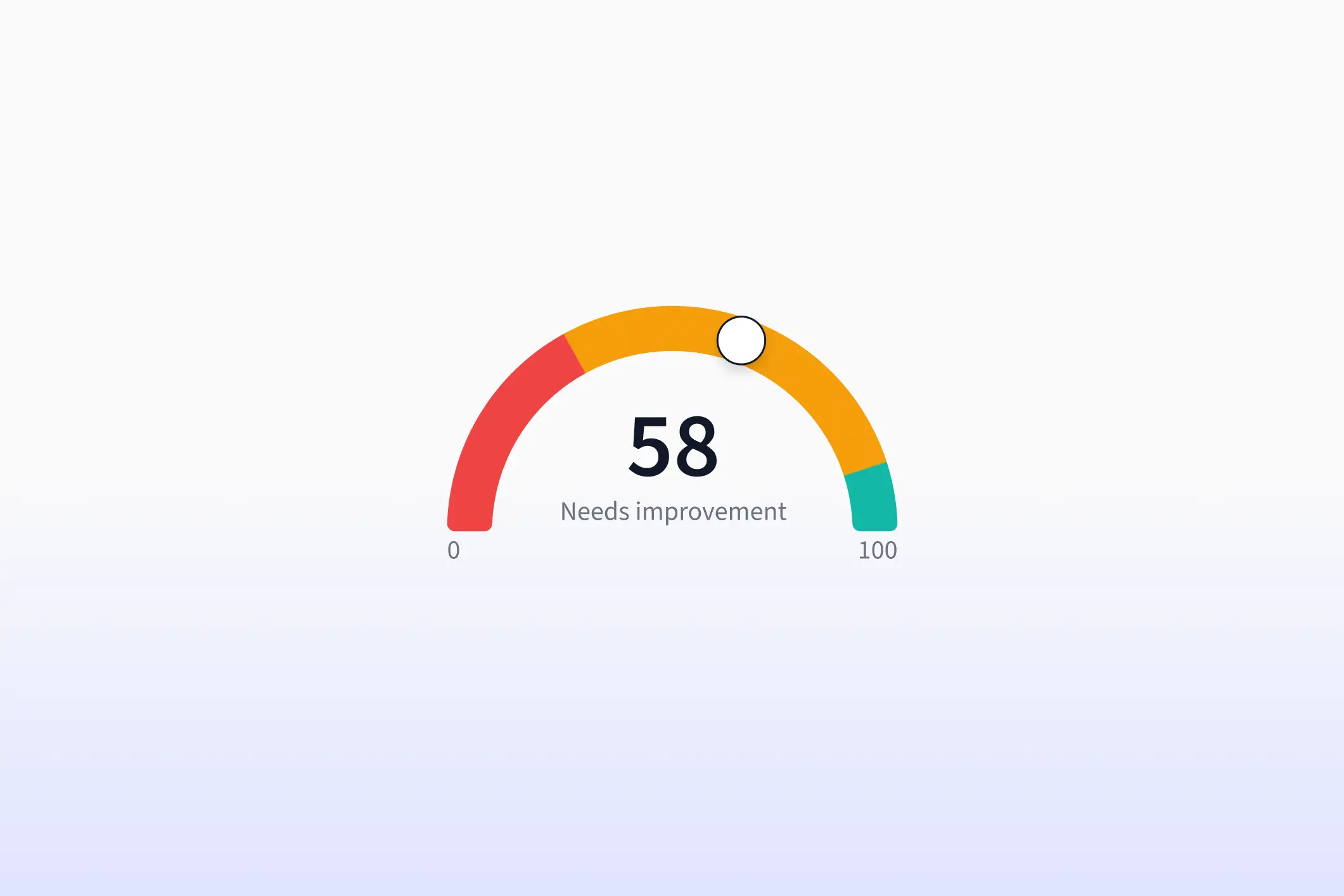
Think of your Rezi Score as your own personal report card that updates in real time as you improve it. You get a score from 1 to 100 that shows how well your resume meets the standards hiring managers and ATS systems care about.
The Rezi Score shows you if your resume is ready for job applications and how you compare to others. It evaluates your resume across these key areas:
- Content: Are your accomplishments strong and specific?
- Formatting: Is your resume professional and ATS-friendly?
- Optimization: Are you using the right keywords and phrases?
- Best practices: Are you following proven resume guidelines?

Your scores are also connected to the Real-Time Analysis feature. So as you write and edit based on the feedback, your score adjusts instantly.
Get a full analysis with AI Resume Agent
Most people stop after using a resume checker, but you can use an AI Resume Agent for deeper insight.
This is built specifically around resumes, ATS optimization, and job search strategy. You get guidance based on the best practices, and all suggestions are tailored to what you’re trying to accomplish with your resume and job search.
Here’s what it can help you do with the right questions and prompts:
- Analyze your resume and identify weak spots
- Rewrite and strengthen bullet points
- Tailor your resume to a specific job description
- Suggest accomplishment-driven statements
- Give interview advice based on your background
- Help surface job opportunities aligned with your experience

All you need to do is upload your resume and job descriptions so the feedback applies directly to you. Here are some questions for inspiration:
- “Why is my optimization score low?”
- “How do I make this bullet more results-focused?”
- “What keywords am I missing for this role?”
How to Improve Your Resume Score

Here’s how to improve your resume score:
- Compare your resume to the job description by identifying repeated keywords, skills, tools, and job titles, then match those terms to your real experience.
- Include job titles that accurately reflect your role by presenting titles, company names, and dates in a consistent format.
- Add missing keywords and requirements by including must-have technical skills and industry terms in your summary, skills section, and experience bullets.
- Stick to a resume ATS format with a simple layout, standard section headings, professional fonts, and bullet points while avoiding tables, icons, and decorative elements.
- Save as an ATS-compatible file type by following the job posting instructions; you can send it as a PDF when no format is specified.
- Be aware of knockout questions that can result in immediate rejection, often stemming from required qualifications such as years of experience or work authorization.
Let’s get into the details.
1. Compare your resume to the job description
ATS systems operate like search engines. They don’t interpret meaning the way humans do. If the job description says “search engine optimization” and your resume says “SEO strategy,” the system may treat those as completely separate skills, even if they’re closely related in real life.
Here’s how to compare your resume:
- Identify the exact keywords and phrases used in the job posting, especially repeated technical skills, qualifications, tools, and the job title itself. If a phrase shows up multiple times, it’s probably important for search filters.
- Match those keywords directly to your experience, including hard skills, credentials, volunteer work, industry knowledge, and hands-on achievements that prove you’ve done the work.
- Mirror the employer’s wording when it accurately reflects your background, rather than using creative synonyms or abbreviations that the system may not recognize.
Check out more tailoring tips and examples:
2. Include the right job titles
Your job titles show your professional background, expertise, and career goals, all at a glance (no pressure). The ATS can scan everything to determine role alignment, seniority, and career progression before a recruiter even looks at your resume.
When optimizing your titles:
- Use the employer’s terminology when it truthfully matches your role, such as ‘Technical Support Specialist’ instead of a broader alternative like ‘IT Help’.
- Present job titles, company names, and employment dates in a consistent format, making it easier for the system to track your timeline and progression.
- Show clear growth or increasing responsibility, because recruiters can filter for progression indicators that suggest readiness for the next level.
When your titles match what recruiters are searching for, you increase your chances of appearing in filtered results.
3. Add missing keywords and requirements
Keywords often determine visibility. Recruiters search the ATS the same way you’d use Ctrl+F or Google. They might type something like “Marketing Manager + SEO + Google Analytics,” and the system returns resumes containing those exact words.
Here’s how to strengthen your keyword alignment:
- Incorporate essential technical skills, certifications, and industry terminology directly from the job description, especially those tied to must-have requirements.
- Place keywords strategically in your headline and summary, where you can mirror the job title and three to four core abilities.
- Build a strong skills section that focuses strictly on role-specific tools and expertise, since this is often the first area ATS systems scan for matches.
- Integrate keywords naturally within your bullet points, showing how you applied those skills rather than simply listing them in isolation.
Here’s what a recruiter says about including keywords in your resume:

And please, don’t try to hide keywords in white text. ATS systems can extract all text into plain view. When recruiters export or share resumes, hidden content becomes visible, and that instantly damages credibility.
Try our AI Keyword Targeting tool to identify keywords from the job description and get suggestions on how to add them to your resume.
Related:
4. Stick to a resume ATS format and template
If your resume relies on visual flair, you may unintentionally confuse the system and make it harder for recruiters to filter and search for keywords. An ATS-friendly format prioritizes clarity and simplicity over creativity.
Here’s how to make your resume easy to parse:
- Use a single-column layout that allows the system to read top to bottom without interruption.
- Organize information under clear, standard headings such as Work Experience, Education, and Skills, so the ATS can correctly categorize each section.
- Avoid tables, text boxes, icons, borders, or decorative elements, since these often disrupt how information is extracted and stored.
- Stick with simple black bullet points and standard resume fonts, ensuring both the software and the recruiter can scan your content.
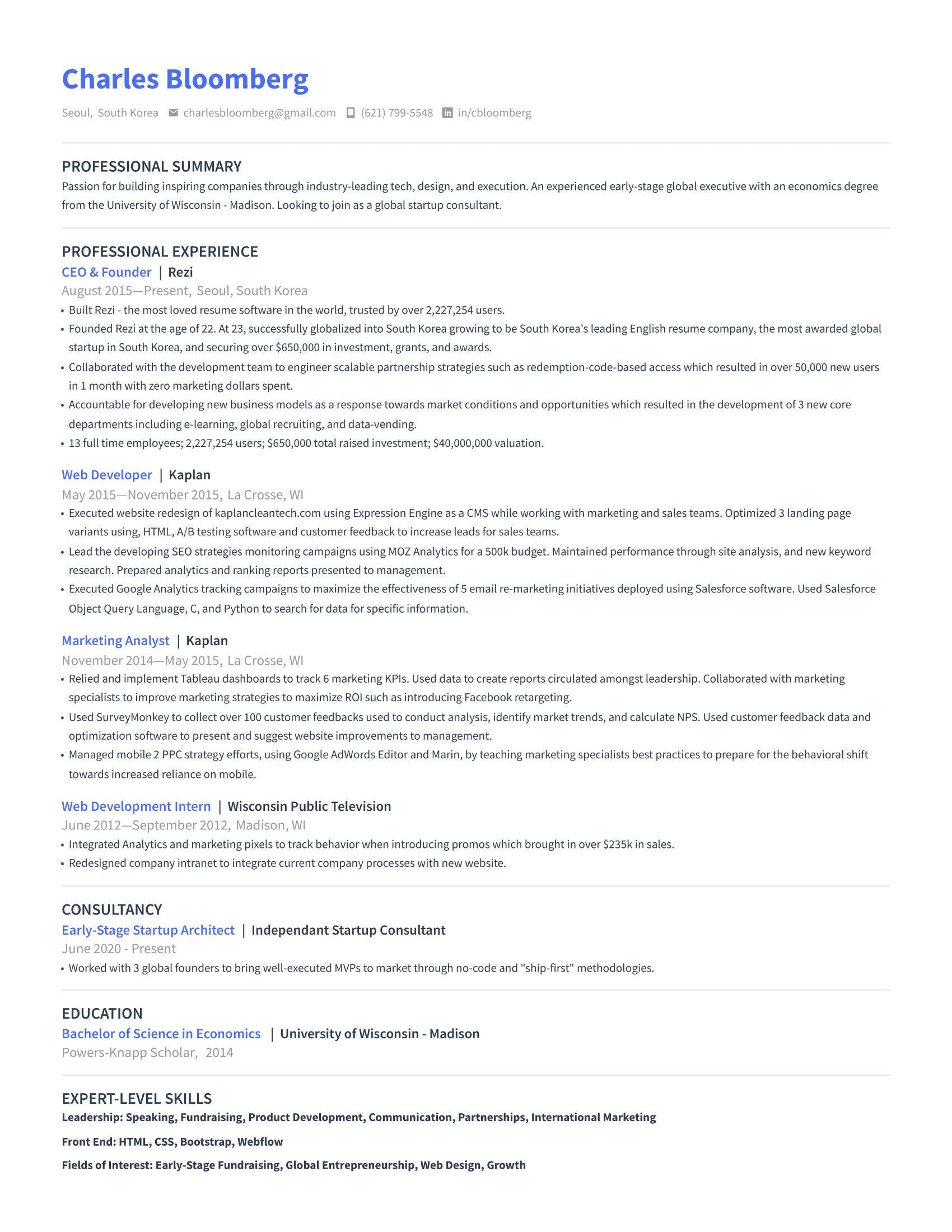
Here’s an example of a modern resume from our ATS-friendly template gallery:
5. Save as an ATS-compatible file type
Even a well-optimized resume can run into trouble if you submit it in the wrong file format. The rule of thumb? Always follow the instructions in the job description when deciding which file format is your best bet.
No instructions? Here’s how to stay on the safe side:
- Send your resume as a PDF unless the employer specifically requests a Word document, since PDFs preserve formatting and work consistently across devices.
- Submit a DOCX file if the application instructions ask for Word, and avoid outdated or unconventional file types like ODT or image formats.
- Name your file clearly using a professional format, such as FirstName_LastName_Resume, which keeps things organized on the recruiter’s end.
6. Be aware of knockout questions
Sometimes what people blame on the “ATS score” isn’t about formatting or keywords — it’s the knockout questions. If you receive an immediate rejection, it often means you answered “no” to a required qualification.
For example:
- A minimum years-of-experience requirement that you don’t meet
- A required certification or license that you don’t hold
- Work authorization or location-based eligibility criteria
While ATS systems can filter automatically based on hard requirements, recruiters don’t always use these aggressively. Still, if you don’t meet a non-negotiable qualification, no amount of keyword optimization will override that.
However, if you genuinely believe that you’re qualified and a strong fit for the role even though you lack a specific requirement (e.g., you have 6 years of experience but the job posting asks for 8 years), don’t let this stop you from applying. You could still be considered!
Summary
- There is no universal ATS score that guarantees whether you get hired, because most Applicant Tracking Systems don’t assign candidates a visible percentage grade.
- An ATS functions like a keyword-driven search engine, which means it matches exact words and phrases from your resume to what a recruiter types into the system.
- Keyword alignment is the biggest factor influencing visibility; if your resume doesn’t contain the exact requirements listed in the job posting, you may not appear in recruiter search results.
- Formatting plays an important role since complex layouts, tables, text boxes, graphics, unusual fonts, and multi-column designs can confuse parsing systems.
- Mirroring the employer’s terminology with the correct job titles and presenting consistent employment dates improves your chances of appearing in filtered searches.
- ATS optimization should focus on relevance, such as meeting core qualifications and including the must-have skills that recruiters actively search for.
- Knockout questions could override everything, since automatic disqualification typically happens when you don’t meet non-negotiable requirements. (However, there’s no harm in applying if you believe you’re genuinely qualified for the role.)
- The smartest way to approach ATS scores is to treat them as feedback tools rather than judgment tools by using them to refine keyword alignment, strengthen accomplishments, and improve structure.
FAQ
What is the best ATS resume checker?
The best ATS resume checker compares your resume directly to a specific job description and gives you actionable feedback, not just a random percentage. Rezi ATS Checker is a strong option. It analyzes keyword alignment, formatting compatibility, and role relevance. It flags missing hard skills, inconsistent job titles, and formatting issues that confuse parsing systems. Our tool also gives updates in real time as you edit.
How to convert a resume to an ATS format?
To convert your resume to an ATS-friendly format, simplify everything. Use a single-column layout, standard headings like Work Experience and Education, and plain bullet points. Remove tables, text boxes, graphics, icons, and bold design elements. Stick to common resume fonts such as Arial or Calibri. Present job titles, company names, and dates consistently so the system can read your timeline correctly. Finally, save your file as a PDF unless the employer requests a DOCX.
Is the ChatGPT ATS score reliable?
ChatGPT doesn’t have access to real ATS systems, so any “ATS score” it generates is an estimate based on best practices and keyword matching. That means it can provide helpful guidance, but it won’t replicate how a specific employer’s ATS filters candidates. Instead, use it for optimization ideas, then test your resume against the actual job description for more targeted insights.
Learn more about ChatGPT for resumes:
Is 50 a good ATS score?
A 50 ATS score means you have plenty of room to improve. Most third-party tools generate scores by comparing your resume to a job description, so 50 often means you’re missing keywords, role-specific skills, or structural best practices.
That said, it doesn’t mean you’ll automatically get rejected. Recruiters don’t typically see that number. However, if you want stronger visibility, aim to increase alignment with the job posting. Focus on adding relevant hard skills, mirroring the job title, and simplifying formatting.
How to optimize your resume for ATS?
Start by studying the job description. Pull out the exact keywords, technical skills, certifications, and job titles used. Then mirror that language naturally in your skills section and experience bullets. Keep your formatting simple and structured so the ATS can parse it correctly. Use a single-column layout, standard section headings, and consistent job titles and dates. Focus on relevant, measurable accomplishments rather than generic duties. Finally, save your resume in the correct file format and make sure you meet the core qualifications.

Upload or drop your resume to get started
Upload your resume to get started
Score my resume

Lauren Bedford is a seasoned writer with a track record of helping thousands of readers find practical solutions over the past five years. She's tackled a range of topics, always striving to simplify complex jargon. At Rezi, Lauren crafts genuine and actionable content that guides readers in creating standout resumes to land their dream jobs.