Comparisons
Rezi vs Claude AI: The Better Job Application Tool
Rezi vs. Claude: Learn which AI tool is better for resumes, cover letters, and job applications. Get an honest overview of features, pros, and best use cases.


Published on
October 29, 2025
Updated on
May 8, 2026
It seems obvious. Why commit to a resume builder when you can just ask Claude or ChatGPT to write your resume in seconds? Actually, it’s not so simple. Claude can generate a solid draft, but only if you know exactly what to ask. And getting the right output often takes multiple prompts, edits, and follow-ups.
But this isn’t a “ditch Claude and use Rezi” situation. Different tools work better for different job hunters. My goal isn’t to convince you of one side. It’s giving you a real comparison of Rezi vs. Claude so you can decide what actually supports your job search. I’ll cover the strengths, limitations, and features that can make or break your resume.
Want to see what Rezi can do for yourself? Try our free AI Resume Builder. We guide you through the process so that you can create a tailored, ATS-friendly job application in minutes.
And check out more of our comparison guides:
Rezi vs. Claude: Summary
To keep things fair, I gave Rezi and Claude the same basic notes about my experiences with the same job description to see how they could transform these details into a job application. While it’s usually necessary to do some tweaking, I’ve included screenshots of the process without any edits so you can see what both platforms can do.
But before diving in, here’s a quick comparison overview of Rezi vs. Claude:
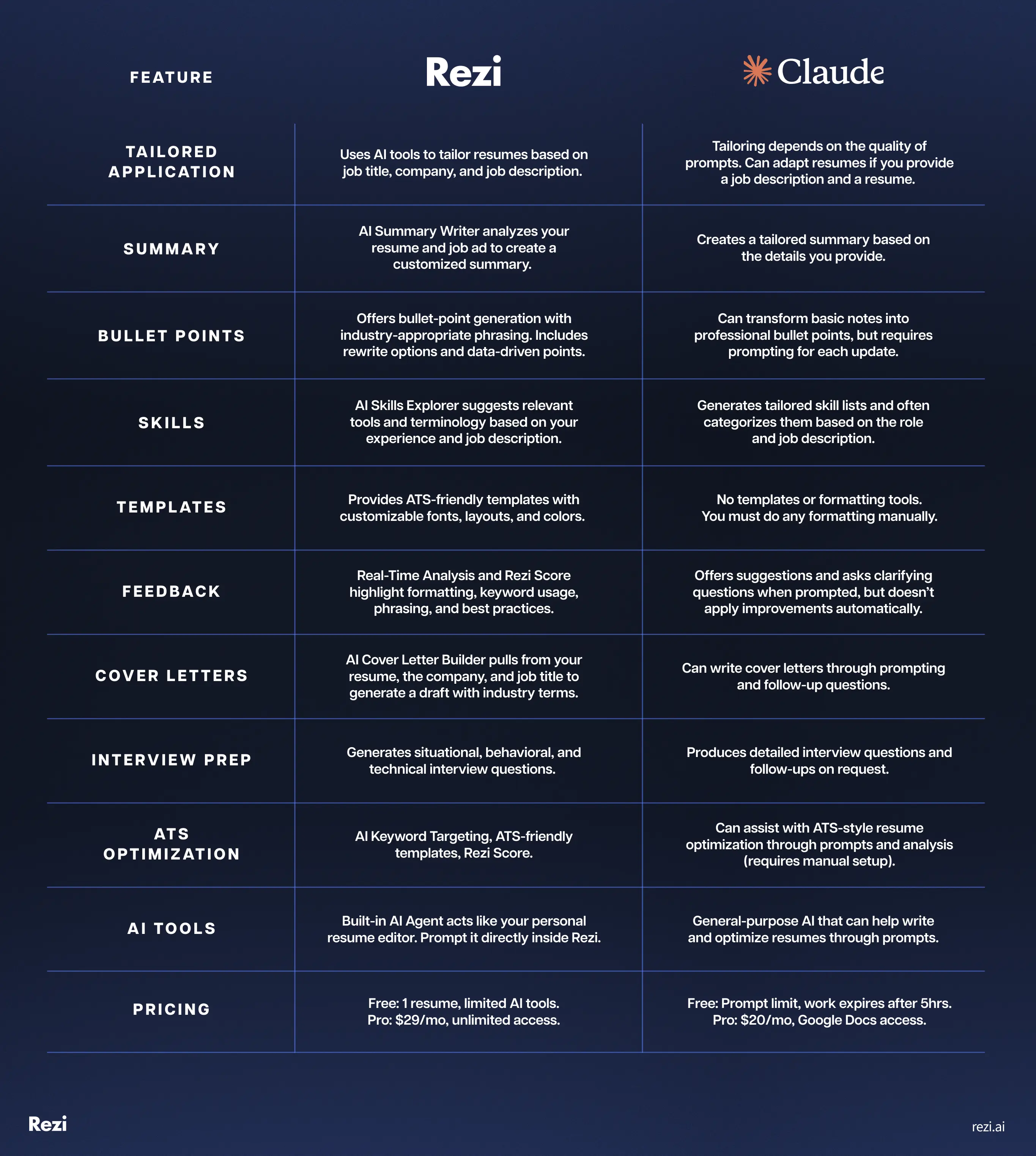
Now, let’s see if this AI assistant is any match for a dedicated resume builder.
Rezi Overview
Rezi is an AI-powered resume and cover letter builder designed to help job seekers create an ATS-friendly job application. It works by guiding you through each section of your resume with prompts, templates, and real-time suggestions.
You can tailor your applications by entering your job title, company, or experience, and Rezi generates personalized content that matches industry expectations and requirements. Its tools help you optimize resumes for keywords, formatting, and clarity.
Here are some of Rezi’s key features:
- AI Bullet Point Writer
- AI Summary Writer
- AI Keyword Targeting
- ATS-optimized Templates
- Real-Time Resume Analysis & Rezi Score
- AI Cover Letter Builder
- Skills Explorer Tool
- AI Interview
Claude Overview
Claude is an AI assistant created by Anthropic that can help with a wide range of writing and reasoning tasks. You can use it to draft cover letters, tailor resumes, brainstorm achievements, or rewrite bullet points with better clarity and impact.
Because it relies on prompts instead of fixed templates, you have the flexibility to shape the output to your style, industry, and goals. You can also paste a job description or your existing resume, and Claude will adapt the content. It’s versatile and great for refining or generating content, though it needs more direction than a dedicated resume builder.
Here’s how you can use Claude for job applications:
- Customizable resume and cover letter generation via prompts
- Tailored bullet point rewrites
- Clarifying follow-up questions to fill experience gaps
- Keyword alignment based on job descriptions
- Formatting suggestions in plain text
- Skill list generation and categorization
Tailor your application
I’ll be honest, tailoring your resume for each job description is tedious, but necessary. AI makes the process much more painless. Rezi gives you plenty of direction, offering keyword suggestions and role-specific phrasing automatically. Claude can do something similar, but only if you feed it the right details and instructions.
Rezi
Rezi makes tailoring your resume refreshingly straightforward. You just enter the job title and company, and it generates personalized bullet points, skills, and feedback.
For example, the Rezi AI Bullet Point Writer can create bullet points that align with your role and industry standards. And it’s all optimized for ATS scanners, meaning it recommends the right keywords to get your resume past automated filters.
But my favorite tailoring feature is AI Keyword Targeting, which analyzes job descriptions, companies, and roles to suggest relevant keywords. This obviously helps your resume read better, but it also boosts your Rezi Score (more on that below).

Claude
Claude’s approach gives you less guidance, yet more control over the output. Aka, how tailored your resume is depends entirely on the prompts you provide. Yes, you could easily enter a simple prompt: “Create a resume for a junior marketing position.” Just expect the output to be generic and not personalized to your experience.
Get a more customized output by attaching your existing resume and the job description, then telling Claude to tailor it. You can even ask it to emphasize specific experiences or skills.
Here’s the prompt I used to tailor my resume:
You are an expert resume writer. Your goal is to create a professional, ATS-optimized resume tailored to the specific job title and job description I provide.
Here is the information you need to work with:
1. Target job title:
2. Job Description:
3. My Existing Experience, Skills, & Background:
4. Resume Format Preference: Reverse-Chronological
5. Tone & Style: Professional & concise
6. Additional Notes:
• Focus on achievements and keep the resume 1 page long.
• Create a customized resume that aligns with the target job title and mirrors the language, requirements, and keywords in the job description.
• Highlight my most relevant achievements, skills, and experiences using quantified bullet points wherever possible.
• Optimize for ATS by using clear section headings and incorporating keywords naturally.
7. Use a professional layout with sections such as:
• Name & Contact Info
• Professional Summary
• Skills
• Work Experience
• Education
• Extra Sections (if relevant)
If important information is missing, list follow-up clarifying questions before drafting the resume.
Find out more about personalizing your application: How to Tailor a Resume to a Job Posting
Generate a resume summary
The challenge in creating a standout summary is choosing the best bits from your resume while aligning those details with the job description. If you provide Rezi with the job and skills, it will draft an ATS-ready summary for you to tweak or regenerate. Claude can also deliver a strong summary, but the quality depends totally on the prompts.
Rezi
Rezi’s AI Summary Writer takes your full resume and job description to create a summary that accurately reflects your qualifications. And the process is pretty simple. You just input the role, skills, and target job, and it generates a professional summary that follows best resume practices.
Take a look at this web development summary:
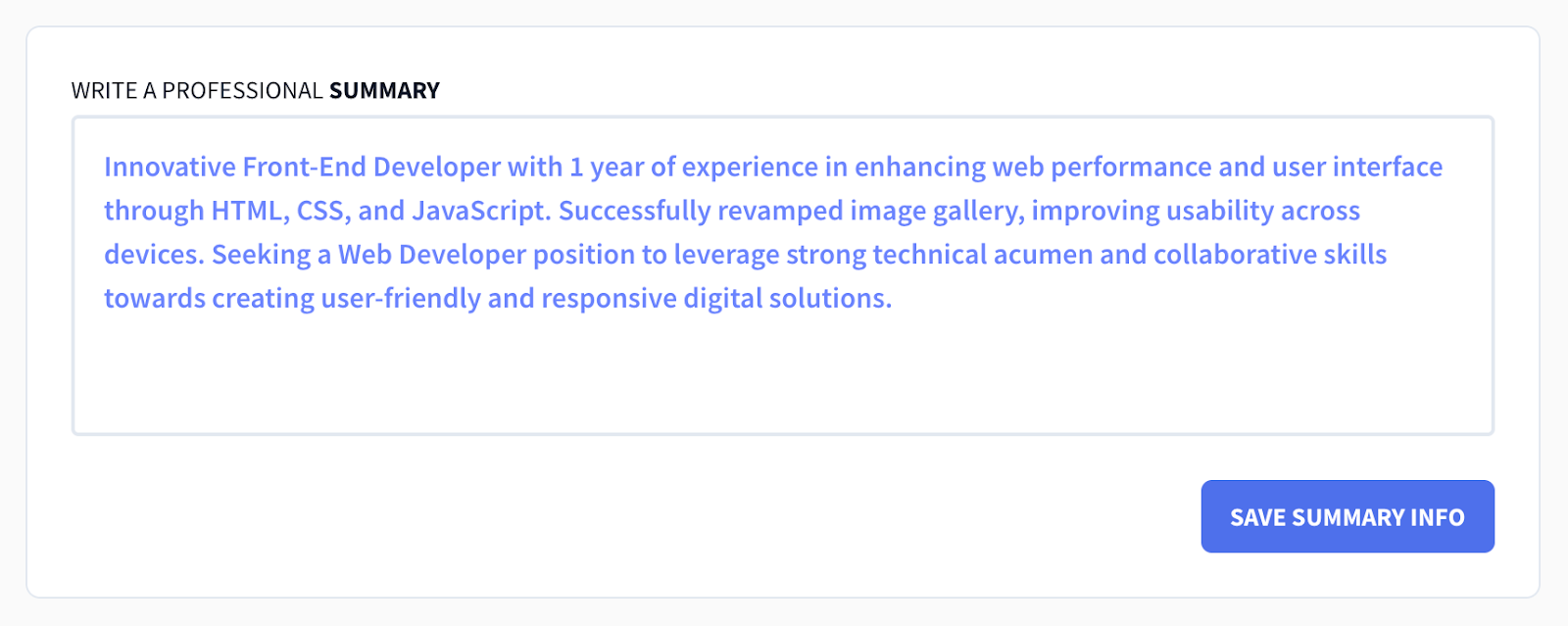
And you’re not stuck with the first version you see. Just click “AI Writer Ready” to see the first draft and regenerate as many times as you want. You can also highlight specific positions or skills from your resume that you want to emphasize in the summary.
Claude
Claude handled my resume summary surprisingly well, even though I only gave general instructions for the whole resume (not individual sections). Claude aligned the summary nicely with my job description and highlighted both relevant soft and technical skills.
That said, if you want to get more specific, here’s a prompt you can use for the summary:
Using my experience and job title, do the following:
• Write a tailored resume summary aligned with the job title and description.
• Incorporate relevant keywords naturally for ATS compatibility.
• Highlight my top strengths, achievements, and value with an enthusiastic tone.
• Avoid clichés like “team player” or “hard worker”—focus on impact and relevance.
• Provide 1 to 2 alternative versions if helpful.
If you need clarification to make it stronger, ask follow-up questions before writing the summary.
My only gripe is that it occasionally sounded robotic, with phrases like “fostering collaborative team environments” or buzzwords such as “strong communicator” that I would need to tone down to sound like an actual human.
Here’s what the first summary draft looks like:

Write impactful bullet points
If you freeze at the sight of an empty bullet point field (been there), Rezi gives you structure, phrasing suggestions, and quick editing tools that do most of the work for you. Claude can also turn your rough notes into professional sentences surprisingly well, but you have to prompt each version. It’s the difference between click-and-generate vs. conversational drafting.
Rezi
The Rezi AI Bullet Point Writer is a huge help if you’ve ever been stuck staring at a blank page. As you work through the guided resume tabs, you get fill-in-the-blank fields along with suggested phrasing. Just input your role details, and it generates professional bullet points that highlight your skills and resume achievements.
If you want a stronger impact, the AI Bullet Point Editor lets you rewrite your points with tailored suggestions. You can generate standard or data-driven bullets with key numbers to make achievements measurable. In my experience, it helped me turn basic bullet points (which were essentially just notes) into strong, quantifiable statements.
Here’s an example of the updated bullet point in purple:

Claude
I tested Claude by giving it super simple resume bullet points describing my experiences to see what it came up with. And I was pleasantly surprised. Claude transformed my basic bullet points into professional (almost) resume-ready sentences.
For example, I gave it this simple note: “Did code reviews with mentor sometimes.” And this is what Claude generated: “Participated in code review sessions to maintain code quality standards and promote the best development practices.” A little repetitive, but not bad.
Here’s an unedited draft of Claude’s resume work experience section:
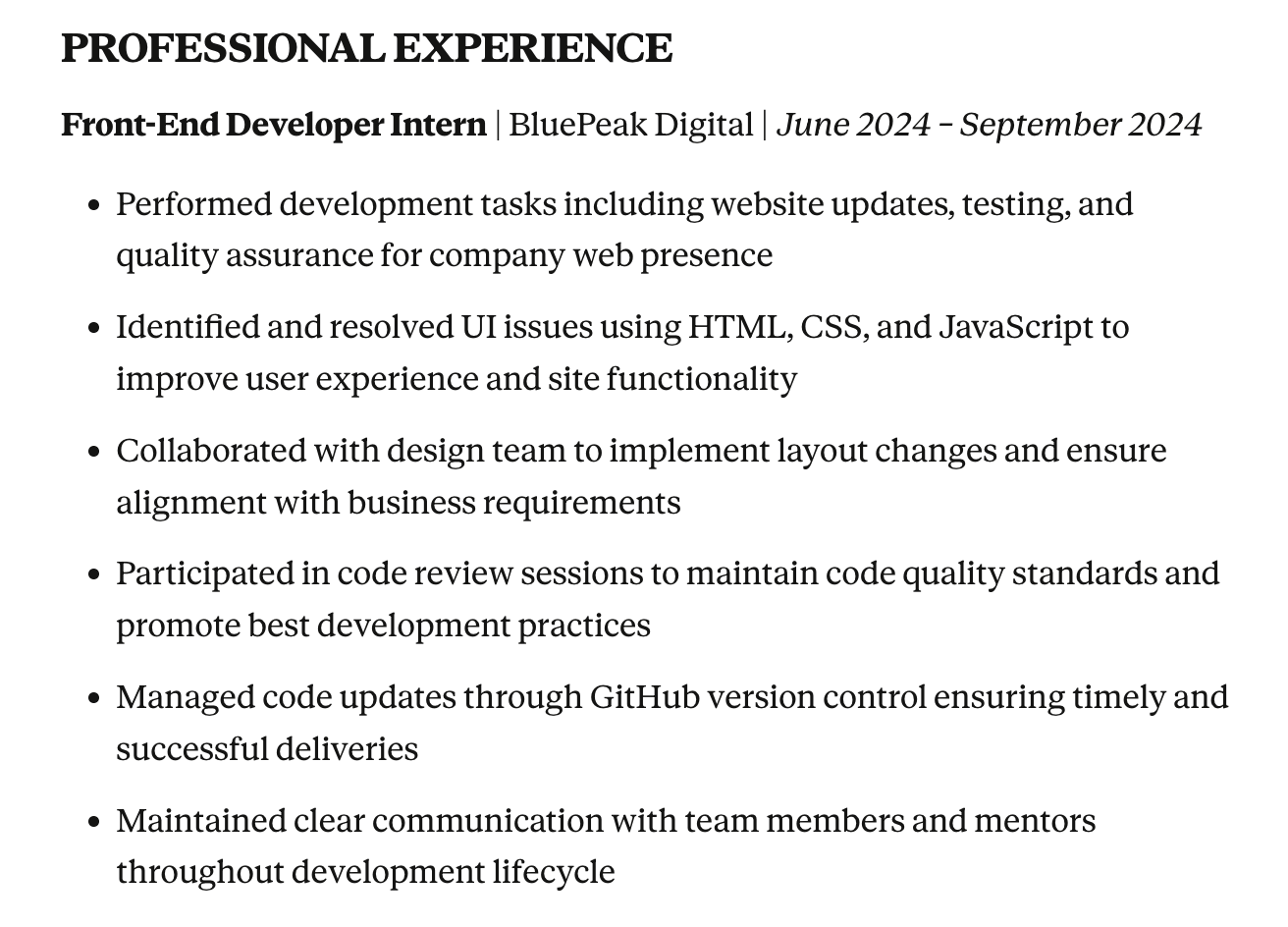
The obvious drawback is that Claude isn’t a resume builder, so regenerating bullets isn’t a one-click process. Each new refinement requires additional prompts, which can take more time. For advanced, highly specific positions, you would probably need to write some bullet points yourself, then use Claude to help improve language, structure, or keywords.
Skills section
When it comes to surfacing relevant skills, both tools do a good job. Rezi provides categories and offers targeted suggestions based on your role and resume content. Claude also recommends relevant skills, but again, it’s pretty reliant on your prompts and job description rather than a built-in feature.
Rezi
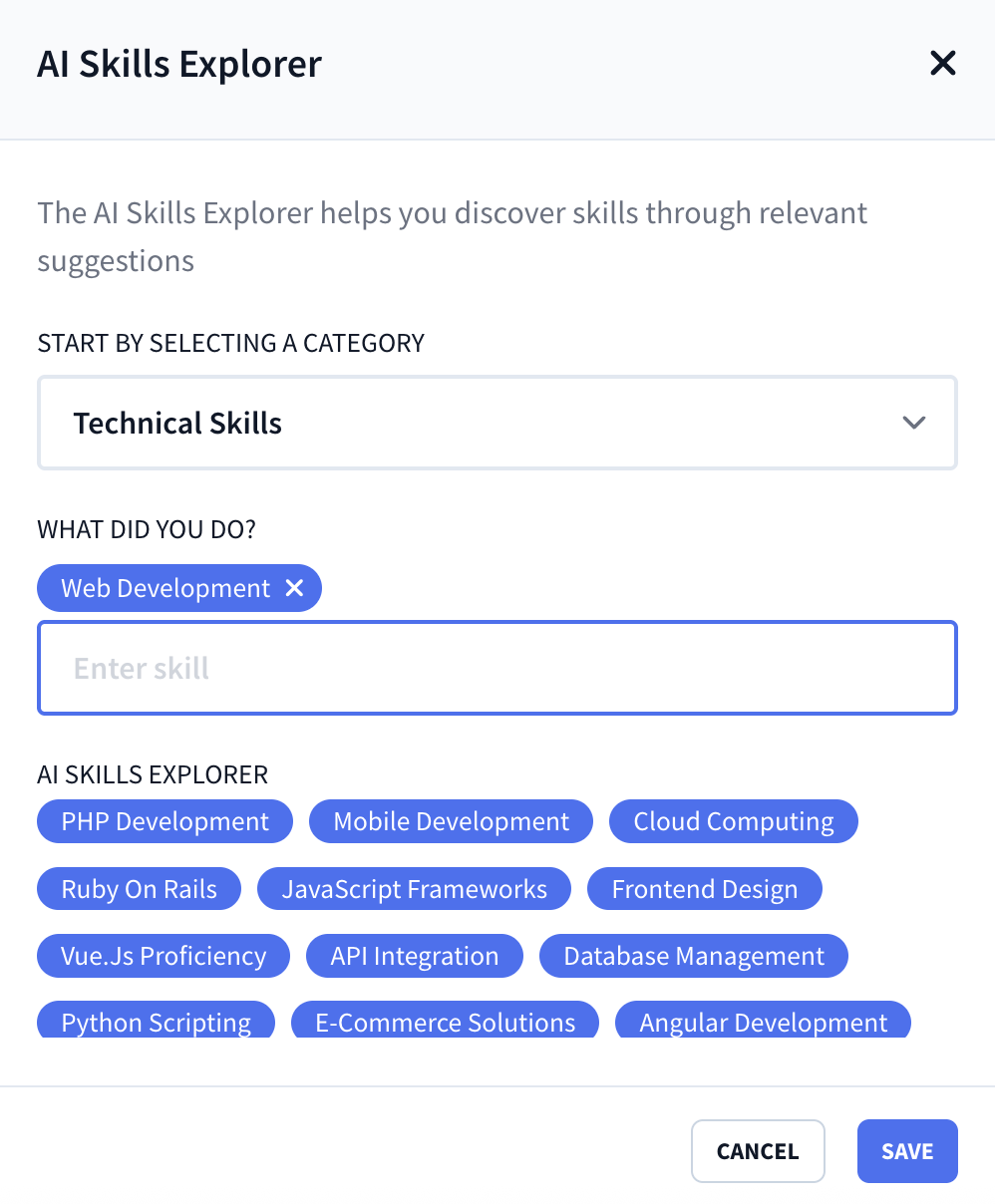
Rezi’s AI Skills Explorer identifies and prioritizes a wide range of soft, technical, hard, and language skills. And it doesn’t just churn out generic buzzwords like “strong teamwork”. It gave me specific programs and tools that are tied to my existing skill set.
For a web development position, I wanted to focus on the technical skills category. From there, I just typed in “web development” to generate ideas. Rezi provided 20 related suggestions, which were all very specific to boost credibility.
Here’s an example of the AI Skills Explorer in action:
Claude
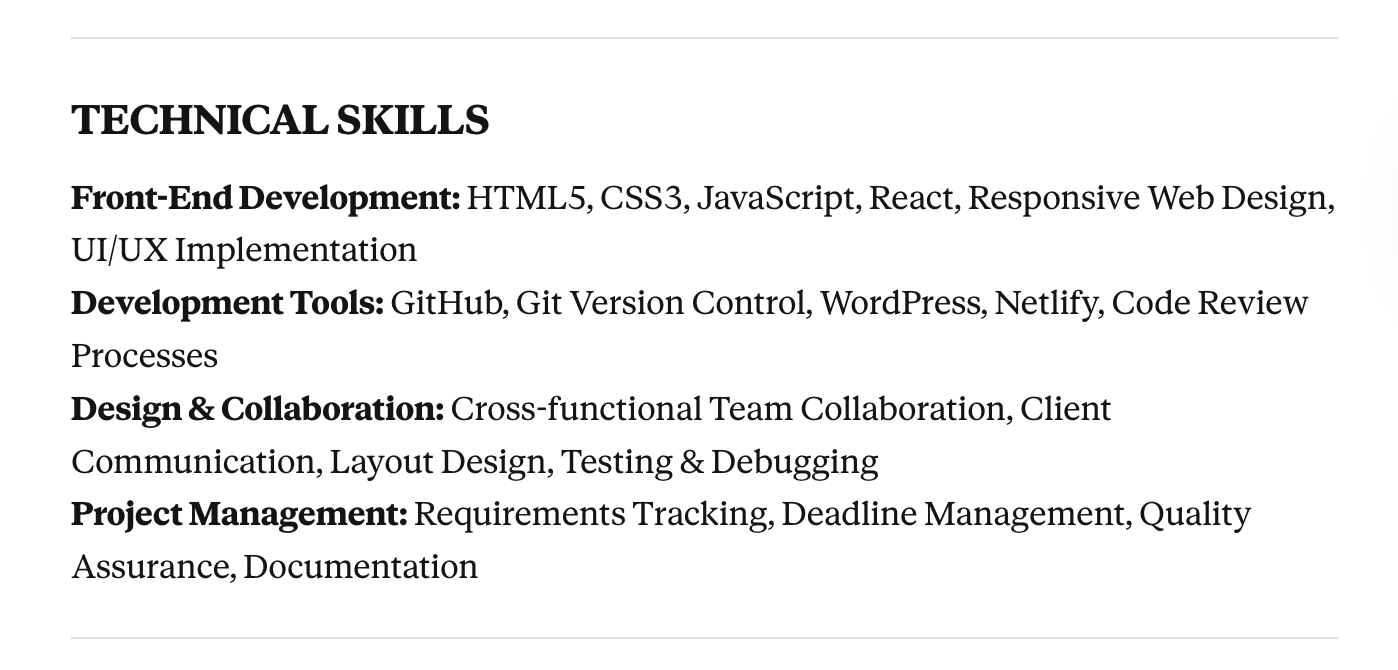
Claude also does a strong job of matching skills to the job description and experience. Like Rezi, it focused more on specific skills than generic abilities, showing recruiters exactly which tools and platforms I know my way around.
I was most impressed by the way it categorized them without being prompted (e.g., “Technical Skills”). It’s a great way to help break up the text and also makes it easy for recruiters to quickly check off key skills.
Here’s the skills list Claude generated from my details:
Check out more popular skills and resume tips:
- Best Skills for a CV
- AI Skills for Your Resume
- Best Communication Skills for Your Resume
- Best Programming Skills to Put on a Resume
Use a professional template
This is the main area where the gap between the two platforms becomes obvious. Rezi removes all formatting stress by giving you pre-built, ATS-approved resume templates. Claude produces clean text with headings, but you have to copy to an external doc for editing. Yes, that makes Claude flexible, but if you’d rather skip layout decisions entirely, Rezi has the advantage.
Rezi
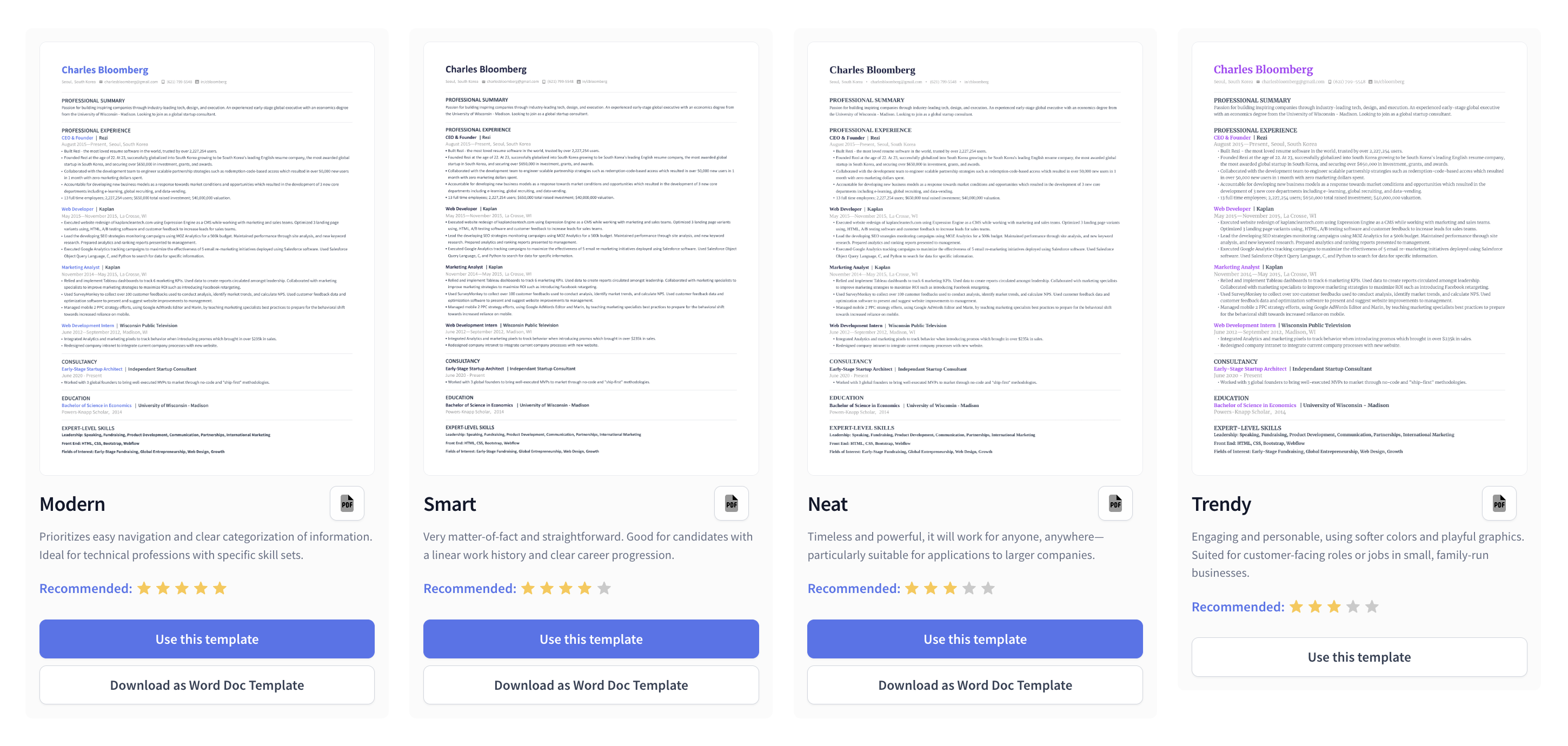
A major selling point of using a resume builder is having the format and templates already taken care of for you. With Rezi, I didn’t need to worry about messing up. They’ve designed all the templates to be organized, professional, and ATS-friendly. Yes, they’re on the simple side, but that’s the point.
You can tweak resume fonts, colors, and layout, with everything structured to avoid common ATS issues. That means no messy text boxes, mismatched fonts, or outdated headshots. Templates are in reverse-chronological order, with the summary and work experience sections at the top. Don’t have much work experience? You can rearrange sections to highlight education or skills.
Here’s a snapshot of Rezi’s template gallery:
You can check out all the templates here: ATS-Friendly Resume Templates
Claude
Claude doesn’t provide templates or formatting options like a traditional resume builder. So, that’s already an extra step that you’ll need to sort yourself, including researching the best formatting practices.
On the plus side, the generated draft had clear resume sections and headings, a professional font, and bullet points to break up the text. It all looked great until I downloaded it as a PDF and saw that it spilled onto a second page (not my usual preference). That meant I had to copy it into a Google Doc (everything was kept intact) to modify the resume font size.
Of course, the ability to copy everything into an external document gives you a lot of flexibility over the design and formatting. But the lack of guidance might be a challenge for those new to resume-building.
Get useful feedback
Wondering how you’re sending out dozens of applications a day and not hearing anything back? If your resume is the culprit, getting tangible feedback is invaluable. Rezi scores your resume in real time and flags weak phrasing, formatting gaps, and missing keywords. Claude gives feedback only when you ask, which you then have to apply yourself.
Rezi
Call me old-fashioned, but I still prefer getting my information from reputable sources rather than ChatGPT. That said, it’s reassuring to avoid the generic feedback and instead get customized suggestions and scoring based on the specifics of my resume.
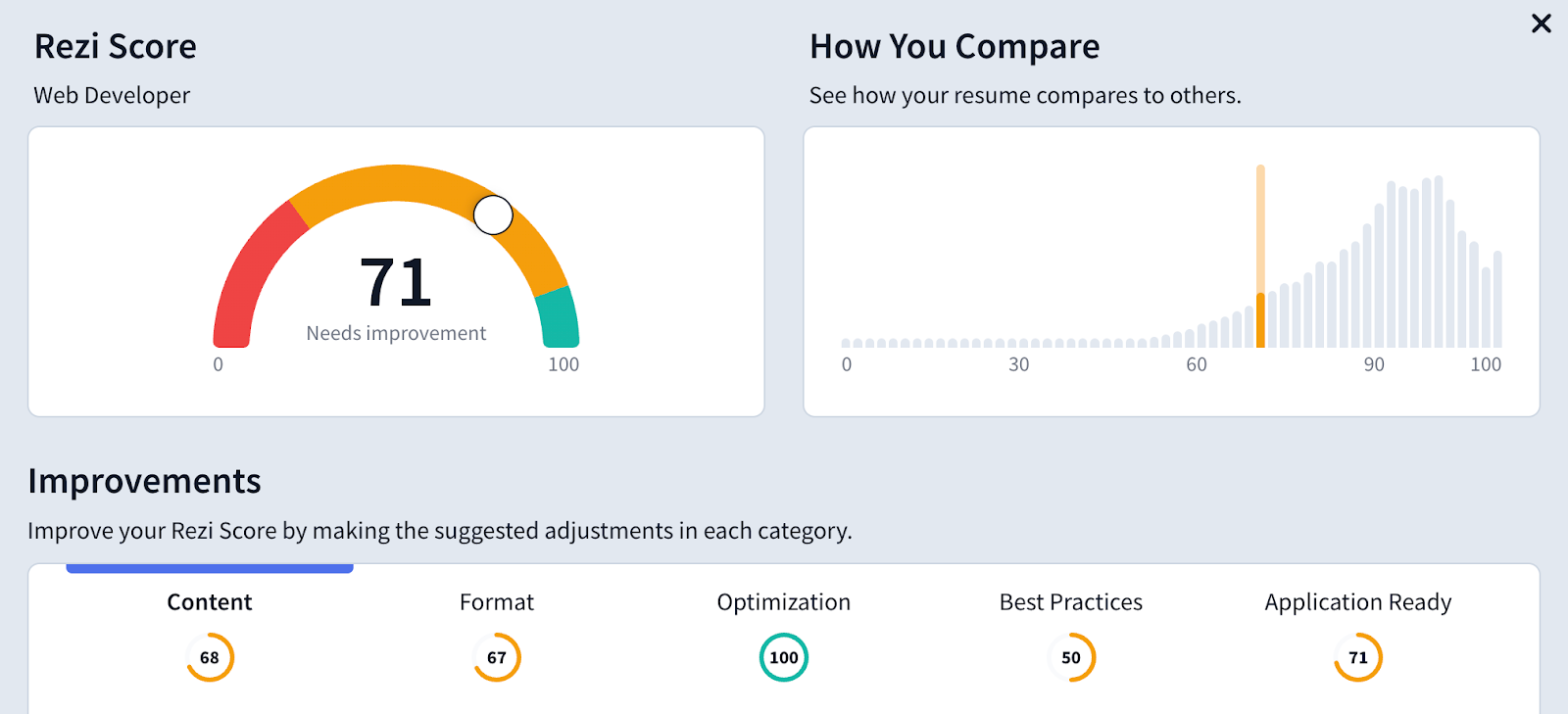
Rezi’s Real-Time Analysis reviews your resume for small but important details. It checks punctuation, filler words, weak phrasing, and whether accomplishments are measurable.

You also get a Rezi Score (1–100) to show how well your resume meets ATS and recruiter standards across four categories: content, formatting, optimization, and best practices. It audits over 20 individual points, ensuring your resume is impactful and keyword-optimized.
Claude
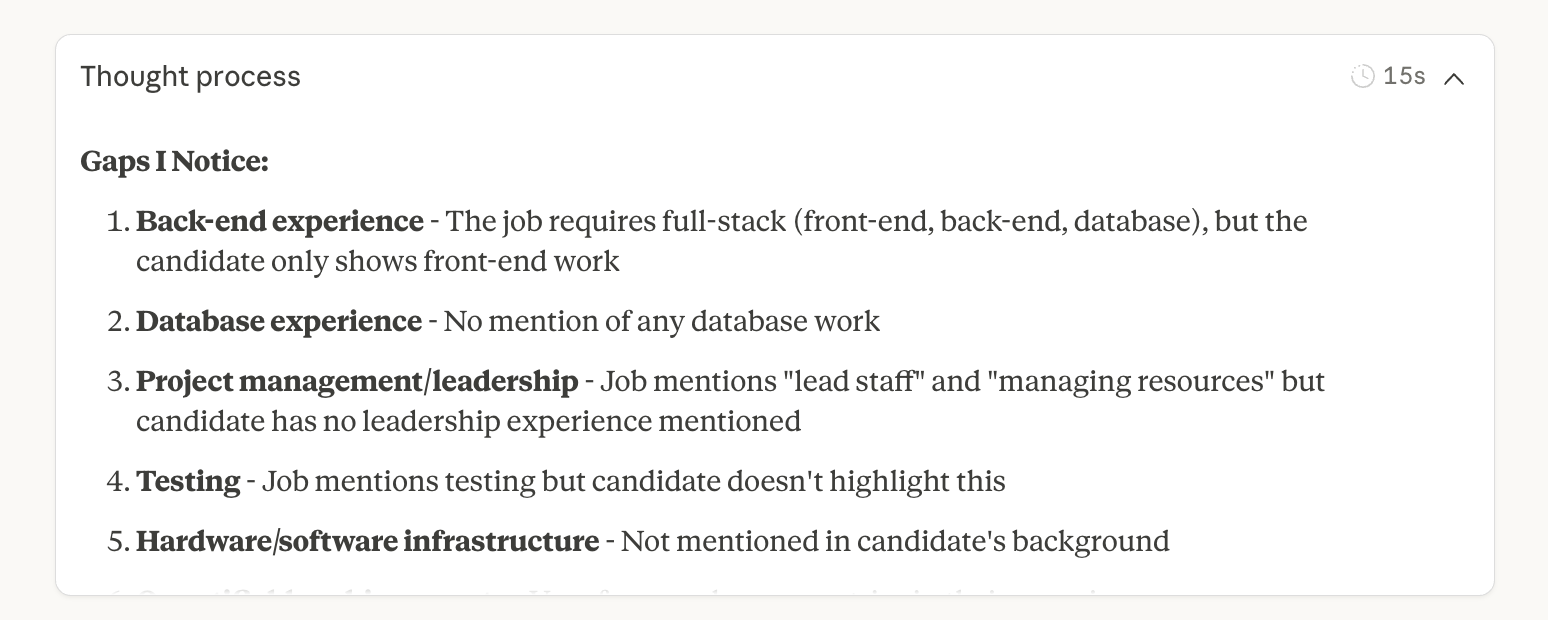
Claude doesn’t provide scoring, but it did suggest some pretty handy improvements. It asked clarifying questions and pointed out missing elements in my resume. Similarly, blog examples can be used to understand how to present accomplishments effectively, adding valuable insights into how your resume can stand out.For example, it asked about quantifiable achievements, which shows it’s up to speed with the best resume practices.
It works well for brainstorming or filling gaps, but unlike Rezi, you have to manually apply these improvements. And yes, that means more prompting or editing; there’s no one-click integration.
Create a cover letter
Most of us agree that writing a cover letter is one of the worst parts of the job search. You’ve already done the resume, personality test, problem-solving, and whatever else the hiring process throws at you. Now, you have to write a document that isn’t just a repeat of everything you’ve submitted. Luckily, AI makes this much easier, so let’s see how the platforms compare.
Rezi
Rezi’s AI Cover Letter Builder pulls information from your resume and generates a draft in seconds. Just input the company name and job title, and it produces a professional, ATS-friendly draft that uses industry-specific phrasing. You can also highlight positions, education, or skills from your resume to include.
Here’s what the initial Rezi cover letter draft looks like:
-1.png)
Claude
Claude is flexible but requires more input. It won’t guide you through formatting, and you need to prompt it to fill in the right details. However, it does ask clarifying questions before writing, which helped me fill in any gaps, but made the process slower.
Here are some questions Claude asked before writing my cover letter:
- Do you know the hiring manager’s name?
- Why are you interested in this specific role?
- Any metrics from your work?
- What was your proudest accomplishment in either role?
- Do you have ANY back-end or database experience? (They asked this because it was mentioned in the job description.)
Not sure what to include in your cover letter? Here’s the prompt I used:
You are an expert cover letter writer and career branding specialist. Your goal is to write a professional, customized cover letter aligned with the target job title and job description I provide.
Here is the information you need to work with:
1. Target Job Title:
2. Company Name (if available):
3. Job Description:
4. My Background & Relevant Experience:
5.Tone & Style Preference: Professional & confident
6. Format Preference: Traditional cover letter (3–4 paragraphs)
7. Additional Details:
• Specific accomplishments or metrics to include
• Values or passions that align with the company
• Motivations for the role or industry
Using the information above:
• Write a tailored cover letter directly aligned to the job description and title.
• Match the company’s tone and priorities (based on the job description).
• Highlight my most relevant achievements and strengths using concrete examples.
• Incorporate keywords naturally for ATS compatibility.
• Include the standard cover letter structure:
• Header (name, contact info)
• Greeting (customized with company/hiring manager name)
• Intro paragraph (why I’m interested and a strong value hook)
• Body paragraph(s) (relevant skills, accomplishments, alignment with role)
• Closing paragraph (enthusiasm and call to action)
• Signature
If any key details are missing, ask me clarifying questions before drafting.
Claude gave me a tailored cover letter with a professional tone, but the paragraphs were long, complex, and sometimes spilled onto a second page. I had to make some tweaks to make it concise and recruiter-friendly.
Here’s what the pre-tweaking Claude draft looked like:
-1.png)
Check out these guides for more cover letter tips and examples:
- How to Format a Cover Letter?
- How to Use ChatGPT for a Cover Letter?
- How to Write a Cover Letter for a Career Change
- Best Cover Letters: Examples, Templates, and Writing Tips
Final Thoughts: Which One’s Better?
If you want structure, guidance, and efficiency, Rezi comes out ahead. It does more of the heavy lifting for you — no guesswork, no formatting stress, and no need to keep prompting for revisions. The built-in templates, real-time feedback, and one-click AI tools make it especially useful if you want a professional resume without spending hours editing.
Are you comfortable giving detailed prompts, or want more control over the writing? Then Claude can be great for brainstorming or improving your existing resume. It’s also flexible enough to help beyond resume writing, like with emails or interview prep. But compared to a resume-focused platform, it takes more time and effort to reach the same level of finesse.
So who benefits most from each?
Rezi is better for:
- People who want an ATS-ready resume without overthinking the formula.
- Anyone who prefers structured tools and instant suggestions over manual prompting.
Claude is better for:
- Users who are more comfortable writing or iterating with prompts.
- People who want flexibility beyond resumes.
Overall, Rezi is the more practical choice for a strong, professional resume. Claude is powerful, but it works better as a writing assistant than a resume builder.
FAQ
Is Rezi actually free?
Rezi does offer a free version, but it’s more of a “starter” plan than a full-access membership. You can create a basic resume, use some AI features, and test the platform without paying.
However, if you want unlimited downloads, cover letters, more AI credits, or advanced tools like keyword targeting and formatting options, you’ll need a paid plan. This costs $29 a month or $149 for a lifetime subscription.
Find out what’s included: Rezi Pricing
Is Rezi safe to use?
Yes, Rezi is safe and doesn’t publicly share your information. You’re in control of what you upload, and your documents aren’t used to train random AI models. That said, like with any online tool, it’s smart not to include overly personal information (like your SIN/SSN or full address).
What is Claude used for?
Claude is an AI writing and reasoning assistant. People use it to draft resumes, cover letters, emails, summaries, interview prep answers, and even research breakdowns. It’s not just for career stuff; you can use it for content writing, editing, idea generation, or explaining concepts in plain language. The main difference from a resume builder is that Claude doesn’t format anything for you. You give it the prompt, and it gives you the words.
Can employers detect AI resumes?
Most of the time, employers can’t “detect” an AI resume unless the writing sounds generic or doesn’t match your background. The bigger issue isn’t detection; it’s whether your resume feels human and specific. If you use AI to generate buzzword-filled sentences with no real substance, a recruiter will spot that right away. But if you customize the content, add real accomplishments, and sound like a person, they won’t know or care that AI helped.

Upload or drop your resume to get started
Upload your resume to get started
Score my resume

Lauren Bedford is a seasoned writer with a track record of helping thousands of readers find practical solutions over the past five years. She's tackled a range of topics, always striving to simplify complex jargon. At Rezi, Lauren crafts genuine and actionable content that guides readers in creating standout resumes to land their dream jobs.