Other
Teal Review 2026: Is This Resume Builder Worth Using?
Teal review: An honest look at Teal’s AI resume builder, job tracker, and career tools to see if it’s worth your time.
.webp)
Published on
February 2, 2026
Updated on
March 11, 2026
Key Takeaways
• Teal is an all-in-one hub (resume builder, job tracker, job search, interview practice) — strong for a full search, easy to feel overwhelming if you only need a resume.
• Useful pieces: dashboard, application tracker (notes/stages/follow-ups), Chrome capture, AI bullets and JD matching once you learn the layout.
• Limits called out in the review: AI often needs heavy editing, match/analyzer scores can be shallow, and some sections feel limited.
• Pricing in the review: free tier is limited; Teal+ is listed at $13/week, $29/month, or $79/3 months for unlimited AI and deeper features.
• Verdict in the piece: capable all-in-one, not the top pick for pure ATS resume building versus simpler focused builders.
If you’ve scrolled LinkedIn, lurked on Reddit, or read one too many AI overviews, chances are you’ve heard about Teal. You may know it as an AI-powered resume builder, but it also offers job tracking, a job search engine, and other career-focused tools.
But is the hype actually justified, or is it just… well, hype?
To give Teal a fair chance, I invented a professional persona, built a marketing job application, searched for jobs in sunny California, and preached my sustainable motivations with the practice interview. All the time, paying close attention to the good, the bad, and the eyebrow-raising so you can decide if Teal is worth your time.
Time to shed some light on my experience. Here’s what I’ll cover:
- A quick summary of Teal and how to use it.
- All the pros and cons of Tea’s key features.
- A roundup of honest opinions from real customers.
Want to see how Teal stacks up against Rezi? Check out our free AI Resume Builder to build a tailored, ATS-friendly job application in minutes with expert feedback and tips.
And check out more expert reviews:
What is Teal?
Teal is a job search platform that combines a resume builder, AI writing tools, a job tracker, and a personalized job search engine. It’s designed to centralize everything, from tailoring your resume to tracking applications and practicing interviews.
Since Teal works by pulling everything into one ecosystem, it can make the platform feel incredibly comprehensive; other times, it borders on overwhelming. But once you get used to the layout, the workflow becomes more intuitive, especially if you’re planning a full job search rather than just updating a single resume.
How does Teal compare to Rezi? Find out and explore our other comparison guides:
How to Use Teal?
Teal has designed an all-in-one hub for your job search; not just another resume builder. When you log in, the dashboard becomes your home base. It pulls together your resumes, job applications, saved job posts, goals, and interview tools into one place.
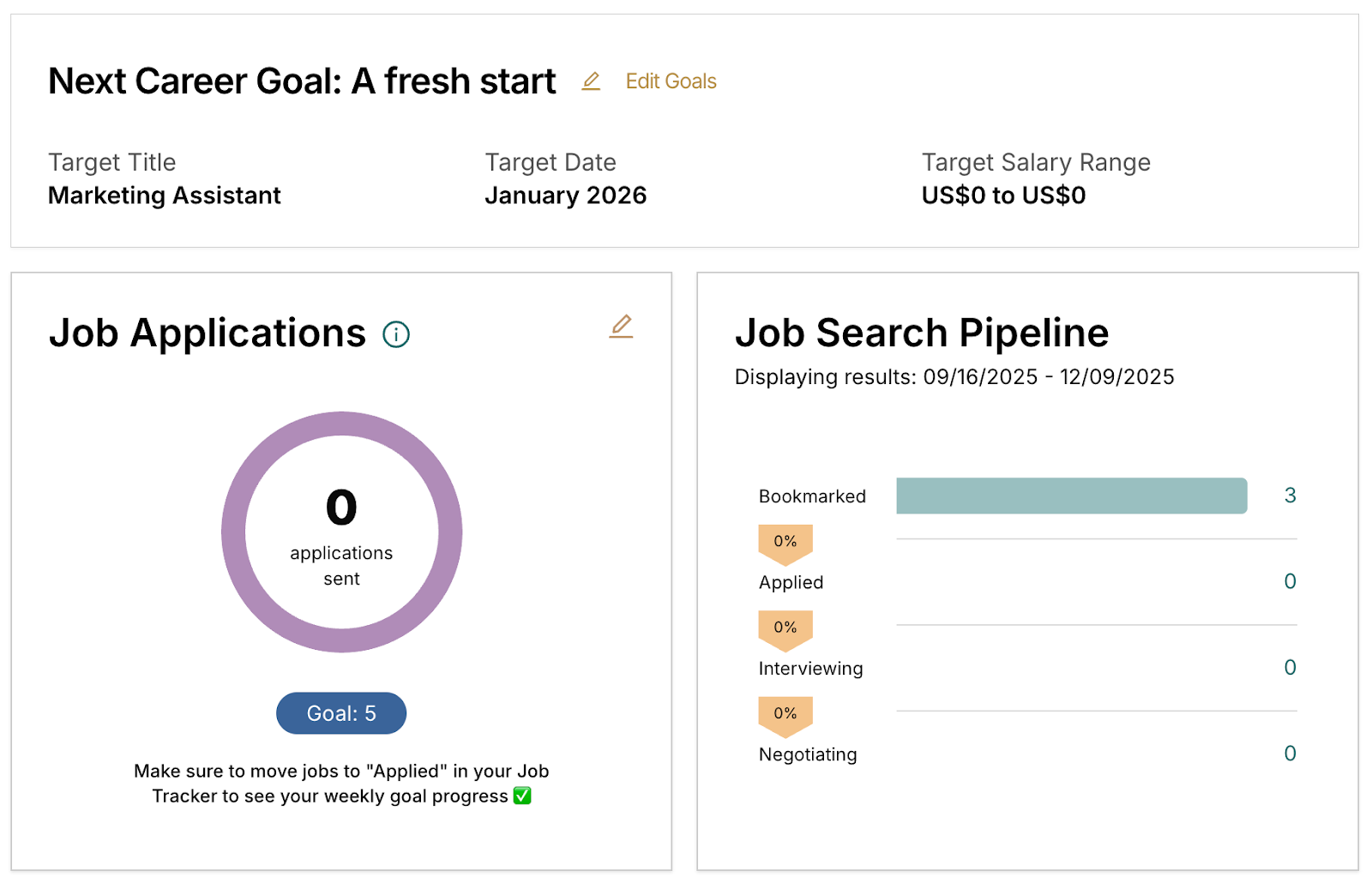
Everything is laid out to help you keep your job search centralized. You can track where you are in the application process, set goals for target roles or salary expectations, and jump back into your latest resume.
The only catch is that because Teal tries to do so much, it’s not immediately clear what the platform primarily wants to be: a resume builder? A job board? A career-planning tool? It’s kind of all three, which is both a strength and a point of occasional confusion.
How to use the Teal Resume Builder?
When you’re ready to build a resume, Teal gives you a few starting points:
- New Resume
- Start from Job Description
- Start from Template
- New Cover Letter
Every resume you’ve created is stored on your dashboard, so you can jump back into past versions or duplicate them for tailored applications.
Starting from scratch takes you into Teal’s guided resume builder. This part is fairly intuitive. You move through structured tabs that cover the essential areas (Work Experience, Education, Skills) along with optional sections.
Each tab walks you through what to include, and the AI tools, like the Bullet Point Generator or the Job Matcher, can help you fill in the blanks and align your text with the job description (at least, that’s the intention).
Get more insight into the best resume-building platforms: Best AI Resume Builders
Teal AI Resume Builder Tools and Features
Quick disclaimer before we jump in: this review is based on my personal experience using Teal. I’ve worked in the resume-building space for a while and have tried a ton of career platforms, so I’ve got a decent point of comparison. Even so, I promise to keep things fair, honest, and as bias-free as possible.
Here are the key AI Resume Builder features I’ll explore:
- Content Editor
- Designer
- Analyzer
- Job Matcher
- Bullet Point Generator
- Summary Generator
- Skills Generator
Below, I’ll explain how these features work and, most importantly, if they’re worth your time.
Teal AI Resume Builder: Content Editor
Teal’s Content Editor is the foundation for building your resume. It guides you through the process by organizing everything into 11 useful tabs:
- Contact Information
- Target Title
- Work Experience
- Education
- Skills & Interests
- Certifications
- Awards & Scholarships
- Projects
- Volunteering & Leadership
- Publications
Each section expands into structured fields, so if you’re newer to resume writing, it’s helpful to have Teal point out what belongs where. One side of the screen is your input area; the other side offers quick suggestions, so you’re not guessing what goes into each section.
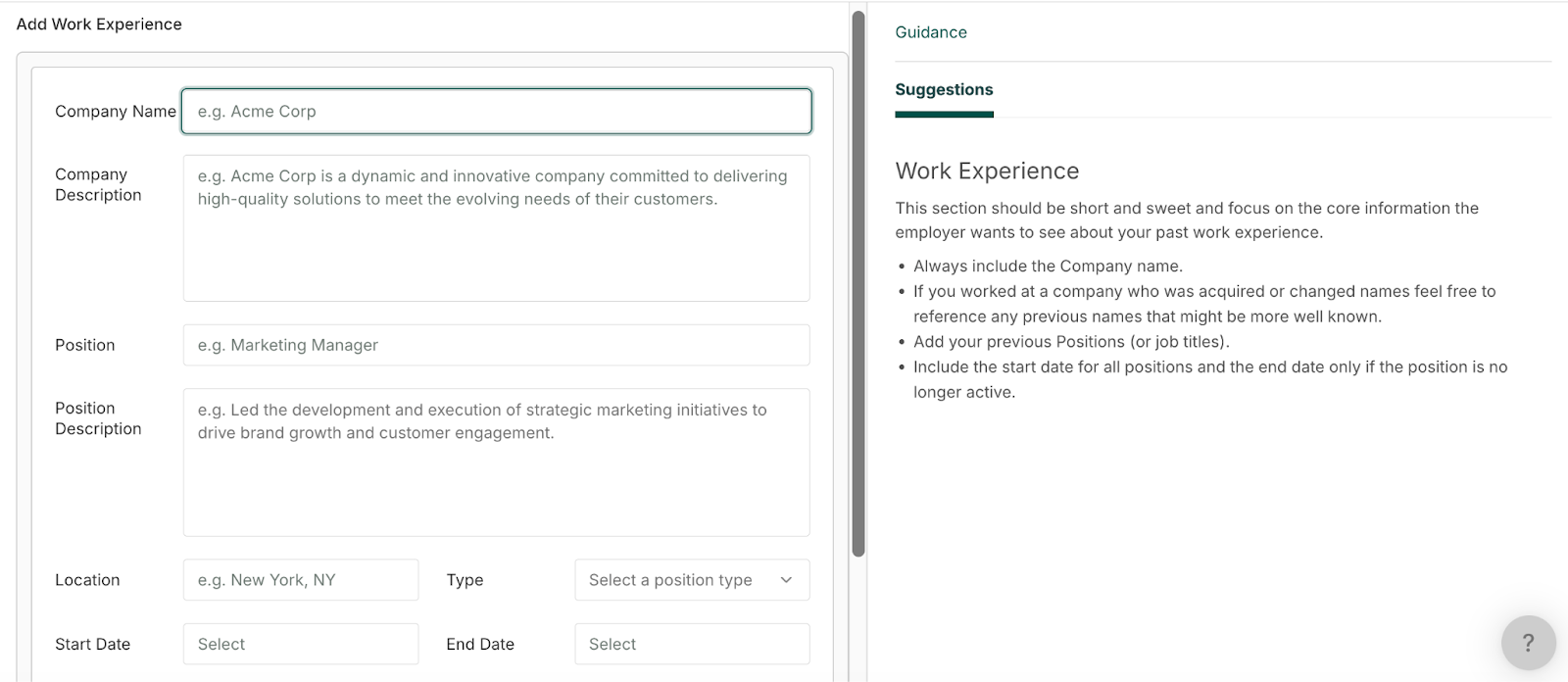
However, some suggestions are surface-level. Things like “include the company name” are good reminders, but they’re not the type of expert insight that makes your resume stand out.
And while the range of categories is genuinely useful, a few of the fields feel incomplete. For example, the Awards section only lets you input the name, organization, and date, even though many awards could use a sentence of context. Some fields also feel unnecessary, such as listing your full address and city and state, or adding a company description.
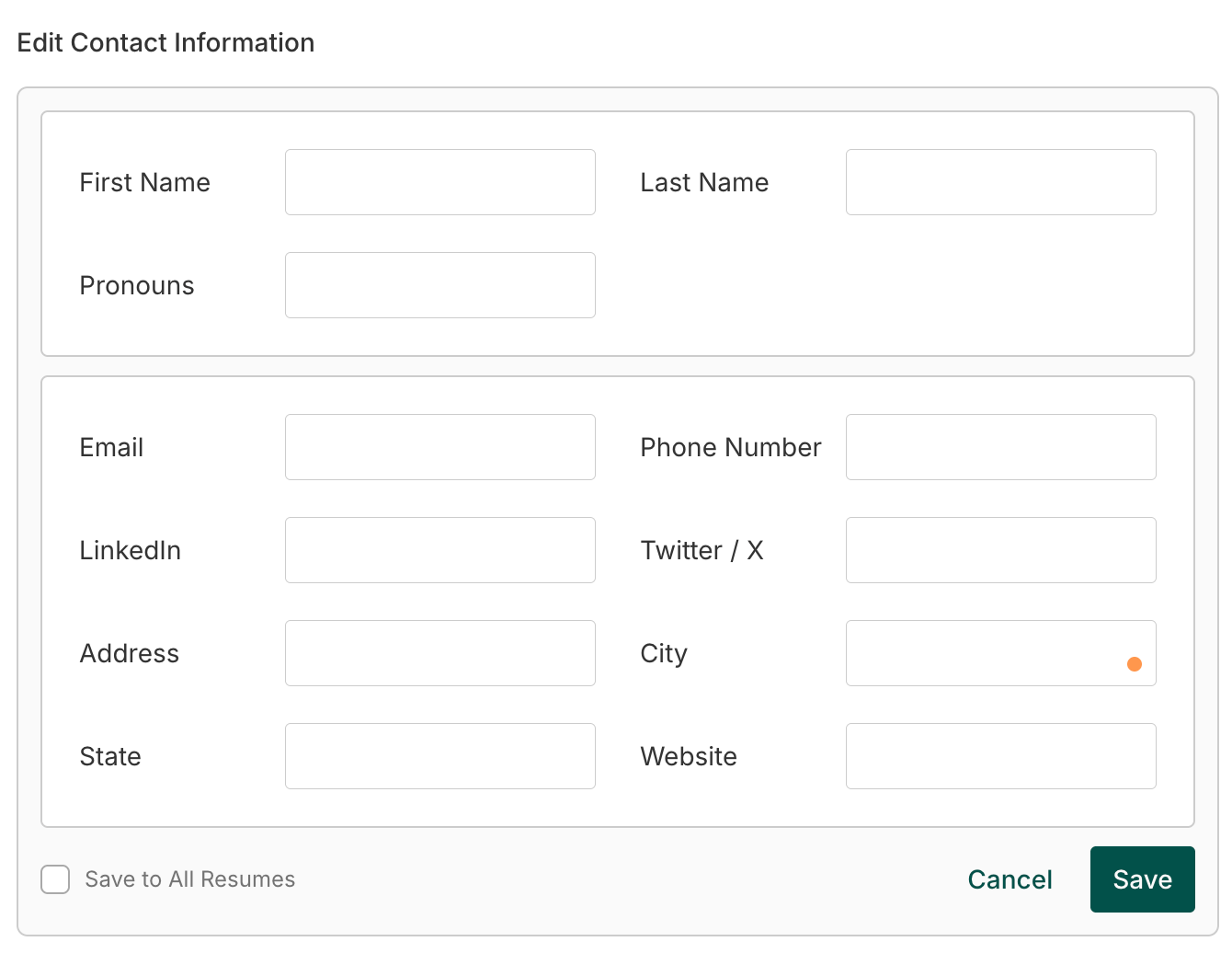
Overall, it was nice to see a live preview of your resume as you go through the process. It was pretty motivating to see everything take shape and shift from “form” to “document.”
Pros
- Organized structure makes it beginner-friendly
- Live resume preview is helpful
- Broad range of relevant resume sections
Cons
- Suggestions are often too basic
- I couldn’t add some important details
- A few fields feel redundant
Teal AI Resume Builder: Designer
Once your content is in place, the Designer section lets you shape what your resume looks like.
Here are just some of the features you can edit:
- Templates
- Fonts
- Margins
- Text alignment
- Accent colors
- Skills layout
- Text weight
- Line height
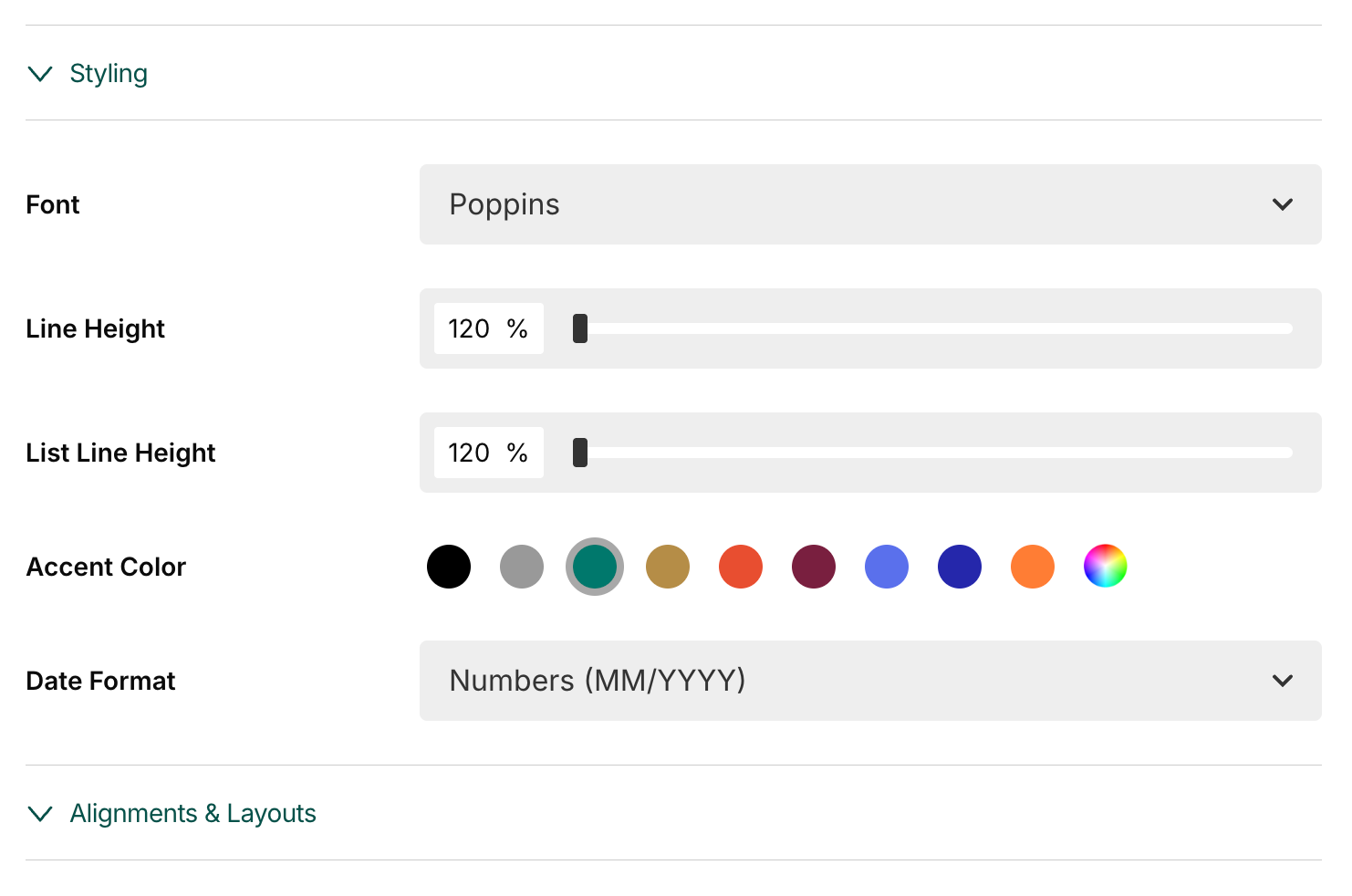
The free tier offers 11 templates, all of which stick to an ATS-friendly, modern, minimalistic style. The range covers both more structured styles for experienced professionals and layouts with extra breathing room for those with shorter backgrounds.
The premium templates (ironically) don’t always improve on these. Several use up half the page with design-heavy white space, which means you lose valuable room for content, making it hard to justify paying for them.
Several templates also use two columns, which can be hit-or-miss with ATS systems. And some templates push your content onto a second page, even when it could easily fit on one. While a two-page resume isn’t the end of the world, most recruiters prefer a single, well-curated page when possible.
Pros
- Lots of formatting customization
- 11 strong, free templates
- Modern designs aligned with current hiring norms
Cons
- Many premium templates aren’t practical
- Two-column layouts may impact ATS readability
- Some designs push content onto an unnecessary second page
Teal AI Resume Builder: Analyzer
The Analyzer feature aims to give you an objective look at how your resume is performing. It scores your document in three areas:
- Structure
- Measurable results
- Keyword usage
Each of which can definitely influence how a recruiter or ATS system interprets your resume. These categories are a good starting point, but it would be even more helpful to have a broader evaluation of overall content quality, clarity, tone, or even potential red flags.
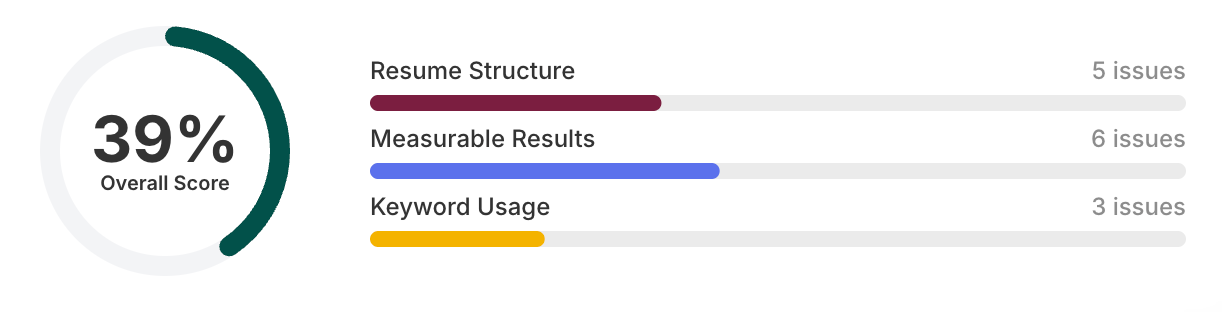
One thing that stood out to me was how ‘strict’ the measurable results scoring is. Even with quantifiable achievements in over half of my bullet points, it still flagged multiple “issues,” which made the feedback feel slightly disconnected from reality.
And just a heads up, while the Analyzer highlights some areas for improvement, the actual explanations are locked behind the paid plan. Without that context, the tool feels more like a teaser than a fully actionable resource.
Another area for improvement is timing. It would be nice to see real-time suggestions as you go through your resume, or at least have the option to overlay them directly on your finished resume instead of switching back and forth between editor tabs.
Pros
- Focuses on high-impact resume categories
- Helps you stay aware of keyword usage
- Quick snapshot of resume “health”
Cons
- Detailed suggestions require a paid subscription
- Not enough variety in scoring categories
- Doesn’t offer real-time or on-document feedback
Get more resume feedback with Rezi’s Real-Time Analysis tool and Rezi Score.
Teal AI Resume Builder: Job Matcher
The Job Matcher is one of the key features in the Teal ecosystem. You simply paste in a job description, and the platform pulls out the skills and keywords that match the role. You can then apply these insights to each section of your resume.
Teal provides keyword lists, section-by-section scoring, and the option to keep the job description visible while editing, which makes tailoring much easier.
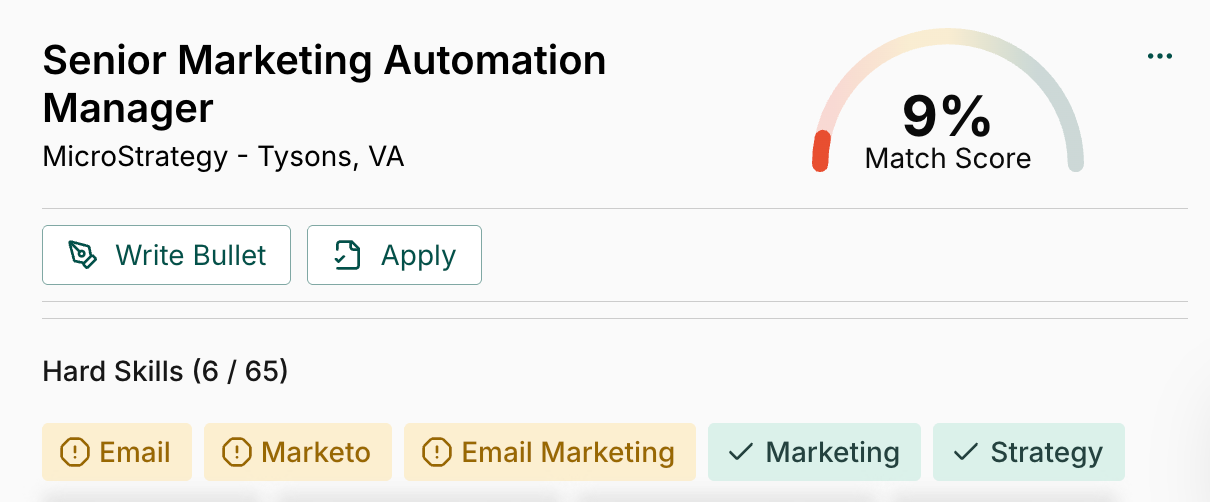
This feature aims to eliminate the manual keyword-hunting process. I especially like that you can select individual resume sections to analyze (helpful if you’re only updating one job or refining a specific part). You can also run an overall score across your entire resume once you’ve made changes.
There are limits, though. To see the full keyword list, you need the premium version. But even then, you get a lot of random keywords that are essentially just filler. It can actually take more time to go through the whole keyword list and decide which ones to include or eliminate.
Plus, if you genuinely don’t have a particular skill that the job requires, there’s no legitimate way to increase your score there (and you definitely shouldn’t try to pad it with skills you don’t have).
Pros
- Helpful in tailoring your resume
- Clear breakdown of hard and soft skills
- Section-by-section scoring
Cons
- The full keyword list is behind a paywall
- Many keywords are filler words or irrelevant
- Scores may pressure users to add skills they don’t possess
Teal Resume Bullet Point Generator
The Bullet Point Generator works hand-in-hand with the Job Matcher, using the job description and your role details to write new bullet points.
Here’s what you can choose from:
- Automatic: Get three bullet points tailored to your position and job description.
- Keywords: Select keywords you want your point to include, or manually enter your own.
- Job Description: Select a statement from the job posting to align your bullet points.
- Coach Me: Answer questions to help the AI tailor your points.
- Custom Prompt: Enter a custom prompt to add specific details or adjust the tone.
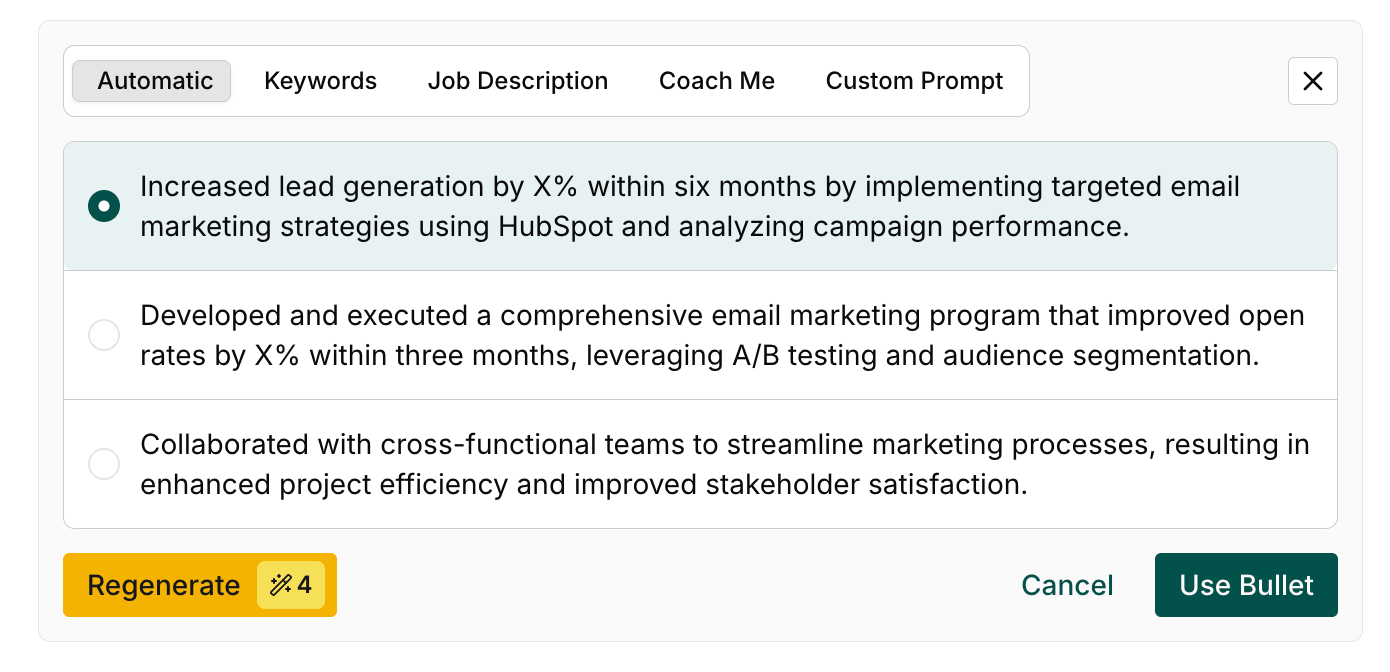
This versatility gives you more freedom and control in the end result. Whether you want bullet points that highlight metrics, technical skills, soft skills, or improved clarity, you can nudge the AI in that direction. It gives you a decent draft that you can refine into something truly personalized.
But that’s the catch: you need to edit and refine these points if you actually want to make a solid first impression. Otherwise, they can end up sounding generic, vague, and robotic.
Pros
- Multiple options for generating tailored bullet points
- Strong integration with Job Matcher
- Encourages customization and user control
Cons
- Quality varies with AI, so you still need to edit
- Strongest results require leveraging other paid features
See how Teal compares by checking out our AI Bullet Point Writer. Our resume sentence generator helps you make achievement-focused points for the role you're writing about.
Teal Summary Generator
The Summary Generator was my least impressive AI tool. The summaries are simple (maybe too simple) and technically correct, but they often feel vague or generic. Yes, they incorporate a few keywords, which is helpful, but they don’t really “sell” the candidate or highlight anything distinct.
Here’s the first summary I generated with the tool:
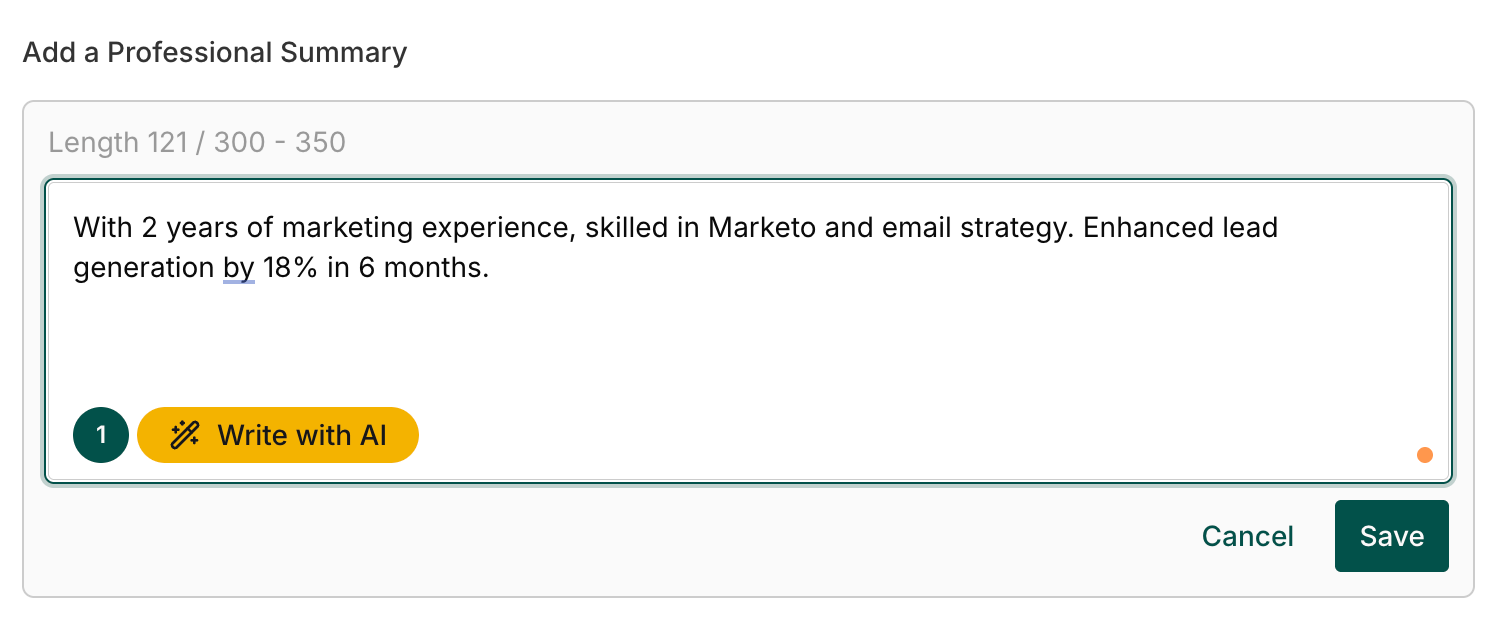
One missed opportunity is personalization. The tool doesn’t use the job description enough to create a more targeted summary, and it’d make a big difference if it could simply reference the company or speak directly to the role.
You get two free generations, and the second attempt was slightly better (likely a nudge toward upgrading to the paid version). Still, the built-in suggestions on the side are genuinely helpful, so even if the AI’s output is meh, it gives you a clear idea of how to improve it.
Pros
- Quick starting point for a resume summary
- Helpful built-in writing tips
- Simple, fast generation
Cons
- Results are often too vague or generic
- Doesn’t use job descriptions for personalization
- Limited free generations
Room for improvement? Check out our own AI Summary Generator. We deliver a tailored and impactful summary in seconds for your resume.
Teal Resume Skills Generator
Teal’s Skills Generator pulls skills from the information you’ve already added, which is pretty convenient. For roles like marketing, it surfaces a mix of software tools and broader abilities. Many are spot-on (e.g., Ahrefs, WordPress), while others are too broad to be meaningful on a resume, like “creativity” or “teamwork.”
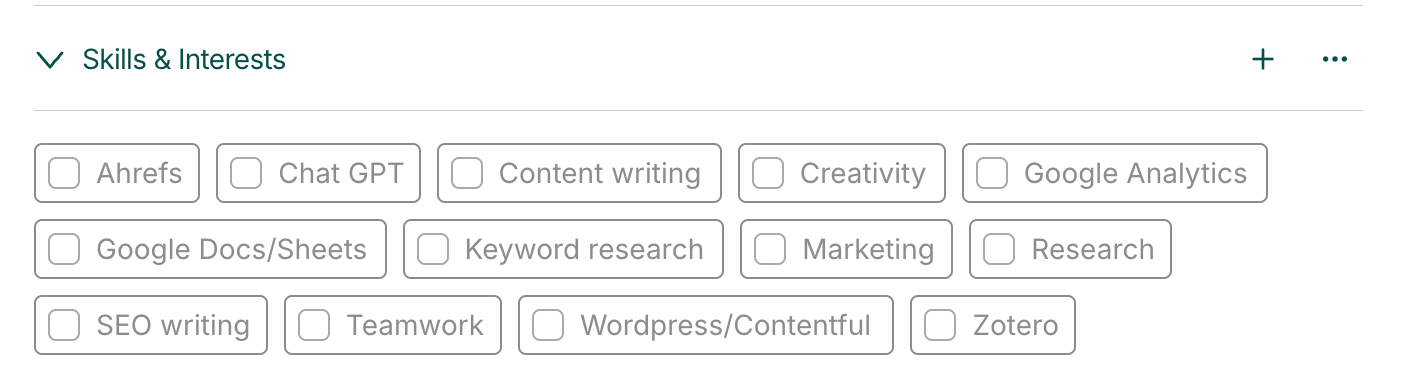
One small but thoughtful touch is the ability to customize how you display your skills on your resume: alphabetically, in columns, or styled differently depending on your template. This makes it easy to clean up what can often be a cluttered section.
Pros
- Auto-suggests skills based on your content
- Useful mix of specific technical skills
- Customizable formatting options
Cons
- Some suggestions are too generic
- You may still need to refine the list manually
Teal Extra Features
Teal’s mission to empower job seekers doesn’t end with its resume-building features. They also include several job search tools and extra services to help you on your journey. But are they actually helpful? Let’s find out.
Here are the extra features I’ll put under the microscope:
- AI Cover Letter Generator
- Teal Job Search
- Teal Application Tracker
- AI Interview Practice
Let’s take a closer look.
Teal AI Cover Letter Generator
Teal’s AI Cover Letter Generator gives you one free shot at producing a full cover letter based on a job description you upload. Before the AI starts writing, you can decide on a few factors:
- Length: Between 100 and 400 words.
- Tone: Match Job Description, Formal, or Casual.
- Job Description: Choose from a list of statements and requirements in the job ad.
- Custom Prompt: Add your own prompt, with the option to load examples for inspiration.
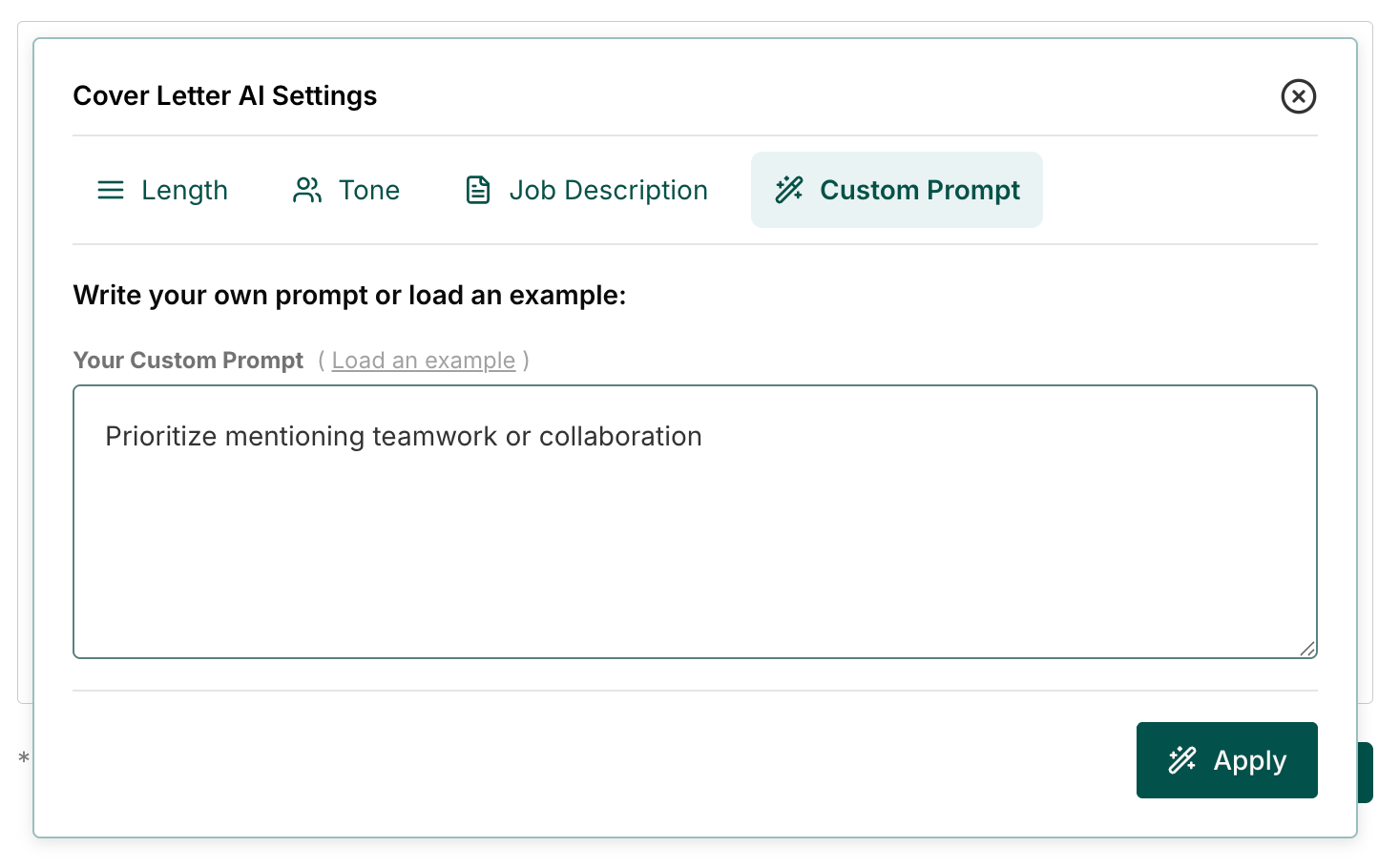
The final output is solid. It does a decent job of weaving in your role, skills, and even the company name, and it pulls relevant points from your resume, so the letter actually sounds tailored to the position.
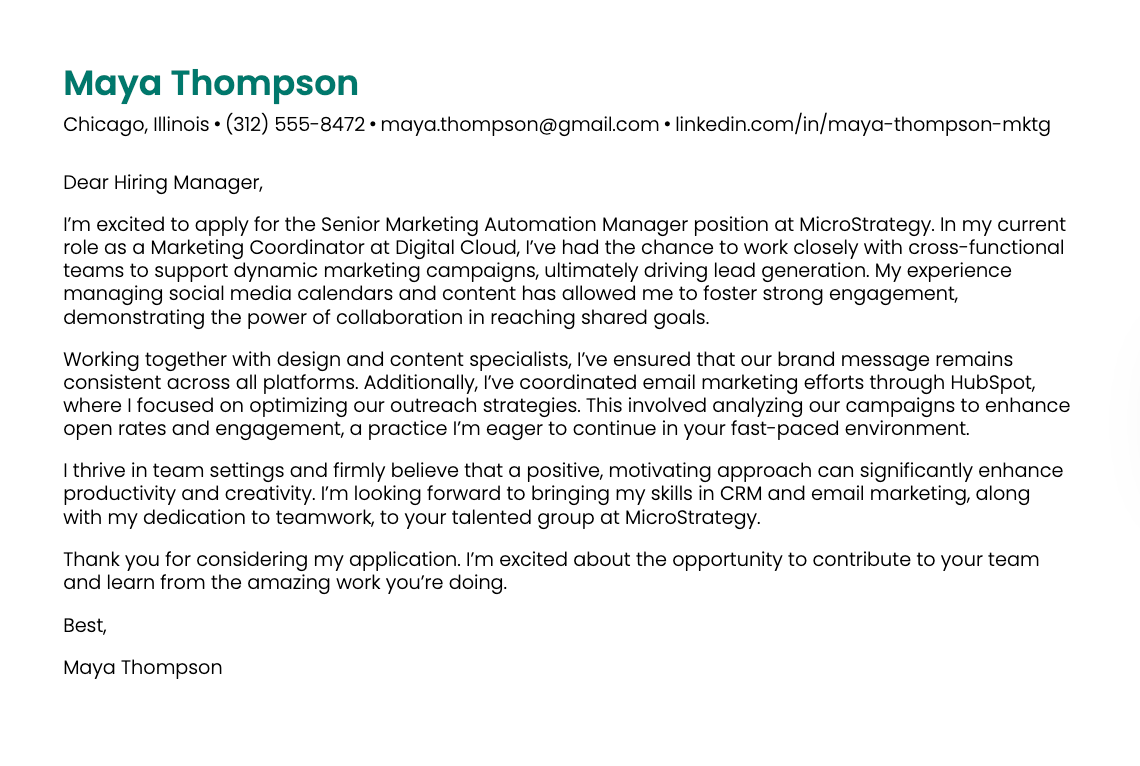
But, like most AI-generated writing, there are still moments where the language feels a bit too impersonal or robotic. Luckily, Teal’s side-by-side editor makes it easy to clean up those stiff lines or add your own voice. What’s missing, though, is some sort of built-in analysis; something that could point out gaps, compare your letter to the job ad, or highlight missing keywords.
Pros
- Highly customizable (tone, length, keywords, prompts)
- Pulls from both your resume and job description
- Easy to edit with a side-by-side view
Cons
- Only one free generation
- AI output needs human editing
- Lacks analysis or alignment insights
Teal Job Search
Teal’s Job Search pulls listings from external job boards and lets you search by company, title, or location. You can then narrow things down using filters, such as:
- Experience level
- Workplace type
- Salary
- Industry
- Job level
- Keywords
Where it gets interesting is how it connects the job postings to your resume. Teal compares your document to a job ad and gives you a match score based on your skills. It’s not a complete compatibility check, though — there are a lot of random keywords pulled from the job description that won’t add any substance to your resume.
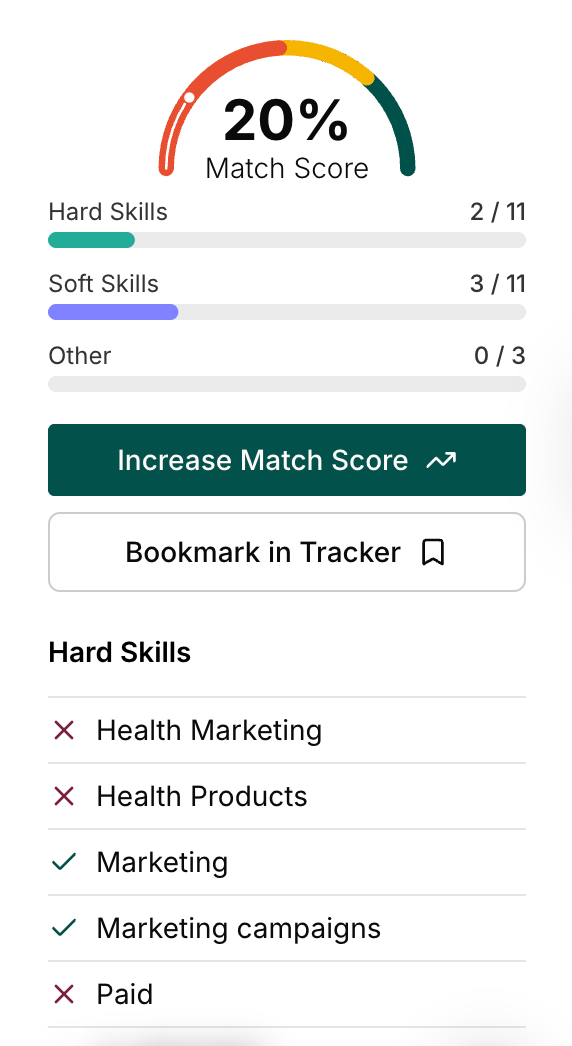
(What is ‘Paid’ doing on the hard skills list?)
There’s also an AI Job Search tool where you input what you’re looking for, and it generates suggested roles from its database. When I tested it with a fairly simple prompt, it pulled hundreds of remote roles and highlighted a few top matches based on my background.

Yes, finding jobs based on your professional background is convenient, but career changers or those new to their field might find it limiting since the recommendations lean heavily on your past experiences.
Pros
- Extensive filtering options
- Integrates with your resume for match scoring
- AI-powered job discovery
Cons
- Match score lacks depth
- Influenced by your existing background (not ideal for career pivots)
- Premium features are required for more insights
Want to expand your job search? Check out more platforms: Best Job Search Engines
Teal Application Tracker
Teal’s Application Tracker is basically a spreadsheet built into their platform, which can be either comforting or intense depending on how you feel about this format.
On the plus side, it’s well organized. Each stage of the job search funnel is displayed at the top as a clickable filter, so you can quickly sort jobs by where you are in the process. You can also update the status of each application directly in the grid, along with details like:
- Salary
- Dates
- Location
- Enthusiasm level (a surprisingly fun metric)
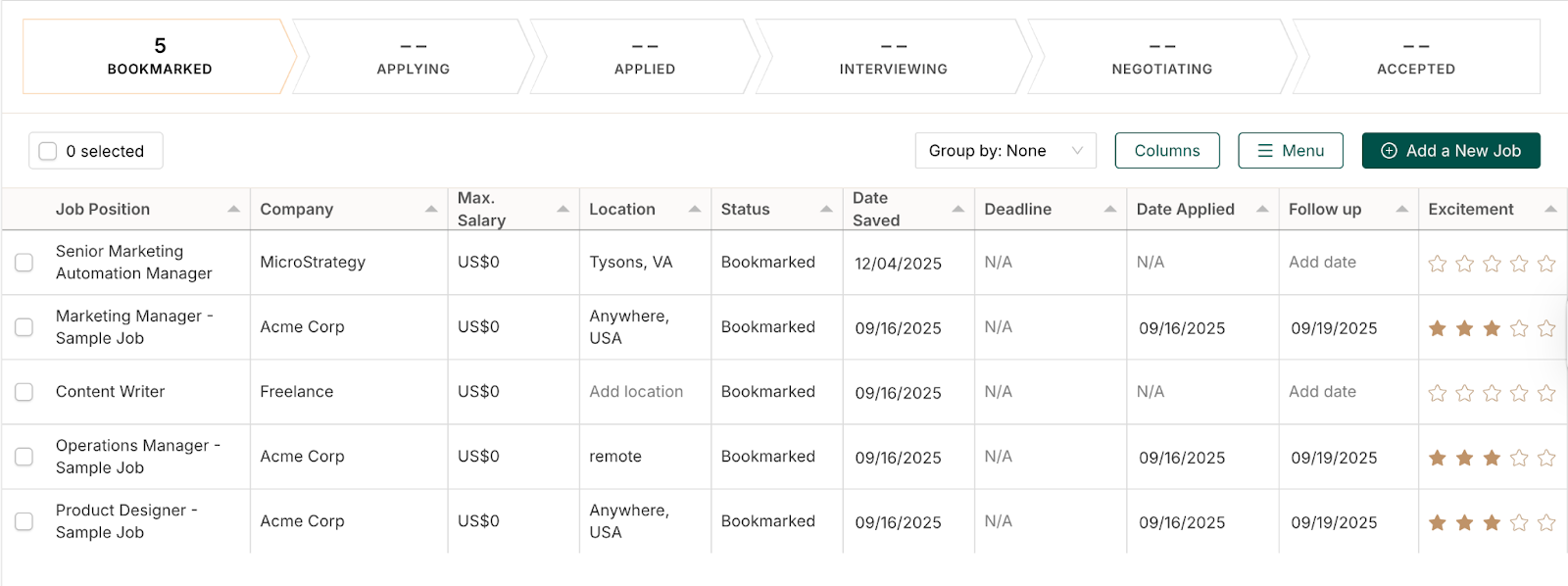
You can also reorder your applications by follow-up date, excitement, job availability, or any of the table headers, and recently saved jobs automatically rise to the top. If the grid is too busy for your taste, you can hide columns to simplify things.
Teal also includes a company tracker and a contact tracker for networking. And if you prefer keeping everything in your own files, you can export the whole thing to your personal spreadsheet.
If you’re struggling to digest all these features, that brings me to my main issue: there’s a lot going on. It’s easy to feel overwhelmed if you prefer a simplified job application tracker that sticks to the basics — applied and rejected.
Pros
- Comprehensive job-tracking system
- Filter and sort by multiple categories
- Unique “excitement” rating
Cons
- Spreadsheet layout won’t appeal to everyone
- Can feel crowded and overwhelming
AI Interview Practice
The AI Interview Practice lets you pick from eight common interview scenarios, such as handling conflict, addressing weaknesses, or discussing salary. Each scenario has a short explanation of what you’ll be practicing and how long the session will take (helping to set expectations before you dive in).
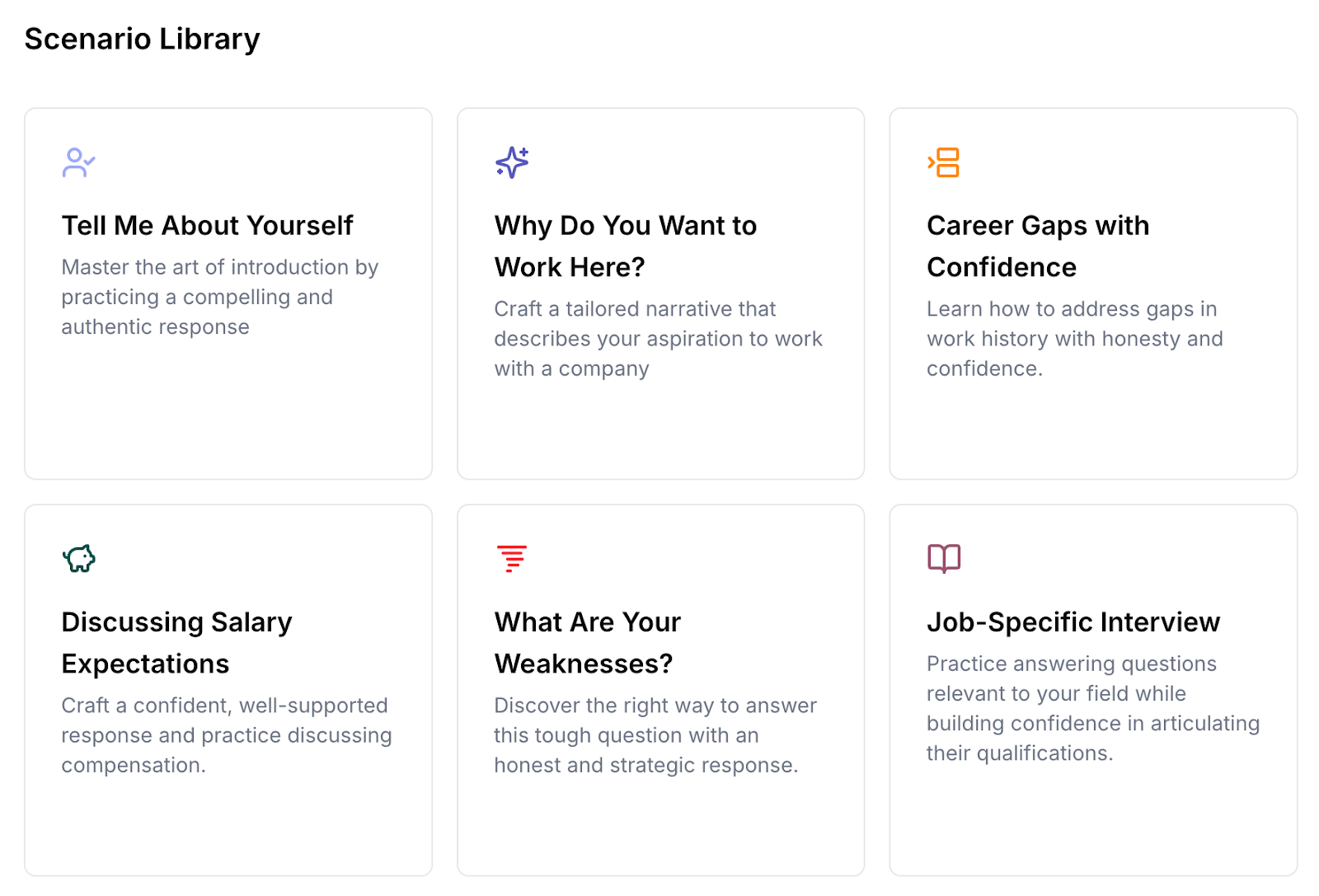
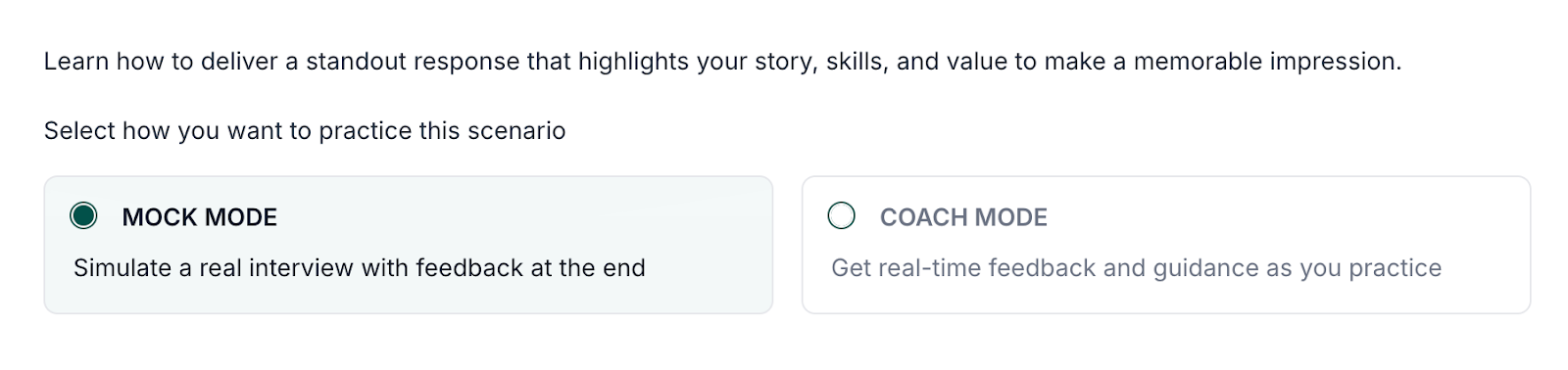
Once you choose a scenario, you can switch between Mock Mode (a full simulated interview with feedback afterward) or Coach Mode (feedback in real time). But despite these being common interview scenarios, it would be nice to have more extensive or tailored choices.
The setup mimics a real interview pretty well: an AI interviewer speaks to you (cue the robotic voice), you can turn on your camera to practice body language, and you get a transcript of the conversation in case you need a second look at the question.
I tested a scenario by pretending to be an eco-conscious marketer, and overall, the experience was mixed. While the critical feedback was specific to the points I mentioned, the praise it gave was more generic — more like “you communicated clearly” than anything deeply tailored.
That said, the speech recognition is impressive; it captured everything accurately (even with my strong Yorkshire accent).
Pros
- Mock Mode and Coach Mode offer two practice styles
- Accurate voice recognition
- Specific feedback on areas to improve
Cons
- Positive feedback is vague
- Limited number of scenarios
- Some advice feels generic
Need to improve your interview game? Take a look at these practice questions and tips:
- STAR Method Interview Guide
- Phone Interview Questions to Prepare For
- Common Interview Questions & Sample Answers
Teal Pricing
Teal has a free version with plenty of basic tools, but many of the features are locked behind a paywall: Teal+. This includes unlimited AI-generated resume content, deeper keyword and skills customization for each application, job-specific resume recommendations, and email templates for every stage of your job search.
Here’s how much you need to pay for Teal+:
- $13 per week
- $29 per month
- $79 every three months
This is the full breakdown of the standard plan vs. Teal+ on their site:
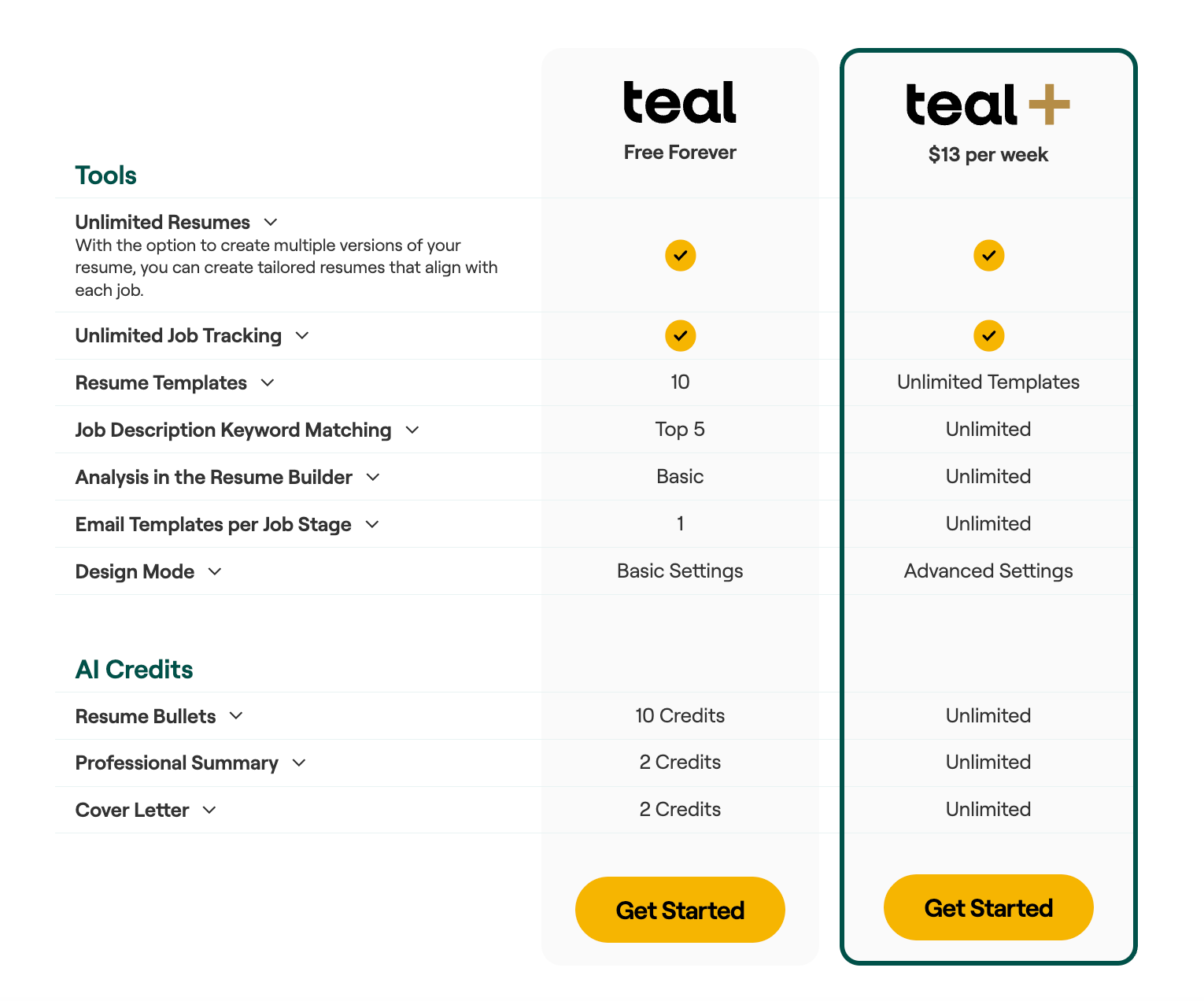
(So yes, the claim that Teal is 100% free on the homepage is pretty misleading.)
Teal Reviews: What Do Customers Think?
Let’s state the obvious: I work for Rezi. And while I absolutely believe we have the best platform in this space, I never want to be accused of being biased. My opinions are always honest and based on my personal experiences. That said, everyone has different perspectives.
I scoured Trustpilot and Reddit (the latter was unfortunately mostly negative) to find some different views on Teal. I couldn’t include all of them, but I’ve included the ones that articulated some of the positive feedback and areas to improve without going into a full-blown rant.
For example, this premium user pointed out some of the main benefits and flaws:
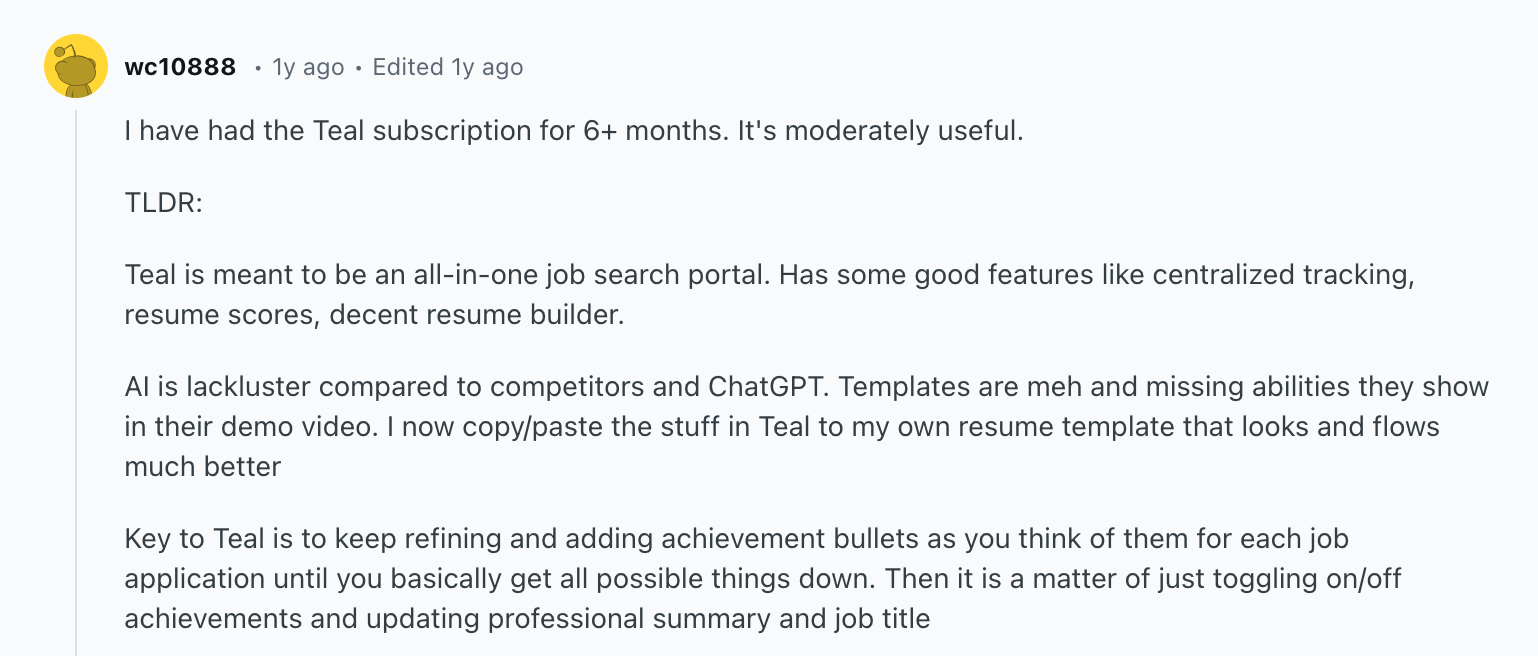
Another customer expressed frustration over the resume templates:
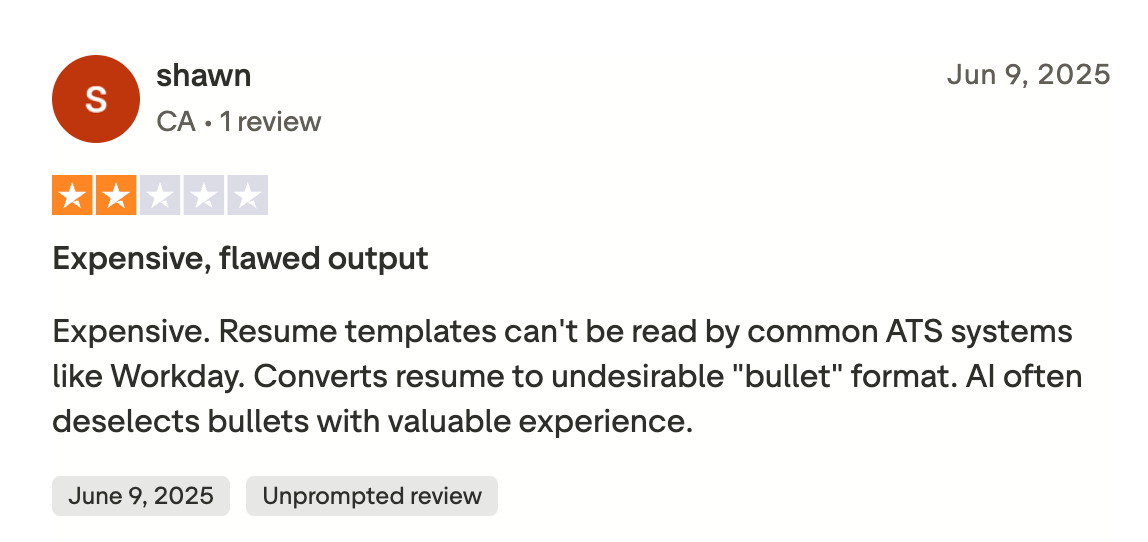
On a positive note, many users complimented the job search trackers and tools:
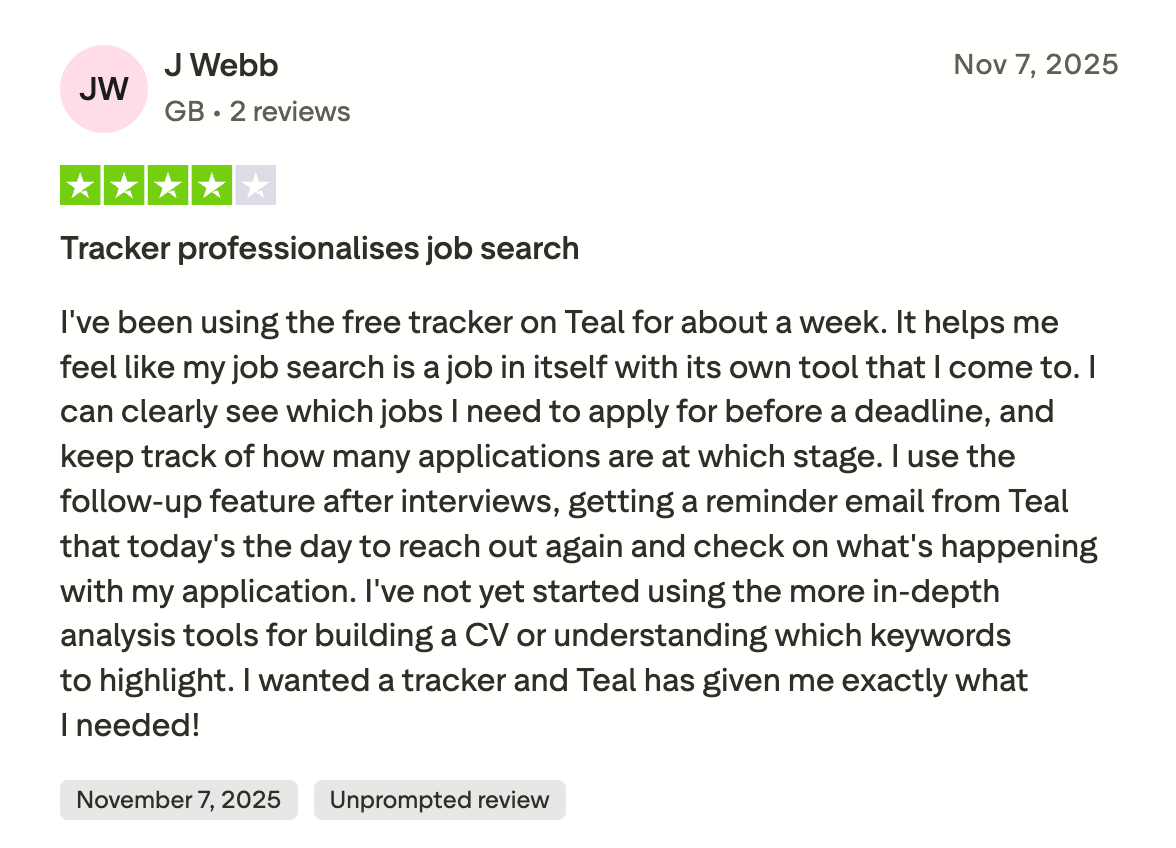
Another user emphasized the usefulness of the job tracking features:
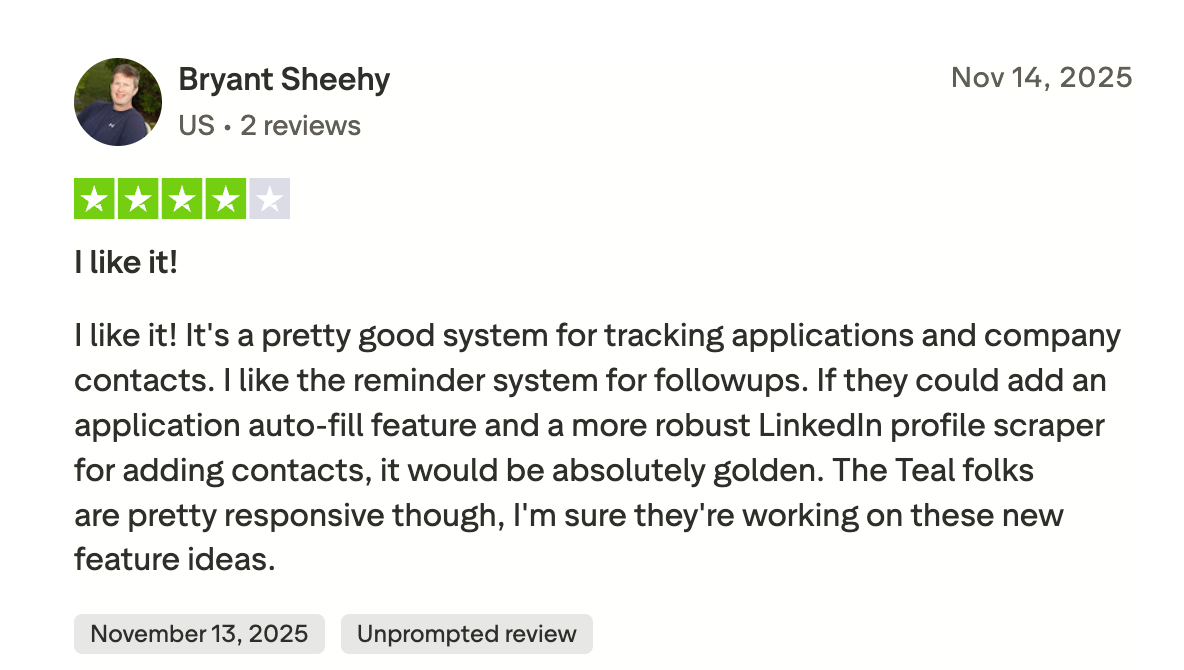
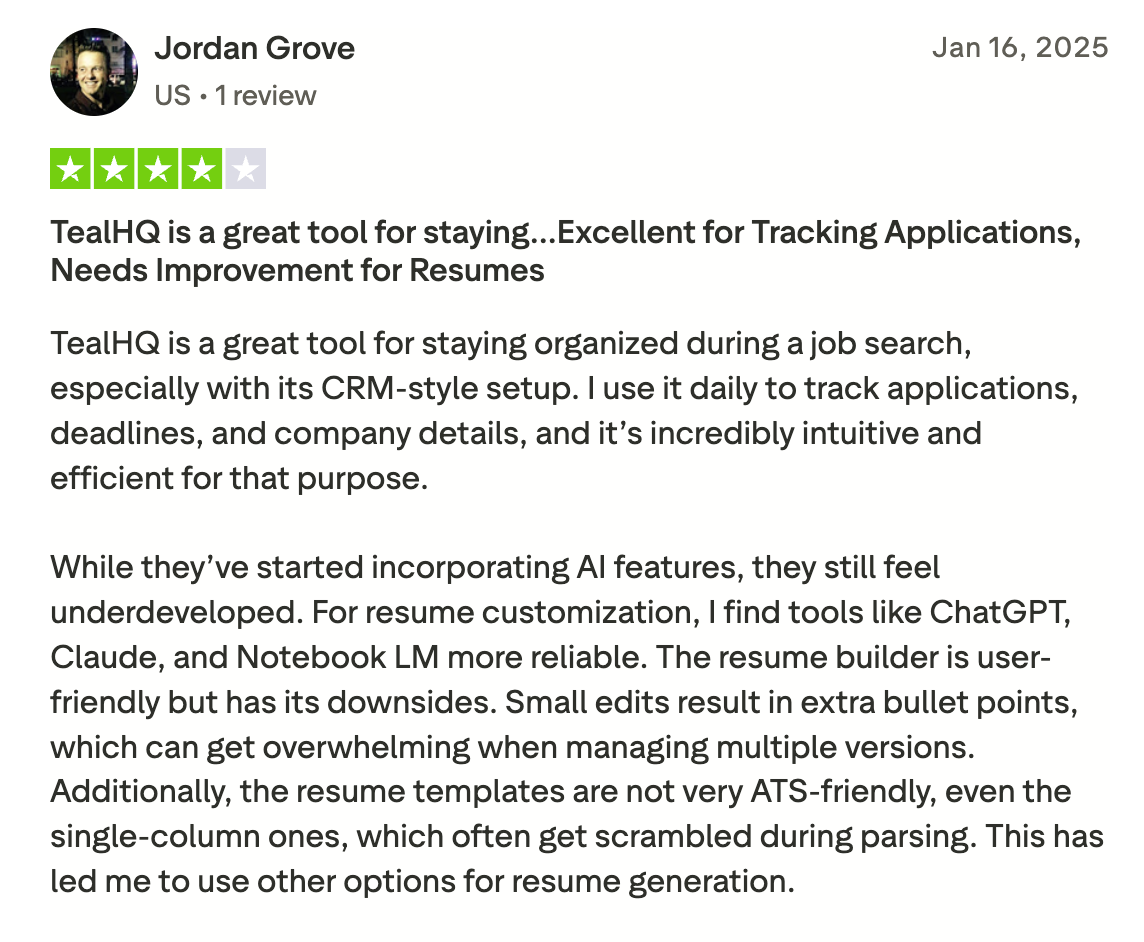
And here’s some more balanced feedback:
Final Thoughts: Is Teal Worth It?
Teal is a capable platform, especially if you want an all-in-one hub for resumes, job tracking, and career tools. The AI features are useful for brainstorming and speeding up your workflow. Plus, the dashboard, application tracker, and interview practice are handy additions that you won’t find in every resume builder.
However, Teal has some obvious drawbacks. The number of features can lack direction and refinement, and much of the AI-generated content still needs a lot of human tweaking to feel truly authentic. A few resume sections feel limited, and the premium pricing adds up if you want access to unlimited AI features.
While I think Teal can work well for people who want structure and guidance throughout their job search, it’s not necessarily my top pick for pure resume building. I still stand by Rezi because of its advanced AI output, better ATS optimization, and the way it just feels simpler and faster for creating a strong resume without all the extra bells and whistles.
FAQ
Is Teal Resume Builder legit?
Yes, Teal is a legitimate and widely used platform. Many reviews and user reports mention that people successfully use its AI‑powered builder and job‑tracking tools. There are no major red flags about scams or shady practices, other than a few complaints about difficulties cancelling subscriptions.
However, “legit” doesn’t mean “miracle worker.” As with any tool, results depend heavily on how you use it, what content you feed in, and how you complement its suggestions with your own judgment.
Can Teal Resume Builder track your job applications?
Yes, one of Teal’s strengths is that it doubles as a job‑tracker. It has a built-in job application tracker (with support for notes, follow‑ups, stages of application, saved roles, etc.), and integrates with many job boards via a Chrome extension so you can more easily capture listings and manage applications in one place. It’s useful if you apply to many roles and want to stay organized.
How much does Teal resume builder cost?
Teal offers both a free version (limited resume features and basic job tracking) and a paid subscription (known as Teal+). The paid version costs $13 every week, $29 every month, or $79 every three months.
Teal+ unlocks advanced features like unlimited AI‑powered resume content, more thorough keyword matching and job‑specific tailoring, unlimited cover letters, advanced resume analysis, and more.
Is Teal a good job tracker?
Teal functions as a solid job tracker, especially for job seekers managing multiple applications at once. It lets you save job postings, track the status of each application, add notes, and schedule follow-ups, all in one centralized dashboard.
That said, some users find that managing multiple versions of resumes for different roles can require extra manual organization, so while it’s powerful, it may feel a bit heavy if you only apply to a few positions.
What is the best resume builder to use?
Rezi tops the list for professional, ATS-friendly resumes with AI-generated bullet points, summaries, and real-time keyword optimization. Enhancv is great for creative, visually striking resumes, but less ATS-friendly. Resume Worded also shines as a tool to improve an existing resume with AI feedback.
Honorable mentions: Kickresume and Teal, which is more of an all-in-one job tracker than a pure builder.

Upload or drop your resume to get started
Upload your resume to get started
Score my resume

Lauren Bedford is a seasoned writer with a track record of helping thousands of readers find practical solutions over the past five years. She's tackled a range of topics, always striving to simplify complex jargon. At Rezi, Lauren crafts genuine and actionable content that guides readers in creating standout resumes to land their dream jobs.

.webp)