Resume
Harvard Resume Templates: Best Formatting, Examples & Tips
Explore the best Harvard resume templates with formatting tips, real examples, and expert advice to help you build a standout student or graduate resume.

Published on
September 23, 2025
Updated on
January 30, 2026
Key Takeaways
• Classic Harvard format is minimal and ATS-friendly: education first, clear sections, accomplishment statements (ideally with numbers).
• Best for students and recent grads whose academics, coursework, research, and activities outweigh work history.
• If you already have meaningful work experience, prefer a Harvard-style layout that leads with experience instead of education.
• Keep design plain — no heavy graphics; use reverse-chronological order inside sections and measurable achievements.
• Pick the variant by stage: high school / undergrad / graduate / internship templates emphasize different education vs. experience balance.
There are endless resume templates floating around, all promising to be ATS-friendly and guaranteed to land you an interview. Many of them are lying to you (style over substance comes to mind). But I’ll give props to the Harvard resume template for getting a lot right. It’s minimal, concise, and not covered in fancy colors or graphics.
Because it’s so widely used, you’ll find tons of variations out there. So how do you know which one’s worth your time? I’ve rounded up a few of the best, starting with the original Harvard format and some smart alternatives that might be a better fit.
Let’s explore your options. This guide will cover:
- The best Harvard and student resume templates.
- How to create a Harvard resume for any job.
- My expert tip for making a lasting impression.
Want to speed up the process? Our free AI Resume Builder uses professional templates to offer personalized bullet point suggestions and feedback to create your resume in minutes.
And check out more popular resume templates:
- 25+ Free Canva Resume Templates
- 30+ Free & Basic Resume Templates
- 35+ Free Professional Resume Templates
- 15 Creative Resume Templates and Examples
- Free ATS Resume Template for Google Docs
What Is the Harvard Resume Format?
The Harvard resume format is a structured template developed by Harvard University, mainly for students and recent graduates. One thing that sets it apart is that it leads with your education, which is especially useful if you’re still in school. It also focuses on accomplishment statements, ideally with numbers to show your impact.
Unlike a typical resume that might jump straight into work history, the Harvard format gives space to show your academic achievements, coursework, research, and extracurriculars — all the things that matter when you don’t have years of professional experience yet.
This Reddit user sums up why it’s a favorite among recruiters:

Harvard Resume Templates
Despite its namesake, Harvard isn’t the only one offering resume templates for students and graduates. So, I’ll give you a few choices, starting with my top two picks.
If you’re looking for a simple, plug-and-play version, you can download the official Harvard template and fill in your details. However, if you want more suggestions, feedback, and AI-generated bullet points, you might prefer using the Harvard-style template through our AI Resume Builder.
Let’s take a look at the two options.
Rezi Harvard Resume Template
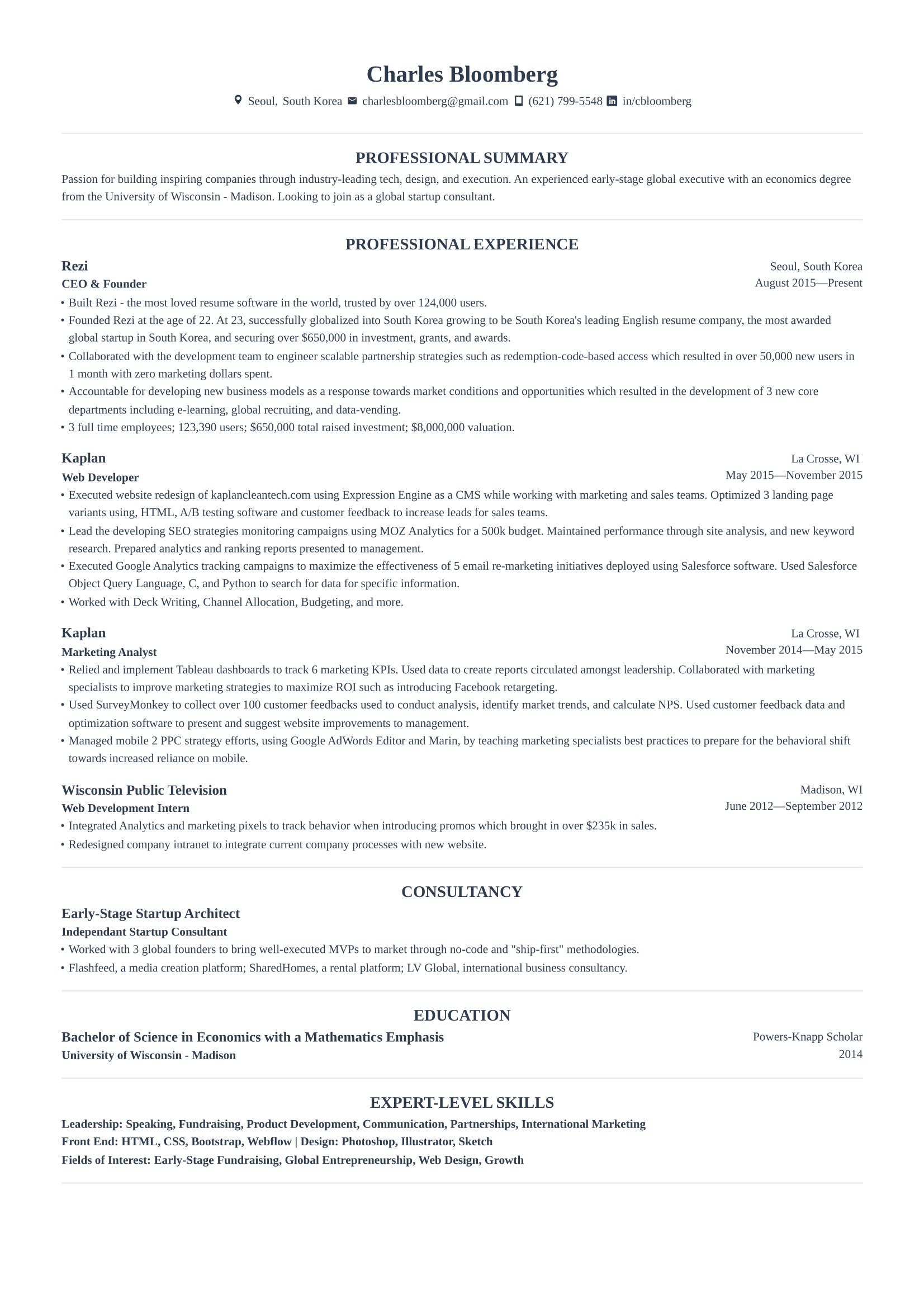
Our version of the Harvard resume gives it a modern, recruiter-friendly spin. Unlike the original Harvard resume, the work experience takes the lead, which is ideal since most hiring managers care more about hands-on experience. It’s professional, easy to scan, and 100% customizable using Rezi’s Resume AI Builder.
Classic Harvard Resume Template
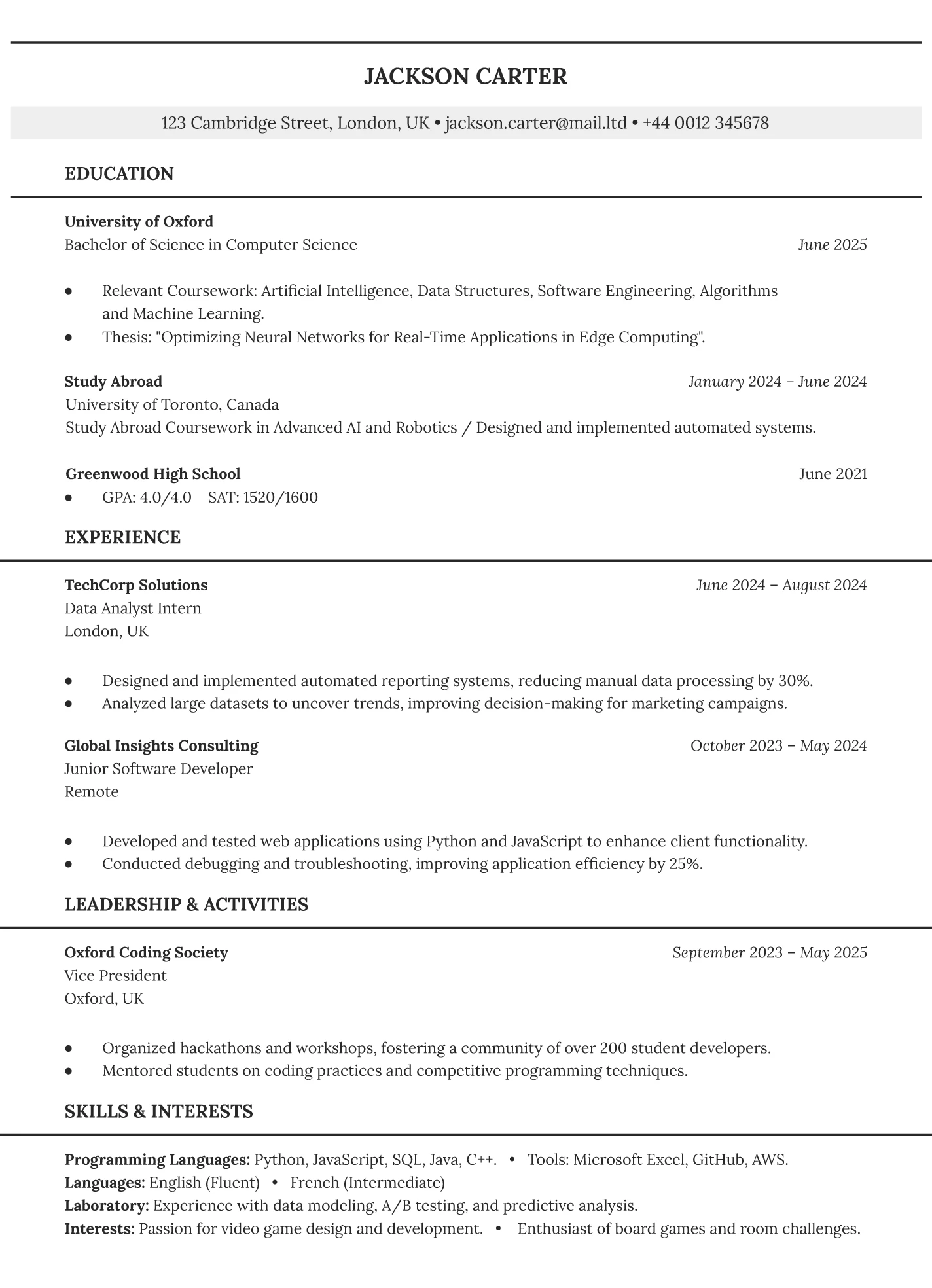
The original Harvard resume highlights your education first, perfect if you’re still in school or freshly graduated. You can expand your education with space for coursework, research, and study abroad. There’s also room for a brief work experience section, as well as leadership roles and activities. The format’s organized and minimal, which means it won’t trip up ATS software.

Student Resume Templates
Harvard-style resumes are built with students in mind. They put the spotlight on your education and make room for extracurriculars and leadership roles. So if you’re still in high school, halfway through college, or freshly graduated, this format helps show off your potential.
If you’re looking for more options to fit your style or goals, I’ve rounded up more free student resume templates worth checking out.
High School Resume Template
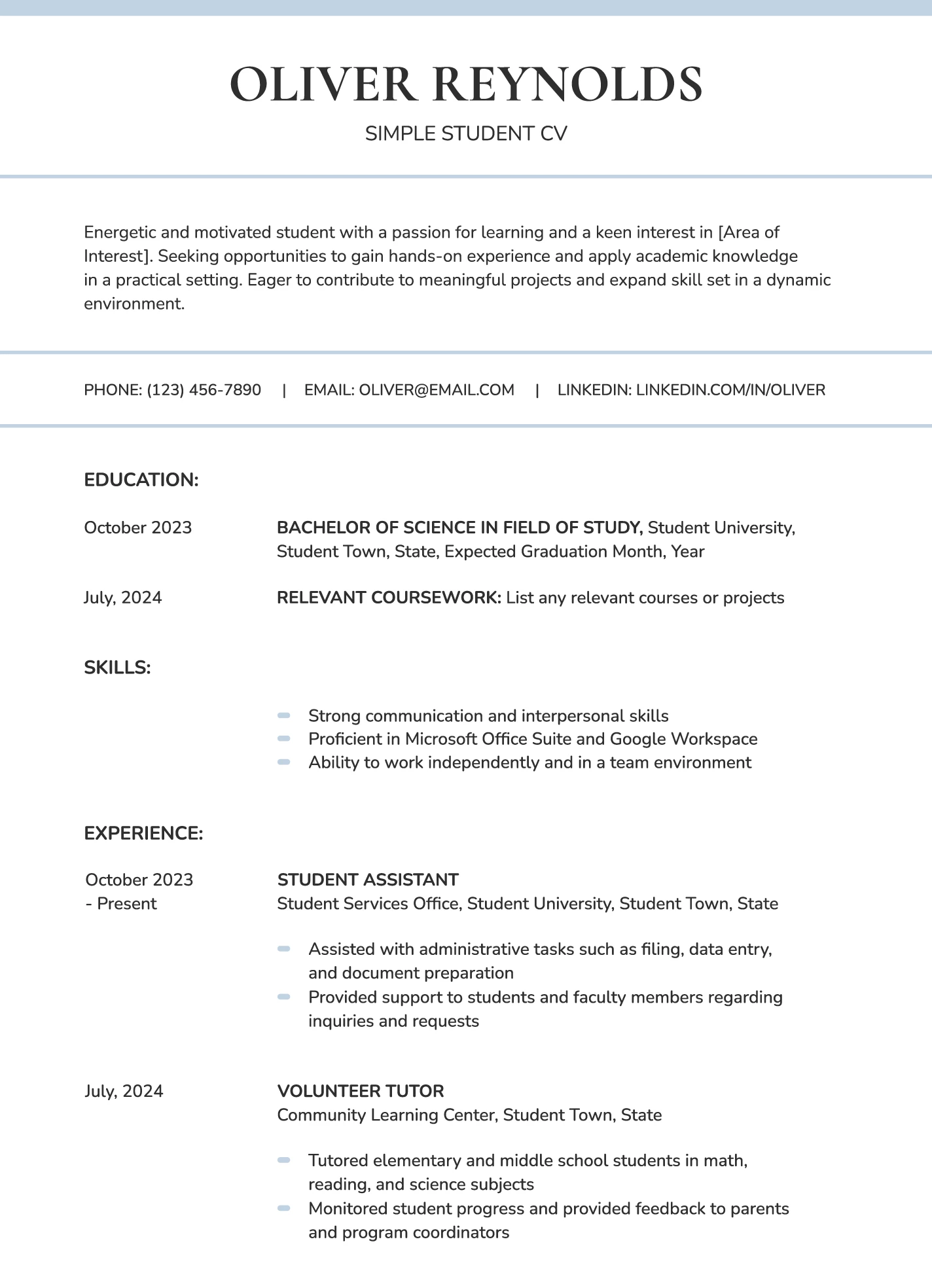
This high school resume is perfect for your first job, internship, or volunteer position. Since you might not have much work experience yet, it puts your education and skills up top. You can share your goals with a short resume objective, and there are extra sections for part-time jobs, volunteering, and school activities.
Undergraduate Resume Template
Inspired by the Harvard resume, this template is ideal for any major or field. Education leads the way, with space to highlight coursework, study abroad, and leadership roles. Experience and skills are organized using clean lines and structured blocks to keep everything scannable. It’s a great choice if you’re still in school and want your academic strengths to shine.
College Student Resume Template
Designed for students who’ve been in college for a while, this template skips high school details and focuses on your college experience. It starts with education, then organizes paid work, volunteer roles, or leadership experience into clear sections. Your skills also get their own space and are grouped into categories for speed-scanning recruiters.
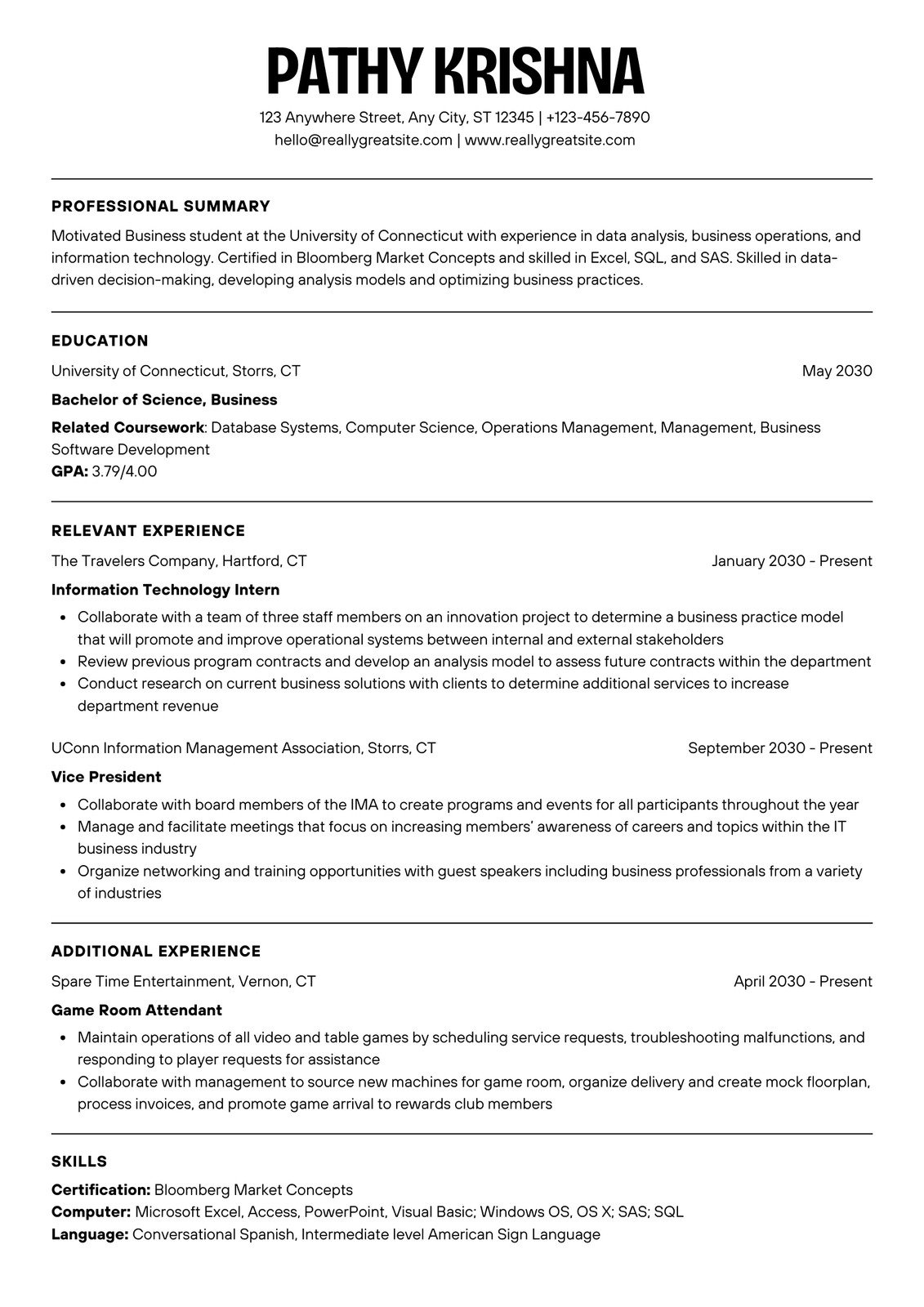
College Graduate Resume Template
If you’ve just graduated, this template helps you shift focus toward your work experience without totally ignoring your education. It keeps your degree up top but trims the details to make room for real-world accomplishments. There’s also a handy section for projects, leadership roles, or extracurriculars to show off your transferable skills.
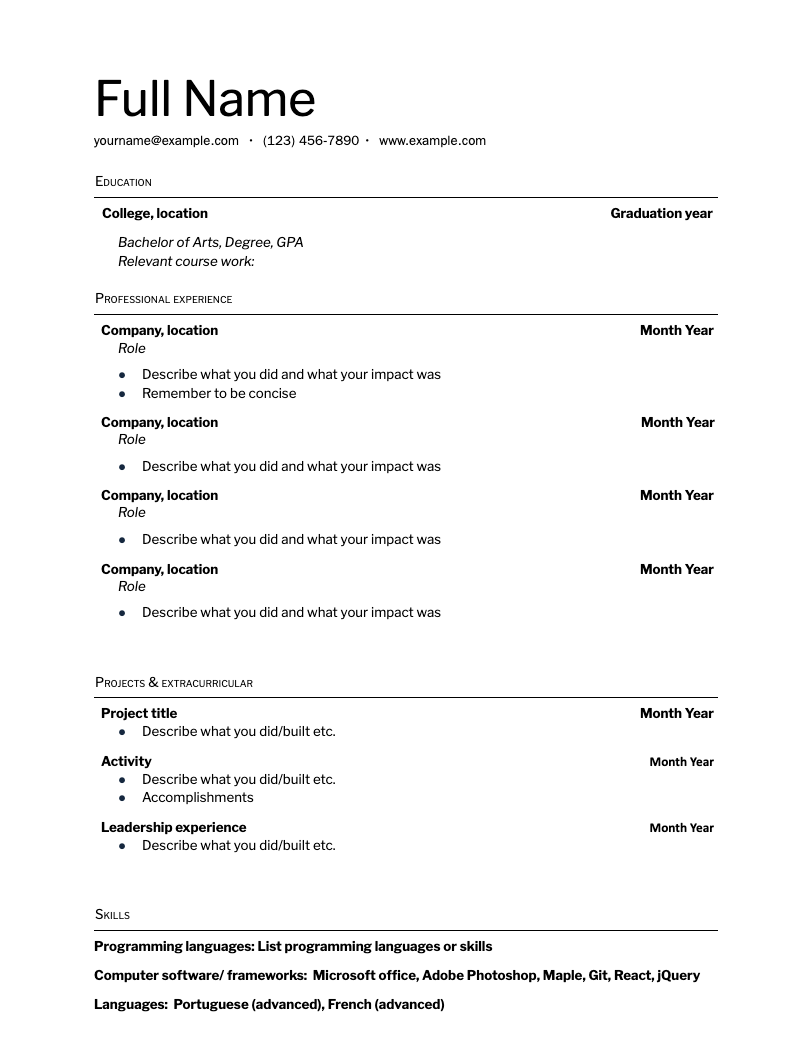
Internship Resume Template
Ideal for students or recent grads looking for internship experience, this Adobe-based resume keeps it simple but professional. Education comes first, followed by a flexible section for internships, volunteer work, or assistant jobs — anything that shows you’ve got workplace potential. The layout is effective and modern, with bold fonts, white space, and bullet points.

Don’t have much work experience? Take a look: How to Write a Resume With No Experience
Harvard Resume Alternatives
Harvard resumes aren’t for everyone. Do you want to focus more on your work experience? Or are you targeting a specific industry? Take a look at these alternative resume templates to find one that best shows your skills and experiences.
Modern Resume Template
This modern resume adds a subtle pop of color to your name and job titles; enough personality to stand out without confusing ATS systems. It’s organized with sleek fonts and neat lines, and is easy to tailor using our resume builder. It works well if you have work or volunteer experience, but it’s still flexible enough to highlight your education or projects if you’re new to the workforce.
-1.png)
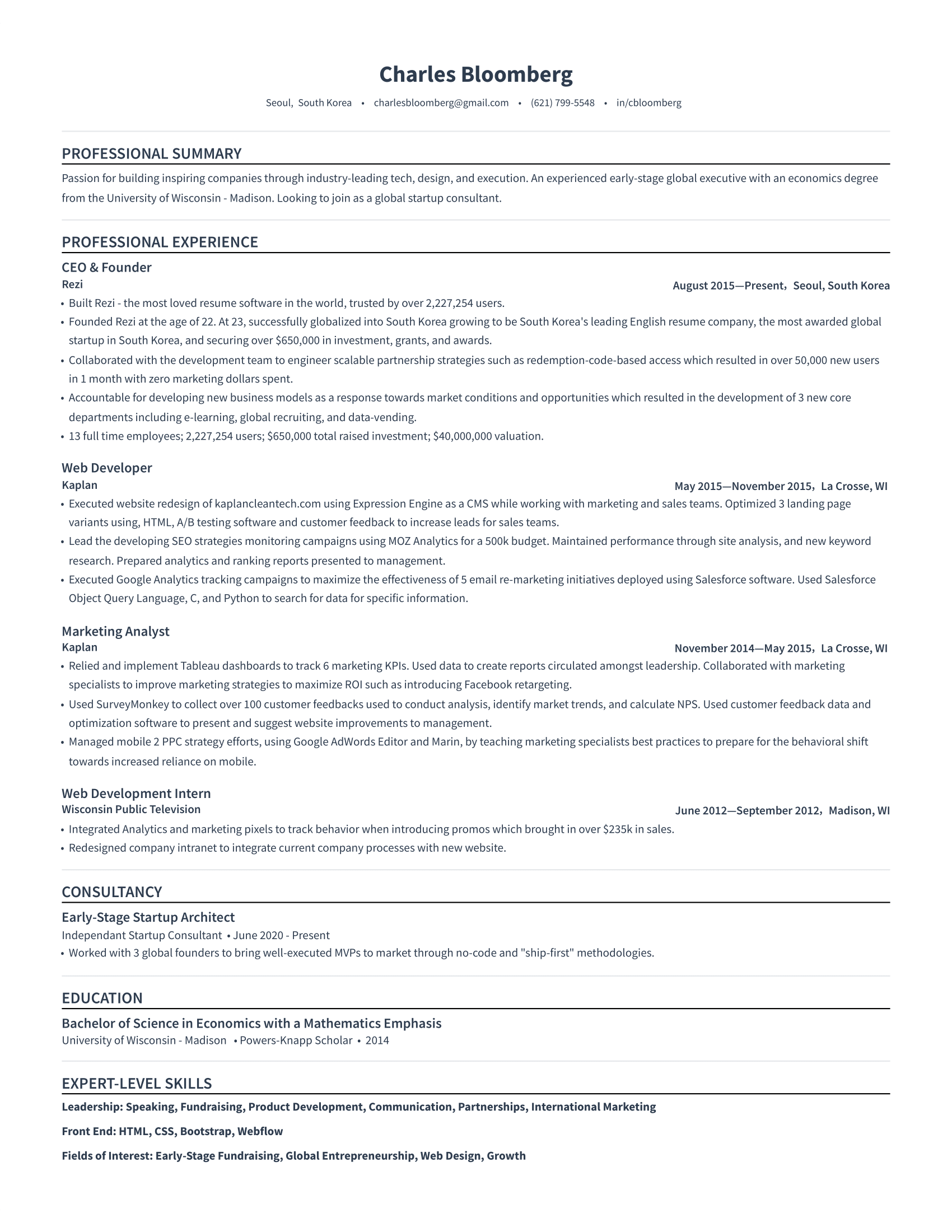
Simple Resume Template
This template is about keeping it straightforward. No design frills; just a professional, single-column layout that makes your experience, skills, and accomplishments the star of the show. It uses white space to make it easy to scan and puts the focus where it matters: the value you can bring to a company.
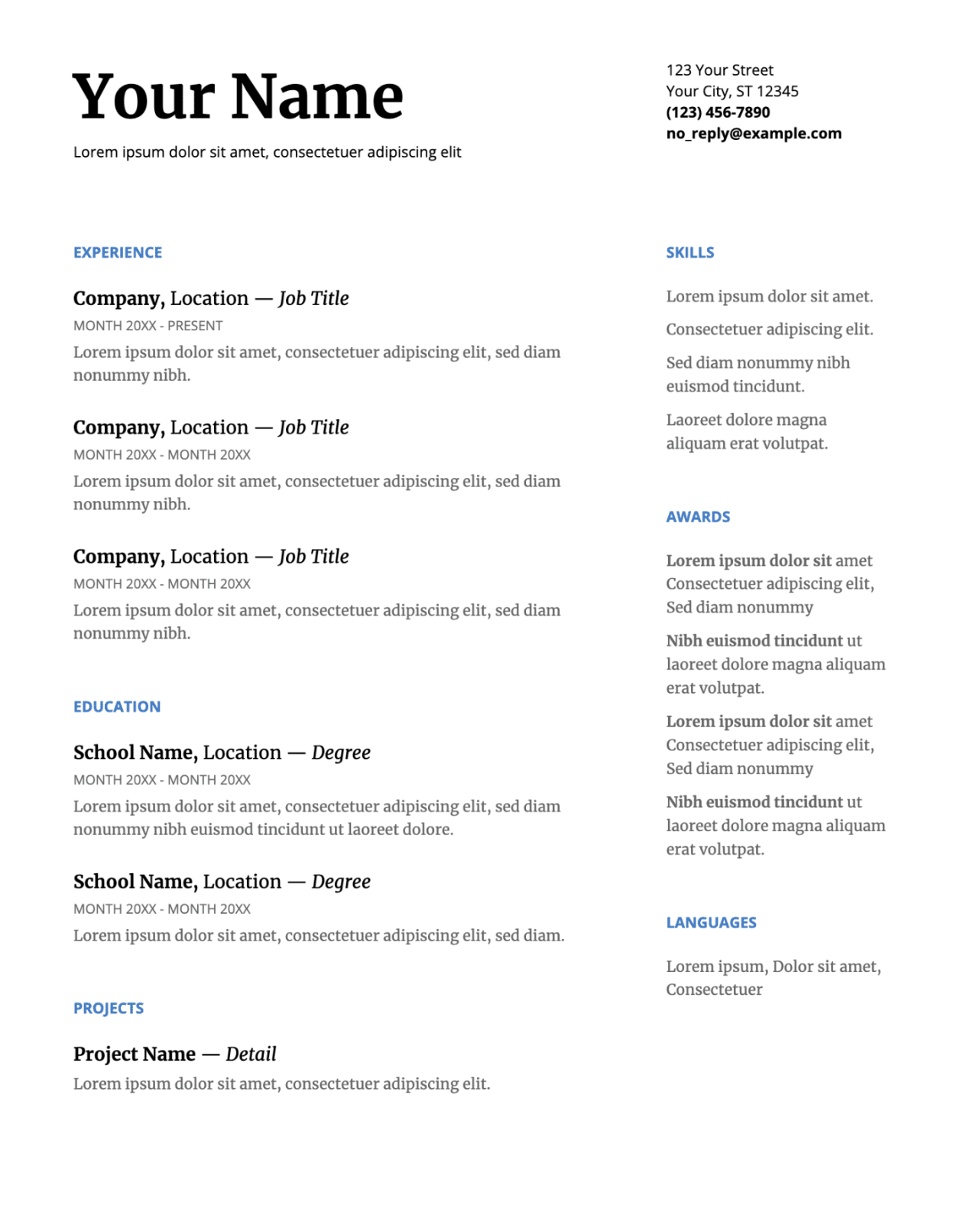
Google Docs Resume Template
Easy to use and beginner-friendly, this Google Docs resume keeps things concise, which is great if you don’t have much experience yet. The two-column design helps fill space and keep key information easy to spot. Just keep in mind: this template won’t guide you much with content (unless you read jumbled Latin), so you’ll have to know what to write.
Explore more resume templates for Google Docs: 40 Free Google Docs Resume Templates
Microsoft Harvard Resume Template
This Microsoft Word template spotlights your name and job title at the top, followed by a resume objective where you can outline your career aspirations. Bold headings and clean dividers make it easy to follow, and it ends with a solid skills section. That said, I recommend focusing more on technical skills if you’re job hunting in a competitive field.

Check out more Microsoft Word resume templates: 50 MS Word Resume Templates
Academic Resume Template
Unlike regular resumes, an academic CV stretches across several pages and include degrees, research, teaching experience, publications, and grants. It’s tailored for postdocs, faculty roles, or research positions. This resume sample can grow with your career, but six pages is a great place to start if you’ve already built a solid academic foundation.
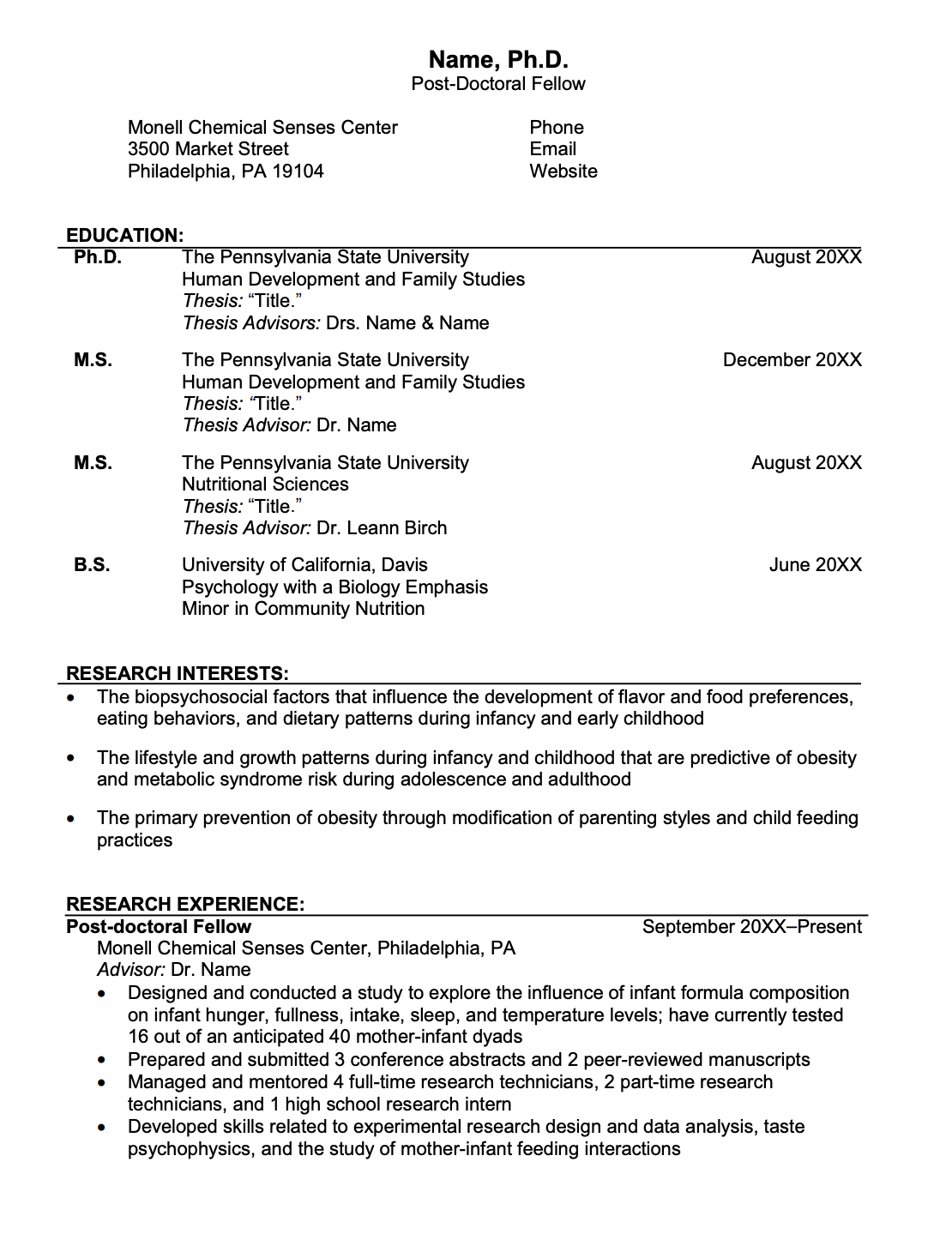
Find out more: Academic CV: How to Write a Curriculum Vitae
Business Resume Template
Designed for the corporate world, this no-nonsense resume is minimalistic and easy to navigate. It provides plenty of space for your work experiences with a left-aligned, single-column layout. Bold, capitalized section headers make scanning easy, and your skills are neatly categorized to help recruiters check off those all-important requirement boxes.

IT Resume Template
Made with tech roles in mind, this resume puts technical skills front and center, so recruiters instantly see your knowledge of various tools and systems. Simple, professional, and completely editable in Canva, this is a solid choice for early-career tech applicants.

Finance Resume Template
This finance resume stays professional with bold touches of blue for some personality. It uses a two-column layout to highlight your work experience while also giving space for categorized skills. There’s even a bonus section for “Additional Information” where you can add certifications, volunteer work, or anything else that gives you a competitive edge.

How to Write a Harvard Resume?
Here’s a quick breakdown of how to write a Harvard resume:
- Add your name and contact details, including a professional email, phone number, and an updated LinkedIn or portfolio link.
- Focus on your education section by placing it at the top, listing your degree, concentration, GPA (if strong), and any relevant coursework or academic achievements.
- Include work experience or volunteering in reverse chronological order, using action-based bullet points to highlight your impact and transferable skills.
- Mention relevant extracurriculars that show initiative, teamwork, or skills that align with your career goals.
- List your skills in categories like technical, language, or lab-based, and make sure they’re reflected in your work experience.
- Consider additional sections, such as a resume summary, if it helps introduce your strengths, experience level, and career aspirations.
Now, let’s explore the details.
1. Add your name and contact details
Start with your full name in bold and slightly larger than the rest of your text. Under that, add your phone number, a professional email (preferably not the one you made in middle school), and an updated LinkedIn profile. You can also add a relevant portfolio or personal site, with design work, writing samples, or coding projects.
And remember:
- Skip the photo. It’s not standard in the U.S. and can encourage bias.
- Triple-check your contact details. A single typo in your email or phone number can cost you an interview.
- Stick to one page. Keep it concise, especially early in your career.
2. Focus on your education section
In a Harvard-style resume, the education section usually goes right at the top, especially if you’re a student or a recent grad. We’ve all been new to the workforce at some point, so recruiters know that your academic experience is likely your strongest asset right now.
Start with the university name, followed by your degree (e.g., A.B., B.A., B.S.), concentration, and GPA (if it’s 3.8 or above). You can also add a joint or double concentration, or a concurrent master’s to show your range of expertise.
Here are some tips:
- Include relevant coursework, research, scholarships, study abroad, or certificates to add more depth, but don’t overdo it. Pick the highlights most relevant to the job you want.
- If you’re applying for something academic (like a grad program), you can go into more detail here than you would for a corporate job.
- Leave out high school unless it’s specifically asked for, or you’re a first-year undergrad with limited content.
As much as your days in the classroom are still fresh, they’ll soon become a distant memory (trust me). When you’ve been in the workforce for a couple of years, you can start slimming down your education section and move it below your work experience.
3. Include work experience or volunteering
Even if you’re thinking, “I haven’t done much”, you probably have more to include than you think. I used to downplay my college bartending job (if you can call collecting glasses ‘bartending’). But it was really a lesson in communication, multitasking, and staying calm under pressure. Aka, all essential transferable skills.
Your work experience section can cover internships, part-time jobs, research roles, campus jobs, or any situation where you’ve worked toward a goal, developed skills, or added value.
List these jobs or roles in reverse chronological order (most recent first). And for each one, include your title, where you worked, the location, and the dates. Then write around 2–5 bullet points for each role.
Here are some guidelines for writing your work experience section:
- Use action verbs. Created, led, designed, analyzed, improved, supported, etc.
- Be specific. Instead of saying “helped with events,” say “coordinated logistics for 3 campus events with 100+ attendees.” (more impressive, right?)
- Add measurable results. Including numbers, percentages, and data helps create a more concrete picture of your accomplishments.
- Use the Problem → Action → Result formula. What was the challenge, what did you do, and what happened as a result?
4. Mention relevant extracurriculars
I’ll be honest, extracurriculars don’t always belong on a resume. Most recruiters are scanning for work experience, and random activities can just take up space. But when used intentionally, they can absolutely work in your favor, especially if you’re light on job experience. They can highlight initiative, leadership, and the soft skills employers genuinely care about.
Be strategic and don’t list every club you joined. I probably wouldn’t bother mentioning my college’s Quidditch club (yes, that’s a thing) for a content writing job.
Focus instead on experiences where you:
- Took initiative
- Led a project or team
- Managed events, budgets, or campaigns
- Created a real outcome
Were you a club officer, launched a campaign, organized events, or started your own group? Think about what skills you developed, how those tie into your career goals, and what results you created. And it’s a huge plus if those activities show a genuine interest in your industry.
Just avoid listing overly personal or controversial organizations. All it takes is for one employer to have different views, and you’ve lost that opportunity.
Learn more: How to List Extracurricular Activities on a Resume
5. List your skills and languages
This is where you quickly show recruiters what you can do without forcing them to search your entire resume. My usual advice applies here: keep everything relevant. Don’t list every app you’ve ever opened — focus on requirements and phrases you see in the job description.
Here’s how the Harvard format breaks skills into categories:
- Technical: Programming languages, tools, and software
- Languages: Fluent, conversational, or basic proficiency
- Laboratory: Specialized techniques or tools
- Interests (optional): Hobbies that add value (nothing random or too niche)
Your skills section is just a preview, but your work experience is where you give examples of those skills in action. So if you list Python, there should be something in your experience section where you used it to produce positive results.
Need help pinpointing your skills? Check out our AI Skills Explorer to find skills tailored to your desired job and industry.
6. Consider additional sections
While the classic Harvard template skips the summary, I recommend adding one if you’re trying to stand out or fill some white space. Your resume summary is around 2 to 3 lines at the top of your resume, highlighting your most relevant and impressive skills and resume achievements.
Here’s what you can include:
- Your experience level
- Relevant career goals
- A few core strengths or key skills
- A standout accomplishment or goal
Check out this example:
Recent computer science graduate with internship experience in software development and data analysis. Strong in Python, SQL, and JavaScript. Led a capstone project that improved data processing speed by 40%.
Try our AI Summary Writer to get a unique and tailored summary for your resume in seconds.
Tips for Writing a Harvard Resume
Choosing the right Harvard resume template is a great start, but it’s your content that will make or break your application. The goal is to prove that you understand what the company needs and how you can help. Even if you don’t have tons of experience, the way you tell your story makes a huge difference.
Here are a few tips to help your content really work with your resume template.
Tailor your resume to the job
Give me a personalized birthday card? Even if it’s weeks late, I’ll forgive you. We all like those personal touches, and recruiters are no different. Tailoring your resume helps it stand out from the generic applications and shows you can speak their language.
What you can do:
- Scan the job description for key skills, experiences, and phrases, then mirror them (when true to your experience) in your bullet points and skills section.
- Highlight the experiences that best match the role, even if it means trimming other parts. It’s always best to focus on quality over quantity.
Follow a professional resume format
Only Elle Woods can get away with an all-frills Harvard resume — the rest of us have to shine in other ways. Following a simple and minimalistic resume format lets your content speak for itself and makes it easier for recruiters and ATS to scan.
What you can do:
- Use a professional resume font like Calibri, Arial, or Verdana, and keep the size between 10 and 12 (14 to 16 for section headings).
- Organize sections in reverse chronological order, so your most recent and relevant experiences are the first thing a recruiter sees.
Learn more about the best formatting practices: The Best Resume Format
Use strong resume action verbs
Action verbs add more impact to your resume bullet points and give insight into what you can do. Did you lead a project? Or is oversaw, coordinated, or mentored more appropriate? Choose your words wisely to help you avoid sounding passive or generic.
What you can do:
- Start each bullet with a powerful verb like “led,” “designed,” “launched,” or “analyzed” to show what you did, not just what you were responsible for.
- Avoid weak or vague phrases like “helped with” or “worked on” — be specific about your role and the outcome.
Need some inspiration? Check out more effective resume synonyms:
- Synonyms to Replace “Created” on Your Resume
- Synonyms for “Developed” to Add to Your Resume
- Resume Synonyms for “Provide” to Sharpen Your Resume
- Resume Synonyms for “Collaborate” (Definition and Examples)
Stick to the facts
Recruiters simply don’t have time for fluff; they want to see results. Harvard-style resumes are direct and concise, which means every line should work hard to prove your value. Focus on facts, numbers, and outcomes that paint a clear picture of what you’ve achieved.
What you can do:
- Quantify your achievements whenever possible (e.g., “Reduced onboarding time by 25%” or “Managed a $10K budget”).
- Ditch buzzwords, overly general claims, and flowery language. Instead, describe your actual contributions in simple terms for each role.
Avoid vague statements
It’s tempting to fill your resume with typical job-seeking words like “go-getter” or “team player,” but without context, they don’t say much. Harvard resumes aim for clarity over cliché. Show the skills with examples; don’t just say you have them.
What you can do:
- Replace generic phrases with examples of how you used a skill to contribute towards the success of the company, like collaborating on a team project or leading a campaign.
- Is the skill relevant to the job you’re targeting? If you’re clutching at straws, go back to the job description and see if any keywords or phrases align with your own expertise.
Summary
Here’s an overview of what to look for in a Harvard resume template:
- Aim for a professional layout and avoid flashy graphics and complicated formatting. Stick to simple fonts, bold section headings, and consistent spacing.
- Skip templates that include photos or color blocks. Harvard resumes are traditional and professional; photos can introduce bias and distract from your qualifications.
- Harvard-style resumes put education first, which works well for students or recent grads. If you’ve been working for a few years, opt for a version that leads with experience.
- Choose a template where you can highlight your strengths, such as leadership experience or projects under the headings “Projects,” “Leadership,” or “Activities.”
- Stick to one or two pages, unless you’re applying for an academic or research-heavy role. Most Harvard-style resumes are strongest when they’re concise.
- Customize your resume through a Word document, Google Doc, or an AI-powered builder like Rezi, to tailor your application and add your unique achievements and skills.
- Unless the job description says otherwise, download your resume in PDF format to maintain the layout and formatting.
FAQ
Is the Harvard resume ATS-friendly?
Yes, the Harvard resume format is organized and minimal, which is a great start for making it ATS (Applicant Tracking System) compatible. As long as you avoid fancy graphics, text boxes, or multiple columns, you should be in the clear. You should also use resume keywords from the job description to prove you have the right experience and skills to match the requirements.
What to include on a Harvard resume?
A Harvard resume typically includes your name and contact details, education, work experience, relevant skills, and optional extras like extracurriculars or resume certifications. The education section usually goes first, especially if you’re still in school or recently graduated.
What makes the format stand out is the emphasis on clear sections, reverse chronological order, and real accomplishments. It’s designed to make you look organized and professional without unnecessary fluff.
Should the education section go at the top of a resume?
You can place the education section at the top of your resume if you’re still in college or just recently graduated. It’s probably your strongest selling point when you don’t have much work experience, and employers understand that.
However, once you’ve been in the workforce for a few years and have solid experience, you can move your education toward the bottom. It’s all about leading with your strengths and what’s most relevant to the position. If that’s your degree and GPA right now, let it shine. Later on, your experience will do the heavy lifting.
What is the difference between a CV and a resume at Harvard?
At Harvard (and in the US in general), a resume is typically a one or two-page summary of your skills and professional history, tailored to a specific job. A CV (Curriculum Vitae) in the US is longer and more detailed, used mostly for academic or research roles. However, in other parts of the world, such as the UK, a CV is almost identical to the US resume.
Applying across the pond? Find out more: UK CV Format: Examples & Advice
Is a Harvard-style CV the best?
The Harvard-style CV is traditional and works really well in professional, academic, or research-focused settings. But if you’re applying to a creative field, startups, or more modern industries, it might feel a little stiff.
The best format is the one that shows off your strengths and fits the expectations of your field. So while the Harvard style is a strong starting point, don’t be afraid to adapt it if the role or industry calls for something different.

Upload or drop your resume to get started
Upload your resume to get started
Score my resume

Lauren Bedford is a seasoned writer with a track record of helping thousands of readers find practical solutions over the past five years. She's tackled a range of topics, always striving to simplify complex jargon. At Rezi, Lauren crafts genuine and actionable content that guides readers in creating standout resumes to land their dream jobs.