Comparisons
Sheets Resume Review: Is It Worth Using?
Get the full Sheets Resume review, including its AI resume builder, cover letter generator, interview practice, and job search tools, plus pricing and user feedback.
%2520(1).webp)
Published on
December 18, 2025
Updated on
December 18, 2025
Sheets Resume is a straightforward resume builder with one clean template and helpful AI tools to guide you through writing your resume. The Work Experience Assistant is useful for turning your experience into strong bullet points, but you’ll still need to tailor your resume yourself and add metrics where relevant. The platform also includes an AI Cover Letter Generator, an AI Job Search, and an AI Interview Practice tool. Pricing is $99 for lifetime access, with a free plan to test things out (though you can’t download the final resume on it). Overall, it’s a good fit if you want an easy builder with helpful AI prompts, but it’s not fully hands-off.
Sheets Resume has been getting a lot of attention lately, so we tested it to see how it actually performs.
This is coming from someone who works at Rezi, an AI resume software company, but my goal here is to share an honest review based on real testing and industry experience. I’ll go through what Sheets Resume does well, where it struggles, and who it’s best for.
This guide covers:
- The Sheets Resume story.
- How the resume builder and AI features work.
- Pricing and user reviews.
For a direct comparison, see Rezi vs. SheetsResume: Which is Best for Your Job Search. Or explore more resume builder comparisons:
- Rezi vs. Enhancv
- Rezi vs. Novoresume
- Rezi vs. Jobscan
- Rezi vs. Kickresume
- Rezi vs. MyPerfectResume
- Rezi vs. Zety
- Rezi vs. Teal
- Rezi vs. ResumeWorded
What Is Sheets Resume?
Sheets Resume, created by ex-recruiter Colin McIntosh with Nate Schier, is an AI Resume Builder. It includes a simple resume template, an AI Cover Letter Generator, AI Interview Practice, and AI Job Search.

So, the lore of Sheets Resume.
Sheets Resume was started by Colin McIntosh, the same guy behind the bedding brand Sheets & Giggles. Before bedding, he spent years as a recruiter, so he knows resumes. On the site, he jokes, “because nobody should have a sheety resume” — a pun that I can appreciate.
In 2018, Colin shared ATS-friendly resume advice on Reddit, which blew up. After helping people one-on-one, he teamed up with his former mentor and software engineer, Nate Schier, to create Sheets Resume.
Today it’s a full platform, including:
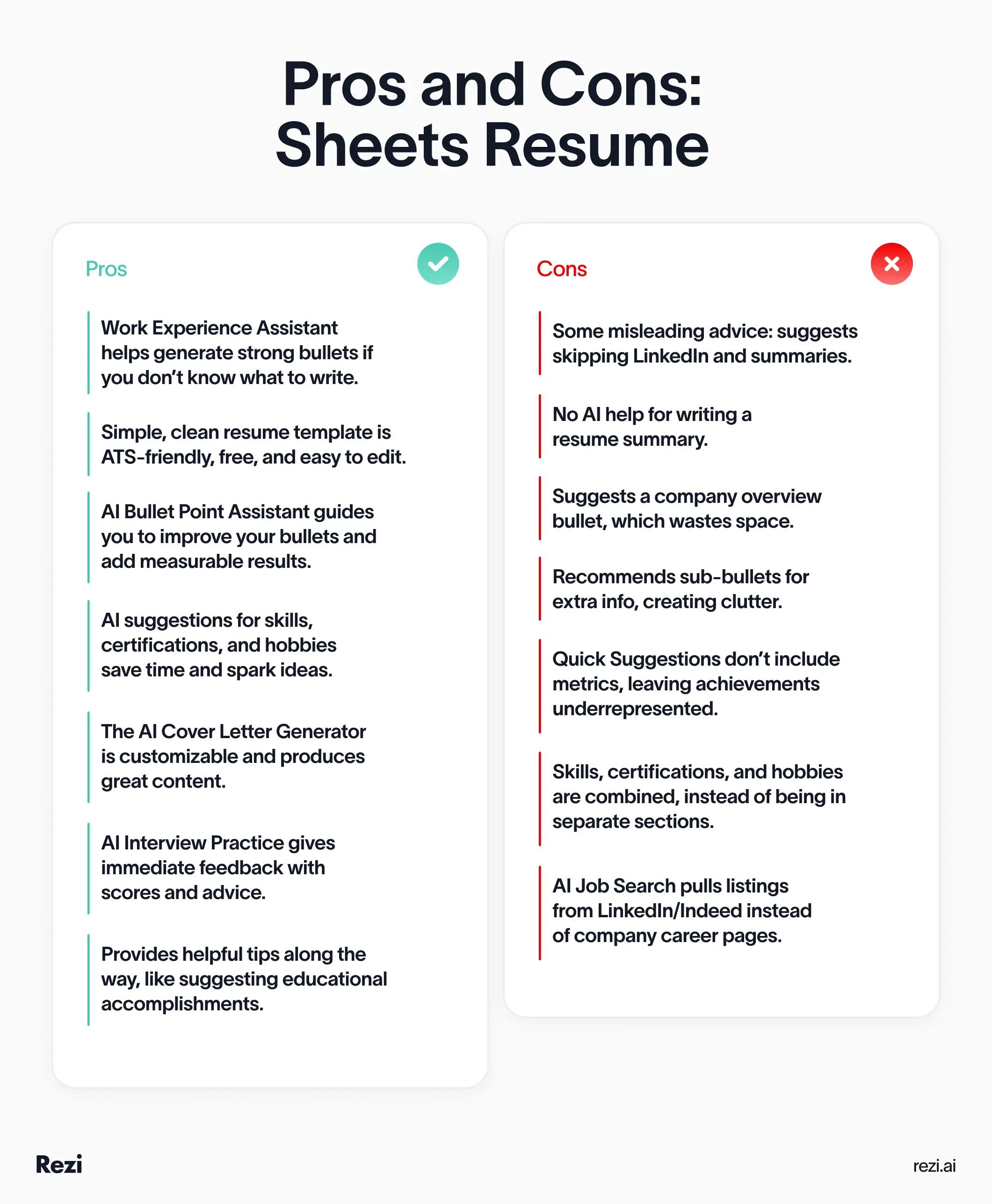
- AI Resume Builder (helpful, but some tips can be questionable, e.g., remove LinkedIn and the summary, add a company bullet)
- ATS-friendly resume template (popular and effective)
- AI Cover Letter Generator (produces a well-written letter)
- AI Interview Practice (gives great feedback)
- AI Job Search (good filtering options, though listings are mostly from job boards)
Check out the pros and cons of Sheets Resume:
Sheets Resume Template
Sheets Resume only has one resume template, and it’s simple, one-column, with no fancy designs. It’s helped a lot of job seekers land interviews, and it’s even popular enough to show up as the suggested “Google Docs resume template” in the r/resumes sidebar.
What I don’t love is the use of indented sub-bullets to show results or tools used. It makes the resume look cluttered. A cleaner approach is to combine the responsibility and result into one bullet using the STAR method (Situation, Task, Action, Result). For example:
“Improved a youth soccer team’s conditioning by developing and implementing a new training program, resulting in a 50% increase in match wins.”
One more note: the template lists the company first and the job title second, which works well if you’ve held the same job titles and your company names are impressive. If you want to emphasize career progression instead, put the job title first in bold, with the company underneath.
Here’s the Sheets Resume template:

If you don’t want to use the builder, download the Sheets template and edit it in Google Docs or Word.
You might also find these helpful:
- How to Pick the Right Resume Template
- The Best Professional Resume Templates
- Free Google Docs Resume Templates
- MS Word Resume Templates
- Canva Resume Templates Explained
How to Make a Resume with Sheets Resume
Here’s how to make a resume using Sheets Resume:
- Fill in your contact info, including LinkedIn (even though Sheets advises against it), and add a photo only if it’s standard in your country.
- Turn on the summary box to add a short overview; Sheets doesn’t help write it, but you can paste one from an AI generator.
- Use the Work Experience Assistant to create bullets with action verbs and metrics, but skip the sub-bullets. Quick Suggestions are handy, but the Bullet Point Assistant adds measurable results.
- In education, use the info button to recall honors and extracurriculars.
- Certifications, skills, and interests are combined in one section; manually add issuing orgs/dates, and only include hobbies if relevant.
- Tailor your resume to each job yourself; the built-in tool isn’t reliable. Use guides or our AI Keyword Targeting tool for help.
Sheets Resume walks you through each resume section with tips along the way. Here’s how to get the most out of it (and where you might want to adjust things).
Contact details
Sheets Resume suggests leaving off your LinkedIn to avoid bias, but I disagree. Hiring managers will look you up anyway, and having a strong LinkedIn that matches your resume actually builds trust.
You’ll also see an option to upload a photo, but they correctly recommend skipping it unless you’re applying in countries where photos are the norm (like Germany or parts of Europe).
Learn more about How to Create a Resume Header.
Summary
Sheets Resume doesn’t include a resume summary by default; you need to check a box to add one. They explain that summaries often end up vague and take up valuable space:

From reviewing numerous Rezi case studies of job seekers who landed interviews, a summary is usually worth including because it gives instant context. Hiring managers skim quickly, and this section gives you a chance to highlight your top strengths, career highlights, most relevant experience, and show enthusiasm for the role.
Sheets doesn’t offer AI help for writing one, so if you don’t want to start from scratch, try our AI Resume Summary Generator. It’s free and easy to paste in.
Work experience
Sheets Resume suggests adding a bullet about the company and even offers AI help to write it. However, I’d argue that this could potentially take up valuable space — mentioning Fortune 500 status or venture capital can be impressive, but it doesn’t showcase you. Focus on what you did and the impact you made. Numbers like user growth or revenue belong in your own achievement bullets.
The Work Experience Assistant is great if you’re stuck. It’s an AI chatbot that asks about your experience and generates bullets starting with action verbs, without pronouns, and often including metrics, like these:
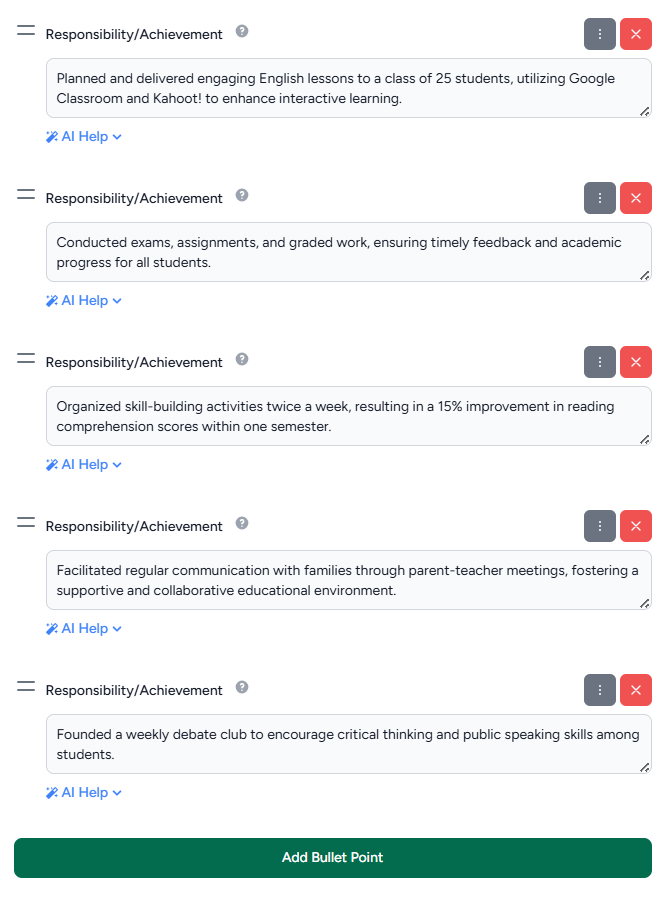
You can add sub-bullets via the three dots, but they’re usually unnecessary and make the resume look cluttered.
Each bullet also has AI Help with two options:
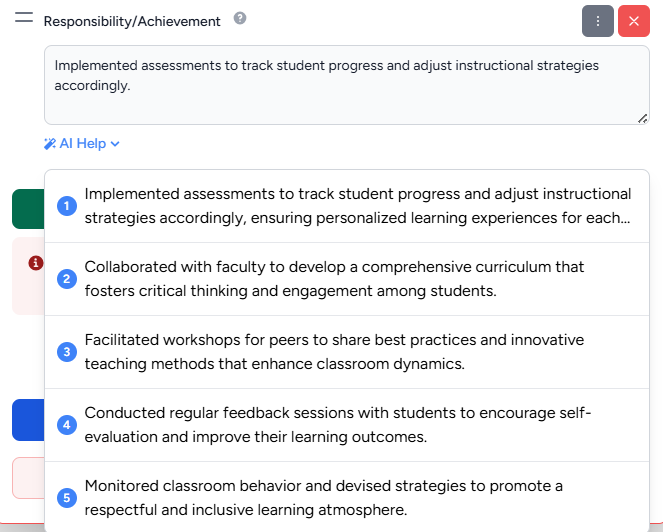
- AI Quick Suggestions. Offers four to five alternative phrasings, but no metrics.
- AI Chat/Bullet Point Assistant. Opens a more interactive box that asks questions about the bullet, so you can refine it and add quantifiable results.
Tip: If you’re in a hurry, only relying on Quick Suggestions can leave out numbers. Using the Bullet Point Assistant takes a bit longer, but ensures measurable achievements are included, which really matters to hiring managers.
Here are examples of some AI Quick Suggestions:
Education
The education section is straightforward, and the info button next to “honors/extracurriculars” is a nice touch. It reminds you of things you might forget to include, like Dean’s List, Summa Cum Laude, or other achievements.
Certifications, skills, & interests
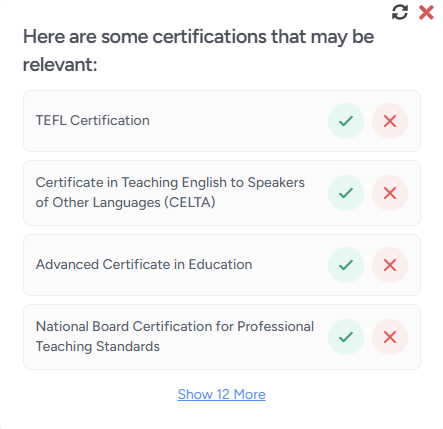
Sheets Resume combines these three sections into one, which can help save space and tighten up your resume. But ideally, these could be individual sections so that they stand out, or certifications could be grouped with education to save space.
- Certifications. The tool recommends relevant certifications based on your experience, but there’s no separate space for the issuing organization or date; you’ll need to include them in the same box as the title.
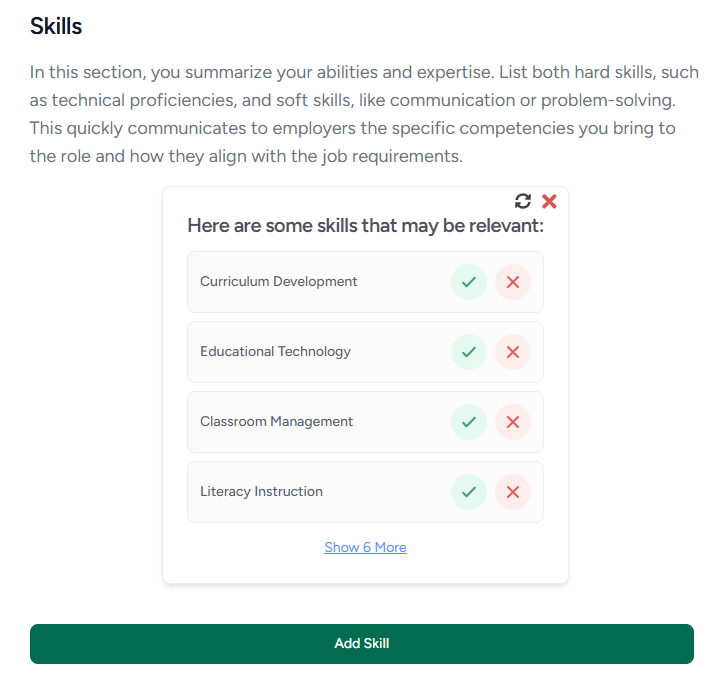
- Skills. AI suggestions are very helpful. If you have technologies and languages, they’re listed on separate lines.
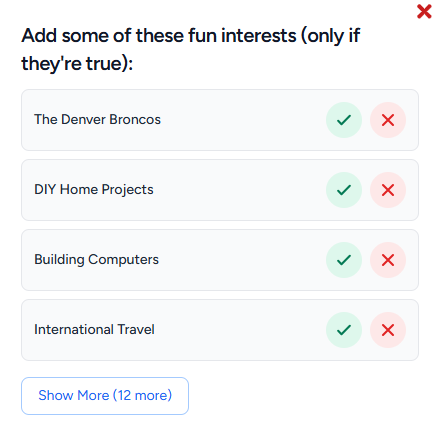
- Interests. The suggestions are broad, and Sheets Resume really pushes adding hobbies. Only include them if they’re directly relevant and you can showcase related knowledge, or if you need to fill space due to limited experience.
Tailor your resume
On the resume preview, there’s a “Tailor” tab where you can paste and target the job description. In practice, it wasn’t very effective: for work history, it only suggested adding a company description or changing a “Teaching Assistant” title to… “Teaching Assistant.”
The skill suggestions also felt a bit off. It only told me to change “student assessment” to “classroom management,” and then suggested replacing “lesson planning” with “classroom management.”
Here are some of the suggestions:
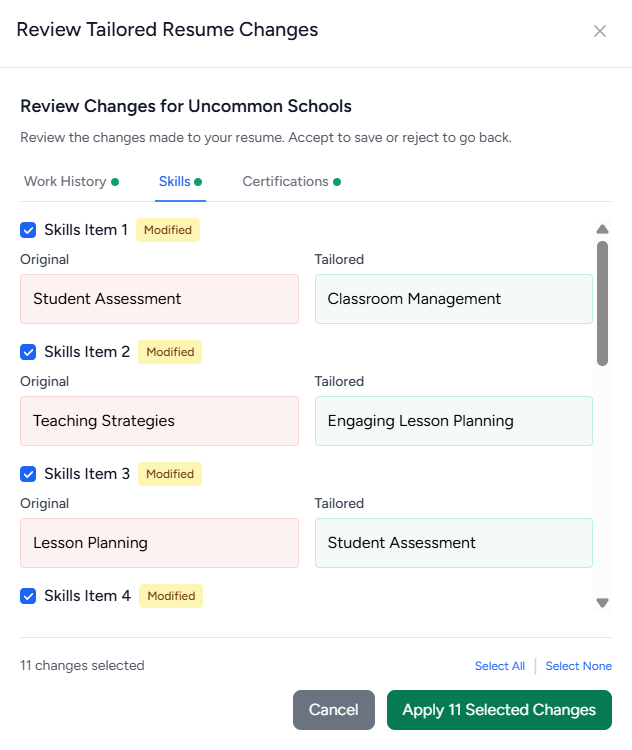
Bottom line: you’ll still need to tailor your resume manually with Sheets Resume. For guidance, check out How to Tailor Your Resume or try our AI Keyword Targeting tool.
Extra AI Features
Sheets Resume offers a few additional AI-powered tools to help with your job search.
Related comparison guides:
AI Cover Letter Generator
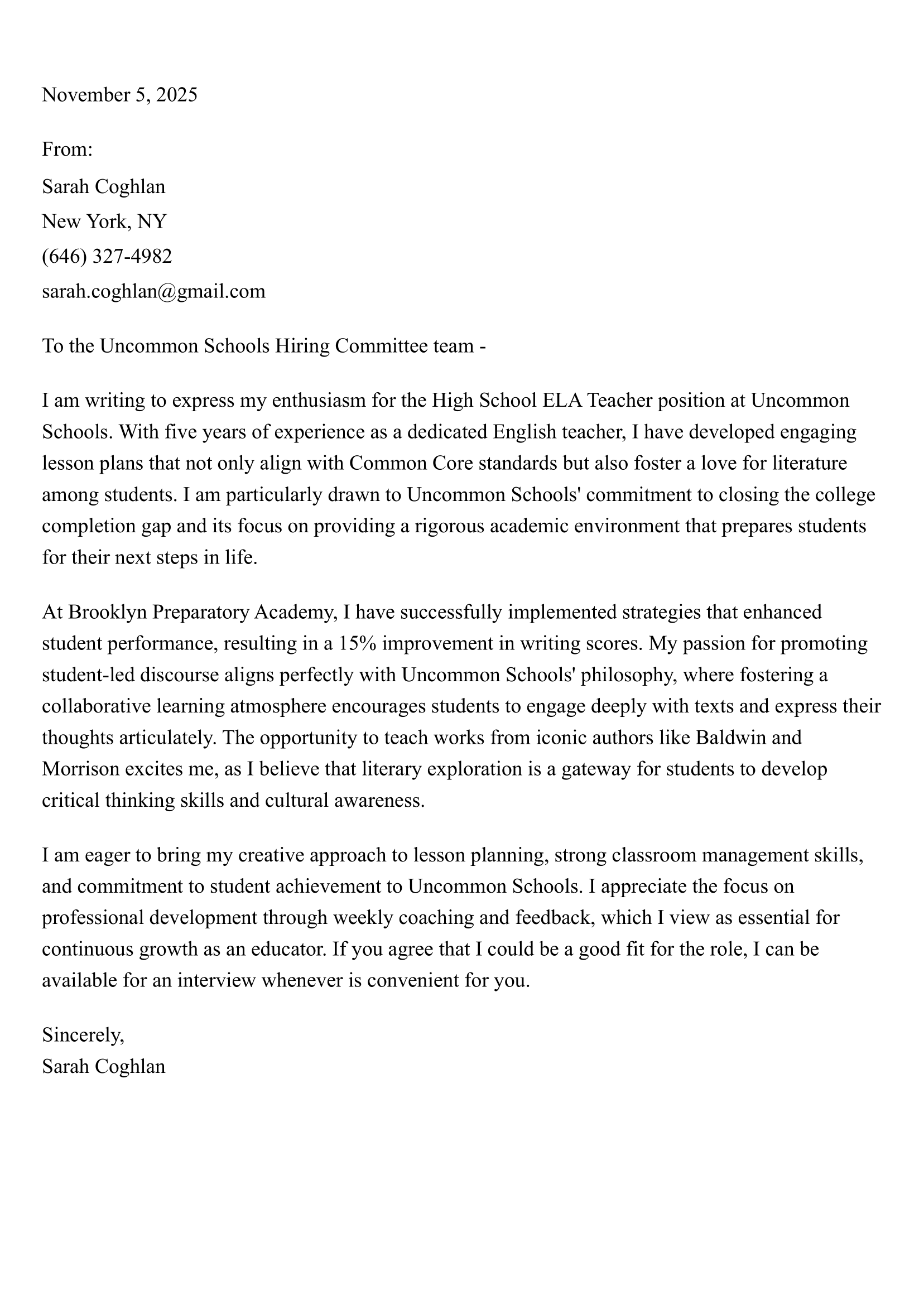
Provide the job description, title, company name, a few notes about why you’re interested, and your preferred length and tone (short, medium, long; casual, professional, very formal).
The result is a solid cover letter; I liked the content, though the header formatting could be better.
This is from Sheets’ AI Cover Letter Generator:
AI Interview Practice
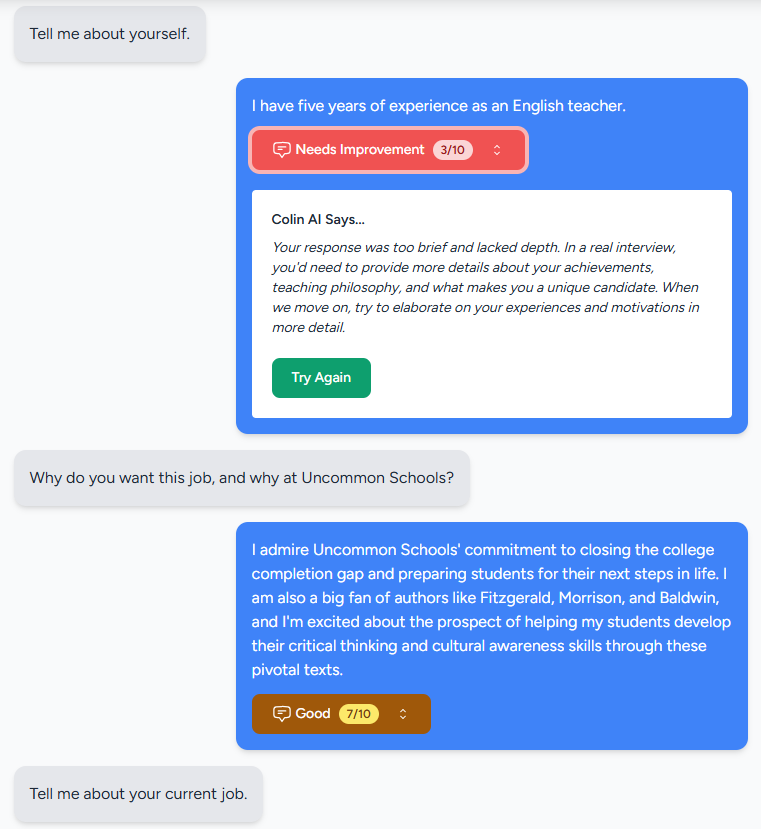
Choose difficulty (beginner–expert), question type (technical, behavioral, leadership, problem-solving, general), and feedback style (gentle, balanced, tough). After each answer, you get scored feedback out of 10.
The feedback matched my answers well, whether I was vague or detailed. You can practice 5 questions for free, with 4 rated answers included.
Here’s some of the feedback from Sheets AI Interview Practice:
AI Job Search
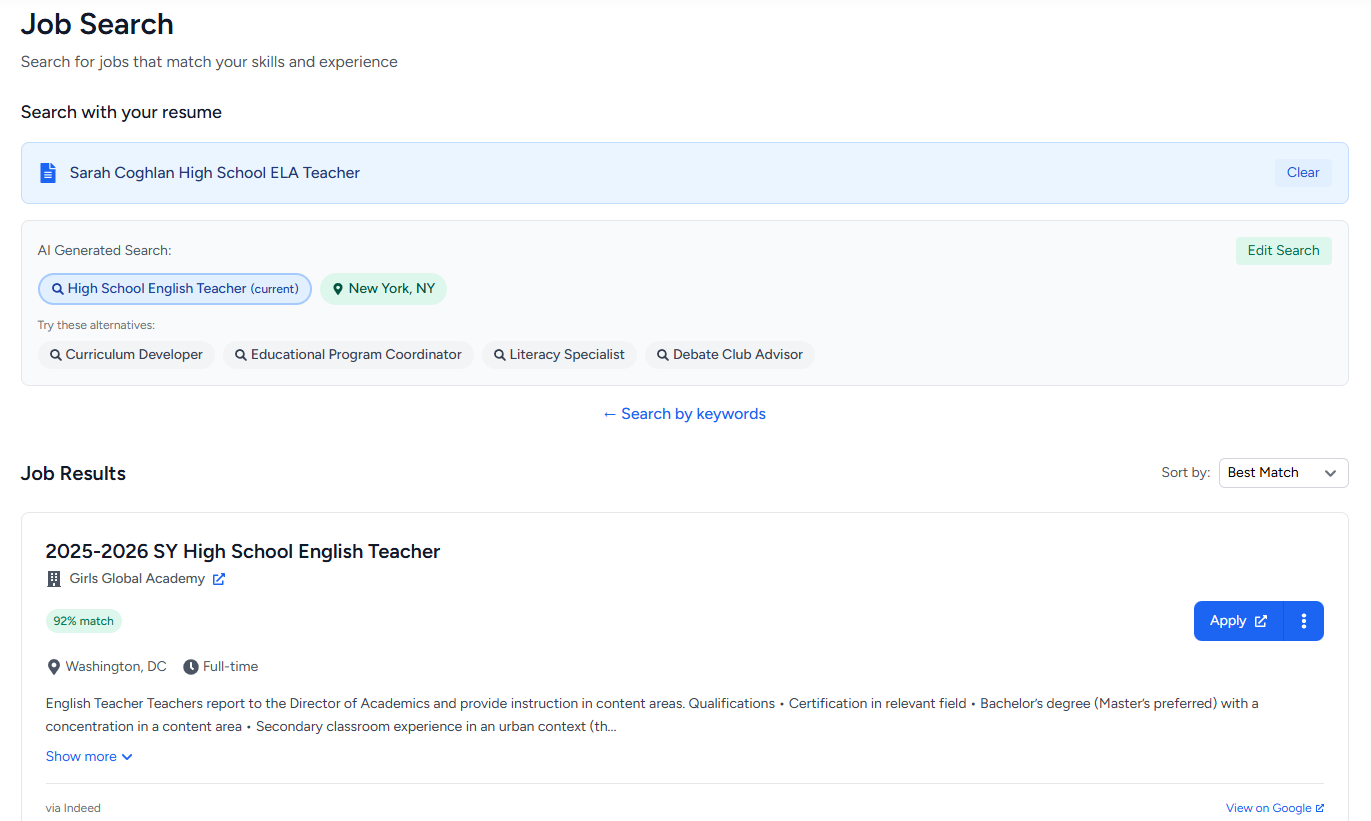
The job search feature has improved since my Rezi vs. SheetsResume comparison. You can search by job title, location, and even your resume, and it shows a match percentage for each position. Options include: apply, tailor your resume, practice an interview, or write a cover letter.
One downside: it sometimes pulls listings from LinkedIn and Indeed instead of linking directly to company career pages, which would help you stand out and avoid the crowded job boards.
Here’s what Sheets AI Job Search looks like:
Pricing
Sheets Resume’s pricing is simple: it’s $99 for lifetime access, or you can try it for one week at $39. Discounts are available for students, teachers, military, and government workers, and there’s even hardship support with a seven-day free membership if you qualify.
The free plan lets you test the AI resume writer, cover letter generator, AI job search, and (limited) interview practice. You can’t download the finished resume on the free plan, but you can grab the resume template and edit it in Google Docs or Word instead.
User Reviews
Sheets Resume isn’t on Trustpilot, but the reviews on its website are strong; over 200 reviews averaging 4.85 out of 5.

Final Thoughts
Sheets Resume is solid for generating strong resume bullets and ensuring your resume is ATS-friendly, though the Quick Suggestions often miss metrics, and the template looks a bit messy to human eyes. The AI Cover Letter Generator is excellent, and the AI Interview Practice is helpful.
Where it falls short: advice against summaries and LinkedIn, combining certifications, skills, and hobbies, not the most efficient tailoring tool, and the Job Search links mostly to big job boards instead of company sites.
I’d recommend Sheets Resume for users willing to do a bit of work themselves — tailoring resumes and applying strategically — but the free plan is enough to explore its features and see if it works for you.
FAQ
Is SheetsResume free?
Yes, Sheets Resume has a free plan that lets you try the AI Resume Builder, Cover Letter Generator, Job Search, and limited Interview Practice. While you can’t download the finished resume on the free plan, you can still use the template and edit it in Google Docs or Word.
How to add a resume link in Google Sheets?
Upload your resume to Google Drive, right-click it, select “Share,” and set access to allow anyone with the link to view. Copy the link and paste it into your sheet, or hyperlink text in a cell using “Insert Link” (or CTRL + K) for a cleaner look.
Which template do most employers prefer for resumes?
Most employers prefer a simple, one-column resume with clear section headings and a standard font. This layout is easy for hiring managers to scan and works smoothly with Applicant Tracking Systems. Templates with fancy graphics or multiple columns may look nice, but they often cause parsing issues and make your experience harder to read.
Who should I address my cover letter to?
Whenever possible, address your cover letter to a real person, ideally the hiring manager or recruiter. Check the job post, company website, or LinkedIn to find a name; it shows effort and feels more personal. If you can’t find it, “Dear Hiring Manager” is the best fallback. Just don’t use “To Whom It May Concern,” which feels outdated and impersonal.
What if my older experience is more relevant to the job I’m applying for than my most recent experience?
Use your summary to highlight the experience and skills that best match the role, even if they’re from an older job. Then choose a format: in reverse chronological resumes, give your recent roles fewer bullets and emphasize transferable skills. Or use a combination resume, where you list key skills and relevant accomplishments at the top so your strongest experience stands out before the work history section.

Upload or drop your resume to get started
Upload your resume to get started
Score my resume

Sarah Coghlan is a writer and editor passionate about making resume and career advice clear and accessible to all. Based in Barcelona, her goal is to help job seekers create standout resumes and navigate the job search process with confidence and ease.