Comparisons
Rezi vs. Figma: Which Is Better for Designing a Resume?
You can use both Rezi and Figma to build and design a resume. Rezi helps you create a resume that gets past ATS and Figma offers design flexibility.
Published on
January 16, 2026
Updated on
January 16, 2026
Rezi is an AI resume builder platform. It was built specifically for solving the resume problem — helping you write strong, targeted content while automatically formatting everything into a clean, professional, and ATS-friendly design. Figma is great for creating visuals and layouts, but it’s not built for applicant tracking systems (ATS). With that in mind, Rezi is the safer choice overall because it handles all the formatting for you, while Figma requires more care to ensure your resume stays parasable by resume scanners.
Rezi and Figma are two tools that you can use to build and design a resume.
Rezi is a resume builder designed to make it simple and effective to create a professional, job-winning resume. Every Rezi template is built for clarity and performance, helping you write strong, targeted content and structure it in a clean, ATS-optimized design that gets past hiring software and into the hands of real recruiters.
Figma, on the other hand, is a powerful design platform, which can be effective for putting together visually stunning layouts. Some may prefer Figma when they have design familiarity, though newcomers often rely on templates or guided resources to get started more easily.
In this article, we’ll take a closer look at how Rezi and Figma compare when it comes to building a resume.
And if you’re curious, check out our other comparison articles to see how we measure up to other tools and platforms:
Rezi and Figma Overview
Rezi and Figma are two different tools that can be used to build a resume.
Rezi is a resume builder designed specifically to help job seekers create professional ATS-friendly resumes that meet modern hiring standards. Every feature — from our AI writer to our AI agent — is made to make your job search easier. You can build, optimize, and tailor your resume for different roles without worrying about design or structure.
However, Figma is a collaborative design platform built for creating digital interfaces, not just resumes. Some designers and creative professionals may prefer Figma for building a resume because it gives them full control over layout and design. Instead of filling out fields, you design your resume visually from scratch or customize a community template.
Rezi Pricing and Core Features
Here are the pricing plans for Rezi:
- Free: $0 (no card details required).
- Pro: $29/mo.
- Lifetime: $129 one-time payment.
- Enterprise: $249/mo per 100 users.
All paid plans come with a 30-day money-back guarantee.
Here are the main features available with Rezi:
- AI Resume Builder: A complete toolkit for creating a polished, ATS-ready resume tailored to your specific job title or industry.
- Resume Checker: Instantly reviews your resume for clarity, formatting, and keyword optimization, then provides a score with actionable feedback.
- Resume Keyword Scanner: Compares your resume against a job description to highlight missing or underused keywords so you can tailor it in seconds.
- Resume Bullet Point Writer and Editor: Automatically generate or refine resume bullet points to emphasize your skills, impact, and measurable results.
- Cover Letter Generator: Creates a personalized, professional cover letter that aligns perfectly with your resume and the target role.
- Resignation Letter Generator: Helps you write a clear, respectful resignation letter based on your situation.
- Job Search: Browse real job listings directly inside Rezi and manage applications without leaving the platform.
- AI Agent: A conversational AI trained exclusively on resumes and career content. It can help you write, review, and optimize your application materials or guide your job search — all in one chat interface.
Figma Pricing and Core Features
Here are the monthly pricing plans for Figma:
- Starter: Free.
- Professional (monthly): Collab $5/mo, Dev $15/mo, Full $20/mo.
- Organization (monthly): Collab $5/mo, Dev $25/mo, Full $55/mo.
Here are some of the core functionalities people use in Figma to create a resume:
- Auto Layout: Helps with keeping sections, margins, and layouts evenly spaced and aligned.
- Frames and Layout Grids: Can be used to structure the resume page.
- Typography: Gives full control over fonts, weights, line height, and spacing so you can create a clear visual hierarchy for headings, roles, and bullet points.
- Components: Use and reuse design elements such as section headers, skill tags, or dividers across multiple resume versions while keeping them consistent.
- Color and Text Styles: Define and reuse color palettes, font pairings, and text sizes so your resume has a cohesive, professional look.
- Constraints and Resizing: Helps maintain consistent alignment and proportions when you resize frames or adjust content.
- Comments and Collaboration: Allows others to leave direct feedback on the design in real time without needing separate files.
- Version History: Track where changes have been made.
- Export Options: Lets you export your finished design as a PDF (most common), PNG, or JPG to share or print.
- Community Templates: The most popular starting point — job seekers duplicate free Figma resume templates from relevant Figma communities and customize them to fit their own needs.
How Rezi Compares to Figma When Building a Resume
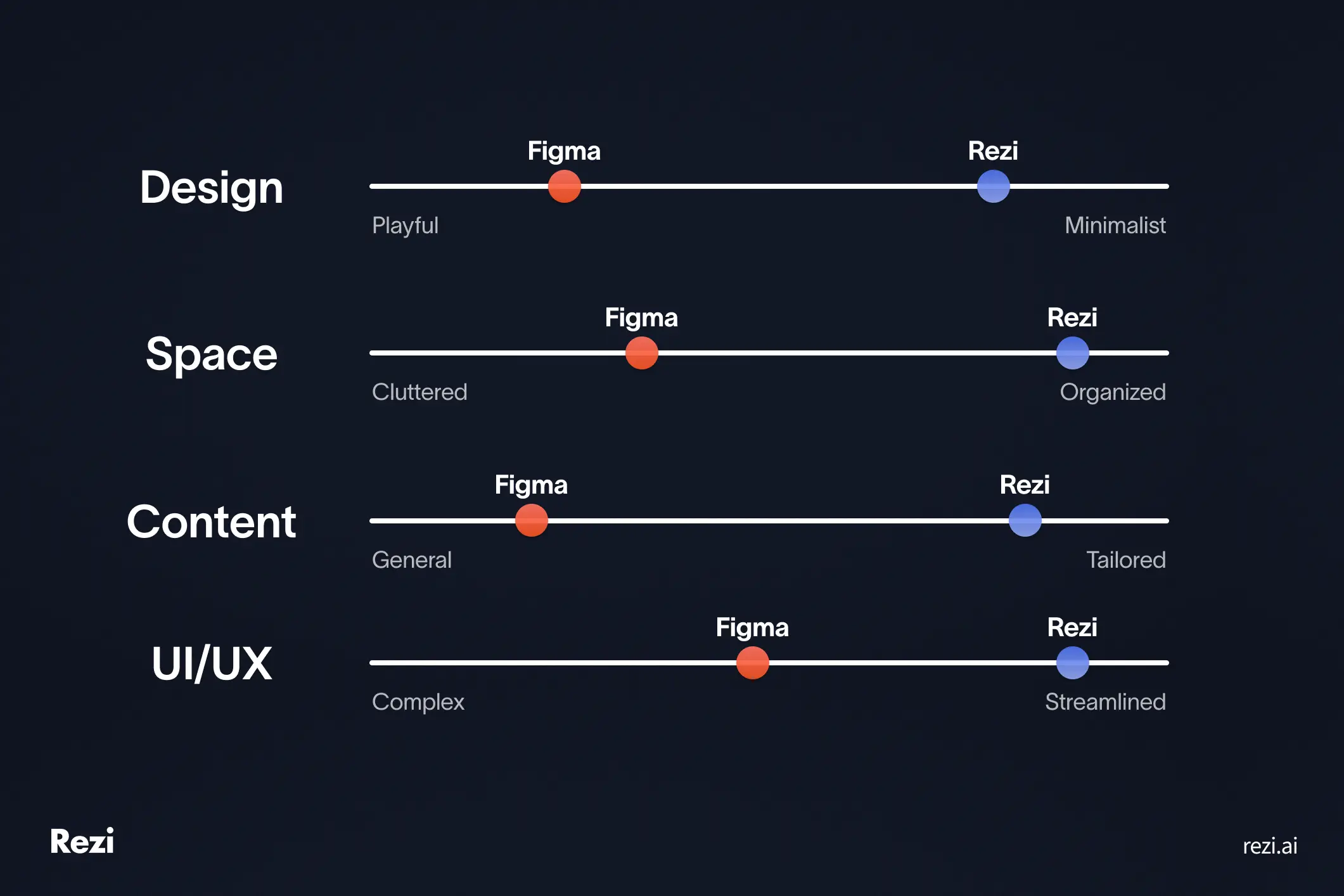
In short: Figma offers a blank canvas, allowing for more creativity when designing a resume. Rezi offers a more structured, guided system to go from a blank resume to a ready-to-submit application in minutes.
Rezi provides all the tools you need to build a professional resume and showcase your skills and experience in a way that matches specific job descriptions. Everything about the platform revolves around helping you create a resume that gets noticed by both applicant tracking systems (ATS) and recruiters.
Figma is quite the opposite. It’s not as guided when it comes to building an ATS-friendly resume, but it offers more freedom for customizing layout, color, and typography. It’s fairly common among designers and creative professionals who want their resume to double as a portfolio piece.
That said, because Figma isn’t designed specifically for resumes, much of the layout, formatting, and styling is managed by the user. Features like auto layout and style presets help reduce repetitive work, but you’ll still need to ensure structure and ATS compatibility manually.
ATS compatibility and formatting
ATS compatibility refers to how applicant tracking systems (ATS) can read and understand the information on your resume. Good resume formatting is crucial for this.
Rezi automatically formats your resume for ATS readability, so every export maintains a consistent structure recruiters and software can interpret. Figma, however, gives you full creative control but doesn’t automatically enforce ATS-safe formatting.
Check out our ATS guides:
Rezi
Rezi is built with ATS compatibility as a core priority. As you fill in your resume, Rezi applies templates and formatting rules that are standardized for how applicant tracking systems (ATS) parse resumes — clean layouts, proper headings, linear reading order, and text layers that remain selectable.
When you export, you get options like PDF or Word, both of which are structured to preserve keyword placement, data order, and legibility for both machines and humans.
Figma
Figma may offer more creative freedom than Rezi but that freedom comes with added responsibility. Since Figma wasn’t originally built for resume formatting, it doesn’t automatically enforce the technical structure that ATS systems rely on to parse text.
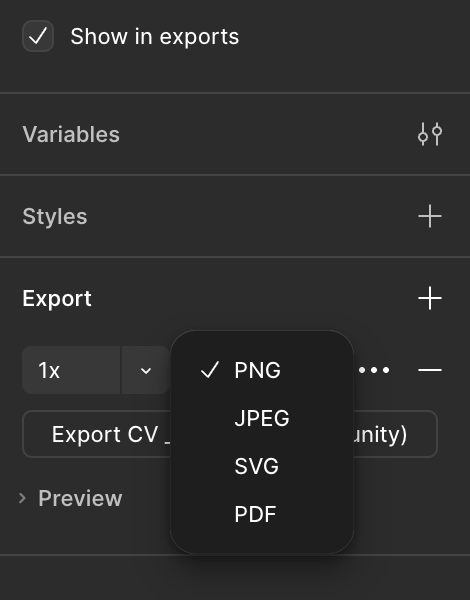
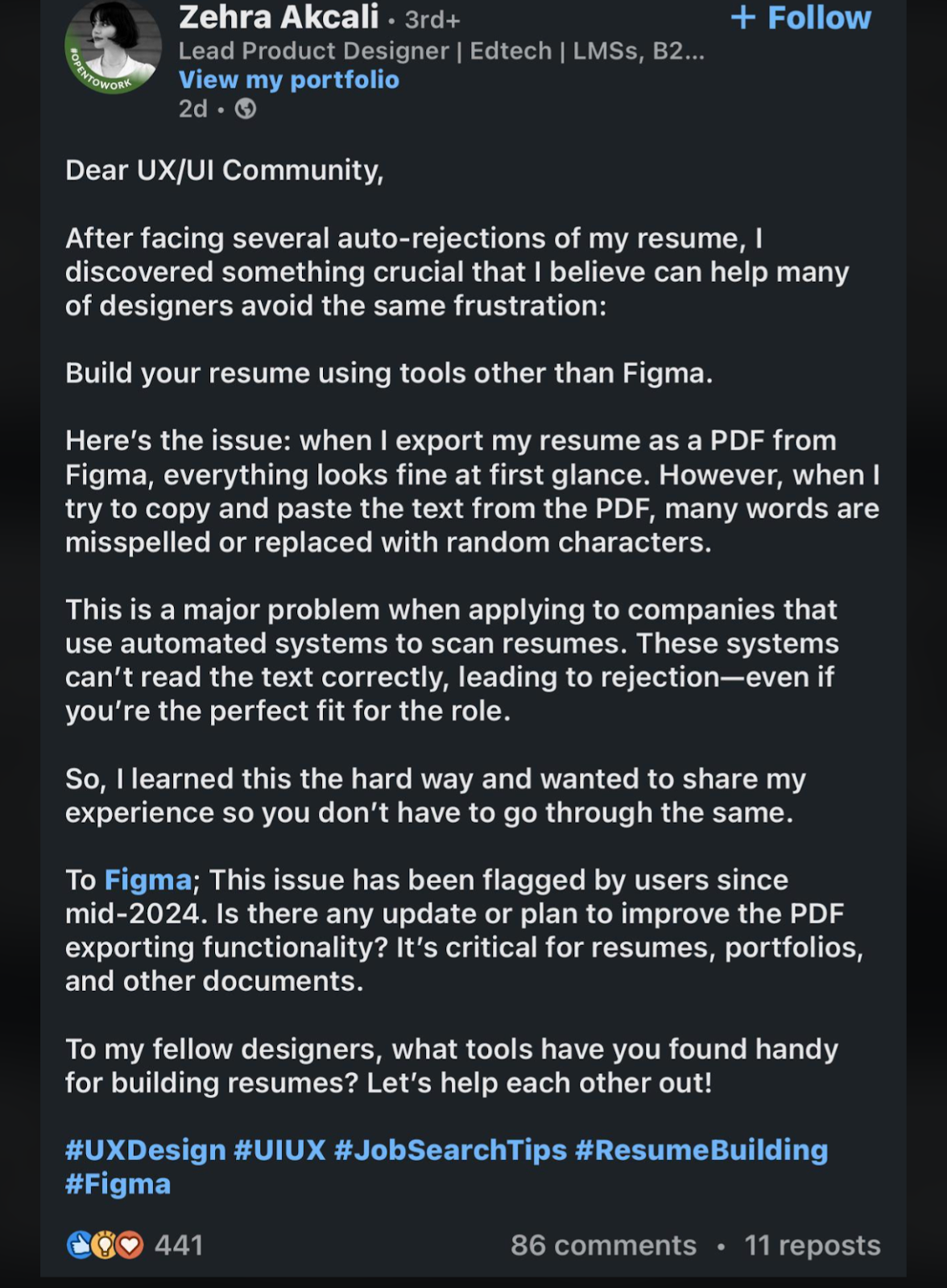
Job seekers can design beautiful resumes using Figma. However, a common concern about Figma as shared on this Reddit thread is that exporting your resume as a PDF can sometimes cause formatting issues. In some cases, this can make parts of your resume unreadable by applicant tracking systems, which in turn, lowers your chances of landing an interview.
Resume templates and designs
Your resume design is important for both resume scanners and recruiters. A clean layout, consistent spacing, and clear typography help your content stand out for the right reasons.
Rezi focuses on simple, professional templates built for readability and ATS performance, so your resume always looks polished without unnecessary design work. Figma, meanwhile, offers more design freedom so you can customize every visual detail. That flexibility can be great for designers, but it also means you need to manually make sure that the final design is scannable.
Rezi
Rezi takes a content-first approach to resume design. All our resume templates are built to look professional, clean, and easy to read. And more importantly, they’re optimized for both human recruiters and applicant tracking systems (ATS). (For more inspiration, check out our resume examples.)
The goal is to make your information effortless to scan without unnecessary design distractions. You can choose from several modern, minimal templates and adjust resume sections to fit your experience, while Rezi automatically maintains consistent spacing, font hierarchy, and alignment across the document.
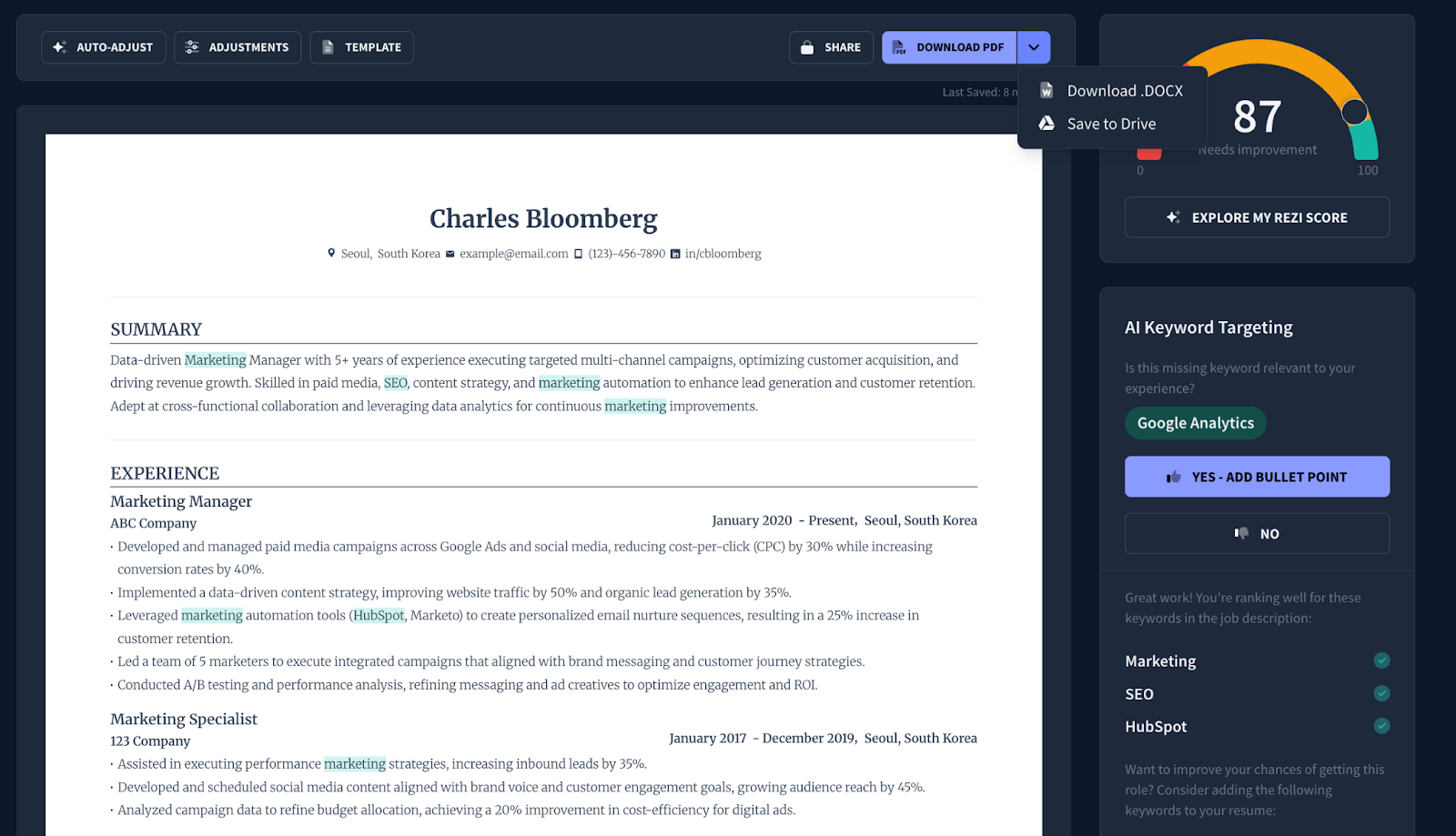
Here’s what our standard resume template looks like:
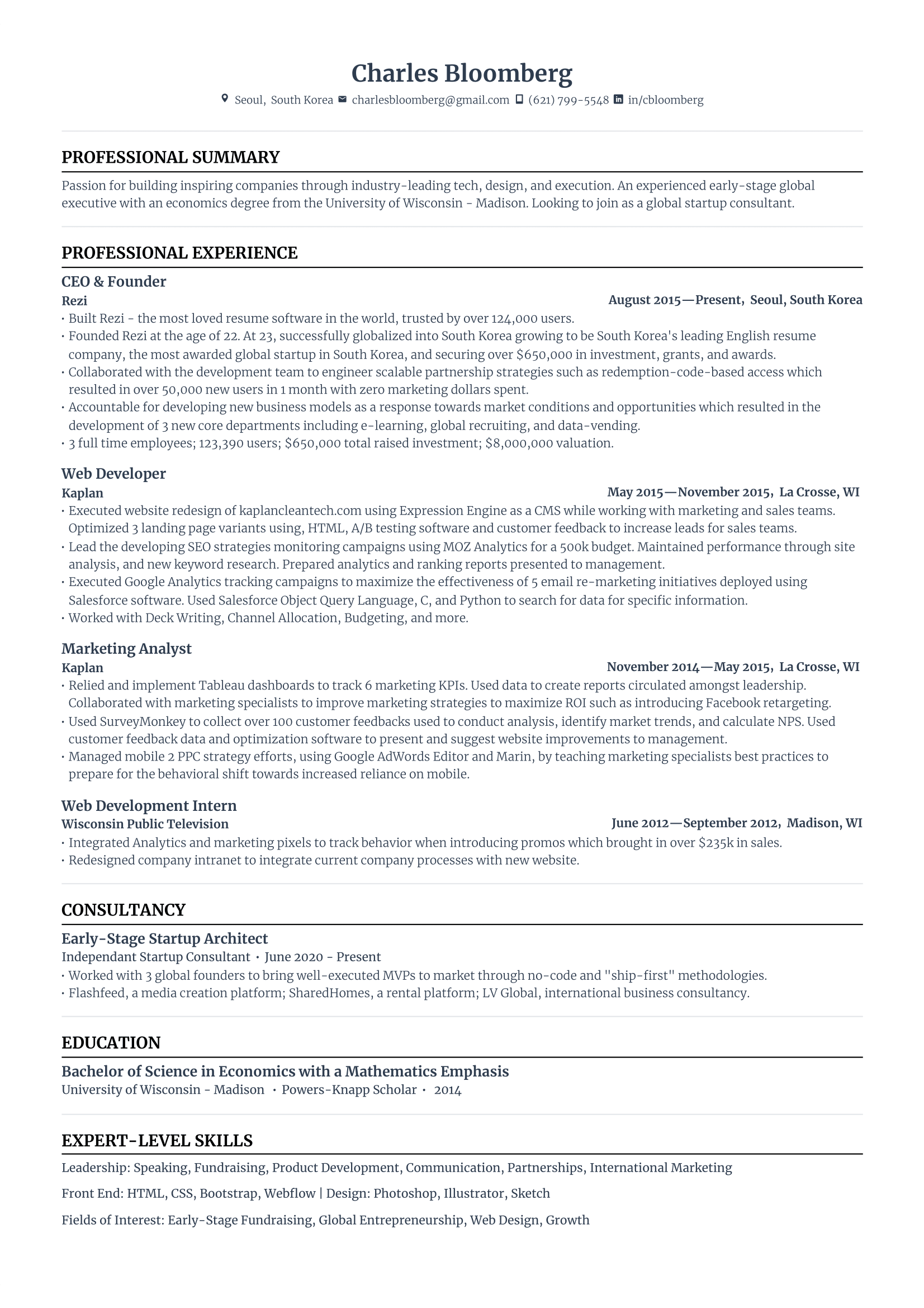
Every design is tested for parsing accuracy, following best practices for resume readability — from bullet points and margins to text spacing and layout order. In one of our own experiments, we compared how different resume builders performed when processed through real ATS software. Our templates at Rezi were the most consistently maintained and extracted, while templates from other platforms showed more data loss.
Read more on resume templates:
- How to Pick the Right Resume Template
- ATS Resume Templates
- Professional Resume Templates
- Basic Resume Templates
- Blank Resume Templates
- Creative Resume Templates
- Free Resume Templates
Figma
You can customize most visual details — from typography and color palette to iconography and spacing — which is why many designers gravitate toward Figma for their resume.
The platform also offers a large library of community-made resume templates that can look highly polished and modern at first glance. Here’s an example of a publicly shared resume template on Figma below:
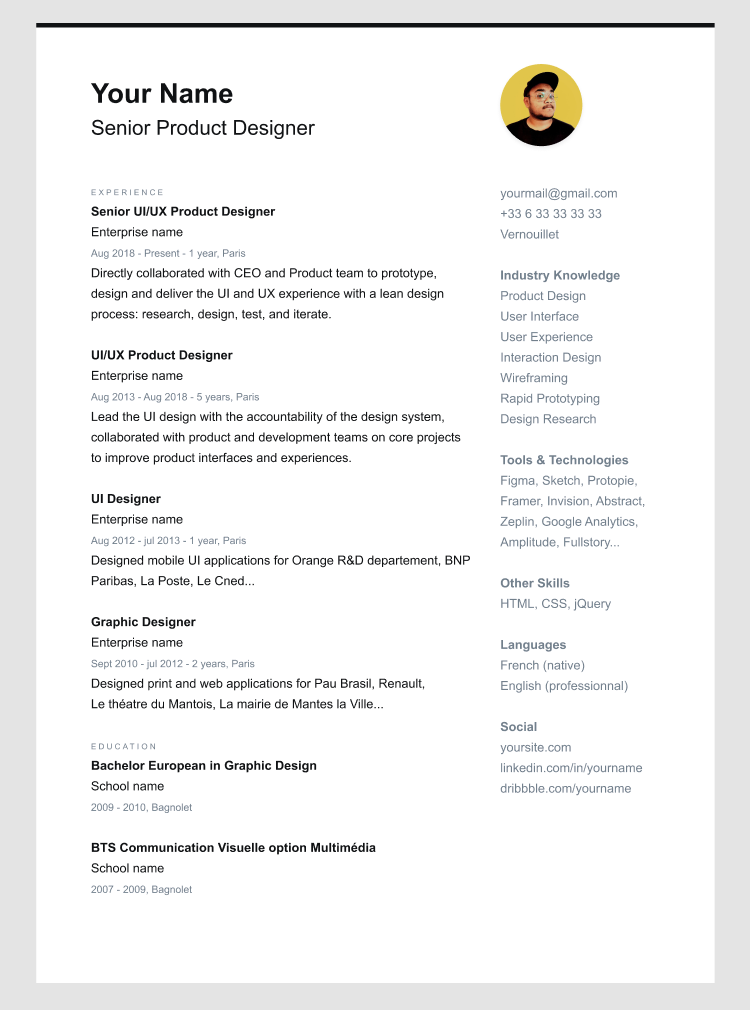
However, visual appeal doesn’t always translate into practicality. To me, many Figma resume templates shared on communities resemble Canva resume templates: striking to the eye, but not necessarily built for applicant tracking systems (ATS). They often include decorative elements, uneven spacing, or multiple columns that make it harder for software to interpret text correctly.
Check out our reviews on other resume templates here:
- MS Word Resume Templates
- Google Docs Resume Templates
- Adobe Illustrator Resume Templates
- LaTex Resume Templates
- Etsy Resume Templates
- Harvard Resume Templates
Ease of use
Ease of use determines how quickly and comfortably you can create a resume that’s ready to send out.
With Rezi, we built the interface in a way that allows you to focus entirely on your content. The structure, spacing, and layout is handled automatically. It’s designed so even first-time users can build a professional resume in minutes. Figma is quite the opposite. It works more like a blank workspace since you’ll need to organize both the resume content and formatting yourself.
Rezi
Rezi is designed to be intuitive for anyone, regardless of writing ability or design experience. The interface guides you through each section of your resume from contact details to work experience with structured outlines to help you know what to write.
Under certain sections, you’ll also find dedicated tools like the AI Bullet Point Writer, which helps you craft strong resume sentences.
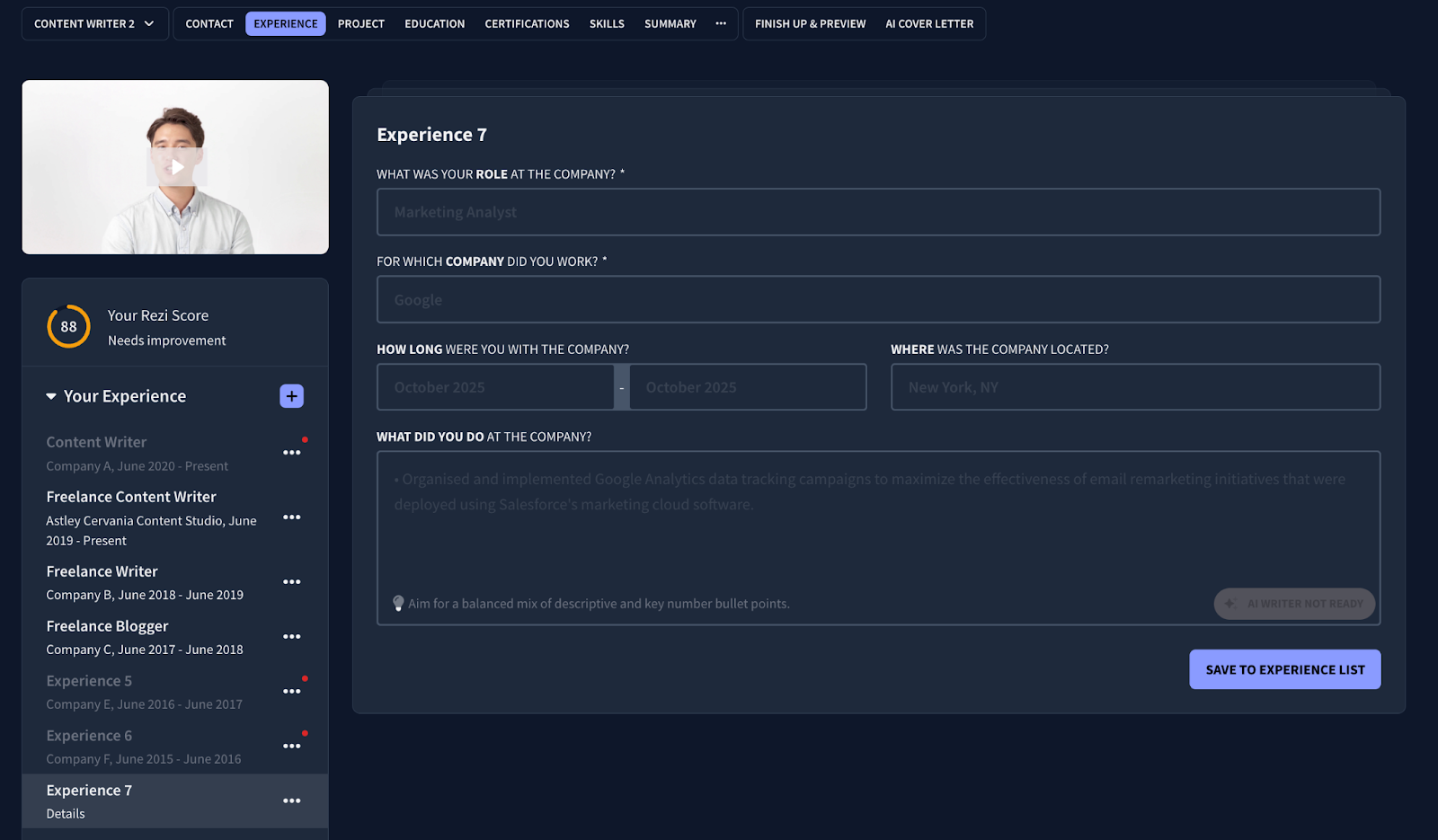
You don’t need to worry about formatting or layout, either — Rezi automatically adjusts spacing, alignment, and design as you type. On top of that, the platform provides real-time feedback and a resume score, showing how your resume measures up against hiring standards. The result is a simple, focused experience that removes complexity so you can concentrate entirely on your content. Even first-time users can go from a blank page to a polished, professional resume in minutes.
Figma
Figma offers a highly customizable environment for resume design, giving users the ability to shape every visual detail from the ground up.
One way to start is with a blank canvas. Manually build your resume using the design tools Figma has to offer. Alternatively, start from one of the many community templates available. Edit the content to reflect your own skills and experience then personalize it by adjusting layout structure, font pairings, spacing, and color schemes.
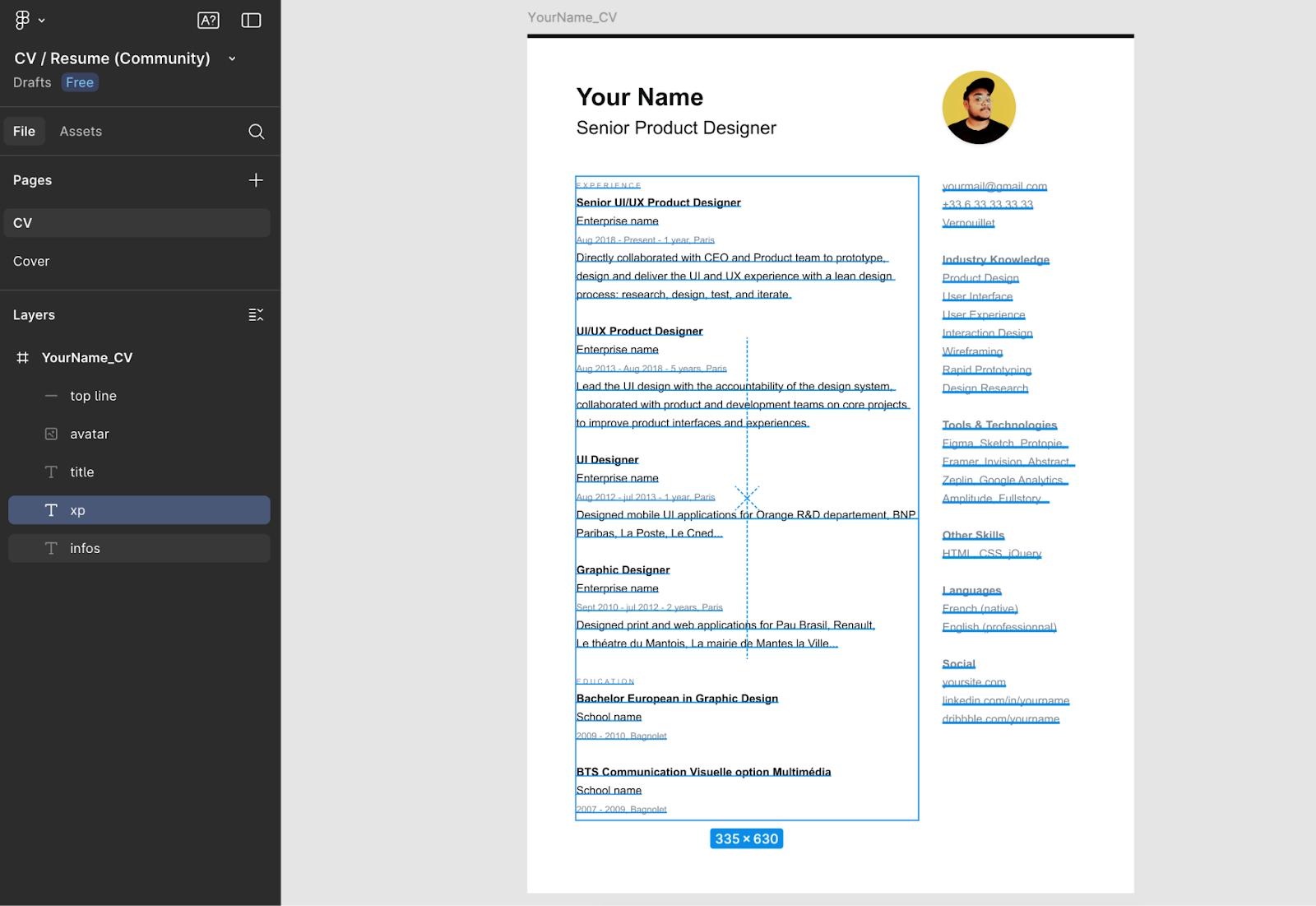
Unlike Rezi, Figma doesn’t provide guided instructions or built-in resume writing tools, so all content creation and formatting decisions rest entirely on the user. This makes the process more design-oriented than writing-focused. For experienced designers, that level of control might feel enjoyable. For most job seekers, however, it may feel like overkill: setting up text boxes, aligning sections, and testing exports can take considerably longer than using a dedicated resume builder.
Feedback and collaboration
Getting input from others can make a big difference when perfecting your resume. It could simply be feedback from a mentor or a quick review from a friend.
Rezi offers built-in tools like the Rezi Score and AI Agent to guide improvements. You can also share your resume link or export it for feedback whenever you need an outside opinion. Figma, by contrast, is built around teamwork. It lets multiple people view, comment, and edit designs in real time, making it great for visual collaboration even though it’s not necessarily tailored for resume-specific feedback or writing guidance.
Rezi
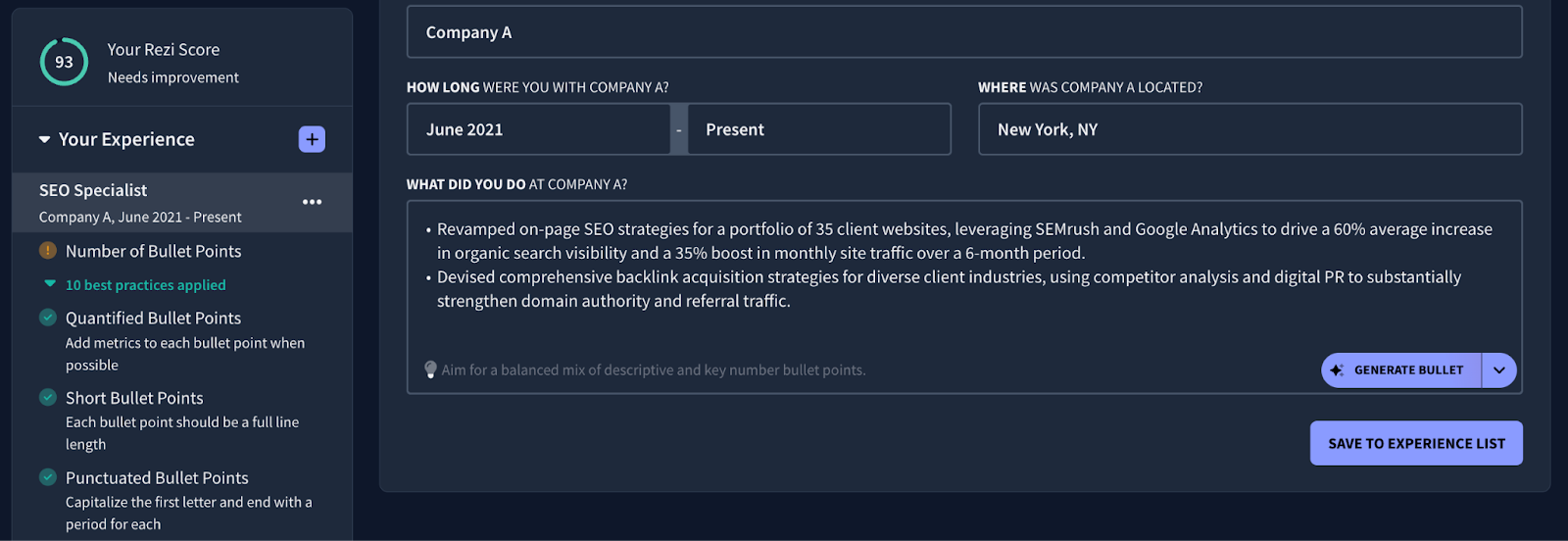
You can get feedback to improve your resume even if you’re working on it alone, thanks to the Rezi score and real-time content analysis features.
Every time you edit, you’ll notice highlighted areas for improvement. Your resume score also updates as you make changes. It gives you an instant snapshot of how your resume measures up to hiring standards. It’s like having a built-in reviewer guiding you through every change.
Additionally, you can use Rezi AI Agent as your personal resume assistant. It’s ready to answer your questions, suggest rewrites, and help you improve your resume. It can also give targeted feedback based on your resume and career situation.
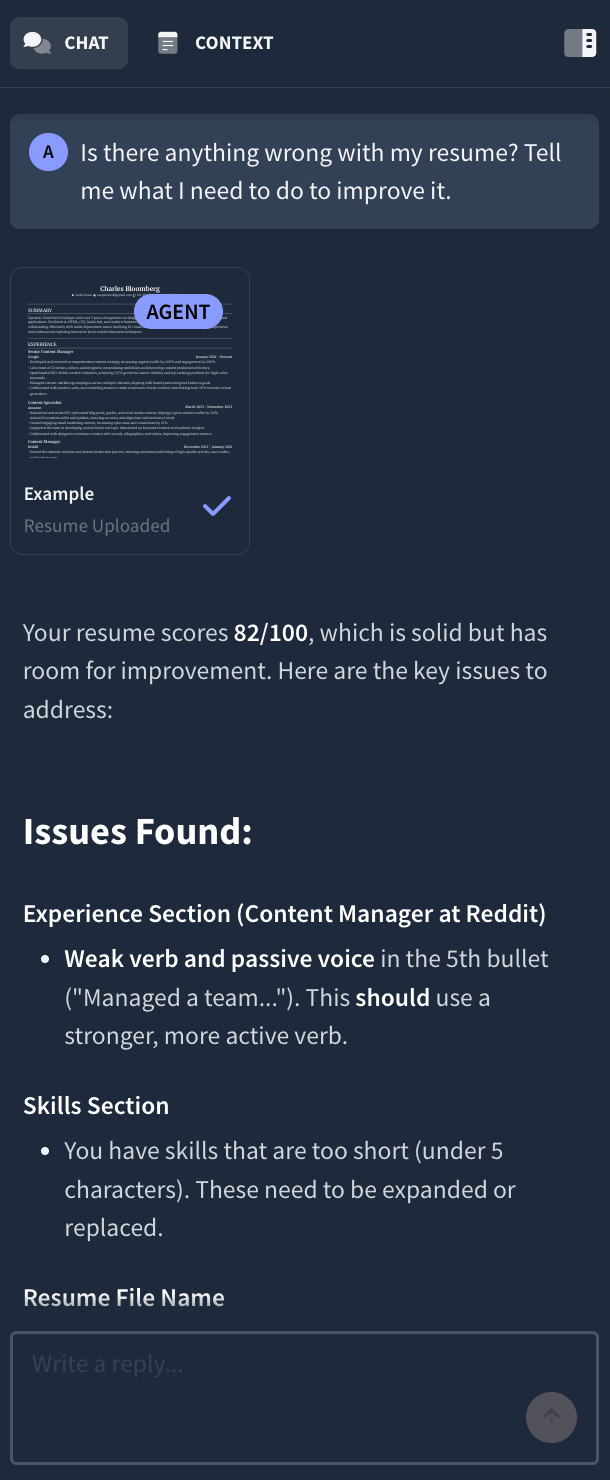
While it’s common to request a resume review, many Rezi users find they don’t need one thanks to all the built-in feedback tools available. Still, our expert resume review feature is there if you’d like more hands-on guidance.
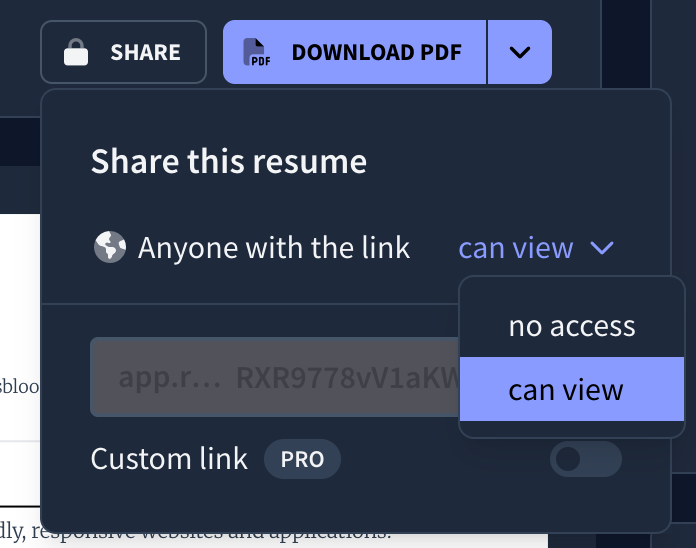
Rezi is primarily designed as a personal resume builder. It’s built to help individuals confidently create, edit, and refine their own resumes. At the same time, collaboration is simple. You can share your resume online using a direct link, or export it in your preferred format — PDF, .DOCX, or even save it to Google Drive — to send to mentors, peers, or career coaches for feedback.
Figma
Figma is one of the best tools for real-time collaboration, and that can extend to building resumes.
You can invite peers, mentors, or career coaches to view or edit your files by sharing a link. Once inside, collaborators can leave comments directly on specific elements, which can make it easier to gather feedback without constantly exporting or emailing drafts back and forth.
Figma offers real-time collaboration tools. You’ll be able to see multiple cursors and live updates when reviewers are working in your file. Plus, the version history tool makes tracking changes straightforward. You can restore previous versions or duplicate variations of your resume for different job applications.
Even though Figma excels at design collaboration, it doesn’t include built-in resume-specific scoring or analysis.
Summary: Rezi or Figma?
If your goal is to create a hireable resume as soon as possible and start landing interviews, go for Rezi. It’s made for that specific purpose: to help you create a clean, professional resume that gets through resume scanners and gets responses.
With Rezi, you can focus on your content. The words, achievements, and the story you’re telling. Rezi takes care of the layout and structure automatically.
Figma, on the other hand, is great for design projects but not ideal for resumes. It’s not optimized for ATS, and most resumes made there look great visually but don’t parse correctly when uploaded to job portals. Unless you’re a designer using it as part of your portfolio, I wouldn’t recommend it.
FAQs
Is a Figma resume ATS-friendly?
Not reliably. Figma can export to PDF, but many exported resumes lose their structural integrity. Text may become non-selectable or broken into odd fragments, which can confuse applicant tracking systems. If you use Figma, make sure to test the PDF in an ATS checker and possibly simplify the layout (e.g., single column, standard fonts) to improve readability.
Do designers actually get hired with Figma resumes?
Some designers do secure roles with resumes made in Figma, especially in creative fields where visual presentation matters more. However, it can be risky since Figma resumes aren’t typically optimized for resume screening tools. Your resume still needs to pass ATS filters or get seen by a human.
Would Figma be better for creating a resume in the design and UX field?
Possibly, but not always. Regardless of your industry, most resumes will get filtered out by applicant tracking systems (ATS). Therefore, your resume content needs to be relevant and the format should be optimized to meet professional standards. Figma doesn’t usually provide ATS-optimized templates, which is why it can be a disadvantage. The only major advantage with Figma for building a resume is having the extra freedom to tweak even the smallest visual details.
How hard is it to make a resume in Figma compared to Rezi?
Quite harder, unless you have resume design and writing experience. Rezi offers a structured approach with all the resume writing and formatting tools provided to make the process easy. In contrast, Figma requires manual layout, typography, spacing, alignment, and export decisions.
Even small changes on Figma such as adding a job or rearranging sections might require redesigning parts manually.

Upload or drop your resume to get started
Upload your resume to get started
Score my resume

Astley Cervania is a career writer and editor who has been sharing resume and job search insights for 5+ years. He shapes the direction of the Rezi blog, providing practical answers for important career-related questions and helping hundreds of thousands of people navigate the job market and build resumes that land interviews.