User Guides
Publications
Learn how to add publications to your Rezi resume, organize them professionally, and highlight your research, writing, or industry expertise.
Published on
August 7, 2026
Updated on
August 7, 2026
You’ve done the hard part and got your work published (congrats). The next challenge is deciding whether it belongs on your resume and how to present it. Rezi helps you organize your publications and include the right details without turning your resume into a lengthy page of citations.
In this guide, I’ll cover how to add, format, and make the most of your publications section.
Start building your sections with our free AI Resume Builder and get tailored feedback, AI suggestions, and ATS-friendly formatting to guide you through the process.
You can also check out these AI tools and features:
And find out how to get noticed with other resume sections:
- How to List Awards on a Resume
- How to List Certifications on Your Resume
- How to List Your Best Projects on a Resume
Publications Section
The Publications section lets you show off any written work you’ve authored or contributed to in a professional, academic, or industry setting. It’s mostly for job seekers applying for roles where your research, writing, or subject-matter expertise is part of what makes you a strong candidate.
Consider adding this section if you’re applying for:
- Academic, research, or teaching positions.
- Roles that involve writing, analysis, or specialized expertise.
- Jobs where your publications strengthen your professional credibility.
- Entry-level roles if you’re a student or recent graduate with relevant published work.
Just don’t get carried away and list everything; relevance always beats quantity. Only include publications that support your application and prove your expertise, whether that’s an academic journal article, research paper, book chapter, conference presentation, or industry report.
How to Fill Out the Publications Section
Here’s a quick rundown of how to add publications with Rezi:
- Create a new resume or upload an existing one, then use Target Your Resume during setup for personalized suggestions based on your target job.
- Add publications to your resume by enabling the Publications section from the Add or Remove menu under the Academic category.
- Fill in your publication details by entering the publication type, title, journal or conference name, publication date, and any additional information.
- Review and customize your application in Finish Up & Preview, where you can adjust the formatting, rename or reorder sections, choose an ATS-friendly template, compare your resume against a job ad with AI Keyword Targeting, and improve your Rezi Score.
Let’s get into the details.
1. Create a new resume or upload an existing one
Before you add publications, you need to create a resume in Rezi. Here are the different ways you can get started:
- Build a resume from scratch.
- Upload an existing resume.
- Import your details from LinkedIn with the Rezi Chrome Extension.
- Use the AI Resume Agent to build your resume through a guided conversation.
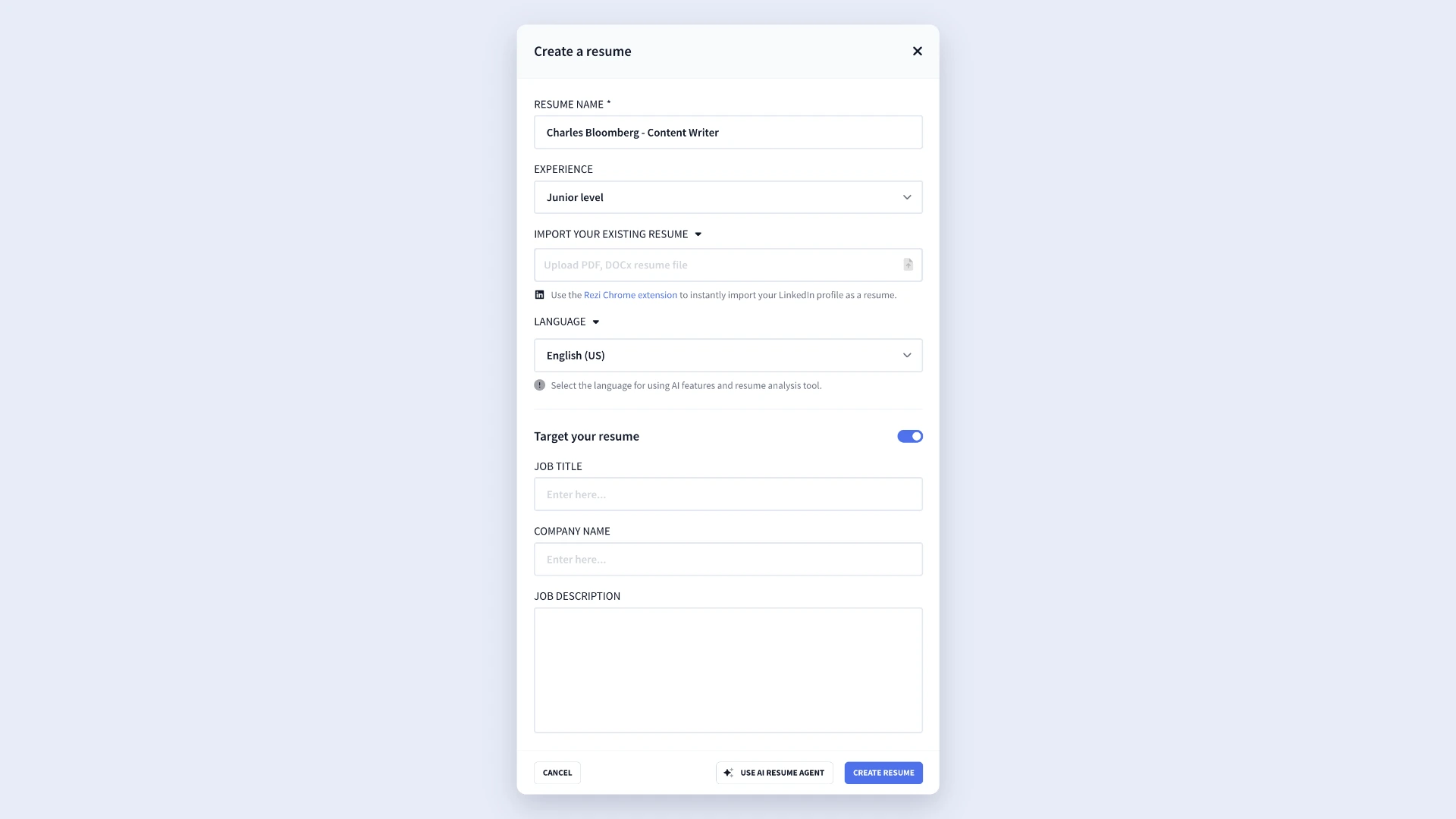
If you’re applying for a specific role, I suggest taking advantage of Rezi’s Target Your Resume feature during setup. All you need to do is add the job title, company name, and job description to get more personalized suggestions and feedback as you build your resume.
2. Add publications to your resume
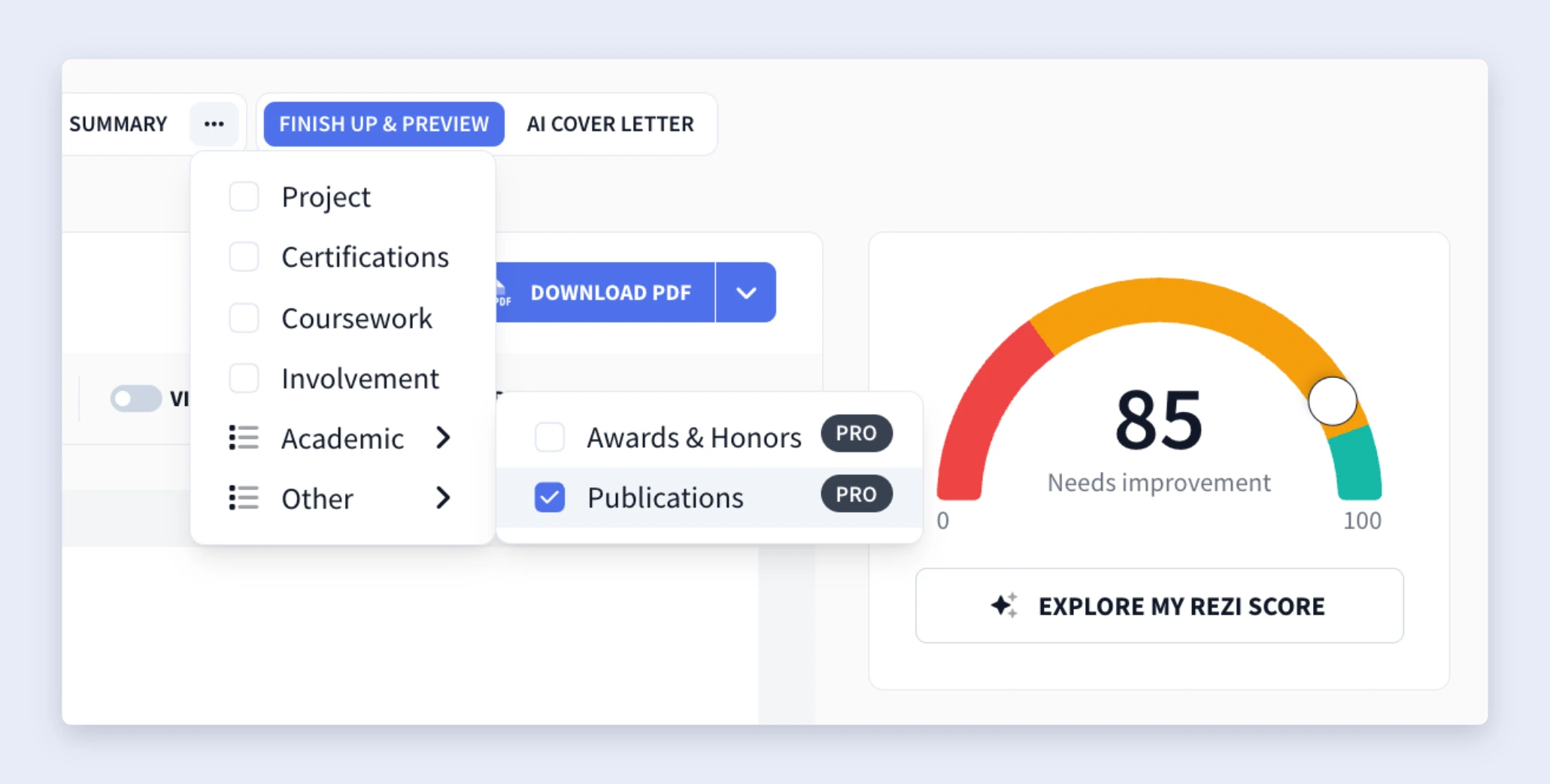
When you enter the resume builder, you’ll see the standard resume sections, including Work Experience, Education, and Skills. To add the Publications section:
- Click the three-dot menu at the end of the section tabs.
- Select Add or Remove Section.
- Open the Academic drop-down menu.
- Enable Publications.
The Publications section will then pop up alongside your other resume sections.
Just keep in mind that you don’t always need a separate publications section. It really depends on your industry, how many publications you have, and how relevant they are to the position.
If you’re unsure, here’s a general guideline:
- Three or more publications: Create a dedicated publications section after your work experience and education sections. List each publication in reverse chronological order and include the title, publication name, and publication date.
- One or two publications: Add them under your education section instead of creating a separate section.
And a heads-up: the publications section is only available with a Rezi Pro or Lifetime subscription, not in the free plan.
3. Fill in your publication details
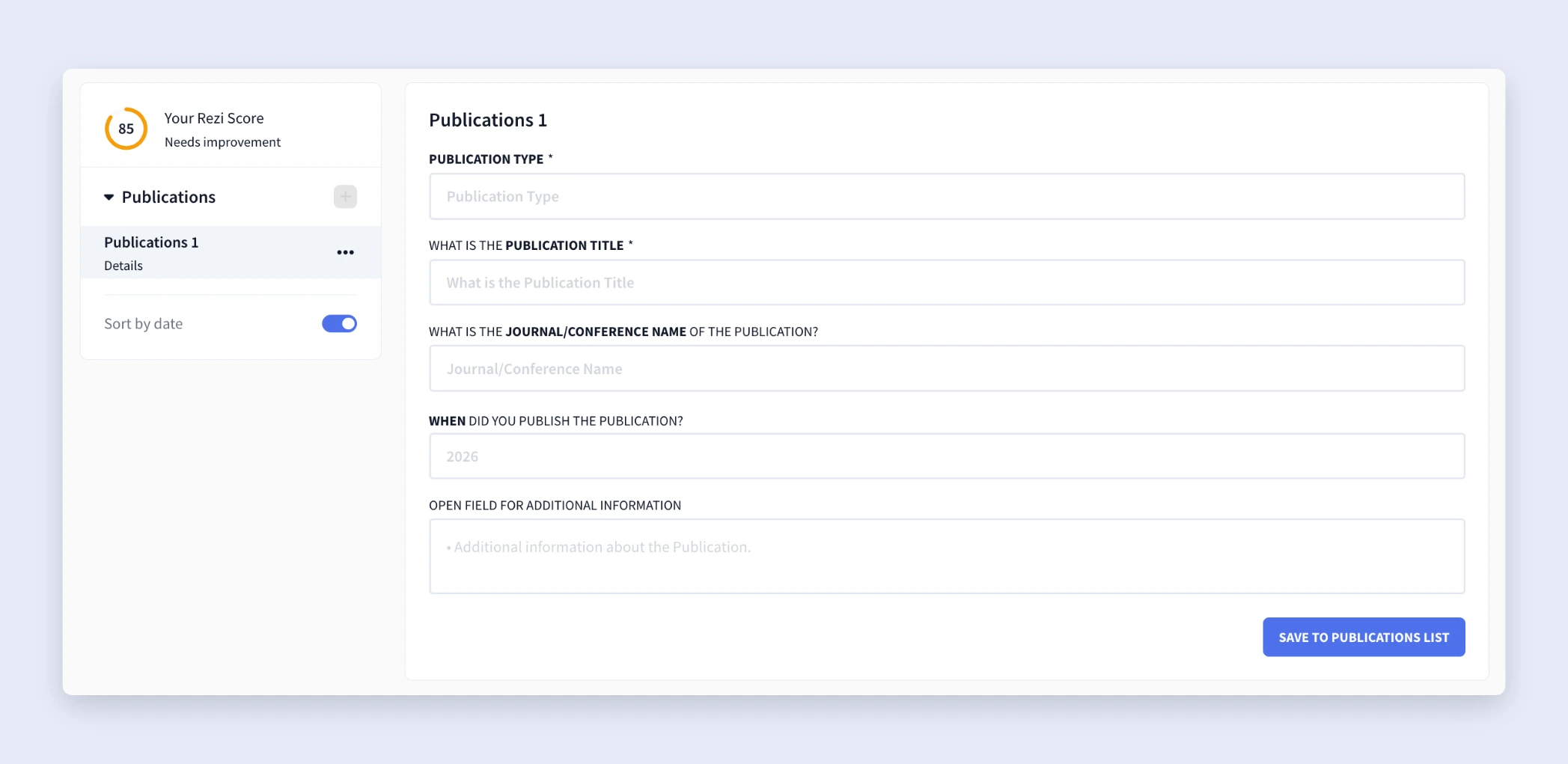
After you’ve enabled the publications section, start adding your entries. For each publication, complete the following fields:
- Publication type
- Publication title
- Journal or conference name
- Publication date
- Additional information
Haven’t released your publication yet? Just label it as in press or submitted to let employers know your work is in progress.
When you need to add more publications, click the + icon in the left-side panel, then select Add New to create another entry.
4. Review and customise your application
Once you’ve finished adding your publications, head to the Finish Up & Preview page to review your resume before sending applications.
From there, you can:
- Review your resume for grammar, clarity, and consistency.
- Choose an ATS-friendly resume template.
- Adjust the formatting and layout.
- Rename or reorder your resume sections.
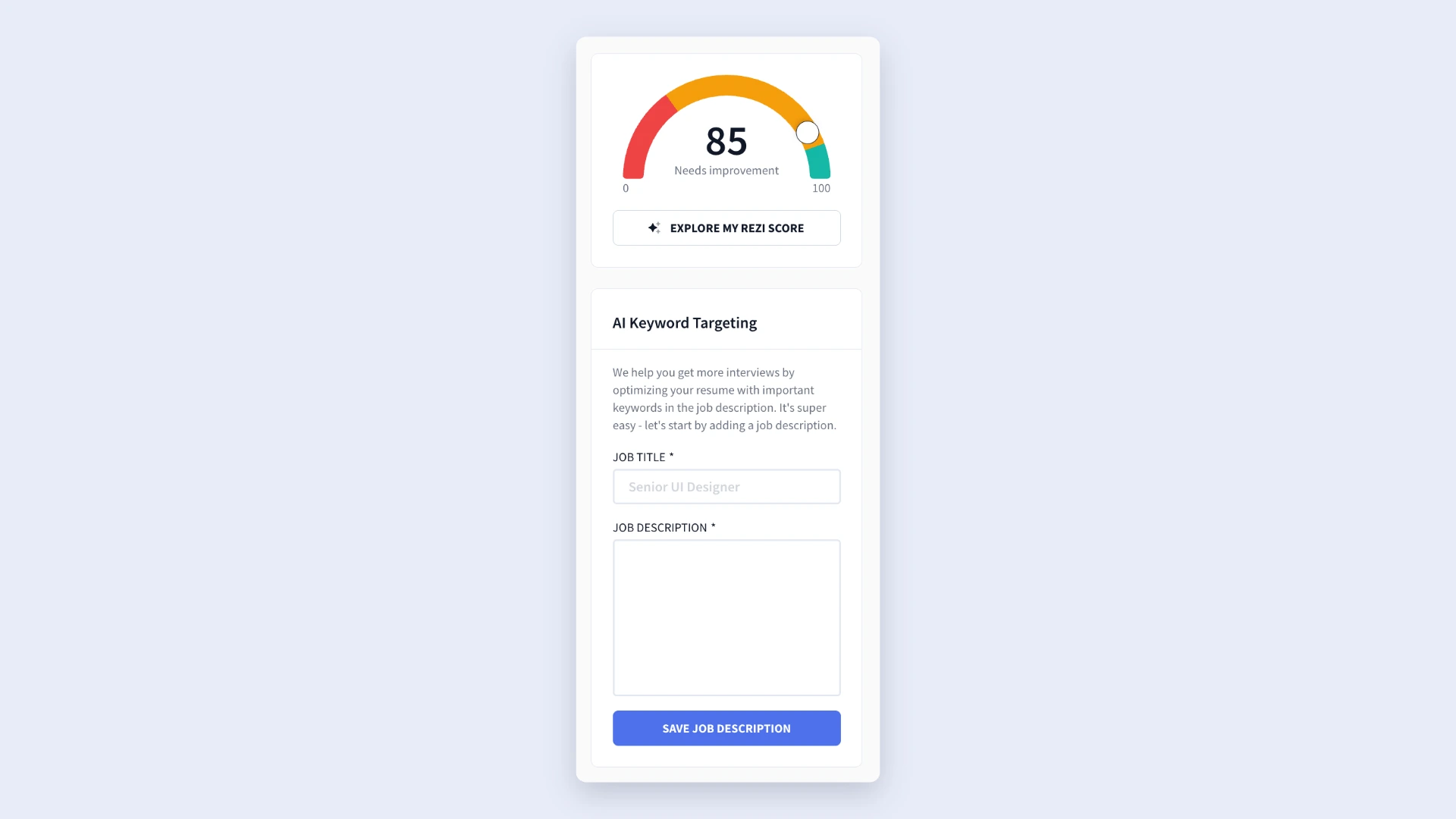
- Use AI Keyword Targeting to compare your resume against a job description.
- Check your Rezi Score and apply suggested improvements.
How to Get the Best Results
Adding your publications is only half the job. A few smart choices and tweaks about what you include and how you format it can make the section look more credible, easier to read, and more relevant to the job you want.
Here are a few simple tips to help you get the most out of your publications section.
Stick to a consistent format
I vividly remember the pressure of using the correct format for all my essay citations in college. It mattered then, and it still matters now. Using the same formatting style for every publication makes your resume look professional and shows that you pay attention to detail.
For many resumes, listing the publication title, publisher or journal, and publication date is enough. But if you need a formal format, these are the most common options:
- APA style: Common in science, engineering, education, and psychology.
- Format: Author’s Last Name, First Initial. (Year). Title of Article. Journal Name, Volume(Issue), Pages. DOI or URL (if applicable).
- MLA style: Most often used in the humanities and liberal arts.
- Format: Author’s Last Name, First Name. “Title of Article.” Journal Name, Volume, Issue, Year, Pages.
Whichever format you choose, use it consistently throughout your publications section.
Learn more about professional resume formatting:
Avoid adding a long list of irrelevant publications
When it comes to publications (and your overall resume), quality beats quantity. A carefully chosen list tells employers more than a page full of random titles.
Think of your publications as evidence of your expertise and subject knowledge. With that in mind, only include the ones that best support the role you’re applying for, and don’t be afraid to cut the ones that don’t add as much value.
As you’re deciding what to include, ask yourself:
- Is this publication relevant to the position?
- Does it highlight an important skill or area of expertise?
- Is it recent enough to strengthen my application?
Consider creating an academic CV
If you’re applying for academic, research, or other specialized roles, a traditional resume might not be the best fit. In these fields, employers often expect to see an academic CV.
Unlike a resume, an academic CV provides a detailed overview of your experience, so a dedicated publications section is standard. Instead of sticking with only your strongest work, you’ll typically include most of your publication history.
Here are a few ways an academic CV handles publications differently:
- Create a dedicated Publications or Research and Publications section.
- Include most of your publications instead of a selected few.
- Organize your work by category, such as journal articles, conference papers, or books.
- Add a brief note for significant publications if they received awards, have a high citation count, or made a notable impact.
- If you work in medicine or the health sciences, use AMA citation style, since it’s the standard for those fields.
That said, if you’re applying outside academia, a concise resume with only your most relevant publications will usually make a stronger impression.
Summary
- Use a publications section for published work you’ve authored or co-authored, such as journal articles, research papers, books, white papers, or industry reports.
- Only include publications that support the role you’re applying for; a few strong, relevant publications are more effective than a long list of unrelated ones.
- Enable the publication section by clicking the three-dot menu in the resume builder, opening the Academic category, and turning on Publications.
- Include the key details for each publication, including the publication type, title, journal or conference name, publication date, and any extra information.
- Choose one citation style to use throughout, such as APA or MLA. If your industry doesn’t require a formal style, a simple, concise format works well.
- If you only have one or two publications, consider placing them under your education section instead of creating a dedicated publications section.
- Consider creating an academic CV for academic or research roles to give you more space to include more publications and organize them by category.
- Review your publications section before applying. Check for consistent formatting, accurate dates, correct publication names, and ensure each entry adds value.
FAQ
Where should you place the publications section on your resume?
If you have several relevant publications, create a dedicated publications section and place it after your work experience and education sections. If you only have one or two publications, you don’t necessarily need a separate section. You can list them under your education section instead to save space and keep your resume concise.
Should you include unpublished or pending work on your resume?
Yes, as long as you’re clear about its status. If a publication has been accepted but hasn’t been released yet, label it as “In Press.” If you’ve submitted it for review, use “Submitted.” Just avoid listing unpublished work as though it’s already been published; being transparent shows professionalism and helps employers understand where your work is in the publication process.
How many publications should you list?
There’s no magic number, but relevance should always be the main factor. For most resumes, three to five strong publications are plenty. But if you only have one or two that directly support your application, that’s also perfectly fine. Skip publications that are outdated or unrelated to the position unless they show particularly impressive achievements or expertise.
What order should you list your publications in?
List your publications in reverse chronological order, starting with the most recent. This makes it easy for employers to see your latest work and makes it clear that you’re actively contributing to your field. For each publication, include details such as the title, publication or journal name, publication date, and any other information that’s relevant to your industry or citation style.
Should you list publications on a resume or an academic CV?
For most resumes, only include publications that are relevant to the position and strengthen your application. Keep the section concise and focus on quality over quantity.
An academic CV is different. Since CVs are designed for academic, research, and teaching positions, they’re typically much longer and include a comprehensive publication history. Rather than selecting only your strongest work, you’ll usually include many publications, often grouped into categories such as journal articles, conference papers, books, or book chapters.
What should you do if your publication has multiple authors?
List the authors in the same order they appear in the published work. Don’t rearrange the names or move your own to the front, even if you made a significant contribution. If your field places particular importance on author order, employers will already understand what it represents. You can also briefly explain your role in the Additional Information field if your contribution adds valuable context, especially for collaborative research or large projects.

Upload or drop your resume to get started
Upload your resume to get started
Score my resume

Lauren Bedford is a seasoned writer with a track record of helping thousands of readers find practical solutions over the past five years. She's tackled a range of topics, always striving to simplify complex jargon. At Rezi, Lauren crafts genuine and actionable content that guides readers in creating standout resumes to land their dream jobs.