
User Guides
References
Learn when to include references on your resume, how to add them in Rezi, and who to choose when an employer asks for them.
Published on
August 7, 2026
Updated on
September 1, 2026
Your mom might think you’re Employee of the Year, but hiring managers want someone a little more credible to back that up. If you’re not sure if references belong on your resume, who to include, or what details employers expect, you’re in the right place. Plus, Rezi gives you a dedicated place to keep all those details organised and looking professional.
In this guide, I’ll walk you through when to include references and how to add them in Rezi.
Get started with our free AI Resume Builder and get tailored feedback, AI suggestions, and ATS-friendly formatting to create your application in minutes.
You can also check out these tools after building your resume:
And learn more about other resume sections:
- How to List Certifications on Your Resume
- How to List Your Best Projects on a Resume
- How to List Hobbies and Interests on a Resume
References Section
References are the people who can back up everything your resume claims. They’re usually former managers, colleagues, teachers, supervisors, mentors, or anyone who’s worked closely enough with you to speak positively about your skills, experience, and work ethic.
That said, you won’t need to include them on your resume in most cases. Hiring managers typically use your resume to decide whether you’re worth interviewing, and they’ll ask for references later if they want to move forward with your application.
So, unless the job posting specifically tells you to include them, it’s usually better to keep your references in a separate document so you can send them when an employer asks.
And on the off chance that the employer or job ad does ask for resume references, make sure you give them a heads-up and only choose people you can trust (and not make you look bad).
Find out more: How to Ask Someone to Be Your Reference
How to Fill Out the References Section
Here’s a quick breakdown of how to create a references section with Rezi:
- Create a new resume or open an existing one by building from scratch, uploading an existing resume, importing your LinkedIn profile, or using the AI Resume Agent.
- Enable the References section by clicking the three-dot menu, selecting Add or Remove Section, opening the Other category, and toggling References on.
- Add your reference details by entering each person’s full name, contact information, reference type, employer, and job title.
- Preview your resume in Finish Up & Preview, where you can review your content, adjust the formatting, check your Rezi Score, and make any final improvements.
Let’s get into the details.
1. Create a new resume or open an existing one
Before you can add references, you’ll need a resume to work with. You can create a resume whichever way suits you best:
- Build a new resume from scratch.
- Upload an existing resume.
- Import your LinkedIn profile with the Rezi Chrome Extension.
- Use the AI Resume Agent to build your resume through guided prompts.
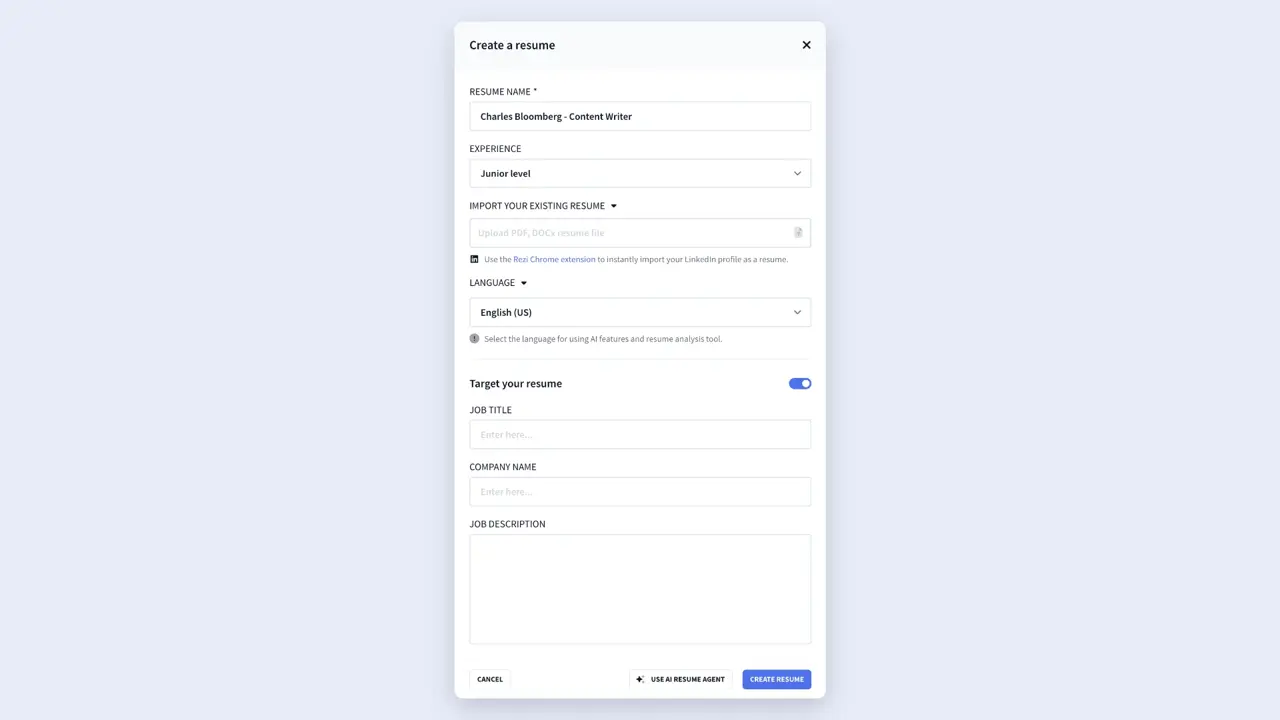
You can also use the Target Resume feature by entering the job title, company name, and job description to get tailored suggestions and feedback as you work through your resume.
2. Enable the References section
When you open the resume builder, you’ll see the standard resume sections like Work Experience, Education, and Skills. To add References:
- Click the three-dot menu at the end of the section tabs.
- Select Add or Remove Section.
- Open the Other category.
- Toggle References on.
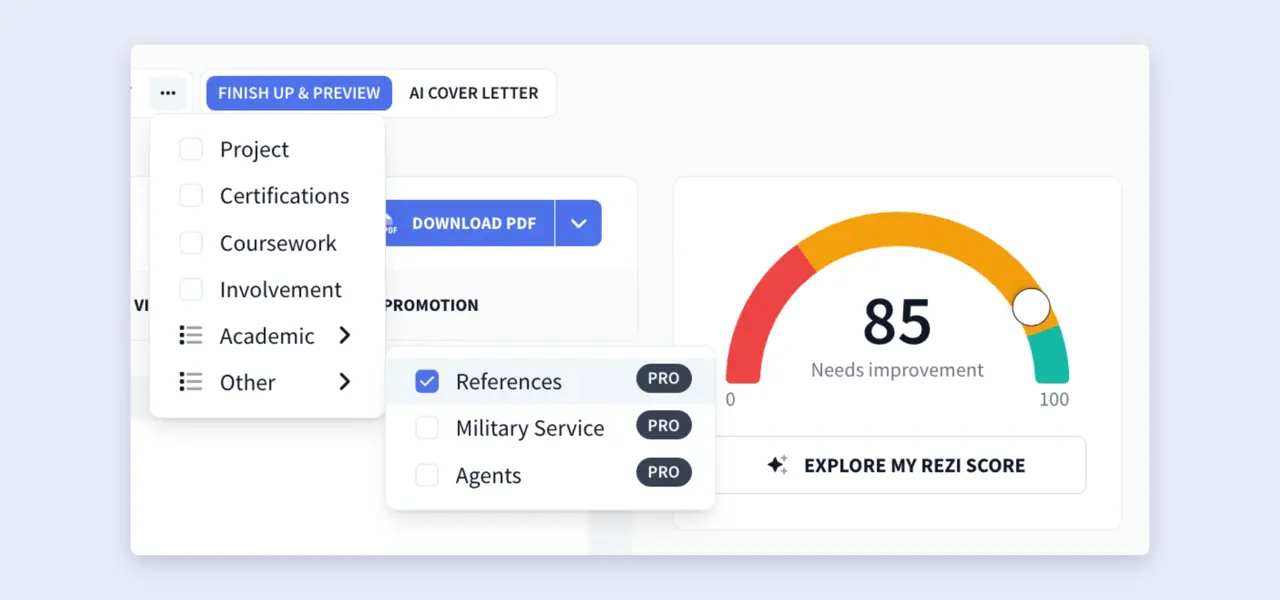
The References section will then appear alongside the rest of your resume sections.
And one thing to keep in mind: this section is only available with Rezi Pro and Rezi Lifetime, so you won’t see it on the free plan.
3. Add your reference details
Open the references section and fill in the information for each person. Rezi gives you fill-in-the-blank fields, so you don’t have to worry about missing anything.
For each reference, add:
- Full name
- Phone number (use the best number to reach them)
- Email address (a current, professional email is always best)
- Reference type (personal or professional)
- Employer
- Job title (their current or most recent role)
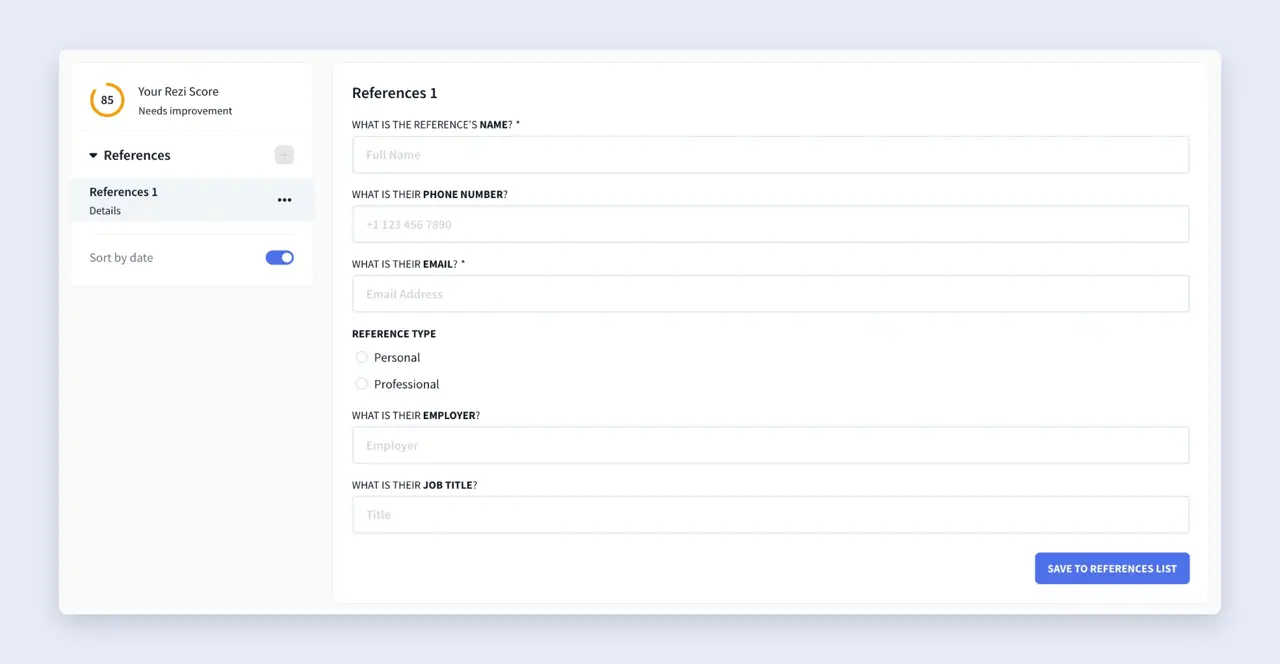
Double-check that all the contact details are accurate before you send your resume. An incorrect or old number or email address won’t do your job application any favours.
4. Preview your resume
Once you’ve finished adding your references, head to Finish Up & Preview to give your resume that final review before you apply.
While you’re there, you can:
- Review your resume for grammar, clarity, and consistency.
- Choose an ATS-friendly template.
- Adjust the formatting and layout.
- Compare your resume against a job description with AI Keyword Targeting.
- Check your Rezi Score and apply suggested improvements.
- Rename or reorder your resume sections.
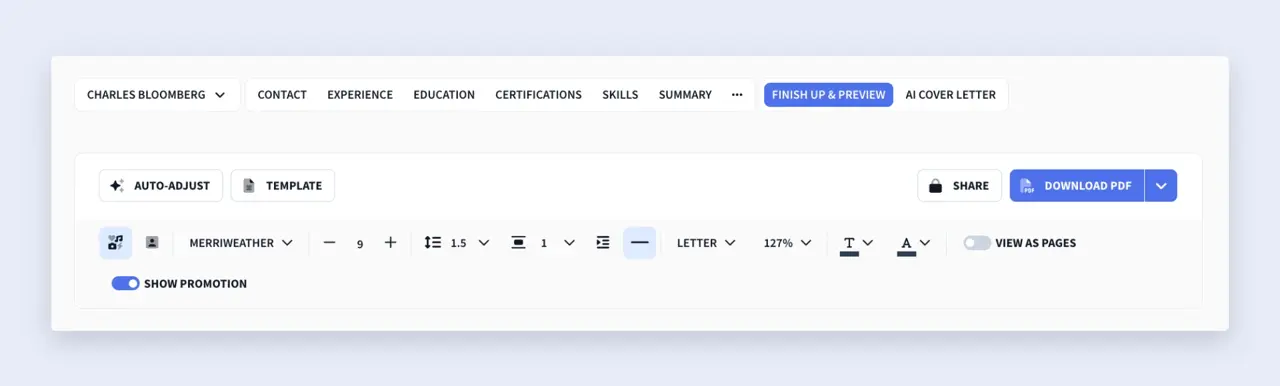
If you decide to include references on your resume, sticking them at the bottom is your best bet. It simply keeps the focus on your experience and skills first, while still making your references easy for employers to find.
Summary
Here’s a rundown of everything you need to know about adding references to your resume:
- In most cases, you can leave references off your resume. Hiring managers will usually ask for them later in the hiring process if they’re seriously considering you for the role.
- The biggest exception is when the job description specifically asks you to include references. If an employer requests them, follow those instructions.
- Choose people who know your work and can speak positively about your skills, experience, and work ethic. Former managers, supervisors, colleagues, clients, professors, or mentors are all solid choices.
- Always ask for permission before listing someone as a reference to give them the chance to prepare and ensure they’re comfortable recommending you.
- Make sure all the information is accurate and up to date. Include each reference’s full name, current job title, employer, phone number, and professional email address.
- Tailor your references when it makes sense. If you’re applying for a leadership role, for example, choose someone who can speak about your management skills.
- If you include references on your resume, place them at the end, so your experience, skills, and achievements remain the main focus.
- Avoid adding “References available upon request,” since employers already expect you’ll provide them if needed.
FAQ
Should you include references on your resume?
Usually, no. Most employers don’t expect to see references on your resume, and including them takes up space for your skills, experience, and resume achievements. The exception is when the job posting specifically asks you to include references. Otherwise, keep a separate reference document ready to send if they ask for it later in the hiring process.
Who should you use as a reference on your resume?
Choose people who know your work well and can speak positively about your skills, experience, and character. The best references are usually former managers, supervisors, colleagues, clients, professors, teachers, or mentors who’ve worked closely with you.
You can also try to choose references who are relevant to the role you’re applying for. For example, if you’re applying for a management position, a former supervisor who can talk about your leadership skills will carry the most weight.
How many references should you include?
If an employer asks you to include or provide references, 2 to 4 are usually enough. That gives hiring managers a good mix of perspectives without being too overwhelming. A few strong references who know your work well are much more valuable than a long list of people who barely remember working with you.
Can you use personal references instead of professional ones?
Professional references should always be your first choice. Employers generally want to hear from people who can comment on how you perform in a work or academic environment. That said, personal references could work if you have little or no professional experience. In that case, choose someone who knows you well and can speak about your reliability, work ethic, and character. Just avoid listing family members unless the employer explicitly says it’s acceptable.
Can you use your current employer as a reference?
Yes, but only if you’re comfortable doing so. Many people don’t want their current employer to know they’re job hunting, so it might be better to leave them off your reference list until you’ve accepted an offer or you’re ready to share your plans.
If you’d rather keep your search private, use previous managers, colleagues, clients, or other professional contacts instead. And if an employer specifically requests your current manager as a reference, explain your situation and ask if they can wait until the later stages of the hiring process.
Learn how to break the news to your current employer: How to Quit a Job
Do employers always contact your references?
No. Some employers contact every finalist’s references, while others only do so before making an offer. Some may not contact them at all, especially if they’ve already gathered enough information through interviews and assessments.

Upload or drop your resume to get started
Upload your resume to get started
Score my resume

Lauren Bedford is a seasoned writer with a track record of helping thousands of readers find practical solutions over the past five years. She's tackled a range of topics, always striving to simplify complex jargon. At Rezi, Lauren crafts genuine and actionable content that guides readers in creating standout resumes to land their dream jobs.