Resume
How to Write a Resume That Doesn’t Get Ignored (+Examples)
How to write a resume that actually gets you job interviews. This guide shares expert resume writing advice from CEOs who reviewed hundreds of resumes.

.webp)
Published on
August 17, 2022
Updated on
January 27, 2026
Here’s how to write a resume: use an ATS-friendly template with a reverse chronological format, fill out your contact details in the resume header, highlight your strengths and unique qualifications in the summary section, and outline key achievements in the work experience section. Use bullet points and start each sentence with a clear action verb that gets straight to the point. Clarify what you did and how you made an impact in previous companies. Next, list your most relevant qualifications in the education section. Then, list your most relevant skills in the skills section. Lastly, add any additional sections that showcase relevant projects and certifications.
We’ve spoken to hundreds of job seekers. The same stories keep coming up again and again: no responses, no interviews, and a job market that feels straight-up impossible.
I won’t sugarcoat it. These are tough times.
Ghost job postings are everywhere. AI is swallowing up entry-level and junior roles. Recent graduates are being thrown into a hyper-competitive mess after an education system that never really prepared them for the current reality of the job market. Companies are cutting costs, laying people off, and expecting more for less.
You don’t have to look far to find horror stories.
Hiring simply doesn’t work the way most people think it does anymore. I’ve personally reviewed numerous resumes and most candidates are qualified for the jobs they’re applying for yet they’re struggling to get a single response.
In this guide, I’ll show you exactly how to write a resume that gets past all the noise. By the end, you’ll have all the tools and knowledge you need to create a resume that turns applications into interviews.
Applicant Tracking Systems (ATS) Read Your Resume First, Not Recruiters or Hiring Managers
Today, your resume isn’t read by a recruiter first. It’s read by software.
Before a hiring manager ever sees your name, your resume is scanned, parsed, and filtered by applicant tracking systems (ATS) and AI. If your resume doesn’t speak their language, it doesn’t matter how qualified you are. You won’t even make it past the first gate.
The purpose of a resume hasn’t changed, but the rules have.
Modern hiring systems stack the odds against you. Many ATS are flawed, and our Resume Metadata Standard experiment proved it: most content generated by modern resume builders isn’t fully parsable. Even our templates (which ended up having the most ATS-compatible formats compared to other resume builders we tested) showed that getting 100% of your content parsed correctly isn’t guaranteed.
That’s the current reality. Is it fair? No. But it is the game. And if you want interviews, you need to know how to play it.
Unfortunately, many job seekers are still following outdated advice that ignores how ATS actually work. Small things including messy layouts, unclear job titles, and vague bullet points with no relevant keywords can break how your resume is read before anyone ever reviews it.
Your resume has one job: get your foot in the door and land an interview. To do that, it needs to pass ATS and still impress a recruiter once it reaches them.
Learn more about Applicant Tracking Systems (ATS):
- ATS Myths Debunked: What People Get Wrong & What Our Experiment Proved
- How to Beat the Applicant Tracking System
- Here’s Why Your ATS Parse Failed
- AI Resume Screening Explained: How It Works and What to Do Next
- Expert Tips for an ATS-Optimized Resume
Example of a Professional Resume That’s ATS-Friendly
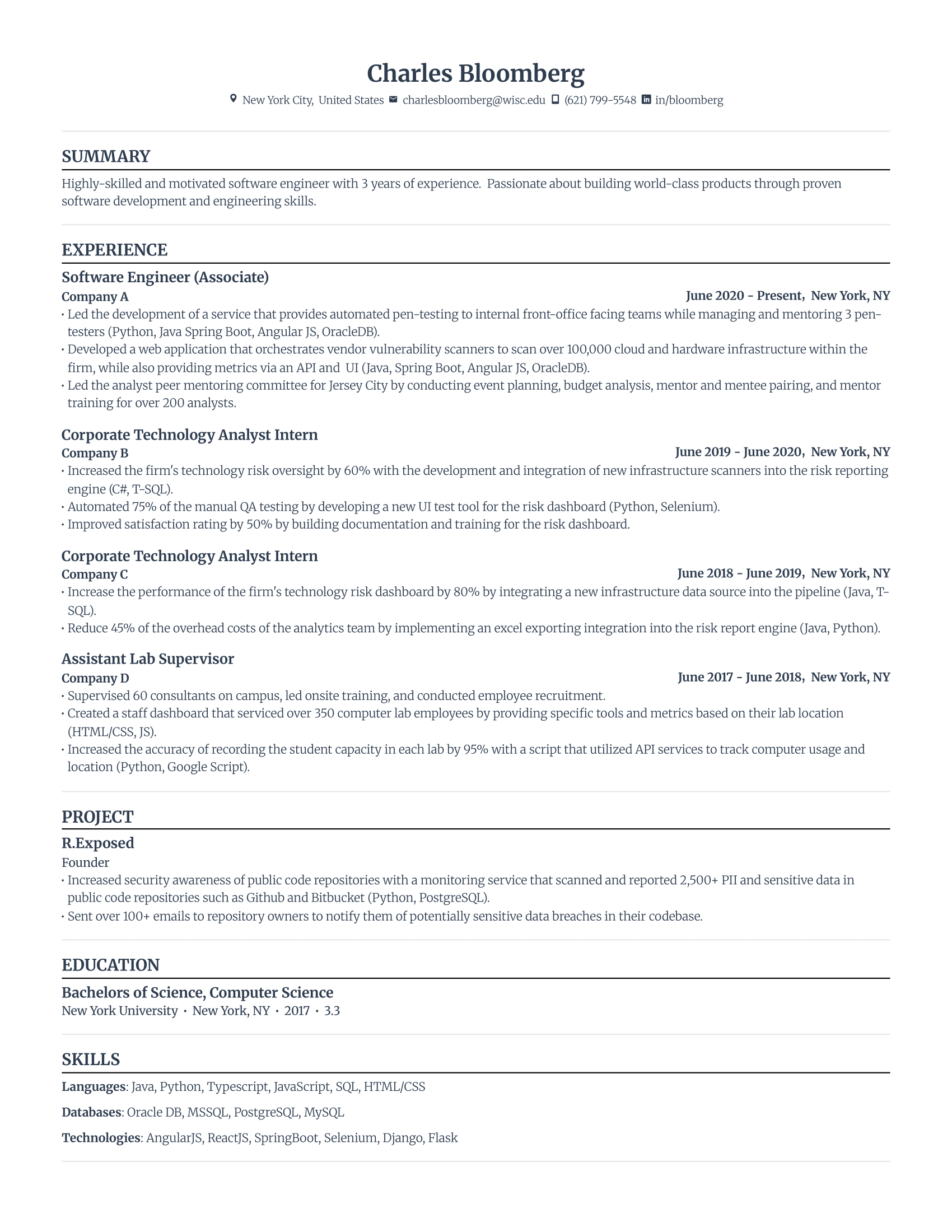
Why this resume works well for both ATS and recruiters
These are the main factors that can make or break your chances of landing an interview:
- Clean formatting. The resume template is ATS-compliant. Keep your layout and design minimal and professional. This is often the biggest reason why most resumes don’t make it past the first stage of the hiring process.
- Clearly articulating the impact you had in previous roles. This is best shown through describing what you did, how you did it, and what the result was.
- Relevant skills and experience. Your resume has to immediately make the hiring manager believe you’ll know how to do this job well. Highlight your areas of expertise that will translate into good performance in your desired role.
- Keywords. Companies use applicant tracking systems (ATS) to determine which resumes match their job description. To get past this, you’ll need to use the right keywords throughout your resume naturally.
These are the top factors that can make or break your chances of landing an interview.
Alari Aho, the CEO of Toggl, has reviewed numerous resumes. For him, the best resumes are focused on quantifiable achievements and job relevance.
“I look for candidates who can demonstrate their impact in previous roles through quantifiable achievements. Instead of generic descriptions of job duties, provide clear metrics that show how you contributed to your previous employer's success, such as percentages of growth, revenue saved, or efficiency improvements.”
He continues to share that:
“Another crucial factor is the relevance of your skills and experience to the position you're applying for. Customizing your resume to highlight how your background aligns with the job description significantly increases your chances of getting an interview. Emphasize specific skills and experiences that directly relate to the duties and expectations listed in the job posting.”
Bottom line: if you want a job-winning resume, provide concrete evidence and details of your success.
How to Write a Resume From Top to Bottom
This is how to write a resume:
- Select a resume format that fits your current situation. For almost all candidates, the reverse chronological format is the best option.
- Fill out your contact details in the right order (name, phone number, professional email address, and LinkedIn URL).
- Create a resume summary by writing three or four sentences about your career highlights (although the summary is at the top of a resume, for some people it’s easier to write this section last).
- In the work experience section, highlight your impact in previous roles by writing bullet points that start with an action verb followed by quantitative data to describe an achievement or outcome you were responsible for.
- List formal qualifications in the education section: degree title, institution, location, and the date of graduation.
- Include a range of core competences in the skills section. From hard skills to soft skills, list your top abilities that you’re proficient in that are relevant to the role.
- Optimize your resume based on the job description and expert feedback.
Do all of that effectively, and you’ll have the perfect resume that guarantees more interviews.
The process might sound stressful, but I can assure you that it’s not as daunting as it seems.
I’ll explain everything below, including:
- Resume writing formulas to ensure every single sentence is impactful, regardless of whether you have metrics to showcase.
- What information to prioritize and leave out on your resume.
- Ways to actually tailor your resume to the job description (it’s not just by picking out words from the job ad and adding them to your resume).
And I’ll also share how to do the above by using AI, because let’s face it, writing a tailored resume with no tools to help can quickly become overwhelming.
Before you start: prepare your professional story
Start by dumping everything you’ve done into a rough document. Don’t edit. Don’t procrastinate with fancy fonts. Just get it out of your head and onto the page. Past projects, wins, duties, side work, leadership moments — anything that feels relevant. Old performance reviews can be gold here if you’re stuck.
Once you’ve got that raw material, look at job descriptions for the roles you want next. Patterns will jump out. Certain skills, tools, and outcomes will keep repeating. That’s your filter.
1. Use an ATS-Friendly Template With a Reverse Chronological Format
Before keywords or bullet points matter, applicant tracking systems (ATS) need to correctly parse your resume. Decorative layouts, columns, text boxes, tables, or inconsistent spacing can cause large chunks of your resume to disappear or get misread. Strong experience won’t save you if the system can’t interpret it.
That’s why you should use an ATS-friendly template. It’s the format hiring systems are built around and the one recruiters expect.
Start here: Best ATS-Friendly Resume Templates in 2026
An ATS-friendly resume template is clean, minimal, and professional: clear section headers, no graphics or tables, consistent spacing, and properly labeled sections.
Learn more about resume templates:
- Top ATS Resume Examples
- Professional Resume Templates
- Best Free Resume Templates
- How to Pick the Right Resume Template
The main resume formats for writing a resume
Here are the main types of resume formats:
- Reverse chronological resume: focuses on your employment history and relevant work experience. The standard order of sections with the reverse chronological resume goes as follows: header with contact information, summary, work experience, education, skills. Additional sections can go either before or after the education section, depending on how much more relevant they are.
- Functional resume: this is also known as the skills-based format, which emphasizes your skills instead of work experience (not advisable). The typical order of sections for the functional resume goes as follows: header with contact information, objectives, skills summary, experience, education, additional sections, skills.
- Combination resume: gives a balanced overview between your skills and work experience. The usual sections for a combination resume include a header with contact information, summary, top skills, work experience, education, and additional sections.
The reverse chronological layout is the best resume format for almost everyone.
On the other hand, the combination or hybrid format can work when you want to emphasize multiple areas of expertise. The functional resume, however, may indicate gaps in your employment history since its structure steers the focus away from your work experience, which can raise concerns.
Ultimately, hiring managers care about whether you’re competent and skilled enough to do what’s required. They typically determine this at a glance by looking at your work history and key achievements, which is why professional experience often comes first in resume reviews. An ATS resume format with the standard structure works best.
The reverse chronological format is designed to emphasize these aspects, making it the ideal choice for most job seekers.
Resume outlines for every career level
Your resume outline depends on your professional strengths and career stage. Here’s a summary of what to focus on in your resume for applicants at all levels:
- Student: showcase academic achievements, relevant coursework, and extracurricular activities demonstrating transferable skills.
- Entry-level: focus on education, internships, and application of relevant skills.
- Mid-level: highlight career achievements, specialized skills or knowledge, and growing responsibilities in your field.
- Seniors: emphasize leadership responsibilities, major accomplishments, and management skills.
- Career changers: prioritize transferable skills, relevant experiences, and how your work history aligns with your new career path.
Below, we’ll go through expert-reviewed resume outlines for each of these.
Student resume outline example
Resume header:
• Your name
• Location (city, country), email address, phone number, link to LinkedIn profile or portfolio
Objective:
State your current academic status, followed by main areas of interest. Include relevant skills and knowledge, or any notable achievements. Mention a career goal and how you aim to contribute to the company or industry.
Education:
Degree title | Institution name | City, State | [Year of Graduation]
• Include extra details, such as awards, honors, relevant coursework, and extracurricular activities.
Experience:
Add an internship, volunteering, or part-time job position.
Company name, [Month], [Year]–[Month], [Year]
• Start the bullet point with an action verb, then describe a key task or responsibility you fulfilled. Next, highlight the result achieved. (If possible, use numbers to specify tasks, responsibilities, and achievements.)
• Add up to three job entries.
• Aim for 3–7 bullet points for every job entry.
Projects:
Your role or project name
Organization, [Month], [Year]–[Month], [Year]
• Start the bullet point with an action verb, then describe a significant accomplishment, followed by what you did. (Use numbers to specify tasks, responsibilities, and achievements.)
• Add up to three projects.
• Write between 2–7 bullet points for every project, highlighting relevant skills and achievements.
Extracurricular Activities:
Your role
Organization, [Month], [Year]–[Month], [Year]
• Start the bullet point with an action verb, then describe a responsibility you carried out. Next, highlight the result achieved. (If possible, use numbers to specify tasks, responsibilities, and achievements.)
• Add up to three extracurriculars.
• Write between 1–7 bullet points for every project, highlighting relevant skills and achievements.
Skills and Interests:
Industry skills: list technical abilities or specific software knowledge (e.g., Microsoft Excel, Google Analytics, Hootsuite).
Fields of interests: mention broader areas you’re passionate about (e.g., Startups, Software, Sustainability, E-commerce, Artificial Intelligence).
Entry-level resume outline example
Resume header:
• Your name
• Location (city, country), email address, phone number, link to LinkedIn profile or portfolio
Objective:
State your highest level of education or job title to introduce yourself. Highlight your top skills and areas of expertise. Mention a career goal aligned with the company’s needs, making it clear how you intend to bring value and contribute.
Education:
Degree title | Institution name | City, State | [Year of Graduation]
• Include extra details, such as awards, honors, relevant coursework, and extracurricular activities.
Professional Experience:
Job position
Company name, [Month], [Year]–[Month], [Year]
• Start the bullet point with an action verb, then describe a key task or responsibility you fulfilled. Next, highlight the result achieved. (If possible, use numbers to specify tasks, responsibilities, and achievements.)
• Add up to three job entries.
• Aim for 3–7 bullet points for every job entry.
Certifications:
Certificate title
Organization, [Year]
• Optional: include specific skills or achievements.
Extracurricular Activities:
Your role
Organization, [Month], [Year]–[Month], [Year]
• Start the bullet point with an action verb, then describe a responsibility you carried out. Next, highlight the result achieved. (If possible, use numbers to specify tasks, responsibilities, and achievements.)
• Add up to three extracurriculars.
• Write between 1–7 bullet points for every project, highlighting relevant skills and achievements.
Skills and Interests:
Industry skills: list technical abilities or specific software knowledge (e.g., Microsoft Excel, Google Analytics, Hootsuite).
Fields of interests: mention broader areas you’re passionate about (e.g., Startups, Software, Sustainability, E-commerce, Artificial Intelligence).
Mid-level resume outline example
Resume header:
• Your name
• Location (city, country), email address, phone number, link to LinkedIn profile or portfolio
Summary:
State your job title and years of experience, followed by key areas of expertise or career achievements. Showcase your track record in a particular field. Include a unique value proposition that’s relevant to the company’s needs.
Work Experience:
Job position
Company name, [Month], [Year]–[Month], [Year]
• Start the bullet point with an action verb, then describe a key task or responsibility you fulfilled. Next, highlight the result achieved. (If possible, use numbers to specify tasks, responsibilities, and achievements.)
• Add up to 3–5 job entries.
• Aim for 3–7 bullet points for every job entry.
Education:
Degree title | Institution name | City, State | [Year of Graduation]
• Include extra details, such as awards, honors, and relevant coursework.
Projects:
Your role or project name
Organization, [Month], [Year]–[Month], [Year]
• Start the bullet point with an action verb, then describe a significant accomplishment, followed by what you did. (Use numbers to specify tasks, responsibilities, and achievements.)
• Add up to three projects.
• Write between 2–7 bullet points for every project, highlighting relevant skills and achievements.
Certifications:
Certificate title
Organization, [Year]
Skills:
Hard skills: list technical abilities or specific software knowledge.
Soft skills: list leadership and interpersonal skills.
Senior resume outline example
Resume header:
• Your name
• Location (city, country), email address, phone number, link to LinkedIn profile or portfolio
Summary:
State your job title and years of experience. Highlight your most significant career achievements, leadership roles, and areas of expertise. Emphasize your impact on company growth, strategy, or innovation. State a unique value proposition relevant to the company’s long-term goals.
Work History:
Job position
Company name, [Month], [Year]–[Month], [Year]
• Start each bullet point with an action verb, then describe your key responsibilities or strategic initiatives, followed by the results of your actions. Use numbers to specify tasks, responsibilities, and achievements.
• Add up to 4–7 job entries.
• Aim for 3–8 bullet points per job entry.
Education:
Degree title | Institution name | City, State | [Year of Graduation]
Skills:
Industry expertise: list advanced technical skills, industry knowledge, or specialized tools.
Soft skills: list skills related to leadership, decision-making, and organizational strategy.
Career change resume outline example
Resume header:
• Your name
• Location (city, country), email address, phone number, link to LinkedIn profile or portfolio
Summary:
State your current or most recent job title and the field you’re looking to transition into. Include your most significant career achievements and top transferable skills. Share how your unique background makes you a qualified candidate.
Work Experience:
Job position
Company name, [Month], [Year]–[Month], [Year]
• Start the bullet point with an action verb, then describe a key task or responsibility you fulfilled. Next, highlight the result achieved. (If possible, use numbers to specify tasks, responsibilities, and achievements.)
• Add up to 3–5 job entries.
• Aim for 3–7 bullet points for every job entry.
Projects:
Your role or project name
Organization, [Month], [Year]–[Month], [Year]
• Start the bullet point with an action verb, then describe a significant accomplishment, followed by what you did. (Use numbers to specify tasks, responsibilities, and achievements.)
• Add up to three projects.
• Write between 2–7 bullet points for every project, highlighting relevant skills and achievements.
Education:
Degree title | Institution name | City, State | [Year of Graduation]
• Include extra details, such as awards, honors, and relevant coursework.
Certifications:
Certificate title
Organization, [Year]
Skills:
Hard skills: list technical abilities or specific software knowledge.
Soft skills: list specific interpersonal and teamwork skills.
2. Fill out Your Contact Details
Recruiters need to know who you are and how to reach you. Put your contact details in your resume header.
Here’s how to include contact details on a resume:
- Put your full name at the top of your resume, center aligned, in a font size of 20–24pt in bold.
- Include your location—the city and country is enough, zip code is optional, no need for street address.
- Enter your professional email address.
- Add your phone number.
- Include a link to your LinkedIn profile, website, or portfolio.
Example of a clean resume header

Best practices: what to do and what not to do
DO:
✅ Use a professional email address that's based on your name.
✅ Keep your LinkedIn profile URL customized and concise, making it easy for employers to visit your profile.
DON’T:
❌ Use nicknames, numbers and symbols, or complex combinations in your email address or LinkedIn profile.
❌ Include sensitive information like your marital status or birthday. (However, this might not apply if you need a biodata format.)
3. Highlight Your Strengths in the Resume Summary Section
The resume summary section is where you provide an overview of your career highlights in around three or four sentences. In this section, summarize key achievements, skills, and experiences to prove you’re a strong candidate for the role.
Here’s how to write a compelling summary:
- Start by describing your professional background by stating your position and area of expertise.
- Prove your credentials by sharing your top career highlights. This can either be a particular achievement, qualification, or a significant task you were responsible for.
- Emphasize your skills by writing a statement that, either explicitly or implicitly, addresses how you’ll add value to the organization.
Want an easier way to write a resume summary? Use our free AI Resume Summary Generator:
- Enter your most recent or most relevant job position.
- List the skills that you want to highlight.
- Press “AI Writer Ready.”
Follow these alternative steps, and our AI resume writer will generate a summary tailored to your background. You’ll also have the option to add your experience level, current job title, company name, and the description of your target job for an even more tailored output.
Examples of compelling resume summaries



Have little to no experience in the field you’re applying for? Use a resume objective section
Last thing to note is that you might not always write a summary. You can either skip it altogether when you have further experience or accomplishments to include that’s more relevant, or you can use the space to showcase resume objectives.
In other words, use an objective section instead of a summary section.
The difference between a summary and objective section is that the latter focuses on your professional goals and how they align with the target job position. This is ideal for those at the start of their career, career changers, or candidates with limited relevant experience.
However, if you’re an experienced professional with a clear track record to share, stick with a resume summary to directly showcase your achievements.
Here’s when you might go for an objective section:
- You have little to no professional experience in the field you’re applying for.
- You’re changing careers and your work history lacks a clear trajectory, making it difficult to summarize your experience cohesively.
- Your resume is dense, and adding a summary would force you to omit more detailed, relevant information about your skills and experiences.
Here’s how to approach the objective section:
- Begin by introducing yourself. State a recent qualification or accomplishment. Alternatively, state your current or desired role.
- Include key skills or strengths that demonstrate your potential. This should immediately make it clear that you have a good foundation to succeed in the role.
- Mention your career goals and aspirations in the field or industry. Make sure it directly aligns with specific company needs and the job description.
Examples of compelling resume objectives
Resume objective example for an engineer:
Recent engineering graduate with a background in mechanical design and project management. Seeking a role at [Company] to apply strong analytical skills and problem-solving abilities in developing innovative, efficient engineering solutions. Eager to contribute to impactful projects while growing professionally in a collaborative environment.
Resume objective example for a customer service representative:
Dedicated customer service professional with a strong commitment to enhancing customer satisfaction. Seeking to leverage excellent communication skills and conflict resolution expertise at [Company] to ensure positive customer experiences and support team success.
Resume objective example for an entry-level marketer:
Creative marketing graduate with experience in digital content creation and social media strategy. Seeking an entry-level role at [Company] to apply knowledge of SEO, analytics, and brand-building to develop engaging campaigns and drive organic growth.
Best practices: what to do and what not to do
DO:
✅ Emphasize relevant skills and experiences. For example, if the company seeks a “dynamic team leader,” use this exact phrasing and mention a career highlight where you successfully led a team in a similar setting.
✅ Include quantifiable achievements for clear evidence of your track record.
✅ Keep your summary concise and focused.
DON’T:
❌ Use a generic summary that could apply to anyone; personalize it to reflect your unique strengths. Think of particular skills or areas that you tend to be better than most people at, and previous experiences or achievements you can talk about in greater detail than others.
❌ Mention generic phrases like “hard worker” or “great team player.” These don’t provide specific, measurable insights into your capabilities (and most recruiters cringe hard when reading them).
❌ Include personal objectives or what you hope to gain from the job. Focus on what you can offer to the employer.
4. Work Experience: Highlight Achievements and Positive Outcomes
The resume work experience section details your impact in previous roles.
It’s all about detailing the results you achieved or worked towards, and explaining how exactly you made a difference.
The most basic formula to follow is to start with a clear resume action word to describe a result, followed by the task you performed.
Here’s how to write the work experience section:
- Start by listing your most recent job—mention your job title at the company.
- Mention the company you worked for, including the dates of your employment by month and year, followed by the location of the company (city, country).
- Write concise bullet points (see below for more resume bullet point formulas). Highlight your impact by describing your responsibilities and the outcomes that your efforts led to. Start with a clear action verb followed by numbers and data to describe the achievement or result you worked towards.
- Repeat for every job position in previous companies listed.
If there’s one takeaway I want you to get from this section, it’s this:
Don’t tell the reader your skills. Show them.
Give concrete evidence of your professional skills. Help employers gauge how you can contribute to their organization.
After describing a responsibility, like “Implemented a new B2B follow-up strategy,” never follow it up with a vague statement like “which developed my sales skills.” This sounds amateur, and anyone could say that. Instead, demonstrate the extent of your abilities through the results achieved. A better follow-up statement would be something like, “which led to an increase in sales revenue by 50%.”
Don’t have the numbers or data for describing responsibilities or achievements on a resume? Then, highlight the purpose of your task.
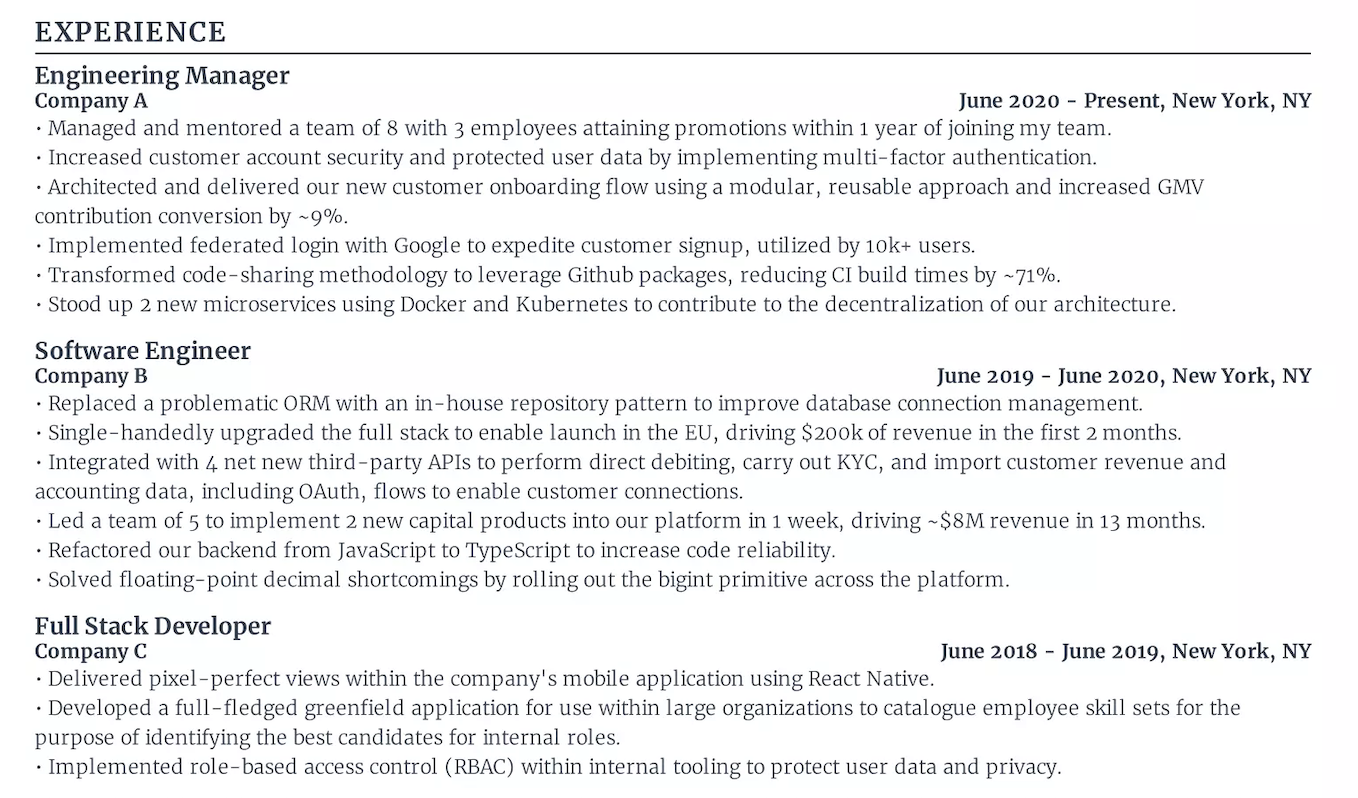
Use these formulas to write impactful bullet points for your work experience section
- Action Verb + Outcome + Task.
• Start with an action verb to describe the outcome achieved, followed by a description of the task you performed.
• Example: “Increased operational efficiency by 50% in less than 1 month by automating report generation processes.”
- Action Verb + Task + Outcome.
• Begin with an action verb to specify the task you performed, followed by the outcome of your contributions.
• Example: “Developed a new client onboarding process, resulting in a 50% increase in client satisfaction ratings.”
- Action Verb + Task + Purpose.
• Use an action verb to describe a task you carried out, followed by the purpose of your efforts.
• Example: “Implemented advanced cybersecurity measures to safeguard company data against emerging threats.”
- STAR (Situation–Task–Action–Result).
• State the situation, describe your task, mention the actions you took, and then highlight the final result.
• Example: “Revamped the customer relationship management (CRM) system, implementing a new software solution that enhanced customer service response times by 35% and boosted customer satisfaction by 20%.”
Examples of top work experience sections
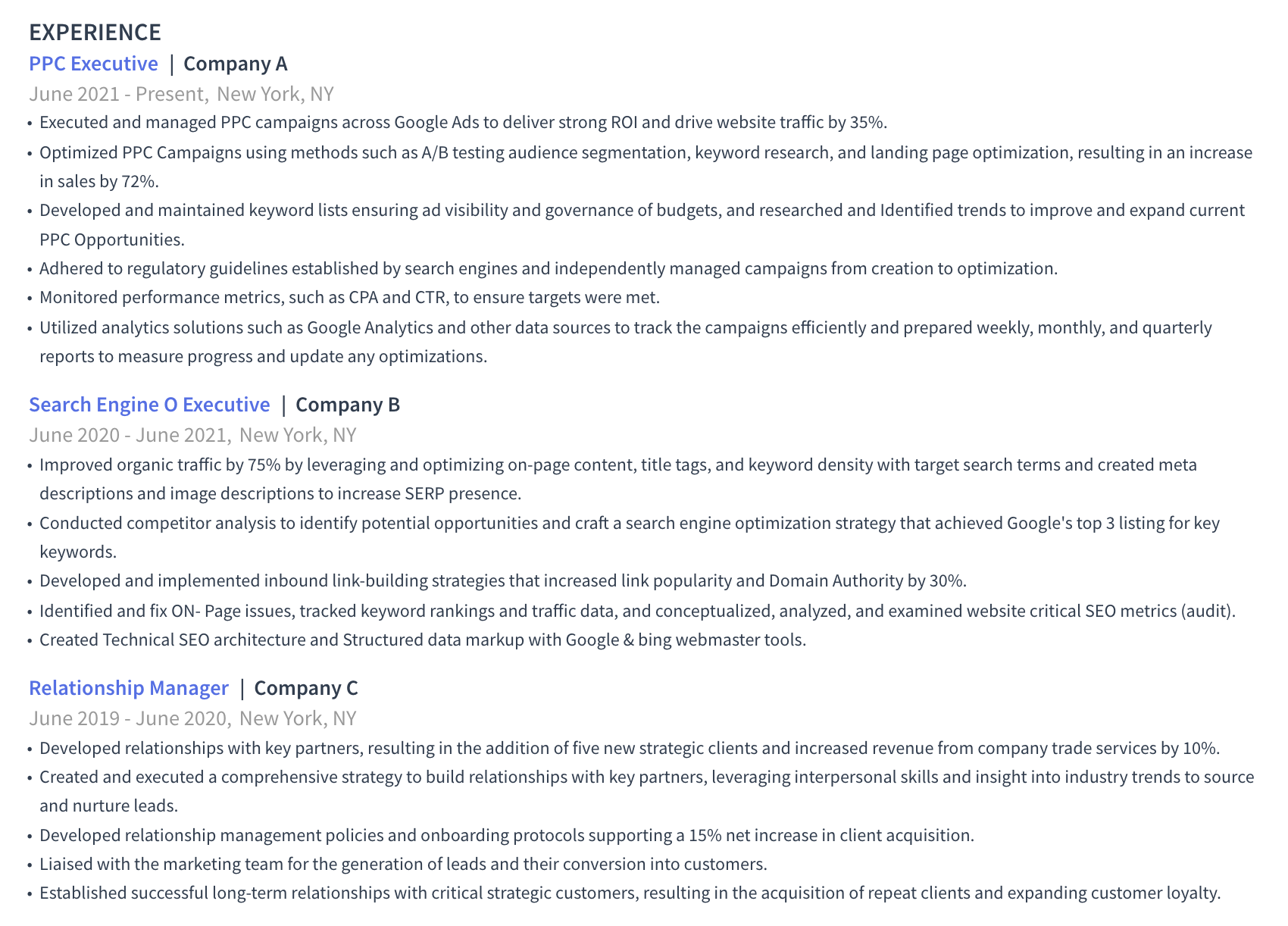
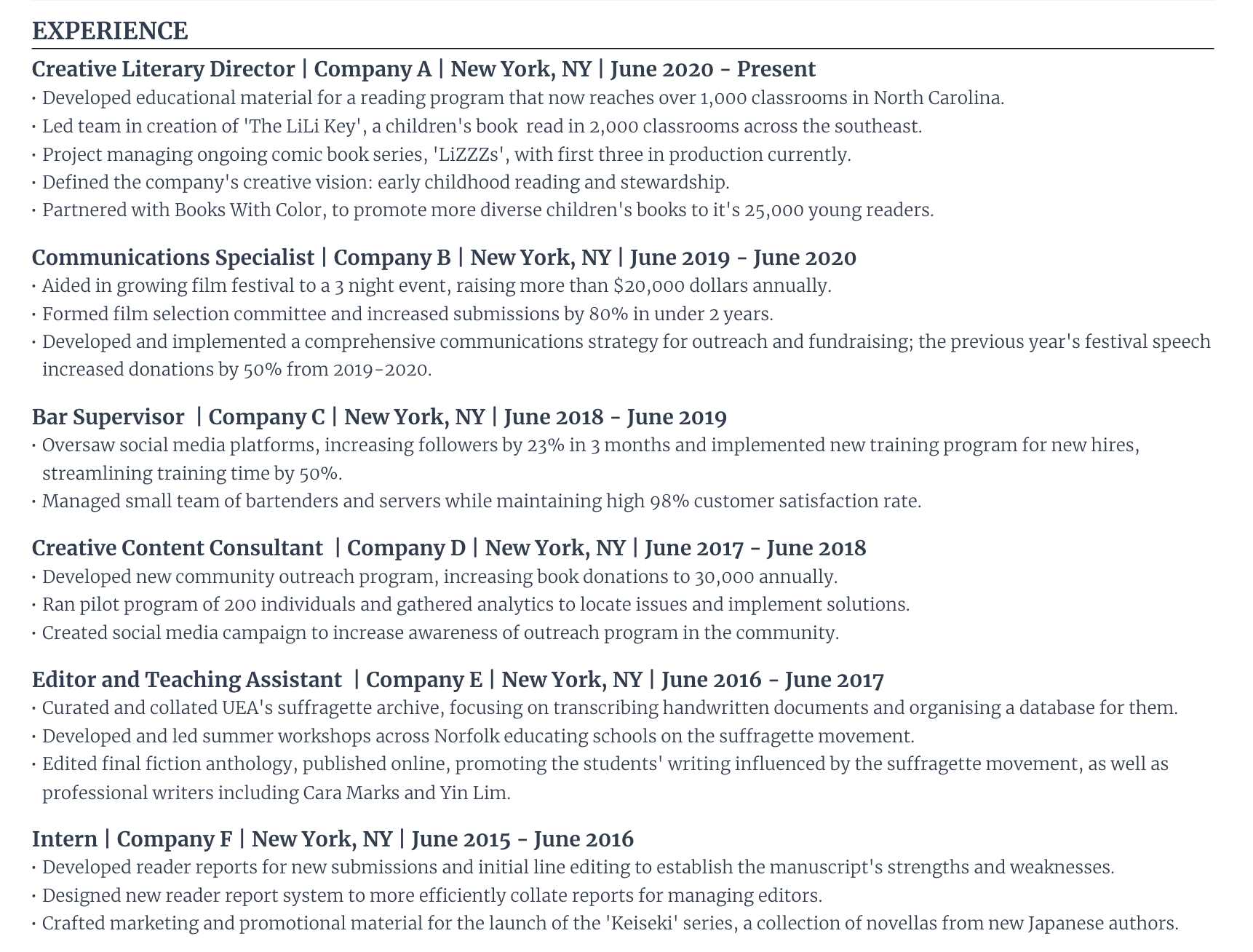
How to use AI to make writing resume bullet points easier
There are two AI features our resume builder offers that make the entire process of writing resume bullet points twice as easy:
- AI Bullet Point Writer. Enter the field you’re applying for, your experience level, then copy and paste the company’s job description into the provided field (optional). Next, mention the job title you’re writing about. Lastly, press “Generate Bullet” and our AI Resume Builder will generate a tailored bullet point following best practices based on your work background.
- AI Bullet Point Editor. Wrote a bullet point that you feel could be improved? Simply highlight it inside our AI Resume Builder and press “Rewrite Bullet.” Then, our AI Writer will refine it and provide up to three suggestions based on your professional background details, using the best writing practices.
This is how our users are able to build their resumes faster and feel less overwhelmed by the process. You can get access to both AI resume features (and more) for free by signing up for an account here.
Relevant guides:
Best practices: what to do and what not to do
DO:
✅ Align your work experience section with the job description. For example, if the job requires “project management skills,” highlight your role in managing a key project.
✅ Prioritize skills, outcomes, and responsibilities directly related to the job requirements.
✅ Quantify your achievements whenever possible. Use numbers to provide a clear measure of your success.
✅ Use strong action verbs to begin each bullet point.
✅ Highlight impact and outcomes rather than merely listing skills you’ve developed. Even without data or metrics, position your responsibilities as impactful by detailing the value added or improvements made.
DON’T:
❌ List duties without context. Instead of just stating what you did, explain how it made a difference.
❌ Use passive or vague language. Avoid phrases like “responsible for” or “involved in.”
❌ Rely solely on describing skills. You're not there to talk about your skills in the abstract, but to show them concrete evidence of your ability by highlighting impactful outcomes.
5. List Qualifications in the Education Section
The education section of a resume lists your academic qualifications. This is crucial for fields that require specific educational credentials.
List qualifications in the education section like this:
- State the title of your highest level of qualification, e.g., “Bachelor of Science in Economics.”
- Mention the institution where you earned your degree or qualification.
- Include the location of your institution (city, country).
- Add the year of graduation (unless you graduated more than ten years ago).
- Highlight any honors, relevant coursework, or minors.
- Optionally, include your GPA score (only when you’ve scored over 3.5 and only if you’ve graduated in the past 5 years).
You can also write a bullet point or two to mention any notable achievements during your time as a student, especially if you have little relevant work experience.
Examples of the education section



Best practices: what to do and what not to do
DO:
✅ Match the job requirements by listing relevant degrees, coursework, or academic achievements.
✅ Place your education section near the top of your resume when you’re a new graduate, have little to no professional experience, or when your academic background is crucial to the role.
✅ Still include your highest level of education, even if it’s not directly related to the role. Some employers may prefer candidates with a degree, even if it’s not stated in the job ad.
✅ List academic honors or awards that prove your dedication and excellence in your field of study, especially when relevant to the job.
DON’T:
❌ List too many qualifications when you have more relevant work experience. Prioritize what’s most relevant to the job at hand.
❌ Include high school information if you’ve completed any higher education.
❌ List every course you’ve ever completed. If needed, create an additional section for relevant coursework.
6. List Skills in the Skills Section That Are Directly Relevant to the Role
The resume skills section is where you list core competencies directly related to the job you’re applying for.
However, only list the top resume skills. These are the ones you’re fully confident in and the tools you’re highly proficient at (yes, that’s my roundabout way of saying “don’t lie on your resume”).
Placed toward the bottom, the skills section is usually the final section of a resume. This emphasizes your areas of expertise and where you excel.
Follow these steps to complete the skills section:
- Review the job description to pinpoint the skills that the company’s hiring managers are seeking.
- Begin listing your skills based on these requirements, starting off with the most relevant ones that you’re most confident in.
- Include a mix of both hard skills (like software proficiency or languages) and soft skills (like leadership or communication).
- Create categories depending on the number of skills you list for readability. Examples of categories include hard skills, soft skills, technical skills, software skills, certifications, fields of interest, and more.
Want more ideas on what skills to include? You can use Rezi AI Skills Explorer to get a list of relevant skills based on its category and the field you’re applying for.
Avoid the dreaded skills chart. Scoring yourself a four out of five for customer service is only underselling yourself and can confuse ATS scanners. A decent resume builder will stick to simple bullets, which you can categorize if you have plenty of relevant skills to show off.
Examples of the skills section



Best practices: what to do and what not to do
DO:
✅ Focus on the skills the company expects of candidates. For instance, if the job requires proficiency with “GA4,” list it in this section to make it clear you’re skilled at using this tool.
✅ Specify your knowledge in certain areas. For example, clarify how fluent you are in another language by simply adding a short description in brackets of your proficiency level.
✅ Be honest. Only list abilities in the skills section that you’re well-versed in.
DON’T:
❌ Overload by listing every possible skill you can. Quality and relevance over quantity.
❌ Overlook the importance of soft skills, especially for management roles.
❌ Lie and list fake skills only to “hit” the right keywords.
7. Include Any Additional Resume Sections
Up until now, you’ve got all the core sections of a resume. Other common additional sections to add include:
- Awards. List an award on your resume, the issuing body, and the date received. If necessary, add bullet points to highlight any particular skills or knowledge developed.
- Certifications. Include the resume certification title, issuing organization, and date of achievement. You can also add bullet points to describe how the certificate is relevant.
- Involvement. This section makes it convenient to add information about your relevant additional activities—be that volunteering, one-off projects, membership in local organizations, and the like. Similar to the structure of the work experience section, detail your role, the organization, dates of involvement, and location. Write concise bullet points that spotlight transferable skills.
- Projects. Mention the project on your resume, organization you did the project at, start and end dates, and include any links if applicable. Then, describe what you did using bullet points. Use the same formulas as discussed for the work experience section.
- Relevant coursework. List courses on your resume that are related to the role. Include the course title, issuing organization, year of completion, and core skills developed. You can also add bullet points to describe achievements.
These are valuable for showcasing skills and experiences that other candidates might not have. In other words, they can help you stand out.
Examples of less common additional sections, including an outline:
- Publications: provide the title of your work, publication outlet, and date.
- Professional affiliations: list the organization, your role (if applicable), and dates of membership.
- Podcasts: include the podcast name, your role (host, guest, producer), episode date, and key topics covered.
- Speaking engagements: mention the conference name, your role, event date, and summarize what you did.
Best practices: what to do and what not to do
DO:
✅ Be picky. Only include additional sections that help position you as the ideal candidate based on the job description.
✅ Quantify any accomplishments or responsibilities mentioned whenever possible.
DON’T:
❌ Feel obliged to add extra sections. Overcrowding your resume with irrelevant information makes it less compelling.
❌ List outdated or irrelevant awards, certifications, coursework, and projects.
8. Optimize Your Resume Using Resume Keywords and an ATS Scoring System
Companies use applicant tracking systems (ATS) to efficiently narrow down the list of resumes for human review. The ATS scans every resume for specific words or phrases that relate to the job description, including skills, qualifications, and experiences.
Using resume keywords is important for getting past the company’s ATS. Without them, you may not reach the hands of your hiring manager.
Here’s the process for including resume keywords:
- Check the job description. Find key skills, qualifications, and experiences the employer emphasizes. These are usually listed in the “responsibilities” and “requirements” sections. Also take note of the “desirable skills” section.
- Use those keywords strategically throughout your resume. Add them naturally into your summary, work experience, skills, and additional sections.
- Use variations of keywords to cover different terms an ATS might recognize.
Tailoring a resume is hard, but AI keyword scanners make it easy
Many of our users agree that tailoring a resume was one of the most difficult aspects of searching for a new role.
There’s a lot of back and forth and small details that’s easy to overlook. To eliminate this, you can use Rezi AI Keword Targeting:
- Enter the job title you’re applying for.
- Copy and paste the job description into the provided field.
- Press “Save Job Description” to get the full list of keywords to use.
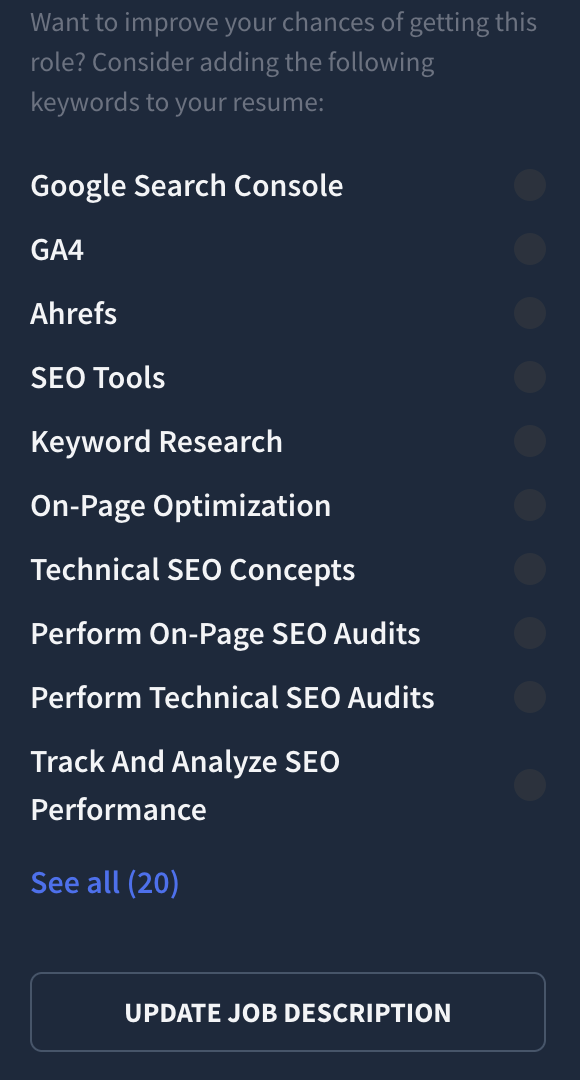
This instantly shows you what keywords from the job description that’s missing or already been included. You can also get suggestions for adding missing keywords as bullet points on your resume.
Use the Rezi Score to check if your resume is ready
Our Rezi Score is an ATS resume checker that gives you a full report across five key areas: content, formatting, optimization, best practices, and application-readiness. You’ll know whether your resume is ready to be sent when it has a score of over 90.
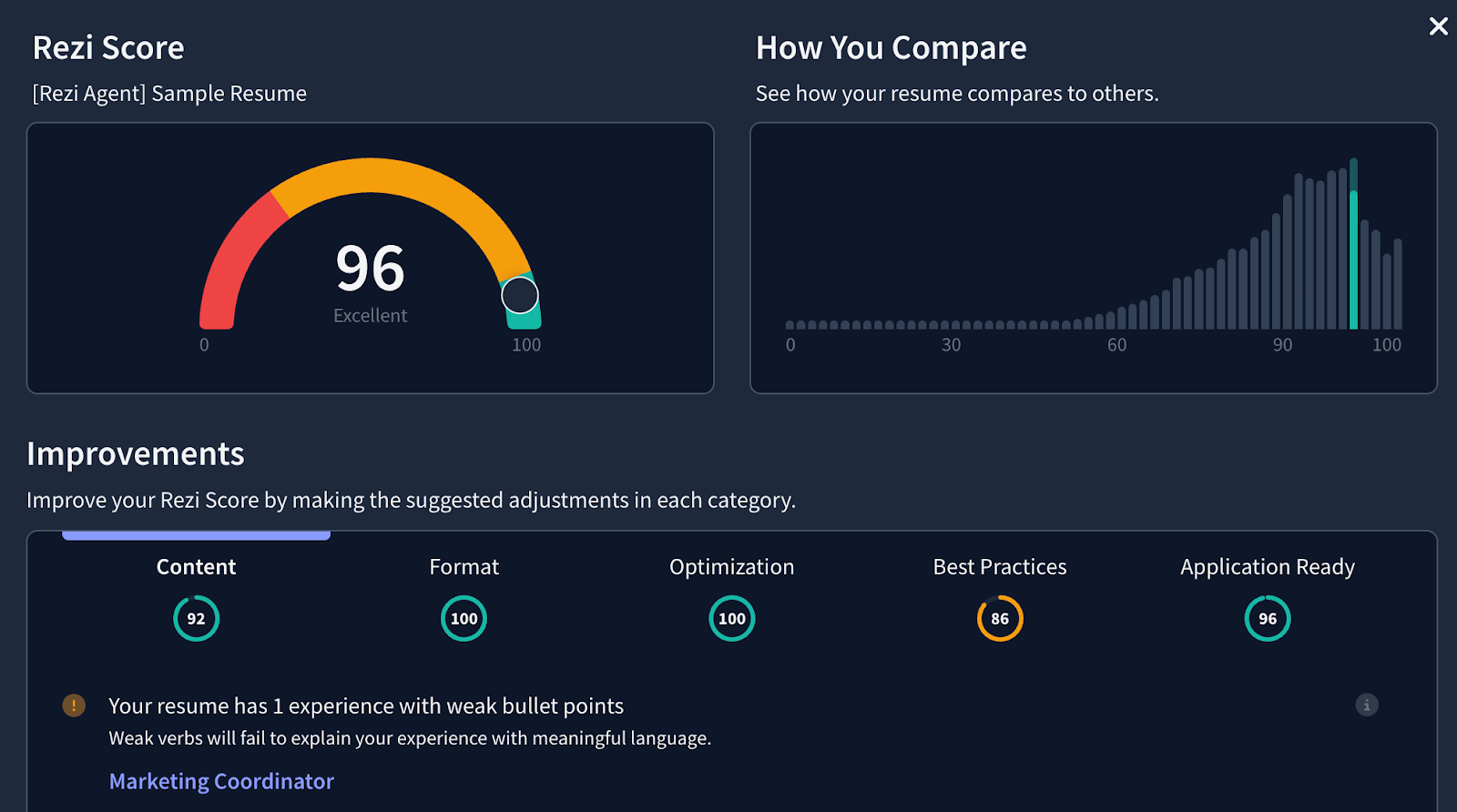
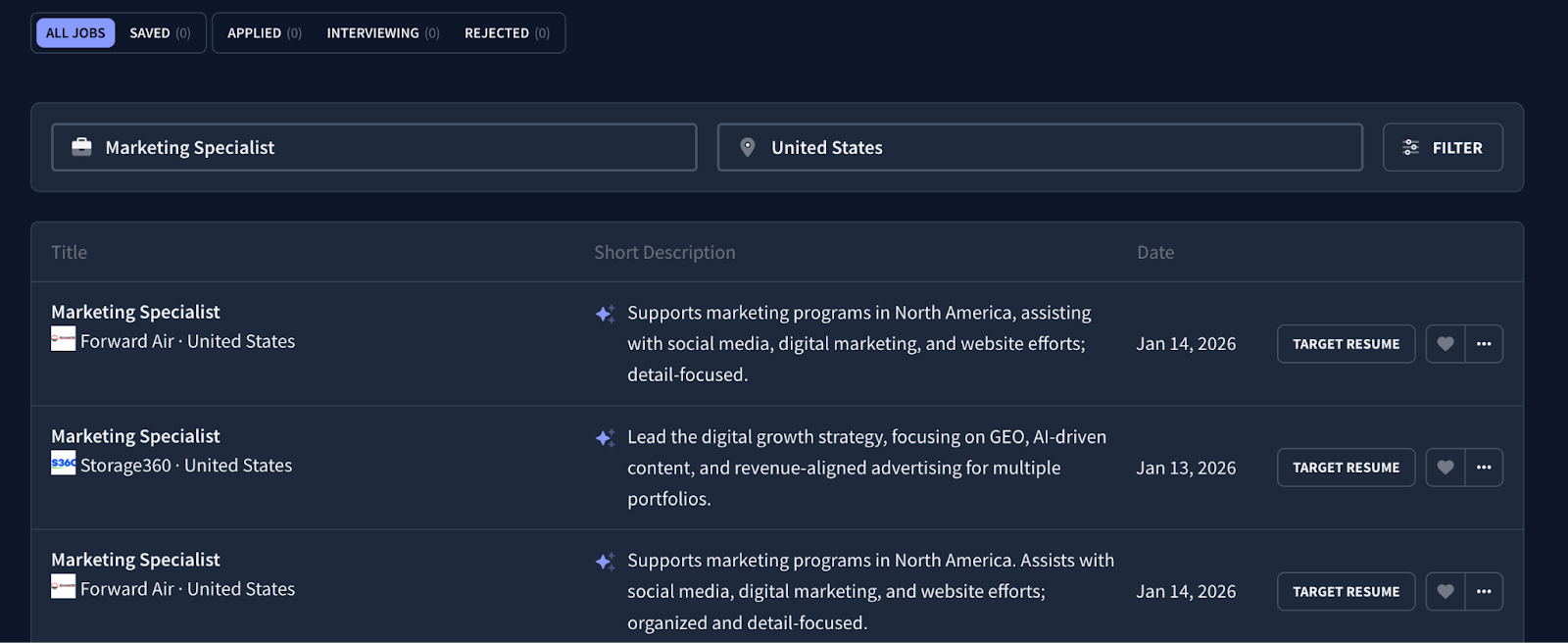
If you want to tailor your resume automatically, use Rezi AI Job Search
Besides tailoring your resume for each role, actually finding jobs and applying to them takes long.
That’s why we built Rezi Job Search. It pulls job openings directly from company websites, and all you have to do is click “Target Resume” and Rezi will automatically tailor your resume to that specific role.
Best practices: what to do and what not to do
DO:
✅ Use keywords naturally within the context of describing outcomes and responsibilities.
✅ Include both the acronym and the full phrase for important keywords. For example, “Search Engine Optimization (SEO).”
✅ Tailor your resume for every company you apply to. All companies will have different job descriptions.
DON’T:
❌ Stuff your resume with keywords.
❌ Expect to land interviews just because of keywords. Your resume must be well-formatted and well-written, succinctly presenting your impact in previous roles.
❌ Ignore ATS keywords and use the same resume to apply for the same role at different companies.
9. Proofread and Finalize Your Resume
Lastly, double-check your resume. Make sure it’s free from spelling, grammar, and formatting errors. A single mistake on your part here could lead to your resume application being disqualified.
Tired of submitting your resume with one eye open? Then, follow this process to effectively proofread your resume:
- Take a quick break. Make sure to review your resume with a fresh pair of eyes.
- Use a spell checker like Grammarly to help you catch basic errors, but don’t solely rely on it.
- Read your resume out loud as you’re checking through it to find any awkward phrasing or grammar mistakes.
- Have someone else read through your resume to help find any writing mistakes.
- Check for consistency in formatting, such as font size, bullet points, and alignment.
- Verify your contact details, as well as all dates, names, and details for accuracy.
- Consider printing your resume or sending it to a dummy email to ensure it looks the way it’s supposed to.
Don’t forget to polish your resume design and formatting
Resumes are formal documents, so it should be clean, sleek, and easy to read. This means no odd line spacing, margins, or unnecessary graphics and colors.
Here are some guidelines to follow:
- Use a professional serif or sans serif font. Keep the font size between 10–12pt for the main content and between 14–16pt for section headings. You can also use bold text for section headings to make your application more readable.
- Make line spacing between 1–1.15.
- Set margins to either 0.5 inches or 1 inch for all sides.
- Download and submit your resume as a .PDF, or in another format that your employer requests.
Or, you can use the “Auto-Adjust” feature inside Rezi AI Resume Builder to format your resume automatically.
Best practices: what to do and what not to do
DO:
✅ Review your resume at least twice. The first round is to make sure no details are missing and that everything’s written professionally. The second is for spotting writing and formatting mistakes.
✅ Give yourself a few hours (or even a day’s break) before proofreading your resume.
✅ Ask for expert feedback from mentors, peers, or professional contacts to gain insights on both content and clarity.
DON’T:
❌ Completely rely on automatic spell checkers. They can still miss context-specific errors or nuances in language.
❌ Rush the finalization process. I understand you might want your resume over and done with ASAP, but a single mistake could cost you that job interview.
❌ Overlook resume formatting. Make sure its looks match the content quality.
Do You Need to Write a Resume From Scratch for Every Job Description?
No, you don’t need to write a resume from scratch all the time. In fact, this is an outdated approach to modern job applications.
However, you should tailor every resume you send because every company has their own job description. Even if the job title you’re applying for is the same, each organization will have specific needs. So, prioritize the details that the target company cares about most.
Tailoring really does get better results. According to Huntr Research, based on over 1.39 million applications, resumes customized for specific roles lead to about six interview invitations per 100 applications, while generic resumes tend to produce fewer than three.
Michael Alexis, the CEO of TeamBuilding, advises the following:
“Create a master resume, then selectively copy and paste your highlights based on the job posting—with the skills and results that most closely align with the text in the ad remaining towards the top—or at least, in a prominent position on the page.”
In other words, create one resume and then use it as a template when tailoring to different job opportunities.
Although you don’t have to start from scratch to do this, it’s still a long process, but you can do it automatically using Rezi AI Agent. It works much like ChatGPT except it’s specifically designed for best resume and job search practices. You can upload your master resume and then ask it to tailor it toward a specific job description, and it can make the changes for you.
If you want to tailor each resume yourself as quickly as possible, you can do the following:
- Edit the summary section based on the specific skills the target company is looking for.
- Name drop the company name in the summary to make your resume feel more personal.
- Add the important keywords from the job description throughout the experience and skills section so that it fits the company’s ATS requirements.
Why Your Resume Might Still Not Be Getting Interviews
Here’s why your resume still might not be getting a response:
- Job fit: Your skills might not exactly match what the employer needs, even if you tailor your resume.
- Competition: Lots of qualified people might be applying, meaning that there could be other stronger fits for the role.
- Poor formatting: ATS scanners may misread your resume due to complex layouts, inconsistent spacing, or non-standard section headers.
- Weak positioning: Your experience may be solid, but the resume doesn’t clearly communicate why you’re a strong fit for this role.
- Overqualification or under-qualified: Some resumes are filtered out simply because the candidate appears too senior or not experienced enough.
- Timing and volume: Applying late or during peak application periods may reduce visibility, even with a strong resume.
Job hunting can be a numbers game, but not one you win by spamming applications. Focus on roles you genuinely want, and put more effort into tailoring your resume and application for those positions. Quality applications consistently outperform volume.
And don’t overlook networking. A real conversation with someone inside the company—someone who knows your name and can vouch for you—can do far more for your chances than another silent application sent through a careers page.
Resume achievements alone won’t guarantee a job interview
Don’t get me wrong—quantifiable achievements are impressive. It’s what to prioritize when writing bullet points about previous work experience and projects.
However, listing achievements alone won’t guarantee an interview.
Michael Alexis, the CEO of teambuilding.com, states that:
“As a CEO of a company culture company who views thousands of resumes a year, the quality that really makes a resume stand out is when applicants show they understand what’s required in a position [and when that understanding is reflected by their resume structure].”
He emphasizes that it’s not just about showcasing what you’ve accomplished in previous roles:
“It's not always enough to simply use numbers and impressive results. Recruiters and hiring managers have hundreds of resumes to review. While including wins that don't directly correspond to a job can demonstrate your uniqueness as a candidate and intrigue recruiters, those decision-makers may tune out or move on if you include too many non-relevant details too soon.”
Don’t place what you believe are your strongest points wherever you see fit. This should be intentional and based on how relevant it is to the job requirements and what hiring managers are looking for.
“Many candidates fall into the trap of sticking to chronology in their resumes, when they should be arranging the information more strategically. Ordering your achievements to put the achievements most relevant to the role towards the top not only shows that you can get outcomes, but also signals to the screener that you understand the role.”
The outcomes of your work do indeed indicate your expertise.
But ultimately, the company doesn’t just want a candidate who can demonstrate that they have the skills and qualifications. They also want the candidate to make it clear that they have a good understanding of what the specific position entails.
And an effective way to do this is by structuring your resume bullet points strategically based on relevance.
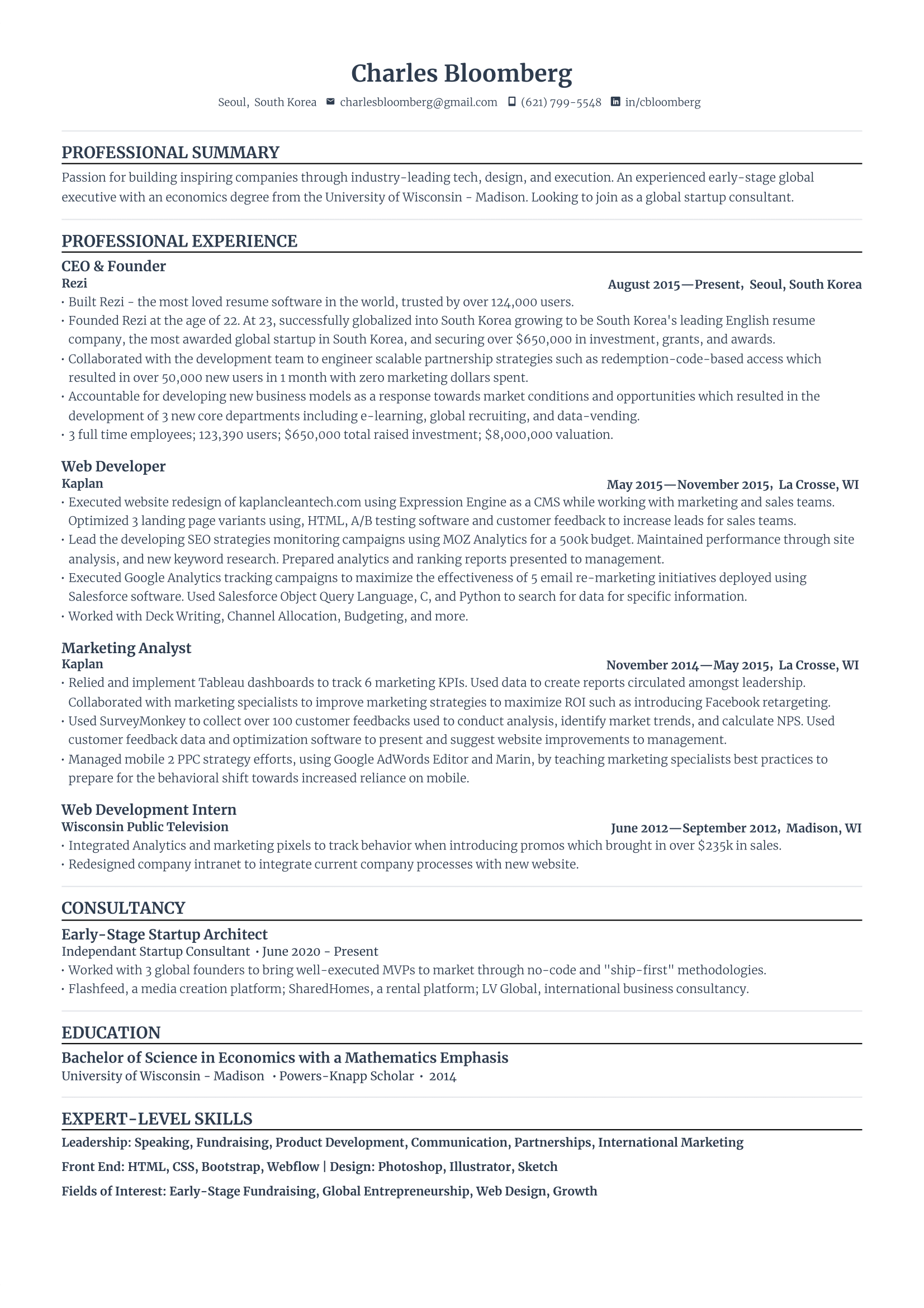
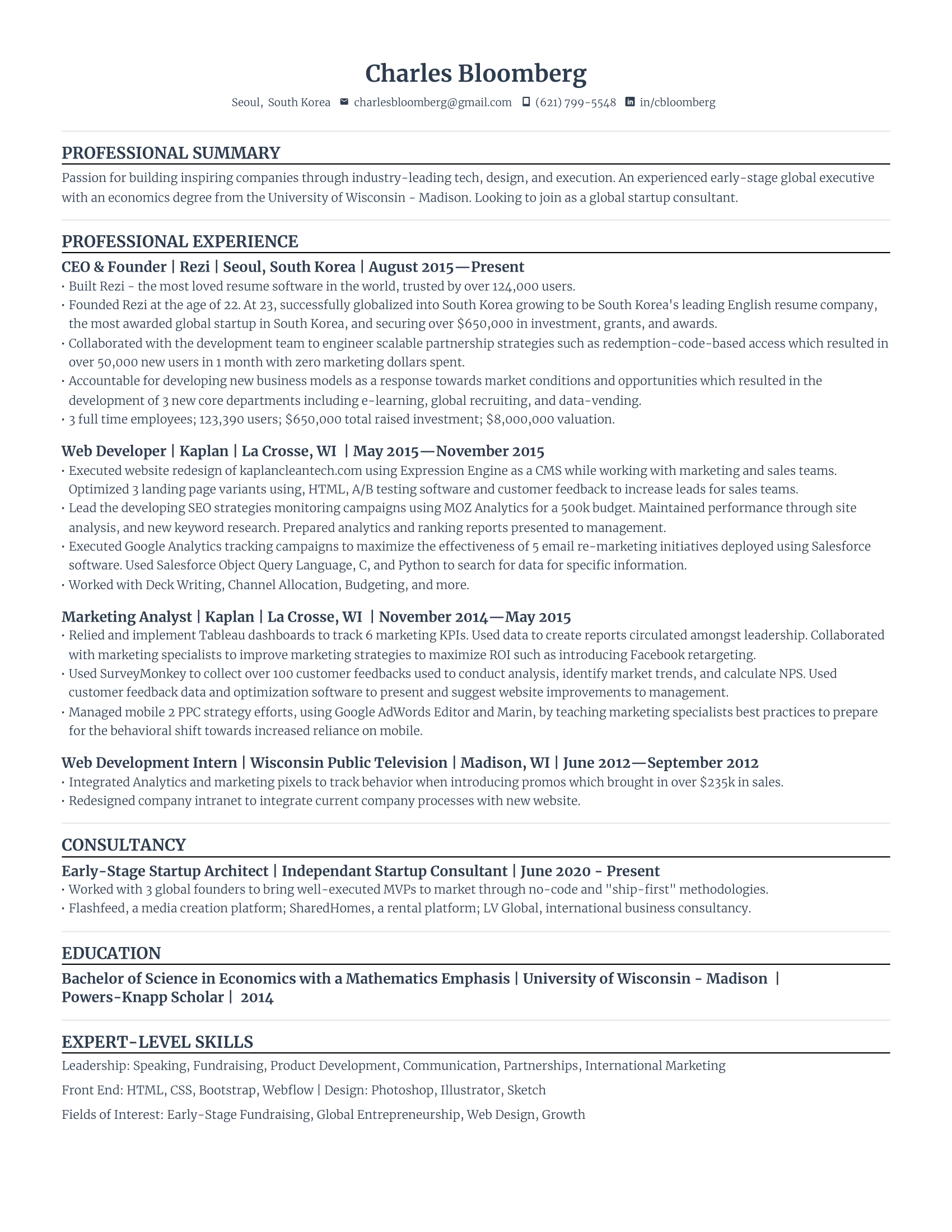
The Best Resume Templates for an ATS-Friendly Application
You can’t go wrong with either of the ATS resume templates listed below. Use these to build a professional resume.
And if you need inspiration, check out our library of resume examples here.
Standard Resume Template
Compact Resume Template
Summary
Here’s a recap on how to write a resume:
- Add your contact details. Include your full name, phone number, professional email address, and LinkedIn profile (optional).
- Put together a succinct summary. Write a brief (2–4 sentences) overview of your professional background, emphasizing key achievements and skills relevant to the position you're applying for.
- Highlight your impact in previous roles in the work experience section. List your jobs in reverse chronological order. For each, include your job title, the company's name, dates of employment, and at least three bullet points highlighting your responsibilities and achievements with quantifiable results when possible.
- Use clear action verbs, numbers, and relevant keywords. This is how you prove impact and make sure your resume is tailored to specific job descriptions, making sure that your resume content gets past ATS requirements.
- List academic qualifications in the education section. State your most recent or relevant qualification first, mentioning the degree obtained, the institution's name, and your graduation year. You can also include notable academic achievements.
- Mention your top skills in the skills section. List the most relevant skills that you’re proficient in. Make sure that you’re able to prove these from your work history.
Your resume shouldn’t be the reason you get rejected. It’s unfortunate and frustrating, but this is happening to so many candidates, even when they’re perfectly qualified for the jobs they’re applying to.
Many job seekers I speak to usually struggle with not knowing the right words to say and how to put those words together in a way that matches the job description and sounds professional without exaggerating.
After applying all the steps discussed in this guide, you’ll have a resume that will help you land the career opportunities that you deserve.
And if you want access to real resume expertise without paying hundreds or thousands of dollars, I highly recommend using Rezi AI. We’ve spent years building resume and career tools based on how hiring actually works today—ATS, modern resume standards, and real job search behavior. From writing and tailoring resumes to speeding up applications and preparing for interviews, everything is designed to help you get your dream job.
Resume Writing FAQs
How do you write a simple resume?
Writing a simple resume is all about showcasing relevant skills, experience, and qualifications concisely. Start by listing your contact information prominently. Next, focus on your work experience. Use action verbs and quantifiable achievements to highlight your skills and impact in previous roles. Include a skills section that lists core competences for the role. Lastly, proofread and make sure your resume is free from error.
What makes a good resume?
A good resume is clear, concise, and tailored to the role. Above all, a good resume is ATS-friendly. You should use a professional resume layout with neat formatting. Your resume should also showcase achievements with strong action verbs, quantifiable results, and relevant keywords from the job description. Place all relevant points first so hiring managers don’t skip them, and mention any additional projects that highlight your expertise.
Can you use ChatGPT to write a resume?
You can use ChatGPT to help you write a resume, but don’t treat it as a replacement. Although it can suggest content based on your background, you’ll need to verify the information provided and ensure it aligns with the job description. An alternative tool is the Rezi AI Agent, which is built to specifically follow the best resume and job search practices.
Learn more:
How to write a resume quickly? I need to apply for a job today.
The fastest way to write a resume quickly is to use an AI resume builder. Simply fill out each section one by one using the provided outline and AI writer to generate or refine bullet points. Alternatively, find a simple resume template online or a resume example for your job position. If you choose to start from a template, fill out the details for each section. If you choose to start from a resume example, replace the existing content with your own details. Lastly, tailor your resume by mentioning the job title you’re applying to in the summary section, and adding key skills and experiences from the job description into your work experience or skills section.
What’s the most common resume mistake?
The most common resume mistake is failing to clarify your contributions and impact. Typos or grammar errors and not tailoring your resume are also common mistakes. These can cost you a potential job interview.
How to write a resume when I have no work experience and just graduated?
To write a resume with no experience, start with your resume objectives, followed by the education section. Highlight your career goals and soft skills, as well as your educational background. Write bullet points in the education section about relevant academic achievements. You can also write about relevant coursework and certifications here—but if you have lots of these to list, create separate sections instead of stuffing them into a single section. Next, add a section titled “Experience.” In this, mention all experiences you have even if not directly relevant to the role. This can include internships, volunteering, extracurricular activities, and projects. If you have absolutely no work experience related to the position, title the entries based on their nature accordingly. For instance, after the education section, go for a “projects” section. In the skills section, list your top competences.
How to write a resume when I feel I’m overqualified for the job?
When overqualified for the job you’re applying to, target your resume instead of outlining your entire work history. Focus on the most relevant skills, achievements, and experiences that align with the job description. And, consider omitting details that are more “nice-to-haves” than “must-haves.”
How long does it take to write a resume?
Writing a resume can take anywhere from one to eight hours, or even longer for some. It really depends on how complex your work history is and how comfortable you are with writing a resume.
- Entry-level resumes. If you’re just starting out and have limited work experience, writing a basic, effective resume can take around one to two hours. That includes gathering your info, picking a format, and writing clear, concise descriptions of your skills, studies, and relevant experience.
- Mid-level resumes. With a few years of experience under your belt, it may take a day or two to put together a resume that highlights your achievements and career growth. You’ll need time to choose the most relevant roles and tailor the content to the job you’re applying for.
- Senior or executive resumes. The process is usually a bit more extensive. It often includes multiple drafts, sometimes with help from a resume writer or career coach, to effectively showcase leadership, strategy, and high-level accomplishments that are directly related to the target role. This may take up to one week or more.
- Career change or specialized resumes. If you’re shifting careers or have a specialized background (like academia or creative work), it may take extra time to frame your transferable skills or unique qualifications and position your experience in a new light. Expect a few days to a week, depending on complexity.
If you’re just updating your resume—assuming it’s already well-written and well-formatted—making a few tweaks to reflect recent changes or tailor it to a specific job usually takes just a few hours.
How long should I spend tailoring my resume?
Spend no more than 20–30 mins. It’s possible to tailor your resume within this time frame by using smart resume tools to your advantage, such as a resume keyword scanner to automatically identify relevant keywords.
What are the 5 P’s of a resume?
The “5 P’s” vary depending on who you ask, but they boil down to a few consistent principles:
- Purpose: Know exactly what role you’re applying for and what the resume needs to achieve before you start writing.
- Positioning: Frame your experience, skills, and achievements so they clearly align with the needs of the role.
- Personalization: Tailor your resume for each job by reflecting the language, priorities, and requirements in the job description.
- Precision: Be specific, accurate, and results-focused by using clear language, measurable outcomes, and relevant details.
- Presentation: Use a professional, ATS-friendly format that’s easy for recruiters to scan.
What should you not put on your resume?
Avoid anything that doesn’t help a recruiter evaluate you for the role. That includes personal details like age, marital status, full address, or a photo (unless explicitly required).
Skip vague resume buzzwords such as “hard-working” or “team player” without evidence. And don’t list every job you’ve ever had; you can remove or trim down older or irrelevant roles. You should also avoid dense paragraphs, skills charts, and exaggerated claims you can’t back up.
What’s the difference between a resume outline and template?
A resume outline is a basic framework that helps you organize key sections and information. It acts as your guide to structuring and writing your resume content based on your particular strengths, achievements, and qualifications. On the other hand, a resume template is a pre-designed resume that includes the layout, fonts, and design elements. An outline focuses more on planning what to include and how to structure your information. A template offers a ready-to-use layout so you can immediately start adding in your details.

Upload or drop your resume to get started
Upload your resume to get started
Score my resume

Astley Cervania is a career writer and editor who has been sharing resume and job search insights for 5+ years. He shapes the direction of the Rezi blog, providing practical answers for important career-related questions and helping hundreds of thousands of people navigate the job market and build resumes that land interviews.