Resume
How to Create a Master Resume (And Why You Should Always Tailor It)
A master resume is a broad document that outlines your entire work history. You can automatically tailor it for job applications too using AI. Here’s how.

Published on
March 4, 2026
Updated on
March 29, 2026
To create a master resume, start by adding all jobs in the work experience section, followed by major tasks and accomplishments under each role. Keep skills and career progression in mind. Highlight broad career highlights and core expertise in the summary, include key qualifications in the education section, and put all your top skills in the skills section. For further experience and credentials, use custom sections. Include contact details and online links in the resume header, then finalize your content using an ATS checker.
We’ve all been told that you need a tailored resume for every single job application.
But who’s actually got the energy for that?
No one likes writing resumes to begin with, let alone having to build a new one for every job opening. It feels like companies are asking for too much, especially when they’re just using AI to filter you out anyway.
You don't have to just “put up with it.” You can use AI to your advantage too. The secret is starting with a master resume, which acts as your personal template that makes customizing it for specific job openings twice as easy.
In this guide, I’ll show you how to build a master resume using smart AI tools so you can get it done in minutes, rather than running in circles for days or weeks.
What Is a Master Resume?
A master resume is a broad document that outlines your entire professional work history and qualifications. You include every single skill, accomplishment, and project without worrying about page limits.
This serves as your personal “career database” that you can easily update whenever you have something new to add. It also allows you to quickly tailor it to any new job opportunity you come across by selectively removing or editing bullet points from your master resume to create a targeted version for that specific role.
And just to be clear, your master resume is not the resume you use for job applications. If you were to send this to hiring managers, the length and lack of focus on precise tasks or outcomes that the target company seeks would likely get it rejected.
The purpose here is to make it easier to submit customized resumes. You’ll no longer have to rewrite details from scratch since you’ll have all the polished information in one place.
Instead, you selectively remove and polish what you’ve already written. Simply duplicate your master resume and trim it down to the most relevant points that match the target job description. Using your master resume as a personal template in this way means you’ll never have to stare at a blank page or struggle to remember details from a long time ago.
How to Create a Master Resume
Here’s how to create a master resume:
- Add your current and previous jobs in the work experience section
- Write bullet points on key responsibilities and outcomes from previous roles
- Showcase a clear narrative of your skills and career progression
- Emphasize your field of expertise and broad career highlights in the summary section
- List qualifications in the education section
- List your top skills in the skills section
- Use additional sections to showcase related credentials and experience
- Add contact details and relevant links in the header section
- Finalize your master resume using an ATS resume checker
- Download your master resume and keep it stored somewhere safe
Don’t overthink the length of your master resume because you’ll be using this as a template. It’s the document that outlines all key information on your professional background and track record so that you can selectively tweak and remove details to customize your application for the next role on your list.
Let’s go through each step in more detail below.
1. Add your current and previous jobs in the work experience section
Outline a complete timeline of your career. In the work experience section of your resume, list every single professional role you’ve held. Add full-time roles, part-time gigs, freelance work, and even related projects or volunteer positions. Use clear section headings for company names, locations, dates, and job entries.
Here is an example of how this outline could look:
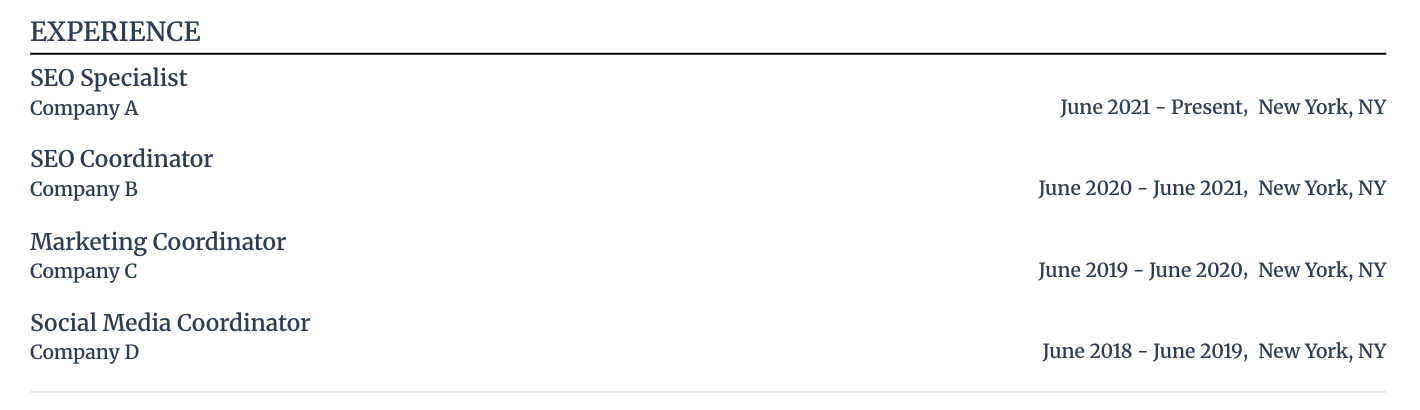
Your master resume will not be the version of your resume that you use for job applications, so forget condensing it down to a one-page resume or a two-page resume.
Related articles:
- How Far Back Should a Resume Go?
- How Long Should a Resume Be?
- Should a Resume Be One Page?
- How to Update a Resume
- How to Use AI to Write a Resume
2. Write bullet points on key responsibilities and outcomes from previous roles
Dump every major responsibility, project, and win under each job position entry. Even if a task feels small now, it might be precisely what a future job description is looking for. The point here is to document everything to save your future self the headache of trying to remember all the specifics from months or years ago.
When writing bullet points under each role, prove your impact and skill. You want a mix of your daily "technical" chores and your high-impact "outcomes.
So, clarify key responsibilities and accomplishments by:
- Focusing on the "How.” Don't just say what you did; explain the tools and processes you used.
- Quantifying as you go. Even if it’s an estimate, add numbers to your tasks and achievements.
Here’s an example of how your master resume work history section could look after adding in the bullet points:
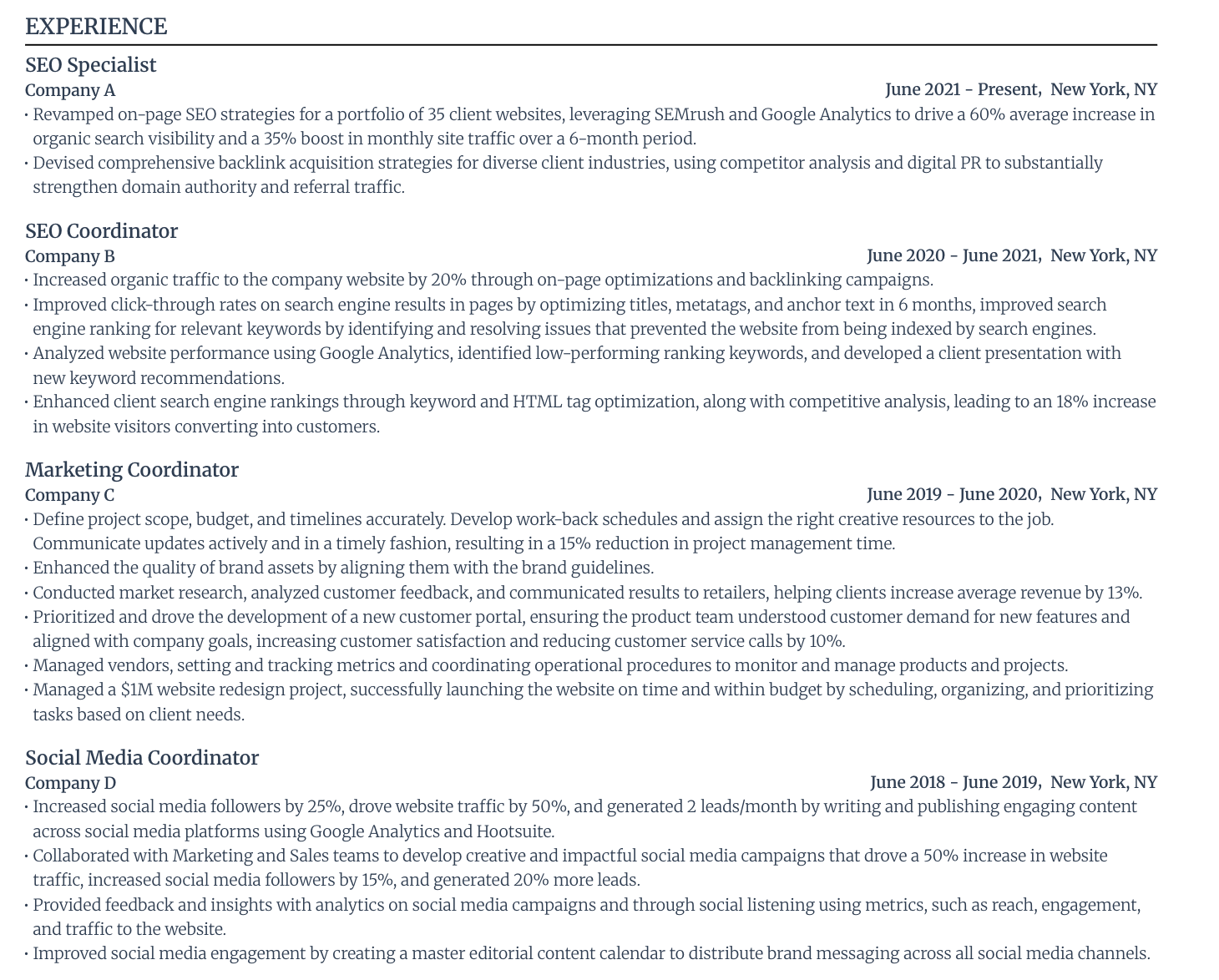
If you’re struggling to put the right words together, use Rezi AI Bullet Point Writer to generate professional sentences based on your role. You can then tweak the bullet points to match your actual experience. Or if you already have a sentence but feel like it could be better, use Rezi AI Bullet Point Editor for rewriting suggestions.
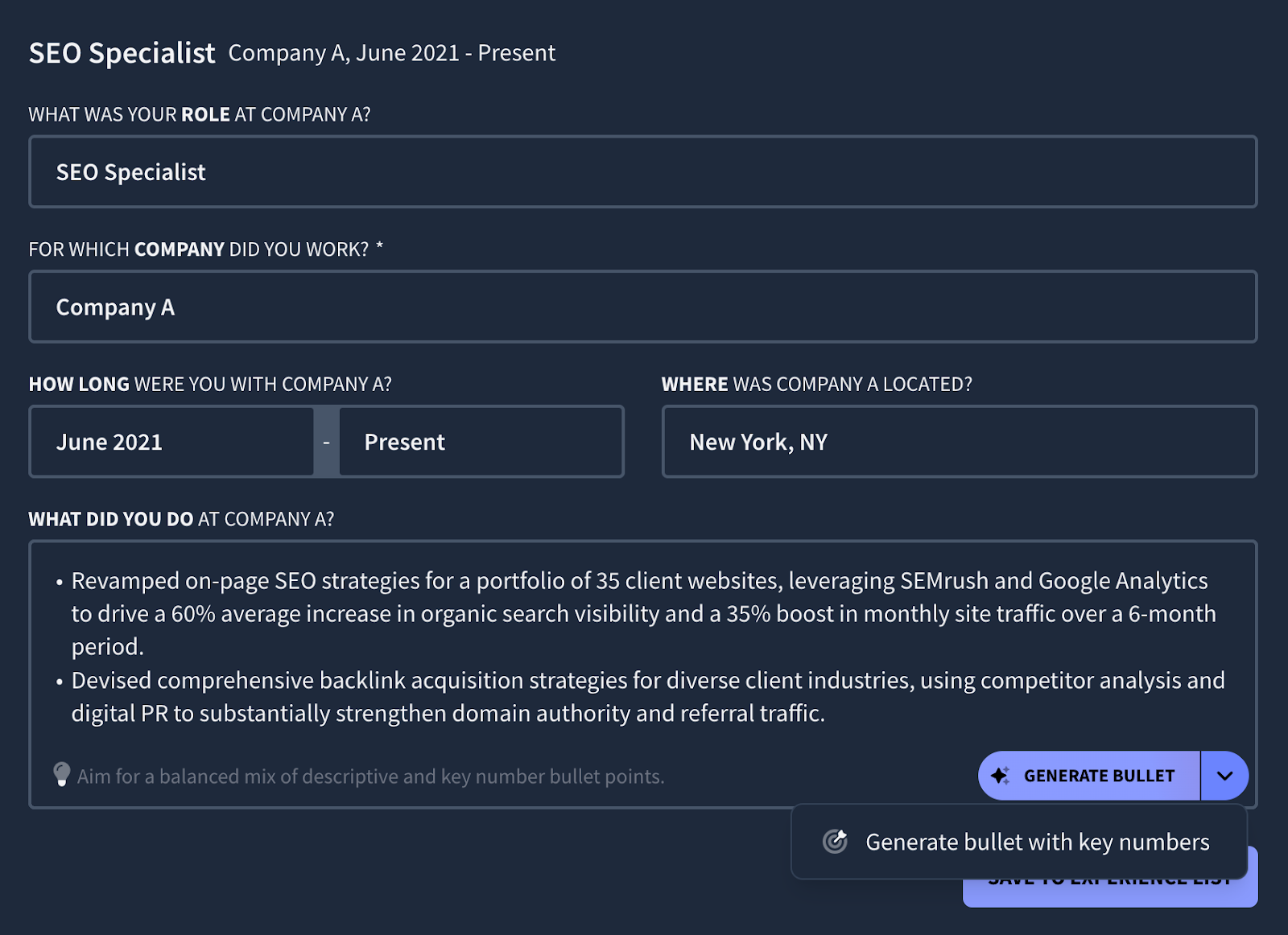
And don’t worry about how many bullet points per job on your resume. Just include all major tasks and outcomes that prove you did your job well. Once you have your master resume, then you can look at cutting sections or bullet points down to match a specific job opening that you want to apply for.
3. Showcase a clear narrative of your skills and career progression
After outlining all key roles and the responsibilities and outcomes under each, take a step back. Does it accurately tell the story of how you became the professional you are today?
If you significantly grew under one company, for instance, make sure you formatted your promotions on your resume. And if there is a steady advancement in job positions throughout your work history, make sure your bullet points reflect that too.
If you want to make sure the story you’re telling on your resume accurately translates your skills and experience into the specific field you’re trying to break into, upload your resume into Rezi AI Resume Agent and then ask for feedback.
Here’s an example prompt:
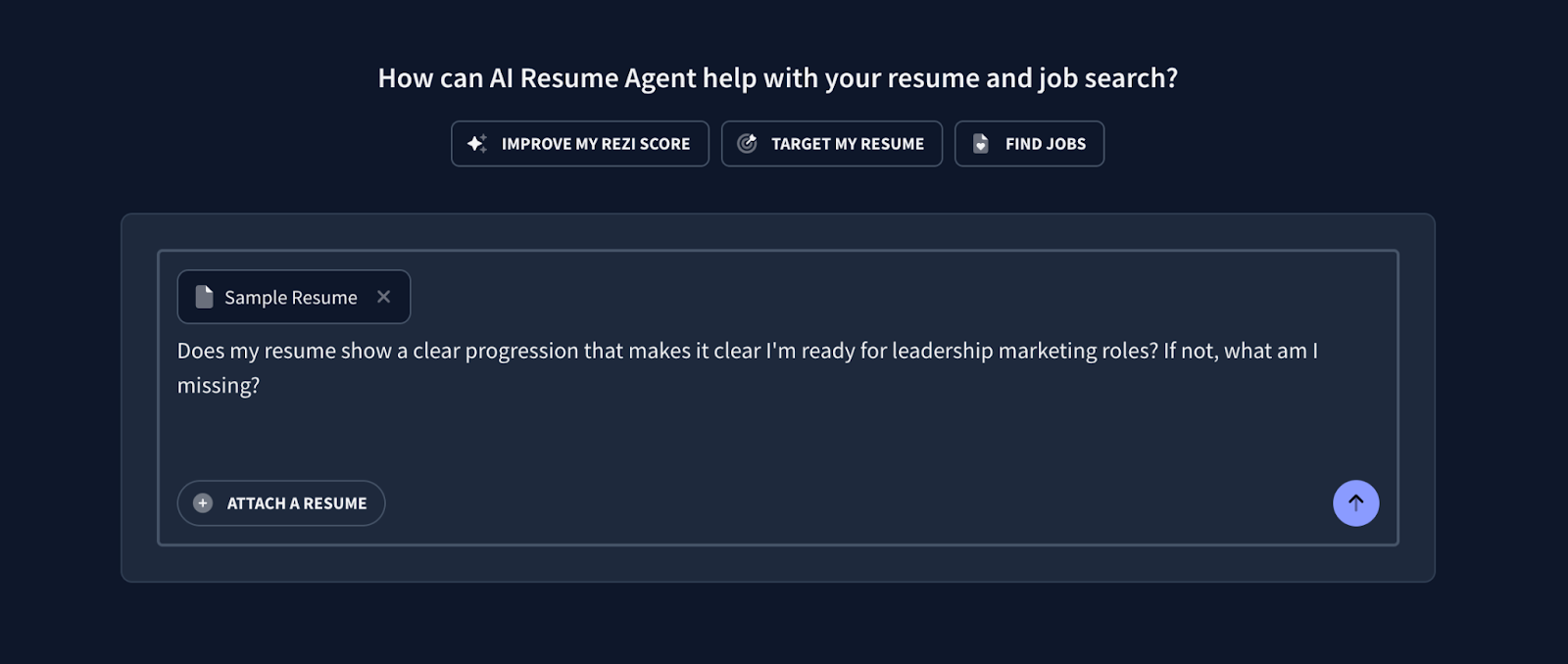
In short, Rezi AI Resume Agent advised me to address the following gaps:
- Strategic Leadership
- Team Management & Mentorship
- Budget & P&L Responsibility
- Cross-Departmental Impact
I also shared a screenshot right below for the detailed response.
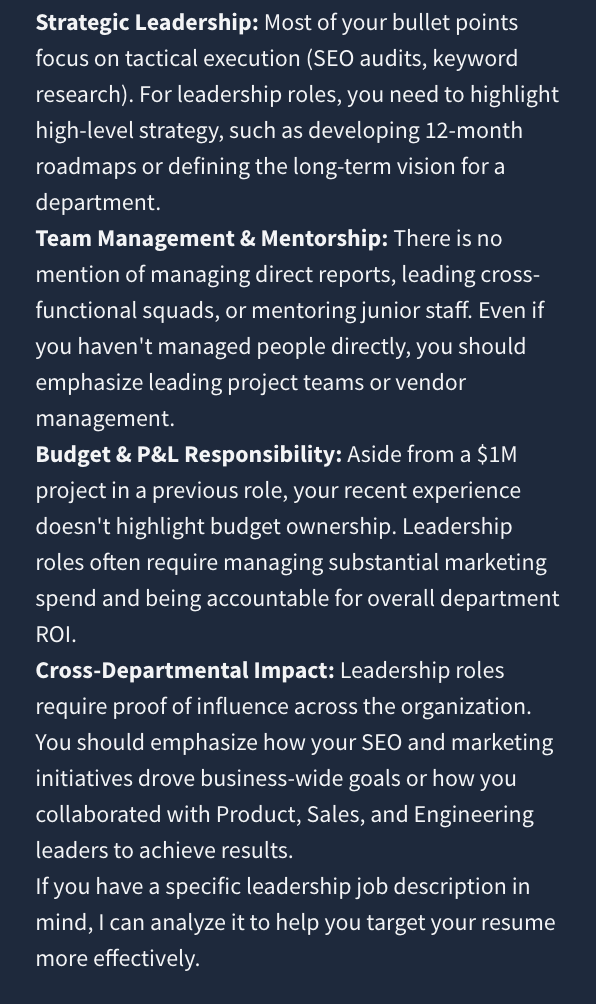
With this, you’ll know if there are any gaps to address in your resume narrative based on the type of jobs you’re after.
Related articles:
- How to Improve Your Resume
- How to Use ChatGPT for a Resume
- Rezi vs. ChatGPT
- Rezi vs. Gemini
- Rezi vs. Claude
- What Are the Best AI Resume Builders?
4. Emphasize your field of expertise and broad career highlights in the summary section
Your resume summary should cover your top strengths and biggest career accomplishments. It’s your answer to the hiring manager’s question of, “Why should we hire you?”
In your master resume, let your summary section act as a bank of your best points for promoting your core expertise. Include a broad overview of your top selling points that make it clear why you’re valuable.
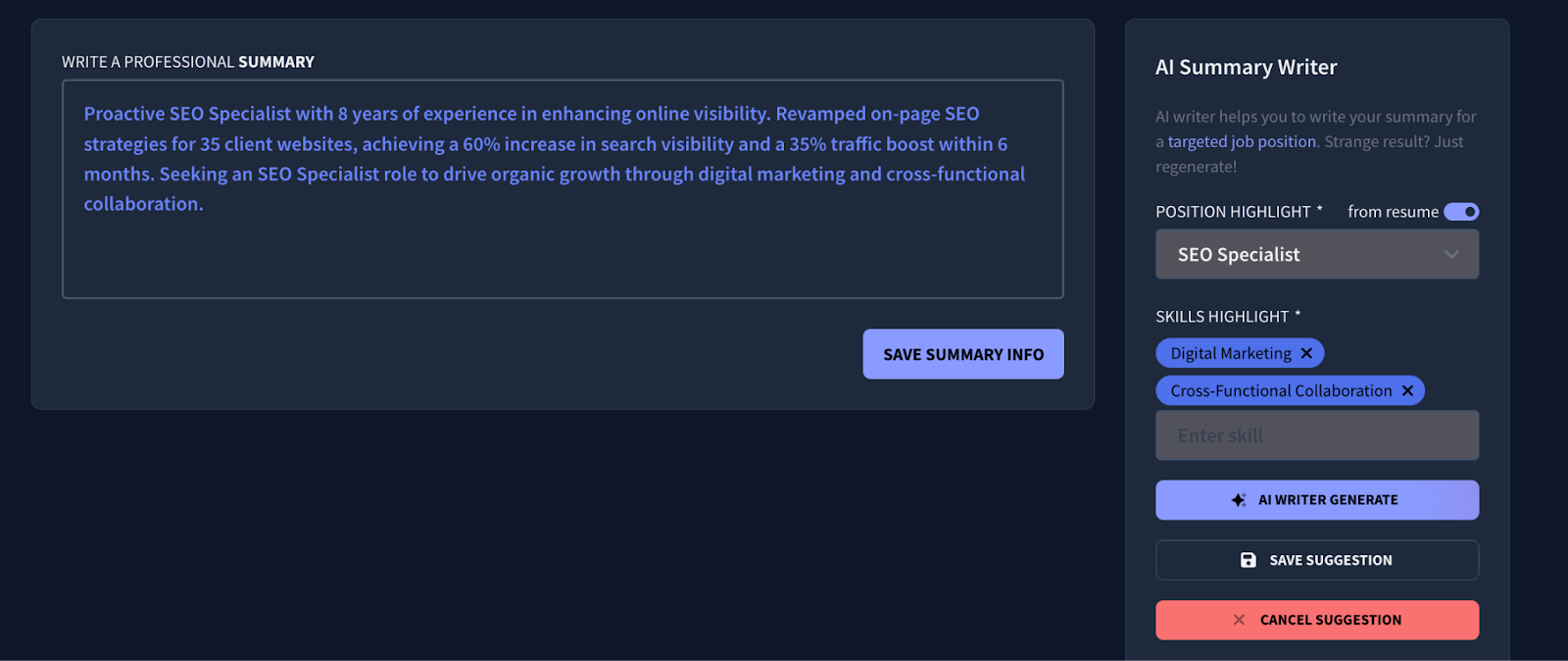
Struggling to write a summary? Use Rezi AI Resume Summary Generator. Simply enter the job position and skills you want to highlight. It factors in your work history and the target job description if you input them.
Related articles:
5. List qualifications in the education section
List every degree, diploma, and certification you’ve earned. In a master resume, you should also include relevant coursework, honors, or major projects from your time in school. Even if you graduated years ago, certain courses might be relevant for a specific future role.
Having the exact names of your degrees and graduation dates in one place ensures your tailored resumes stay consistent and professional.
Learn more:
- How to List Education on a Resume
- How to Put GPA on a Resume
- How to List Certifications on a Resume
- How to Include Relevant Coursework on a Resume
6. List your top skills in the skills section
In the skills section of your resume, make a complete list of the hard and soft skills you possess.
And if you have a range of skills, consider grouping them under specific categories like “Technical Skills” and “Leadership Skills.”
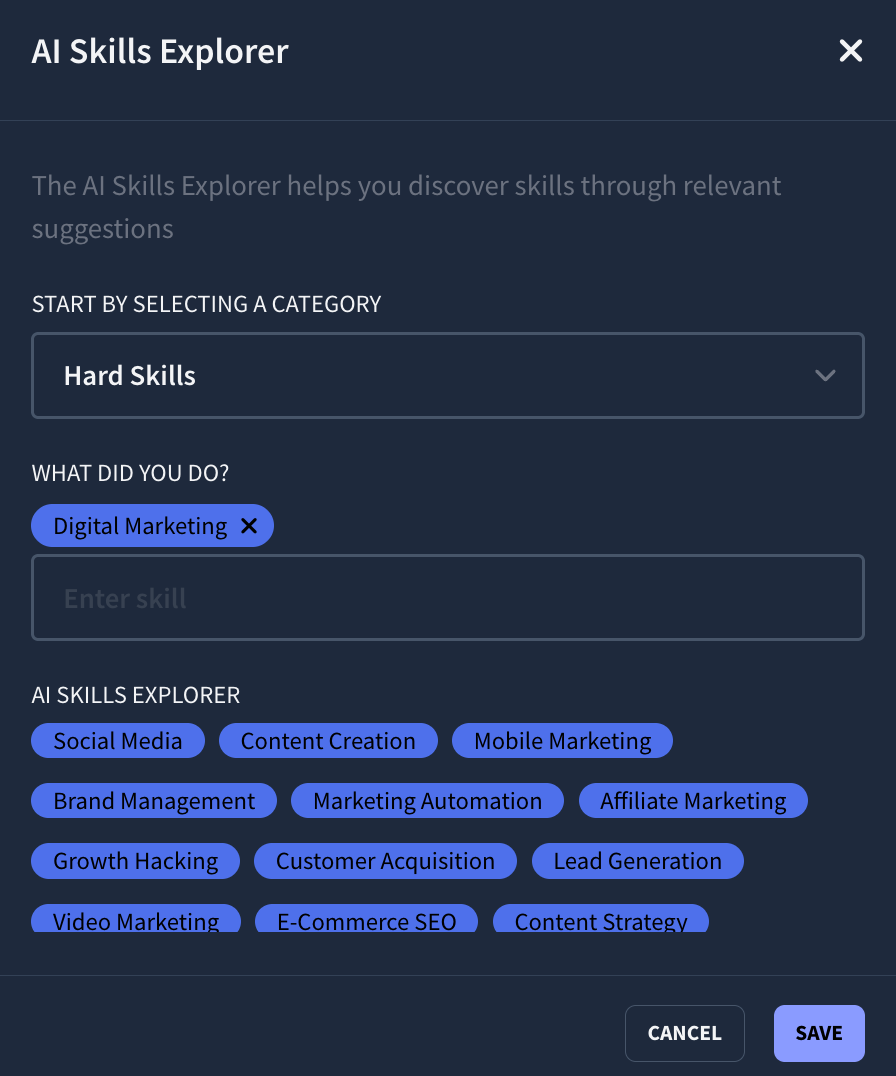
Not sure what resume skills to include? Rezi AI Skills Explorer makes it easy to discover relevant skills that you can put on your resume. Simply select a skill category followed by a description of what you did. It’ll then pull a list of related abilities.
Again, don’t worry about overstuffing this section in your master resume.
When you apply for a job later, you can use a resume keyword scanner to see which skills you listed are required for the job and keep only those.
Learn more about resume skills:
- Hard Skills for a Resume (With Examples)
- Soft Skills for a Resume (With Examples)
- What Technical Skills to Put on a Resume?
- Transferable Skills to Show on a Resume
- AI Skills to Put on a Resume
- Computer Skills on a Resume
- Resume Communication Skills
- Interpersonal Resume Skills
- Leadership Resume Skills
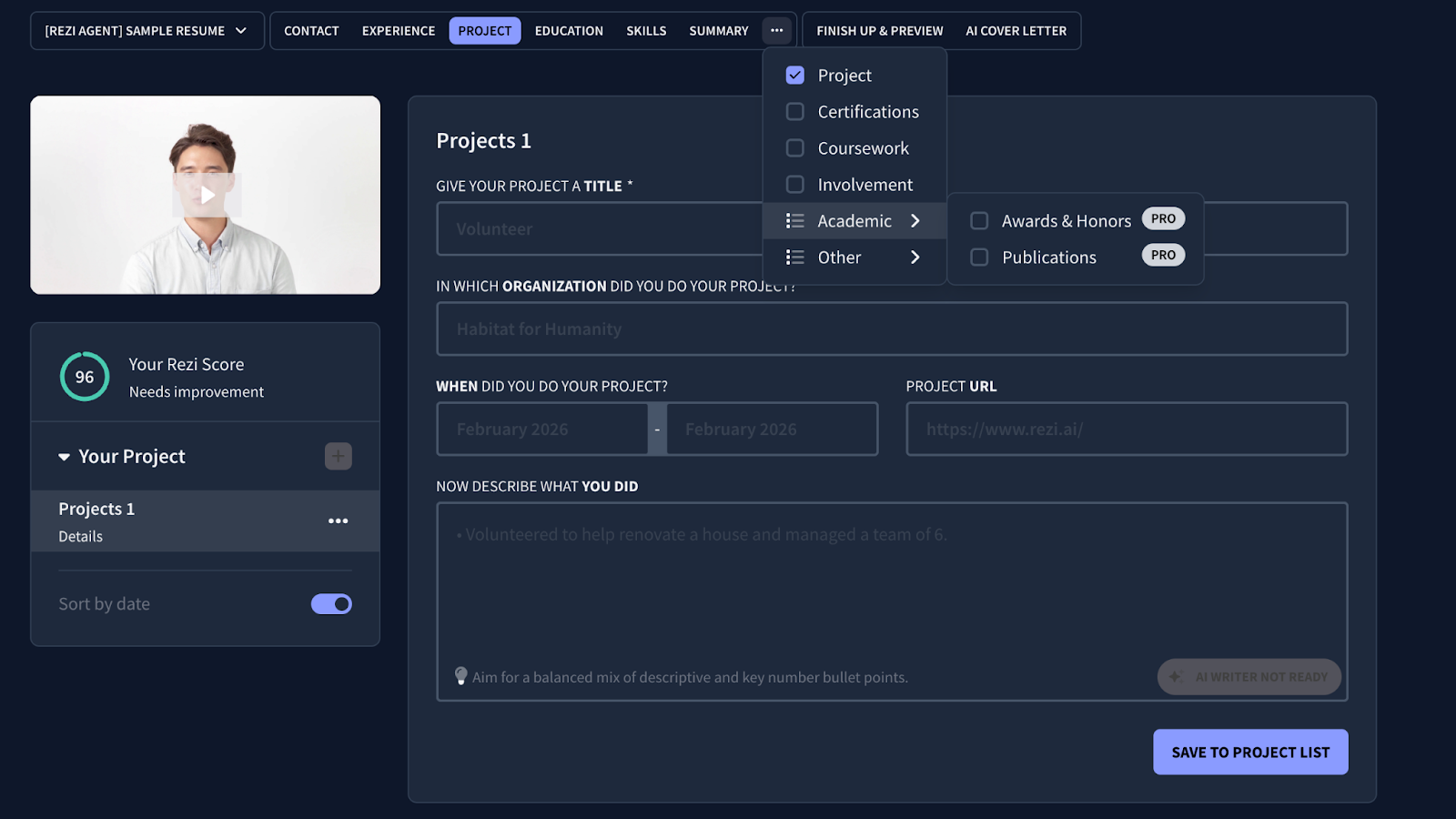
7. Use additional sections to showcase related credentials and experience
One of the biggest advantages of a master resume is having a home for the "extra" stuff that usually gets cut for space. These details often turn into the most interesting conversation starters during an interview.
Here are a few examples:
- Projects: Side hustles, GitHub repos, or volunteer work.
- Certifications: Professional licenses or online course completions (HubSpot, Coursera, etc.).
- Involvement: Professional associations or clubs.
- Languages: Every language you speak and your proficiency level.
If you have extra experience or credentials to add that don’t quite belong on the standard resume sections, use custom sections. With Rezi, simply add a new section and then enter the details.
Learn more about different sections:
- How to List Projects on a Resume
- How to List Publications on a Resume
- Awards to Put on a Resume
- How to Put Extracurricular Activities on a Resume
- How to Show Volunteering Experience on a Resume
- How to Include Language Skills on a Resume
- Hobbies and Interests on a Resume
8. Add contact details and relevant links in the header section
Make sure your resume header is up to date. This includes your first and last name, phone number, professional email, and location (country, city, state). Next, include links to your LinkedIn profile, portfolio, personal website, or other relevant social media accounts.
In your master resume, you can keep a list of various links (like different portfolio folders for different types of work). When you create your tailored version, you’ll just keep the link that is most relevant to the hiring manager.
Related: How to Write a Resume Headline
9. Finalize your master resume using an ATS resume checker
Even though your master resume is for your eyes only, it shouldn't be a mess. If your foundational descriptions are weak or your formatting is messy, those problems will carry over every time you duplicate the document to tailor it for a real job application.
In other words, you want your "source of truth" to be technically sound.
Run your master resume through an ATS resume checker to get an objective look at your content. With the Rezi Score, for instance, it will give you a report on all key aspects of your resume, including content, formatting, optimization, best practices, and job-readiness, as shown below.
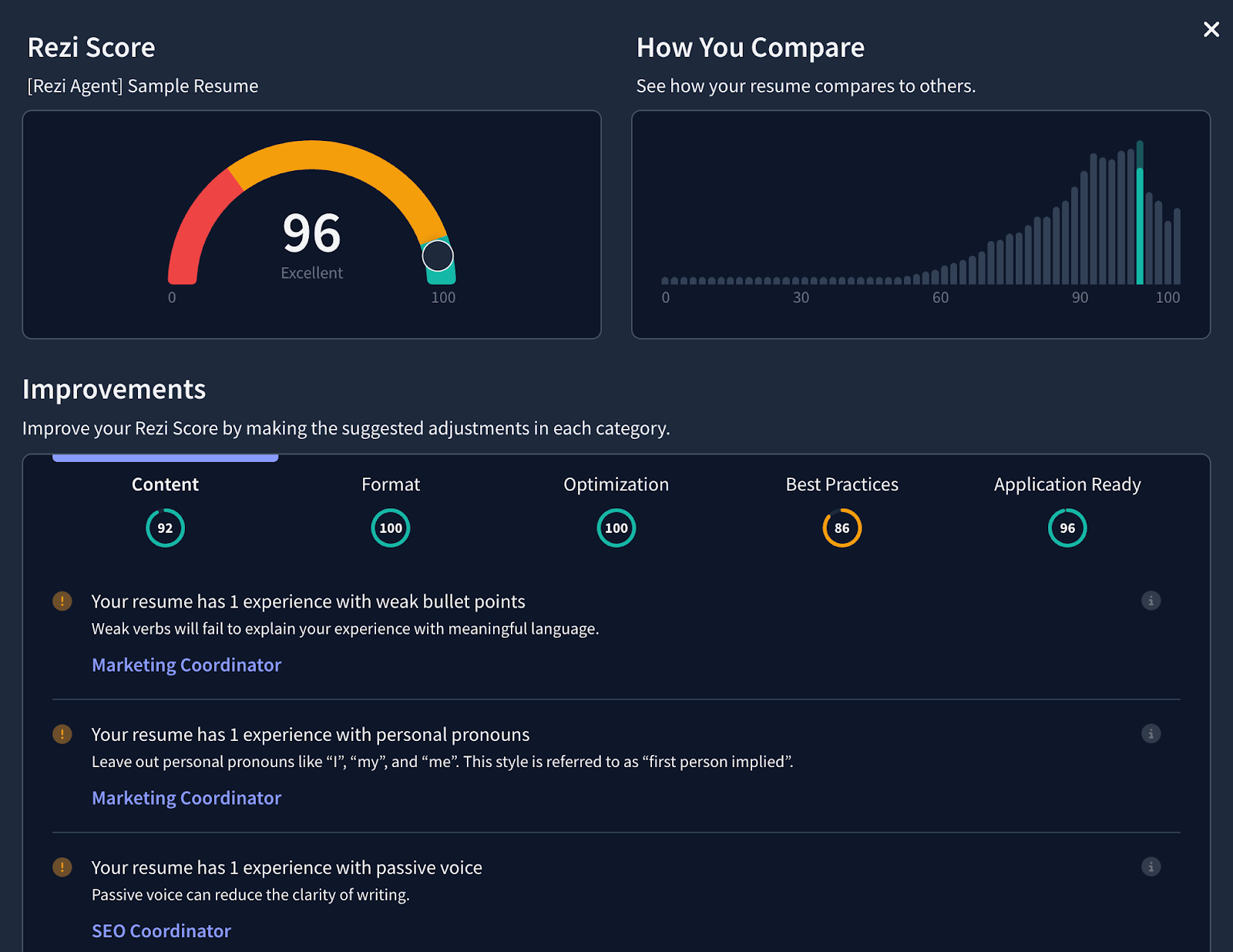
A report like this will flag if your bullet points are too vague or if you’ve missed critical keywords for your industry. More importantly, it lets you know whether it’s ready for job applications and if the content and format are optimized for compatibility with applicant tracking systems (ATS).
To make sure your master resume layout is parsable for hiring software, stick to ATS-friendly resume templates.
Further guides:
- How to Format a Resume
- ATS Resume Formatting
- Best ATS Resume Examples
- Professional Resume Templates
- How to Beat Applicant Tracking Systems (ATS)
10. Download your master resume and keep it stored somewhere safe
The last thing you want is to lose your master resume or have a version control nightmare where you aren’t sure which document is the most up-to-date. So after polishing your master resume, download it and keep it somewhere safe. Store it somewhere reliable, like a dedicated "Job Search" folder in Google Drive.
Further resources:
What to Do After Creating Your Master Resume
Once you have your master resume, the next step is to find relevant job opportunities that interest you and then tailor your resume for each job description.
Tailoring a resume is about adjusting your resume’s contextual skills and keywords so it speaks the exact language of a specific job description. It should not only match the company’s requirements to get past the ATS, but it should also be clear to the hiring manager that the resume you’re sending is meant specifically for them.
And look, I get it: rewriting your resume for every single job description is a total headache. Your master resume was already difficult enough. The last thing you want to do after finishing that is start editing it all over again.
The easiest way to automatically customize your resume for every job application in just a few minutes is by using Rezi Job Search. Simply find openings directly within Rezi (sourced directly from company websites) and click “Target Resume” to automatically generate a tailored version of your master resume for any role that interests you.
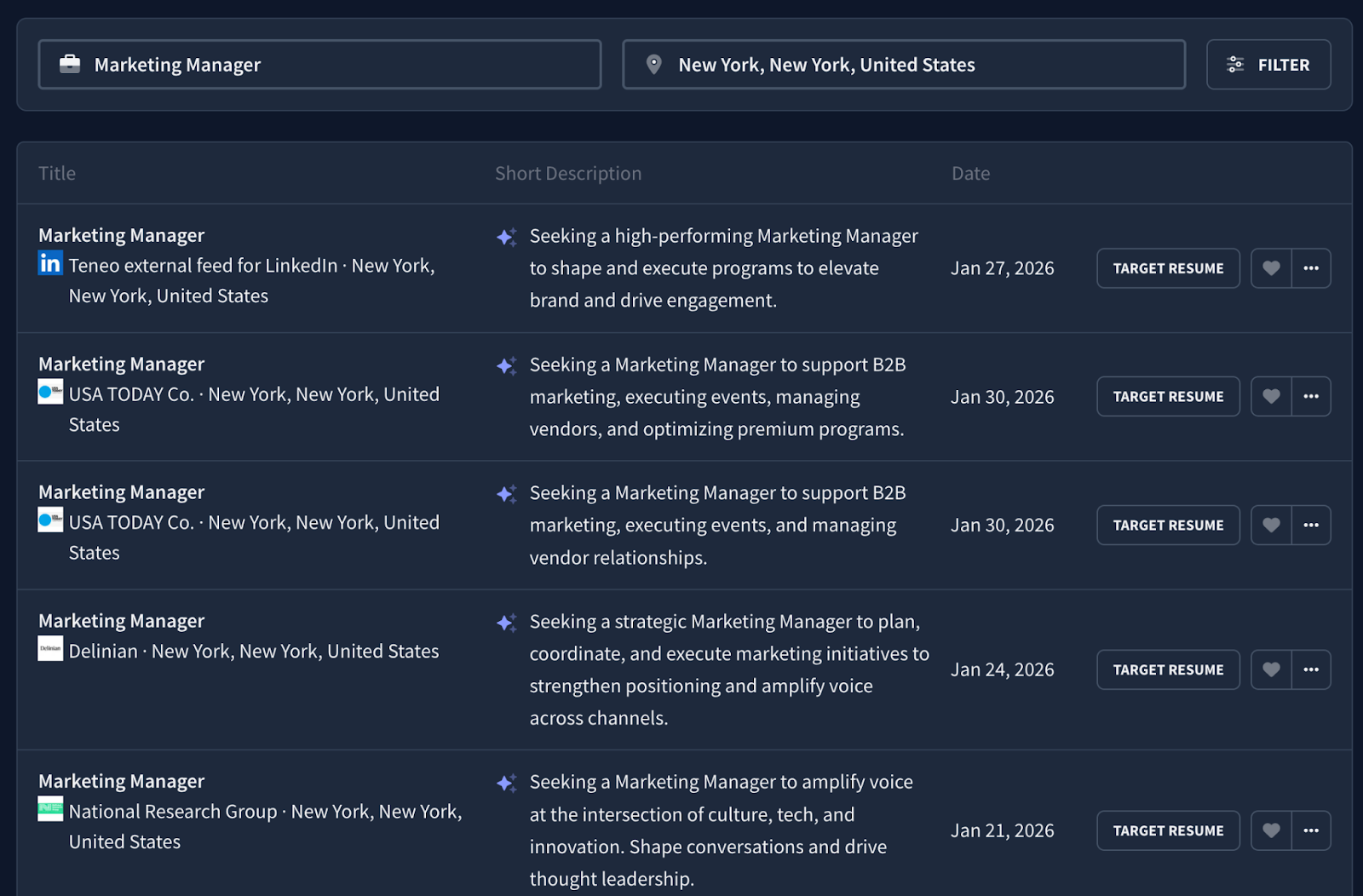
Done. That simple.
If you want a more hands-on approach, use our AI resume agent for gap analysis. Ask, "What’s missing from my master resume to make it fit this specific role?" and you’ll get an immediate, expert-level breakdown. Alternatively, use a resume keyword scanner to instantly show you the exact words and phrases you need to include.
Learn more:
- How to Use Resume Keywords
- How to Quickly Find Keywords That Your Resume is Missing
- ATS Myths: What People Get Wrong & What Our Experiment Proved
- AI Resume Screening: How It Works
Should You Send Your Master Resume to Employers?
In short, no. You shouldn’t send your master resume to employers.
A master resume might work for a lucky few, but it won’t give you the best shot at landing interviews. Technically, a master resume could work if you’re applying for a role that perfectly matches every single thing you’ve ever done, but that’s a gamble. More often than not, a master resume is too broad and contains far too much information for a recruiter who is only going to skim it for a few seconds.
There have been plenty of discussions about tailoring your resume for every role. In one Reddit post about master resumes, a user pointed out how a tailored resume for every new job application has been their only way of hearing back from companies. This is expected especially considering most hiring teams use ATS to filter candidates.

We also agree with another user’s input: always tailor every resume you send.
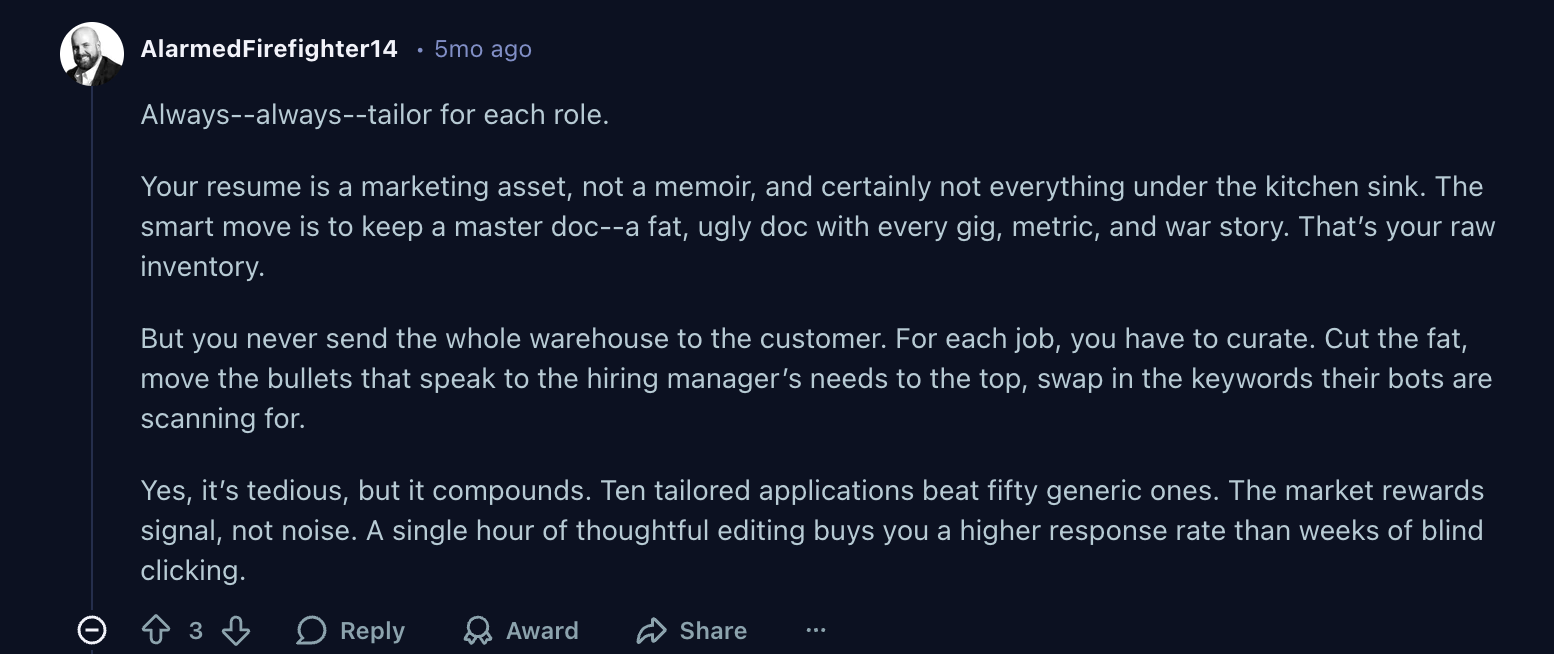
Treat your master resume as your personal template that you can easily customize for job openings that you want to apply to. You won't hear back nearly as often if you send a four-page list of every task you've ever performed.
Employers hope to see that your resume was meant specifically for them and that you have the skill set for their particular needs.
Summary
Let’s recap on how to create a master resume:
- List all professional job positions in the work experience section
- Add bullet points focused on the main tasks and accomplishments from your current and previous job positions
- Make sure your professional work history paints a clear picture of your career growth
- Clarify your core expertise and interests in your resume summary
- Outline academic qualifications from universities and reputable institutions in the education section
- Include your best skills in the skills section
- Create custom resume sections to highlight further credentials that reinforce your professional background
- Put contact details and online links in your resume header
Once you’ve done each of those steps, finalize your master resume using an ATS checker and download it to keep it stored securely.
FAQs
How to write a master resume?
To write a master resume, start by listing every single professional experience, educational milestone, and skill you’ve ever acquired (without worrying about page limits for now). Focus on adding data-driven bullet points for every role, including specific metrics and individual contributions that you can later "cherry-pick" for different job applications. Keep this document in a simple, easy-to-edit format so you can continuously add new certifications, projects, or responsibilities as they happen. After you have everything outlined and you’re job hunting, condense your resume down to one or two pages and tailor it to the specific target job description.
Read more:
Is it a good idea to create a master resume?
Yes, creating a master resume is an excellent idea that makes life easier when it comes to job hunting and exploring new career opportunities. A master resume is your "career database" that eliminates the stress of remembering specific dates or project details years down the line. Having all your achievements in one place allows you to quickly tailor specific resumes for different roles by simply cutting and pasting the most relevant parts. It saves an immense amount of time during the job search and ensures you never accidentally miss crucial details.
Do I need to have a master resume?
Well, it’s not a legal requirement, but it’s definitely essential if you’re on the lookout for new career opportunities. Without one, you’re forced to rebuild your resume from memory every time you apply for a new position, which often leads to inconsistent details or forgotten accomplishments. Above all, it’s time-consuming starting from scratch each time you want to apply to a new job posting you come across. A master resume makes tailoring your resume easier too, which is important for increasing your chances of landing interviews and getting noticed.
How to build a master resume?
The most effective way to build a master resume is to use an AI resume builder like Rezi. Start by filling out every section that’s relevant to you—from standard work history to certifications and side projects—and use our AI tools to polish the bullet points of each entry. Once this master version is complete, you can simply duplicate it to create targeted versions for specific roles. Alternatively, you can use Rezi Job Search to upload your master resume and automatically tailor it for job postings sourced directly from company websites you're interested in.

Upload or drop your resume to get started
Upload your resume to get started
Score my resume

Astley Cervania is a career writer and editor who has been sharing resume and job search insights for 5+ years. He shapes the direction of the Rezi blog, providing practical answers for important career-related questions and helping hundreds of thousands of people navigate the job market and build resumes that land interviews.